










 Limited to 100 registrants

SAP ERP is often the first name that comes up when enterprises look for a system capable of managing finance, supply chain, and operations under one roof. Its reputation for handling complex, multi-entity environments is well-established across industries worldwide.
What receives less attention is the cost structure behind that capability. Beyond the initial license, SAP’s total expenditure layers in customization fees, consultant-driven implementation, infrastructure investment, and ongoing support, each adding to a figure that frequently surprises first-time adopters.
For Singapore companies managing statutory compliance, GST reporting, and multi-entity consolidation, the relevant question is not just how much SAP costs, but whether alternative platforms can meet the same requirements at a fraction of the total investment.
Key Takeaways
SAP ERP’s high prices are due to its complex implementation, maintenance, and brand premium pose hurdles for many businesses.
As businesses expand, a mismatched ERP can hinder efficiency and reporting, emphasizing the need for a robust system that aligns with operational complexity and growth plans.
Evaluating an ERP’s Total Cost of Ownership helps businesses understand the full financial impact, including licenses, implementation, training, maintenance, and future scaling needs.
Why SAP ERP Is Expensive
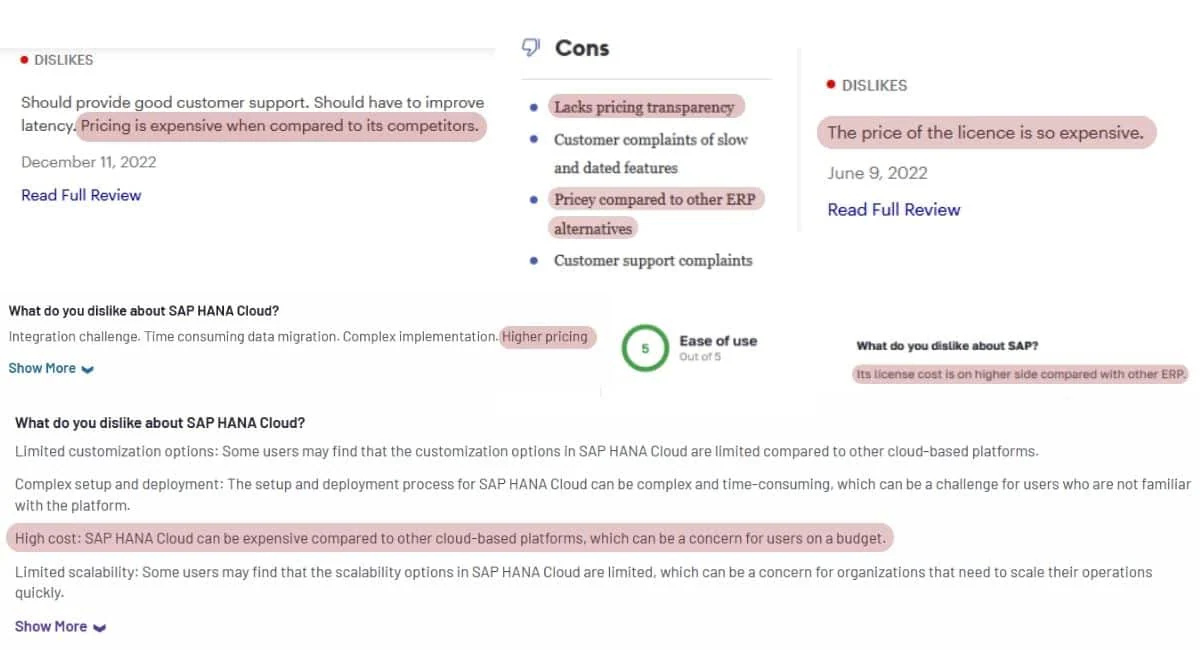
The cost of implementing and maintaining SAP ERP can be a major challenge for many businesses, especially small and medium-sized enterprises. From my experience, I’ve seen firsthand how its pricing can impact business decisions.
There are several reasons why SAP software has an exorbitant price among its competitors. Below are three main reasons why this software is expensive.
- Complexity and functionality
The software itself is free. However, the complicated implementation along with customization makes it costly. The implementation involves adjusting business processes and integrating the system. This can be difficult and may require consultants. As a result, there is an additional cost.
- Development and maintenance
The initial costs of developing and implementing SAP ERP software, while the software itself is offered without charge, constitute a substantial part of the overall expenses. Customization tailored to fit specific business processes involves a significant investment, including hiring consultants and integrating the system.
These development expenses substantially contribute to the overall cost of adopting SAP.
Moreover, ongoing maintenance and support services further elevate the expenses. SAP’s foreign origins might lead to limited local support infrastructure, resulting in additional costs for after-hours support, language barriers, and the potential need to engage third-party support providers or increase in-house support staff.
- Brand recognition
SAP’s strong reputation as a market leader significantly impacts its pricing structure. The brand’s prominence and recognition as a leader in enterprise software solutions often correlate with premium pricing.
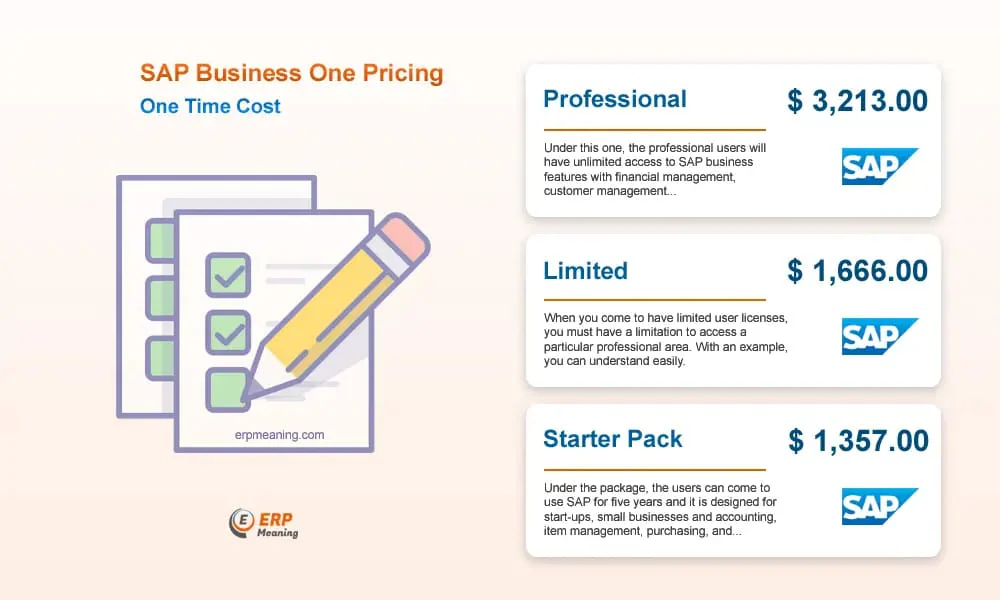
The perceived value attached to SAP’s market leadership influences its pricing strategy, contributing to the relatively higher cost of SAP ERP compared to other available SAP alternatives. Here is an illustration of SAP ERP pricing:
What Happens When Businesses Outgrow Their ERP
SAP ERP is well-known for its high implementation and maintenance costs, which can make it challenging for businesses to justify the investment as they grow. When a company outgrows its ERP, daily operations usually start showing signs of strain before leadership notices the root cause. Systems slow down, reports take longer to generate, integrations fail more often, and teams begin relying on manual workarounds to keep processes moving.
An outdated platform can also limit visibility and decision-making because it cannot process growing data volumes or support new business models. As a result, departments operate in silos, productivity drops, and the organization loses the agility needed to respond to market changes.
A clear example is global healthcare company Abbott, which improved its ERP system for inventory and supply chain management to support more advanced operational tracking. With real-time data visibility, automated processes, and accurate forecasting, Abbott increased product availability while minimizing excess inventory and operational waste.
This shows that upgrading or replacing an ERP software for mid-to-large enterprises is more than a technical choice, it’s a strategic investment. Companies using a platform that matches their growth and complexity gain faster reporting, better integration, and scalable infrastructure that supports long-term success rather than restricting it.
Read more: Key Phase of an ERP Implementation Process in 2026
How to Evaluate ERP Total Cost of Ownership (TCO)

Many companies assume ERP cost is just the license price, when actually that’s only one portion of the total investment. Total Cost of Ownership (TCO) calculates the full spending from initial deployment until around year five of usage, so here are the key cost components you should evaluate:
1. Licensing & infrastructure
This includes subscription or perpetual license fees together with infrastructure expenses such as cloud hosting, servers, storage, and security layers. Some platforms appear cost-effective upfront but require higher backend resources to maintain performance and stability.
2. Implementation & customization
Deployment costs cover consultant services, system configuration, workflow adjustments, integration, and historical data migration. The more tailored the solution is to match operational processes, the more time, expertise, and budget the rollout typically demands.
3. Training & change management
User training ensures teams can operate the system correctly and maximize its features from day one. Companies should also factor in temporary productivity slowdowns, internal support resources, and structured communication during transition phases.
4. Ongoing maintenance
Long-term expenses often include annual support fees, system monitoring, patches, compliance updates, and technical assistance. Cost structures can vary depending on service level agreements and whether support is delivered locally or from offshore teams.
5. Scaling costs
As operations expand, organizations may need additional user licenses, new functional modules, or higher system capacity. Planning for scalability early helps prevent unexpected budget spikes when business growth requires system expansion.
Considerations in Choosing ERP Software
Before diving into the key considerations, I want to share that I’ve often seen businesses rush into ERP adoption without clear evaluation steps, only to face mismatches later on. That’s why I believe it’s essential to carefully weigh certain factors before deciding on the right system.
Here are the key considerations you should keep in mind before making a decision:
- Identifying your business needs
Understanding your business’s unique requirements is fundamental when selecting Enterprise Resource Planning (ERP) software. This phase involves a comprehensive analysis of your operational necessities, ensuring alignment between the software functionalities and your business objectives.
- Evaluating budget constraints
Careful evaluation of your budgetary constraints is crucial in the selection process. Assessing the costs involved in implementing and maintaining ERP software helps in determining a solution that optimizes functionality while staying within budgetary limits.
- Comparing features and pricing
Comparing various ERP solutions’ features and pricing models allows for an informed decision-making process. By comparing the functionalities against costs, businesses can ascertain the best-suited ERP system that aligns with their specific needs and financial capacities.
- Ensuring local regulatory compliance
For Singapore-based businesses, the ERP system must support GST calculation and e-filing to IRAS, financial reporting aligned with SFRS, and ACRA annual return formats. If the system includes HR or payroll modules, CPF contribution calculation and submission capability is equally important.
- Assessing regional scalability
Companies operating across ASEAN markets should verify multi-currency support, cross-border tax handling, and the ability to consolidate financials across multiple entities in different jurisdictions.
Conclusion
SAP ERP’s high cost is driven by its complexity, extensive customization, ongoing maintenance, and strong brand reputation. Understanding these factors helps businesses set realistic expectations before committing to such a solution.
When an ERP system no longer keeps up with a company’s growth, operational efficiency, data visibility, and decision-making can all suffer. Real-world cases like Abbott demonstrate how a properly scaled ERP can improve supply chain tracking, forecasting, and overall productivity.
Evaluating Total Cost of Ownership and considering business-specific needs, budget, compliance, and scalability are critical steps in choosing the right ERP. Careful assessment ensures that the selected platform supports long-term growth, operational efficiency, and seamless integration across all business processes.
FAQ About Cloud Accounting
SAP is a German multinational company founded in 1972. It was founded by Klaus Tschira, Claus Wellenreuther, Dietmar Hopp, Hasso Plattner, and Hans-Werner Hector. The aim of this company is to create and develop software solutions to handle customer relationships and business operations management. As a software solution, SAP covers many aspects of business management, such as distribution, logistics, finance, and more. As we know, SAP ERP is globally popular. It’s popular because of its mobile infrastructure which seamlessly connects with your enterprise system, for any kind of business. This allows you to access your business processes from anywhere at any time.
The cost of implementing and maintaining SAP ERP can be a major challenge for many businesses, especially small and medium-sized enterprises. There are several reasons why SAP software has an exorbitant price among its competitors. Below are the five main reasons why this software is expensive.
– SAP ERP Has Difficult Implementation
– Limited Customer Support
– Various Customer Requests
– SAP ERP Needs Compatible Devices
– Limited User.
Due to the costly prices, you can use another ERP system alternative for your company or business. One of the alternatives that you can use is HashMicro ERP. HashMicro ERP is a simple and automated system that helps you manage and integrate essential business operations. In other words, it helps businesses and companies improve efficiency and productivity by providing a centralized platform for managing various business processes. With HashMicro ERP, businesses and companies can choose to implement only the modules they need and add new ones as they grow. This allows them to tailor the ERP system to their specific needs and budget. Additionally, HashMicro ERP offers customization options and can be integrated with other software solutions to provide a comprehensive solution for businesses and companies.