








Selecting between ERP and WMS software requires more than looking at their features. Both systems support operational efficiency, but they serve different purposes. ERP software brings multiple business functions together, while WMS specialises in warehouse processes, including stock control, picking, packing, and order dispatch.
So, which system makes more sense for your business? The answer depends on your current workflows, inventory demands, and future expansion plans. By examining how ERP and WMS differ in functionality, advantages, and practical applications, you can make a more informed decision about which solution best supports your business objectives.
Key Takeaways
ERP vs WMS differs mainly in scope: ERP integrates the whole business, while WMS goes deep on warehouse execution and inventory accuracy.
ERP and WMS work together when ERP owns orders, purchasing, and finance while WMS executes stock movements and syncs the results back.
Choose between ERP and WMS by comparing flexibility, functionality, and long-term value instead of looking at feature lists alone.
Diagnostic questions on order volume, picking errors, batch tracking, returns, automation, and multi-site visibility show whether an ERP module is enough.
What is ERP?
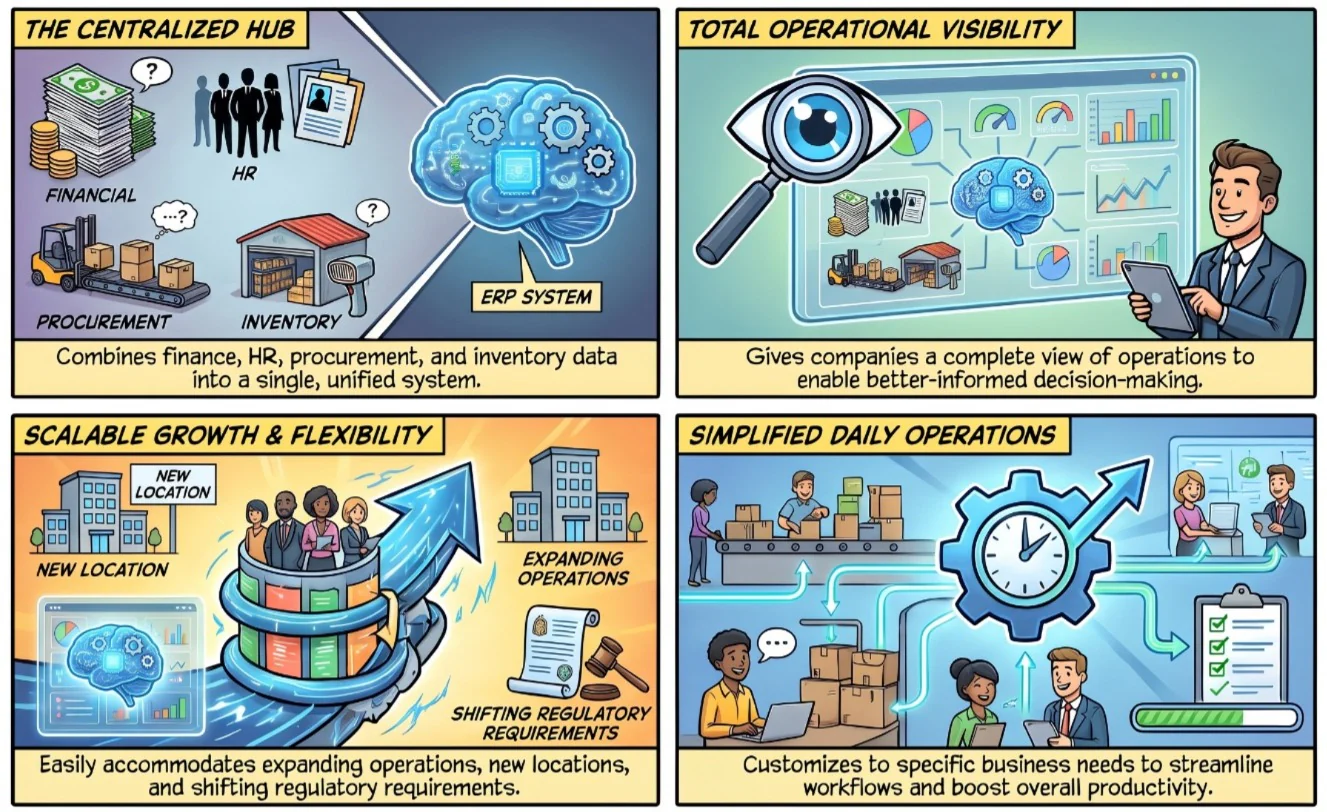
Enterprise Resource Planning (ERP) solutions is a software system that helps businesses manage and streamline their day-to-day operations. The best ERP software acts as a centralized hub, collecting and organizing data from different departments like finance, human resources, procurement, and inventory management. By integrating these various functions into one system, ERP allows companies to have a comprehensive view of their operations and make better-informed decisions.
ERP also helps businesses ultimately increase productivity and drive growth. This system provides the flexibility to accommodate expanding operations, new product lines, additional locations, and changing regulatory requirements. It can be customized and configured to align with specific business requirements, ensuring that the system continues to support the company’s goals. In addition, it’s a critical consideration for businesses due to its ability to simplify operations.
What is WMS?
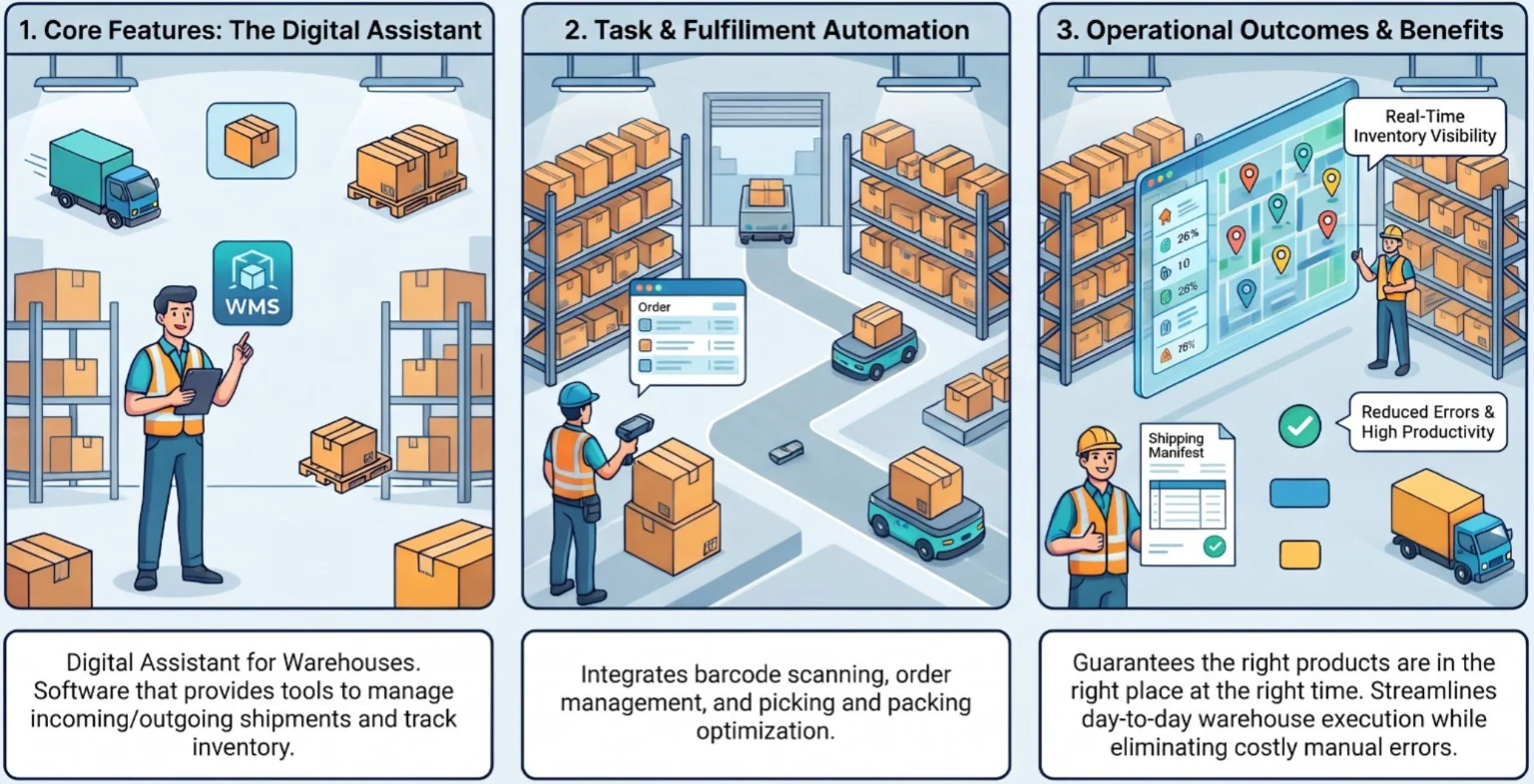
A Warehouse Management System (WMS) is a software system that helps businesses effectively manage and control their warehouse operations. It provides tools and functionalities to efficiently organize and track inventory, handle incoming and outgoing shipments, and optimize overall warehouse processes. In simpler terms, a digital assistant for warehouses is the actual WMS meaning. It helps warehouse managers and employees keep track of warehouses.
An ERP warehouse management system typically includes features such as barcode scanning, inventory tracking, order management, and picking and packing optimization. By automating these tasks and providing real-time visibility into inventory movements, it ensures that the right products are in the right place at the right time. Overall, a WMS helps businesses manage their inventory effectively, reduce errors, and improve productivity within the warehouse environment.

The Differences Between ERP and WMS
ERP and WMS systems both serve distinct purposes in the realm of business management, focusing on different aspects of the supply chain. An ERP system is a comprehensive software platform designed to integrate and manage various core business processes, such as finance, human resources, procurement, and inventory management.
On the other hand, WMS specifically targets the management of warehouse operations. It offers a range of functionalities tailored to optimize warehouse processes, including inventory tracking, order fulfillment, picking and packing, and shipping. A WMS empowers businesses to efficiently organize their inventory, monitor stock levels, minimize errors, and improve overall warehouse productivity, as shown by the benefits of WMS for trading companies.
While ERP systems often include modules for managing warehouse activities, they typically do not possess the same depth of functionality as a dedicated WMS. ERP systems prioritize integration across various departments and aim to provide a comprehensive overview of the entire business. In contrast, WMS focuses solely on the specific needs of warehouse management, offering specialized features and tools to address the complexities of running a warehouse efficiently.
The table below summarizes how the two systems compare across the points that matter most when you evaluate them.
| Aspect | ERP | WMS |
|---|---|---|
| Primary focus | Integrating core business processes across departments | Controlling and optimizing warehouse operations |
| Scope | Company-wide: finance, HR, procurement, sales, inventory | Warehouse-specific: receiving, put-away, picking, packing, shipping |
| Inventory depth | Stock levels and valuation at a general level | Bin-level tracking, batch, serial number, and expiry control |
| Operating logic | Transaction-based and sequential | Real-time and event-driven |
| Flexibility with exceptions | Limited, changes are harder to apply quickly | High, adapts to changes as they happen |
| Main users | Management, finance, procurement, and sales teams | Warehouse managers, pickers, and logistics staff |
| Best for | Businesses needing one system for all operations | Businesses with complex, high-volume warehouse workflows |
How ERP and WMS Work Together
ERP and WMS are not rivals in most businesses. They cover different layers of the same supply chain, and they perform best when data flows between them without manual re-entry.
To recap how an ERP system centralizes business data, it holds the orders, purchasing, and financial records. The WMS takes those instructions and turns them into physical warehouse work. The handoff usually follows this sequence:
- Purchase order: the ERP creates the purchase order and sends the expected receipt to the WMS.
- Receiving and put-away: the WMS confirms what arrived, assigns storage bins, and updates stock in real time.
- Sales order and picking: the ERP releases a customer order, and the WMS generates the pick, pack, and shipping tasks.
- Financial closure: once goods ship, the WMS syncs quantities back so the ERP can invoice and update inventory valuation.
When both systems share one database, stock figures stay consistent across finance, sales, and the warehouse floor. This removes duplicate entry and delays between a physical movement and its record.
Integration quality matters as much as features. A WMS that connects natively to your ERP avoids custom middleware, reduces sync errors, and keeps reporting in one place.
Factors to Consider When Choosing ERP or WMS
When making the decision between an Enterprise Resource Planning (ERP) system or a Warehouse Management System (WMS), it is essential to take several factors into account based on your specific requirements and priorities. While customization options may exist, it is crucial to have a clear understanding of the overall features and functionalities that the chosen system should encompass. Presented below are key considerations to aid in your decision-making process.
Flexibility
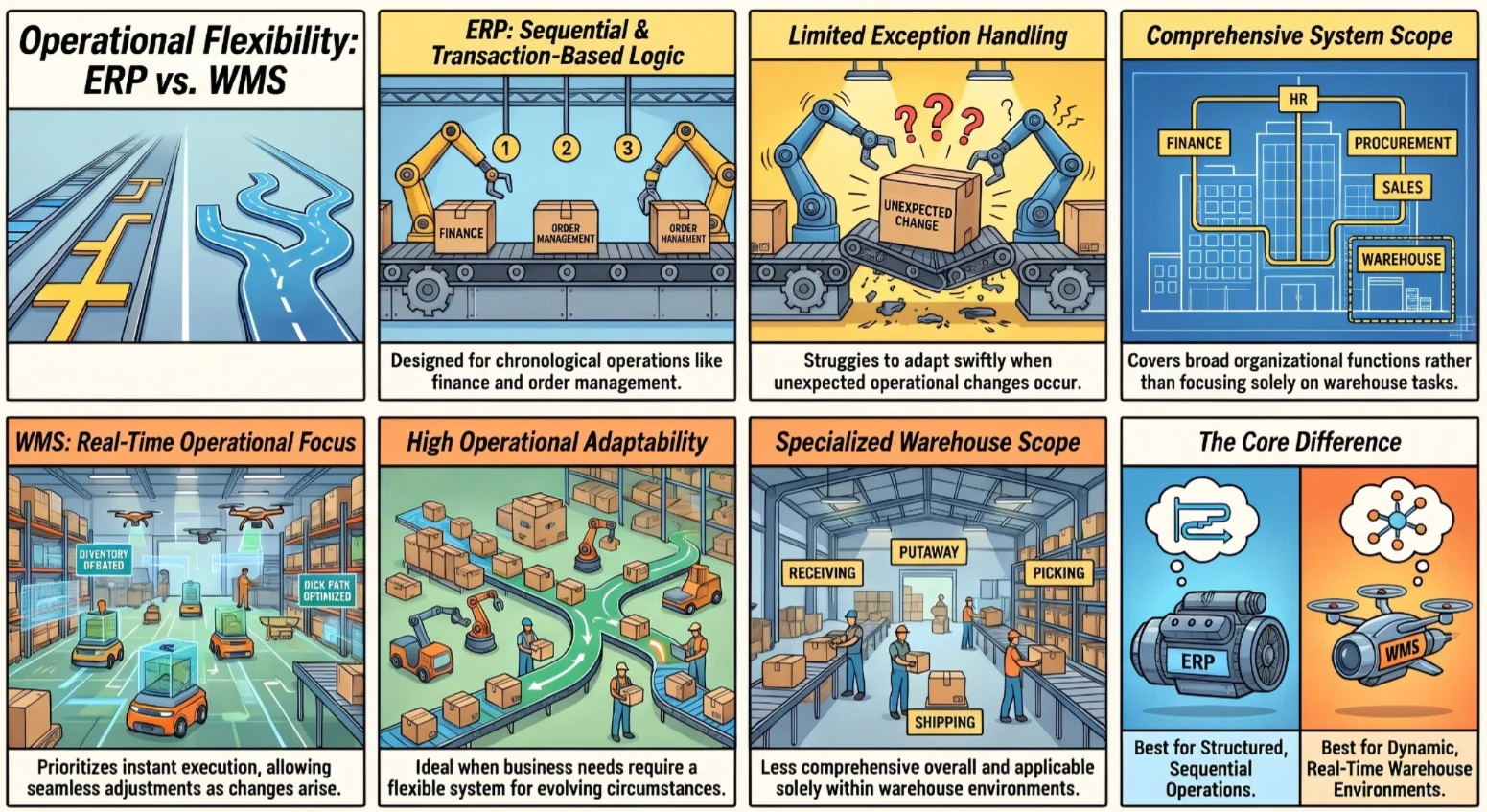
Enterprise Resource Planning (ERP) systems are purposefully designed with a transaction-based logic, rendering them well-suited for environments characterized by sequential and chronological operations. Primarily utilized in areas such as financial and order management systems, ERP systems are limited in their ability to handle exceptions, making it challenging to adapt swiftly to changes.
In contrast, Warehouse Management Systems (WMS) prioritize real-time operations, enabling the more seamless implementation of changes as they arise. This flexibility in adapting to evolving circumstances makes WMS an optimal choice when you require a system with greater adaptability. However, it is important to note that warehouse software systems are not as comprehensive as ERP systems and are typically applicable solely within warehouse settings.
Functionally
In complex operational scenarios, conventional ERP warehouse modules often necessitate significant compromises. These compromises can limit the ability to effectively manage intricate operations and may result in suboptimal outcomes. Additionally, certain Enterprise Resource Planning (ERP) systems may not provide thorough product tracking capabilities, which is crucial for maintaining visibility and control over inventory.
In such cases, businesses with complex operations may find it necessary to consider the enhanced functionality offered by best-of-breed warehouse management software. By opting for the best WMS systems, companies can benefit from advanced features and capabilities specifically tailored to intricate operational requirements. This enables more efficient and effective management of warehouse processes, improving overall operational performance.
Value
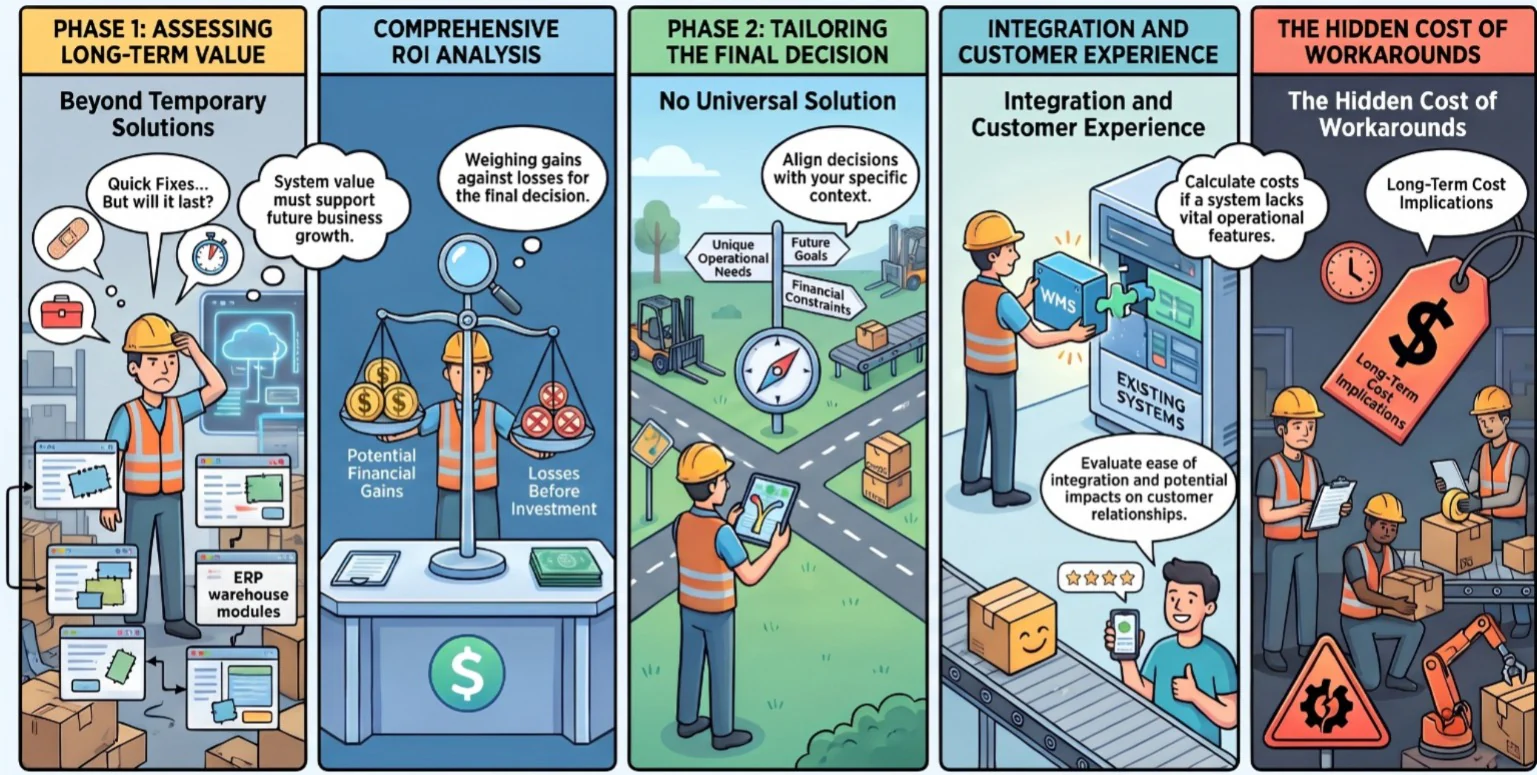
Ultimately, the system’s value should be the determining factor when making the final decision. While sticking with the module within the existing ERP warehouse system may offer a temporary solution, it is crucial to consider its long-term value as your business grows. This evaluation should include an in-depth analysis of the return on investment (ROI) and the potential losses or gains associated with investing in the Warehouse Management System (WMS).
It is important to acknowledge that there is no one-size-fits-all solution in this scenario. The decision should be based on factors such as the unique operational needs of your business, future objectives, and financial considerations. Additionally, it’s also crucial to consider the ease of integrating the system, the potential impact on customer relationships, and the cost implications of implementing workarounds in case the system lacks the desired functionality.
Questions to Ask Before Choosing an ERP or Dedicated WMS
Feature comparisons only go so far. These diagnostic questions help you check whether your current ERP warehouse module is enough, or whether your operation has outgrown it:
- How many orders and SKUs do you handle?
- Do picking errors occur frequently?
- Do you need batch, serial number, or expiry tracking?
- How often do you process returns?
- Does your warehouse require automation or robotics?
- Must production-line replenishment happen in real time?
- Do you need multi-site inventory visibility?
If you answered yes to several of these, a dedicated WMS integrated with your ERP is likely to give you the control you need. If most answers are no, the warehouse module inside your ERP may be enough for now, and you can revisit the decision as order volume grows.
Conclusion
Both Enterprise Resource Planning (ERP) systems and Warehouse Management Systems (WMS) play important roles in business operations and logistics. ERP systems focus on integrating and managing core business processes across departments, providing a comprehensive overview of operations. On the other hand, WMS is specifically operating to optimize warehouses, offering functionalities tailored to inventory management and warehouse productivity.
When deciding between ERP and WMS, several factors need to be considered depending on the specific needs and priorities of the business. If you are still confused as to which are the best ERP software, HashMicro offers an ERP system that you can adjust according to your specific requests, and HashMicro also offers WMS with the best technologies. Don’t miss the chance to try the free demo, so that you will receive some insights about the overall dashboard before choosing the system.

Frequently Asked Questions
ERP manages core business processes such as finance, HR, procurement, and sales in one platform. WMS focuses only on warehouse execution, including receiving, put-away, picking, packing, and shipping, with deeper inventory control.
Many ERP systems include a basic warehouse or inventory module, but a full WMS is usually a separate system or an advanced add-on. It offers deeper features such as bin-level tracking, wave picking, and automation support.
For small warehouses with simple workflows, an ERP inventory module can be enough. Businesses with high order volumes, batch or serial tracking, or multiple sites usually need a dedicated WMS for accuracy and speed.
Not always. Choose ERP alone if warehouse needs are basic. Add a WMS when picking errors, tracking requirements, or order volume exceed what the ERP module can handle. Both work best when integrated.
Neither is better in every case, because they solve different problems. ERP suits company-wide coordination, while WMS suits warehouse-level control. The right choice depends on your operation size, complexity, and growth plans.
The ERP sends purchase and sales orders to the WMS, and the WMS returns confirmed receipts, stock movements, and shipments. A native integration or shared database keeps quantities consistent without manual re-entry.