









 Limited to 100 registrants


ERP dynamic product feeds help wholesalers keep product information accurate as stock levels, prices, and customer demand change. Instead of exporting spreadsheets by hand, the ERP sends updated data to every sales channel automatically.
For wholesalers managing large catalogs, this keeps listings aligned with real inventory and avoids selling items that are out of stock or priced incorrectly. This guide explains how dynamic feeds work and how wholesalers can apply them.
Key Takeaways
Static product feeds go out of date quickly, which leads to wrong prices, stock mismatches, and lost orders for wholesalers.
Sales velocity shows which products move fastest, so ERP dynamic product feeds can refresh and prioritize those listings first.
To implement ERP dynamic product feeds, audit current feeds, set ERP-based triggers, segment channels, and connect marketing tools.
What is Strategic Planning?
Strategic planning involves setting the direction for an organization and determining how to allocate resources effectively to achieve long-term objectives. It turns broad goals into clear, actionable steps that guide daily operations and decision-making.
By creating a structured roadmap, strategic planning helps organizations anticipate challenges, prioritize initiatives, and ensure that teams are working toward common objectives. This process ultimately supports sustained growth and long-term success.
How ERP Supports Each Stage of Strategic Planning
ERP is a system that helps you plan and improve business efficiency. It collects data, stores, interprets, and analyzes it. The data come from various departments such as production, finance and accounting, HR, procurement, sales, and so on.
You also can share data in real-time with external stakeholders such as vendors, customers, and partners in one platform. With ERP , it also helps businesses improve and scale processes and enhance resource management.
ERP Readiness Checklist for Strategic Planning
A well-defined ERP strategy is key to successful implementation. It’s not just about choosing software but transforming business processes to support organizational goals. This includes reviewing current systems and identifying essential customizations.
Define ERP across your enterprise
Stakeholders often have different views of “ERP,” which originally evolved from MRP II in the 1990s. Many still see it through legacy systems, risking overlooked smaller or standalone solutions and under-scoped requirements.
Expanding ERP understanding to include modern functionalities ensures a complete, future-ready strategy that addresses all critical business areas and avoids gaps in implementation.
Review existing solutions and determine need, time, sponsorship, and budget
The first step in crafting an ERP strategy is to thoroughly assess the current technology and systems used in areas like finance, operations, sales, and marketing. This evaluation should examine both system performance and integration, identifying gaps, inefficiencies, redundancies, and any legacy systems that will remain.
From there, define the organization’s needs, implementation timeline, leadership sponsorship, and budget. Establishing these elements sets realistic expectations and ensures the project stays on track, while analyzing business processes helps determine the specific functionalities required in the ERP.
Identify key IP and custom solutions
Organizations often rely on proprietary systems or unique intellectual property that provide a competitive advantage. It’s essential to recognize these assets so that the new ERP can either integrate with or replace them while preserving functionality and data integrity.
Review and document organizational structure
A clear understanding of the organizational structure is vital. This includes mapping decision-making processes, data flows, and interdepartmental dependencies to ensure the ERP system enhances operations rather than disrupts them.
Determine requirements and assess ERP readiness
Selecting the right ERP system begins with a clear understanding of the organization’s needs and readiness for change. This includes analyzing technical requirements, evaluating compatibility with current processes, and assessing operational workflows.
Additionally, establishing a realistic implementation timeline, securing executive support, and defining a budget are critical to ensure the ERP aligns with both strategic goals and organizational culture.

Key Steps in Implementing Strategic Planning with ERP System

There are several steps in strategic planning before you can finally carry out the new strategies and their positive impacts on the company. We are going to break down the steps and elaborate on how ERP can make the most of these crucial processes.
Clarifying your vision
The purpose of goal-setting is to clarify the vision of your business. This stage includes three key elements:
- Define both short- and long-term goal
- Identify the processes that can help you achieve that goal
- Socialize the process with the employees and give them clear tasks
Make sure that these targets are detailed, realistic, and harmonize with the value of your vision. The most important thing in this stage is communicating these targets to your stakeholders and employees.
ERP helps you in delivering this information to many people on one platform. Don’t worry if in conveying these targets you are stating some confidential information. You can easily manage the document access right and the system ensures data security.
Collect and analyze information
An analysis is a crucial stage because the results will affect the next two stages. In this stage, you can start by collecting information and relevant data that can help you achieve your vision.
You should focus on what the company needs to sustain its entity and grow. It should be based on the SWOT (strength, weakness, opportunity, threat) analysis.
As a system that digitizes daily business operations, ERP can provide you with accurate data regarding your business performance so far. You can generate the reports in a few seconds and the data will display in which part your strengths and weaknesses are.
ERP system also analyzes market trends and forecasts the company’s needs with its historical data analysis. It will help you prepare the strategy for the foreseeable market demand.
Formulate the strategy
The first step in formulating the strategy is to review again the analysis. Then, what you should do next is decide what resources your company currently has that can help reach the defined goals.
The issues should be prioritized by their importance to your success. After it is all settled, then you can start formulating the strategy. Make sure that you come up with several alternative plans because the business situation is very fluid.
Thankfully, ERP has covered a project management system that can help you solve all of those issues while you’re preparing the strategy. It helps you solve it with minimum cost, well-tracked progress, and efficiency.
You can input, prioritize, assign, and set the deadline for the issues. Both the internal team and external team can work and collaborate well because they can share data and information in real time.
Strategy implementation
Successful strategy implementation is critical to the success of the business venture. This is the action stage of strategic planning. So, everyone in the company should know their responsibilities, tasks, and target fulfillment.
An ERP system that is integrated into all departments facilitates this stage. Everyone can access their task list and monitor its progress for optimal implementation. Moreover, with KPI management, you can measure how your employees’ performance is.
Plan for change management and training
A strategy must include a comprehensive plan for managing organizational change, communicating the benefits of the new system, and providing thorough user training and ongoing support to ensure adoption and success.
Document integration into operations
Clearly define how the ERP system will be integrated into daily operations and existing business processes to ensure a seamless transition and continuous support.
Evaluate and control
Evaluating and controlling the established strategies involves measuring the performance, reviewing internal and external issues, and carrying out corrective actions when necessary. Then, compare the actual results versus the plan.
ERP that stores business operational data can provide you with the comparison and point out the significant changes. You can generate the reports anywhere at any time accurately.
Here is a table summarizing the key steps for implementing strategic planning with an ERP system, making it easy to understand.
| Key Steps for Implementing Strategic Planning with an ERP System | Description |
| Clarifying your vision | Set clear, realistic goals, assign tasks, and communicate them effectively. ERP ensures secure and easy sharing with all stakeholders. |
| Collect and analyze information | Use ERP to gather data, assess SWOT, track performance, and forecast trends to support informed strategic planning. |
| Formulate the strategy | Review analysis, identify resources, prioritize issues, and create flexible plans. ERP tools help track tasks and enable real-time team collaboration efficiently. |
| Strategy implementation | Execute the plan by assigning clear responsibilities and monitoring progress. ERP integration allows task tracking and KPI-based performance measurement. |
| Plan for change management and training | Develop a clear plan to manage change, communicate ERP benefits, and provide user training and support for smooth adoption. |
| Document integration into operations | Define how the ERP system will fit into daily workflows and business processes to ensure seamless implementation. |
| Evaluate and control | Monitor performance, address issues, and take corrective actions while comparing actual results with planned goals. |
Also Read : Best ERP Software Recommendations: Explore the best software options available this year and find the right fit for your business needs.
How ERP Reduces Costs in Strategic Planning
Strategic plans often lose value through duplicated effort, disconnected data, and slow decisions. An ERP system addresses these cost drivers in three main ways.
Less manual work and fewer errors
When finance, sales, procurement, and operations data live in one platform, teams no longer re-enter figures into spreadsheets or reconcile conflicting reports. This reduces administrative hours and the cost of correcting mistakes before they reach the planning stage.
Better use of resources
Real-time visibility into inventory, workforce, and budgets helps you allocate resources where they support strategic priorities. You can spot overspending or idle capacity early and redirect it before it becomes a loss.
Faster and lower-risk decisions
Accurate, up-to-date data shortens the time needed to evaluate options. Decisions based on reliable forecasts reduce the risk of costly course corrections during execution.
ERP Reporting & Dashboard for Strategic Planning
Strategic planning depends on seeing the right numbers at the right time. ERP reporting and dashboards turn operational data into insights that leaders can act on.
Real-time dashboards for leadership
Dashboards consolidate key metrics such as revenue, cost, inventory, and team performance on a single screen. Leaders can monitor progress against strategic goals without waiting for manual reports.
Customizable reports and forecasts
Reports can be tailored to each department or planning horizon, from monthly performance reviews to multi-year projections. Trend analysis and forecasting help you test assumptions and adjust the plan as conditions change.
Tracking KPIs against strategic goals
By linking KPIs to specific objectives, you can measure whether each initiative is delivering the expected result. Variances are flagged early, so corrective action can start before targets are missed.
How Wholesalers Can Use Dynamic Product Feeds
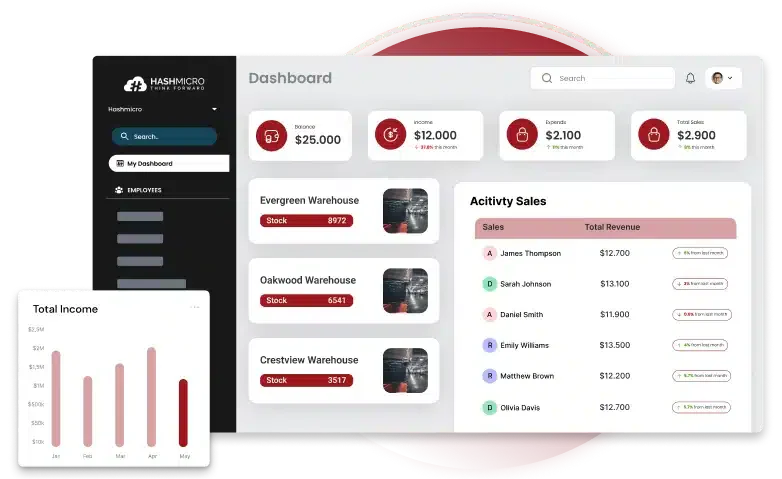
Static product feeds are exported on a schedule, so they fall behind stock, price, and demand changes. Wholesalers can replace them with ERP dynamic product feeds that update listings as soon as the underlying data changes.
In daily wholesale activity, dynamic feeds are most useful in three areas:
- Inventory availability : Update quantities after every sale, purchase receipt, or stock transfer so channels never show stock that is gone.
- Pricing : Push tier prices, volume discounts, and contract rates to each channel without manual edits.
- Customer demand : Highlight fast-moving items and pause or flag listings that are running low.
Using sales velocity to guide product feeds
Sales velocity measures how quickly each product sells. When the ERP tracks it, the feed can refresh fast-moving products more often and surface them first on sales channels.
Slow-moving products can be updated less frequently or promoted with adjusted pricing, which helps wholesalers clear stock without hurting margins.
How to Implement ERP Dynamic Product Feeds
- Audit your product feeds : Review current feeds for outdated fields, missing attributes, and manual update steps.
- Set ERP-based triggers : Define which changes, such as stock level, price, or order volume, should update the feed automatically.
- Segment channels : Send each channel only the products, prices, and stock levels that apply to it.
- Integrate with marketing : Connect the feed to advertising and marketplace tools so campaigns always use current data.
Conclusion
ERP keeps product feeds accurate and responsive by connecting listings to live inventory, pricing, and sales data. Wholesalers no longer depend on manual exports that go stale.
With feeds aligned to stock levels and market demand, wholesalers can reduce overselling, keep pricing consistent, and respond faster to changing customer needs. Request a free consultation with our team to see what you need.
Frequently Asked Questions
ERP dynamic product feeds are product data feeds that update automatically from the ERP whenever stock, price, or product details change, so sales channels always show current information.
ERP centralizes inventory, pricing, and sales data, then uses triggers to update feeds for each channel automatically. This removes manual exports and keeps listings consistent.
Dynamic feeds read stock levels directly from the ERP, so every sale, receipt, or transfer is reflected in listings right away. This reduces overselling and out-of-stock orders.