



















ATP is a permit from the BIR to print invoices. Business owners and finance teams must check whether their chosen printed invoice process requires it. Confusing ATP BIR rules with registration or digital invoicing can delay issuance and create compliance gaps.
The challenge grows as businesses move toward electronic invoicing. A 2026 Philippine study by Cababat and Jegonia found limited e-invoicing readiness among surveyed firms in Cagayan de Oro despite basic regulatory awareness. Businesses can address this gap by mapping each invoice format to BIR requirements and assigning ownership across finance and IT.
This guide covers ATP eligibility, applications, required documents, and the BIR Printed Invoice option for new registrants. It distinguishes ATP from computerized accounting registration and electronic invoicing. A PDF alone does not prove electronic invoice compliance. Confirm your approach with your Revenue District Office or tax adviser.
Key Takeaways
ATP is BIR’s authorization for a taxpayer to print their own principal and supplementary invoices.
Businesses printing their own invoices may need ATP, while new registrants choosing BIR Printed Invoices do not.
To apply, complete BIR Form 1906, choose an accredited printer, and submit the required documents through your RDO.
ATP covers printing, while covered taxpayers must check separate EIS rules for electronic invoice issuance and reporting.
What is ATP in BIR?
BIR Authority to Print (ATP) lets a business have its own invoices printed through an accredited printer. The BIR ATP process covers principal invoices for sales and supplementary invoice forms. It identifies the approved printer and invoice series, helping businesses issue printed documents that match their approved application.
ATP does not register the business itself. BIR registration establishes the taxpayer’s record, while ATP authorizes printing its own invoice forms. The applicable process depends on the taxpayer’s status and invoice method.
New registrants who choose BIR Printed Invoices during registration do not need ATP for that application. If you are printing your own forms, consult the BIR Citizen’s Charter - RDO External Service and your RDO.
ATP vs BIR Printed Invoice vs EIS E-Invoice
The ATP BIR process, taxpayer registration, BIR Printed Invoices, and electronic invoicing address different requirements. Software can generate an invoice without making it an EIS e-invoice. Before choosing a format, businesses should check BIR definitions, taxpayer coverage, system approval, customer delivery, and BIR electronic sales reporting rules.
| Term | Meaning | Purpose |
|---|---|---|
| BIR registration | Registration of a taxpayer with the BIR | Establishes the taxpayer’s registration. It does not authorize invoice printing. |
| ATP | Authority to Print | Allows a taxpayer to have its own principal and supplementary invoice forms printed by an accredited printer. |
| BIR Printed Invoice | A printed invoice supplied through the BIR’s registration process | Lets new registrants who choose this option use BIR Printed Invoices without applying for ATP during registration. |
| System-generated invoice | An invoice created by accounting, billing, or point-of-sale software | Produces an invoice through software. Its tax treatment depends on how the system generates and issues it. |
| PDF invoice | An invoice saved as a PDF file | Provides a readable digital document. The file format alone does not establish compliance as an electronic invoice. |
| EIS e-invoice | An electronic invoice that meets BIR requirements for structured data and electronic delivery | Issues invoices electronically and keeps data capable of electronic sales reporting. |
| CAS registration | A separate process concerning a computerized accounting system | Addresses the accounting system and its records. It does not replace ATP or electronic invoice requirements. |
A PDF or printed software-generated invoice should not automatically be called an EIS e-invoice. BIR guidance requires structured data, electronic delivery, and reporting capability. It treats actual electronic sales reporting as a separate obligation.
How to Apply ATP in BIR Philippines
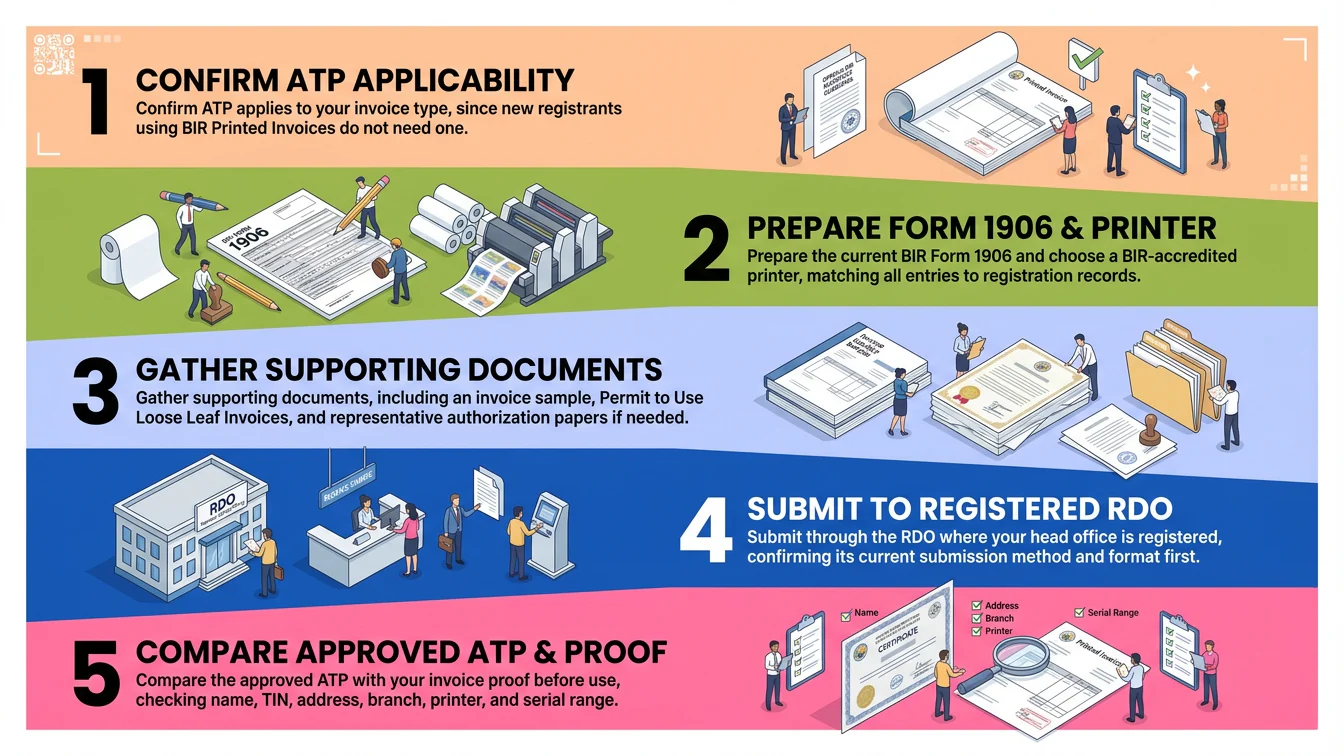
To learn how to apply for ATP in the BIR, first confirm your taxpayer status and invoice method. This process covers applications to print your own manual invoices. Loose-leaf forms, repeat applications, and representative filings may need extra documents. Check the latest BIR instructions and your RDO before submission.
1. Confirm whether ATP is the correct route
Check whether ATP covers your planned bound or loose-leaf invoices. New registrants choosing BIR Printed Invoices do not need an ATP for that registration application. For electronic issuance, review the Philippine e-invoicing compliance guidelines and confirm your route.
2. Prepare BIR Form 1906
Use the current BIR Form 1906. Enter the TIN, RDO code, registered name, office, accredited printer details, and invoice specifications. For a manual application, prepare two originals. Match all entries to your registration records before signing.
3. Select an eligible printer when required
Choose a BIR-accredited printer for your own bound or loose-leaf invoices. Verify its accreditation through the BIR list or your RDO. If you use recurring billing, estimate the booklets and serial ranges needed before ordering.
4. Prepare supporting documents
Prepare a final, clear sample of your own invoice forms. Loose-leaf applications also need a Permit to Use Loose Leaf Invoices. For subsequent applications, provide the previous ATP, Printer Certificate of Delivery, or booklet specified for your invoice type.
If a representative applies, individuals need a Special Power of Attorney and IDs. Companies may need a board resolution, written resolution, or secretary’s certificate, plus IDs. Check the latest BIR documentary checklist for the requirements that apply to your case.
5. Submit through the applicable RDO or approved channel
File with the RDO where the head office is registered or through a channel it accepts. The BIR TRRA Portal describes submission using scanned documents emailed to the concerned RDO. Confirm your RDO’s current submission method and document format before filing.
6. Review the issued invoice details before use
Compare the approved ATP with the invoice proof before use. Check the registered name, TIN, address, branch, invoice type, printer, and serial range. AI invoice processing may flag later data mismatches, but it cannot replace this approval check.
ATP Invoice Example
This example shows a VAT-registered seller’s invoice printed under an approved Authority to Print (ATP). It highlights details to check before use, including the serial number, sale, VAT, and printer information. Actual fields and wording must follow BIR invoice guidance and the taxpayer’s approved documents.
| Field | Illustrative value |
|---|---|
| Invoice type | Sales Invoice |
| Registered seller | ABC Trading Corporation |
| Seller’s VAT-registered TIN and branch code | XXX-XXX-XXX-XXXXX |
| Registered business address | Sample registered address, Manila, Philippines |
| Invoice serial number | 000001 |
| Date issued | 15 November 2026 |
| Customer name | Sample Customer Corporation |
| Customer TIN | XXX-XXX-XXX-XXXXX |
| Customer business address | Sample registered address, Quezon City, Philippines |
| Item, quantity, and unit price | 10 desk lamps at ₱1,000 each |
| VATable sales | ₱10,000 |
| VAT at 12% | ₱1,200 |
| Less: withholding tax | ₱0, assuming none applies |
| Total amount due | ₱11,200 |
| Printer and ATP details | Use the actual approved printer information, ATP number and date, and approved serial range. |
The serial-number row identifies the invoice’s sequence. Seller and buyer rows show identifying information, while item and VAT rows describe the sale. The final row covers approved printing details. See e-invoices versus regular invoices for the format distinction.
ATP Invoice Requirements to Review
An ATP BIR invoice check should cover the seller, buyer, transaction, and approved printing details before forms go to press. Use the areas below to catch missing fields and numbering errors. Requirements vary by VAT status and invoice format, so compare the proof with BIR invoice guidance.
1. Taxpayer information
Match the seller’s details to its BIR registration record. Check that the VAT designation and branch details reflect the business location issuing the invoice.
Check:
- Registered taxpayer name
- TIN and branch code
- Registered business address
- VAT or non-VAT designation
2. Invoice identification
Check the invoice heading and serial number against the approved format. Review the ATP and printer details on the proof before authorizing a print run.
Check:
- Invoice type, with “Invoice” clearly displayed
- Invoice series, serial number, and transaction date
- ATP number, issue date, approved serial range, and printer details
- System or permit details, where applicable
3. Customer information
Provide space for buyer information and complete it as the transaction requires. Verify business customer details before issuing an invoice that the buyer may use for tax records.
Check:
- Customer or registered business name
- Customer TIN, where required
- Customer business address, where required
4. Transaction information
Itemize the sale and check the calculations. Proforma invoice examples can help compare quoted amounts, but a proforma invoice does not replace a registered invoice.
Check:
- Description of goods or services, quantity, and unit price
- Discounts and taxable amount
- VAT or other applicable tax amounts
- “Less: Withholding Tax” field and amount, as applicable under BIR’s 2026 guidance
- Total amount due and relevant payment terms
5. Internal controls
Keep every issued number traceable after printing. Reconcile invoices with accounting records and compare them with related purchase orders to identify mismatched quantities or prices.
Check:
- Control serial number sequences and prevent duplicates
- Record canceled invoices and related credit or debit notes
- Retain invoices under applicable rules
- Reconcile issued invoices with accounting records
- Restrict access to approved invoice templates
What Changes Under EIS?
The ATP BIR process authorizes printed invoice forms. Under the BIR’s 2026 electronic invoicing rules, covered taxpayers must issue structured electronic invoices through an authorized system. They must deliver invoices digitally and keep sales data extractable for later BIR reporting. Actual reporting follows separate implementation rules.
An ATP does not establish electronic invoicing compliance. The two processes answer different questions:
| ATP-related question | Electronic invoicing question |
|---|---|
|
|
What businesses should verify before EIS implementation
Confirm your coverage before changing the invoice workflow. Then test how the approved system issues, delivers, retains, and corrects invoices for your taxpayer category.
Review:
- Whether current rules cover the taxpayer and its branches
- Which invoice types and data fields the rules cover
- Whether the system needs a Permit to Issue Electronic Invoice and EIS certification
- How the system delivers invoices digitally to buyers
- Whether electronic sales reporting has been activated for the taxpayer
- How the system handles failed delivery, downtime, and transmission
- How staff issue corrections without changing the original invoice
- How the business retains electronic records and logs
- Which deadlines apply to its taxpayer category
Keep issued invoices unchanged. Under the BIR’s correction rules, an authorized credit note handles a decrease, while a new electronic invoice handles an increase. Both reference the original and help resolve discrepancies before invoice payment.
How Businesses Can Prepare for ATP and EIS
Preparing for ATP and EIS starts with the process around each invoice, beyond checking printed fields. Map ownership, document types, system controls, and reconciliation points. The ATP BIR route governs approved printing, while electronic invoicing adds system authorization and digital delivery. BIR sales reporting follows separate rules when activated.
1. Document the current invoice workflow
Trace an invoice from a completed sale to record retention, then assign an owner to each handoff. This reveals where manual work causes delays.
Compare:
- Sales order or service completion and the invoice trigger
- Draft preparation, approval, and issuance
- Delivery to the buyer and payment follow-up
- Accounting posting, tax reporting, and record retention
2. Review invoice master data
Use one approved source for taxpayer and customer records. Compare your system’s field mapping with the ATP BIR example above before testing invoice output.
Compare:
- Assign an owner to registered seller and branch records.
- Maintain buyer records and payment terms in one controlled source.
- Check tax-code mapping against the rules used for VAT invoice management.
- Review master-data changes before the next invoice run.
3. Separate invoice methods
Give each output a distinct label and delivery method. A PDF copy, a software-printed invoice, and a structured electronic invoice serve different purposes.
Compare:
- Printed invoice from an approved print run
- Software-generated invoice issued on paper
- PDF copy of an invoice
- Electronic invoice delivered digitally to the buyer
- BIR sales-data transmission, when that separate obligation applies
4. Test exception handling
Run realistic failure scenarios before rollout. Record who can pause issuance, resolve an error, and resume delivery after an outage.
Compare:
- Incorrect tax mapping or incomplete buyer records
- Branch or invoicing-system changes
- Failed electronic delivery
- Network downtime and the authorized manual fallback
- Amount corrections through documents that reference the original invoice
5. Reconcile invoices with accounting records
Reconcile issued invoices with ledger and collection records on a fixed schedule. Accurate outstanding balances also support decisions about invoice financing.
Compare:
- Invoiced sales against accounting entries and tax reports
- Outstanding balances against payment receipts
- Adjustments against their original transactions
- Electronic issuance records against BIR transmission logs, when applicable
If your review finds gaps between approval, delivery, and reconciliation, explore HashMicro’s invoicing software through the banner below.
Common ATP Mistakes to Avoid
Invoice errors often begin with assumptions about which approval applies, rather than missing fields. The ATP BIR process, taxpayer registration, electronic invoicing, and payment methods serve different purposes. Check these common beliefs against current BIR guidance and the rules for your taxpayer category.
Common mistakes include:
- Confusing ATP with BIR registration: Registration establishes the taxpayer’s BIR record. ATP authorizes printing the business’s own invoice forms when that route applies. Registration alone does not grant printing authority.
- Calling every software invoice an EIS e-invoice: A PDF or printed software invoice does not automatically meet electronic issuance rules. Check the required authorization, data format, and delivery method before calling it EIS-compliant.
- Applying one EIS deadline to every taxpayer: Coverage and implementation dates depend on the taxpayer category and applicable BIR issuance. A deadline without its scope can mislead businesses about their obligations.
- Relying on outdated ATP advice: Guidance on how to apply ATP in BIR can age. Check the current form, printer accreditation, and requirements for your application in the BIR documentary checklist.
- Editing an issued electronic invoice like a draft: BIR correction rules require a separate document referencing the original invoice. Do not overwrite or delete the issued record to fix an error.
- Treating payment tools as invoice authorization: Accepting digital wallet payments changes how customers pay, not the rules for issuing invoices. Software settings cannot replace the BIR authority required for your invoice method.
Conclusion
Start by choosing how your business will issue invoices, whether it is through BIR Printed Invoices, approved printed forms, or an electronic system. Next, check whether the ATP BIR process applies to your chosen method. Then determine whether current EIS rules cover your taxpayer category and invoice workflow.
Check the latest BIR guidance and your RDO’s instructions before printing or issuing invoices. Confirm that your forms, system approvals, and correction procedures match the method you chose.
If you need help connecting invoice creation, delivery, and payment tracking, acquire a free consultation from HashMicro. A free demo can help your finance team assess the suitable software.
FAQ About ATP BIR
Authority to Print (ATP) is BIR approval for a taxpayer to have its own principal and supplementary invoices printed. Businesses using this method generally apply through the relevant RDO and an accredited printer. ATP does not replace taxpayer registration or authorize electronic invoicing.
If you are researching how to apply for ATP in BIR, first confirm that you will print your own invoices. Complete BIR Form 1906, prepare a clear invoice sample, and choose an accredited printer. Check the documentary checklist and your RDO’s accepted submission channel before filing.
ATP remains relevant when a taxpayer prints its own invoices. EIS rules address electronic invoice issuance for covered taxpayers and may involve separate system and data requirements. An existing ATP alone does not establish EIS compliance. Check current BIR guidance against your taxpayer category and issuance method.
A PDF is a file format, not proof that an invoice meets BIR electronic invoicing rules. EIS treatment depends on the taxpayer’s coverage, the authorized system, invoice data, and electronic delivery requirements. Check those conditions before labeling a PDF or software-printed document an EIS e-invoice.
An ATP BIR example can illustrate an invoice’s type, serial number, seller and buyer details, transaction amounts, and printer information. It is not an approved template. Compare your actual proof with the ATP, applicable BIR invoice rules, and your accountant’s review before printing any forms.
No. A taxpayer can apply directly or appoint an authorized representative, subject to the documents required for that situation. An accountant or tax adviser can help you choose the right invoice method for your registration status. Confirm that route with your RDO.