

 Limited to 100 registrants

According to the Asian Development Bank, late payments remain one of the top cash flow challenges for small and medium enterprises across Southeast Asia, with invoice discrepancies cited as a leading cause of payment disputes. For many Philippine businesses, invoice errors aren't just an inconvenience, they directly affect cash flow and make it harder to follow up on outstanding accounts.
Getting invoices right starts with understanding what they are and what they should include. When structured correctly, it protects your business legally, supports your BIR compliance requirements, and gives your finance team a clear audit trail. Businesses that deal with high invoice volumes often benefit from using the right invoicing software invoicing software to automate the process and reduce manual errors.
This guide explains what an invoice is, the different types used in the Philippines, the key components every invoice should have, and how to create one that meets both business and regulatory standards. By the end, you'll have a clear picture of how invoices work and what to look for when choosing the tools to manage them.
Key Takeaways
An invoice is a document that shows what was bought, how much it costs, and when to pay.
Manual invoicing takes too much time, causes mistakes, and makes tracking payments harder.
Invoicing software helps businesses create invoices faster, send reminders, and keep records accurate.
HashMicro’s e-invoicing software makes billing easy with automatic tracking and payment reminders.
What is an Invoice?
An invoice is a dated commercial document that details and records a transaction between a buyer and a seller. If the purchase was made on credit, it usually includes the payment terms and available payment methods.
The document must clearly indicate that it is an invoice. It generally features a unique invoice number for tracking purposes and includes the seller’s or service provider’s contact details in case of billing issues.
Invoices often specify payment terms, including discounts, early payment options, or penalties for late payments. They also list item prices, quantities, shipping costs, taxes, and other charges, providing a breakdown of the total amount due.
Types of Invoice
Philippine businesses typically work with several distinct invoice types, each suited to a specific transaction stage or billing arrangement. Understanding the differences helps you send the right document at the right time.
| Type | Description |
|---|---|
| Sales Invoice | The standard document issued after goods or services are delivered. Required by the BIR for VAT-registered businesses and serves as the primary record for revenue. |
| Proforma Invoice | A preliminary invoice sent before a transaction is finalized, used for quotations, advance payments, or customs declarations. It is not a demand for payment. |
| Commercial Invoice | Used in international trade to declare the value, quantity, and details of exported or imported goods. Required by the Bureau of Customs for clearance. |
| Credit Invoice (Credit Note) | Issued to reduce the amount owed on a previously sent invoice, typically for returned goods, billing errors, or approved post-sale discounts. |
| Debit Invoice (Debit Note) | Issued to increase the amount owed when additional charges apply after the original invoice, such as revised quantities or unexpected fees. |
| VAT Invoice | A BIR-compliant invoice that separately itemizes the VAT amount. Required for VAT-registered entities to support input tax claims. |
| Recurring Invoice | Sent at regular intervals, either it's weekly, monthly, or quarterly for ongoing services such as retainer fees, subscriptions, or lease agreements. |
| Past Due Invoice | An invoice that has not been paid by its due date, signaling overdue accounts and triggering follow-up collection activity. |
Each invoice type works hand-in-hand with the terms you set for your customers. Choosing the right invoice payment conditions such as due dates, early payment discounts, or penalty clauses can gives your billing process the structure it needs to maintain healthy cash flow and reduce late payments.
Functions of Invoice
Invoice is important for everyday business processes, since its main function is to be the official document that records all sales transactions, whether goods or services. But actually, invoices have more benefits and are important for smooth business operations.
Here’s some of the main functions and benefits:
1. Proof of Transaction
Invoice confirms that a deal between seller and buyer really happens. It lists down all the details: what was sold, price, quantity, and total cost.
With this document, both sides got clear payment proof as proof of the transaction, so it will reduce the risks of dispute or argument since there’s clear proof that a transaction has happened.
2. Managing Cash Flow
Invoices also support better cash flow management because they show when money is expected to come in, which payments are still outstanding, and how much revenue the business can plan around. As a result, the company’s funds can be allocated to different priorities, from paying invoices to saving for emergency costs.
3. Accounting Records
For accounting, invoice acts as an official record of income and outstanding payments. It makes bookkeeping easier, as well as helps in financial reports, audits, and verification. If the invoice is all properly recorded, finances will be neat and comply with tax regulations, so won’t be in trouble.
4. Quality Control & Customer Satisfaction
Since the invoice has details of goods or services, businesses can use it to check if orders are delivered correctly and up to standard. If there is an issue, a company can use the invoice to process claims or refunds quickly, so customers are also happy and trust the business more.
5. Makes Payment Easier
A clear and detailed invoice makes it easy for buyers to pay up. It’s got full information on how much to pay, accepted payment methods, so payments are confirmed on time. Using invoicing software is way faster, as it can offer e-payment options and even send auto reminders.
If businesses use invoices properly, they can improve efficiency, stay compliant, and grow long-term without so much headache.
Elements of an Invoice
 A legally valid invoice should include all necessary details to facilitate payment and provide a way for customers to ask questions. Here are the key components of an invoice:
- The word “INVOICE”: The document must prominently display “Invoice” along with the company logo for easy identification.
- Invoice number: Each invoice should have a unique identifier, such as an invoice number, purchase order number, or reference number, to distinguish it from others.
- Date of service rendered: Including the date of service or sale helps with proper record-keeping and organization.
- Date of invoice issuance: The document should specify the date it was sent to ensure timely payment.
- Seller’s name and contact details: The seller’s business name and contact information should be clearly stated to assist customers with inquiries.
- Buyer’s name and contact details: The client’s contact information must be included for legal and record-keeping purposes.
- Terms and conditions: The document should outline payment terms, due dates, and penalties for late or partial payments.
- Description of products or services: Each item or service provided should be listed with clear descriptions.
- Unit price: The cost per unit of each product or service must be specified.
- Tax details: VAT-registered businesses should clearly separate the VAT amount from the total so the document can function as a proper VAT invoice for reporting and audit purposes.
- Total amount due: The full amount owed, along with the currency, should be clearly displayed.
- Personalized note: Adding a custom thank-you message can enhance customer relations.
How to Create an Invoice and Template
According to AccountingTools, a complete invoice must include the seller's contact details, a unique invoice number, a clear description of goods or services, the total amount, applicable taxes, and payment terms.
Making a proper invoice is super important for smooth business transactions. Here’s what you need to do to make sure everything goes well:
1. Prepare Basic Info
First step, collect all the important details. This includes the full name and address of both seller and buyer, tax identification number (TIN), and contact info.
Make sure all the details are correct and updated so there is no hassle later. If you’re using invoicing software, it’s easier; the contacts are already saved for future transactions, saving time and effort.
2. Create a Unique Invoice Number
Each invoice needs a unique number, so you can easily track and manage them. Usually, it’s a mix of letters and numbers arranged systematically.
Consistent numbering helps you quickly find invoices, monitor payments, and keep accounting records organized. Before you lock in a sequence, it helps to know how to format and sequence invoice numbers, since changing the structure later breaks the audit trail on invoices you have already issued
3. Add Transaction Details
The full details of the products or services you sold must be included here. Product/service name, quantity, unit price, and subtotal per item are included.
Make sure it is clear and complete to avoid confusion. If there is a tax such as VAT, include the percentage and amount separately for transparency.
4. Set Date & Due Date
Include the issue date of the invoice, which is when it was created. Also, include the due date so the buyer knows exactly when payment is expected.
Due date helps manage cash flow and makes sure payments come in on time. When the due date is clear, there are fewer chances of late payments and finances are in order.
5. Provide Payment Methods
Tell the buyer what payment methods are available. Bank transfer, GCash, Maya, check, or credit card are possible. Also, include bank details or payment links if applicable.
The more options, the more convenient for customers, and the faster the payment. Just make sure all payment details are correct so there is no hassle in the transaction.
6. Include Terms & Conditions
If your business allows a partial payment, state the amount, schedule, and remaining balance clearly in the terms to avoid confusion between the seller and buyer.
Businesses handling large volumes can further reduce manual errors by using AI invoice processing to automate how invoices are generated, validated, and recorded.
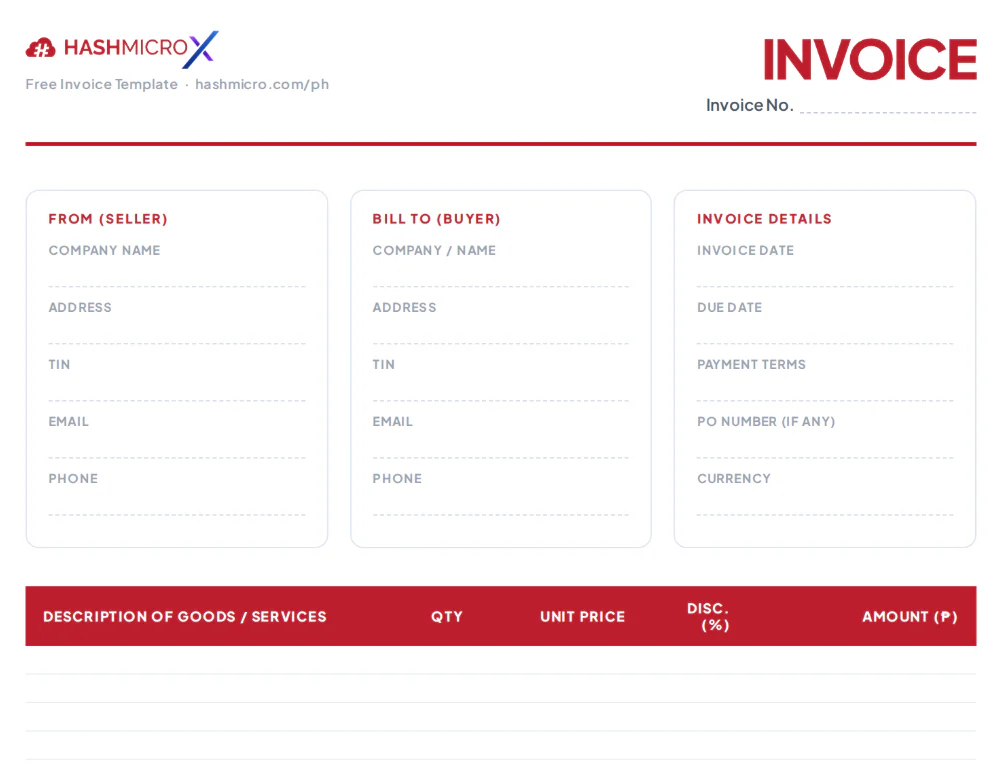
Explore the sample invoice template below for an effective inventory management tool that fits seamlessly into your operations.
Download Invoicing Template
Problems with Creating Invoices Manually
Some businesses still use manual invoices, especially small ones. However, this method often causes many challenges. Here are some common issues businesses face when using manual invoicing:
1. Errors and Inaccurate Data
Manual data entry often leads to mistakes, such as incorrect details, wrong amounts, or missing important information. Even minor errors cause major discrepancies in calculations, which affect financial records.
2. Takes Too Much Time
Manual invoice creation requires more time since businesses must enter each detail separately. When transactions increase, this process becomes overwhelming and reduces operational efficiency.
3. Hard to Track and Store
Manually handling invoices makes tracking and storage more difficult. Physical copies often get lost or damaged, which creates problems when retrieving documents for audits or billing.
4. Causes Late Payments
Manual invoicing slows down invoice delivery, especially when using physical copies. This delay often leads to late payments since customers receive invoices too late.
5. Lacks Automated Payment Reminders
Without automation, businesses must manually follow up on unpaid invoices. This process consumes time and increases the chances of overdue payments.
Manual invoicing seems simple at first, but as the business expands, this method might create inefficiencies and slow down the overall progress.
Manual processes also create blind spots: duplicate invoices, missing BIR fields, and altered amounts can slip through unchecked. Knowing how to verify invoice authenticity closes those gaps before the payment run.
Generate and Manage Invoices Easier with HashMicro
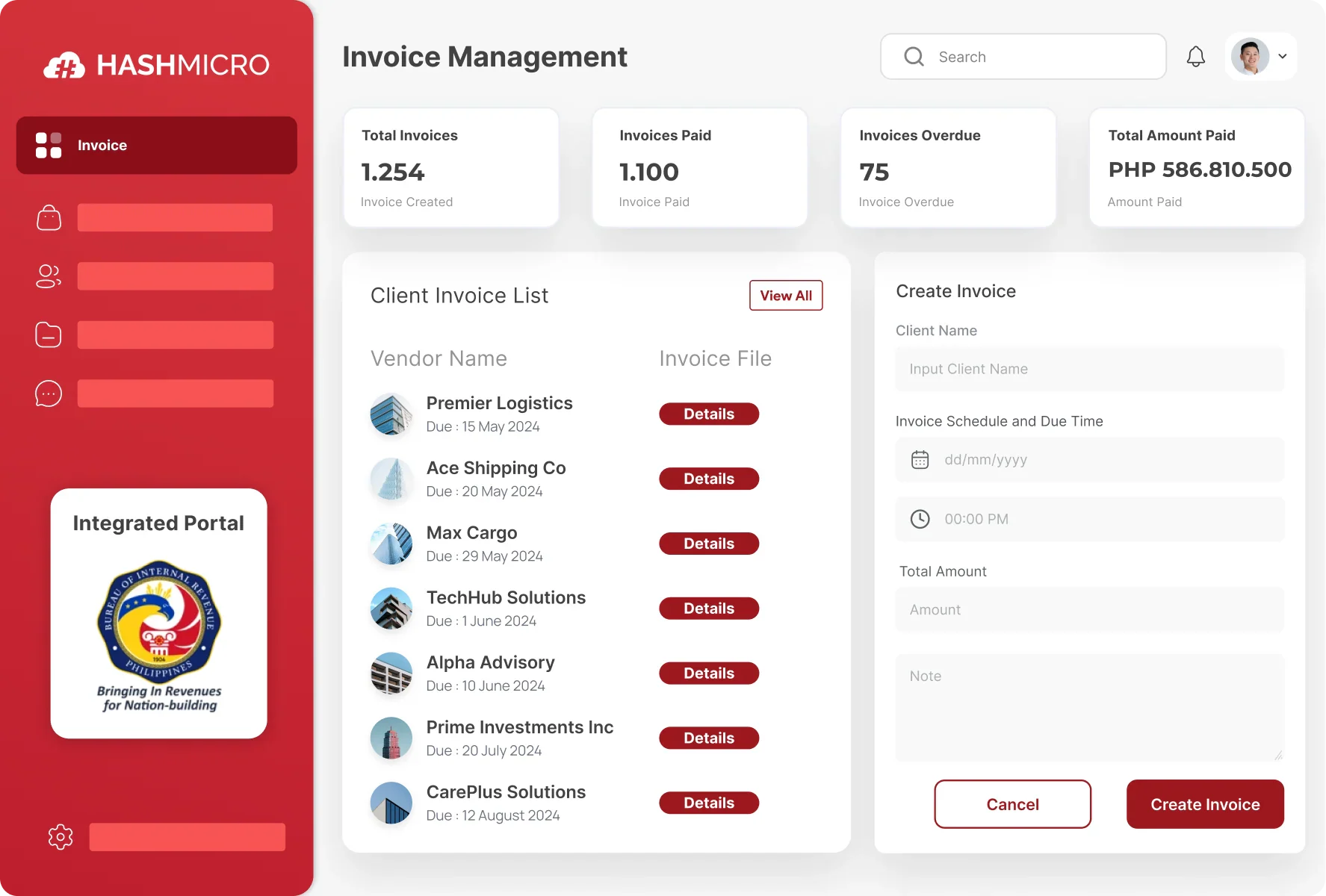 Are you still managing invoices manually? Managing invoices manually can be stressful, isn’t it? you can streamline the entire process with HashMicro's invoicing software, built to automate invoice creation, tracking, and BIR compliance in one platform.
Powered by Hashy AI, the system automates complex calculations and minimizes human errors, ensuring precision in every invoice. It also offers an easy-to-use invoicing feature that integrates seamlessly with other modules.
With a user friendly interface, users can quickly generate invoices by entering details such as seller and buyer names, product or service descriptions, prices, and total costs.
Beyond invoice creation, HashMicro helps track and manage invoices effortlessly. Set due dates, send automatic invoices via email, and ensure payments arrive on time, no problem.
Why Choose HashMicro for Invoice Management? Let’s take a look at the features:
- Invoice Management: Create, edit, and track invoices in one place with automated payment reminders.
- Recurring Invoices: Automate invoices for subscriptions and long-term contracts.
- Custom Invoice Printout: Personalize invoices with your brand’s logo, colors, and layout.
- Bank Integration – Auto Reconciliation: Sync bank transactions with invoices for accurate records.
- Budget S Curve: Monitor expenses and revenue over time with a visual S-curve.
- Multi-Level Analytics: Gain deeper insights into business performance with detailed reports.
With these features, you don’t need to worry about your invoicing anymore, since this system will keep everything on track for you.
These problems are not isolated mistakes, they are the expected result of a process that depends entirely on manual effort. When every invoice requires a person to enter the right data, calculate the correct VAT, and remember every BIR-required field from scratch, errors become a matter of when, not if. The good news is that most of these issues have a direct fix.

Conclusion
An invoice is an important document that records every transaction between buyers and sellers for goods or services. With different invoice types available, companies can easily organize transactions and maintain accurate records.
But let's be honest, manual invoicing takes too much time, increases errors, and causes late payments. HashMicro’s e-invoicing software can automate invoice creation, seamless tracking, and on-time payments without hassle.
With an easy-to-use interface, automated billing, and accurate tracking, no more stress from managing invoices by hand. Moreover, it has features like automated reminders and full system integration to make your life easier.
So, if you are interested, try the free conclutation now by contacting our expert team!
Frequently Asked Questions on Invoices
To record payments made via cash or checks, you can create offline payment records in your invoicing system. This ensures that all transactions are accurately documented, even when electronic payment methods aren’t used.
Typically, invoice numbers are sequential and cannot be reset to avoid duplication. However, you can use prefixes or suffixes to indicate different periods or projects, helping to organize and identify invoices more effectively.
Yes, many invoicing systems allow you to personalize your invoices by adding your company logo, changing titles, and adjusting other elements to align with your brand identity. This customization helps present a professional image to your clients.
In cases of overpayment or duplicate payments, you should issue a refund for the excess amount. This can usually be done through your payment processing system or by creating a credit note that can be applied to future invoices.