

Digital payments are now part of everyday retail in the Philippines. According to the Bangko Sentral ng Pilipinas, digital payments accounted for 57.4% of monthly retail payment volume in 2024, and merchant payments became the biggest driver of that shift.
For store owners, that creates a practical question. If a customer scans your merchant QR Ph code, pays from an e-wallet or banking app, and walks away with a successful payment screen, what should happen next at your counter, in your POS, and in your books?
You need to choose the right merchant facility, understand settlement timing, issue the right invoice, and reconcile every scan against your sales report. This guide explains how to accept QR Ph at your counter without losing track of the money after the payment is approved.
Key Takeaways
Merchant QR Ph is for person-to-merchant payments, not personal wallet transfers between individuals.
Customers usually pay the exact sale amount, while providers may charge merchants a discount rate or service fee.
A payment confirmation screen is not the same as a BIR invoice, so your POS or invoicing process must still document the sale properly.
The safest workflow is to record the sale at gross, book fees separately, and reconcile your Z-reading against the provider settlement report.
What QR Ph Is and Who Can Accept It
QR Ph is the national QR standard set by the Bangko Sentral ng Pilipinas. One merchant code lets customers pay from any participating bank or e-wallet app, so your store does not need a separate code for each provider.
The key word is interoperable. A proper merchant QR Ph accepts scans from many institutions instead of tying your counter to one wallet brand, which suits a store that already handles cashless transaction.
Is Merchant QR Ph the Same as GCash or Maya QR?
No. A personal wallet QR is built for sending money between individuals. A merchant QR Ph is built for business payments (P2M), it links to a merchant account, follows the provider's merchant rules, and produces settlement reports your bookkeeper can actually use.
For example, a store can start with a personal QR. Once you need branch reports, BIR-registered invoices, or a second counter, the merchant setup is the cleaner route.
Which Type of QR Code Should Your Counter Use?
Three setups are available, and the right one depends on your daily volume:
- Printed code: one code taped to the counter, and the customer types the amount. Cheapest option, fine for low volume.
- Per-sale code: the cashier enters the amount first, so the customer cannot underpay or overpay.
- POS-linked code: your POS creates the payment request and updates the sale itself. Best for multiple counters and daily reconciliation.
Which Apps Can Pay Your QR Ph Code?
The list of participating banks and e-wallets changes as providers join or update their services.
Ask your acquiring bank three things before you print the code: which apps can pay you, where the transaction report is downloaded, and whether settlement is grouped by branch or terminal. Those answers decide how cleanly each QR scan turns into a recorded POS transaction.
Requirements Before You Apply
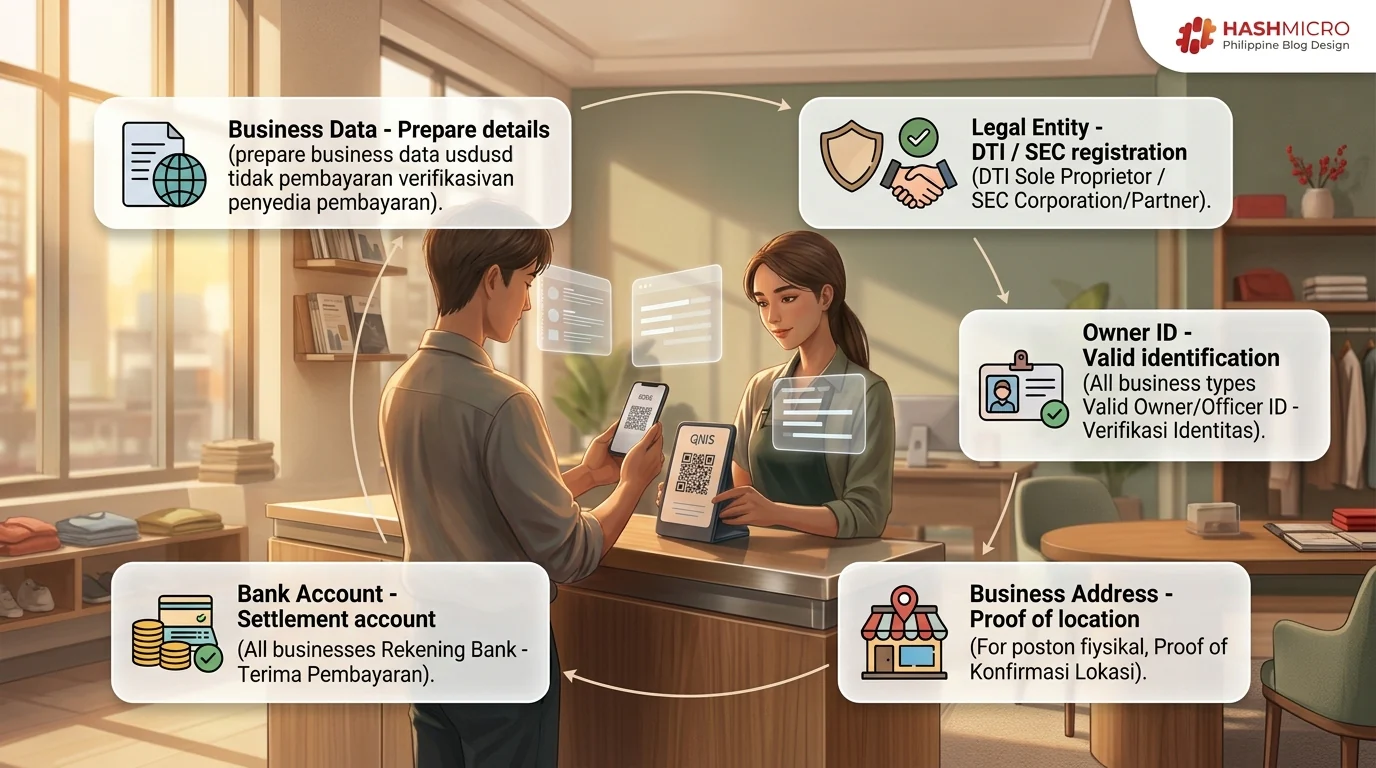
Before applying for merchant QR Ph, prepare the same business information your payment provider will need for Know Your Customer and merchant verification.
| Requirement | Who Usually Needs It | Why It Matters |
|---|---|---|
| DTI registration | Sole proprietors | Confirms the legal business name |
| SEC registration | Corporations or partnerships | Confirms the registered entity |
| Valid owner or officer ID | All businesses | Supports identity verification |
| Proof of business address | Most merchants | Confirms operating location |
| Settlement bank account | All merchants | Receives payouts from QR Ph transactions |
| BMBE certificate, if applicable | Qualified micro businesses | May support small-business classification |
The exact list varies by provider, so treat this table as a preparation checklist rather than a complete legal requirement list.
1. Business Documents You Need to Register
The documents depend on your business type. A sole proprietor usually starts with DTI registration, while a corporation or partnership starts with SEC. Your provider may also ask for a mayor's permit, BIR Certificate of Registration, or other papers depending on your setup.
Use the business name that appears in your registration documents. If your counter shows one name but your bank account uses another, settle that early with the provider so settlement reports stay easy to match.
2. Valid IDs and Proof of Address
Providers normally ask for a valid government ID from the owner, an authorized officer, or a signatory. A proof of address is often required too, especially for a physical store.
Do not rush this step. If the address, branch name, or legal name is wrong during onboarding, that error can follow you into receipts, reports, and settlement records.
3. Choosing Your Settlement Account
Choose a settlement account your finance or bookkeeping process can monitor. For formal businesses, this is usually a bank account under the business or its registered owner.
Avoid routing QR Ph payouts into a personal account used for household spending. It feels convenient at first, but it makes daily reconciliation and audit preparation harder.
4. For Small and Home-Based Sellers
Small sellers can still explore merchant QR Ph, but they should ask the provider what level of registration is required for their case.
The key question is not only “Can I get a QR code?” The better question is: “Can I receive a merchant report that my bookkeeper can reconcile against my daily sales?” If the answer is no, the setup may solve collection but create reporting problems later.
How to Apply for Merchant QR Ph
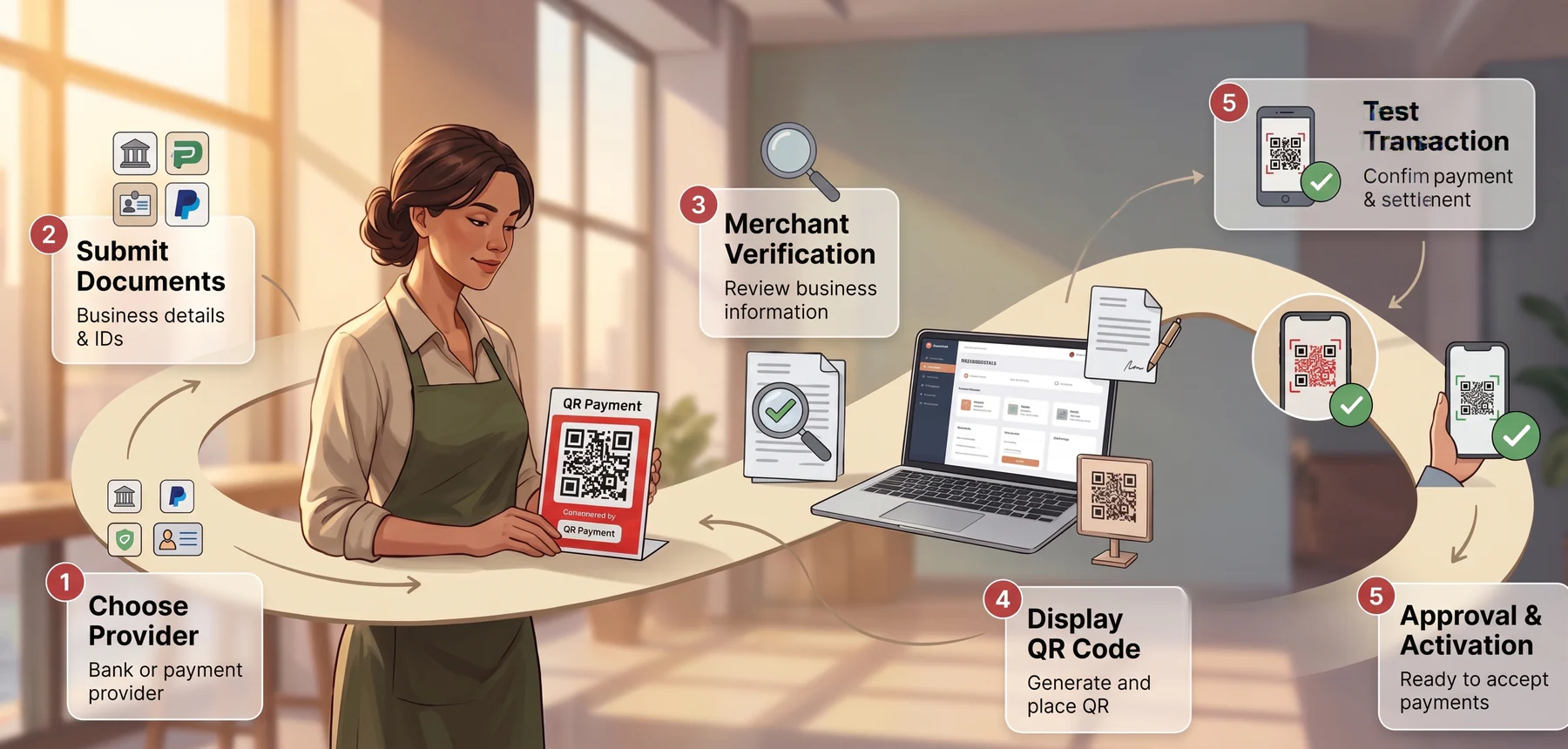
Applying for merchant QR Ph is usually done through a bank, payment provider, or e-money issuer that supports QR Ph P2M payments. The specific screens differ by provider, but the business process is similar.
1. Choosing Your Bank or Provider
Start by choosing who will acquire your QR Ph payments. This may be your existing bank, an e-wallet business product, a payment gateway, or a provider that also supplies the payment terminal your cashier uses to take card and QR payments.
Compare four things before signing up: merchant fees, settlement schedule, reporting format, and POS integration options. Businesses that need to connect payment records directly to their accounting or POS system should confirm whether the provider supports GCash API integration for Philippine businesses before signing up. The cheapest published rate is not always the best choice if the report is difficult to reconcile.
2. Submit Your Business Documents
Upload or submit your registration documents, IDs, settlement account details, and branch information. If you operate several branches, do not squeeze them all into one generic merchant name unless the provider confirms that reports can still be separated by branch.
Branch-level reporting matters because a settlement total is not enough. You need to know which counter earned the money.
3. Complete Merchant Verification
The provider reviews your documents and may verify your business category, legal name, owner information, and expected transaction activity.
During this step, confirm how the merchant name will appear to customers after scanning. If the displayed name is unclear, customers may hesitate to approve payment or may later dispute the transaction.
4. Generate and Display Your QR Code
Once approved, generate the QR code from the provider’s merchant portal or app. For static QR, print it clearly and place it where customers can scan without handing over their phones.
Use a clean display stand, not a worn-out photocopy taped beside several unrelated QR codes. If you accept multiple payment types, label them clearly so the cashier does not need to explain every option during peak hours.
5. Run a Test Transaction
Before opening the counter with QR Ph, run a small test transaction. Confirm three things: the customer app shows the right merchant name, the payment appears in the merchant report, and the money lands in the expected settlement account.
Do not skip this step. Many QR payment issues are not discovered during registration. They appear when the first payout arrives and the bookkeeper cannot match it to the POS report.
How Long Approval Usually Takes
Approval depends on the provider, how complete your documents are, and whether your details need manual review. Ask the provider when approval is expected, when the QR can be used, and when the first settlement report arrives.
The report date matters as much as the activation date. Your counter is ready only when payment and reporting both work.
What QR Ph Really Costs per Sale
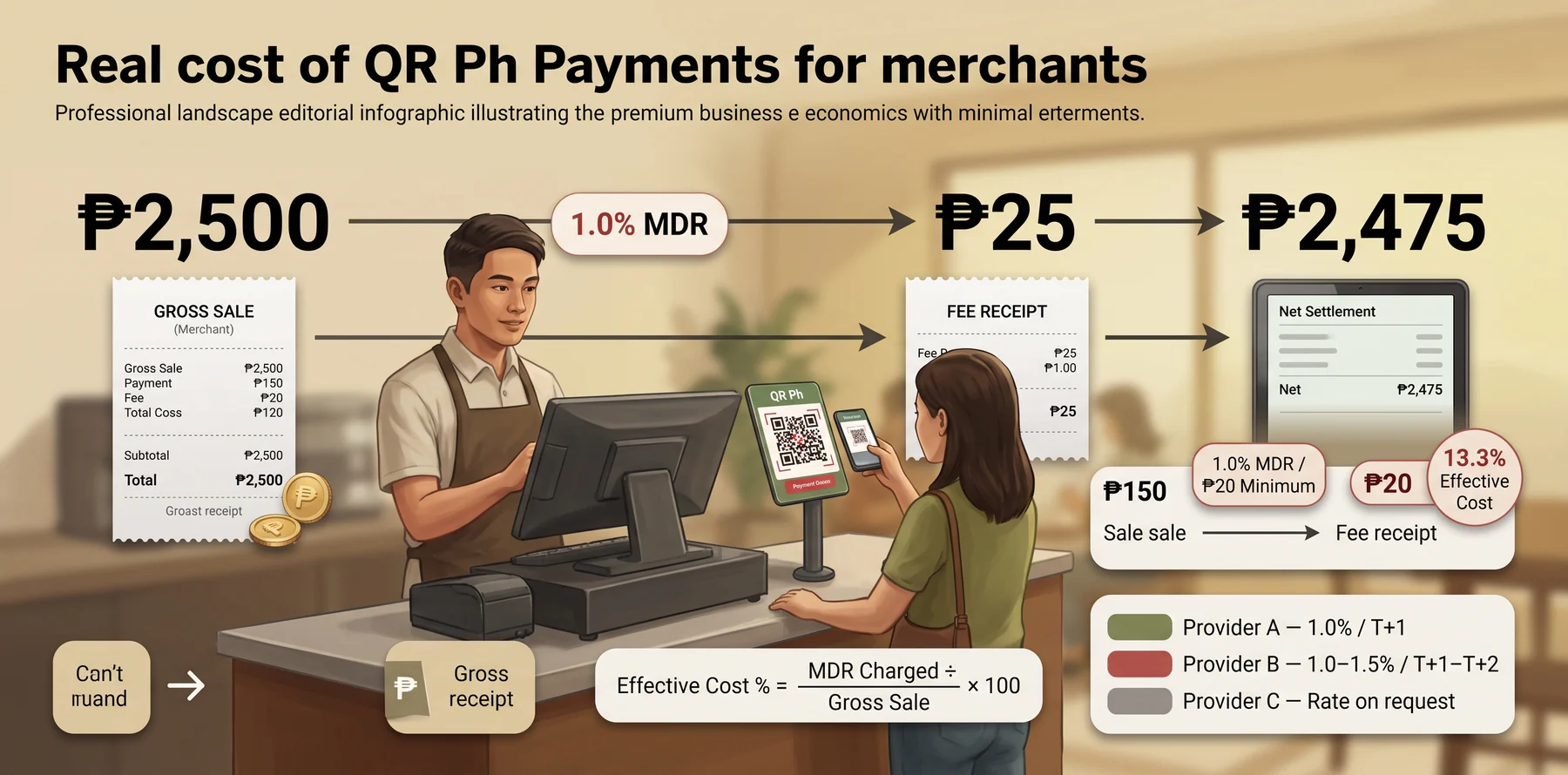
Customers generally pay the exact amount shown at the counter. The cost is usually on the merchant side, through a merchant discount rate or other provider fee.
BSP’s QR Ph P2M FAQ explains that banks or e-money issuers may charge merchants reasonable fees for the service.
1. The Merchant Discount Rate
The merchant discount rate, or MDR, is the fee charged to the merchant for accepting a digital payment. It may be a percentage of the sale, a minimum fee, a fixed fee, or a combination depending on the provider.
For example, if a provider charges 1.0% MDR on a ₱2,500 sale, the fee is ₱25. If the customer paid ₱2,500, your report may show ₱2,500 as the sale but only ₱2,475 as the net settlement after fees.
That ₱25 is not missing cash. It is a payment processing expense.
2. Comparing Provider Rates
Before choosing a provider, compare fees in a table like this:
| Provider | MDR or Fee Model | Settlement Timing | Reporting Detail |
|---|---|---|---|
| Provider A | 1.0% or minimum fee | T+1 | Export by transaction |
| Provider B | 1.0% to 1.5% | T+1 or T+2 | Portal summary |
| Provider C | Rate on request | Provider-specific | Confirm before signing |
Use this structure in your own comparison. Do not only ask “How much is the rate?” Ask how the fee appears in the report, whether VAT is shown separately where applicable, and whether branch-level settlement is available.
3. The Minimum Fees
Minimum fees can make small transactions expensive.
On a ₱2,500 sale at 1.0% MDR, the fee is ₱25 and the effective cost is 1.0%. On a 150 sale with the same 1.0% MDR but a ₱20 minimum fee, the fee charged is ₱20 and the effective cost jumps to 13.3%.
That is the trap. A rate that looks cheap on large tickets can turn expensive at a low-ticket counter.
To understand the real cost, calculate fees by ticket size, not only by rate. Compute fees by your actual ticket size, not only by rate. A cafe with ₱100 tickets feels the MDR differently than a furniture store with ₱20,000 invoices. The best provider is the one whose cost and settlement match how your counter sells.
Also, Settlement timing varies by provider. Some credit the net amount on the next banking day; others follow batch schedules or cut-off times that push payout further out. Confirm your provider's settlement cycle before choosing, because a lower MDR matters less if cash arrives three days late.
Issuing a BIR-Compliant Invoice
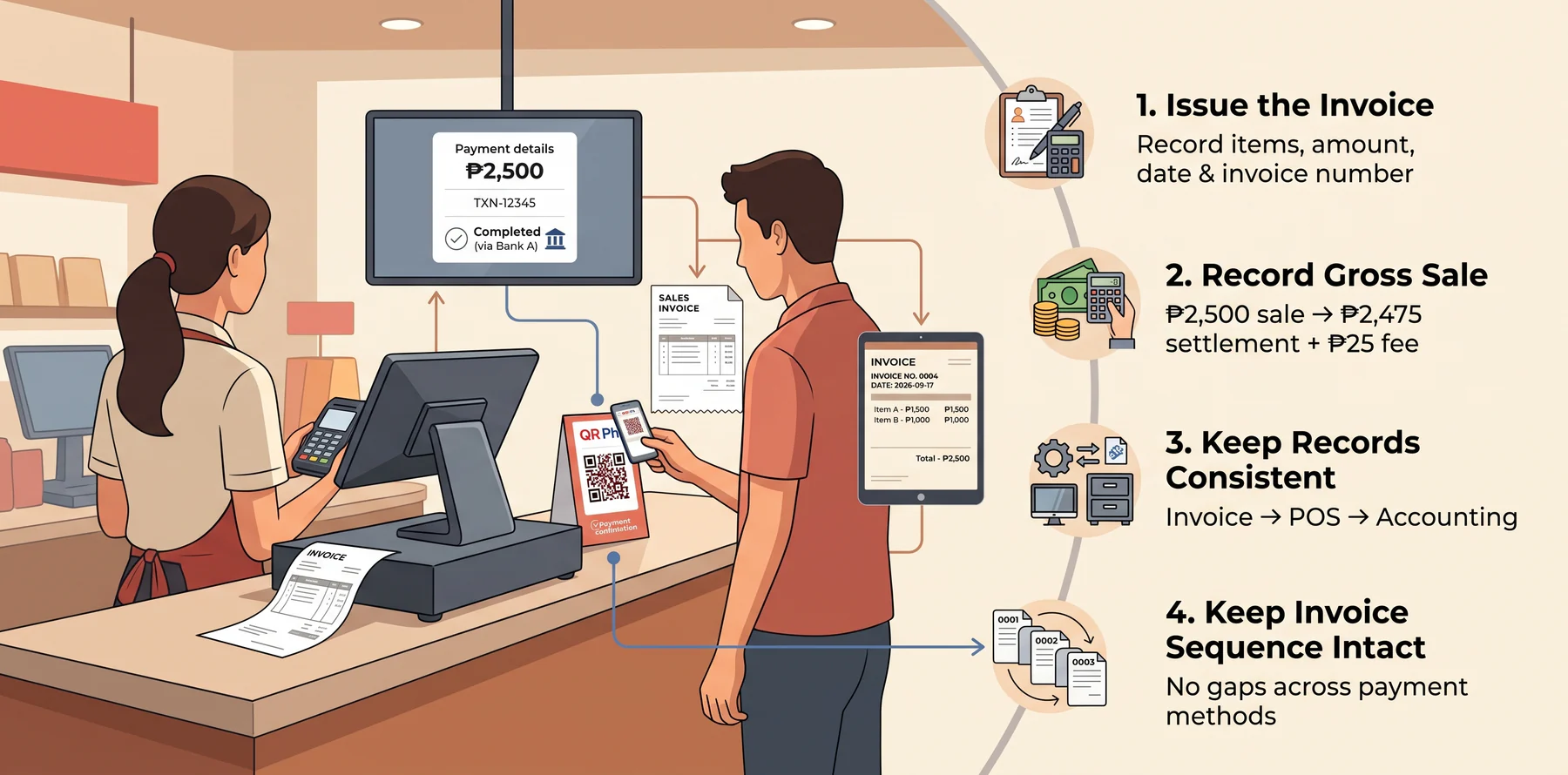
A QR Ph payment confirmation proves that a payment was made, but it does not replace the sales invoice. Philippine businesses still need to issue invoices under applicable BIR invoicing rules, including the requirements and transition rules under Revenue Regulations No. 7-2024 and No. 11-2024.
The key is to keep payment records, invoices, and accounting entries consistent. HashMicro provides POS, accounting, and ERP software, but this article is general guidance, not tax or legal advice.
1. Keep Payment Confirmation Separate from the Invoice
A successful QR Ph payment screen confirms that the customer paid. It does not replace the sales invoice that documents the sale itself.
The invoice should still record the items sold, transaction amount, date, and invoice number. Your POS or invoicing system should therefore issue the invoice regardless of whether the customer pays by QR, cash, card, or another method.
2. Record the Sale Before the Payment Fee
Record the sale at the gross amount paid by the customer, not the amount received after the QR provider deducts its fee.
For example, if the customer pays ₱2,500 and the provider settles ₱2,475, the sale remains ₱2,500. The ₱25 difference should be recorded separately as a payment processing fee or merchant expense based on your accounting setup.
This keeps revenue and payment costs visible instead of understating sales.
3. Keep VAT and Fee Records Consistent
For VAT-registered businesses, confirm with your accountant how the VAT on sales and provider fees should appear across your invoice, POS report, and accounting records.
The important operational point is consistency. Your invoice, sales report, and accounting entry should clearly reconcile, while the QR payment fee should remain visible as a separate cost rather than reducing the recorded sale.
4. Keep the Invoice Sequence Intact
QR payments should not create gaps in your invoice sequence.
Every qualifying sale should receive the appropriate invoice number under your business process, regardless of payment method. If your counter runs on a BIR-accredited POS, the series should continue from the same machine no matter how the customer pays.
That mismatch can complicate month-end reconciliation and audit preparation.
Reconciling QR Ph Against Your Books
A QR Ph payment is recorded when the customer completes the transaction, while the settlement may reach your bank later. Track the sale on its transaction date and keep any unsettled amount identifiable until the provider pays it out.
The reconciliation process should confirm that each QR Ph sale in the POS matches the provider report and, eventually, the bank settlement.
| What to Check | What Should Match |
|---|---|
| POS Z-reading | Gross QR Ph sales for the day |
| Provider report | Same gross transaction amount |
| MDR | Recorded separately as a payment expense |
| Bank settlement | Net amount after applicable fees |
| Pending transactions | Sales not yet included in the bank deposit |
For example, a ₱2,500 QR Ph sale with ₱25 MDR should reconcile to a ₱2,475 net settlement. The ₱25 difference is a payment expense, not a cashier shortage.
At month-end, transaction reconciliation matters most for sales made near the cutoff, so a sale from the last day of the month may settle in the following month, so it should remain traceable as a pending provider receivable rather than being recorded based on the bank deposit date.
Common errors to check: recording net payouts as sales, omitting MDR, using settlement date instead of transaction date, or processing refunds without linking them to the original QR transaction.
Refunds, Voids, and Failed Scans
Refunds, voids, and failed scans can affect your POS, provider report, cash drawer, and accounting records. Document what happened in the POS first, then match the payment treatment to the actual transaction status.
A void in the POS does not automatically refund the customer's e-wallet or bank account. For cash refunds, failed payments, or duplicate charges, verify the transaction with the provider before issuing a refund or adjusting the sale.
QR Ph Exception Check
1. Customer Wants a Refund
POS void/refund → Check provider process → Refund customer → Link records
2. Paid but POS Shows Nothing
Check payment status → Match reference + amount → Confirm before releasing goods
3. QR Scan Failed
No confirmed payment → Do not assume success → Retry or use approved payment method
4. Customer Charged Twice
Keep both references → Verify settlement → Refund/adjust duplicate payment
Connecting QR Ph to Your POS System
A printed static QR can work for a small store with low transaction volume. As sales grow across multiple counters, branches, or cashiers, manually checking each payment becomes harder to manage consistently. At that stage it helps to review POS systems used by businesses in the Philippines before adding another branch.
An integrated POS connects the sale with its payment method and transaction record, reducing the need for cashiers to check and record each payment manually. This becomes particularly useful when a business needs visibility across multiple branches or cashiers.
When Does POS Integration Make Sense?
| Business Situation | Why Integration Helps |
|---|---|
| One counter, low transaction volume | Manual QR checking may still be manageable |
| Multiple cashiers | Reduces payment-checking inconsistencies |
| Multiple branches | Keeps transaction records organized by location |
| High transaction volume | Reduces repetitive manual confirmation |
| Finance team handles daily reconciliation | Creates more consistent sales and payment records |
Connecting QR Ph to your POS system turns each scan into part of a complete sales record. Instead of checking payment apps separately, your team can match transactions with the right items, totals, and BIR-registered invoices in one workflow.
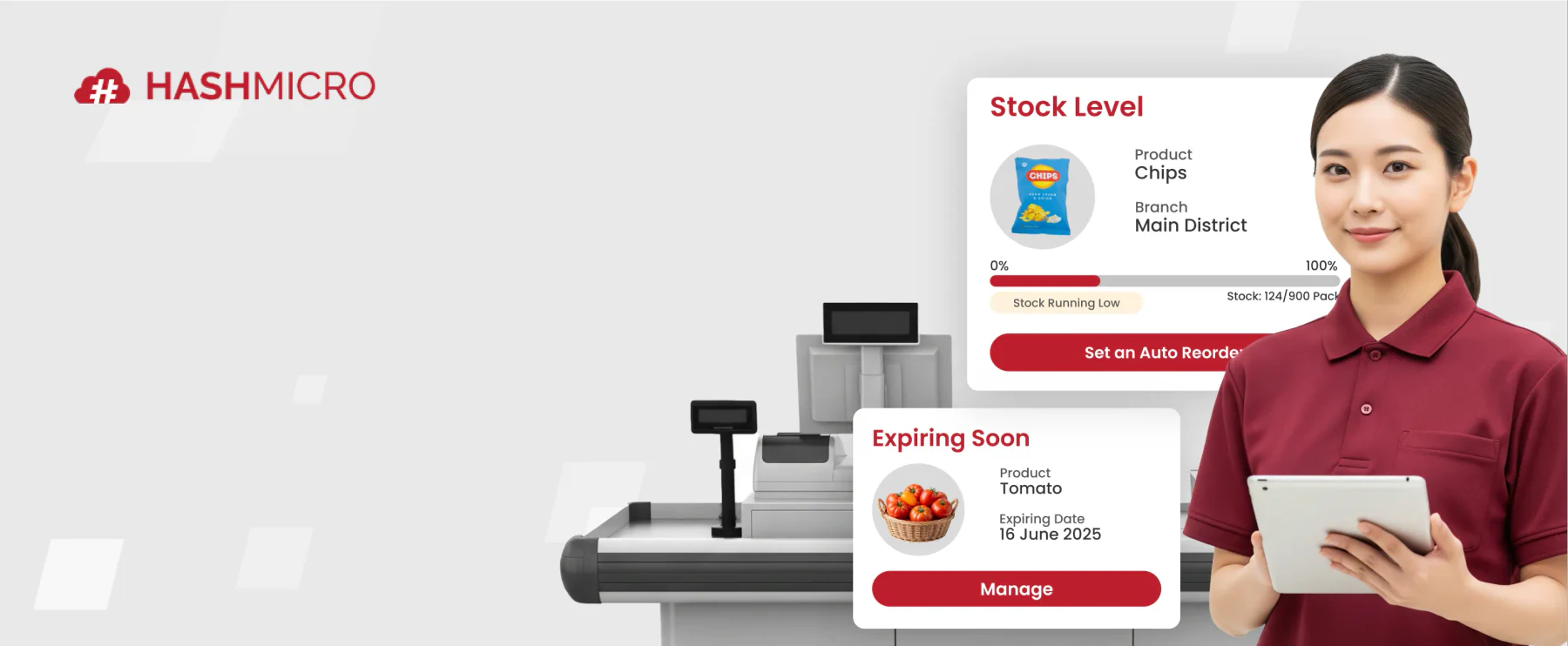
HashMicro’s POS Software works together with accounting software for businesses in the Philippines help businesses connect QR Ph payments with counter sales, keeping daily transactions organized and easier to review.
Conclusion
Merchant QR Ph can make counter payments faster, cleaner, and easier for customers. But the real test comes after the scan: the invoice must be issued correctly, the fee must be recorded separately, and the payout must match the POS report.
Start simple if your counter volume is low. But as soon as you have multiple cashiers, daily settlement checks, or month-end reporting pressure, treat QR Ph as part of your POS and accounting workflow, not just another payment sticker beside the register.
With HashMicro's POS, teams can connect payments, invoices, sales reports, and reconciliation in one system, helping every QR Ph sale move from counter to books with less manual checking.
Book a free consultation with HashMicro and our team will review your counter flow, settlement checks, and BIR reporting needs, then show you the setup that fits how your business actually runs.
FAQ Around Merchant QR PH
Apply through a bank, e-money issuer, payment gateway, or POS-linked provider that supports QR Ph P2M payments. Prepare your business registration, valid ID, settlement bank account, and branch details. After approval, generate the QR code, display it at your counter, and run a test transaction.
Merchant fees depend on the provider. Some charge a percentage of the sale, some apply a minimum fee, and some disclose rates only during onboarding. Always compare the effective fee by ticket size, because a minimum fee can make small transactions much more expensive.
Yes, small businesses can explore merchant QR Ph if they meet the provider’s onboarding requirements. A sole proprietor usually needs DTI registration, valid identification, and a settlement account. Requirements vary, so confirm the exact document list with your chosen provider.
Settlement timing depends on your provider. Some payouts may arrive on the next day, while others follow banking-day schedules, cut-off times, or batch releases. Record the sale on the transaction date, then reconcile the payout when the net settlement reaches your bank account.
Yes. A QR Ph payment confirmation shows that payment was made, but it does not replace your business invoice. Your POS or invoicing process should still issue the proper invoice for the sale and keep the invoice sequence consistent across payment methods.
Yes, but the refund process depends on your provider and store policy. Voiding a sale in the POS does not always return money automatically to the customer. Record the original QR transaction, document the refund method, and match any provider adjustment against your books.