Most accounts payable teams in the Philippines release payment as soon as the invoice amount matches the purchase order. That single check proves the arithmetic, not the document. A fabricated bill, a duplicate submission, or a supplier document that fails BIR requirements can clear it without resistance, and the loss usually surfaces only during an audit. Billing schemes remain one of the most frequent occupational fraud cases worldwide, according to the ACFE Report to the Nations.
Invoice verification is the set of checks that prove a supplier invoice is correct and genuine before it is paid. In practice that means matching it to the purchase order and goods receipt, ruling out a duplicate, confirming the supplier's identity, and checking the document carries every field the BIR requires.
This article guides you through both layers in the order your AP team should apply them. You will find the five accuracy checks, the document red flags that expose a fake invoice, a 12-item BIR validity checklist for Philippine suppliers, a step-by-step verification workflow, and the escalation steps to take the moment an invoice looks fraudulent.
Key Takeaways
Most AP teams stop once the invoice matches the purchase order, but invoice verification runs in two layers of accuracy first, then authenticity and BIR validity.
The accuracy layer is five checks, covering the PO match, the goods receipt, duplicates, arithmetic, and payment terms. It catches errors and overpayments, not fraud.
Fraud surfaces in the second layer instead, where a changed bank account, a broken invoice sequence, or pressure to pay urgently exposes a document that was never genuine.
Even a genuine invoice can still fail on tax, so run the 12-item BIR validity checklist before approval to protect your input VAT claim.
What Is Invoice Verification?
Invoice verification is the set of checks an accounts payable team runs on a supplier invoice before approving it for payment. Those checks fall into two layers. The accuracy layer confirms the invoice matches what was ordered and what actually arrived. The authenticity layer confirms the supplier is real and the document itself holds up as a sales invoice that a BIR audit will accept.
It sits between two adjacent processes that are often confused with it.
- Invoice processing is the wider workflow that carries a document from receipt through to payment, and verification is one step inside that workflow.
- The invoice approval process is the authorisation step where a manager or CFO signs off. Verification comes first, so the invoice a manager authorises has already been proven correct and genuine.
AP staff and finance managers own both layers. In smaller Philippine businesses the finance controller often handles verification and approval alone, and that is exactly why the checks have to be written down.
How to Verify an Invoice for Accuracy
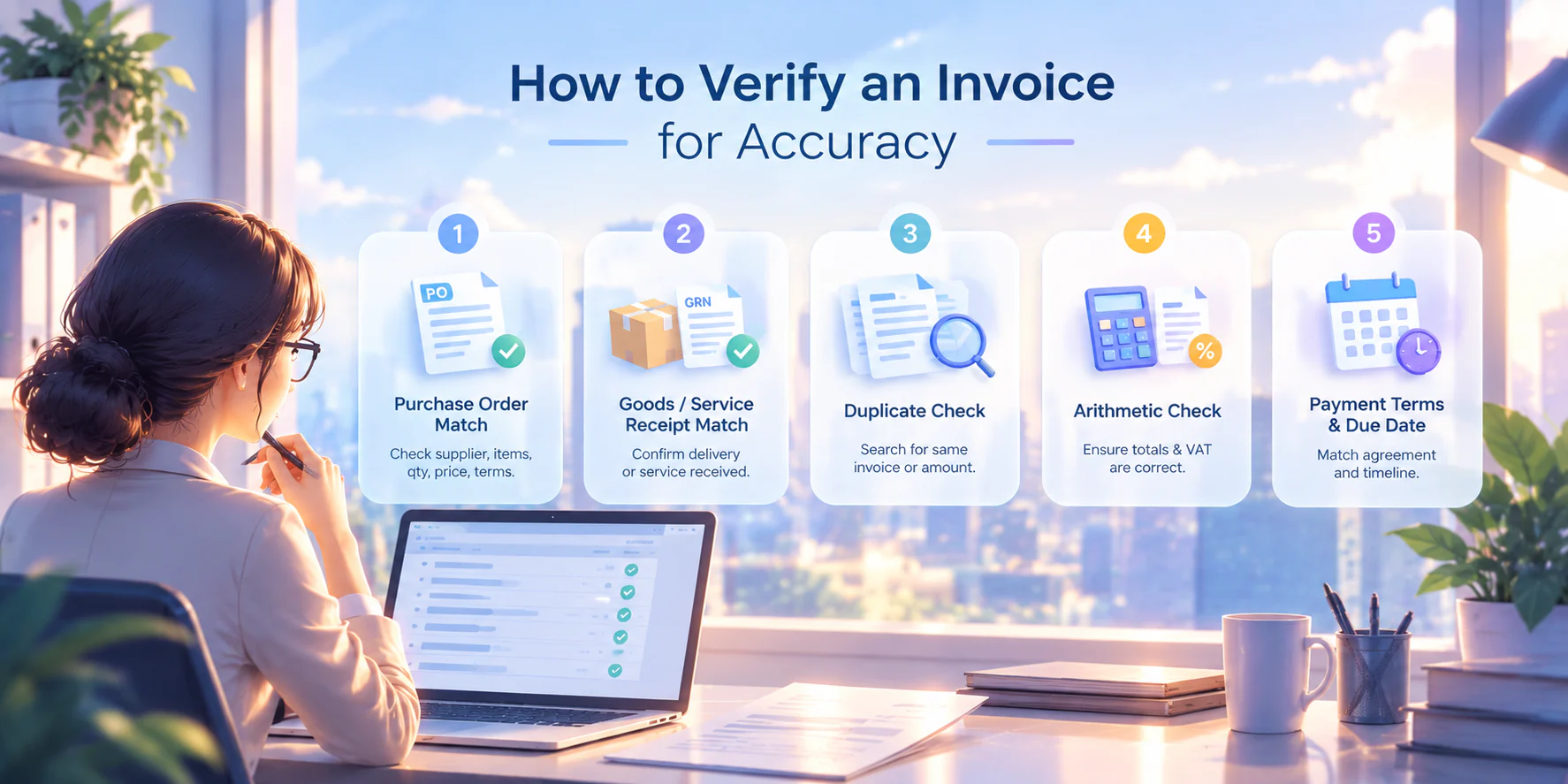
Accuracy verification confirms that an e-invoice reflects the transaction that actually took place. It is the first layer and runs before anything else because a document that fails here does not need an authenticity review. There are five standard checks as follows:
1. Purchase order match
Compare the invoice against the purchase order like supplier name, item descriptions, quantities, unit prices, and payment terms should all match. Any discrepancy, such as a quantity 10% higher than ordered or a unit price that differs from the agreed rate, is a mismatch exception that must be resolved before payment is released.
2. Goods or service receipt match
Compare the invoice against the goods receipt note (GRN) or service confirmation document. Was the delivery actually made, or was the service actually rendered? An invoice for goods not yet received should be held until delivery is confirmed, and pairing the PO, the receipt, and the invoice as a 3-way matching check makes that hold automatic rather than optional.
3. Duplicate check
Search your AP records for the same invoice number from that supplier, then widen the search to the same amount on a different date. Resubmitted invoices are one of the most common sources of overpayment, whether the second copy arrives by accident or by design.
4. Arithmetic check
Verify that line item totals add up to the subtotal, that VAT is calculated correctly on the taxable base, and that the total due matches the sum of all components. Errors here are usually entry mistakes, but they can also be deliberate manipulation.
5. Payment terms and due date
Confirm the payment terms on the invoice match your supplier agreement. A supplier that shortens terms from 30 days to 7 days has rewritten the contract in its own favour, and paying the invoice as issued quietly accepts that change.
Formalising checks 1 and 2 as a structured 2-way matching or 3-way matching process significantly reduces both manual effort and error rate. Those pages cover each method in full.
How to Verify Invoice Authenticity
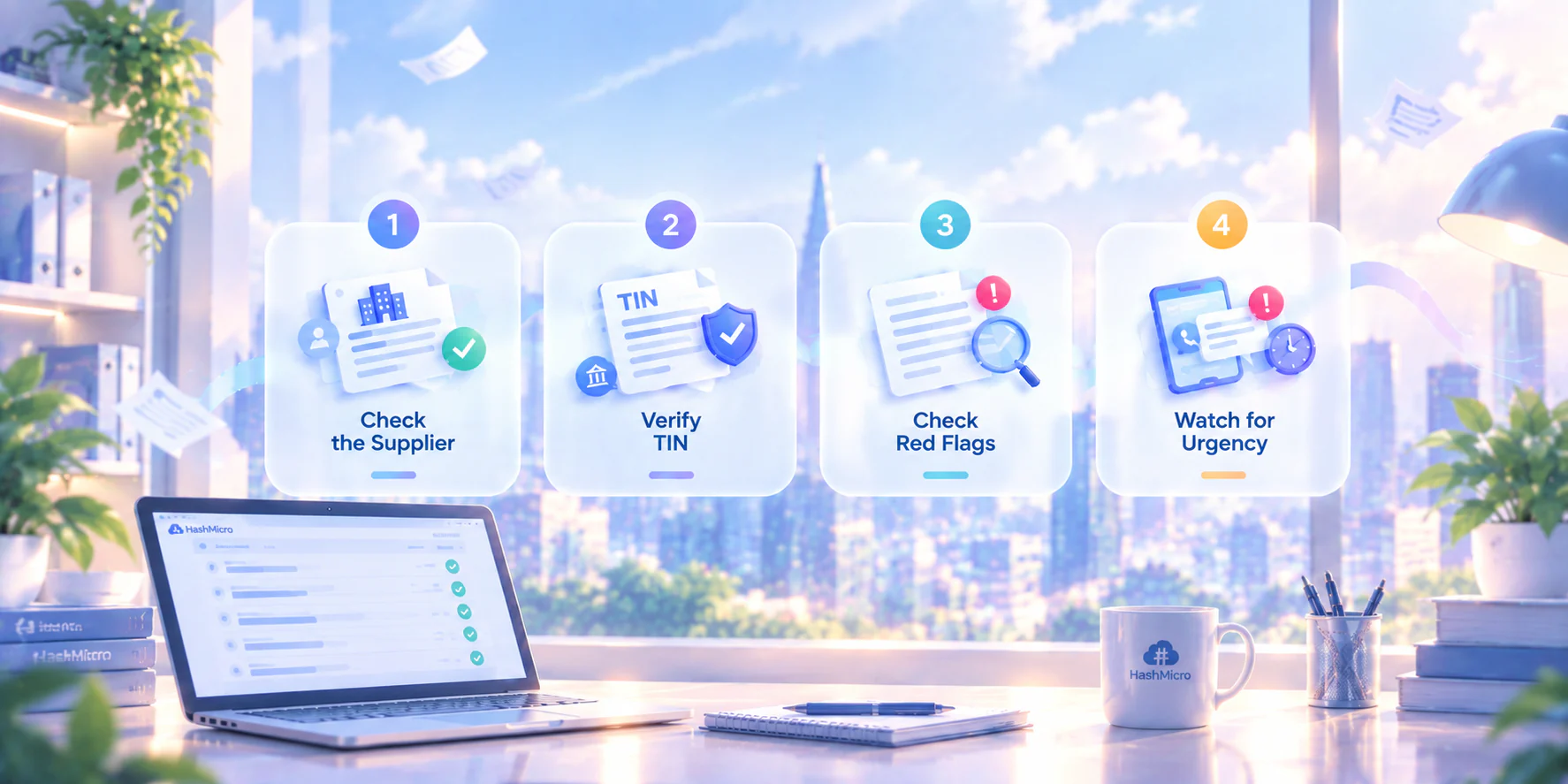
Accuracy verification catches wrong numbers. Authenticity verification catches wrong documents like invoices that were fabricated, altered, or submitted by a supplier that does not exist.
1. Check the supplier
The business name, address, and bank account on the invoice should match the details in your approved vendor master. A mismatch, especially a different bank account number, is a red flag.
Many billing fraud cases involve a fraudster redirecting payment by submitting an invoice with updated banking details that the AP team processes without cross-checking.
2. Verify the supplier's TIN
Every legitimate, BIR-registered supplier has a Tax Identification Number. Cross-check the TIN on the invoice against your vendor master. For new or irregular suppliers, verify the TIN through the BIR's TIN Validation service before approving payment. A TIN that does not exist in BIR records, or a TIN registered to a different business name, is grounds to hold payment immediately.
3. Check document-level red flags
A fake invoice often shares visible tells, for example invoice numbers that do not follow a logical sequence from prior invoices by the same supplier, fonts or logos inconsistent with previous transactions, missing or out-of-sequence Authority to Print (ATP) serial numbers, dates that fall on public holidays, or amounts rounded to suspicious precision.
A genuine supplier's invoice format stays consistent across transactions, so a document that suddenly looks unfamiliar deserves a second look before it enters the approval queue.
4. Watch for urgency pressure
Those document tells are easier to ignore when someone is pushing you to pay. A legitimate supplier chasing an unpaid invoice uses the account-management channel you already have on file.
Pressure to pay immediately through an unfamiliar one, a new phone number, a personal email address, or a messaging app, is a standard impersonation tactic, and the urgency exists precisely to skip the checks above. For the wider set of billing fraud schemes and the controls that contain them, see that guide.
Is This Invoice BIR-Valid? A Philippine Compliance Checklist
Under RA 11976 (the Ease of Paying Taxes Act, effective 2024), a Sales Invoice is now the primary document for both sales of goods and services in the Philippines.
For AP teams this matters for two reasons. A supplier document that fails the BIR-validity test is not a valid basis for claiming input VAT. And if the transaction is subject to expanded withholding tax (EWT), the invoice triggers your obligation to issue Form 2307 to the supplier. Running this BIR validation check before payment protects both your tax position and your compliance record. Invoice verification should be part of a broader compliance checklist for Philippine businesses, covering tax filings, employee obligations, permits, and other recurring requirements.
Use this checklist on every supplier invoice before approving payment:
| Required field | What to check |
|---|---|
| 1. Seller's registered business name | Matches the name on the seller's BIR Certificate of Registration. |
| 2. Seller's BIR-registered business address | Printed in full, e.g. "VAT Reg TIN 123-456-789-00000". |
| 3. Seller's Tax Identification Number (TIN) | The address registered for the branch that issued the document. |
| 4. Authority to Print (ATP) or CAS-assigned serial number | Sales Invoice, Service Invoice, Charge Invoice, and Cash Invoice are all valid. |
| 5. Invoice date | Present, with no future date or anomalous timing. |
| 6. Buyer's registered name, address, and TIN | Required when the sale is ₱1,000 or more and your company is VAT-registered. |
| 7. Serial number | Printed prominently. Compare it against prior invoices from the same supplier for a break in sequence. |
| 8. Quantity, unit cost, and description | Specific enough to identify what was actually delivered. |
| 9.Total amount of sale | VAT-inclusive when the supplier is VAT-registered. |
| 10. VAT amount as a separate item | Shown separately from the base, not folded into the total. |
| 11. Breakdown for mixed transactions | VATable Sales, VAT Amount, Zero Rated Sales, and VAT Exempt Sales stated separately when the invoice carries more than one type. |
| 12. "VAT-Exempt Sale" or "Zero-rated Sale" | Printed where the transaction is exempt or zero-rated. |
A valid VAT invoice that satisfies items 10 and 12 is the document that substantiates your input VAT claim. A sales invoice that passes all 12 items is the document a BIR audit will ask for. An invoice that fails any item should be returned to the supplier for correction before payment is released.
The Invoice Verification Process
Combining both layers into a repeatable AP workflow gives your team a single sequence to follow on every supplier invoice.
1. Receive and log
Record the invoice in your AP system on receipt. Assign a reference number and note the supplier, invoice date, amount, and payment due date. Teams handling high volume often let AI-powered invoice processing capture those fields instead of keying them in one by one.
2. Run accuracy checks
Work through the five checks above in order, from the PO match to the payment terms. Anything that fails becomes an exception logged against the invoice rather than a note in someone's inbox.
3. Run authenticity checks
Compare the supplier's name, address, and bank details against your vendor master, confirm the TIN, and read the document itself for the red flags described earlier.
4. Run the BIR validity checklist
The invoice must clear all 12 items before it reaches an approver. If it fails any of them, return it to the supplier with a written request for a corrected document instead of holding it in your own queue.
5. Route for approval
Based on your authorisation policy, whether that is amount thresholds, department budget, or contractual requirements, route the invoice through the appropriate approval chain. This is where the invoice approval process formally begins.
6. Release payment or escalate
If all checks pass and approval is granted, release payment. If any check raises an exception, escalate to the finance manager before proceeding.
Steps 2 and 5 are where AP automation removes the most manual effort. HashMicro's accounts payable software automates PO and GRN matching, flags duplicates before they reach the approval queue, routes invoices through multi-level authorisation workflows, and maintains a timestamped audit trail for every document. That leaves your AP team free for the authenticity and BIR-validity checks that still require human judgment.
Those six steps are easy to write down and hard to repeat by hand on every invoice. As volume rises, the PO match and the duplicate check are the first steps to get skipped, and those are the two that cost the most when they slip.

What to Do When You Suspect Billing Fraud
When an invoice fails your authenticity checks and the supplier cannot satisfactorily explain the discrepancy, treat it as suspected billing fraud. Follow these steps.
1. Hold payment immediately
Do not release payment while the invoice is under review. Document the hold decision with a timestamp and the reason.
2. Document everything
Save a copy of the suspicious invoice. Note exactly which checks it failed and when you received it. Screenshot any related communications.
3. Contact the supplier through a verified channel
Use the phone number or email address in your existing vendor master, not any contact details that appear on the suspicious invoice itself. Confirm whether the invoice was actually issued by them. This single step defeats most invoice scam attempts.
4. Escalate internally
Notify your finance manager, CFO, or compliance officer. Set an escalation threshold based on invoice amount and severity of a ₱5,000 discrepancy and a ₱500,000 discrepancy warrant different urgency levels.
5. Engage legal or compliance advisors if confirmed
If the invoice is confirmed fraudulent, your legal or compliance team determines whether to file a complaint with the appropriate authority. For a guide to business-wide fraud types and prevention, see organisation-wide fraud controls.
Billing fraud at the invoice level is a symptom. Vendor onboarding controls, segregation of duties in AP, and periodic independent AP audits are the prevention layer, outside the scope of this article but directly relevant for businesses that process high invoice volumes.
Conclusion
Invoice verification is two checks, not one. Accuracy verification, matching numbers against purchase orders and receipts, catches errors and overpayments. Authenticity and BIR-validity verification, confirming the supplier is real, the document is genuine, and the invoice satisfies Philippine tax requirements, catches the fraud and compliance risks that accuracy checks alone will miss.
If your AP team still verifies invoices manually, HashMicro can help make the process faster and more controlled. With automated matching, approval workflows, document tracking, and payment controls in one system, your team can reduce manual errors while keeping every invoice review traceable before payment.
Running both layers consistently for every invoice before every payment is the standard. A written checklist makes it repeatable. Software makes the accuracy layer faster. The rest is human judgment that belongs with your AP team.
FAQ Around Invoice Verification
Start with the supplier invoice, purchase order, and goods receipt or service confirmation. Add the approved contract or quotation when the PO does not show the full terms, plus the supplier record used for identity and bank-detail checks. For a non-PO invoice, include the purchase request and the responsible manager's approval.
Place the invoice on hold and record the exact mismatch before anyone approves payment. Check whether the difference comes from a partial delivery, an approved price change, or an incorrect invoice. Ask procurement, receiving, or the supplier to resolve it, then request a corrected invoice or credit note and retain the evidence with the payment record.
Yes, but the review needs another approval trail. Use the supplier contract, purchase request, quotation, service confirmation, or other evidence that proves who requested the spend and what was delivered. Route the invoice to the budget owner for approval, document why no PO exists, and apply stricter review to recurring non-PO purchases.
No. Use it mainly for goods and inventory purchases, where the invoice should agree with the PO and receipt. Service invoices may rely on a PO plus a signed service confirmation, while low-risk expenses may follow a separate policy. Your written control should define the required documents, tolerance limits, and approver for each category.