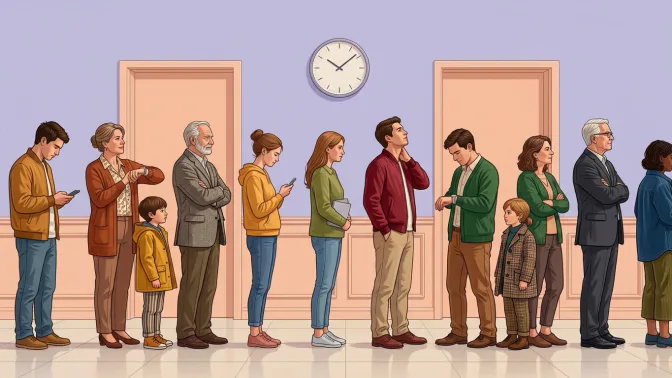
Long checkout lines cost operators revenue when shoppers walk away and leave sales unrung. A 2024 ICSeB conference study describes long lines at human-staffed checkouts as a problem in Philippine grocery stores. Payday weeks and weekends concentrate those losses in the busiest hours.
A queue management system answers this problem, and adoption is rising for practical reasons. Customers now expect counter service to match app-based speed. Multi-counter operations need to balance load so no teller sits overwhelmed while another idles. Queue tools now also share data with point-of-sale systems.
This guide explains what the system is, how it works from arrival to service completion, and its four main types. It also covers measurable benefits for Philippine businesses and how to choose and implement one without disrupting operations.
Key Takeaways
A queue management system organizes customer flow through tickets, displays, and routing rules.
It assigns customers, directs them to counters, and manages priority or virtual queues.
POS integration connects queue data with transactions for better service and sales insights.
Successful implementation requires flow mapping, suitable setup, staff training, and KPI tracking.
What Is a Queue Management System?
A queue management system is software, usually paired with light hardware, that controls how customers join a line. It decides who gets called next and which counter serves them. Every ticket logs arrival time, wait time, the assigned staff member, and service duration.
The software also holds service rules. You can open a priority lane for senior citizens and PWDs, split pickup from consultation, and cap tickets per counter. That turns guesswork about peak hours into a log of exactly when service slowed.
Core Components of Queue Management Software
Four parts do the work in almost every deployment. They cover ticket issuance, the display board, the staff console, and the reporting layer. Queue management software links all four, so the digital queue management system runs as one flow, not four separate tools.
- Ticket issuance: This is where a customer joins the line. A touchscreen kiosk prints a number, or a staff member hands one out at the entrance. A QR code also starts a virtual queue system, so people wait off-site and return near their turn.
- Display board: A screen shows the number now being served and the counter serving it. Audio announcements help crowded halls. SMS or app notifications extend the same update to customers who stepped out for coffee or errands.
- Staff console: Tellers and cashiers use this interface to call the next customer, pause a counter, or transfer someone to another line. Supervisors use the same view for customer queue management across counters when one lane stalls.
- Reporting layer: The dashboard turns every ticket into data. It reports average wait time, service time per staff member, abandonment rate, and volume per hour. Branch managers use those four numbers to set staffing for payday weekends.
Queue Management System vs. Basic Numbering Machine
A numbering machine prints a number and advances a counter. It never knows who waits or which window is free. Smart queue management software reads live counter state and routes customers to the first open window. It also applies priority rules and flags supervisors when wait time crosses a threshold.
The distinction matters because most businesses already have a queue. What they lack is control over it and data about it. A queue management system replaces guesswork about busy hours with a log that shows exactly when service slowed down and where.
How a Queue Management System Works
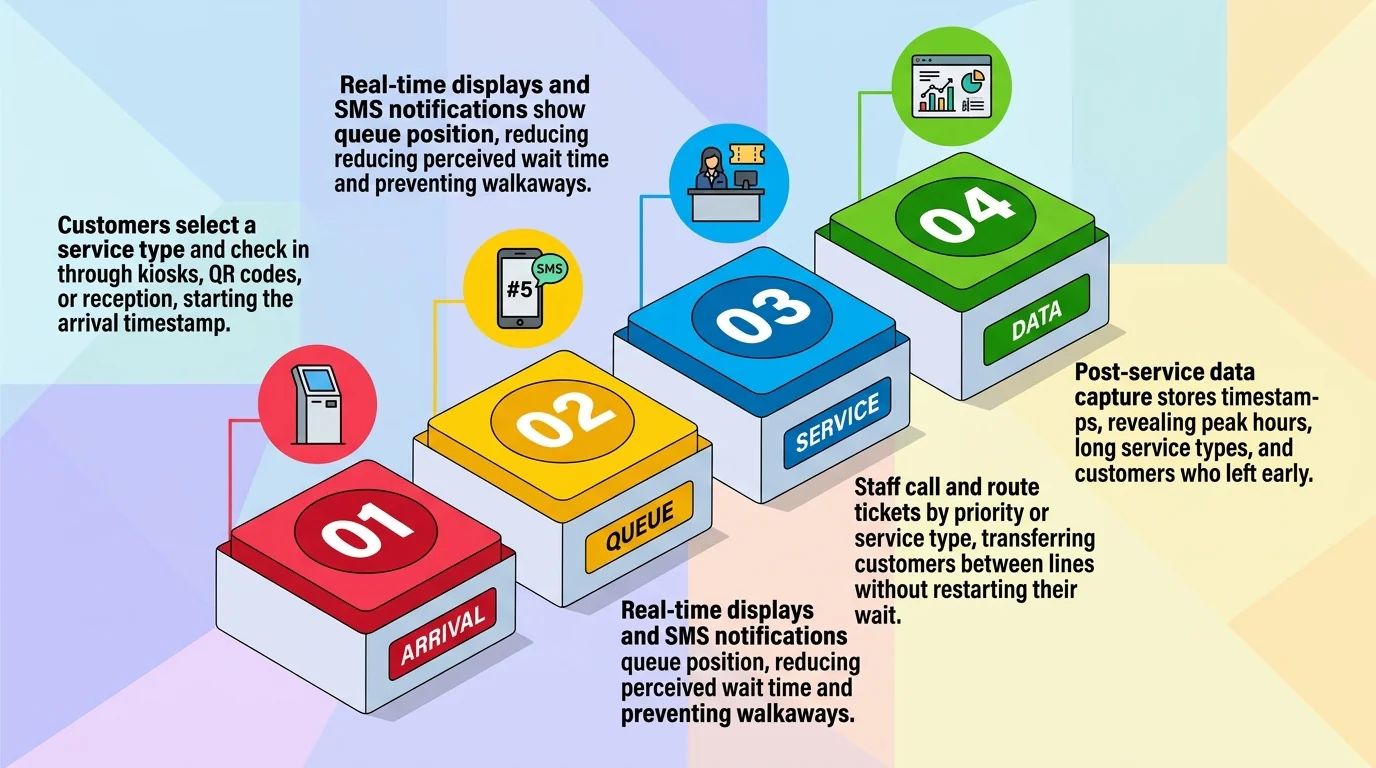
A digital queue management system runs in four stages, and each stage produces a timestamp for the reporting layer. The flow stays the same at a restaurant host stand, clinic reception, bank lobby, or office front desk. Only the service types change.
Step 1: Customer Check-In and Ticket Issuance
The customer selects the service they need and receives a ticket. This choice matters because service times differ. A bank customer paying a bill should not wait behind one opening an account. A restaurant guest picks a party size, and a clinic patient picks a department.
Check-in happens at a lobby kiosk, through a QR code at the entrance, or at a reception desk. Staff can also tag a walk-in customer manually. Every method starts the same arrival timestamp.
Step 2: Real-Time Display and Notification
The ticket enters the queue, and the customer sees their position. A wall display serves customers waiting on site. For virtual queuing, the system sends an SMS or app alert as the turn approaches. That frees diners to browse the mall and patients to wait in their cars.
Perceived wait time drops sharply when customers know their position, even if the actual wait stays the same. That clarity keeps a busy front-of-house area calm and helps reduce walkaways.
Step 3: Staff-Side Call, Routing, and Transfer
Staff calls the next ticket from their console. The system assigns each ticket to a counter based on configured rules: first-come, first-served, service type matching, or priority status. A clinic can fast-track urgent cases, and a bank can send business clients to a dedicated teller.
If a customer needs a different service, staff transfer the ticket to the correct line. The customer does not return to the start. An office front desk can hand a visitor to the right department the same way.
Step 4: Post-Service Data Capture and Reporting
When service ends, the system closes the ticket and stores the timestamps. Over a week, those records show which hours need an extra counter and which service types run long. They also count customers who left before service. Without this step, a queue system is just a display screen.
Types of Queue Management Systems
Most businesses run one of four models, and many combine two. A queue management system supports each model through configuration, so you switch rules without buying new hardware. Choosing the wrong model creates friction that no kiosk or screen ever fixes. The table below compares all four.
| Type | How it works | Best for | Limitation |
|---|---|---|---|
| Linear queuing | Staff serve customers strictly in arrival order from one pool, across every open counter. | Fast food counters, convenience store checkouts, and any site where service times stay similar. | One slow transaction delays the entire line, because the pool cannot separate short visits from long ones. |
| Priority queuing | The system calls flagged customers ahead of the general line and logs each override. | Pharmacies, banks, clinics, and government windows that must serve senior citizens and PWDs first. | Heavy priority volume stretches general waits, so you need a second counter during peak hours. |
| Virtual queuing | A digital queue management system lets customers join by QR code or link, then notifies them by SMS or app. | Mall tenants, clinics, and service centers with small waiting areas. | Customers who wander too far miss their call, so you must set a clear grace period. |
| Self-service kiosk queuing | A touchscreen at the entrance lets customers pick a service and take a ticket without staff help. | Branches with a short, clearly labeled service menu and steady walk-in traffic. | Menus past six or seven options push customers into the wrong line and raise transfer rates. |
A note on priority queuing rules in the Philippines:
Priority lanes are mandatory, not a courtesy. RA 9994 requires express lanes for senior citizens, and RA 9442 requires them for persons with disabilities. The duty covers private retail, banks, commercial offices, and government windows. Fines run from ₱50,000 to ₱200,000, and violators face up to six years in prison.
An automated queue system is optional, though we strongly recommend one because it enforces priority without relying on staff memory. Appointment priority sits outside the statutes, so treat it as business policy. Queue management software also logs every override as proof.
Key Benefits of a Queue Management System for Philippine Businesses
Every benefit below ends in a number a manager can track. A virtual queue system covers remote check-in plus the routing and reporting layer behind it. That combination gives Philippine operators three measurable gains: lower abandonment, better staff utilization, and staffing decisions based on recorded volume.
1. Reduced Perceived Wait Time and Lower Customer Abandonment
Queue length drives lost sales more than actual speed does. A 2013 study by Lu, Musalem, Olivares, and Schilkrut tracked supermarket queues on video against point-of-sale records. They found that waiting affects purchase incidence nonlinearly. Shoppers react to the line they see, not to how fast it moves.
That gives you a metric. Track abandoned tickets as a share of issued tickets each week. Abandonment hides inside a stable average, because the average holds while peak-hour transaction count falls. For retail operators tracking average transaction value, multiply abandoned tickets by that average to estimate revenue at stake.
2. Improved Staff Productivity and Workload Distribution
Routing balances load automatically. The system sends the next ticket to whichever window frees up first. One counter no longer draws a long line while its neighbor sits idle. Measure the gain as counter utilization, meaning the share of open hours each window spends serving customers.
Service time per staff member also becomes visible. That turns staffing talks from impressions into data. The outcome is a measurable spread between your fastest and slowest counter. A counter that consistently runs long may need retraining, or it may simply handle the complex service types.
One caution from the same 2013 study applies here. Pooling every counter into a single line can make the visible queue look longer and reduce revenue. Keep separate lines for distinct service types, then route within each line rather than merging everything.
3. Service Data and Reporting for Peak-Hour Planning
A week of queue data shows exactly which hours need extra counters open. Most businesses schedule staff on habit rather than volume. The correction is usually small, such as opening one more counter for ninety minutes instead of adding a full shift. That precision needs recorded arrival and service times.
The measurable outcome here is labor cost per transaction. Divide counter hours paid by tickets served, then compare payday weekends against quiet midweek days. Managers who run that ratio monthly can add capacity where it pays and pull it back where it does not.
Which Industries Use Queue Management Systems in the Philippines?

Queue management is not tied to one sector. Retail, healthcare, banking, government, and food service all run the same mechanics with different service logic. Customer queue management works in each sector. The system tracks arrival, routing, and service time no matter what sits at the counter.
1. Retail Stores and POS Counters
Supermarkets, convenience stores, and pharmacies manage checkout lines and service desks with tickets. Pharmacies gain the most from splitting prescription fulfillment from over-the-counter sales, because those two service times are nowhere near equal. One shared line would force every quick buyer to wait behind a compounding order.
2. Clinics, Hospitals, and Healthcare Centers
Patient flow moves through registration, consultation, laboratory, then billing. A queue system follows one patient across all four stages instead of treating each desk as an isolated line. That is where the waiting actually accumulates, since every handoff restarts the clock at a new counter.
3. Banks and Government Service Windows
Banks and agencies such as SSS, PhilHealth, and LTO handle high volume under strict priority rules. Customer queue management matters most here, because service type routing keeps one complex transaction from stalling everyone behind it. Priority lanes and appointment slots also run from the same ticket pool.
4. Restaurants and Food Service Counters
Restaurants run waitlists at the door and pickup queues at the counter. A ticket promising a table in twenty minutes keeps that customer in the mall. More seated covers lift the sales base behind restaurant food cost percentage. The same logic covers telcos, universities, and service centers with front desks.
POS System Integration: Why It Matters for Retail and F&B
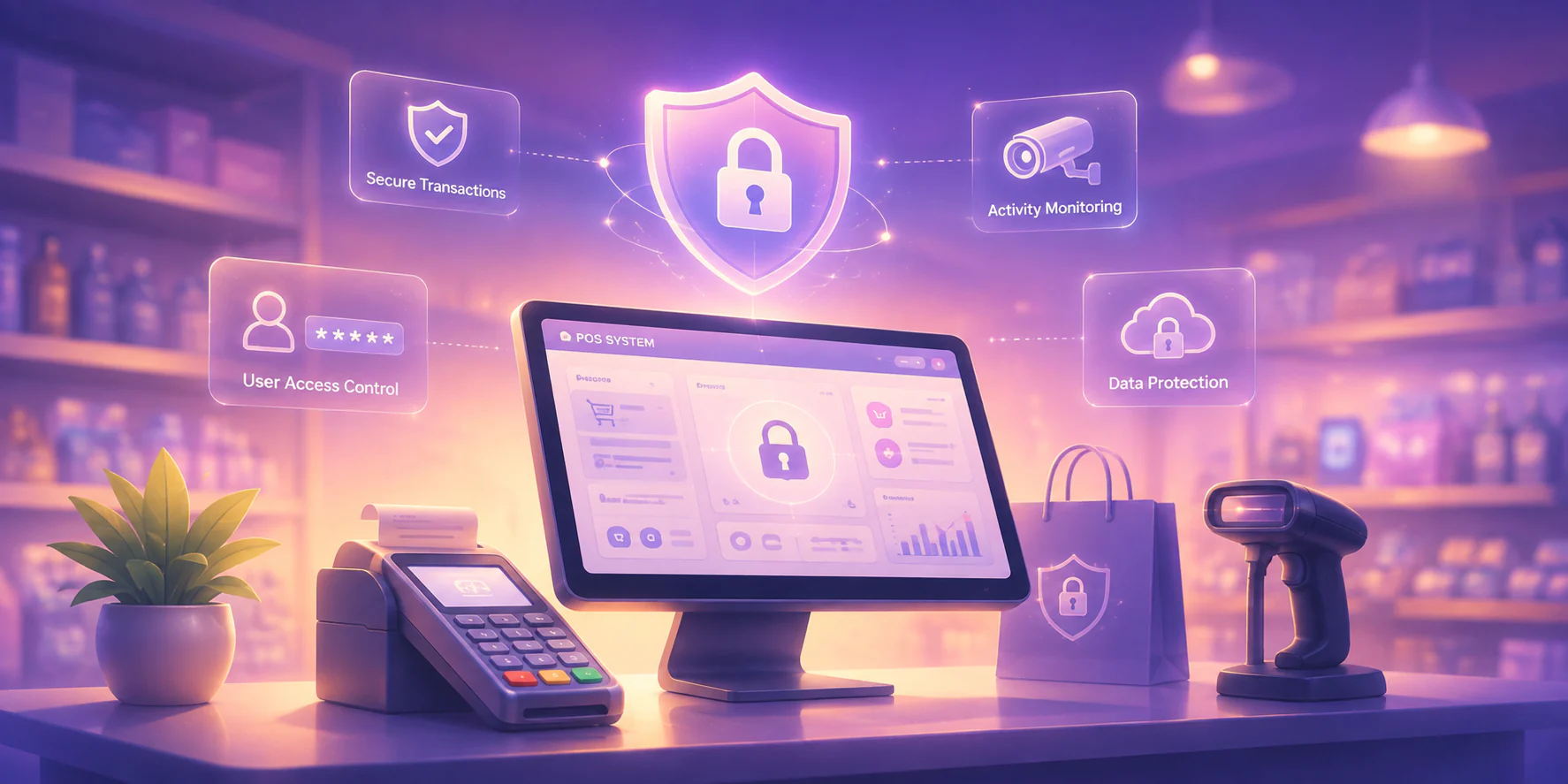
A standalone queue management system shows how long customers wait, but it cannot connect waiting time with purchasing behaviour. Integrating it with a POS system combines customer flow and transaction data, helping retail stores, restaurants, pharmacies, clinics, banks, and service centres identify peak periods, monitor service performance, and understand how queues affect sales.
For multi-industry operators, an integrated POS system reduces separate vendors, logins, and hardware requirements. It gives managers one platform to monitor queues, process transactions, compare branch performance, and improve customer service across locations. Explore how integrated POS software can connect these workflows and support more efficient operations across every branch.
How to Choose a Queue Management System
Selection becomes easier when requirements are defined before demos. Evaluate how each queue management system routes customers, communicates wait times, measures service performance, supports priority lanes, and continues operating during connectivity issues.
Features to look for:
- Multi-counter routing
- Screen, SMS, and app alerts
- Wait-time and abandonment reports
- Senior citizen and PWD priority rules
- Offline operation
- Centralized branch controls
A suitable queue management system should combine configurable service rules, accessible notifications, measurable performance data, compliant priority handling, and reliable offline operation. For broader front-counter efficiency, use the best POS systems in the Philippines as a reference when comparing queue tools with point-of-sale workflows across branches.
How to Implement a Queue Management System: A Step-by-Step Guide
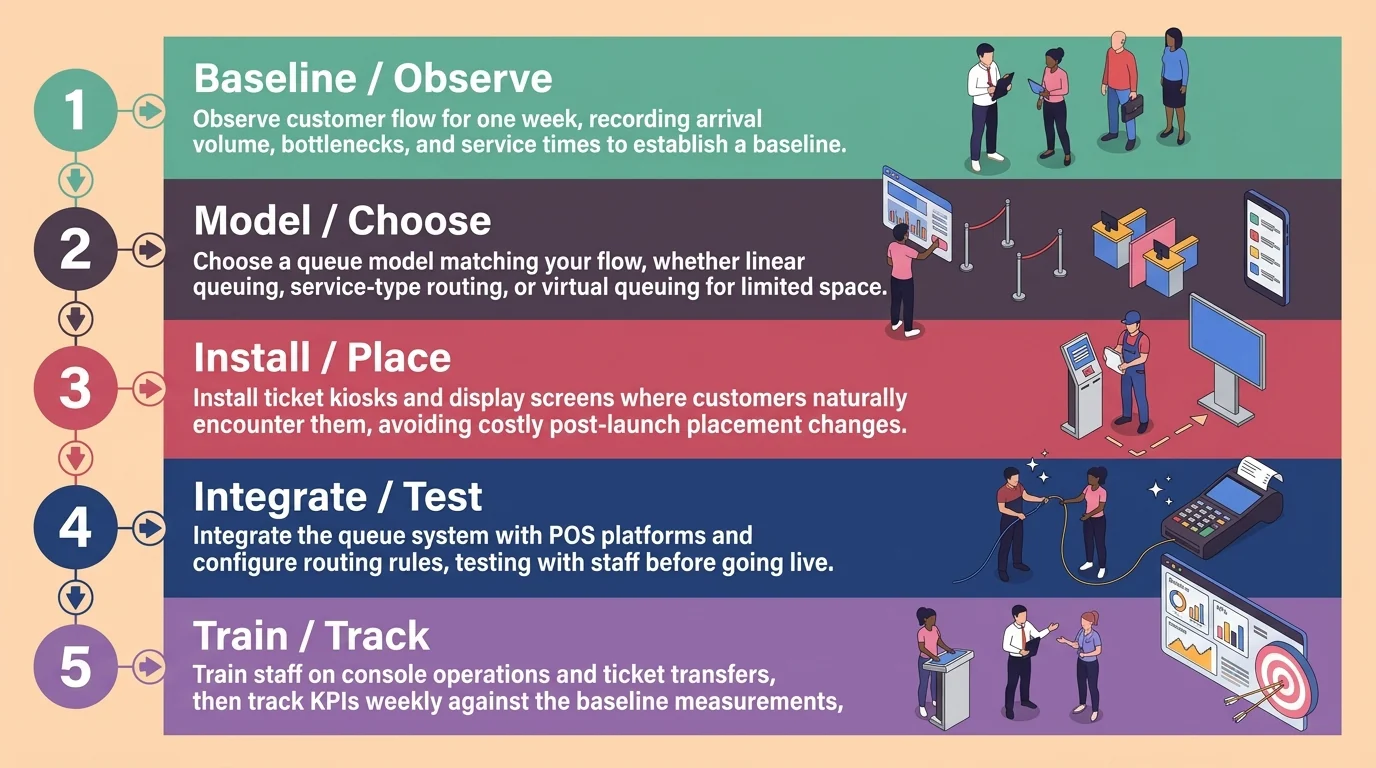
Implementation works best when businesses understand their customer flow before installing hardware. These five steps help create an effective queue management system and improve customer queue management from planning to performance review.
Step 1: Map Current Customer Flow and Identify Bottlenecks
Spend one week observing customer movement. Record arrival volume by hour, open counters, service types, and points where customers stall. Note which services take the longest. This baseline helps measure whether the queue management system improves operations.
Step 2: Choose the Queue Type That Fits Your Business Model
Match the queue model to the flow identified in step one. Uniform service times suit linear queuing, while varied service times require service-type routing. Virtual queuing works well when customers have limited waiting space. Apply regulatory priority requirements to the selected model.
Step 3: Set Up Hardware and Display Screens
Install the ticket kiosk or QR entry point where customers encounter it before joining a line. Place display screens where customers can see them across the waiting area. Poor placement can create confusion and costly changes after launch.
Step 4: Integrate With POS and Configure Routing Rules
Connect the queue management system with the POS or service platform so tickets and transactions share one record. Configure service types, priority lanes, transfer permissions, and counter assignments. Test every routing rule with staff before going live.
Step 5: Train Staff and Set KPIs
Train staff to use the console, pause counters, and transfer tickets correctly. Set two or three KPIs, such as average wait time, service time per counter, and abandonment rate. Review them weekly and compare results with the baseline from step one.
Conclusion
A queue management system turns an unmanaged line into a measurable customer journey. Businesses can improve flow by mapping demand, choosing the right queue model, placing entry points and displays carefully, configuring routing rules, and training staff to manage exceptions.
The most effective solution also connects with the tools already running the business. A queue management system integrated with a POS links customer flow, service activity, and transaction data in one record. This helps retail stores, restaurants, pharmacies, clinics, banks, and service centres compare wait times with revenue and make better staffing decisions.
Philippine businesses can improve service by mapping customer flow, selecting suitable queue models, and tracking key performance indicators. A POS-integrated customer queue management solution supports consistent service and branch visibility. Start with a free consultation to assess your options.
FAQ About Queue Management System
A ticketing system issues numbers. A queue management system issues numbers and also decides routing, tracks wait and service times, enforces priority rules, and reports on the whole flow. A ticketing machine is one component of a queue management system, not a substitute for it.
Cost depends on the number of counters, the number of branches, and whether the deployment includes kiosks and display screens or runs on QR-based virtual queuing. Software licensed per counter costs less at a single site than a full kiosk installation. Request a quotation scoped to your actual counter count rather than a list price.
Yes. A small store with two counters can run virtual queuing through a QR code and a single display screen, with no kiosk hardware. The value comes from the routing and the data, and both work at small scale.
At minimum, a display screen and a device running the staff console. A ticket kiosk or thermal printer is optional if customers join by QR code. Virtual queuing shifts most of the hardware requirement onto the customer's own phone.
The queue ticket is linked to the transaction recorded at the counter, so the system can report wait time and sales together. That connection is what allows a peak-hour report to show whether long queues coincided with lower basket sizes or fewer completed transactions.