
A business buys equipment, moves it between sites, lends it to staff, and sends it out for repair. No single record shows what it owns or where each unit sits. A 2025 study of a Philippine laboratory linked manual tracking to errors, misplacement, loss, and damage.
Philippine businesses rarely keep equipment in one place. An equipment inventory has to follow units across branches, warehouses, job sites, and field teams. Without one shared record, units go missing, get bought twice, or sit broken for weeks.
This guide defines equipment inventory management, lists the fields every record needs, and walks through the build process. It also provides a ready template, compares related terms, and outlines best practices for accuracy.
Key Takeaways
Equipment inventory management tracks every unit a business operates, including its location, condition, custodian, and maintenance schedule.
A complete equipment inventory takes seven steps, from cataloging assets and assigning IDs to scheduling maintenance.
An equipment inventory template needs at least nine columns, from asset ID to next scheduled maintenance date.
Keeping equipment records accurate requires updates at the moment of change, not on a fixed schedule.
What Is Equipment Inventory Management?
An equipment inventory is a maintained record of the equipment a business owns or controls, including its identity, location, custodian, condition, and status. Equipment inventory management keeps these records accurate throughout equipment management, from purchase and tagging to transfers, repairs, and disposal.
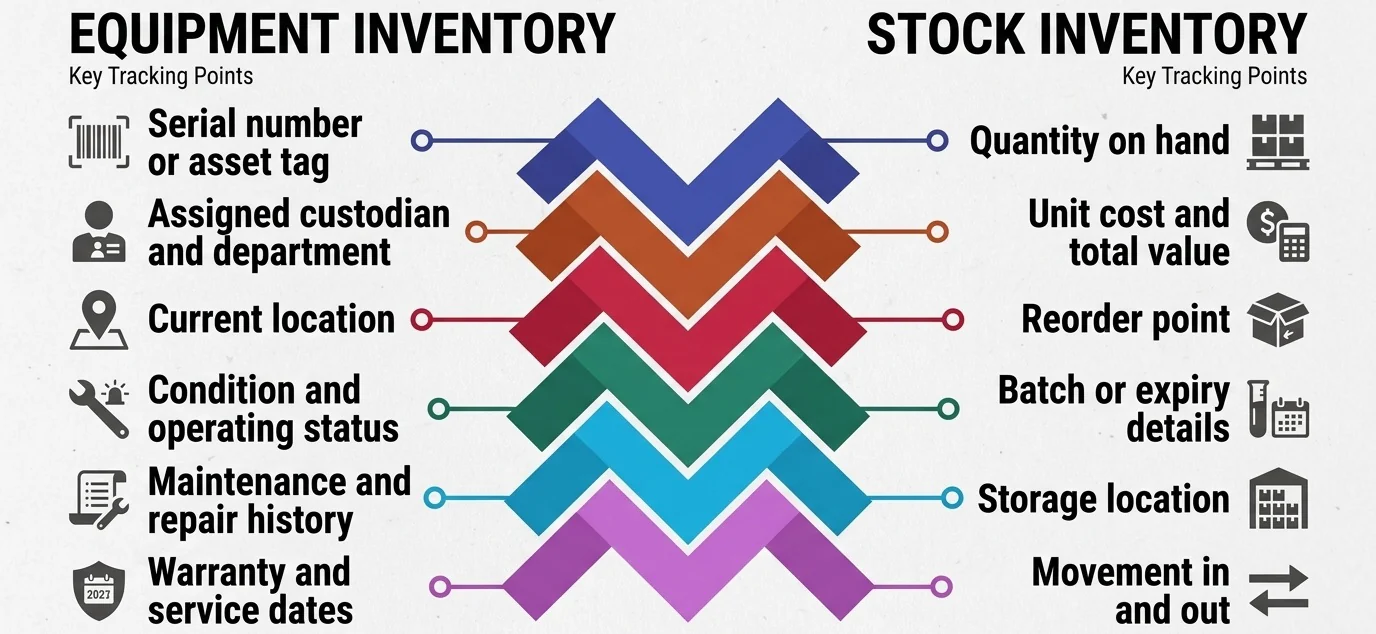
Equipment includes machinery, tools, vehicles, IT devices, and lab or office units. Unlike consumables and resale stock, each item is tracked individually using details such as serial numbers or asset tags, assigned custodians, location, condition, maintenance history, and warranty dates. Stock inventory instead focuses on quantities, costs, reorder points, batch or expiry details, storage locations, and inventory movements.
Because equipment is generally treated as property, plant, and equipment rather than consumable stock, accurate records support both operations and financial reporting. Finance can reconcile book values with the same records operations uses to locate and maintain each unit.
Why Equipment Inventory Management Matters for Businesses
Missing record fields rarely feel urgent. The cost shows up later. A unit cannot be found, a repair runs overdue, or finance cannot match the list to the books. Here is what each gap actually costs.
- Asset visibility: Teams cannot deploy what they cannot locate. Crews stop work while someone calls other branches, and untracked units get duplicated in purchase requests. The company pays twice for a machine it already owns.
- Loss and shrinkage prevention: Without a custodian field, nobody can name who last held a unit. Missing items surface only during audit season, months after the trail went cold. Recovery becomes unlikely and the write-off lands in one period.
- Maintenance planning: Service schedules depend on knowing the unit, its usage, and its last service date. Without those fields, equipment maintenance happens after a breakdown instead of before one. Emergency repairs cost more and take longer.
- Cost control: Purchase cost, repair spend, and useful life together show whether to repair or replace. Without that history, managers approve a fourth repair on a unit that should have been retired. The spend never gets questioned.
- Audit and reporting readiness: Finance needs the physical record to reconcile against book values. When the list does not match, the team spends period close chasing serial numbers instead of closing. Auditors raise findings the business then has to answer.
- Operational continuity: A missing or unserviceable unit stalls production, delivery, or field work. One forklift out of action can hold a shift. The record is what tells you a spare sits two branches away.
Philippine retailers, manufacturers, logistics providers, and construction support teams usually run across several branches and job sites. The more places a unit can sit, the faster an unmanaged list drifts from reality.
What Should an Equipment Inventory Include?
The value of an equipment inventory comes from field discipline, not from the tool you use. A spreadsheet with the right columns beats an expensive system with half-filled records. Consistency decides whether anyone trusts the list.
Start every unit with a unique code. Teams usually apply it through a standard asset tagging process at receipt, using a barcode, QR code, or engraved plate. Every other record then links back to that code.
| Field | What it records | Why it matters |
|---|---|---|
| Asset ID | Unique internal code per unit | The single identifier every other record links to |
| Equipment name | Plain, standardized description | Prevents duplicate entries under different names |
| Category | Machinery, IT, vehicle, tool, office | Enables grouped reporting and policy by type |
| Brand and model | Manufacturer and model number | Needed for parts, service, and replacement sourcing |
| Serial number | Manufacturer's unique number | Proves identity in warranty and insurance claims |
| Purchase date | Date acquired | Drives warranty window and useful life |
| Purchase cost | Acquisition value | Base for depreciation and repair-or-replace decisions |
| Location | Branch, site, room, or vehicle | Answers where the unit physically is |
| Custodian | Accountable person or department | Assigns responsibility when a unit goes missing |
| Condition | New, good, needs repair, unserviceable | Shows what is actually deployable today |
| Warranty expiry | Coverage end date | Prevents paying for repairs still under warranty |
| Last and next maintenance date | Service history and schedule | Links the inventory to preventive maintenance |
| Status | In use, in storage, under repair, disposed | Separates owned units from available units |
| Disposal date and method | Retirement record | Closes the lifecycle and cleans the active list |
Not every column carries equal weight. Asset ID, equipment name, serial number, location, custodian, condition, and status are non-negotiable, because losing any one of them breaks accountability. Purchase cost, warranty expiry, and maintenance dates add planning value once the basics stay current.
One detail most lists get wrong is assuming that condition and status are the same field. Condition tells you whether a unit works, and status tells you where it sits. A unit can be in use and still need repair. Collapsing the two into one column is the most common reason equipment lists go stale.
How to Create an Equipment Inventory in 7 Steps
You do not need software to start. You need a clear scope, a walk-through of every site, and a rule for who updates the record afterward. Work through these seven steps in order, because each one depends on the decisions made in the step before it.
1. Define the scope of your equipment inventory
Decide what qualifies before you record anything, then set a value threshold, list the categories included, and name the sites covered. Exclude consumables explicitly. Printer paper and cleaning supplies belong in stock inventory, not here.
Write the scope down and share it with everyone collecting data, as two people applying different rules produce a list nobody trusts.
2. Gather existing records and purchase data
Pull purchase invoices, delivery receipts, warranty documents, and any spreadsheets your teams already keep. Do this before you walk the floor. These documents give you serial numbers, purchase dates, and costs that are hard to recover later from the unit itself.
Ask finance for the fixed asset register as well. It often holds acquisition values and depreciation data that operations never sees.
3. Conduct a physical verification
Visit every site and confirm each unit actually exists. Paper records and reality rarely match on the first pass, so note every discrepancy as you go. Both units on the list but not on site, and units on site but not on the list need follow-up.
Photograph anything unusual. A photo settles later arguments about condition, model, or whether a unit was ever there.
4. Assign asset IDs and tag each unit
Use one consistent coding format across all sites. A simple pattern such as category, site, and sequence number is enough. Apply durable labels or barcodes on the unit itself. A record with no matching tag cannot be verified during a count.
Choose a label that can survive the environment. Heat, grease, and outdoor sun can destroy ordinary paper stickers within months.
5. Record location and custodian
Every unit gets a place and a responsible person. Be specific with the branch, floor, room, or the vehicle it travels in. Shared equipment gets a department, not a blank field.
Update the custodian whenever staff transfer or resign. A name that no longer works there is as useless as an empty field.
6. Validate condition and maintenance status
Check whether each unit is serviceable, under repair, or already due for service. Record the last maintenance date while you are in front of it.
Flag anything unserviceable right away. Those units should not sit in the deployable count. Record the next service date at the same time. Scheduling it later usually means never scheduling it.
7. Set an update and review schedule
Name who updates the record, how often, and what triggers an immediate update. Transfers, repairs, new purchases, and disposals all qualify. Pair the schedule with a periodic inventory report so changes get reviewed instead of just logged.
Set a full recount at a fixed interval, yearly for most businesses. Spot checks between recounts catch drift before it becomes a write-off.
Equipment Inventory Template: Essential Columns and Example
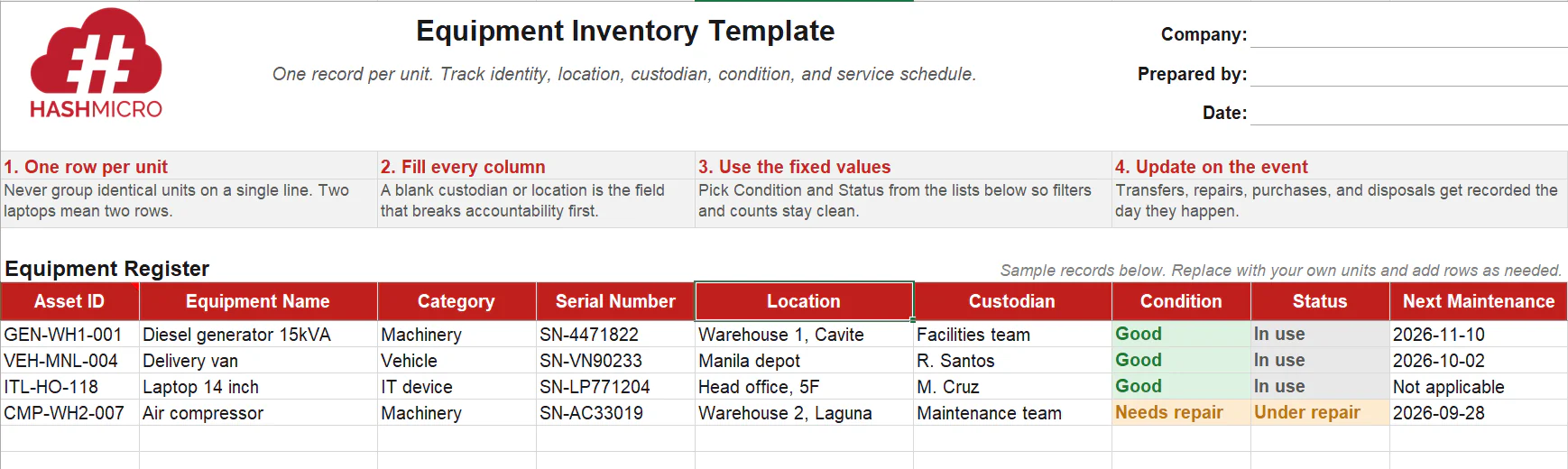
An equipment inventory template gives you the structure, not the system. It works best when you are starting from scratch and need one shared file that everyone can read. Download the columns below, then replace the sample rows with your own units.
Free Equipment Inventory Template
When a Spreadsheet Stops Being Enough
An Excel equipment inventory template is the right tool for one site with a stable list. It stops working when equipment moves often, several people edit the same file, and nobody can tell which version is current.
The question is a threshold, not a preference. Run through the seven checks below. If most of your answers sit in the right column, an equipment inventory and monitoring system is the cheaper option.
| Check | A spreadsheet still works | Time to move to a system |
|---|---|---|
| Number of locations | One site or one warehouse | Several branches, depots, or job sites |
| Frequency of data changes | A few changes per month | Daily transfers, issues, and returns |
| Users needing access | One or two editors | Many editors across departments |
| Audit trail | Nobody asks who changed what | Finance or auditors need change history |
| Maintenance alerts | You track service dates manually | Schedules need automatic reminders |
| Reporting | One flat list is enough | Reports by site, category, or custodian |
| Real-time visibility | Yesterday's file is fine | Teams need current status now |
If most rows point right, the next step is not a better spreadsheet. A single inventory management system holds the equipment record, the movement history, and the maintenance schedule in one place. Every inventory report it generates comes from that same live record. When multi-site teams hit that threshold, a dedicated system is the natural move.

Equipment Inventory vs. Asset Register vs. Maintenance Record
These three records overlap, which is why teams confuse them. Each one answers a different question about the same physical unit. The overlap looks harmless until three separate lists exist and none of them agree.
Operations builds one list, finance builds another, and the maintenance team keeps a third. Each list is correct inside its own department. Nobody can reconcile them because the three teams never agreed on a single code per unit.
| Aspect | Equipment inventory | Asset register | Maintenance record |
|---|---|---|---|
| Core question | What do we own and where is it? | What is it worth and how long will it last? | What work has been done on it? |
| Primary owner | Operations, warehouse, facilities | Finance and accounting | Maintenance or technical team |
| Key fields | Location, custodian, condition, status | Cost, depreciation, book value, useful life | Work order, service date, parts, technician |
| Update trigger | Transfer, assignment, repair, disposal | Purchase, revaluation, period close, disposal | Each service, repair, or inspection |
| Typical frequency | Continuous or monthly | Monthly or annually | Per maintenance event |
Most businesses miss this part. The equipment inventory is the shared source of identity, so both the asset register and the maintenance record should point back to the same Asset ID. When they use separate codes, reconciliation becomes guesswork. A full asset management system usually sits on top of that shared identity.
Best Practices for Keeping Equipment Records Accurate
Building the inventory is the easy part. Keeping it accurate six months later is where most records fail. Equipment moves, staff change, and repairs happen daily. Each unrecorded event pushes the list further from reality. These practices close that gap.
- Tag every unit physically: A record with no matching label cannot be verified during a count. Use durable barcodes or engraved plates, and replace worn labels before the next spot check.
- Standardize naming and categories: Agree on one naming pattern before anyone enters a unit. The same item under three different names produces wrong totals in every filter and report.
- Run scheduled physical verification: Quarterly spot checks catch drift early, before the annual count turns into a full search. Resolve any discrepancy before the session closes, not later.
- Make custodianship explicit: Assign a named person or department to every unit in the equipment inventory, and require sign-off on transfers. A blank custodian field is the fastest route to a missing unit with no trail.
- Control who can edit records: Limit edit access to a named group and keep a change log on every update. When a figure changes without a log entry, you cannot tell whether it was corrected or corrupted.
- Connect maintenance to the inventory record: Every service event should update the condition field and set a new next-maintenance date that day. Separating the maintenance log from the main record means neither stays current.
- Record disposals immediately: Units sold, scrapped, or written off must leave the active list the same week. A disposed unit still listed as active inflates counts and skews the next physical count.
- Reconcile across departments: Operations, finance, and maintenance each hold a piece of the same record. A discrepancy found three months late takes far longer to trace than one caught the same week.
Conclusion
An equipment inventory is not a list of things you own. It connects asset IDs, custodians, condition ratings, maintenance schedules, and movement history into one auditable record. Each field closes a different accountability gap, from misplaced units to overdue service.
Most businesses start in a spreadsheet, and that is a reasonable first step, but it breaks down once equipment moves across branches weekly and several people edit the same file. At that point, no audit trail explains what changed or why.
If that describes your setup, start with the seven steps in this guide. Build a complete equipment record that captures every asset, its location, and its assigned custodian. HashMicro's Equipment Inventory System then keeps that record live and consistent across every branch.

FAQ About Equipment Inventory
Update it the moment something changes, including transfers, repairs, new purchases, and disposals. On top of that, run a physical verification quarterly if equipment moves often, or twice a year if your setup is stable and single-site.
Operations or facilities should own the record day to day. Custodians confirm the units assigned to them, and finance reconciles the list against the asset register each period. Ownership must sit with one named role, never with a committee.
An equipment inventory is operational and covers everything the business controls, including low-value and fully depreciated units. A fixed asset list follows accounting thresholds and depreciation rules, so the two lists will never match line for line.
Yes. The business controls it, uses it, and is liable for it, even without ownership. Exclude it from the fixed asset register since ownership sits with the lessor. Track it separately in the operational inventory with the return date, lessor name, and contract reference.