

POS security combines people, processes, software, devices, networks, payment controls, and governance. For a Philippine business, that may include head-office finance staff, branch cashiers, supervisors approving refunds, IT administrators supporting terminals, an external payment provider, and integrations that move sales data into inventory or accounting systems. Each party needs a clear responsibility and evidence that the control is working.
POS security is the combination of people, processes, software, devices, networks, and payment controls that keep every point-of-sale transaction accurate, authorized, and traceable. It protects the checkout layer where sales, cash, card data, and customer records meet, to make sure a routine transaction cannot turn into fraud, data loss, or an untraceable adjustment.
This guide explains the scope of point-of-sale security, the threats leaders should review first, and 10 practical controls that can be assigned across branches. It also includes a responsibility map, a branch-readiness checklist, and questions for evaluating POS or ERP requirements. Use the framework to identify gaps before discussing POS, ERP, payment, or integration requirements with your internal IT team or software adviser.
In a multi-branch retailer, a single cashier login can lead to unauthorized discounts, altered records, and difficult investigations across several locations. POS security is an operational discipline, not just an IT concern, because branch performance depends on accurate transactions, accountable cash handling, secure payment flows, protected customer information, and clear responsibility among cashiers, supervisors, IT admins, and payment providers.
Use the framework to identify security gaps before discussing POS data, payment, or integration needs with your IT team or software advisor.
Key Takeaways
POS security protects the users, devices, transactions, payment flows, integrations, and records that support daily branch operations.
The 10-control framework connects each POS security measure with its risk, accountable owner, recommended practice, and evidence to review.
POS software can strengthen permissions, approvals, audit trails, inventory synchronization, and reporting, but it does not replace identity, network, endpoint, or payment controls.
A practical POS security review should produce assigned actions, documented evidence, provider questions, and a recovery process for every branch.
What is POS Security?
POS Security Scope for Multi-Branch Businesses
POS Security Scope for Multi-Branch Businesses
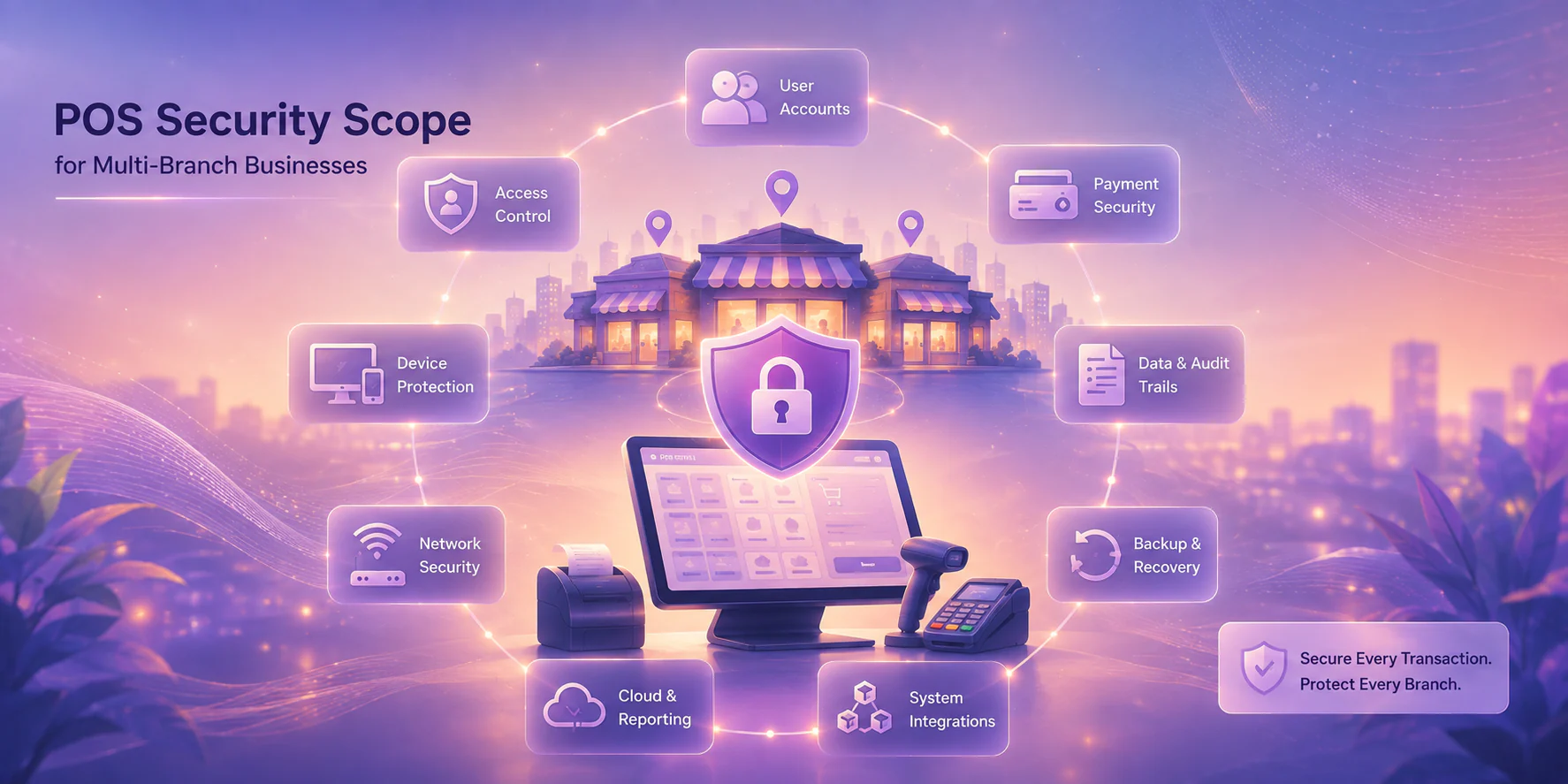
A branch POS environment includes the controls that protect POS users, devices, transactions, payment flows, integrations, and records. Its purpose is to preserve confidentiality, integrity, availability, accountability, and recovery throughout the sales process.
A branch POS environment is broader than the cashier screen. It may include:
- Cashier and supervisor accounts
- POS terminals, scanners, receipt printers, and cash drawers
- Payment terminals and links to banks or acquirers
- Branch Wi-Fi, routers, switches, and remote-support channels
- Cloud POS services and head-office reporting
- Inventory, purchasing, accounting, loyalty, and e-commerce integrations
- Administrator accounts, vendor support access, backups, and audit logs
To add on, a useful audit trail guide can help finance and operations teams understand why chronological records matter when reviewing POS activity.
What Are the Main POS Security Threats to Review First?
The first POS security threats to review are compromised access, unauthorised software, payment exposure, insecure connectivity, integration weaknesses, poor auditability, and operational disruption. Prioritise them by their effect on transaction integrity, payment handling, branch availability, and investigation difficulty.
POS security threats usually start from everyday operational gaps, not only from advanced cyberattacks. Shared cashier accounts, weak supervisor approvals, unsecured Wi-Fi, outdated terminals, and poorly monitored integrations can all create the same business problem: a transaction that cannot be clearly explained, verified, or traced to an accountable owner.
For Philippine multi-branch businesses, the fastest way to review POS risk is to group each threat by where it enters the operation. The table below shows the main attack surface, what can go wrong, and what leaders should check first before moving into detailed controls.
| Attack surface | Common threat | Business risk | What to check first |
|---|---|---|---|
| Users | Shared logins, weak passwords, and excessive access rights | Unauthorized discounts, refunds, voids, or cash adjustments become hard to trace | Named cashier accounts, role-based access, approval limits, and login history |
| Devices | Unpatched terminals, exposed tablets, or unmanaged POS hardware | Sales data, payment activity, and branch availability become vulnerable | Device inventory, patch status, endpoint protection, and lock-screen rules |
| Networks | Weak branch Wi-Fi, shared guest access, or unsecured remote access | Attackers may reach POS terminals or payment-connected systems through the branch network | Network segmentation, VPN rules, Wi-Fi access, and remote-support controls |
| Payments | Unclear settlement references, refund gaps, or payment-provider exceptions | Finance teams struggle to match POS sales, bank deposits, and gateway reports | Payment references, refund workflow, settlement reports, and reconciliation evidence |
| Integrations | Weak API controls or unmonitored data transfers to inventory and accounting systems | Incorrect sales, stock, or accounting records move across systems without review | API access, integration logs, sync errors, and exception alerts |
Not every threat has the same likelihood in every business. A CFO may prioritise refund integrity and transaction reconciliation, while an IT manager may begin with endpoint inventory and remote access. The review should connect both views to a named owner and a practical piece of evidence.
10 Controls To Secure a POS System
How Do You Secure a POS System? Apply These 10 Controls
POS security requires coordinated identity, approval, device, network, payment gateway, integration, logging, continuity, and response controls. The following 10 measures are designed to be assigned, tested, and reviewed across Philippine branches.
POS security requires coordinated identity, approval, device, network, payment, integration, logging, continuity, and response controls. The following 10 measures are designed to be assigned, tested, and reviewed across Philippine branches.
| Control | Risk addressed and recommended practice | Accountable owner | Evidence to review |
|---|---|---|---|
| 1. Unique accounts and role-based access | Shared credentials hide responsibility. Create individual cashier, supervisor, finance, and administrator roles using least privilege. Review access after transfers and resignations. | IT manager with branch and HR coordination | Current access list, role matrix, deprovisioning records |
| 2. Privileged-access protection | Administrator accounts can change configuration or expose data. Use stronger authentication, separate admin accounts, approval records, and time-limited support access. | IT security or infrastructure lead | Privileged-account register, authentication settings, approval tickets |
| 3. Transaction approvals | Uncontrolled refunds, voids, discounts, price changes, and cash adjustments can distort results. Set cashier-to-supervisor approval rules and exception thresholds. | Operations director and finance controller | Approval matrix, sample override logs, policy sign-off |
| 4. Supported software and devices | Unpatched terminals or unapproved applications increase technical and operational risk. Maintain an inventory, update schedule, endpoint protection, and installation controls. | IT operations | Device inventory, update records, endpoint alerts, installation approvals |
| 5. Secure branch networks | Poor segmentation or weak Wi-Fi can expose terminals and cause outages. Separate POS traffic where appropriate, restrict remote access, and document escalation for intermittent connectivity. | Network administrator and branch manager | Network diagram, Wi-Fi configuration, remote-access logs, outage tickets |
| 6. Controlled payment handling | Payment responsibilities may sit with an approved provider, bank, acquirer, or qualified advisor. Avoid storing sensitive payment data unnecessarily and confirm supported terminal configurations. | Finance, payment provider, and IT | Provider agreement, terminal inventory, configuration confirmation |
| 7. Integration and API governance | Unowned keys, undocumented data flows, or weak failure handling can corrupt inventory and accounting records. Assign owners, rotate credentials, test changes, and document retries and exceptions. | Enterprise applications or integration lead | Integration inventory, data-flow diagram, key-access record, change approvals |
| 8. Audit logging and review | Without reliable logs, unusual refunds or configuration changes are difficult to investigate. Retain and review logins, overrides, refunds, voids, administrator activity, and configuration changes. | Finance controller and IT operations | Log samples, review schedule, exception reports, escalation records |
| 9. Continuity, backups, and reconciliation | Connectivity or system failure can create duplicate or missing transactions. Test backups, recovery, approved offline capabilities where applicable, and post-outage reconciliation. | Operations, finance, and IT | Backup-test record, recovery procedure, reconciliation report, outage drill notes |
| 10. Incident response | Delayed action can increase operational and evidence loss. Define detection, containment, access review, evidence preservation, provider notification, and post-incident correction. | Incident manager or designated executive | Runbook, contact list, incident register, lessons-learned actions |
A retail business should test these controls during busy periods, not only during a quiet implementation window. When evaluating a POS terminal, ask how the physical device, payment connection, software, and support process fit into the wider control framework. A feature list is not proof that a control is configured or monitored.
How to Govern POS Security Across Branches
How to Govern POS Security Across Branches
POS security holds across multiple branches only when accountability is explicit and evidence-backed. Three tools make that practical: a compliance responsibility map for external obligations, a branch-readiness checklist before each launch, and a role ownership matrix for daily operations.
1. Map compliance responsibilities and evidence.
POS compliance review depends on payment roles, contracts, system architecture, and applicable Philippine requirements. Confirm the exact obligations with your payment provider, software vendor, internal IT team, auditor, and a qualified Philippine compliance advisor.
| Party | Questions to clarify |
|---|---|
| Business owner or executive sponsor | Which risks are accepted, funded, escalated, and reviewed at management level? |
| POS or ERP vendor | Which security features are included, how are updates delivered, and how is support access controlled? |
| Payment provider, bank, or acquirer | Which payment-security requirements apply to the terminal, network, data flow, and provider relationship? |
| Internal IT team | Who manages identity, devices, networks, logs, backups, and incident coordination? |
| Managed service provider | What monitoring, access, response times, and subcontractor controls are documented? |
| Finance and operations | Which approvals, reconciliations, and exception reviews are required for daily control? |
2. Run the branch-readiness checklist before launch
Before opening a new branch or approving a major configuration change, assign an owner and evidence for each item:
- Confirm the branch device inventory, serial numbers, operating software, and support contacts.
- Create individual user accounts and test cashier, supervisor, finance, and administrator permissions.
- Verify approval workflows for refunds, voids, discounts, price changes, and cash adjustments.
- Confirm supported versions, update responsibility, endpoint protection, and application-installation restrictions.
- Review network segmentation, Wi-Fi credentials, router ownership, remote-access rules, and connectivity escalation.
- Coordinate payment-terminal setup with the approved provider and document what payment data is handled.
- Record every integration, API owner, credential owner, data flow, retry rule, and failure contact.
- Test audit-log visibility for logins, overrides, refunds, voids, configuration changes, and administrator actions.
- Run a backup, recovery, continuity, and reconciliation test before peak trading begins.
- Publish incident contacts and train staff on suspicious requests, lost devices, unusual refunds, and outages.
Repeat the checklist after branch expansion, major staffing changes, new payment methods, or integration changes, and keep the evidence where finance, operations, and IT can review it without depending on one individual.
3. Assign daily ownership with a governance matrix.
Security is easier to sustain when accountability is explicit. This matrix prevents the common assumption that the vendor, payment provider, or IT team is automatically responsible for everything.
| Activity | Cashier | Branch supervisor | Finance | IT | Vendor or payment provider |
|---|---|---|---|---|---|
| Daily login and transaction handling | Daily login and transaction handling | Monitor exceptions | Review reports | Support access issues | Provide technical guidance |
| Refunds, voids, and discounts | Request | Approve per policy | Review trends | Maintain configuration | Explain product behaviour |
| User access changes | Report transfer or departure | Confirm branch need | Review segregation | Provision or revoke | Process approved support requests |
| Device and network maintenance | Report faults | Protect equipment | Escalate business impact | Maintain controls | Support contracted components |
| Reconciliation after outage | Provide transaction records | Confirm branch totals | Reconcile and sign off | Investigate system events | Confirm service status |
| Suspected incident | Preserve details and report | Contain local activity | Assess transaction impact | Coordinate response | Notify and assist within contract |
The matrix does not assign legal liability. It clarifies operating ownership so that a suspected incident, access change, or failed integration always has a clear next action.
How to Evaluate POS and ERP Security Software
How to Evaluate POS and ERP Security Software
How to Evaluate POS and ERP Security Software
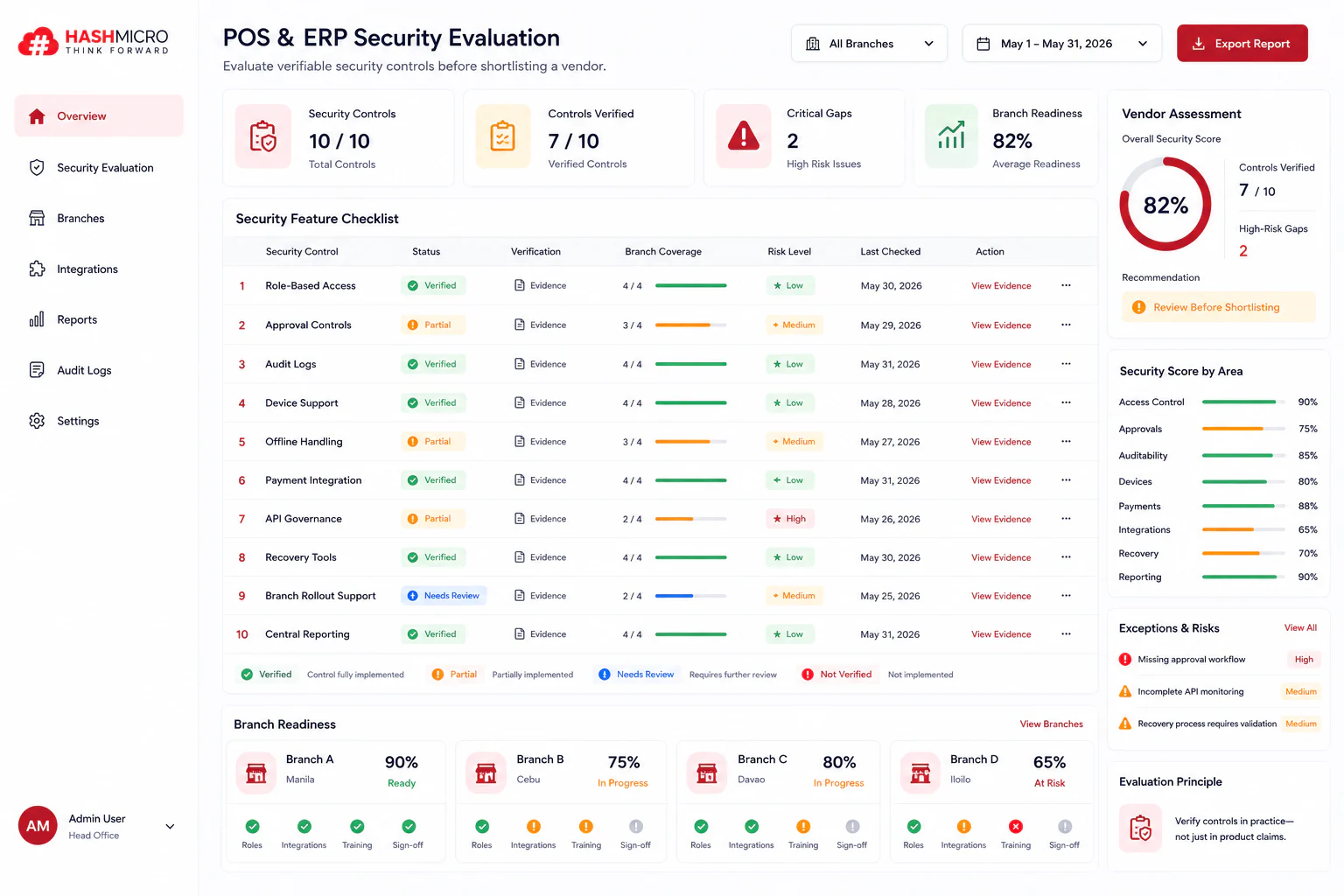
When comparing platforms, focus on verifiable controls and operating fit rather than broad claims such as secure by default. Ask each provider to demonstrate how the system supports your branches, roles, approvals, integrations, and recovery process.
When comparing platforms, focus on verifiable controls and operating fit rather than broad claims such as secure by default. Ask each provider to demonstrate how the system supports your branches, roles, approvals, integrations, and recovery process.
Use the feature checklist below to confirm the software actually delivers these controls before shortlisting a vendor.
- Role-based access: controls who can view, approve, or change POS and ERP data by branch and job level.
- Approval controls: requires supervisor sign-off for refunds, voids, discounts, and price overrides.
- Audit logs: records logins, changes, overrides, and exceptions for review later.
- Device support: manages approved terminals, versions, updates, and remote support safely.
- Offline handling: keeps transactions moving during weak connectivity and syncs them later without duplicates.
- Payment integration: connects the software to banks, acquirers, and payment providers with clear reference tracking.
- API governance: controls access keys, sync rules, and failed integration alerts.
- Recovery tools: includes backup, restore, escalation, and incident evidence handling.
- Branch rollout support: shows who configures roles, tests integrations, trains staff, and signs off readiness.
- Central reporting: gives finance and operations one place to review exceptions, totals, and branch activity.
A broader ERP and business-system plan can help connect POS controls with finance, inventory, purchasing, and management reporting. For inventory-heavy operations, SKU governance is also relevant because inaccurate item master data can create operational exceptions that appear to be security issues.
If inconsistent permissions, fragmented transaction records, or limited audit visibility are making POS governance difficult, discuss your ERP and POS requirements with a qualified adviser to identify practical control and integration priorities. The aim is to match the platform to the organisation’s responsibilities, not to assume that software alone resolves every risk.
If your current POS setup still relies on shared logins, manual approvals, or scattered branch reports, HashMicro can help you map the controls your branches need first. Try free consultation to see which features matter most for your operation, so you can strengthen oversight without adding another disconnected system.
Conclusion
POS security protects more than a checkout device. It connects user identity, transaction approvals, devices, branch networks, payment handling, integrations, audit logs, continuity planning, and incident response. In a Philippine multi-branch business, these controls need named owners and evidence that can be reviewed by head office, branch leaders, finance, IT, vendors, and payment providers.
Use the 10-measure framework to document current gaps, test branch procedures, and prepare focused questions for technology providers. When your requirements are clear, POS or ERP discussions can address real operating needs such as cash accountability, inventory synchronization, centralized reporting, and recovery after disruption.
Frequently Asked Questions
Explain a responsibility matrix covering cashiers, branch supervisors, finance, operations, IT, payment providers, and software vendors. Show which role approves transactions, reviews logs, manages access changes, coordinates outages, and escalates suspected incidents. Keep the answer operational and avoid assigning legal responsibility without verified local guidance.
Recommend requesting access-role records, approval settings, device and update inventories, network and integration documentation, audit-log samples, backup-test evidence, incident contacts, and support-access procedures. Explain that a feature description alone does not prove that a control is configured or monitored.
Answer no. Explain that POS software can support permissions, approvals, logs, and operational reporting, but identity management, endpoint protection, network controls, payment handling, backup ownership, and incident response require separate responsibilities and controls.
Describe the need for a documented continuity procedure covering transaction handling, approved offline capabilities where applicable, reconciliation, duplicate prevention, escalation, and post-outage review. Require the business to confirm the actual behaviour with its POS vendor and payment provider rather than assuming offline operation is safe or available.
Cover user provisioning, role and approval setup, device hardening, supported software, network configuration, payment-provider coordination, integration testing, backup and recovery ownership, log visibility, staff training, and incident contacts. Recommend recording an owner and evidence for each item before go-live.