A point-of-sale (POS) system integrates hardware and software to manage sales, inventory, customers, and staff in one connected platform. For Philippine businesses, the right point of sale system also supports accurate reporting and more efficient operations across stores and sales channels.
BSP data shows digital payments reached 52.8% of total retail transactions by volume in 2023 (up from 42.1% in 2022) and 55.3% by value. As more transactions happen digitally, businesses need systems that can keep up without causing delays.
Without an integrated POS, stock discrepancies and reporting errors become more common. A modern system helps reduce mistakes, speed up checkouts, and maintain accurate control as the business grows.
Key Takeaways
A Point of Sale system simplifies transactions, keeps inventory accurate, reduces errors, and supports better decisions through real-time reports.
A modern POS system should handle flexible payments, track inventory, manage customers, and generate sales reports, helping businesses run more efficiently.
POS Management Software integrates sales reporting, inventory tracking, CRM, and employee management into a single platform.
What is a Point of Sale (POS) System?
A Point of Sale (POS) system is an integrated hardware and software solution designed to help businesses handle sales transactions efficiently. It functions as a computer-based cash register equipped with software to calculate orders, accept payments, and gather marketing insights.
Point Of Sale system include countertop terminals and apps that allow payments through connected devices like smartphones. They can be physical devices in stores or virtual checkout points in online shops.
POS technology often uses barcode scanning to calculate order totals and process payments. The POS software meaning encompasses these various functions that allow businesses to streamline their operations effectively.
Benefits of Point of Sale System
Understanding the POS meaning in business is essential for leveraging its full potential. Now, let’s explore the Point of Sale software benefits for your business:
- Automates sales and inventory tasks, reducing manual work and errors.
- Lowers operational costs by streamlining processes and optimizing inventory management.
- Provides up-to-date information on stock levels, helping prevent overstocking or stockouts.
- Stores customer data and purchase history, aiding in personalized marketing and loyalty programs.
- Tracks employee performance and manages schedules and sales commissions.
- Reduces the risk of theft and fraud with secure payment processing and cash management.
- Generates detailed reports on sales trends, helping with business decision-making.
Beyond processing payments, a modern POS system connects sales data with inventory, customer records, and employee activity. This gives businesses a clearer view of daily operations and provides context for the functions and benefits explained below.
How Does a POS System Work?
A Point of Sale (POS) system, like BIR-compliant POS software or mPOS, is the central hub for your business’s sales and operations. Understanding how it works can help maximize its features and enhance your business efficiency.
1. Record the Items Being Purchased
The cashier scans each product’s barcode or selects the item from the POS software. The system retrieves its name, price, stock information, and applicable tax before adding it to the transaction.
2. Calculate the Purchase Total
After all items have been entered, the POS system calculates quantities, discounts, promotions, taxes, and additional charges. The final amount is then displayed for confirmation before payment.
3. Process the Customer’s Payment
The customer selects an available payment method, such as cash, card, or digital wallet. For electronic payments, the payment provider verifies the transaction before returning an approval or rejection to the POS software.
4. Finalize the Transaction and Generate a Receipt
Once payment is approved, the POS system records the sale and produces a printed or digital receipt. Businesses in the Philippines should ensure that receipt formats and transaction records follow applicable BIR requirements.
5. Update Inventory and Customer Data
The system automatically deducts the purchased products from available inventory. If customer or loyalty information is collected, it can also update purchase history, loyalty points, and customer profiles.
6. Record Sales Data for Reporting
The completed transaction becomes part of the business’s sales records. Managers can use this data to review revenue, payment methods, product performance, employee activity, and remaining stock levels.
1. Record the Items Being Purchased
The cashier scans each product’s barcode or selects the item from the POS software. The system retrieves its name, price, stock information, and applicable tax before adding it to the transaction.
2. Calculate the Purchase Total
After all items have been entered, the POS system calculates quantities, discounts, promotions, taxes, and additional charges. The final amount is then displayed for confirmation before payment.
3. Process the Customer’s Payment
The customer selects an available payment method, such as cash, card, or digital wallet. For electronic payments, the payment provider verifies the transaction before returning an approval or rejection to the POS software.
4. Finalize the Transaction and Generate a Receipt
Once payment is approved, the POS system records the sale and produces a printed or digital receipt. Businesses in the Philippines should ensure that receipt formats and transaction records follow applicable BIR requirements.
5. Update Inventory and Customer Data
The system automatically deducts the purchased products from available inventory. If customer or loyalty information is collected, it can also update purchase history, loyalty points, and customer profiles.
6. Record Sales Data for Reporting
The completed transaction becomes part of the business’s sales records. Managers can use this data to review revenue, payment methods, product performance, employee activity, and remaining stock levels.
1. Record the Items Being Purchased
The cashier scans each product’s barcode or selects the item from the POS software. The system retrieves its name, price, stock information, and applicable tax before adding it to the transaction.
1. Record the Items Being Purchased
The cashier scans each product’s barcode or selects the item from the POS software. The system retrieves its name, price, stock information, and applicable tax before adding it to the transaction.
1. Record the Items Being Purchased
The cashier scans each product’s barcode or selects the item from the POS software. The system retrieves its name, price, stock information, and applicable tax before adding it to the transaction.
1. Record the Items Being Purchased
The cashier scans each product’s barcode or selects the item from the POS software. The system will retrieves its name, price, stock information, and applicable tax before adding it to the transaction.
2. Calculate the Purchase Total
After all items have been entered, the POS system calculates quantities, discounts, promotions, taxes, and additional charges. The final amount is then displayed for confirmation before payment.
3. Process the Customer’s Payment
The customer selects an available payment method, such as cash, card, or digital wallet. For electronic payments, the payment provider verifies the transaction before returning an approval or rejection to the POS software.
4. Finalize the Transaction and Generate a Receipt
Once payment is approved, the POS system records the sale and produces a printed or digital receipt. Businesses in the Philippines should ensure that receipt formats and transaction records follow applicable BIR receipt requirements.
5. Update Inventory and Customer Data
The system automatically deducts the purchased products from available inventory. If customer or loyalty information is collected, it can also update purchase history, loyalty points, and customer profiles.
6. Record Sales Data for Reporting
The completed transaction becomes part of the business’s sales records. Managers can use this data to review revenue, payment methods, product performance, employee activity, and remaining stock levels. Businesses can further examine how POS data for reporting supports sales analysis, payment monitoring, inventory control, and outlet performance.
Types of Point of Sales Systems
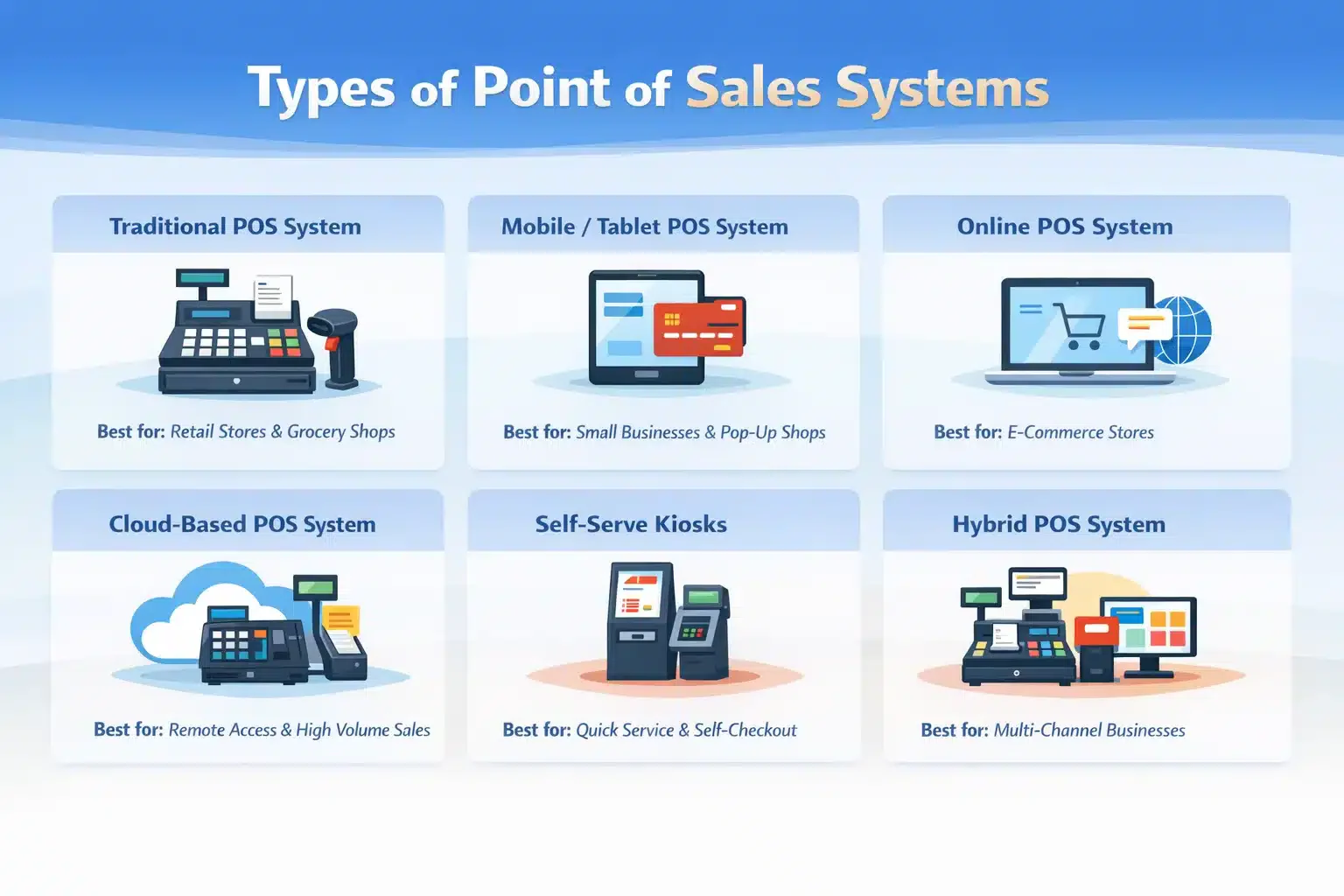
Here are six types of POS system in the Philippines and their ideal use cases:
1. Traditional POS System
A traditional POS system uses hardware such as barcode scanners, cash registers, card readers, and receipt printers supported by software that manages payments and inventory. During checkout, the cashier scans or inputs items, processes the payment, and the system updates total, and applies taxes or discounts.
Best for: Retail stores, grocery shops, and businesses that handle various payment methods and maintain inventory. Ideal for processing high transaction volumes with multiple hardware components.
2. Mobile/Tablet-Based POS System
A mobile or tablet-based point of sale system offers the same core functions as a traditional POS, but in a more portable, intuitive format. Staff can update prices, add products, integrate with tools like CRMs or accounting software, and handle transactions over cellular networks.
Best for: Small businesses, retailers needing mobility, or businesses transacting in dynamic locations like trade shows, farmer markets, or customers’ homes. For example, the POS system for local mini shops can include mobile or tablet-based POS systems.
3. Online POS System
This POS transaction system is designed for e-commerce, helping businesses process payments online. Customers input account details, delivery addresses, and payment information, while businesses use the system to manage orders efficiently. Some retailers extend this further by offering curbside pickup via modern POS systems, letting customers order and pay online, then collect their items outside the store.
Best for: Businesses handling online transactions through websites or social media, such as online retail shops or restaurants offering delivery and takeout services.
4. Cloud-Based POS System
A cloud-based point of sale system stores sales and business data on a secure online platform, offering greater storage capacity and security while allowing access from any location with an internet connection. It also supports online or tablet-based POS setups by acting as the main storage hub. Businesses comparing providers can review the best cloud POS systems in the Philippines based on their features, integrations, and deployment requirements.
Best for: Businesses requiring remote access to data, handling high sales volumes, or needing to reduce hardware costs while improving data security.
5. Self-Serve Kiosks
Self-serve kiosks let customers handle their own transactions by scanning items, selecting payment methods, and finalizing orders without relying on a cashier. They appear in grocery self-checkouts, ticket kiosks, supermarket POS, and cafe POS setups.
Best for: Businesses seeking to reduce wait times and cater to customers who prefer a self-directed shopping or service experience.
6. Hybrid POS Systems
Hybrid POS systems combine multiple POS types to address diverse sales needs. For example, a business might use a traditional POS system in-store, a mobile POS for off-site sales, and an online POS for e-commerce, all integrated into a single management platform.
Best for: Businesses with multiple sales channels or large volumes of transactions that require versatile and integrated solutions, including a POS Software for Entertainment Venues that can seamlessly manage ticketing, merchandise, and real-time sales reporting.
Features to Look For in a POS System
A modern POS system for restaurants has features that streamline business operations, improve efficiency, and enhance customer experiences. Here are some of the most common features you can expect from an ideal local POS system:
1. Payment processing
Efficient payment processing is a core feature of any cashier system. These systems support multiple payment methods, including cash, credit/debit cards, and digital wallets. Many systems also offer contactless payment options, improving customers’ checkout experience. Modern POS systems also support buy now pay later (BNPL) at checkout, giving customers a flexible way to split payments without delaying the transaction.
2. Multi-location management
For businesses with multiple locations, retail sales software can provide centralized management. You can oversee inventory, sales, and employees across all locations from a single dashboard, ensuring consistency and efficiency.
3. Integrated payments
Many POS Philippines systems integrate directly with payment processors, ensuring seamless transactions and often reducing processing fees. This retail POS system integration also helps manage refunds and other payment-related tasks more efficiently.
4. Receipts and invoicing
POS machines can generate printed or digital receipts for customers. They also offer invoicing capabilities, allowing businesses to send professional invoices directly from the system, which is particularly useful for service-based industries.
5. Inventory management
One of the most valuable features of the POS platforms used by Philippine businesses is its ability to manage inventory in real-time. It automatically updates stock levels with every sale, alerts when items are low and can assist with purchase orders.
6. Customer management
Modern POS systems include CRM features that store customer information, purchase history, and preferences. This data allows you to personalize marketing efforts, run loyalty programs, and provide better customer service.
7. Employee management
POS systems simplify employee management by tracking working hours, sales performance, and commissions. You can easily manage schedules, process payroll, and monitor performance metrics, making it easier to reward top performers.
8. Sales reporting
POS systems provide detailed sales reports that give you insights into your business performance. You can track sales trends, peak sales times, and top-selling products. This information is crucial for making informed business decisions and planning future strategies.
Common Types of POS System Hardware
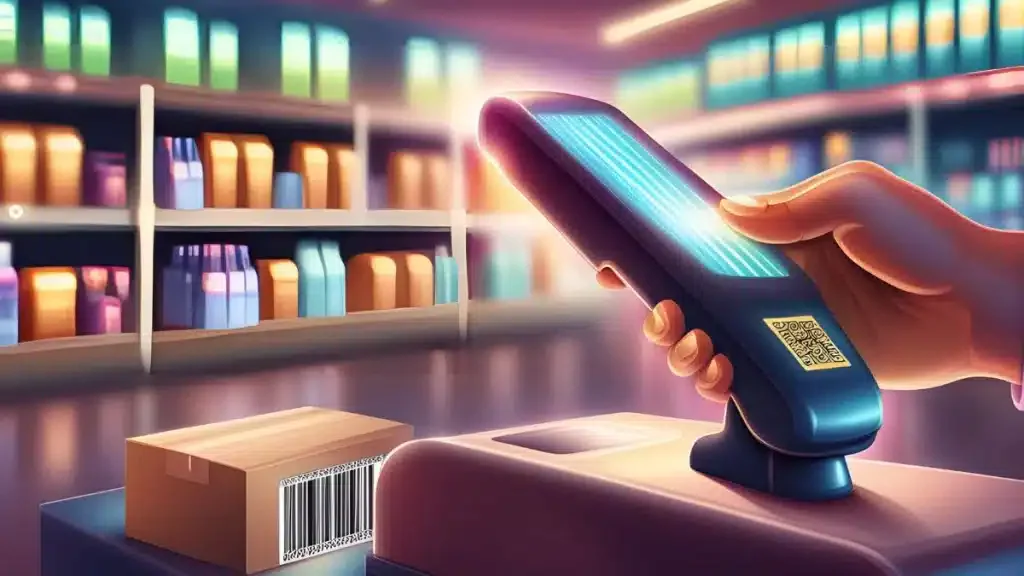
A POS terminal is the main device used to enter items, process transactions, and connect payment, receipt, and inventory functions. Understanding how POS terminals work helps businesses select hardware that matches their checkout volume and operating environment.
Here are the most common types of POS hardware you might encounter:
- POS terminal: The POS terminal is the core of the POS system, often featuring a touchscreen interface. It processes transactions, manages inventory, and performs other essential functions.
- Barcode scanner: A barcode scanner quickly and accurately inputs product information by scanning items’ barcodes. This speeds up the checkout process and reduces errors in product entry.
- Receipt printer: This printer generates physical receipts for customers after a transaction. It can be thermal or impact-based, with thermal printers being the most common due to their speed and quiet operation.
- Cash drawer: A cash drawer stores cash securely. It typically connects to the POS terminal and opens automatically when a cash transaction is completed, ensuring that cash handling is secure and efficient.
- Card reader: A card reader facilitates credit and debit card transactions. Modern card readers often support EMV (chip) cards and NFC (contactless) payments, making them versatile for various payment methods.
- POS keyboard: In some setups, a POS-specific keyboard with programmable keys is used. These keyboards are designed for high-speed, repetitive tasks and can be customized to include shortcuts for common functions.
Marketing and Innovation
These POS systems are particularly significant for marketers, as they provide an opportunity to influence spontaneous buying decisions, especially with products strategically placed near the checkout counter.
The strategic placement of POS terminals allows retailers to target specific product categories and impact shoppers earlier in their buying journey. For instance, department stores often feature separate POS areas for product groups like electronics, appliances, and clothing.
Cloud-based POS systems help minimize initial costs for businesses by enabling multiple locations to share the same infrastructure. These systems can also process transactions at customer sites with the help of location-based technology. For restaurant businesses specifically, platforms like Toast POS are built around these cloud capabilities, connecting order management, kitchen operations, and staff scheduling in one integrated system.
"A modern POS system is not just for payments, it’s a strategic tool that drives impulse sales, improves targeting, and connects multi-location operations through one efficient platform."
Conclusion
The importance of using a POS system cannot be overstated. POS system in the Philippines can streamlines sales transactions, manages inventory in real time, and enhances customer experiences, ultimately driving higher efficiency and profitability.
A modern POS solution goes beyond processing payments. It integrates sales reporting, inventory tracking, CRM, and employee management into a single platform, allowing businesses to operate more strategically.
Investing in the right POS system is a strategic step toward sustainable growth. If you’re ready to elevate customer satisfaction, consider scheduling a free consultation to explore the best solution for your business needs.
FAQ on Point of Sale
A common POS transaction is when a customer purchases items at a grocery store, the cashier scans the barcodes, the POS calculates the total cost, and the customer pays via cash, card, or mobile payment. The system logs the sale and updates inventory.
A POS terminal is a device used by businesses to process payments, accepting methods like credit/debit cards, mobile wallets, and contactless payments. It connects to a payment processor to verify and authorize transactions, ensuring quick and secure customer payments.
An example of a POS system is a retail store terminal that scans barcodes, calculates total costs, accepts payments via cash or card, and prints receipts. Online checkout systems for e-commerce businesses are also examples of POS.
Businesses often require customer verification to help prevent fraud. In-store debit card transactions typically ask customers to enter a PIN, while online or phone orders usually require the CVV code on the back of the payment card.
1. Log in & open shift: Sign in, confirm your branch/terminal, then “Open Shift” (starting cash float if needed).
2. Add items to cart: Scan barcodes or search items, then adjust quantity/variants (size/color) if applicable.
3. Apply promos/discounts: Add store promos, coupons, or manual discounts (with approval if required).
4. Attach customer details (optional): Select a customer for loyalty points, returns tracking, or e-receipts.
5. Collect payment: Choose payment type (cash/card/QR/e-wallet), enter amount, confirm change or split payments.
6. Issue receipt: Print or send e-receipt, then confirm the sale is completed.
7. Handle common actions: Returns/exchanges, voids, refunds, and “parked” transactions should follow your store’s approval rules.
8. Close shift & reconcile: Run end-of-day reports, count cash, and reconcile sales vs. cash drawer totals.
1. On-premise POS: Installed on local computers/servers in-store; works even with limited internet but needs local maintenance.
2. Cloud-based POS: Runs online with data stored in the cloud; easier multi-branch reporting and remote access.
3. Mobile POS (mPOS): Uses tablets/phones with a card reader; ideal for pop-ups, kiosks, or queue-busting.
4. Self-service POS (kiosk/self-checkout): Customers place and pay for orders themselves; reduces cashier load and speeds checkout.