
Section 232 of the NIRC requires businesses to maintain books and records that support their tax filings. Revenue Memorandum Circular No. 8-2023 extended that duty to an annual inventory list template. Auditors often extend the examination when the submission is incomplete.
An inventory list template does not solve every stock management problem. It gives a business a clear starting point, with consistent columns and a regular update schedule. Even a small operation can maintain records that survive scrutiny and support faster purchasing decisions.
This guide covers what an inventory list template is and which fields belong in it. It explains how BIR-relevant records differ from a generic format. It also walks through building one from scratch in a spreadsheet.
Key Takeaways
Philippine SMEs without a proper inventory list risk BIR audit penalties and lose the visibility needed to reorder on time.
A complete inventory list template needs 10 core columns plus three BIR fields to support audit-ready stock records.
Download a ready-to-use inventory list template with 10 core columns and three BIR compliance fields pre-built into a spreadsheet.
Spreadsheet templates fail at scale when multiple editors, locations, or high SKU counts make manual reconciliation error-prone.
What Is an Inventory List Template?
An inventory list template is a pre-formatted document that records every stock item a business holds at a given point in time. It captures item names, quantities, unit costs, and the last verification date. Businesses use it to confirm what stock they physically have on hand.
It is not a purchase order, which records intended purchases. It is not a receiving log, which tracks goods as they arrive. Both of those record movement, while the list records what exists at a single moment.
Templates work best in spreadsheets and suit businesses running weekly or monthly counts. Most operations managing under 200 active SKUs benefit from a structured format that keeps every column consistent and every count traceable.
Why Philippine Businesses Need a Proper Inventory List
For BIR-registered businesses, an inventory list serves as a tax compliance document, not just an operational tool. Section 43 of the National Internal Revenue Code requires businesses to keep accurate inventory valuation records. A BIR inventory list template helps you meet this requirement and reduces your audit exposure.
Poor stock records create two direct cost problems. Untracked overstock ties up working capital in dead stock. These goods sit past their demand cycle and must be written off or marked down. Stockouts trigger emergency purchases at higher unit costs and erode customer trust.
A structured inventory list also resolves supplier disputes faster. When a delivery discrepancy arises, a dated stock record provides the reference point for a formal claim. Without one, disputes default to the supplier's delivery receipt, which rarely favors the buyer.
BIR Compliance and Your Inventory Records
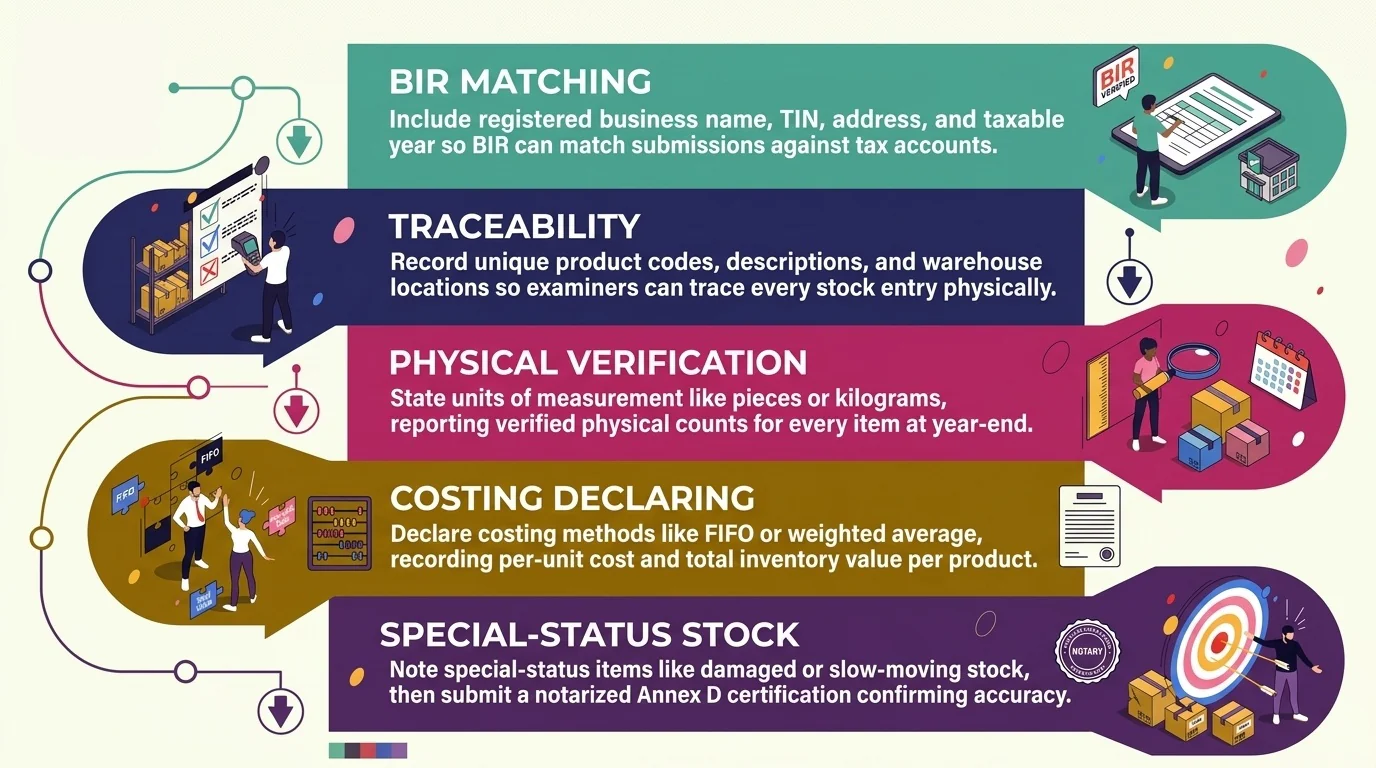
The BIR requires every registered business to submit an accurate inventory list. This list must tie directly to the company's financial statements and annual income tax return. RMC No. 57-2015 enforces this reconciliation requirement. Businesses that record stock consistently throughout the year reduce discrepancy risk at filing time.
Business and Tax Identity: Include your registered business name, TIN, complete address, and taxable year covered so the BIR can match your submission against your official tax account.
Item Identification and Storage Location: Record a unique product code, clear item description, and the warehouse address for each SKU so BIR examiners can trace every stock entry to a physical location.
Quantity and Unit of Measurement: State the unit each product is counted in (pieces, kilograms, liters) and report the verified physical count at year-end for every item.
Valuation Method and Inventory Cost: Declare your costing method (FIFO, weighted average, or specific identification) and record the per-unit cost and total inventory value for each product line.
Remarks and Notarized Certification: Note any items with special status (damaged, slow-moving, held for return) and submit a notarized Annex D certification to confirm the list is complete and accurate.
Every item on this list must match your books, financial statements, and annual ITR. The BIR cross-checks these three sources during an audit. Businesses that track stock movements accurately throughout the year make this reconciliation faster. Accurate records also reduce your exposure to Section 250 penalties.
What to Include in an Inventory List Template
The columns below represent the minimum viable set for a Philippine SME. Each field serves a specific function. Removing any of them creates a gap that typically surfaces during a stock count or a supplier dispute. Use this list as the starting point for your inventory list template.
| Column | What to Record | Why It Matters |
|---|---|---|
| Item Name | Descriptive product name | Human-readable reference for staff |
| SKU / Item Code | Unique identifier | Links to purchase orders and supplier invoices |
| Description | Specifications (size, color, unit) | Prevents mis-picks during fulfillment |
| Unit of Measure | pcs, kg, box, liter | Prevents quantity errors when items are bought in bulk and sold in units |
| Item Category | Raw material, WIP, or finished goods | Determines the correct BIR Annex (A, B, or C) |
| Quantity On Hand | Current physical count | Core of every reorder decision |
| Reorder Point | Threshold that triggers a purchase | Prevents stockouts without manual checking |
| Reorder Quantity | Units to order per trigger | Completes the replenishment decision alongside Reorder Point |
| Supplier Name | Primary vendor | Fast reference during emergency reorders |
| Last Purchase Price | Cost per unit at last transaction | Supports cost of goods sold calculation |
| Date Last Updated | Timestamp of last count or adjustment | Shows how current the record is |
| Notes | Damage, hold, or special storage | Flags items that cannot be sold as-is |
BIR-Ready Fields: What to Add for Philippine Compliance
A standard inventory template does not capture tax-relevant purchase records. Philippine businesses that may face a BIR examination should add three extra columns to their template. These fields let an examiner trace each item back to a specific purchase transaction without requesting a separate document:
- Official Receipt (OR) Number: The official receipt number from the purchase transaction that brought the item into stock.
- Date of Purchase: The date on the OR, not the date the item was received into the warehouse.
- Supplier TIN: The Tax Identification Number of the supplier.
These three fields support SLSP (Summary List of Sales and Purchases) preparation at the end of each quarter. Consistent records also prevent discrepancies when the BIR cross-checks purchase data against supplier reports.
Free Inventory List Template
This inventory list BIR template covers all 12 columns from the table above and the three BIR-ready purchase fields. It is ready to use in Excel and is available as a free download. You can adapt it to any product type without changing the column structure.
Inventory list free template:
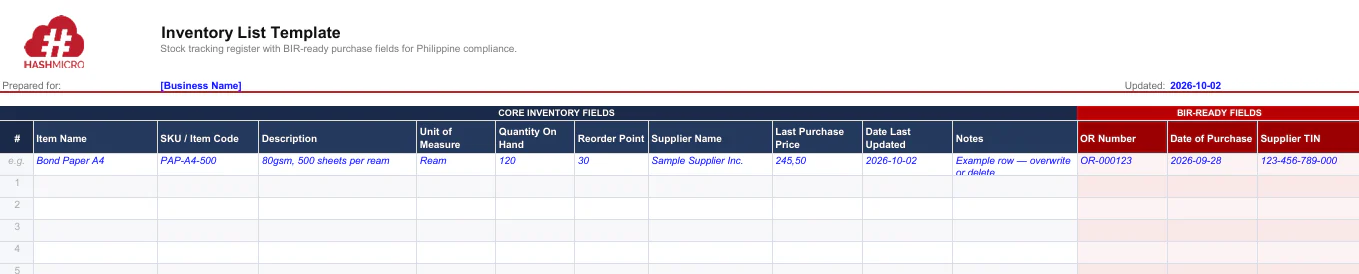
How to use:
- Day-to-day columns vs. BIR columns: The first 9 columns handle daily stock operations. The last 3 (OR Number, Date of Purchase, Supplier TIN) apply only to purchased items.
- Per-SKU per-variant rule: Record each size, color, or pack count as a separate row. Combining variants into one line hides stock discrepancies at count time.
- Blank master copy practice: Keep one unlocked file as your master template. Work from duplicates so the original column structure stays intact.
- Date Last Updated discipline: Update this field every time you adjust a quantity. An outdated timestamp flags an unverified record during a BIR review.
Once you have the template ready, the next step is to choose the inventory list format that fits your business type.
Types of Inventory List Templates by Business Type
Not every Philippine business needs the same inventory columns. A bakery tracking expiry dates has different needs from a hardware store tracking bin numbers. The table below maps five common business types to the extra columns their industry most often needs.
| Business Type | Recommended Additional Columns |
|---|---|
| Retail (clothing, hardware, general merchandise) | Selling Price, Variant (size/color), Location/Bin Number |
| Food and Beverage (restaurant, bakery, cloud kitchen) | Expiry Date, Storage Temperature, Par Level, Lot/Batch Number |
| Manufacturing or Assembly | Component Usage Rate, BOM Reference, Work-in-Progress Qty, Supplier Lead Time (days) |
| Small Business / Sari-sari Store | Wholesale Cost, Markup Percentage, Days of Supply |
| Pharmaceutical or Health Products | Lot Number, Expiry Date, License to Operate Reference, FDA CPR No. |
The ten core columns from the previous section apply to all types. The additions here are for businesses where a missing field frequently causes stock problems or compliance exposure specific to their industry.
How to Make an Inventory List Template
Learning how to make an inventory list template is straightforward once you follow a consistent process. Philippine SMEs in retail, F&B, and distribution can build a working template in five steps. Each step builds directly on the one before it.
Step 1: List All SKUs
Write down every product variant you sell or stock. Each size, color, or configuration gets its own row. Use supplier invoices or your POS records as the starting list.
Step 2: Assign Units of Measure
Set one unit of measure for each SKU and keep it consistent. A bakery item counted in pieces should never switch to dozens midway. Write the unit before you fill in quantities.
Step 3: Add Reorder Points
Calculate a reorder point for every SKU before your first count. Multiply average daily usage by supplier lead time in days. Enter the result in the Reorder Point column.
Step 4: Link Entries to OR Receipts
For every stock purchase, record the OR number in the OR Number column. This links your inventory record to a BIR-verifiable document. Businesses filing SLSP need this link at the transaction level.
Step 5: Set a Review Cycle
Decide how often each item gets counted. Daily for fast movers, weekly for mid-velocity items, monthly for slow movers. Write the schedule in the Notes column. A set cycle keeps the template accurate and audit-ready.
Limitations of Manual Templates and When to Switch
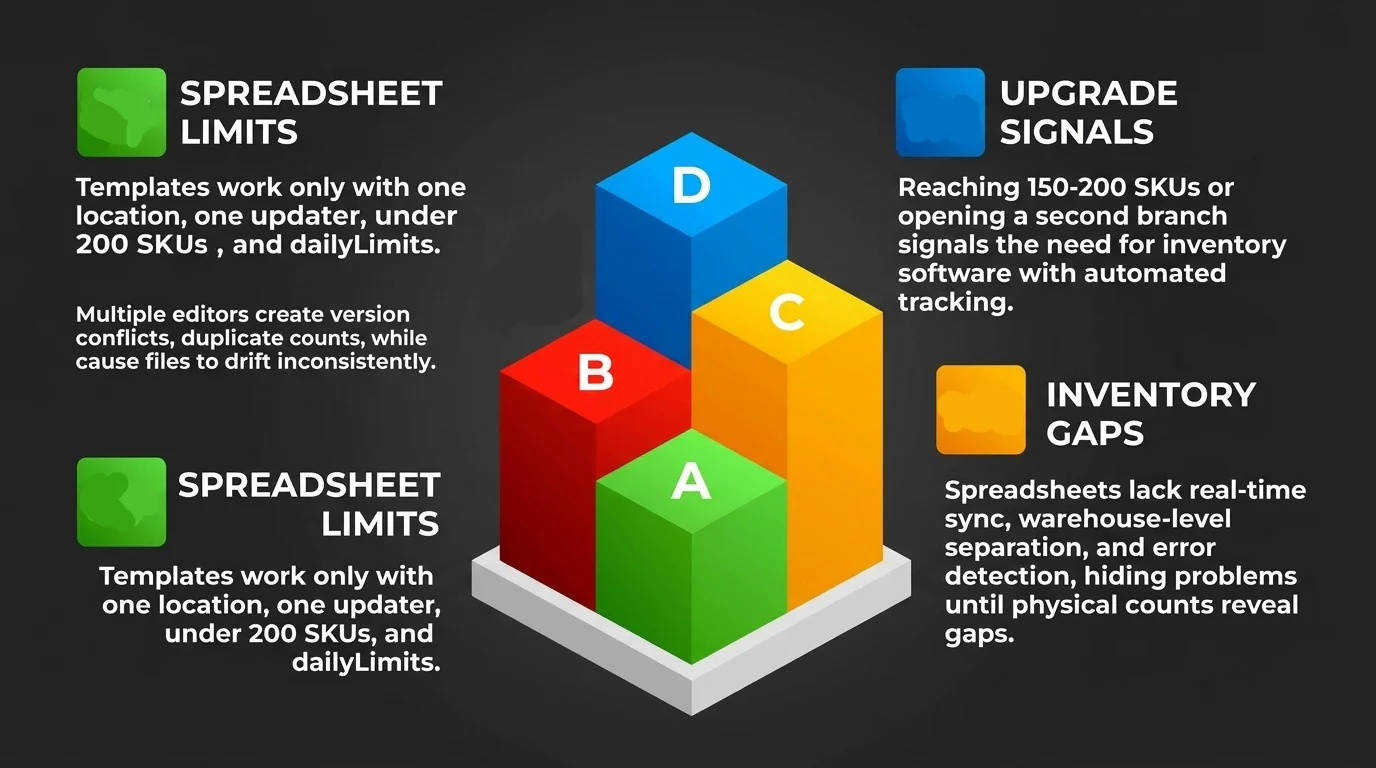
A spreadsheet-based inventory list works well only under specific conditions. These include one location, one updater, under 200 SKUs, and stock movement no more than once daily. The moment any of those conditions change, the template stops being a record and starts generating errors.
Multiple people editing the same file create version conflicts and duplicate counts. Whoever saves last overwrites the current stock figure. A second location demands either one merged file nobody maintains consistently, or two separate files that slowly drift apart. Both paths lead to inaccurate records.
Excel and Google Sheets offer no real-time sync across locations, no warehouselevel- stock separation, and no automated error detection. Human errors stay hidden until a physical count reveals the gap. By that point, stockouts or overorders have already disrupted customer orders or cash flow.
The common transition point for Philippine SMEs is around 150 to 200 active SKUs. The other trigger is opening a second branch in retail, F&B, or distribution. At that point, HashMicro inventory software records every movement in real time, automates reorder alerts, and generates BIR-ready purchase records.
Conclusion
Revenue Memorandum Circular No. 8-2023 makes it clear that Philippine businesses must keep accurate, audit-ready inventory records. A well-designed inventory list template gives SMEs the structure to meet that requirement from day one. List your SKUs, assign units, add reorder points, link BIR receipts, and set a review cycle to create one.
When your SKU count or branch count outgrows a manual file, a dedicated system removes the guesswork. Book a free consultation for HashMicro's inventory management system. See how real-time stock tracking, BIR-ready records, and automated reorder alerts work for Philippine operations.

FAQ About Inventory List Template
An inventory list records what stock is on hand at a specific moment. An inventory report summarizes movement over a period, such as receipts, sales, or adjustments. Philippine businesses need both: the list for day-to-day control and the report for accounting and BIR filing.
Yes. Google Sheets covers core columns for a standard inventory list, supports multiple editors, and works on mobile for stockroom counts. Limitations appear when movement volume is high or when real-time stock levels matter. Philippine retailers and distributors often hit this limit once SKU counts grow.
The BIR does not prescribe a specific template format. However, an examiner will expect to trace each inventory item back to a purchase transaction. The three fields that enable this are the official receipt number, the date of purchase, and the supplier TIN.
The update frequency depends on how fast items move. Fast-moving consumables, such as restaurant ingredients and packaging, should be counted daily or with every delivery. Retail stock in Philippine SMEs is counted weekly. Slow-moving items can be verified monthly. A missed count breaks the running balance.
The practical threshold for most Philippine businesses is 150 to 200 active SKUs. The same signal applies when a second storage location is added. Below that, a spreadsheet is sufficient. Above it, the time spent on manual reconciliation and version errors becomes difficult to manage.