

Many HR teams assume errors happen because they lack data. However, Levenson and Fink (2017) found that HR analytics often struggles not because of a lack of data, but rather because the organization has too many fragmented measurements. Additionally, HR often doesn't have enough usable models or business insights, making it difficult to turn data into clear decisions.
HR teams need clearer workforce visibility to turn scattered records into timely decisions. This guide explains HR analytics, key metrics, real examples, and practical steps for stronger HR data analytics. With better data use, teams can improve hiring, retention, scheduling, productivity, and workforce planning.
Key Takeaways
HR analytics turns employee data into decisions and not just reports.
The four analytics types answer four questions: what happened, why it happened, what may happen next, and what to do.
Start HR analytics with one clear business question, choose only relevant HR metrics, centralize employee data, and review insights regularly to turn analysis into action.
HashMicro HRM centralizes HR data, tracks workforce patterns, and helps teams turn metrics into practical decisions.
What Is HR Analytics?
Human resource analytics uses employee data to explain workforce problems and improve business outcomes. It goes beyond reporting by connecting HR metrics, such as hiring, attendance, payroll, performance, and turnover, to patterns leaders can act on. A report shows the absenteeism rate, while analytics helps explain why it happened and what to do next.
The data usually comes from everyday HR operations, including recruitment pipelines, attendance logs, leave records, payroll runs, overtime, training completion, and performance reviews. On their own, these are just separate events. Read together, they reveal how your workforce behaves and where it needs attention.
For teams that still rely on scattered files, HR analytics can also show where an HRMS or integrated ERP HR module becomes useful. The clearer the data foundation is, the easier it becomes to produce reliable HR reports and workforce insights.
How HR Analytics Differs From Related HR Tools
HR analytics, people analytics, workforce analytics, HR reporting, and HRIS often overlap, but they are not the same. The table below explains how each term differs and where workforce analytics fits in the broader people-data conversation for clearer and better decisions.
| Term | Meaning | Main Focus | Example Use |
|---|---|---|---|
| HR Analytics | Analyzing HR data to support people-related decisions. | Hiring, attendance, payroll, performance, retention. | Finding the cause of high turnover in one department. |
| People Analytics | A wider view of employee experience and workforce behavior. | Engagement, culture, productivity, employee lifecycle. | Linking engagement levels to retention. |
| Workforce Analytics | Analysis focused on capacity, planning, and cost. | Headcount, scheduling, manpower cost, forecasting. | Predicting how many staff a branch will need. |
| HR Reporting | Reports showing current or past HR status. | Numbers, summaries, status. | Monthly headcount, absence, or payroll reports. |
| HRIS | A system that stores and manages employee data. | Data management. | Storing employee records, leave, payroll, attendance. |
Understanding the relationship between HR data analytics is easier than the jargon suggests. An HRIS stores data, HR reporting shows data, and HR analytics interprets data. People analytics and workforce analytics widen the lens toward employee experience, behavior, capacity, and planning. All these layers are usually needed for a mature HR team.
If your HR data still lives across reports, spreadsheets, and separate systems, then it's time to modernize. HashMicro HRM helps centralize employee records, attendance, leave, payroll, and workforce insights in one connected platform.
How Does HR Analytics Work?
HR analytics works by moving data through a practical pipeline, from collection and cleaning to analysis and final decisions. Skip any step and the process becomes weak. Messy data produces misleading insight, while insight that no one acts on becomes another unused report.
Data Collection & Integration
The first step is pulling data from where it already lives. This includes recruitment records, employee profiles, attendance logs, leave requests, payroll, overtime, performance reviews, and training completion. The challenge is not only collecting data, but collecting it in a format that supports consistent hr data analytics across teams, periods, and locations.
For example, two systems that spell department names differently can quietly damage the analysis. Centralized HR data reduces this problem because teams work from one consistent source. This helps HR teams compare hr metrics clearly and avoid arguments over which report is correct.
Analysis & Pattern Detection
Once HR unifies its data, teams can track trends instead of reading each record in isolation. They can see whether turnover keeps recurring in one team, overtime rises every peak season, or time-to-hire stays slow for certain roles. This is where hr data analytics turns numbers into patterns worth investigating.
Strong analysis also compares results across departments, managers, employee groups, work locations, schedules, and periods. By comparing hr metrics over time, HR can spot anomalies early and understand where the business needs attention, whether the issue is hiring delays, workload imbalance, or recurring absence.
Turning Insight Into HR Decisions
The final step is the one teams skip most often. An insight only matters if it changes something, such as a revised hiring process, a workload adjustment, a retention plan, or a schedule fix. A dashboard that nobody uses to make decisions has failed, no matter how polished it looks.
The best HR analytics workflows connect each insight to a next step. If the system shows attendance instability, HR should know which team to review. If overtime pressure keeps rising, operations and finance should be able to discuss capacity before payroll cost increases further.
The 4 Types of HR Analytics
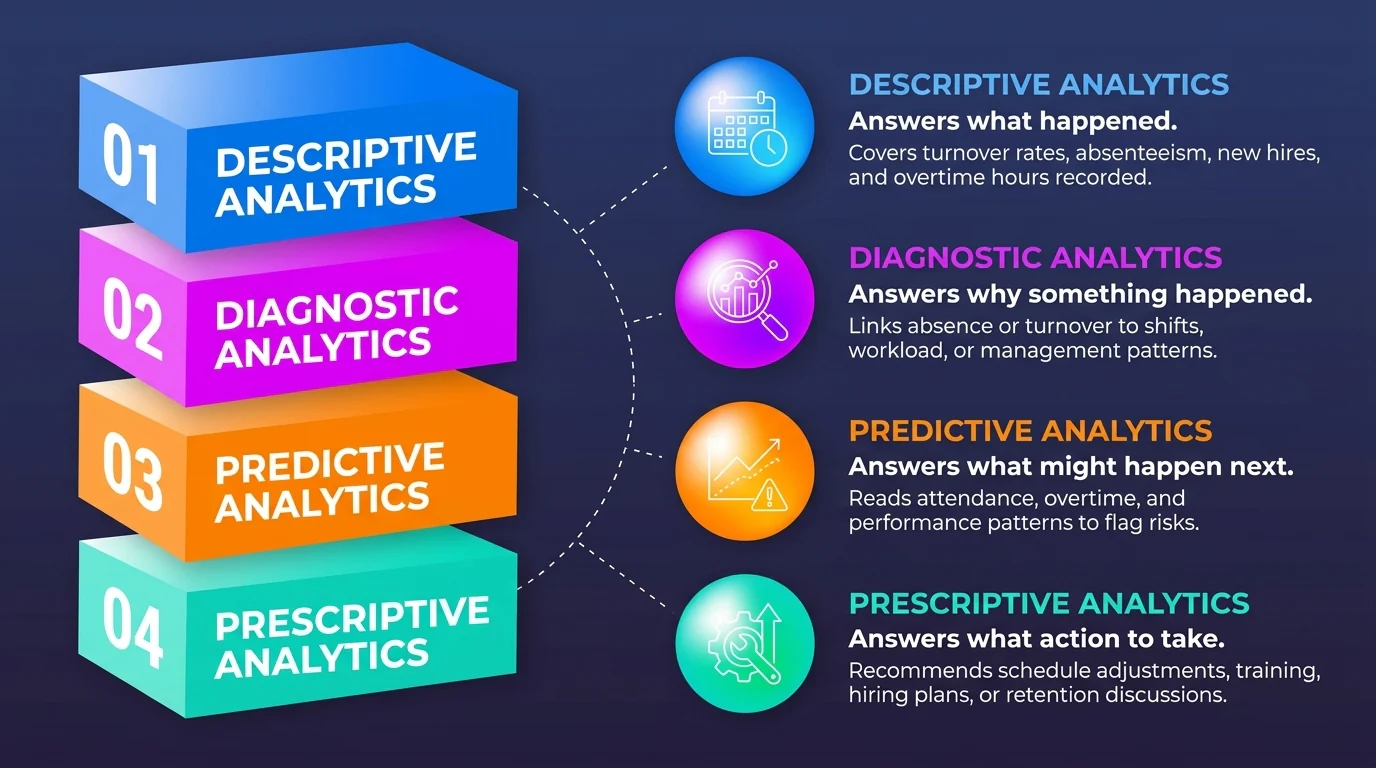
There are four types of HR analytics, and they build on one another like a staircase. Each answers a different question. Most teams start with descriptive reporting, then move toward diagnosis, forecasting, and action planning as their data becomes cleaner and more complete. A mature team should thoroughly know the four types:
1. Descriptive Analytics
Descriptive analytics answers what happened. It covers basic information such as last month's turnover rate, this quarter's absenteeism, the number of new hires, or the total overtime hours recorded in a period. It does not explain the cause yet, but it gives HR a factual starting point.
2. Diagnostic Analytics
Diagnostic analytics is a core part of HR analytics as it answers why something happened. If absence increased, HR can check whether it is linked to a specific shift, season, role, department, or workload pattern. If turnover rose, HR can review whether it followed long overtime periods, poor internal mobility, or repeated manager changes.
3. Predictive Analytics
While predictive analytics cannot predict someone's emotions or private psychological state, it can read observable work patterns. Predictive analytics answers what might happen next. By reading patterns in attendance, overtime, tenure, schedule, workload, and performance records, this workforce analytics helps HR flag risks earlier.
4. Prescriptive Analytics
Prescriptive analytics answers what action should be taken. It can suggest actions such as a schedule adjustment, workload review, hiring plan, training recommendation, or retention discussion. This is the most advanced level because it connects HR analytic data to a clear next step for HR and managers.
Key HR Metrics You Should Track
A veteran HR team will not waste time tracking every HR metric. Rather, they only track the metrics that contribute to a decision. Start with the metrics that answer a real business question, then expand once the team has a reliable review rhythm.
| Metric | What It Measures | Why It Matters |
|---|---|---|
| Turnover rate | The percentage of employees who leave during a period. | High turnover may signal workload, culture, compensation, or management issues. |
| Retention rate | The percentage of employees who stay during a period. | Low retention increases hiring, onboarding, and training costs. |
| Time-to-hire | The time between opening a role and hiring a candidate. | Long time-to-hire can slow growth and cause teams to lose good candidates. |
| Time-to-fill | The time needed to fill an open position from approval to acceptance. | It helps HR understand planning gaps and recruitment bottlenecks. |
| Cost per hire | The total cost of filling a role. | It shows recruitment efficiency and budget pressure. |
| Absenteeism rate | The percentage of scheduled time lost to absence. | Absence spikes can point to burnout, scheduling issues, or workforce instability. |
| Overtime ratio | Overtime hours compared with standard working hours. | Sustained overtime can signal capacity problems or poor workforce planning. |
| Employee productivity | Output compared with headcount, hours, or role expectations. | It helps leaders identify bottlenecks and capacity needs. |
| Training cost per employee | Average training investment per employee. | It helps HR connect learning investment to performance and capability building. |
| Performance rating distribution | How performance ratings are spread across teams or roles. | Uneven patterns may indicate calibration issues, manager bias, or training needs. |
HR Analytics Example: How Businesses Use the Data
This is where HR analytics becomes practical. The pattern is always the same. Start by reviewing the data, finding the pattern, deciding what to change, and then measuring whether the action works. These examples show how ordinary HR metrics can guide better business decisions.
Reducing Absenteeism
A company notices absenteeism increasing but does not know why. Instead of guessing, HR uses HR analytics to compare attendance data with shift schedules, overtime, leave records, and department-level HR metrics. The pattern shows absence is concentrated in one shift with the highest overtime pressure and limited leave coverage.
The decision changes because the operational cause becomes clearer. Rather than treating absenteeism only as a discipline problem, HR and operations can use hr data analytics, workforce analytics, or hr analytics software to review workload, staffing levels, shift rotation, and leave planning. The action becomes operational, not emotional.
Improving Time-to-Hire
Recruitment feels slow, but “slow” does not tell HR what to fix. With HR analytics, HR breaks time-to-hire into candidate source, screening time, interview stage, offer approval, offer acceptance, and other hiring HR metrics. The data shows one role keeps stalling at the same interview step.
That insight helps HR act without increasing the recruitment budget. Through hr data analytics, people analytics, and workforce analytics, the team can adjust interview ownership, set response deadlines, automate reminders, or redesign approval steps. HR analytics software makes these bottlenecks easier to track, so the hiring process improves because the actual delay becomes visible.
Managing Turnover Risk
Voluntary turnover rises in one department, and leadership wants answers before more employees resign. Using HR analytics, HR reviews tenure, overtime, workload, performance trends, internal mobility, manager changes, and other HR metrics. The pattern shows high performers with limited growth movement are leaving first.
The response becomes more targeted. HR can design retention discussions, talent development initiatives, or workload reviews for the right group. This is stronger than a generic employee engagement campaign because the action is connected to a specific workforce pattern.
Benefits of HR Analytics for Your Business
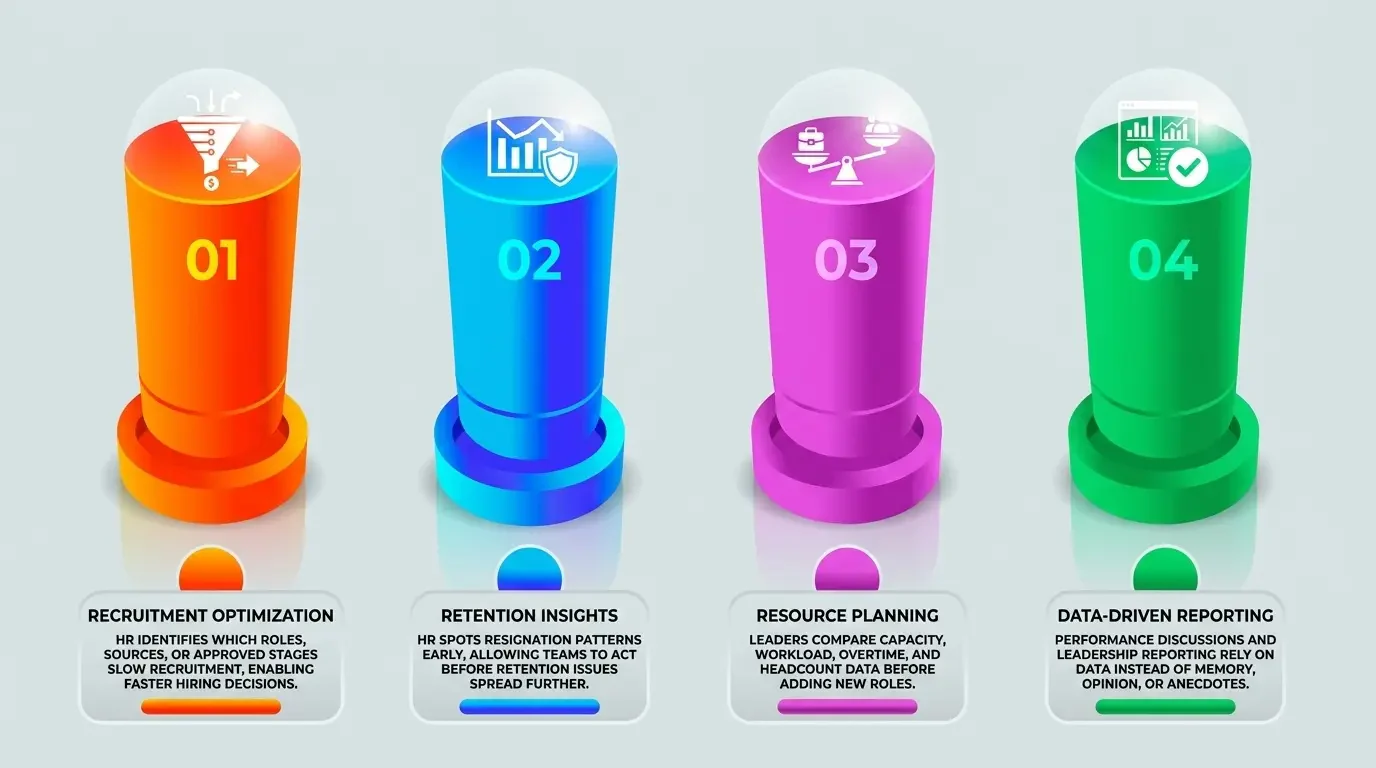
The real value of HR analytics is not a better dashboard; it is better business decisions. When people decisions are based on evidence instead of instinct, the effect shows up in hiring, retention, cost control, performance, and management reporting.
- Faster hiring decisions: HR can see which roles, sources, or approval stages slow recruitment down.
- Better retention strategy: HR can identify patterns behind resignations and act before the issue spreads.
- More accurate workforce planning: leaders can compare capacity, workload, overtime, and headcount before adding new roles.
- More objective performance management: performance discussions can be supported by data rather than memory or opinion alone.
- Stronger cost control: overtime, absenteeism, hiring cost, and payroll variance become visible and manageable.
- Clearer reporting to leadership: HR can bring evidence to management discussions instead of relying on anecdotes.
Each benefit connects back to a decision someone already needs to make. HR analytics simply makes that decision more informed, consistent, and easier to defend.
Step-by-Step Guide to Start Using HR Analytics
You do not need a data science team to begin to use HR analytics. The only thing needed is one clear business question, a few relevant metrics, and the discipline to review findings regularly. Start small, prove value, then expand the analytics scope over time.
1. Define the Business Question
Start with a real problem, not a tool. Good starting questions include "Why is turnover increasing?", "Which roles take the longest to hire?", and "Which department has the highest overtime pressure?". A vague goal like using more data usually leads nowhere because it has no decision attached.
2. Choose the Right HR Metrics
Pick the HR metrics that answer your question. If the question is about turnover, review retention, tenure, workload, overtime, and internal movement. If the question is about recruitment, review time-to-hire, source quality, screening time, and offer acceptance. Measuring everything at once usually creates confusion.
3. Centralize Employee Data
Bring recruitment, attendance, leave, payroll, overtime, and performance data into one consistent place. This is often the most valuable step because it removes the common argument over which number is correct. It also creates a stronger foundation for HR reports and a good workforce management system.
4. Review Insights Regularly
HR analytics should become a routine, not a one-time project. Set a regular review with HR, finance, operations, and management so the same HR metrics lead to shared decisions. This rhythm turns analysis into action plans, and action plans into measurable improvement.
Common Challenges: Data Quality
HR analytics only works when teams trust the data and the process behind it. Incomplete records, siloed payroll or attendance systems, spreadsheet errors, biased metrics, and weak access controls can distort workforce analytics. Keep the scope clear, support responsible AI use, govern employee data responsibly, and focus on observable work signals.
Poor data quality turns HR data analytics into guesswork. Duplicate profiles, missing fields, inconsistent department names, and disconnected payroll or attendance records can make a normal issue look like a major trend. Before reviewing HR metrics, standardize names, clean records, and confirm that each source uses the same definitions.
Employee privacy should set the boundary for every HR analytics project. Limit access, explain why data is collected, and follow applicable privacy rules. CIPD’s people analytics study surveyed 3,852 business professionals and highlights data protection, so HR should analyze attendance, leave, overtime, schedules, workload, and performance records without turning analytics into surveillance.
Use HashMicro to Help With HR Analytics
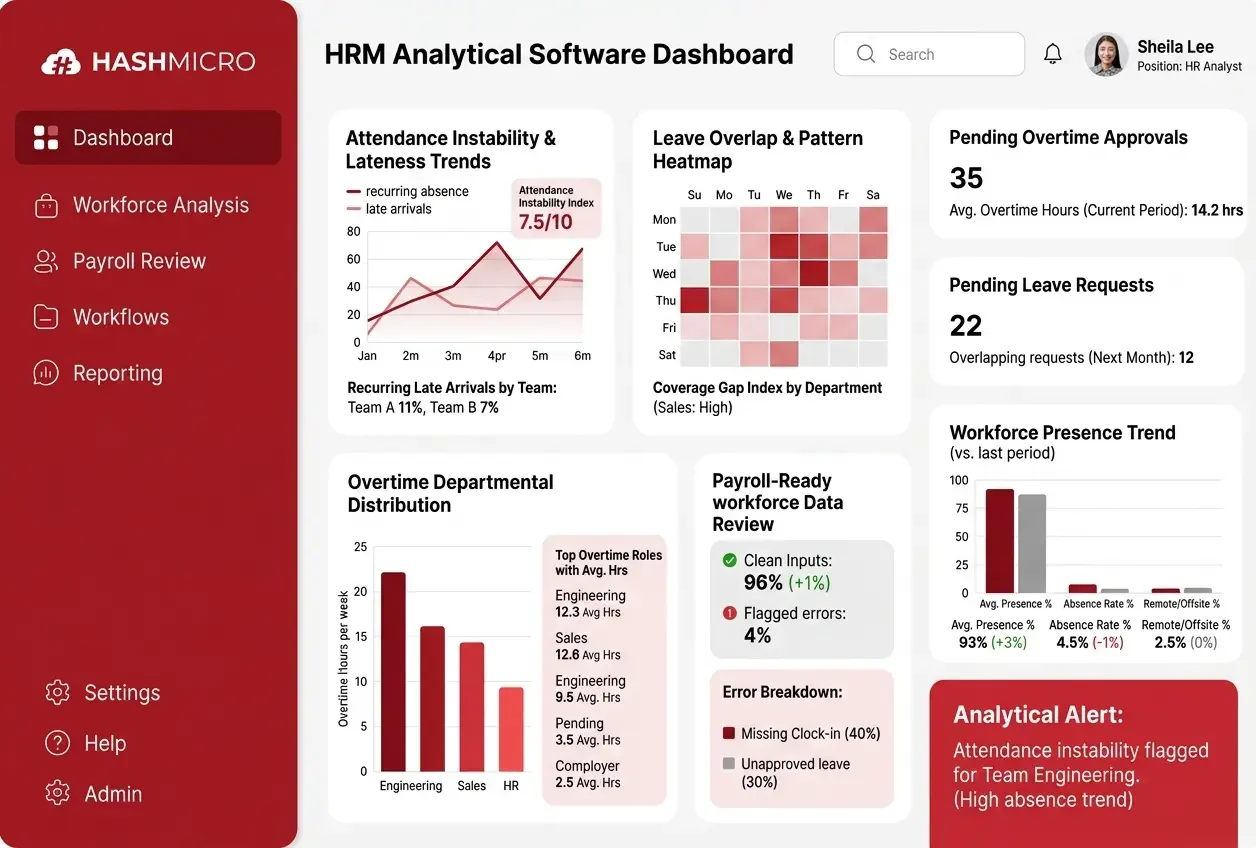
Good HR analytics software should unify employee records, attendance, leave, overtime, payroll, recruitment, and performance data in one place. This foundation helps HR teams stop stitching spreadsheets together and start reading workforce patterns from consistent, connected records.
HashMicro HR analytics software helps businesses collect, connect, and analyze workforce data through one dashboard. Teams can review HR metrics faster, track operational signals, and make decisions based on shared data instead of scattered reports. Book a Free consultation to see how it fits your HR workflow.
Key features to look for include:
- Attendance and lateness trends: Track recurring absences, late arrivals, and attendance instability across teams or periods.
- Leave pattern analysis: Review leave imbalance, overlapping requests, and coverage gaps without turning data into surveillance.
- Overtime tracking: Monitor overtime pressure by role, department, schedule, or location to support workload reviews.
- Payroll-ready workforce data: Connect attendance, leave, overtime, and employee records so payroll teams can review cleaner inputs.
- Approval workflows: Manage HR data analytics and workforce analytics to compare practical HR signals from one reliable source.
- Centralized HR reporting: Use HR data analytics and workforce analytics to compare practical HR signals from one reliable source.
A good HR analytics software does not only display numbers. It helps HR understand observable work patterns, connect them to practical decisions, and review the right issue faster. The strongest platform keeps data centralized, reporting consistent, and workforce insight focused on improving daily HR operations.
Conclusion
HR analytics turns scattered employee data into decisions HR leaders can explain and act on. By connecting hiring, retention, performance, attendance, leave, overtime, payroll, and workforce planning data, teams can compare HR metrics clearly and identify patterns that need review.
The main lesson is that HR data analytics only works when the data is clean, governed, and tied to action. It should help teams understand observable work signals, such as attendance instability, leave imbalance, overtime pressure, and hiring delays. It should not become employee surveillance or private psychological prediction.
If your HR data still sits across spreadsheets and separate systems, HashMicro HRM can help centralize employee records, payroll, attendance, leave, overtime, recruitment, and performance data in one platform. Click the banner below to see how HR analytics software can support faster and more consistent workforce decisions.

FAQ About HR analytics
HR analytics is the process of collecting, organizing, and analyzing employee data to support better HR decisions. It uses information such as attendance, payroll, hiring, leave, turnover, and performance to help leaders understand workforce patterns and decide what to do next.
HR analytics focuses on HR processes and decisions such as hiring, attendance, payroll, and retention. People analytics takes a wider view of employee experience and behavior, including engagement, culture, and productivity. Many companies use both together to understand HR operations and employee experience more clearly.
The most important HR analytics metrics are the ones tied to real decisions. Common examples include turnover rate, retention rate, time-to-hire, time-to-fill, cost per hire, absenteeism rate, overtime ratio, and performance distribution. Start with a few metrics linked to your main business problem.
HR analytics can improve retention by revealing patterns that often appear before employees leave. These may include workload pressure, repeated overtime, low internal mobility, attendance instability, or performance changes. With these signals, HR can create targeted retention plans before turnover becomes harder to manage.
A business can start by choosing one clear question, selecting the right metrics, centralizing employee data, and reviewing insights regularly with HR, finance, operations, and management. Starting small is better than waiting for a perfect data system that never gets used.