






The sections below explain the workflow, evaluation criteria and practical next steps.
Where purchasing breaks down as your business grows
A purchase system combines the processes and software used to manage business buying. Choose one by testing your complete request-to-payment workflow, including exceptions, before comparing feature counts.
Your purchasing team may receive requests through email, spreadsheets, and chat. Approvers cannot see which requests need their attention. Buyers place orders without knowing another department already requested the same items. Finance then searches for receiving records when supplier invoices arrive.
These situations create practical questions for Philippine procurement managers and business owners. Who authorized the purchase, and which supplier price was accepted? What actually arrived, and what remains unpaid? A useful evaluation follows those questions across departments.
Keep the purchase request separate from the purchase order. A purchase request records an internal need before ordering. A purchase order communicates the supplier-facing order. Approving an internal requirement should not obscure who can authorize supplier commitments.
Start with an actual transaction from your business. Follow its documents, decisions, and unresolved questions through purchasing, receiving, and finance. Include a delayed approval or returned delivery. That exercise gives your team a concrete basis for comparing vendors.
Map your purchasing route before evaluating software
Write down your buying route before scheduling demonstrations. Identify who provides information, who approves spending, and who communicates with suppliers. Use the following sequence as your starting point.
- Identify the business need and check available stock.
- Raise a purchase request with items, quantities, and required dates.
- Obtain approval through the agreed departmental route.
- Obtain supplier pricing where the purchase requires sourcing.
- Issue the purchase order through an authorized buyer.
- Receive goods and record quantities, condition, and discrepancies.
- Review the supplier invoice against relevant purchasing records.
- Arrange payment after completing the applicable finance checks.
Pricing can follow different routes within this sequence. Procurement may request quotations and compare supplier offers. Alternatively, the requester may provide price research for purchasing to review. An existing vendor pricelist or blanket agreement may already establish pricing.
Do not require guessed prices from staff identifying operational needs. A warehouse employee may know the item, quantity, and required date. Procurement can obtain prices after reviewing that requirement. Agree how approval continues when the actual quotation becomes available.
HashMicro purchase requests can capture items, quantities, and required dates while keeping prices optional. Requester quotations are stored as attachments or notes, a workaround rather than dedicated quotation comparison. Keep that distinction visible when evaluating who performs the comparison.
Use your process map to explain what a purchase requisition should contain. Then review the differences between purchase requests and purchase orders with approvers. These supporting documents help staff distinguish a purchasing requirement from an authorized supplier order.
Evaluate controls through the exceptions your team handles
Assess controls through transactions that require decisions or corrections. A clean purchase alone will not reveal how responsibility changes during an exception. Ask the demonstrator to show records and approval history.
| Requirement | Demonstration scenario | Evidence to request | Business consequence |
|---|---|---|---|
| Approval routing | Submit purchases across different amounts and categories. | Configured rules, assigned approvers, and decision history. | Staff understand who can authorize each purchase. |
| Departmental budget review | Send a request against a department with limited remaining budget. | Finance's budget view and treatment of pending commitments. | Approvers understand available funds before deciding. |
| Receiving records | Receive part of an order with damaged items. | Accepted quantities, rejected quantities, and outstanding balances. | Purchasing can distinguish delivered items from unresolved orders. |
| Vendor returns | Return goods after the supplier invoice was recorded. | Original receipt, reversal, revised received quantity, and debit note. | Stock corrections remain connected to financial follow-up. |
| Supplier evaluation | Review a supplier with delivery and quality issues. | Evaluation criteria, supporting records, and assessment period. | Buying decisions have an explainable basis. |
HashMicro approval rules are configurable by amount and category. They route requests to relevant department heads, finance, and procurement. Budget accounts by cost center let finance review remaining funds before approving. This describes finance review, not a demonstrated automatic budget block.
Ask vendors to show partial deliveries, invoice mismatches, and overdue approvals separately. Who owns the next action in each case? Can another authorized approver respond during an absence? Record these answers in the evaluation sheet.
For returns, insist on tracing the original receipt. Check the stock reversal and revised received quantity. Where goods were already billed, follow the financial adjustment too. An explanation ending at the warehouse leaves finance's work unresolved.
Check Philippine supplier documents, VAT, and withholding
Bring your Philippine finance team into the evaluation early. Ask them to test supplier documents, tax treatment, and payment records using anonymized transactions. Keep these checks separate from general purchasing approval.
VAT and BIR invoicing
Ask how supplier invoice details reach accounting for VAT review. Can finance inspect the supplier identity, transaction description, tax treatment, and supporting records? Ask which invoice records remain available for finance review. Have finance assess input VAT eligibility against current BIR guidance.
Include the BIR invoicing amendments in that review. Ask how invoice corrections and replacement documents remain traceable. Avoid treating an uploaded document as sufficient tax validation. Finance should explain the checks applied to each transaction.
A purchase order, receiving record, invoice, and payment record serve different purposes. Ask your accountant when each transaction affects the books. Ask which supporting documents finance needs for its VAT review. It should not replace an assessment of liability recognition.
Expanded withholding tax and supplier payments
Ask finance to demonstrate applicable expanded withholding tax classification by ATC code. Follow the withholding treatment through supplier payment and certificate preparation. Ask how BIR Form 2307 is prepared and reconciled. Review the relevant guidance through the BIR withholding tax information page.
For an illustrative PHP 50,000 supplier invoice, ask finance to identify the applicable tax treatment. Then request the corresponding payable, withholding, and payment records. Do not insert a generic withholding rate into the demonstration. Classification and current rules should guide finance's decision.
Supplier-onboarding documents
Use this checklist for your company's supplier-accreditation review. Ask finance which documents apply to each supplier type. Assign responsibility for checking authenticity and keeping records current.
- BIR Certificate of Registration, Form 2303, for tax-registration review.
- Applicable SEC registration evidence for a corporate supplier.
- Applicable DTI business-name registration evidence for a sole proprietor.
- Relevant business permits and verified supplier payment details.
Check corporate registration through the SEC. Review sole-proprietor business-name records through the DTI business-name registration service. Treat this as an onboarding checklist for finance to confirm. It does not establish an identical document requirement for every supplier.
Test the handoffs between purchasing, inventory, and accounting
Follow the same transaction across purchasing, inventory, and accounting. Ask users to locate its request, order, receipt, invoice, return, and payment. Each handoff should preserve enough detail for another department's review.
Begin with goods arriving before the supplier invoice. Ask where the receipt remains visible while finance awaits billing. Then reverse the sequence and enter the invoice before delivery. Check how users identify the unmatched transaction and its responsible owner.
Next, ask the demonstrator to correct a quantity discrepancy. Can purchasing identify what remains open without searching separate spreadsheets? Can finance see why an invoice is awaiting resolution? Ask whether users can trace changes back to their supporting documents.
HashMicro's vendor-return flow starts from a completed receipt. Validation reverses stock and valuation and reduces the PO received quantity. A debit note is raised against the bill when already billed. Follow that full sequence when assessing a billed return.
Separate a shared internal workflow from a third-party integration. A connected purchasing and accounting demonstration does not establish compatibility with your existing application. Ask which system owns supplier records, purchase orders, and payment status. Identify what is entered, imported, or transferred between applications.
Request a written integration scope covering supported transfer methods and error handling. Ask how duplicate records are prevented and failed transfers become visible. Name the team responsible for resolving failures. Require written confirmation of purchase-order API availability for your intended application.
Measure purchasing performance with defined KPIs
Choose measures your team can reproduce from transaction records. Establish your own baseline before setting improvement targets. Use the same definitions throughout the pilot and subsequent reporting.
| KPI | Formula | Required records | Interpretation |
|---|---|---|---|
| PR-to-PO cycle time | PO confirmation date − PR approval date | Approved PR and confirmed PO dates. | Shows procurement processing time after request approval. |
| Vendor on-time delivery | (Receipts on or before promised date ÷ total receipts) × 100% | Promised dates and actual receipt dates. | Shows delivery reliability against recorded commitments. |
| Price variance in PHP | (Bill unit price − PO or pricelist unit price) × quantity | Bill prices, selected baseline prices, and quantities. | Shows differences against the identified pricing baseline. |
| Three-way match exception rate | (Bills with mismatches ÷ total bills) × 100% | Bills and their matching results for the reporting period. | Shows the share of bills requiring mismatch review. |
Keep approval waiting time separate from procurement processing time. Otherwise, a delayed departmental approval can be mistaken for slow sourcing. Review both intervals when investigating an overdue purchase. Assign corrective action to the team controlling the relevant step.
For delivery reporting, count each posted partial receipt once in the denominator. Assess each receipt against its recorded promised date. For price variance, identify whether the baseline is the PO or pricelist. Compare prices using consistent units and tax treatment.
Choose a reporting period for match exceptions and retain its underlying bill list. Review the reasons behind mismatches instead of examining the ratio alone. These are evaluation measures, not a promise of standard vendor reports. Ask each vendor to reproduce them using your sample records.
Use a small worked example to check the calculations. Suppose a PR receives approval on 4 November and its PO is confirmed on 7 November. Procurement processing takes three calendar days under that reporting convention. Record approval waiting time separately from the request submission date.
For an illustrative month, eight of ten posted receipts arrive on time. The receipt-based delivery result is 80%, including each partial receipt once. This measures receipt timeliness rather than whether entire orders arrived complete. Review outstanding quantities alongside the percentage to identify unfinished deliveries.
Suppose the PO unit price is PHP 500, while the bill shows PHP 520 for 20 units. Using consistent units and tax treatment, the variance is PHP 400 above the PO baseline. If three of 20 reviewed bills have mismatches, the exception rate is 15%. These illustrative results are calculation checks, not performance benchmarks.
Define a mismatch as a discrepancy between the PO, receipt, and bill under your agreed matching rules. Count each affected bill once, even when several lines differ. Keep the bill list, discrepancy reasons, and resolution owners available. This lets finance investigate the result and reproduce the calculation.
Use six questions to make a purchasing demo meaningful
Send these questions ahead of the demonstration. Ask the vendor to answer through transactions and supporting records. Record both the good answer and the red flag.
| Question | Good answer | Red flag |
|---|---|---|
| Can staff request items without knowing prices? | Good answer Capture items, quantities, and required dates. Procurement then obtains supplier prices. | Red flag Staff must enter guessed prices just to submit requests. |
| Who compares quotations? | Good answer Demonstrate procurement-led sourcing. Identify requester attachments as a separate workaround. | Red flag Attachments are presented as automated quotation comparison. |
| How do approval and budget review interact? | Good answer Show configured approvers and finance's remaining-budget view. Demonstrate any claimed automatic block separately. | Red flag A budget display is presented as automatic spending enforcement. |
| What happens when already-billed goods are returned? | Good answer Trace the receipt reversal and revised received quantity. Show the related debit note. | Red flag Stock changes, but financial follow-up remains unexplained. |
| Can supplier reviews use our criteria? | Good answer Demonstrate a configured template covering delivery, quality, and price. Explain the evaluation period. | Red flag A supplier score appears without explained criteria. |
| How will purchase orders reach our existing application? | Good answer Provide written integration scope and confirm API availability. Identify responsibility for transfer failures. | Red flag A standard API is promised without supporting documentation. |
HashMicro supports configurable vendor performance templates covering delivery, quality, and price. Vendors are evaluated by period, with configurable supplier-performance dashboard setup. Use your own criteria to test the proposed configuration. Ask the demonstrator to explain how an assessment reaches its score.
Keep the evaluation sheet beside your workflow map. Mark whether each answer was demonstrated or only discussed. Then assign unresolved questions to purchasing, finance, or the vendor. This gives your team a shared record for the buying decision.
How HashMicro can support the purchasing workflow
HashMicro supports purchase requests, configurable approval routing, vendor returns, and periodic supplier evaluation. Evaluate these workflows against your department responsibilities and exception scenarios. Agree on configuration details during the demonstration.
A HashMicro purchase request can contain items, quantities, and required dates. Request prices can remain optional while procurement obtains supplier quotations. Configurable rules route approvals by amount and category. Finance can review remaining departmental funds through budget accounts by cost center.
HashMicro supports procurement-led requests for quotation. Requester-supplied price research follows a different route through attachments or notes. That attachment route is a workaround, not dedicated quotation comparison. Ask purchasing to show how it records the comparison decision.
For returns, HashMicro starts the process from a completed goods receipt. Validation reverses stock and valuation and reduces the PO received quantity. If the goods were already billed, a debit note addresses the bill. Include purchasing, warehouse, and accounting users when reviewing this sequence.
HashMicro's vendor performance templates are configurable for delivery, quality, and price. Periodic evaluations provide the assessment record. Supplier-performance dashboard setup is also configurable. Agree on criteria, assessment ownership, and review periods before relying on scores.
You can explore HashMicro procurement workflows alongside your process map. Use the same sample documents when assessing each relevant workflow. Ask which configuration decisions belong in the implementation scope. Keep integration methods and tax-related outputs as separate demonstration questions.
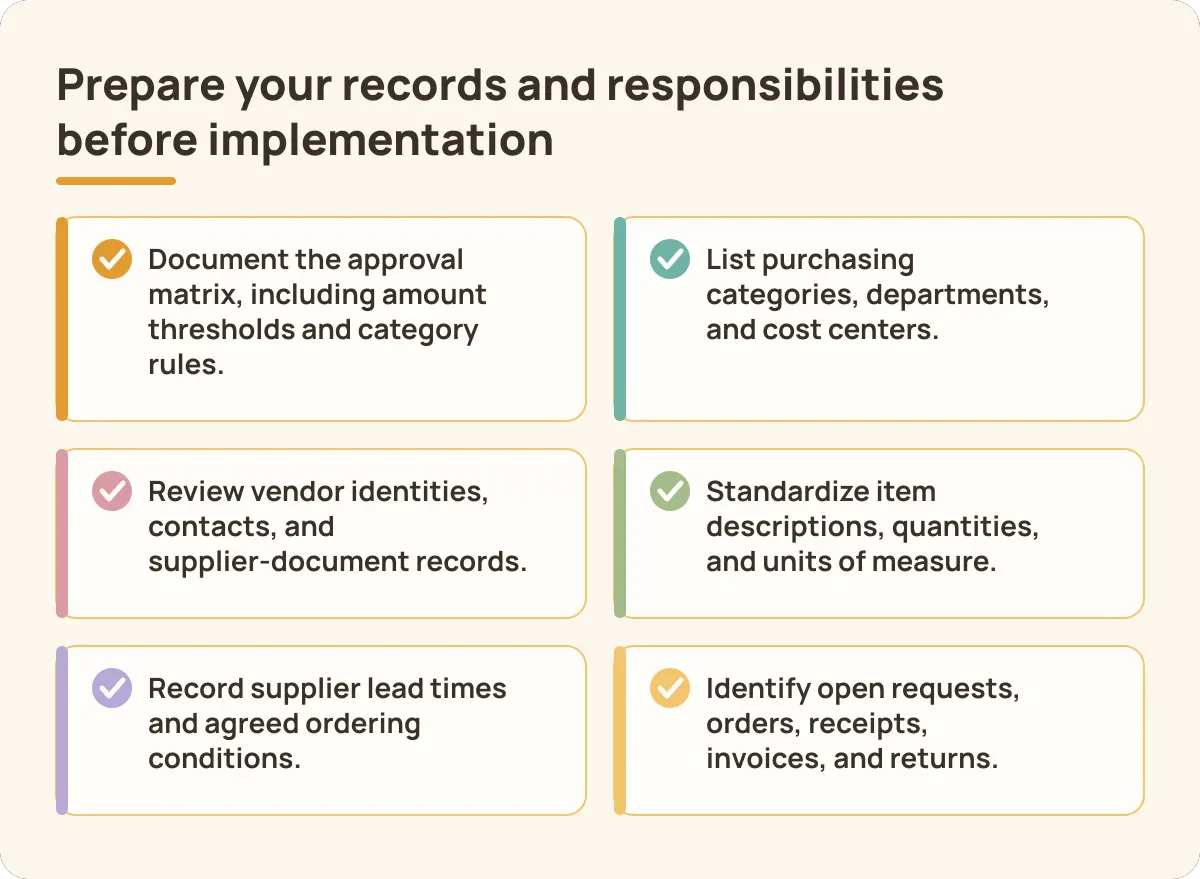
Prepare your records and responsibilities before implementation
Prepare your purchasing records before agreeing on implementation scope. Clean sample data helps your team explain its actual requirements. It also makes demonstration results easier to compare.
- Document the approval matrix, including amount thresholds and category rules.
- List purchasing categories, departments, and cost centers.
- Review vendor identities, contacts, and supplier-document records.
- Standardize item descriptions, quantities, and units of measure.
- Record supplier lead times and agreed ordering conditions.
- Identify open requests, orders, receipts, invoices, and returns.
Agree who compares prices before configuring approval routes. Decide when finance reviews budget and who resolves missing information. Assign responsibility for receiving, rejected deliveries, and vendor returns. Name a substitute for each critical operational role.
Prepare anonymized Philippine business documents for the demonstration. Include a purchase request, supplier quotations, an order, and receiving records. Add the supplier invoice and an already-billed return. Use the related guide for purchase requisition document preparation when checking request completeness.
HashMicro allows request prices to remain optional while procurement sources quotations. Decide whether that route fits each requesting department. Where requesters provide quotations, retain the attachment-or-notes workaround in your process instructions. Do not describe it internally as dedicated quotation comparison.
Assign finance owners for supplier-document review, VAT treatment, and withholding records. Refer them to the Philippine tax checks discussed earlier. Keep tax decisions separate from software configuration assumptions. Record unanswered questions in the implementation issue list.
Define pilot success using your baseline measures and exception scenarios. Require users to complete the workflow with their assigned responsibilities. Review unresolved deliveries, invoice mismatches, and return adjustments together. Agree who signs off before expanding the process.
Conclusion
Start with the workflow and control requirements that matter to your team. Test those requirements with representative records before deciding on the next step.
Frequently asked questions about purchase systems
What is the difference between a purchase system and a purchase order?
A purchase system covers business buying processes and their supporting software. A purchase order is a supplier-facing document within that workflow. A purchase request records the internal need before ordering. Evaluate how these records remain connected through receiving and payment.
Can employees raise purchase requests without supplier prices?
Yes, requests can identify items, quantities, and required dates while procurement obtains prices. HashMicro purchase requests allow prices to remain optional. Requester quotations use attachments or notes, a workaround rather than dedicated quotation comparison. Decide who performs and records the comparison.
Can purchase approvals depend on amount and category?
Yes, HashMicro approval routing is configurable by amount and category. Relevant approvers can include department heads, finance, and procurement. Finance can review remaining funds through cost-center budget accounts. Ask for a separate demonstration of any claimed automatic budget block.
Can a purchase system connect to existing accounting software?
That depends on the supported transfer methods and agreed integration scope. Ask which application owns each record and how duplicates are prevented. Require written confirmation of API availability and error-handling responsibilities. Test your intended application connection before accepting an integration promise.
What Philippine tax requirements should buyers discuss with finance?
Discuss VAT invoice records, supplier-document checks, and supplier withholding classification. Include BIR Form 2307 preparation and reconciliation in the demonstration. Ask finance to check current BIR rules for your transactions. Confirm actual software support for the records and outputs involved.
Bring your purchasing workflow to a tailored demonstration
Choose your purchase system around the work your team must complete. Bring the approval route, receiving exceptions, and finance checks into the same evaluation. Use your KPI baseline to define the expected improvement. Keep unanswered integration questions visible in the proposed scope.
For a Philippine business, include local supplier documents and finance review responsibilities. Ask purchasing, warehouse, and accounting users to follow the same transaction. Include a returned delivery that has already been billed. Check whether everyone can explain the next required action.
Request a HashMicro demonstration using your purchase request, approval matrix, and return scenario. Prepare anonymized records so the discussion stays practical. Record configuration decisions and unresolved questions during the session. Use those results to assess whether the proposed workflow fits your business.