

You've already decided to start the business. DTI or SEC registration is in hand. Then someone mentions the BIR, and suddenly you're facing unfamiliar portals, interchangeable form numbers, and blog posts contradicting each other on cost. A 2026 study of 11 sole proprietors in Baliwag City found owners learn this from peers, Google, and counter visits. None had a formal orientation first.
This guide will cover what it involves for a Philippine business owner, online resellers, and freelancers. From who's required to register, which online route fits your situation, what documents your entity type needs, the steps from submission to certificate, and the part most guides skip entirely: which obligations switch on the moment that certificate is released.
Key Takeaways
Online BIR registration produces two things a business can't legally operate without: a TIN and a Certificate of Registration.
ORUS is the BIR's online registration and update system used directly by taxpayers; NewBizReg is the electronic submission channel for new business registration applications.
BIR registration requirements differ by taxpayer type: Form 1901, 1903, or 1905, plus RDO jurisdiction and permit caveats.
Registration fees changed under RA 11976. There is no longer an Annual Registration Fee, plus official timeline standards have changed.
Post-registration compliance runs on records, not paperwork sprints; HashMicro maintains them, without touching registration itself.
What Is Online BIR Registration?
Online BIR registration is how a business becomes a registered taxpayer with the Bureau of Internal Revenue using the agency's electronic channels instead of walking into a Revenue District Office with a folder of documents. Section 236 of the Tax Code requires it before operations begin, producing two documents: a Tax Identification Number (TIN) and a Certificate of Registration (BIR Form 2303), which lists the taxes you must file.
The BIR divides its requirements into two categories. Primary Registration covers TIN application, which is the step most people mean when they search how to register a business in BIR online. Secondary Registration covers the permits and records that follow. The BIR registration requirements that generate compliance penalties most often sit in Secondary, not Primary. To keep up to date, read the BIR's Ease of Paying Taxes page for the current legal basis.
Secondary Registration is where the ongoing work sits from books of accounts, invoices, and the records behind every return you file. Accounting software that keeps sales records, purchase records, and invoice trails in one place makes those obligations manageable from your first month of operations.

Who Needs to Register with the BIR?
Anyone earning income from a trade, business, or profession in the Philippines generally needs to register with the Bureau of Internal Revenue, though it helps to know which earnings qualify as tax-exempt before you assume your situation is covered. That sounds simple, but in practice, BIR registration requirements cover more than storefront businesses. They also apply to SEC-registered entities, DTI-registered sole proprietors, online sellers, freelancers, professionals, and business branches operating in different locations.
- Sole proprietors: If your DTI business name is registered, BIR registration comes next. It applies to physical stores, home-based shops, services, and online businesses. First-time owners learning how to register a business in BIR online make the business visible to the BIR.
- Partnerships and corporations: SEC-registered entities register with the BIR separately from their partners, incorporators, directors, or shareholders. The company receives its own Tax Identification Number (TIN), while the individuals connected to it keep or secure their own personal TINs.
- Online sellers and digital service providers: Selling on Shopee, Lazada, TikTok Shop, Facebook, Instagram, or your website still counts if it is regular and income-generating. That is why BIR business registration online matters: it makes marketplace sellers and digital-first businesses in the Philippines visible as taxpayers.
- Professionals and freelancers formalizing their practice: Doctors, consultants, designers, accountants, tutors, content creators, and other self-employed professionals register when they want to operate formally, issue invoices or official receipts, and file the correct business or professional tax returns.
- Branches and additional business locations: A head office registration is not always enough. Each branch, store, warehouse, clinic, kiosk, or additional place of business generally needs registration with the RDO that has jurisdiction over that location.
The timing rule matters as much as the obligation. Registration is required before the business begins operating, not after the first sale. Registering late is one of the more common and more expensive mistakes; it gets its own section further down.
A note on scope: this guide covers business registration. If you're an employee applying for a personal TIN for the first time, that's a different process with different forms, usually handled through your employer.
ORUS vs NewBizReg: Which One Should You Use?
This is where many first-time registrants stall. Both portals appear in guides about how to register a business in BIR online, but they do not serve the same purpose. ORUS is built around online taxpayer registration and updates, while NewBizReg works more like a guided submission route for new business registration documents.
| Route | Orus | NewBizReg |
|---|---|---|
| What is it? | BIR’s Online Registration and Update System, a web-based system for taxpayer registration and registration updates. | BIR’s New Business Registration Submission channel for electronic submission of business registration applications. |
| Primary use | Creating an online account, submitting registration forms, uploading documents, and using supported update transactions. | Sending a new business registration application and required documents through the RDO-directed submission flow. |
| Best for | Registrants who want an interactive BIR business registration online account they can keep using for future updates. | First-time business registrants who mainly need to submit BIR registration requirements for a new business application. |
| Where | https://orus.bir.gov.ph/home | https://web-services.bir.gov.ph/newbizreg/ |
Use ORUS if you want an account-based route for online registration and future record updates. Use NewBizReg if your immediate need is a one-time electronic submission for a new business application and the portal routes you to the proper RDO process.
One thing holds regardless of route: your Revenue District Office remains part of the flow. ORUS and NewBizReg are online channels, but your RDO still has jurisdiction over your registration, document review, and follow-up steps. If the office asks for clarification or additional documents, that is normal processing, not a sign that the portal failed.
BIR Registration Requirements by Business Type
Document requirements are not universal. They follow your taxpayer type, business structure, and registration route, so preparing the wrong set can stall your application before the first review. Use the list below as a working guide to BIR registration requirements, then confirm the latest checklist with the BIR portal or your RDO before submission, and set up the records these requirements assume while you prepare.
1. Sole Proprietor / Self-Employed
Use BIR Form No. 1901, the registration application form for self-employed individuals, single proprietors, professionals, mixed-income individuals, estates, and trusts. Prepare a valid government-issued ID showing your address, proof of residence or business address if your ID does not show it, a final sample of your own invoices or the BIR Printed Invoice option, and a DTI Certificate if you registered a business name.
2. Partnership or Corporation
Use BIR Form No. 1903, the application form for corporations, partnerships, cooperatives, associations, and other non-individual taxpayers. Prepare the SEC Certificate of Incorporation, Digital Certificate of Incorporation, or Certificate of Recording for partnerships, plus the Articles of Incorporation or Articles of Partnership and invoice-related requirements.
3. Online Sellers
Online selling does not create a separate BIR form category. If you are an individual seller, the usual route is BIR Form No. 1901; if the online business is a corporation or partnership, use BIR Form No. 1903. For taxpayers searching how to register a business in BIR online, the key detail is your taxpayer type, not whether sales happen on Shopee, Lazada, TikTok Shop, Facebook, or your own website.
4. Existing Taxpayers Updating Registration Details
Use BIR Form No. 1905 for registration updates, corrections, cancellation, transfer, closure, or replacement of a lost Certificate of Registration. This applies when you change registered information such as trade name, address, accounting period, line of business, facility details, tax type details, contact information, books of accounts, or RDO registration.
5. Practical Notes Before Submission
For BIR business registration online, your RDO is generally based on the head office or place of business. For online sellers or content creators without a physical business address, the BIR Citizen’s Charter points to the RDO with jurisdiction over the taxpayer’s place of residence.
Local permits are not a universal baseline item in the current BIR Citizen’s Charter checklist for every initial registration. A Mayor’s Permit or a duly received application may still matter in specific update or transfer cases, so check the current RDO checklist instead of assuming either way.
How to Register Your Business with BIR Online: Step by Step
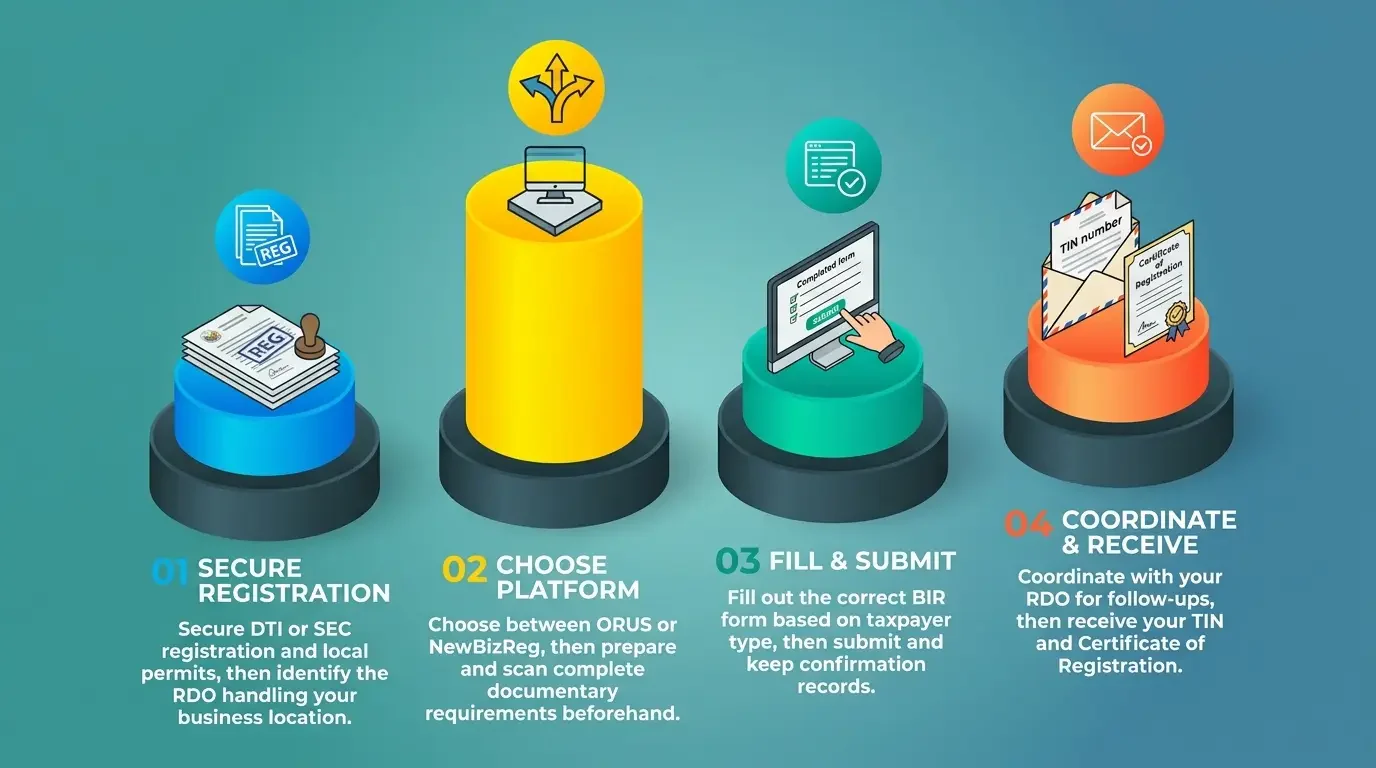
If you are searching for how to register a business in BIR online, treat the process as a document-led registration, not a portal shortcut. The right route depends on your taxpayer type, RDO jurisdiction, and whether your BIR registration requirements are complete before submission.
- Step 1 - Complete your prerequisite registrations: Secure your DTI registration if you are a sole proprietor, or SEC registration if you are a partnership or corporation. Local permits such as barangay clearance, Mayor’s Permit, or proof of application may be needed depending on your route and RDO checklist.
- Step 2 - Identify your Revenue District Office: Determine the RDO with jurisdiction over your head office or place of business before you begin. For online sellers or digital service providers without a separate physical business address, the relevant RDO may follow the taxpayer’s residence.
- Step 3 - Choose your online route: Use ORUS if you want an account-based route for online registration, uploads, status updates, and downloadable registration outputs where supported. Use NewBizReg if you are making a one-time electronic submission of a new business registration application through the RDO-directed flow.
- Step 4 - Prepare and scan your documentary requirements: Assemble the documents for your taxpayer type before opening the portal. Clear, complete scans matter because incomplete documents remain one of the easiest ways to delay BIR business registration online. Keep those scanned documents organized.
- Step 5 - Fill out the correct application form: Use BIR Form No. 1901 for sole proprietors, self-employed individuals, professionals, and mixed-income individuals. Use BIR Form No. 1903 for partnerships, corporations, cooperatives, associations, and other non-individual taxpayers; use BIR Form No. 1905 only for updates to existing registration details.
- Step 6 - Submit your application: Submit through your chosen channel and keep the acknowledgment, reference number, or confirmation email. You will need it if your RDO asks for clarification or if the application status does not move. Keep a trail of BIR Revenue Regulations No. 7-2024 BIR Revenue Regulations No. 7-2024 so you can match it later.
- Step 7 - Coordinate with your RDO: Your RDO remains part of the process even when the submission starts online. Respond quickly if the office asks for additional documents, corrected details, or confirmation of your tax type and line of business.
- Step 8 - Receive your Certificate of Registration: Once approved, you receive your TIN and Certificate of Registration, or BIR Form 2303. Before you start filing, read the tax types in the certificate.
BIR Registration Fees and Timeline
RA 11976 amended Section 236 of the Tax Code and changed BIR registration-fee rules. Older guides may still cite the pre-2024 Annual Registration Fee, but BIR Revenue Regulations No. 7-2024 says business taxpayers no longer pay it. Separate charges may apply to specific documents or services, so check the BIR Citizen’s Charter before paying any amount listed for your route.
The timeline depends on three factors: whether your documents are complete, how quickly you respond to RDO requests, and the workload of the district office handling your file. The BIR Citizen’s Charter gives official service standards by registration route and taxpayer type, so treat generic turnaround estimates from blogs or forums as anecdotal unless they cite the same BIR standard.
Last verified: August 24, 2026. Tax rules, forms, processing standards, and fees can change. Verify the latest registration requirements, service standards, and applicable charges directly with the BIR before relying on this guide for a filing decision.
What Happens After You Receive Your COR
Receiving your Certificate of Registration closes primary registration and opens secondary registration, the BIR's own term for what comes next. Most businesses treat the certificate as a finish line, and that assumption produces the penalties that surface later.
First, invoices and receipts. Your business must issue compliant invoices for its transactions. RA 11976 amended Section 237 of the Tax Code and changed both the invoicing rules and the terminology the law applies to these documents, so review any template you built from a pre-2024 guide. Retail and food businesses that ring up sales on a point-of-sale machine carry a separate obligation for the machine itself, and our guide to POS accreditation requirements covers that path.
Second, books of accounts. Your business must maintain books of accounts and register them with the BIR. RA 11976 also amended the provisions on preserving those books, so confirm the current retention rules against the latest revenue regulations instead of older guidance.
Third, your filing calendar. The tax types printed on your certificate determine which returns you file and when. The BIR treats a missed return the same way whether you knew about that registration or not.
From release day, your business must produce accurate records on demand: sales, purchases, invoices, and the books behind them. Manual tracking holds for a while, then breaks when you reconcile twelve months of transactions against filed returns. The spreadsheet survived the first year, collapsed in the second. A BIR-ready computerized accounting system keeps that record trail intact from the start, avoiding the need for reconstruction later.
Common BIR Registration Mistakes to Avoid
Most online BIR registration problems trace back to a handful of avoidable errors. Each one below costs time at the RDO or shows up later in your filings.
- Registering after operations begin: Registration is required before you start operating. Late registration exposes the business to penalties and complicates your first filings.
- Filing with the wrong RDO: Jurisdiction follows your place of business. Getting this wrong at registration means a transfer request later.
- Using the wrong application form: The form for a self-employed individual is not the form for a corporation, and neither is the form for updating existing registration details.
- Declaring the wrong tax types: Errors in the tax type or line-of-business fields propagate into every return you file afterward. Check your declared types against the current BIR tax rates so the rates you expect match what your certificate actually registers you for.
- Treating the COR as the finish line: Books of accounts and invoice compliance are separate obligations that start immediately. Businesses that need to issue compliant sales documents should review the BIR official receipt requirements as part of post-registration setup.
- Relying on outdated guides: RA 11976 changed multiple registration and invoicing provisions in 2024, so parts of any pre-2024 online BIR registration walkthrough are now wrong. Verify every number, form, and fee against a current BIR issuance. When you reach the filing stage, our eFPS BIR filing guide covers electronic filing enrolment.
Keep Your BIR-Registered Business Compliant with HashMicro

Registration is a one-time event; compliance is not. Once the BIR issues your certificate, your business enters a recurring cycle. You issue compliant invoices, maintain books of accounts, and file the returns your certificate lists. Auditors expect all three to reconcile. Reviewing your full business compliance checklist is a sensible first step after online BIR registration.
HashMicro's accounting software keeps those records accurate from day one. It maintains sales and purchase records, preserves your invoice trail, organizes books of accounts, and produces the reports that support tax filing. Compliance then becomes a by-product of daily work, not a year-end reconstruction.
For businesses that have just finished their BIR registration requirements, these are the practical benefits:
- Sales and purchase records kept transaction by transaction, so your figures stay current instead of being rebuilt at filing season.
- A continuous invoice trail that ties each sales document back to the transaction behind it.
- Books of accounts maintained in one system, rather than spread across spreadsheets and folders.
- Reports that support your filing schedule, matched to the tax types printed on your certificate.
- Reconciliation between records and returns, so sales, purchases, and books line up when the BIR asks.
To be clear about scope, HashMicro does not process, transmit, or expedite BIR registrations on your behalf. It handles the record-keeping obligations that begin after registration, not the registration itself. Get a free consultation to see how the accounting software fits your business.
Conclusion
Online BIR registration comes down to four decisions, including confirming you must register, choosing between ORUS and NewBizReg, preparing the document set your entity type requires, and knowing which obligations activate once the BIR releases your Certificate of Registration. Your RDO stays involved throughout.
Get the first three right, and registration stays administrative. Miss the fourth, and the cost surfaces a year later, when a records request arrives, and the books do not reconcile. HashMicro accounting software that keeps invoices, books, and supporting reports aligned prevents that second-year collapse.

FAQ About Online BIR Registration
Business registration applications can be submitted through the BIR's online channels. Your Revenue District Office remains part of the process and may request clarification or additional documents before approval, so treat online submission as the start of the process rather than the whole of it.
Requirements depend on entity type. Sole proprietors file BIR Form 1901 with a DTI Certificate, a valid government ID showing address, and invoice samples. Partnerships and corporations file Form 1903 with SEC documents and Articles of Incorporation or Partnership. Local permits are not a universal baseline item in the current BIR Citizen's Charter, so confirm your RDO's checklist before submission.
Use ORUS if you want an account-based system for online registration and future updates. Use NewBizReg if you only need to submit a new business registration application electronically. Both route your documents to the RDO with jurisdiction over your business, so confirm current portal coverage first.
Processing time depends on your documents, your responsiveness to RDO requests, and district office workload. The BIR Citizen's Charter publishes official service standards per registration route and taxpayer type, so check the current edition rather than trusting turnaround figures quoted in blogs or forums.
Register your books of accounts, set up compliant invoicing, and read the tax types listed on your certificate, because those define your filing calendar. Retail and food businesses running a POS system complete a separate accreditation before issuing receipts through that machine.