
Every week, someone on your team opens a folder of GCash screenshots and matches them to orders by hand. That manual check is what sends most Philippine businesses searching for the GCash API, hoping for a direct link between their checkout and GCash that confirms payments automatically. The catch shows up early: GCash does not publish an open merchant API, so the integration you pictured is not the one available to you.
According to the GCash API Portal FAQ, the portal is currently only available for selected partner organizations, and other businesses are advised to reach out to a GCash account manager for information about the onboarding process. That single line changes the decision in front of you. You are now choosing which licensed route to buy either a payment gateway, an e-commerce plugin, or a partner application that may never be approved.
This guide covers that choice and everything it sets in motion. It explains who actually qualifies for direct access, how collections, payouts, and in-store QR differ, what licensed Philippine gateways publish as their per-transaction rates and settlement timelines, and what happens to the transaction data after the payment succeeds, so your bank deposits still reconcile with your books at year-end.
Key Takeaways
GCash API access is limited to selected partners, so most businesses use a payment gateway or plugin instead
Your payment route determines how money is collected, transferred, and eventually settled into your bank account.
A GCash integration needs proper payment creation, webhook handling, duplicate checks, and testing before going live.
Transaction fees, payment limits, and settlement timing all affect the actual amount and timing of your cash flow.
What is the GCash API, and can merchants access it directly?
The GCash API is the channel that lets your own system request a payment, send the customer to GCash to approve it, and receive confirmation back automatically. GCash operates as a digital wallet, so every payment clears against a stored balance instead of a card rail. That design explains why the customer approves inside the GCash app, and why your system only receives a confirmation callback afterward.
There is a distinction here that trips up most people searching for this, and it is worth being precise about. A GCash for Business merchant account and GCash API access are two different things. Plenty of businesses have the former. Very few have the latter. If someone tells you they "set up GCash for their store," they almost certainly signed up as a merchant and are collecting through a QR code or a gateway, not building against an API.
How does GCash money move when you accept GCash payments?
There are three separate flows, and mixing them up can slow down approval. Collections cover money coming in, such as customer payments, while payouts or disbursements cover money going out, including refunds, supplier payments, and rider or commission payments. In-person QR is a separate option where customers scan a code at the counter and is often the fastest to activate for physical stores.
For a collection, the process is straightforward: a customer selects GCash at checkout, your system creates a ₱1,000 payment, and the customer approves it in GCash. GCash then confirms the payment through the gateway, your order is marked as paid, and the gateway later deposits the funds into your bank account.
For physical stores, the POS may also need BIR registration regardless of the payment method. Learn more about BIR POS compliance requirements before setting up your system. GCash is one payment option under the broader QR Ph standard, which follows EMV standards and uses codes issued by participating banks, e-money issuers, and payment service providers.
| Method | Type | Best for |
|---|---|---|
| GCash | E-wallet | Widest consumer reach in PH |
| Maya | National QR standard | Counter payments |
| Cards (Visa/Mastercard) | Card | Higher-value and international sales |
| InstaPay | Real-time transfer | Instant transfers, per-transaction caps |
| PESONet | Batch transfer | Larger amounts, same-day batch |
| GrabPay / ShopeePay | E-wallet | Customers already inside those apps |
| Buy now, pay later | Credit | Higher-ticket retail |
| Over-the-counter | Cash | Unbanked and cash-preferring customers |
Which Payment Flow Fits Your Business?
The right GCash integration depends on where the sale happens and whether money is coming in or going out. Collections handle customer payments, recurring collections support subscriptions, in-person QR suits counter sales, and payouts cover supplier or rider disbursements.| Your situation | Flow needed | Typical route |
|---|---|---|
| Online store checkout | Collections | Gateway or plugin |
| Physical counter | In-person QR | QR Ph or merchant QR |
| Invoices sent to clients | Collections | Payment links |
| Monthly subscriptions | Recurring collections | Gateway |
| Paying suppliers or riders | Payouts | Gateway with disbursement approval |
This distinction matters because collections and payouts may require separate approval processes. Choose the flow that matches your transaction type before selecting a provider or starting development.
Should you use the GCash API directly or a GCash payment gateway?
For most Philippine businesses, a licensed payment gateway is the right answer, and a plugin is the right answer for small online stores. Direct partner integration only becomes realistic once your volume is large enough that GCash assigns you an account manager.
A disclosure before the comparison, since everything else you will read on this topic is written by a payment provider HashMicro as an ERP and POS vendor. We do not operate a payment gateway and we earn nothing from your transaction fees. We care about this topic because of what happens to the transaction data afterwards, which is the last section of this guide.
The route you choose also affects how much development work, control, and ongoing maintenance your team takes on.
| Route | Who qualifies | Build effort | Control | Who maintains it |
|---|---|---|---|---|
| Partner-direct | Selected partners only, via GCash account manager | High | Highest | Your developers |
| Payment gateway | Most registered businesses | Low to medium | Good | Gateway, mostly |
| E-commerce plugin | Anyone on a supported platform | Very low | Limited | Platform and plugin |
You cannot get GCash API access directly unless GCash invites you, so for most businesses, the practical choice is between a payment gateway and an e-commerce plugin.
That choice affects your transaction fees, limits, settlement timing, and how much control you have over the integration. More importantly, the payment process does not end when the webhook fires. Your system still needs to match payments to orders, record fees, and reconcile deposits with your books.
Does your business qualify, and what documents do you need?
Before choosing a route, make sure your business is properly registered, as every option requires a know-your-business (KYB) check.
- For the partner-direct route, GCash's stated process is to contact an account manager, there is no public application form and no published eligibility checklist.
- For the gateway route, each provider runs its own onboarding, and requirements differ between a sole proprietorship and a corporation.
- If you run a physical store, also consider the separate POS compliance requirements. Your POS may need BIR registration regardless of the payment method you accept.
How do you build and test a GCash integration?
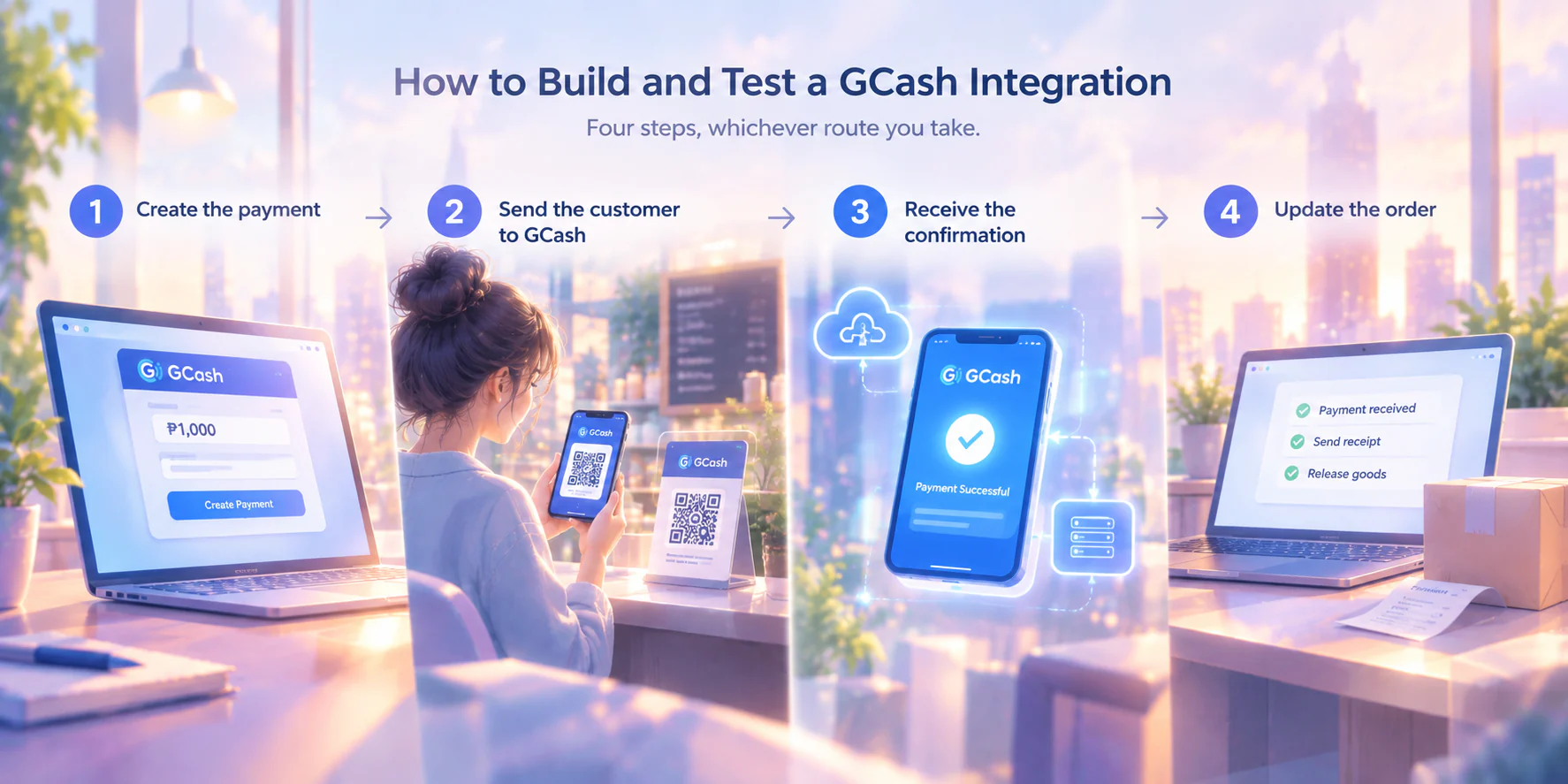
Four steps, whichever route you take.
1. Create the payment. Your system tells the gateway the amount, your reference number, and where to send the customer afterwards.
2. Send the customer to GCash. Redirect or display a QR code at the counter.
3. Receive the confirmation. The gateway calls your system back with the result. This callback is the webhook, and it is the part that fails in interesting ways.
4. Update the order. Mark it paid, send the receipt, release the goods. The webhook deserves attention because it is where assumptions break. The callback does not depend on the customer's browser. If they pay and immediately close the tab, the confirmation still arrives, which is good, and also means you cannot treat the customer returning to your thank-you page as proof of payment.
The same confirmation can also arrive more than once, as gateways may retry when they are unsure the first callback was received. If your system treats every callback as a new event, one order could trigger two shipments, so store the payment reference, check it before processing, and ignore any callback that has already been handled.
This becomes especially important when your POS integration connects payment results with sales and accounting records.
What does the GCash API cost, and what are the limits?
There is no single GCash API price, because what you pay depends on the route you choose. Three separate costs stack up, and quotes usually mention only the first.
Published rates from two licensed Philippine gateways, checked on 14 September 2026:
| Cost | PayMongo | HitPay |
|---|---|---|
| GCash per transaction | 2.23% | 2.3% |
| Maya | 1.79% | (not published on the provider's public pricing page) |
| GrabPay | 1.96% | 2.2% |
| ShopeePay | 1.70% | 2.5% |
| QR Ph | (not published on the provider's public pricing page) | 1% or ₱20, whichever is higher |
| Local cards | 3.125% + ₱13.39 | 3% + ₱15 |
| International cards | 4.02% + ₱13.39 | 4% + ₱15 |
Worked through: a ₱1,000 GCash sale at 2.23% costs ₱22.30, leaving ₱977.70. Add a ₱10 payout fee, and ₱967.70 reaches your bank. On thin retail margins, that is not a rounding error.
Limits are set by your provider, not by GCash universally. Ecommpay's published GCash specification, for example, caps purchases between ₱1.00 and ₱10,000.00 and payouts between ₱10.00 and ₱100,000.00, with processing from 30 minutes up to one day depending on threshold. Ask your provider for its numbers in writing before you commit, particularly if you sell anything above ₱10,000.
When does the money actually reach your bank account?
Confirmation and settlement are different events, often days apart. Your order can be marked paid within seconds, while the cash arrives later.
PayMongo states a standard settlement cycle of 2–7 days, with instant settlement available for an additional fee. HitPay publishes T+1 for non-card payments, T+2 for in-person card payments, and T+7 for online card payments. Both figures were checked on 14 September 2026.
Plan your cash flow around the settlement date, not the confirmation timestamp. Treat each cashless transaction as paid on the customer side but unbanked until payout lands. Reconcile the gateway report against your bank statement every cycle.
What happens after a GCash payment succeeds?
This is where most guides stop and finance teams start having problems. Picture 40 GCash orders at ₱1,000 each: your sales report shows ₱40,000, but your bank statement shows roughly ₱39,098 after transaction and payout fees. The deposit alone does not tell your bookkeeper which orders it covers.
Three things need to happen next:
- Match payments to orders. Store the reference number from the payment step so each deposit can be traced back to an order.
- Record the fees. The ₱892 in transaction fees is a business expense. Recording only the net deposit understates both revenue and expenses.
- Reconcile the batch. Gross order value minus fees should match the settlement deposit. Any difference should be investigated while the transaction details are still easy to trace.
Refunds require separate attention. Support varies by provider: HitPay states that refund processing has no additional fee, although the original transaction fee is non-refundable, while Ecommpay lists full and partial GCash refunds as unsupported. Confirm your provider's policy before promising a refund, especially if it may need to be handled manually. A manual transfer is also easy to book without tax, so make sure the VAT is recorded correctly on both sides of the refund.
Before going live, confirm that references flow end to end, duplicate callbacks are ignored, fees are recorded, deposits reconcile to order batches, and someone owns the refund process.
Conclusion
You cannot get a GCash API directly unless GCash invites you, so the real choice is between a gateway and a plugin. That choice sets your per-transaction rate, your limits, and how long you wait for the cash. And the payment is not finished when the webhook fires, it is finished when the deposits are matched to the orders, the fee is booked, and the numbers agree.
That last part is where a spreadsheet stops being enough. Once GCash deposits arrive net of fees, someone has to match each batch to its orders, book the fee, and keep the VAT clean.
Accounting software that reads the payout file does that work for you, so reconciliation closes the same week the sales happen instead of in January.
FAQ about the GCash API
The timeline depends on the route, not the code. An e-commerce plugin can be live the same day you install it. A gateway adds know-your-business review before your account is switched on, and that review, not development, is usually the longest part of the wait.
Not through a gateway or a partner integration. Every licensed route runs a know-your-business check first, and that check assumes a registered entity. Personal GCash transfers between individuals are a different product, and they leave you without the transaction records your bookkeeper needs.
Check your provider agreement before you try. Surcharging rules differ between gateways, and some prohibit it outright in their merchant terms. Many Philippine businesses price the fee into the product instead, which keeps checkout simple and avoids a term you might be breaching.
The payment channel does not change the sale. Revenue is recognized and invoiced the same way whether the customer taps GCash or hands over cash. What does change is your evidence trail, since the deposit arriving in your bank is net of fees rather than gross.
The checkout fails before any money moves, so the customer is not charged. The risk sits with abandoned orders rather than lost funds. Keeping a second payment method live at checkout, such as a counter QR code or bank transfer, limits what a short outage costs you.