
A stock card helps businesses avoid common inventory problems such as missing transaction records, inaccurate balances, and unexpected stockouts. By recording every receipt, issue, and balance change for one item in one location, it creates a clear and reliable history that staff can use to monitor stock and investigate discrepancies.
This approach also aligns with inventory control practices in the Philippines. The Philippine Commission on Audit’s Stock Card guidance explains that a stock card records all receipts, issues, and the quantity balance at any time. This makes it useful for businesses and organizations that need better control over procurement, stock issuance, and inventory verification.
Learn what information a stock card contains, how to fill it out correctly, and how to read a completed example. See how consistent stock card records can support stocktaking, reordering, accountability, and inventory tracking.
Key Takeaways
A stock card tracks one item at a time. Each line records a date, a source document, a quantity in or out, and the new balance on hand, so the current stock level can always be traced back to evidence.
Philippine stock cards carry three extra fields. Fund Cluster, RIS No., and No. of Days to Consume turn a plain quantity record into an accountability document that satisfies government supply requirements.
Accuracy depends on discipline, not the form. Recording every issue against a reference, recomputing the balance on the same line, and signing off on adjustments are what make a card reconcilable.
What Is a Stock Card in Inventory Management?
A stock card is a running ledger for one inventory item. It records each receipt and issue, including the date, reference document, quantity, and updated balance on hand. Since each card covers only one item, it quickly shows how much stock is available and how the current balance was calculated. Unlike a full inventory list, which summarizes everything a business owns, a stock card provides the transaction history behind one item.
The card is usually maintained by the stock custodian, property officer, or storekeeper who receives and releases the item. In Philippine government offices, it serves as a formal accountability document managed by the Supply or Property Unit. Its balance should match both the physical stock count and the related accounting records.
Key Components of a Stock Card
A stock card has two parts. The header identifies the item and stays fixed. The transaction table below it grows one line at a time as stock moves. The table below shows the fields you will find on almost every version.| Field | What it records | Example entry |
|---|---|---|
| Item Description | The name and specification of the item | Bond Paper A4, 70 gsm |
| Stock No. / Item Code | The internal code used to identify the item | SUP-BP-A4-70 |
| Unit of Measure | The unit the item is counted in | Ream |
| Fund Cluster | The funding source the stock is charged to | 01 – Regular Agency Fund |
| Re-order Point | The balance at which you must reorder | 20 reams |
| Date | The date the movement happened | 04 March 2026 |
| Reference / RIS No. | The source document for the movement | RIS 2026-03-018 |
| Receipt (Qty) | Quantity received into storage | 50 |
| Issue (Qty) / Office | Quantity released and who received it | 12 – Accounting Dept. |
| Balance on Hand | The running balance after the movement | 78 |
| No. of Days to Consume | How long the remaining balance will last | 21 days |
| Remarks | Notes on condition, delays, or adjustments | Partial delivery, PO 2026-114 |
Step-by-Step How to Fill Out a Stock Card
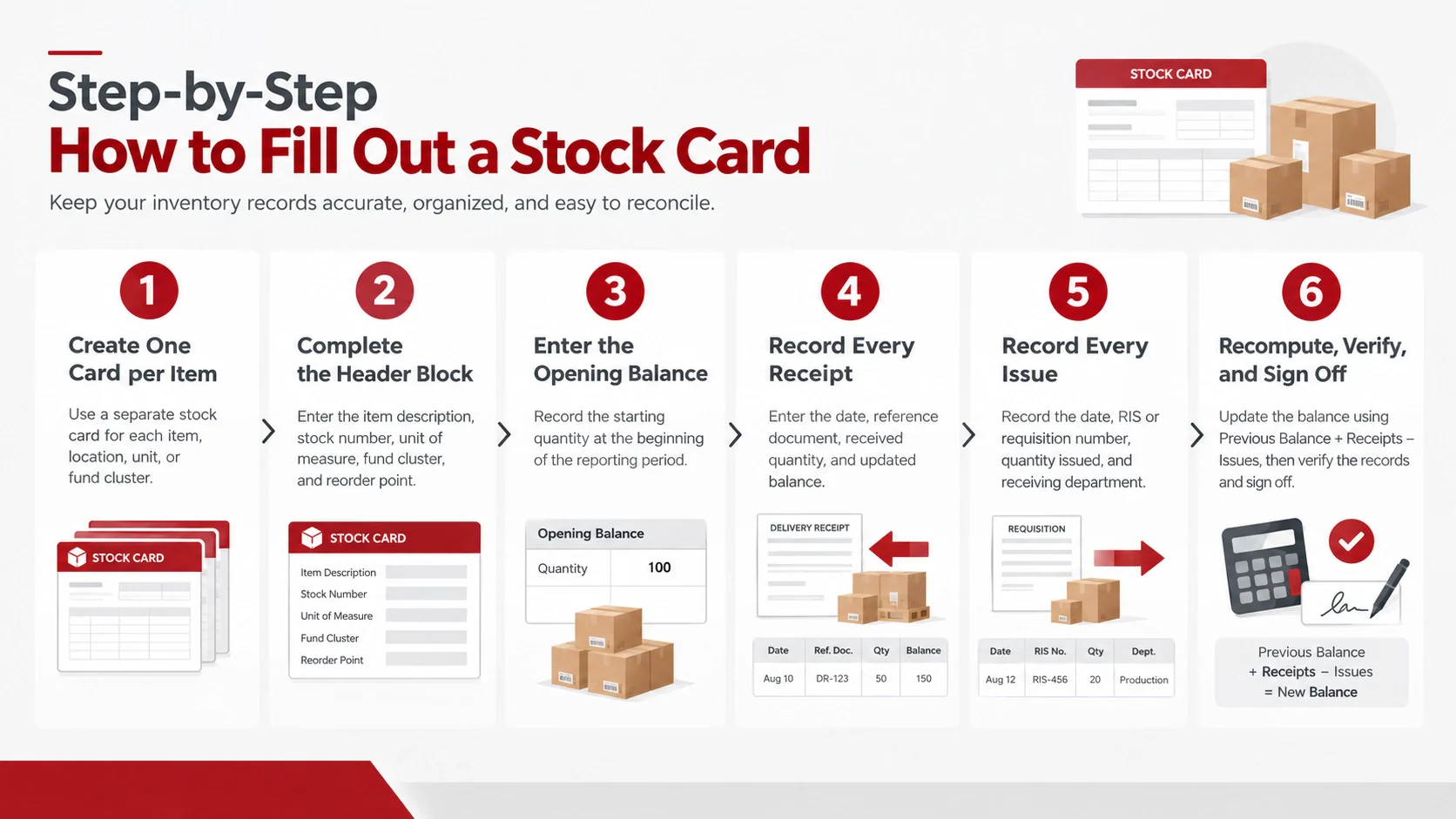
Filling out a stock card correctly requires consistency and attention to detail. Every entry should clearly show what item moved, when the movement happened, how much was received or issued, and how the balance changed. Following the same steps for every transaction keeps the stock card accurate, easy to reconcile, and ready for review.
1. Create one card per item
Open a separate stock card for each stock item. Use the same card for identical items only when they share the same location, unit of measure (UoM), and fund cluster. If the item is stored in another warehouse or charged to a different fund, prepare a separate card to avoid mixing balances and transaction records.
2. Complete the header block
Enter the item description, stock number, unit of measure, fund cluster, and re-order point before recording any movement. These details provide the basic identity of the stock item and help prevent confusion between similar supplies. The re-order point also shows when new stock should be requested.
3. Enter the opening balance
Record the quantity available at the start of the reporting period on the first transaction line. Label it clearly as the beginning balance or opening balance. This gives the custodian and reviewer a clear starting point for checking all receipts, issues, and remaining quantities.
4. Record every receipt as it arrives
When new stock arrives, record the date, delivery receipt, purchase order, or other reference document. Enter the accepted quantity in the Receipt column and update the balance on hand immediately. If the delivery is partial or includes damaged items, record only the quantity accepted into usable storage and explain the difference in the Remarks column.
5. Record every issue against a reference
When stock is released, enter the date, RIS or requisition number, quantity issued, and receiving office or department. The issue should be recorded on the same day whenever possible. Never record an issue without a valid reference document, because every release must be traceable to an approved request.
6. Recompute, verify, and sign off
After each receipt or issue, recalculate the balance using this formula: previous balance plus receipts minus issues. Check that the quantity written on the card matches the supporting document and the physical movement of stock. Once the entry has been reviewed, the custodian and verifier should initial or sign the line to confirm that the record is complete and accurate.
The sixth step is the one most often skipped, and it is the one auditors check first. A card with an unsigned adjustment is treated as an unexplained discrepancy, not a correction.
Stock Card Sample: What a Completed Card Looks Like
The sample below tracks bond paper at a Philippine office over one month. The item is Bond Paper A4, 70 gsm, the unit of measure is ream, the unit cost is ₱185.00, and the re-order point is 20 reams.| Date | Reference / RIS No. | Receipt | Issue | Balance | Remarks |
|---|---|---|---|---|---|
| 01 Mar 2026 | Beginning balance | — | — | 40 | Carried over from February |
| 04 Mar 2026 | PO 2026-114 / DR 8842 | 50 | — | 90 | Delivered at ₱185.00 per ream |
| 07 Mar 2026 | RIS 2026-03-018 | — | 12 | 78 | Issued to Accounting |
| 14 Mar 2026 | RIS 2026-03-025 | — | 20 | 58 | Issued to Registrar |
| 21 Mar 2026 | RIS 2026-03-031 | — | 15 | 43 | Issued to HR |
| 28 Mar 2026 | Count adjustment | — | 1 | 42 | One ream damaged by water, written off |
How to Read This Sample
Every balance is the previous balance plus receipts minus issues. The card opens at 40 reams, receives 50 on 4 March to reach 90, then falls to 42 after 48 reams are issued or written off. Total receipts of 50 minus total issues of 48, added to the opening 40, confirm the closing balance of 42 reams — worth ₱7,770 at ₱185.00 per ream.
The last line is the one worth studying. The damaged ream is recorded as an issue with a remark explaining why, not quietly removed from the balance. That single habit is what keeps a stock card auditable, because the card explains the loss rather than hiding it. Note that the ending inventory balance of 42 sits well above the re-order point of 20, so no purchase request is triggered yet.
Stock Card vs. Bin Card
Stock cards and bin cards are often confused because both track quantities for one item. The difference is where they live and how much they record.| Point of comparison | Stock card | Bin card |
|---|---|---|
| Where it is kept | With the custodian or accounting office | Attached to the shelf, bin, or rack |
| What it records | Quantity, reference documents, and sometimes value | Quantity only |
| Level of detail | Full transaction history with source references | Running count of items in and out |
| Who updates it | The stock custodian or property officer | Warehouse staff at the storage point |
| Main purpose | Accountability and reconciliation | Quick physical check at the bin |
The two are complements, not alternatives. The bin card gives a warehouse worker an instant answer at the shelf, the stock card gives the finance team a traceable record they can reconcile against purchase and issue documents. When the two disagree, the gap is usually an unrecorded issue, and finding it is exactly why both are kept.
Benefits of Using a Stock Card for Inventory Tracking
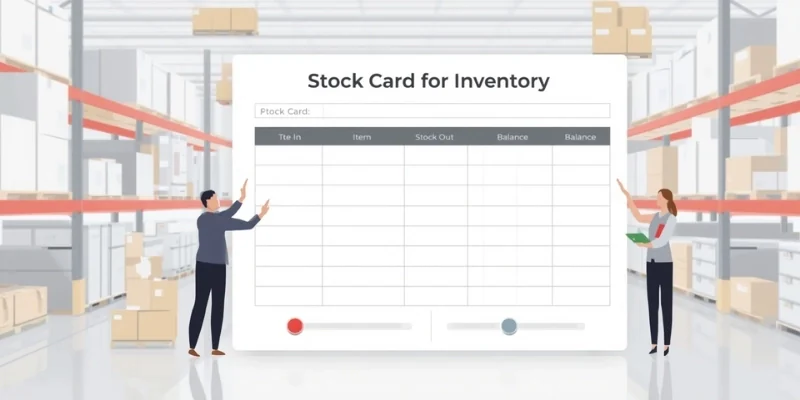
A stock card is a simple document that can significantly improve how businesses monitor and control inventory. By recording every receipt, issue, and balance change, it gives staff a clear reference for checking stock levels and investigating discrepancies.
- Accurate running balances
A stock card shows how the inventory balance changes after every transaction. Since receipts and issues are recorded line by line, staff can check the current quantity without relying only on memory or recounting the shelves. This provides a reliable reference for daily operations, purchasing decisions, and inventory reporting.
- Clear accountability
Each stock issue can include a reference number, receiving department, and responsible personnel. This makes it easier to identify who requested or received the items and when the transaction occurred. Clear documentation also discourages unauthorized releases and supports better internal control. - Faster stocktaking
During a physical count, employees can compare the actual quantity with the balance recorded on the stock card. This creates a clear starting point and helps staff identify whether differences came from unrecorded receipts, incorrect issues, damaged goods, or counting errors. As a result, inventory stocktaking can take less time and produce more focused reconciliation work. - Early reorder signals
A re-order point helps staff recognize when inventory is approaching a low level. Instead of waiting until an item is completely depleted, the purchasing team can review the stock card and prepare a new order in advance. This reduces the risk of stockouts, delayed operations, and urgent purchases at unfavorable prices. - Audit readiness
A properly maintained stock card contains transaction dates, quantities, reference documents, and verification signatures. These details provide supporting evidence for the balance shown in the record. When auditors or managers review inventory, they can trace the quantity back to documented receipts and issues instead of treating the figure as an unsupported estimate.
Together, these benefits explain why stock cards remain useful despite their simple format. They capture the essential information needed to monitor inventory, assign accountability, support stocktaking, and defend the accuracy of a recorded balance.
When a Stock Card Isn't Enough: Moving to Inventory Software
Manual stock cards work well up to a point. That point arrives when the number of items, locations, or daily transactions grows faster than the people maintaining the cards. Updating hundreds of cards by hand introduces delay, and a card updated at the end of the week is a historical document rather than a live balance. An inventory list template can create a more consistent starting structure, but it still depends on manual updates as the business grows.
Cards also cannot answer questions that span items. Stock valuation across a whole warehouse, movement trends by category, or a consolidated inventory report for management all require pulling figures from many cards and recomputing them manually. Inventory management system keeps the same logic, which is receipts, issues, running balance, and source reference, but updates every item at once and makes the data queryable.
Conclusion
A stock card remains one of the clearest tools for inventory management because it shows exactly how a balance was reached. Each receipt, issue, adjustment, and remaining quantity is recorded in sequence, with supporting documents that make the stock history easier to review and verify.
For a small stockroom, consistent stock card usage may be enough to maintain control. As transaction volume grows, however, businesses need a system that can update inventory records in real time, track stock movements, and provide visibility across multiple locations. Whether records are kept on paper or managed digitally, the standard remains the same: every balance should be accurate, traceable, and supported by documentation.
If your business is ready to move beyond manual stock cards, book a free demo and see how centralized stock records, movement tracking, and multi-location reporting can help your team manage inventory with greater confidence.

FAQ about Stock Cards
No. A stock card tracks one item in detail over time. An inventory report summarizes many items at a point in time, usually including quantities and values across locations. The report is typically compiled from the balances that individual stock cards maintain.
A bin card is kept at the shelf and records quantities only, so warehouse staff can check stock instantly. A stock card is kept by the custodian or accounting office and records quantities plus reference documents, making it the document used for reconciliation and audit.
The core columns are date, reference or RIS number, quantity received, quantity issued, balance on hand, and remarks. Philippine government stock cards add fund cluster and number of days to consume, along with header fields for item description, stock number, and unit of measure.
RIS No. is the number of the Requisition and Issue Slip, the document that authorizes the release of stock in Philippine government offices. Recording it against every issue links the quantity released to an approved request and the office that received it.
Yes. A spreadsheet works well for a small number of items, and a formula can compute the running balance automatically. The limitation appears as volume grows, since spreadsheets are updated manually and offer no built-in controls over who edits a figure.