

Every busy service tests a restaurant's weakest link: the handoff between BOH and FOH. A verbal order change that never reaches the line produces a wrong dish, off-book stock movement, and payment records that drift out of sync. A waste-management study found that these strings of miscommunication lead to avoidable food waste.
Before fixing it, it is important to know the precise roles of the two halves. The front of house (FOH) is the guest-facing side that directly interacts with customers, while the back of house (BOH) operates behind the scenes to keep service running. This guide is written for the people accountable for any mistakes, such as restaurant owners, CFOs, IT managers, operations directors, and branch leaders who need more than a list of job descriptions.
This article goes beyond definitions to show the decisions leaders must make regarding BOH and FOH. It maps order handoffs, pinpoints where information breaks down, and sets the KPIs and multi-branch governance that keep every branch consistent. Read further to learn how a restaurant leader can understand roles, diagnose problems, find solutions, and operate FOH and BOH as a single operation with the support of the best restaurant POS system.
Key Takeaways
BOH manages production, preparation, storage, and supply execution, while FOH manages customer-facing service and order capture.
Most FOH and BOH breakdowns begin at unclear ownership, inconsistent procedures, disconnected records, or weak exception escalation.
Restaurant software fits when FOH and BOH workflows are clear, but records stay disconnected or hard to audit.
HashMicro POS connects FOH, BOH, branch, and finance records into one clearer restaurant operating workflow.
BOH and FOH Meaning in a Restaurant Operation
FOH and BOH meet at the order itself. When a server changes an order, the kitchen ticket, stock movement, and payment record must all update from that one action, so separate silos create operational problems. Grasping this shared record and the true FOH meaning and BOH meaning is what separates a well-run restaurant from one endlessly reconciling mismatched information.
Front of house (FOH) includes guest service, reservations, seating, order capture, cashiering, payment handling, and service recovery. A cashier correcting a side dish, a server confirming a modifier, or a supervisor approving a refund is acting within front-of-house operations.
Back of house (BOH) in restaurants covers kitchen production, preparation, receiving, storage, inventory handling, purchasing coordination, cleaning, and related behind-the-scenes work. A kitchen lead confirming that an item is available or a stock controller recording a delivery is performing a back-of-house control.
| Function | Primary objective | Typical activities | Accountable role | Operational record |
|---|---|---|---|---|
| FOH | Capture and fulfil the customer's service requirements | Reservations, seating, ordering, cashiering, payment, complaint handling | FOH supervisor or branch manager | Reservation, order, modifier, payment, void, or refund record |
| BOH | Produce the order using available stock and approved procedures | Receiving, storage, preparation, production, waste recording, cleaning | Kitchen lead or BOH supervisor | Availability, recipe input, stock movement, production, or waste record |
| Shared | Complete and reconcile the transaction | Stock-out response, substitutions, allergen communication, handover, closing | Branch manager with designated functional owners | Approved exception and reconciliation record |
The boundary shifts by restaurant format. Kiosks are used for self-service outlets, while hosts and cashiers work in full-service branches, yet every order still flows from selection to payment and reporting. A controlled stock keeping unit (SKU) structure keeps that flow consistent, giving both teams one reference for purchasing, storage, preparation, and sale.
BOH and FOH Difference in Responsibilities and Control Points
The central difference between front of house versus back of house is where each function acts. FOH detects customer requirements and service exceptions; BOH confirms whether the order can be produced and controls the related stock or production execution. Effective communication and understanding between the two sections is important for a smooth operation. Shared control points keep these responsibilities from becoming isolated silos.
| Control area | FOH responsibility | BOH responsibility | Shared control point |
|---|---|---|---|
| Customer interaction | Capture the request and confirm changes | Advise whether the request is feasible | Approved modifier or substitution |
| Order ownership | Enter the complete order and monitor service status | Accept, prepare, and update fulfilment status | One traceable order reference |
| Inventory exposure | Communicate unavailable items to customers | Confirm available quantity and expected replenishment | Current menu availability status |
| Service timing | Manage expectations and table or queue flow | Control preparation sequence and report delays | Escalation threshold and status update |
| Exception handling | Record complaints, voids, refunds, and remakes | Record production causes, remakes, and waste | Approved reason code and owner |
| Financial impact | Capture correct prices, discounts, and payments | Record consumption, waste, and receiving differences | End-of-shift reconciliation |
A busy-service stock-out shows why BOH and FOH differences should be defined through control points and not stereotypes. BOH confirms the shortage, FOH updates the order and informs customers, and a supervisor resolves exceptions. Because both functions create financial records, restaurant groups should validate each control against their POS that logs every order with a named owner and escalation path.
Which Roles Own each BOH and FOH Responsibility?
Clear ownership separates who creates a record from who approves, monitors, and escalates it. Without that distinction, there will be a chain of confusion. The cashier may assume the kitchen changed availability, while the kitchen may assume the manager approved a substitution, and finance might only discover the difference during POS data reconciliation.
The following RACI-style model covers exactly eight operating areas. It is editorial guidance and should be adapted to the restaurant group's organisation chart and approval rules:
| Operational area | Create | Approve | Monitor | Escalate | System record |
|---|---|---|---|---|---|
| Menu and price updates | Menu administrator or central operations | Authorised commercial or finance leader | Branch manager | Operations director | Item, price, effective date, branch scope |
| Order changes | Cashier or server | FOH supervisor within set limits | Branch manager | Operations or finance for repeated exceptions | Original order, modifier, reason, approval |
| Stock availability | Stock controller or kitchen lead | BOH supervisor | FOH supervisor and branch manager | Procurement or central operations | Item code, available quantity, status |
| Purchasing | Procurement coordinator | Authorised budget owner | Finance and operations | CFO or procurement leader | Request, supplier, quantity, price, approval |
| Receiving | Receiving staff or stock controller | BOH supervisor | Procurement and finance | Branch manager or central procurement | Purchase order, receipt, variance, date |
| Production or waste records | Kitchen or line staff | Kitchen lead | BOH supervisor | Branch manager | Quantity, input, output, waste reason |
| Workforce scheduling | FOH or BOH supervisor | Branch manager | HR or central operations | Operations director | Shift, role, branch, approval |
| End-of-day reconciliation | Cashier and designated stock owner | Branch manager | Finance | Finance leader or internal control owner | Sales, payments, adjustments, stock variance |
The full BOH and FOH meaning extends beyond the floor. The FOH covers hosts, servers, and cashiers, and the BOH spans chefs, stock controllers, and receiving staff. Branch managers oversee the combined result, and head-office finance, IT, and operations set the standards that keep local flexibility within approval limits.
Coordinating hosts, servers, cashiers, kitchen staff, and managers is hard when everyone works from separate notes. Orders, tickets, and payments end up mismatched. A good POS system fixes this by giving every role one shared order to follow.

A Step-by-Step Movement of a Restaurant Order from FOH to BOH and Back
A restaurant order moves from FOH capture to BOH fulfilment, then returns through service and payment while inventory and accounting records are updated. The precise technology may vary, but every restaurant needs a clear system of record for availability, order status, stock movement, receiving, payment, and financial posting.
Imagine one menu item moving through a branch:
1. Purchase
Procurement issues an approved purchase order to the chosen supplier. It sets the item code, quantity, price, and delivery branch from an approved request. The order becomes your official procurement record, but an unapproved price or supplier is the exception to flag.
2. Receive and store
Next, the receiving staff, or the stock controller, compares the delivery against the purchase order. They also record the accepted quantity, rejected quantity, and any variance. BOH then stores the ingredient and updates its available or usable status. The output is an accepted receipt. Any wrong quantity or poor quality is a warning to flag, and the purchase receipt is the system record.
3. Confirm availability
The kitchen lead confirms whether the menu item can be sold during the shift, checking usable stock against planned demand, and FOH receives the current availability status. This produces a sellable status; if an item runs out or is restricted, that's the flag signal, and the on/off status shows up on the POS so servers see it before taking an order.
4. Capture the order
A customer orders the item, and the cashier or server captures it at the POS. This records the quantity, modifiers, service channel, and any instructions. The complete order then becomes the official system record. Staff works only from what is captured there, so a verbal or unsupported change will not be considered an order.
5. Prepare
BOH receives a kitchen ticket or production instruction. They prepare the dish according to what the ticket shows, and as work moves, they update the item's status for service. The finished dish is the expected output of this step. Any delay, substitution, or remake is the exception to flag as it happens.
6. Serve and pay
FOH serves or releases the order to the customer. It then processes payment and records any discount, refund, void, or complaint. The finished item and paid bill close the transaction, confirming the sales and cash. A complaint, void, or refund is the exception to flag on the payment.
7. Adjust stock
The system or an assigned staff member records how stock moved. This covers consumption, waste, and any manual adjustments. Each entry keeps the on-hand quantity accurate for the next order. The updated quantity is the expected output of this step. A negative or unexplained variance is the exception to flag and investigate.
8. Reconcile
The branch manager and finance team post the required accounting entries. They combine the sales, payment, and stock records into one closing result. Everything should agree before the day is signed off, and an approved close then becomes the output. Any unmatched difference is the exception to flag and needs to be resolved before posting.
Across the eight steps, a recurring weak point is a verbal change that bypasses the record, like when a FOH tells BOH a swap the kitchen ticket never captures. A connected workflow updates the modifier at its source, so a restaurant comparing a periodic process with a perpetual inventory system should examine how quickly order, receiving, waste, and adjustment activity becomes visible.
Common Cause of FOH and BOH Handoffs Failing During Service
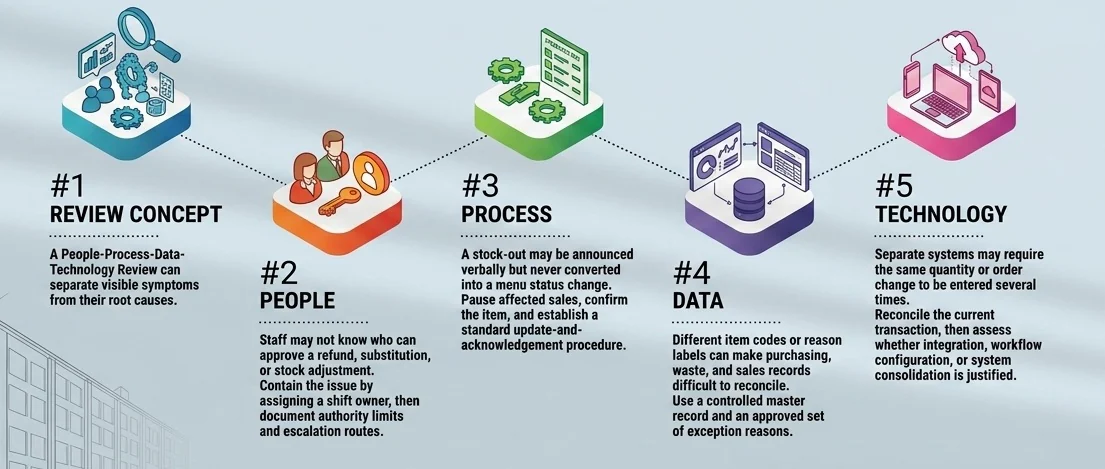
FOH and BOH handoffs usually fail when ownership, procedures, records, or systems do not make the next action visible. Managers should not play the blame game after a difficult shift; rather, they should ask better questions. For one, where was the information first recorded? Who was expected to confirm it? Which record should have shown the exception?
A people-process-data-technology review can separate visible symptoms from their root causes:
- People: Staff may not know who can approve a refund, substitution, or stock adjustment. Contain the issue by assigning a shift owner, then document authority limits and escalation routes.
- Process: A stock-out may be announced verbally but never converted into a menu status change or reflected in the kitchen display system.
- Data: Different item codes or reason labels can make purchasing, waste, and sales records difficult to reconcile. Use a controlled master record and an approved set of exception reasons.
- Technology: Separate systems may require the same quantity or order change to be entered several times. Reconcile the current transaction, then assess whether integration, workflow configuration, or system consolidation is justified.
For a stock-out, FOH records the affected order and customer response while BOH confirms the unavailable item and any approved alternative. The supervisor authorises exceptions, and the system retains the outcome. A complaint should follow the same principle. Capture the category, immediate response, operational cause, owner, and closure rather than storing only a free-text comment.
Leaders should review incident logs, voids, adjustments, stock variance reports, ticket timestamps, complaint categories, and handover checklists together. Establish an internal baseline before setting targets because a count without consistent definitions or ownership can mislead the review.
How to manage FOH and BOH as one operation
To manage FOH and BOH as one operation, both teams work from the same standards, ownership, escalation rules, and trusted records instead of separate notes. HashMicro's editorial governance framework structures this through four layers including central standards, branch execution, exception control, and management review:
| Governance layer | Purpose | Typical owner | Required record |
|---|---|---|---|
| Central standards | Define items, prices, procedures, permissions, and approval limits | Central operations, finance, IT, or procurement | Approved master data and policy |
| Branch execution | Apply standards during purchasing, service, production, and closing | Branch manager and functional supervisors | Transaction and shift records |
| Exception control | Resolve stock-outs, substitutions, complaints, variances, and system incidents | Designated approver | Reason, decision, owner, and resolution |
| Management review | Identify repeated causes and decide corrective action | Operations, finance, and IT leaders | KPI, incident, and reconciliation review |
Each layer exists to keep one FOH action and its matching BOH action on the same record that is an order, an availability status, a receipt, or an adjustment. When both sides write to the same trusted record instead of talking past each other, the front and back of house run as a single operation rather than two teams reconciling later.
Short routines are useful only when they change a record, assign an owner, or close an exception. A practical operating cadence may include:
- A pre-shift availability check that updates the approved menu status.
- A handover covering open orders, shortages, reservations, equipment issues, and pending complaints.
- A closing review of payments, voids, refunds, waste, receiving variances, and stock adjustments.
- A periodic cross-branch review of recurring causes rather than isolated incidents.
Central governance should standardise item definitions, branch identifiers, approval rules, reason codes, reporting logic, and permission principles. Branches may retain controlled flexibility in local scheduling, service recovery, production sequencing, and approved substitutions.
An audit trail is particularly useful when leaders need to establish who changed an order, price, availability status, purchase receipt, or adjustment and when the action occurred. However, traceability is useful only if roles and review procedures are already defined.
Important KPIs to Identify a Broken FOH-to-BOH Handoff
To identify a broken FOH-to-BOH handoff, managers should review several KPIs together, not one number alone. Each indicator must connect to a data owner, source record, definition, and follow-up action so leaders can see whether the issue starts in FOH, BOH, inventory, or finance.
Before setting targets, managers should complete a simple KPI checklist. Targets matter only when every branch measures the same event in the same way; otherwise, teams may reward noise, undercount risk, or misread improvement:
- Define exactly what the indicator includes and excludes.
- Identify the source system and responsible data owner.
- Check whether branches use the same item, reason, and status definitions.
- Establish an internal baseline using a representative operating period.
- Assign an owner to investigate exceptions and record corrective action.
- Review related indicators together before changing policy or technology.
Useful indicators that can trace where service, stock, payment, and records stop matching include:
- Order modifications that were entered late, communicated verbally, or rejected by BOH.
- Voids, refunds, discounts, remakes, and service-recovery transactions by reason.
- Stock-outs compared with purchasing, receiving, availability, and demand records.
- Preparation delays by order channel, item category, shift, or branch.
- Waste and stock adjustments by reason, approver, and timing.
- Complaint categories linked with the relevant order and operational cause.
Differences between sales, payments, inventory movement, and restaurant accounting postings.
- Open exceptions that remained unresolved after the shift handover.
When Should BOH and FOH Coordination Involve Restaurant Software?
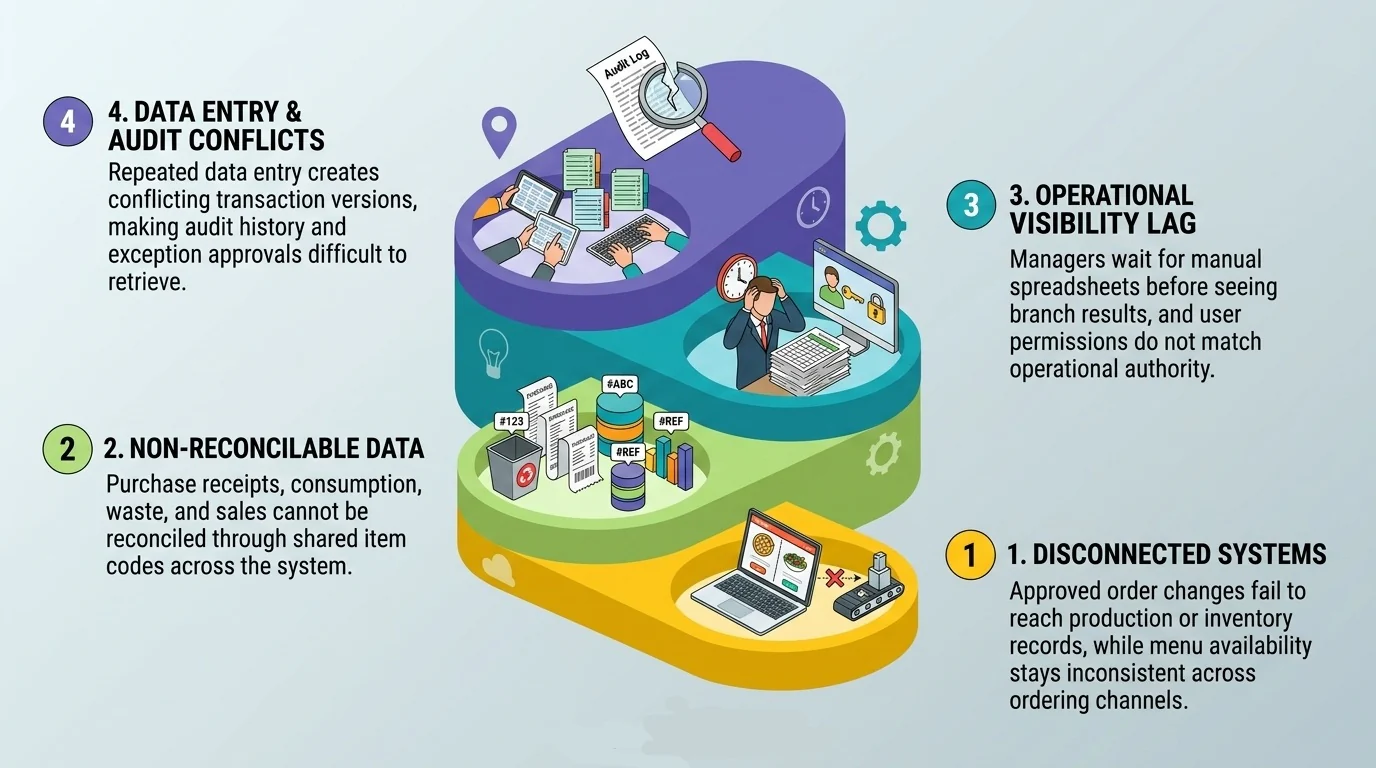
The larger the operation, the harder BOH and FOH work together, and miscommunication becomes easier. Once the BOH and FOH meaning is clear, software helps when agreed workflows still create disconnected records; unclear approvals, procedures, or handovers need training and ownership fixes first.
A software or integration assessment becomes more reasonable when:
- Approved order changes do not reach production or inventory records.
- Menu availability is maintained separately across ordering channels.
- Purchase receipts, consumption, waste, and sales cannot be reconciled through common item codes.
- Managers wait for manual spreadsheets before seeing branch results.
- User permissions do not reflect operational authority.
- Repeated data entry creates conflicting versions of the same transaction.
- Audit history and exception approvals are difficult to retrieve.
A restaurant group can map which platform owns each field, where approvals happen, and which handoffs carry the greatest risk. Before a demo, document baselines, integrations, permissions, reporting needs, and success measures, then compare value against cost using an ERP ROI framework, especially where FOH meaning and BOH meaning in restaurants overlap.
How can a multi-branch restaurant assess software readiness?
A readiness assessment should confirm that the organisation can define consistent data and controls before connecting FOH and BOH records across branches. Begin with one representative order-to-inventory workflow, then test whether the same definitions apply elsewhere.
Check the following areas:
- Item master consistency: Confirm that menu items, ingredients, units, recipes where applicable, prices, and availability statuses use controlled definitions.
- Branch identification: Ensure transactions, users, stock locations, and reports carry the correct branch or operating-unit code.
- Process ownership: Assign owners for order changes, purchasing, receiving, waste, refunds, reconciliation, and system incidents.
- Permissions: Match access and approval rights with actual job responsibilities and escalation limits.
- Historical data quality: Identify duplicates, missing fields, inconsistent reason codes, and unreconciled balances before migration or integration.
- Exception definitions: Agree on how stock-outs, substitutions, remakes, voids, complaints, and integration failures will be recorded.
- Reporting requirements: Define the operational and financial questions that branch and head-office teams must answer.
- Change capacity: Plan training, testing, branch support, cutover responsibilities, and post-launch issue handling while locations remain operational.
Software such as HashMicro ERP may be considered when a restaurant group wants to assess connected workflows across sales, inventory, purchase, accounting, workforce, and multi-branch reporting. However, look into other systems by comparing the fit, integration design, implementation sequence, and commercial scope against the organisation's existing technology and operating model to see which fits your business.
Build a Clearer FOH-to-BOH Operating Chain With an Integrated POS System
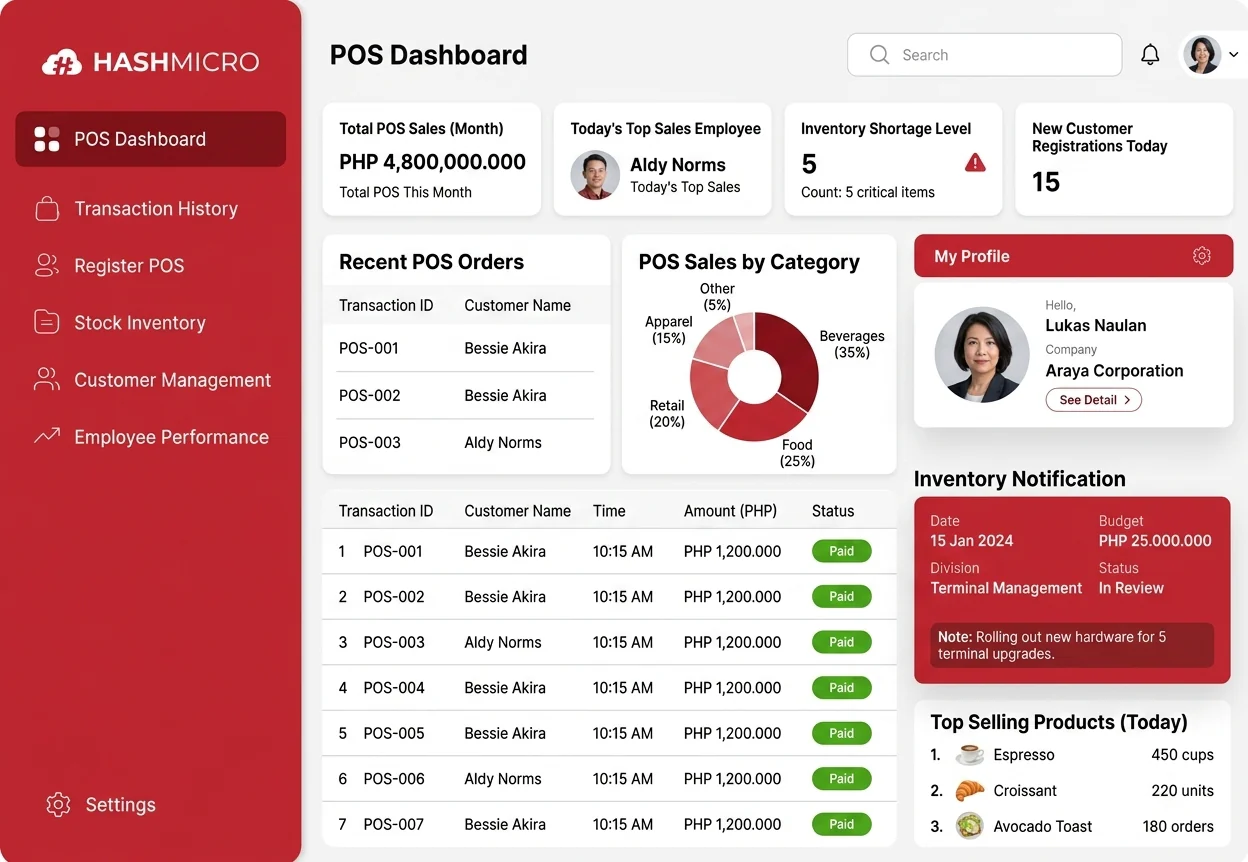
An integrated POS system makes the FOH-to-BOH operating chain clearer by turning one customer request into a shared order, kitchen ticket, stock movement, payment, and finance record. To implement it, define the BOH and FOH meaning first, map one real transaction, assign owners, validate inputs, review incidents, and track KPIs.
There are many good POS systems for restaurants, but HashMicro POS is the strongest option for businesses that need integrated FOH, BOH, branch, and head-office workflows. As an added trust signal, HashMicro ERP is rated 4.3 out of 5 on G2, though the rating should be presented as a vendor-level review signal, not a POS-only score.
Key benefits of HashMicro POS include:
- Connects orders, kitchen activity, stock, payment, and accounting records.
- Helps FOH and BOH work from the same order status.
- Supports multi-branch visibility for restaurant owners and managers.
- Reduces repeated data entry between cashier, kitchen, and finance teams.
- Improves traceability for voids, refunds, discounts, and stock adjustments.
- Makes the FOH meaning and BOH meaning in restaurants easier to manage through clear system records.
Use HashMicro POS if your restaurant needs more than a cashiering tool. It helps translate the BOH meaning and FOH role boundaries into one connected operating flow, so leaders can manage service, kitchen, inventory, and finance with clearer control. Start with a free consultation to assess your current FOH-to-BOH workflow.
Conclusion
Effective FOH and BOH coordination starts with shared ownership, not just separate job descriptions. FOH captures customer requests, while BOH confirms production, stock, and fulfilment. When both sides follow one record, restaurants reduce verbal changes, mismatched payments, stock errors, and delayed reconciliation.
To implement the system effectively, restaurant leaders should map one transaction, define record owners, standardise approval rules, and review KPIs across branches. Hashmicro POS software helps turn those controls into daily practice, linking orders, kitchen tickets, inventory, payments, and finance in one workflow.

FAQ About FOH & BOH
Review the incident pattern, procedure, ownership, and system capabilities before choosing a fix. Use process training when staff are unclear about approvals, confirmations, or escalation. Consider software or integration when the workflow is already defined but records remain disconnected, delayed, manual, or hard to audit.
Standardize shared data before branches adapt workflows. Start with menu items, branch IDs, availability, recipes, purchasing, receiving, waste reasons, payments, schedules, and then reconciliation rules. Central teams should set approval limits and reporting logic, while branches keep controlled flexibility for sequencing, scheduling, and service recovery when every decision stays traceable.
Review order modifications, voids, refunds, stock-outs, preparation delays, waste adjustments, complaint categories, and reconciliation differences together rather than in isolation. Each indicator should have a consistent definition, source record, and data owner. Establish an internal baseline before setting targets so that managers can distinguish an operating change from a change in how branches record incidents.
Map ownership for each critical field first, including item code, order status, quantity, receipt, payment, and financial posting. Then review integrations, exports, approval rules, identifiers, and reconciliation points. Connect the riskiest handoffs in phases, while checking security, system constraints, current apps, and implementation capacity.
Check item master consistency, user permissions, branch identifiers, historical data quality, process ownership, exception definitions, reporting requirements, and change-management capacity. Managers should also document the business case, current baseline, required integrations, testing approach, training plan, and measurable success criteria before requesting a consultation or product demonstration.