

Business documents can quickly become difficult to manage when files are spread across separate places. Staff handling documents from owners, managers, and operations teams waste time searching emails, shared folders, chats, cabinets, and devices. Employees also waste time hunting for the latest version, waiting for approvals, or checking who can access sensitive records.
A document management system helps solve this by giving businesses one organized place to store, control, track, and manage documents. In this guide, we’ll explain what a document management system is, how it works, its key benefits, essential features, and how it supports different departments.
Key Takeaways
An electronic document management system is a digital system used to organize and manage documents.
A DMS controls each document from capture to retrieval, with secure access, approvals, version history, and audit trails.
Essential DMS features include capture, structured storage, search, version control, permissions, approvals, audit trails, cloud access, ERP integration, and e-signatures.
A good DMS is secure, scalable, and workflow-ready; HashMicro centralizes files, automates approvals, and connects documents to ERP workflows.
What Is a Document Management System?
A document management system (DMS) is a digital platform businesses use to store, organize, track, secure, and manage business documents in one place. It gives teams a structured way to keep invoices, contracts, employee records, policies, reports, and operational files accessible without relying on scattered folders or manual filing.
Document management software allows teams to find the right file, manage user access, control document versions, and trace every activity. The system also supports document capture, keyword search, approval workflows, permission settings, and audit trails. With these capabilities, businesses can monitor who created, edited, approved, viewed, or shared each file.
An AIIM study of over 400 ECM users found that 52% of organizations had three or more content, records, or document management systems in place. This finding shows why a centralized DMS matters. It helps teams reduce duplicate versions, protect sensitive records, and maintain accountability across departments.
Why and When Does a Business Need a Document Management System?
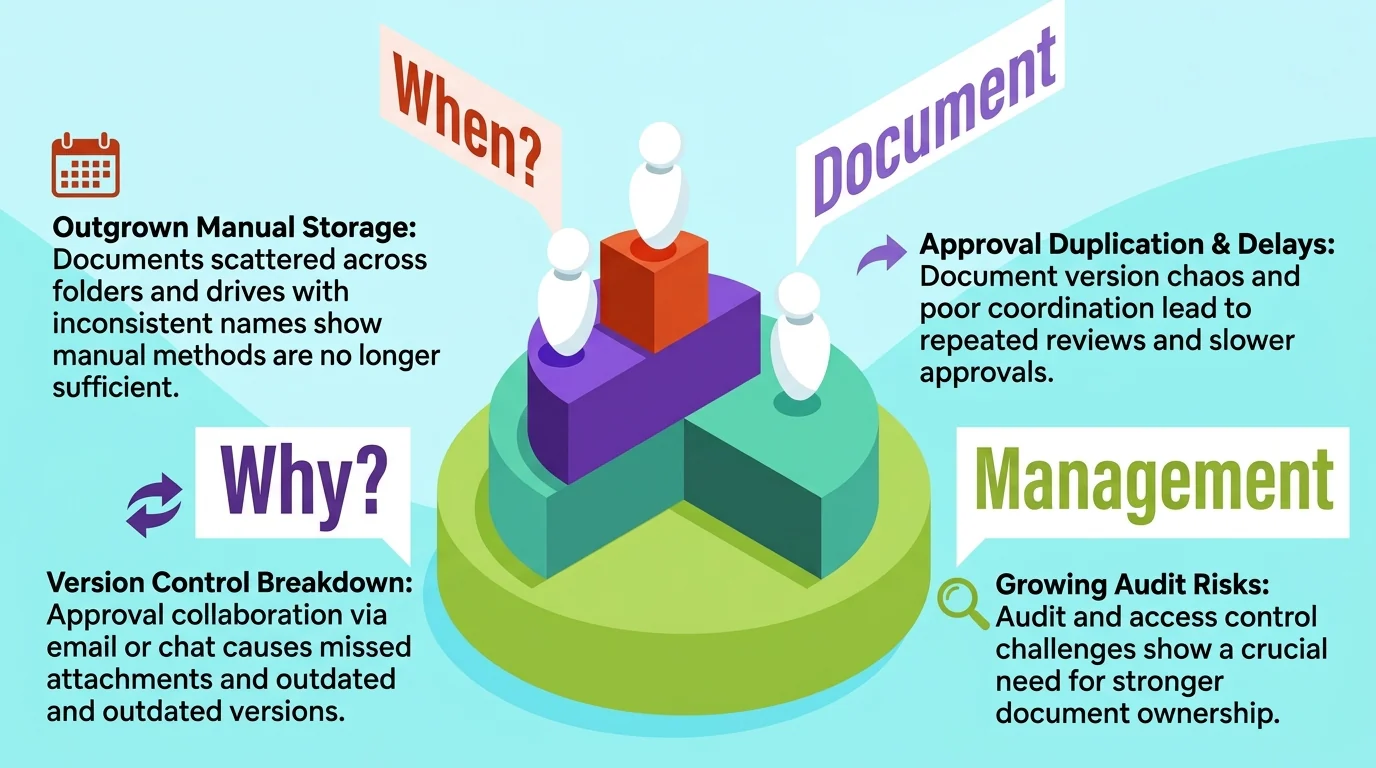
Businesses need a document management system when daily document handling starts creating delays, confusion, and control risks. Missing files, unclear versions, too many email attachments, growing teams, multiple branches, paper-heavy work, and audit preparation issues are clear signs that the current process no longer works well enough.
1. When documents are hard to find
A common trigger appears when employees spend too much time looking for documents. Files may sit in different folders, email threads, shared drives, paper cabinets, or personal devices. Some documents may also use inconsistent names, making it difficult to identify the right contract, invoice, HR record, policy, or report.
This problem becomes more serious when teams need documents for customer requests, financial reporting, branch operations, or internal approvals. If employees must ask several people just to locate one file, the business has outgrown manual document storage.
2. When approvals still rely on email or chat
Approval delays often happen when teams send documents through email or messaging apps. Managers may miss attachments, review outdated versions, or lose track of which file has already been approved. Long email threads also make it harder to confirm who changed, reviewed, or forwarded each document.
This is a strong sign that the business needs a more controlled approval process. When every department sends files in different ways, employees may repeat reviews, approve the wrong version, or spend extra time checking message history before moving work forward.
3. When audit and access control become harder to manage
Audit and access problems usually grow as the company handles more sensitive documents.
Audit and access problems usually grow as the company handles more sensitive documents. Contracts, payroll files, financial records, legal papers, and payroll compliance records should not move freely. There should be clear ownership or access control for every inbox, chats, and shared folders.
The need becomes clearer when the company expands across departments, branches, or paper-based workflows. The current document process has become too risky when teams must manually check who accessed a file, where the latest version is stored, or whether supporting documents are complete before an audit.
How a Document Management System Functions
A document management system works by turning every incoming file into a controlled digital record. The document management process follows a fixed order. It starts with capture or upload, indexing with metadata, secure storage, role-based access, approval routing, retrieval, version control, and an audit trail that records each action along the way.
1. Document capture and indexing
The process starts with document capture. Users upload digital files or scan paper records into the system, including PDFs, spreadsheets, images, contracts, invoices, HR files, and operations management. Most electronic document management system tools also read scanned pages through OCR, so paper records become searchable text instead of flat images.
The system then indexes each file with metadata. This includes document type, date, department, vendor name, customer name, project code, or approval status. Once indexing is complete, the document management software stores the file in a central cloud repository with encryption and automatic backup. Thus, the record no longer depends on one folder, one inbox, or one employee's device.
2. Access control and approval workflow
After storage, the system applies role-based access. It decides who can view, edit, approve, download, or share each file. HR documents may stay open only to HR staff and authorized managers, while financial records stay limited to accounting and management teams.
The document management system then routes the file to the right approver based on department, amount, role, or business rule. A purchase order moves to the branch manager, a contract moves to legal, and an invoice moves to finance. Each step records the approver, the date, and the decision, so teams stop chasing approvals through email threads.
3. Retrieval, version history, and audit trail
Once a document sits inside the system, users retrieve it through keyword search, filters, or metadata such as department, date, or document type. Version control keeps every revision in order, marks the current file as the latest, and shows what changed between versions.
The audit trail closes the loop when business processes are automated by logging uploads, edits, approvals, downloads, and permission changes. Companies that run a document management system in the Philippines across several branches rely on this record to confirm who handled a file, when they handled it, and whether the supporting documents were complete before an audit.
Key Benefits of Using a Document Management System
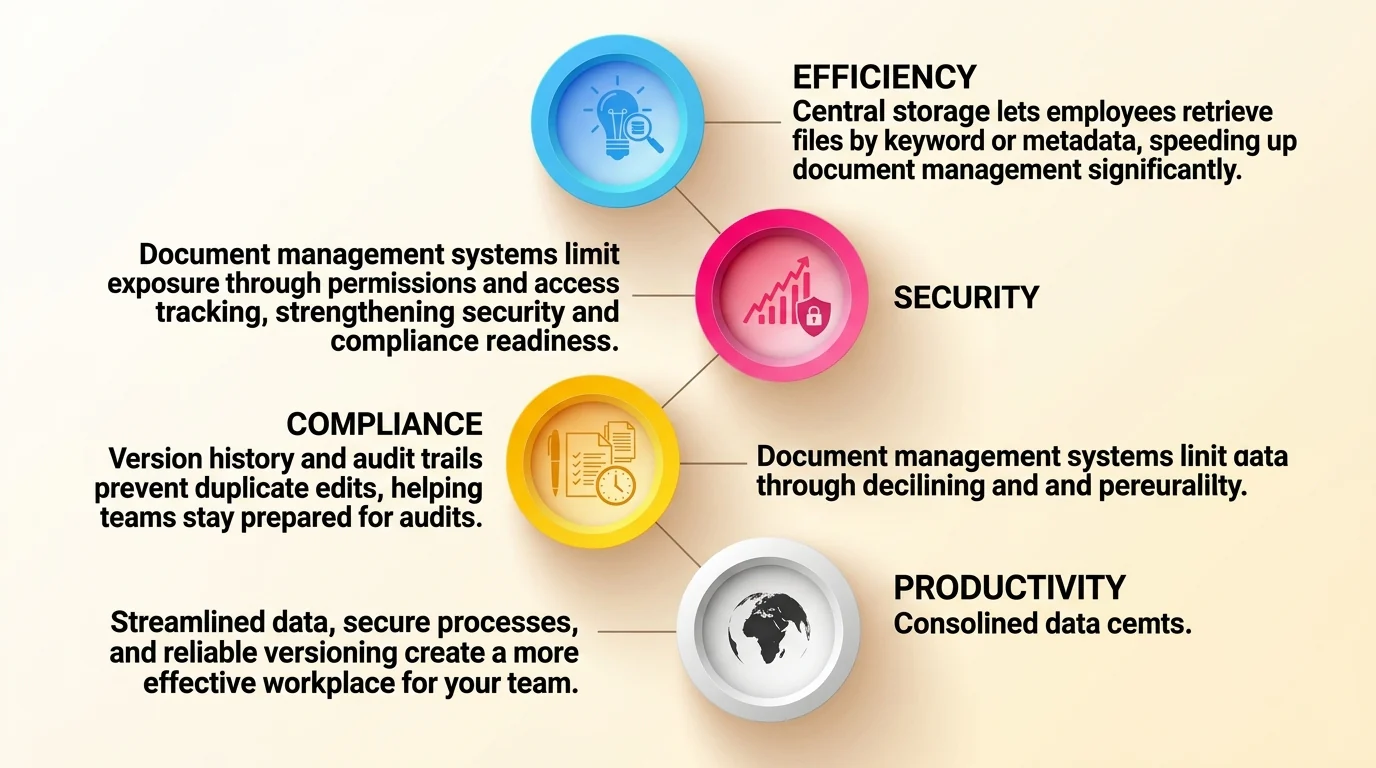
The main benefit of a document management system is tighter control over business documents. Teams find files faster, work from one central storage location instead of scattered folders, apply stronger security to sensitive records, and collaborate without version confusion.
1. Faster document retrieval
Manual filing causes delays to customer replies, branch requests, and month-end reporting. This is because it forces employees to dig through folders, email threads, shared drives, and paper cabinets, which often ends with asking a colleague who might still have the file.
Central storage removes most of that search. DMS lets users pull up a file by keyword, metadata, category, date, department, or status. This means one person can retrieve a contract or invoice without waiting for the person who filed it. With centralization, there will be fewer interrupted colleagues, stalled requests, and time spent rebuilding files that already exist somewhere. While not a dramatic gain, it still fastens the document management process.
2. Better security and access control
Business documents carry information that should not circulate freely, including contracts, financial statements, payroll records, customer details, and vendor agreements. When those files move through inboxes and chat groups, no one can say for certain who still holds a copy.
A document management system limits exposure through user permissions, role-based access, and activity tracking, so each team opens only the documents its work requires. This also makes compliance work easier to handle, since the business can show which records exist, who could access them, and when access changed. It does not replace the policies but supports compliance efforts, so the company still needs to run reviews.
3. Improved collaboration and audit readiness
Most business documents pass through several people before they are final. Without a controlled document management process, teams create duplicate copies, edit the wrong file, or approve a version that a manager already replaced.
Version history, approval status, and audit trails keep that work in one place, so a team edits the current file and sees who reviewed it. For companies preparing an audit, the same record helps auditors confirm which version is final, who approved it, and whether the team attached the supporting documents. Finance, HR, and legal teams spend the days before a review checking the trail instead of rebuilding it.
Essential Features of Document Management Software
Document management software should help businesses capture, store, find, secure, approve, and track documents. A complete document management system supports the full document management process, from file entry to daily use. The core features include capture tools, advanced search, structured folders, version control, permissions, approvals, audit trails, cloud access, ERP integration, and e-signature support.
1. Search, storage, and version control
A good DMS starts with document capture. Users can upload digital files, scan paper records, or capture forms into an electronic document management system. The software should then organize each file by folder, category, department, project, vendor, customer, or document type.
Version control also matters because it shows the latest file, keeps older versions available, and helps teams review changes while managing information throughout its lifecycle.
Advanced search helps users find documents without opening folders one by one. Teams should be able to search by keyword, file name, metadata, date, status, or document owner. Version control also matters because it shows the latest file, keeps older versions available, and helps teams review changes while managing information throughout its lifecycle.
2. Permissions, approvals, and audit trails
User permissions help businesses control who can open, edit, download, share, or approve each document. Not every employee needs access to contracts, payroll records, financial reports, or legal files. Role-based access lets companies match document access with each user’s responsibility.
Approval workflow moves documents to the right reviewer or approver. The system records each step, including who reviewed the file and when they approved it. Audit trails then show uploads, edits, approvals, downloads, and access changes. E-signature support can also help when teams need signed contracts or internal approvals.
3. Integration with business systems
A document management system becomes more useful when it connects with daily business systems. Invoice documents can connect with accounting, purchase orders with procurement, delivery notes with inventory, and employee files with HR. This keeps documents close to the transactions or records they support.
Teams can retrieve files across branches, devices, or remote work locations with cloud access. For a document management system Philippines businesses use across departments, ERP integration can reduce duplicate data entry and keep files traceable. The DMS then supports operations instead of acting as a separate storage folder.
Document Management System vs Traditional File Storage
A document management system is different from traditional file storage because it does more than store files. Shared folders can hold documents, but a DMS adds structure. Not only does it store documents; it also provides permissions, approval workflows, version control, audit trails, and integration with business processes.
| Comparison Point | Traditional File Storage | Document Management System |
|---|---|---|
| Search | Users browse folders manually | Users can search by keyword, metadata, category, or document detail |
| Access Control | Usually limited to folder permissions | Role-based permissions can control view, edit, approve, and download access |
| Approval | Usually handled outside the folder | Approval steps can be connected to the document, with each step recorded |
| Traceability | Limited activity tracking, and versions may be duplicated manually | Version control identifies the latest file, while audit trails record access, edits, and approvals |
| Integration | Often separate from business systems | Can connect with accounting, procurement, inventory, HR, and ERP workflows |
This difference matters because businesses need more than file storage when documents become part of approvals, audits, customer service, finance, procurement, HR, and operations.
How a DMS Supports Different Business Departments
A document management system supports each department by organizing the files that the team handles every day. It keeps department records easy to find, safe to access, and connected to the workflows behind them. The examples below show which documents each team stores inside the system.
1. Accounting and finance documents
Accounting teams handle invoices, receipts, financial statements, tax records, payment proofs, and supporting attachments. Without a central system, these files sit in inboxes, shared drives, and physical folders. Finance staff then waste time proving that a payment was approved.
Free accounting and finance documents template:
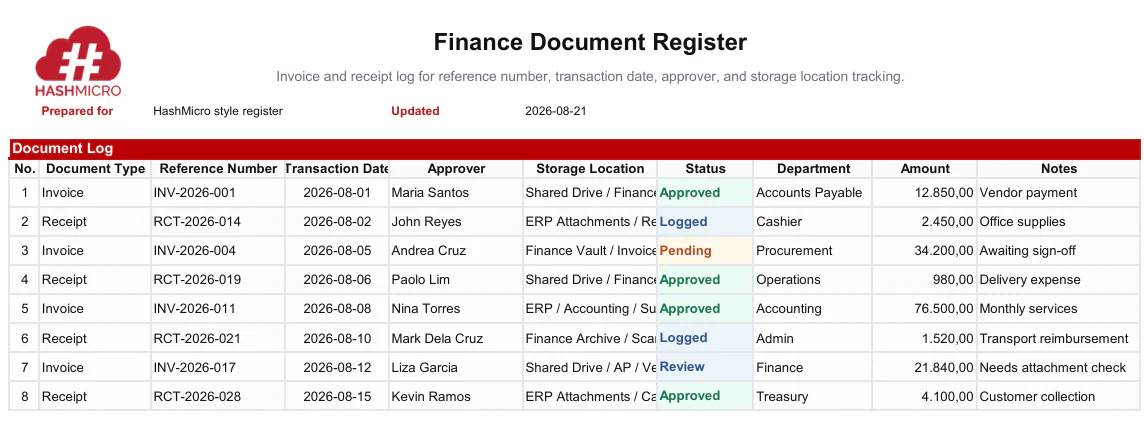
A document management system stores these records in one place and returns them through keyword or metadata search. Document management software can also connect to accounting systems, so each invoice or receipt stays linked to its transaction and approval trail.
2. Procurement, inventory, and operations documents
Procurement teams manage purchase orders, purchase requests, vendor contracts, quotations, and supplier records. Inventory and operations teams handle stock records, delivery documents, warehouse forms, and quality control reports. Each file supports a decision someone must make quickly.
Free procurement, inventory, and operations documents template:
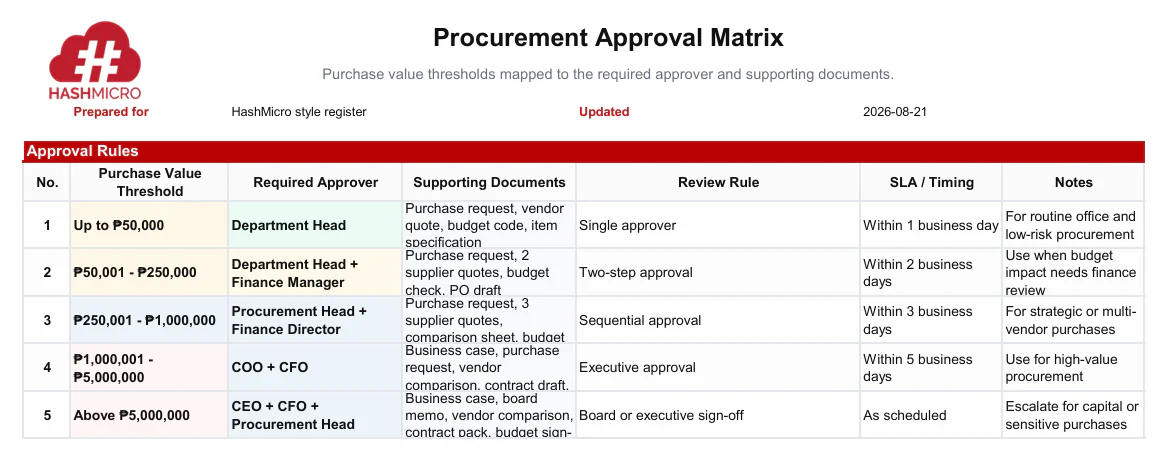
The system ties these documents to the activities behind them. A purchase order moves through its approval path, while delivery documents and stock records support receiving, verification, and audit checks. Teams across branches then follow the same document management process.
3. HR, sales, and management documents
HR teams keep employee records, employment contracts, policy documents, performance reviews, and onboarding forms. Sales teams manage proposals, customer documents, and signed agreements. Management reviews SOPs, internal reports, and board materials before making decisions.
Free HR, sales, and management document template:
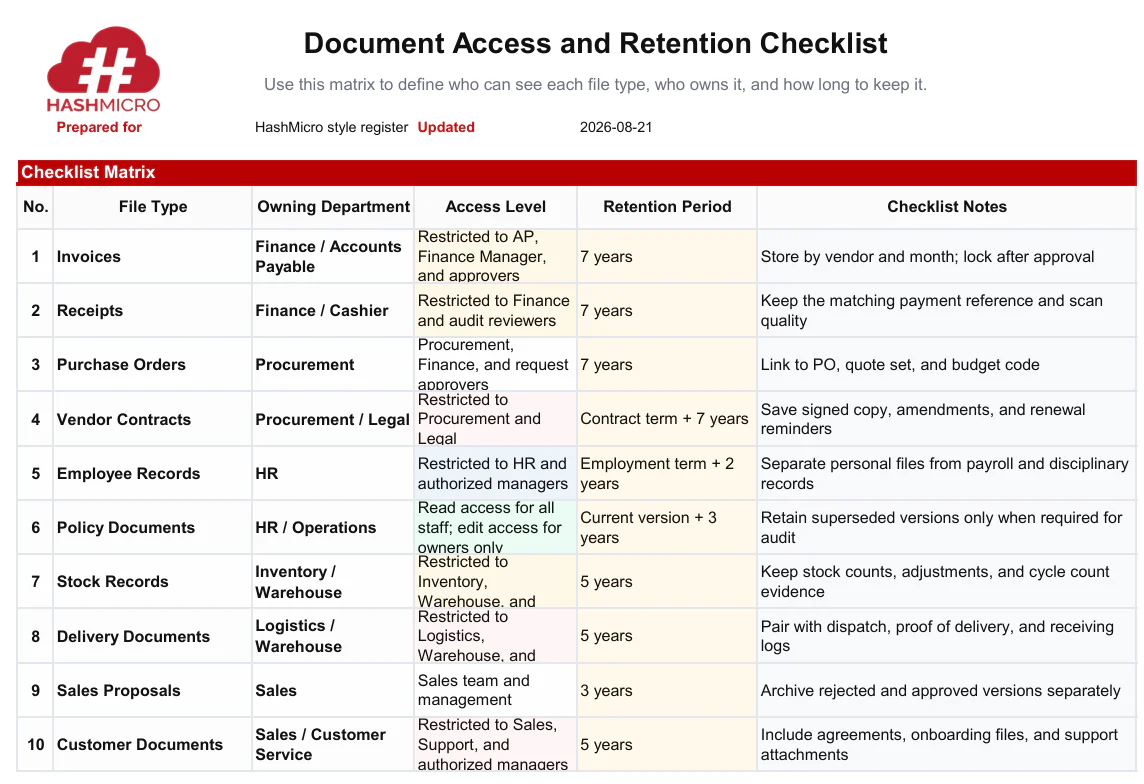
Role-based access matters most here, because these files carry personal and strategic information. An electronic document management system limits each folder to the right team and logs every view. Managers then open the current file directly instead of requesting it by email.
Simplify Document Workflows with HashMicro's Document Management System
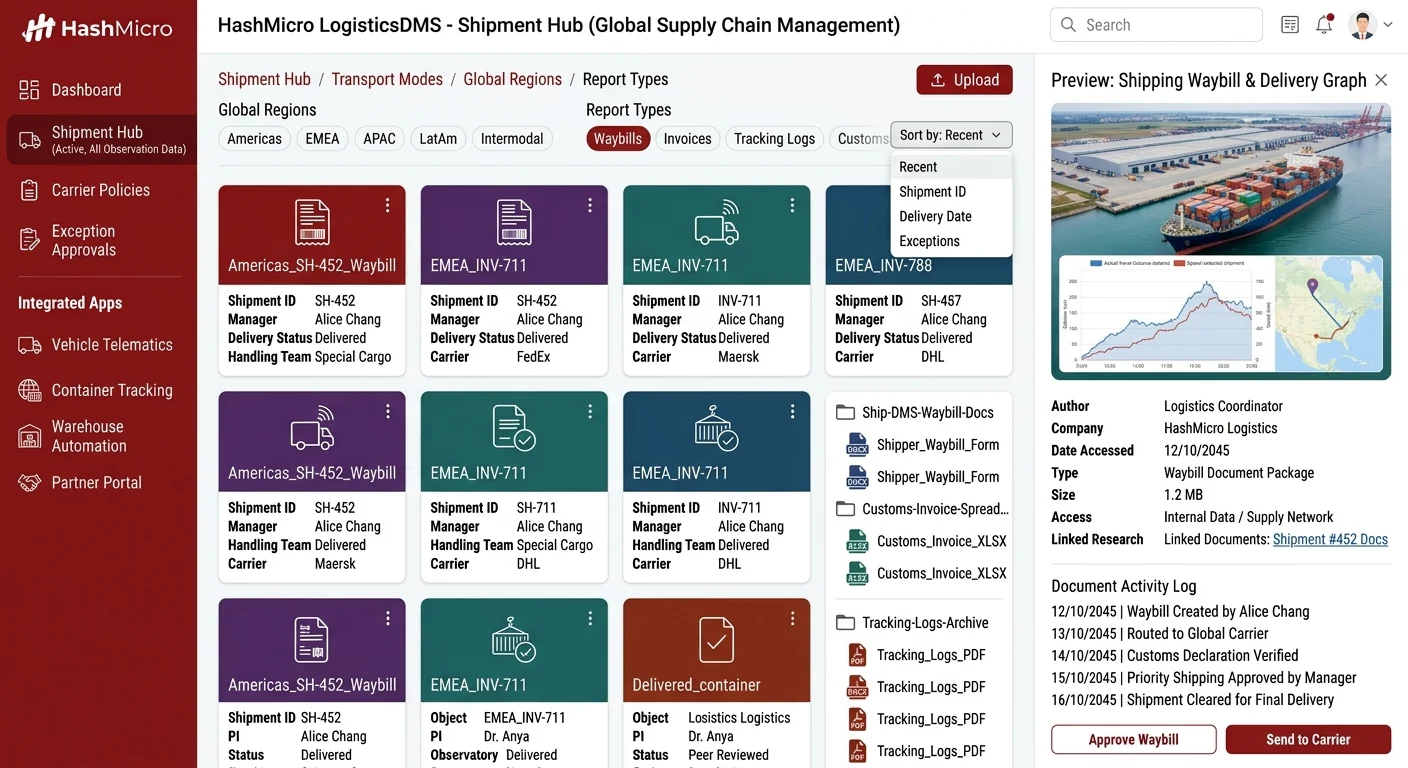
A good DMS should be secure, scalable, easy to use, workflow-ready, and connected with daily business operations.
HashMicro helps businesses centralize files, automate approvals, enforce role-based access control, and track document activity across accounting, procurement, inventory, HR, and broader ERP workflows. The best document management system gives teams a practical way to manage documents.
Here are the key features:
- Centralized document storage in one platform
- Automated approval workflows for faster routing
- Role-based access control for sensitive files
- Document activity tracking for better visibility
- Integration with accounting and procurement
- ERP-connected workflows for finance, HR, inventory, and operations
With HashMicro, businesses can move away from scattered folders, manual filing, and disconnected approvals. If your team needs better control over files, approvals, and visibility, HashMicro’s document management system helps create a more organized and traceable way to manage business records.

Conclusion
A document management system helps businesses organize, secure, track, and manage documents more effectively. It gives teams a centralized place to store files, control access, manage versions, route approvals, and retrieve records when needed.
For growing companies, a DMS is more than a storage tool. It supports faster approvals, better collaboration, stronger document security, and clearer audit readiness. When connected with ERP workflows, it can also help departments manage documents alongside daily business operations.
Businesses that still rely on scattered folders, email attachments, chat approvals, or paper files should consider using a DMS to create a more controlled and efficient document process. One of the best providers in the Philippine market is HashMicro. Book a free consultation to see how it can help you automate and centralize files, approvals, user access, and document activity
FAQ for Document Management System
A document management system is a digital platform that stores, organizes, tracks, secures, and manages business documents in one place. It helps teams find the right files faster, control access, manage versions, route approvals, and keep every document activity traceable for audits and daily operations.
The benefits of a document management system include faster retrieval, centralized storage, stronger security, better collaboration, reduced paper use, improved version control, and easier audit preparation. It gives teams a clearer way to manage documents, reduce duplicated work, and keep records consistent across departments.
A document management system works by capturing or uploading documents, adding searchable details, storing files securely, controlling access, managing versions, routing approvals, and recording activity through audit trails. This process helps users retrieve the right file, confirm approval status, and review document history when needed.
Cloud storage mainly helps users save and share files online. Document management software offers broader document control through metadata, advanced search, access permissions, approval workflows, version history, audit trails, and business system integration. It supports the full document process, not just file storage.
Businesses need a document management system when they manage many files, handle sensitive documents, rely on manual approvals, operate across departments or branches, prepare for audits, or face missing documents and duplicate versions. It becomes useful when scattered storage starts slowing down daily work.