

Managing HR data becomes more challenging at month-end, when teams must reconcile attendance, leave, payroll, recruitment, and performance records across departments, locations, and disconnected systems before leadership reviews the results. Reliable HR reports bring these data points together, reveal inconsistencies, and reduce repetitive manual reconciliation.
For enterprise organisations, the challenge is not merely producing a report but ensuring that every figure is consistent, exceptions are identified early, and decision-makers can trust the final output. A 2022 Éditions Tissot and PayFit survey of 713 HR professionals in France found that 63% spent at least half their working time on administrative tasks, highlighting the need for more efficient HR reporting.
A structured HR report organises headcount, attendance, payroll, recruitment, turnover, performance, and statutory contribution data into a clear format that supports informed decisions. Read the article further to understand the importance of HR reports, what metrics to observe, get free templates, the different types of HR reports, and how a good HR system can centralize all the data.
Key Takeaways
Monthly HR reports are strategic workforce-health tools, not only attendance summaries.
Effective reports connect attendance, turnover, labour costs, hiring, and workforce capacity metrics.
Use these free templates to standardise attendance, leave, and payroll reporting while flagging records that require review.
An integrated HRIS can reduce manual data consolidation, revisions, and reporting delays.
What is a Monthly HR Report?
A monthly HR report is a structured summary of workforce activities, metrics, issues, and outcomes during a specific month. It can include information on employee headcount, attendance, leave, payroll, hiring, employee performance, learning activities, and turnover.
The purpose of HR reporting is to turn employee data into information that management can use. Rather than presenting only raw figures, a useful HR report should highlight trends, unusual changes, operational risks, and recommended actions.
Monthly and annual HR reports have different but complementary roles:
| Monthly HR Report | Annual HR Report |
|---|---|
| Monitors current operations, exceptions, and near-term actions | Reviews strategic trends, workforce planning, programme outcomes, and budget planning |
| Focuses on the current reporting period | Focuses on patterns and outcomes across the year |
| Supports routine follow-up with managers | Supports long-term evaluation and leadership planning |
For example, a monthly report may show a sudden increase in absenteeism in one site. An annual report can show whether that pattern is recurring and whether it is linked to turnover, workload, seasonal demand, or workforce policy changes.
Why Are Monthly HR Reports Important for Businesses?
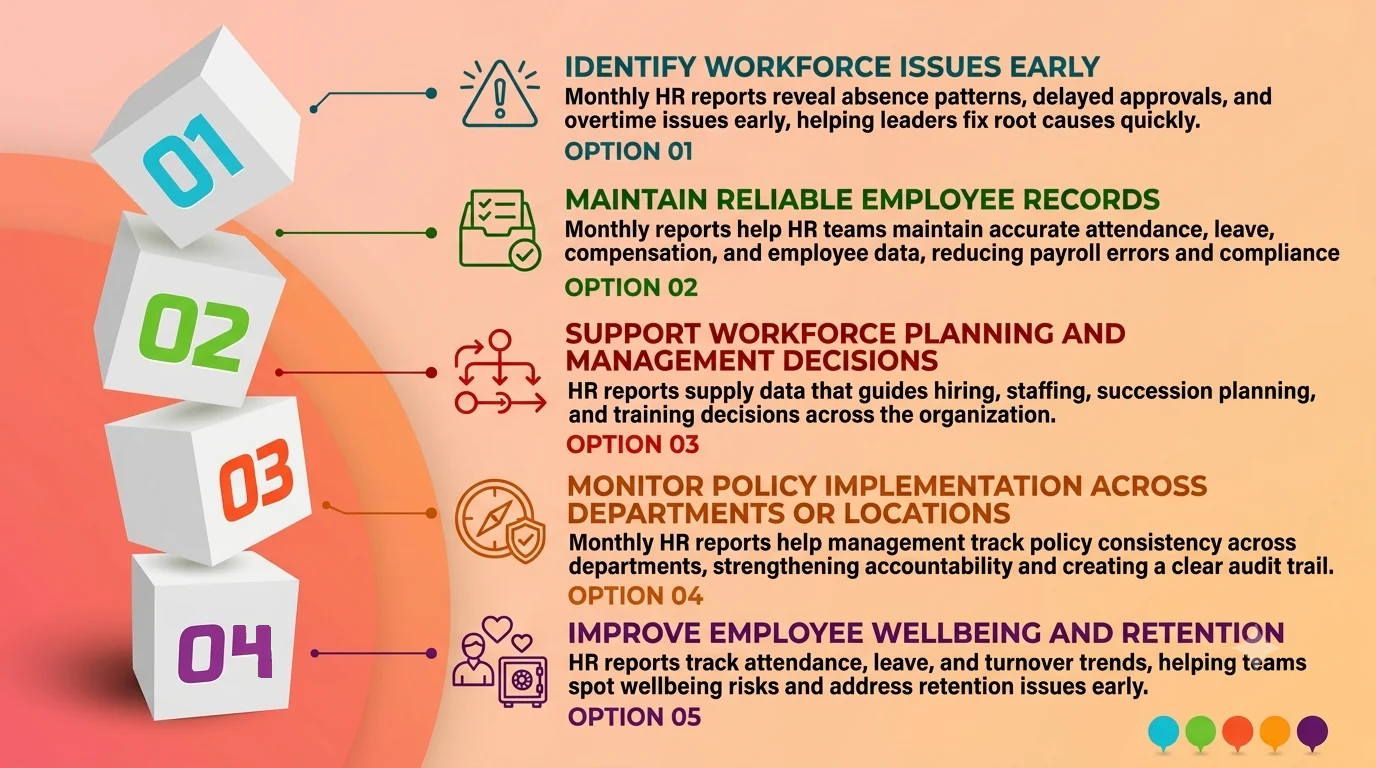
1. Identify workforce issues early
Monthly HR reports reveal patterns in repeated absences, delayed approvals, excessive overtime, and employee exits before they become larger operational problems. Leaders can use these findings to investigate root causes, redistribute workloads, improve approval processes, or recruit additional employees where staffing gaps affect productivity.
2. Maintain reliable employee records
HR departments manage information that affects payroll, employee experience, staffing, and compliance processes. Monthly reports help ensure that attendance, leave, compensation, performance, and employee master data are regularly reviewed and updated.
Reliable records also reduce the risk of repeated corrections during payroll processing or management reporting.
3. Support workforce planning and management decisions
HR reports provide the data needed to make decisions about hiring priorities, workforce capacity, succession planning, training investments, and labour costs.
For instance, headcount and Full-Time Equivalent (FTE) data can help leaders determine whether a department needs additional capacity or whether existing roles can be redeployed.
4. Monitor policy implementation across departments or locations
In multi-site enterprises, HR policies may be applied differently across business units. Monthly HR reports can help management monitor whether leave approvals, attendance rules, overtime workflows, and performance processes are being followed consistently.
This creates a clearer audit trail and improves accountability among process owners.
5. Improve employee wellbeing and retention
Attendance patterns, leave usage, engagement results, and turnover data can help HR teams understand employee wellbeing and retention risks. These metrics should not be viewed in isolation, but they can reveal areas that need closer review.
For example, a department with high overtime, frequent sick leave, and rising resignations may need a workforce or management intervention.
Essential Metrics to Include in an HR Report
HR reports give leaders the workforce evidence they need to make hiring, retention, productivity, and cost decisions. Effective HR reporting groups each metric by business question, while an HR reports sample shows how to present the findings clearly. The table below organises the main types of HR reports, their essential metrics, and the decisions they support.
| Pillar | Metrics to Cover | Business Value |
|---|---|---|
| Workforce profile | Headcount, FTE, demographics, tenure, skills | Supports workforce planning and capability mapping |
| Talent acquisition | Time to fill, cost per hire, quality of hire | Measures recruitment efficiency and hiring quality |
| Retention and organisational health | Turnover, absenteeism, engagement, cost of absence | Identifies people and productivity risks early |
| Productivity and HR financials | Labour cost per employee, revenue per employee, training ROI | Helps assess workforce investment and productivity |
1. Workforce profile metrics
Headcount shows the number of active employees, while FTE provides a more accurate view of workforce capacity when part-time, contractual, or flexible work arrangements are involved.
Other useful workforce metrics include tenure, skills profiles, department distribution, and location data. These help leaders assess whether talent availability aligns with future business needs.
2. Talent acquisition metrics
Recruitment metrics help HR teams assess both speed and quality of hiring. Time to fill measures how long it takes to fill a vacancy, while cost per hire tracks the resources spent to recruit an employee.
Quality of hire can be assessed through probation outcomes, early performance reviews, retention rates, or manager feedback. It should be interpreted carefully because hiring outcomes may also be influenced by onboarding, role clarity, and manager support.
3. Retention and organisational health metrics
Turnover rate, absenteeism rate, engagement results, and leave patterns can indicate workforce stability. These metrics may help HR identify where teams need more detailed investigation.
A high turnover rate does not automatically mean a company has a retention problem. Leaders should review it alongside role type, location, tenure, performance, workload, and market conditions.
4. Productivity and HR financial metrics
Labour cost per employee, revenue per employee, and training ROI can help leaders understand the financial side of workforce management. However, these metrics should always be reviewed with business context.
For example, revenue per employee may differ significantly between departments, industries, and business models. It should not be used as a standalone measure of employee performance.
Important Components of an HR Report

HR reports organise attendance, performance, payroll, development, and engagement data into a structure that supports workforce decisions. Effective HR reporting validates each component before leaders review trends or approve action. The sections below explain the essential components across different types of HR reports and provide a practical HR report sample structure for consistent monthly analysis.
1. Attendance and timekeeping
The attendance section records scheduled workdays, present days, late arrivals, approved leave, sick leave, absences, and authorised overtime. These data help HR reports explain payroll inputs, staffing coverage, scheduling pressure, and recurring attendance exceptions.
Before approving the report, HR should compare timekeeping records with work schedules, approved requests, and employee master data. Reviewers should flag missing punches, duplicate entries, unapproved adjustments, and unusual variances for correction. Leaders can then decide whether to change schedules, redistribute workloads, improve approval workflows, or investigate recurring attendance concerns.
2. Employee performance
Performance reporting combines goal achievement, appraisal results, competency assessments, manager feedback, development plans, and performance-improvement records. This component helps management identify strong performers, capability gaps, succession candidates, and employees who require additional support.
A reliable validation workflow confirms that managers completed every required review, used the correct evaluation period and scoring method, and supported ratings with documented evidence. An HR reports sample should also separate measured results from qualitative feedback. Leaders can use the validated findings to approve training, coaching, promotion, succession, or performance-management actions.
3. Payroll, benefits, and statutory contributions
Payroll HR reporting consolidates basic salary, allowances, authorised overtime pay, bonuses, benefits, deductions, and net pay. In the Philippines, the report may also track records associated with BIR withholding tax, SSS, PhilHealth, and Pag-IBIG Fund, depending on the organisation and applicable requirements
Payroll report structures should be reviewed by the organisation’s payroll, tax, or legal adviser to ensure alignment with current requirements.
4. Learning and development
Learning and development reports cover completed courses, participation, training costs, certification status, skills gaps, competency progress, and planned development activities. They show whether workforce-development spending addresses the capabilities the organisation needs.
HR should validate completion records against attendance, provider documentation, assessment results, cost allocations, and the organisation’s competency framework. Leaders can use this HR reporting to prioritise critical skills, approve training budgets, assign development plans, prepare successors, or discontinue programmes that do not address defined business needs.
5. Employee satisfaction and engagement
Employee satisfaction and engagement reports satisfaction and engagement reports combine survey results, response patterns, feedback themes, grievances, recognition data, and exit-interview findings. Among the different types of HR reports, this component provides essential context for understanding retention and organisational health.
HR should apply consistent survey definitions, protect confidential responses, separate evidence from assumptions, and compare engagement findings with turnover, absenteeism, overtime, and mobility data. Leaders can then decide whether to review workloads, improve management practices, revise employee programmes, strengthen communication, or introduce targeted retention measures.
9 Types of HR Reports Every Company Should Know
Making an HR report is not a one-and-done kind of paperwork. HR reports organise workforce costs, attendance, payroll, recruitment, scheduling, and retention into clear reporting areas. HR teams validate this data and use it to guide staffing, budgets, compliance, and employee support. The nine report types below explain what each tracks, who uses it, and which data risks require attention.
1. Employee reimbursement report
- Tracks: Employee expense claims, supporting receipts, approval status, and reimbursement amounts.
- Used by: HR, finance, and payroll teams.
- Supports: Expense control, reimbursement scheduling, and audit documentation.
- Data risk: Missing receipts or delayed approvals can lead to inaccurate reimbursement records and employee dissatisfaction.
2. Employee payroll report
- Tracks: Salary components, allowances, overtime pay, bonuses, deductions, statutory contributions, and net pay.
- Used by: Payroll, HR, finance, and leadership.
- Supports: Payroll reconciliation, cost management, and management visibility.
- Data risk: Incorrect employee data, deductions, or overtime input can create payment errors and compliance concerns.
3. Recruitment report
- Tracks: Open positions, applicants, interviews, offers, hires, recruitment sources, and time to fill.
- Used by: Talent acquisition, HR leaders, and department managers.
- Supports: Hiring prioritisation, recruitment budgeting, and source-performance evaluation.
- Data risk: Incomplete candidate or vacancy data can hide recruitment bottlenecks.
4. Attendance and absenteeism report
- Tracks: Workdays, attendance, late arrivals, approved leave, unauthorised absences, and absence trends.
- Used by: HR operations, payroll, and department managers.
- Supports: Payroll inputs, staffing coverage, and attendance policy monitoring.
- Data risk: Missing or unvalidated attendance data can affect payroll accuracy and workforce planning.
5. Employee leave report
- Tracks: Leave type, entitlement, leave used, remaining balance, dates, and approval status.
- Used by: HR, employees, and line managers.
- Supports: Staffing visibility, leave planning, and consistent policy implementation.
- Data risk: Incorrect balances or pending approvals can cause scheduling conflicts and employee disputes.
6. Sick leave and absence report
- Tracks: Sick leave days, absence duration, supporting documentation where required, and recurring absence patterns.
- Used by: HR, managers, and workforce planners.
- Supports: Wellbeing monitoring, staffing decisions, and risk identification.
- Data risk: Incomplete data may prevent HR from identifying recurring workload or health-related concerns.
7. Shift schedule report
- Tracks: Shift assignments, work locations, staffing levels, shift changes, and coverage gaps.
- Used by: Operations managers, HR, and workforce planners.
- Supports: Workforce allocation, business continuity, and fair scheduling.
- Data risk: Inaccurate schedules can result in understaffing, payroll disputes, or operational disruption.
8. Overtime report
- Tracks: Overtime hours, reasons, approvals, employee records, and related pay calculations.
- Used by: HR, payroll, finance, operations, and managers.
- Supports: Labour-cost control, workforce capacity planning, and approval monitoring.
- Data risk: Unapproved or inaccurate overtime entries can increase costs and create payroll discrepancies.
Overtime records should be reviewed against applicable Philippine labour regulations, company policies, and collective bargaining agreements where relevant.
9. Employee turnover report
- Tracks: Resignations, involuntary exits, turnover rate, exit reasons, departments affected, and role vacancies.
- Used by: HR leaders, managers, finance, and executive leadership.
- Supports: Retention strategy, workforce planning, and management intervention.
- Data risk: Poor exit data can make it difficult to identify the causes of recurring turnover.
Employee Attendance Report Template
Free downloadable employee attendance template
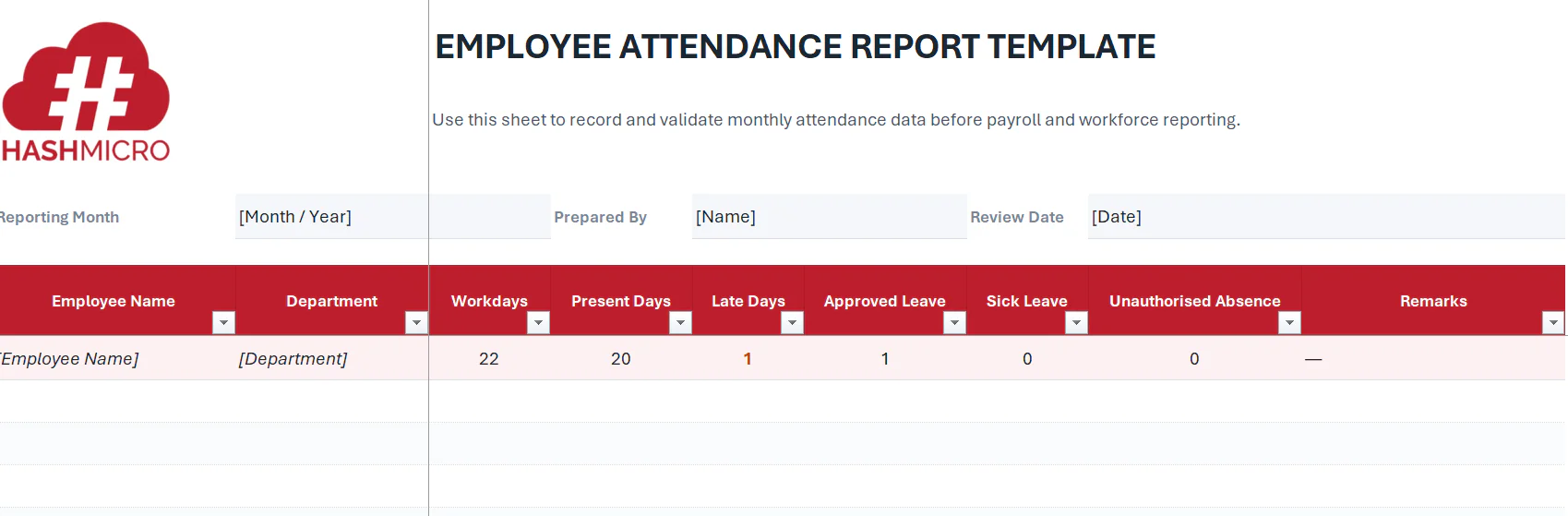
- Purpose: Payroll input, leave monitoring, and absence trend analysis.
- Data owner: HR operations or the timekeeping administrator.
- Update frequency: Daily capture with monthly validation.
- Exceptions to flag: Missing attendance records, repeated late arrivals, and unusual absence spikes.
Employee Leave Report Template
Free downloadable employee leave report
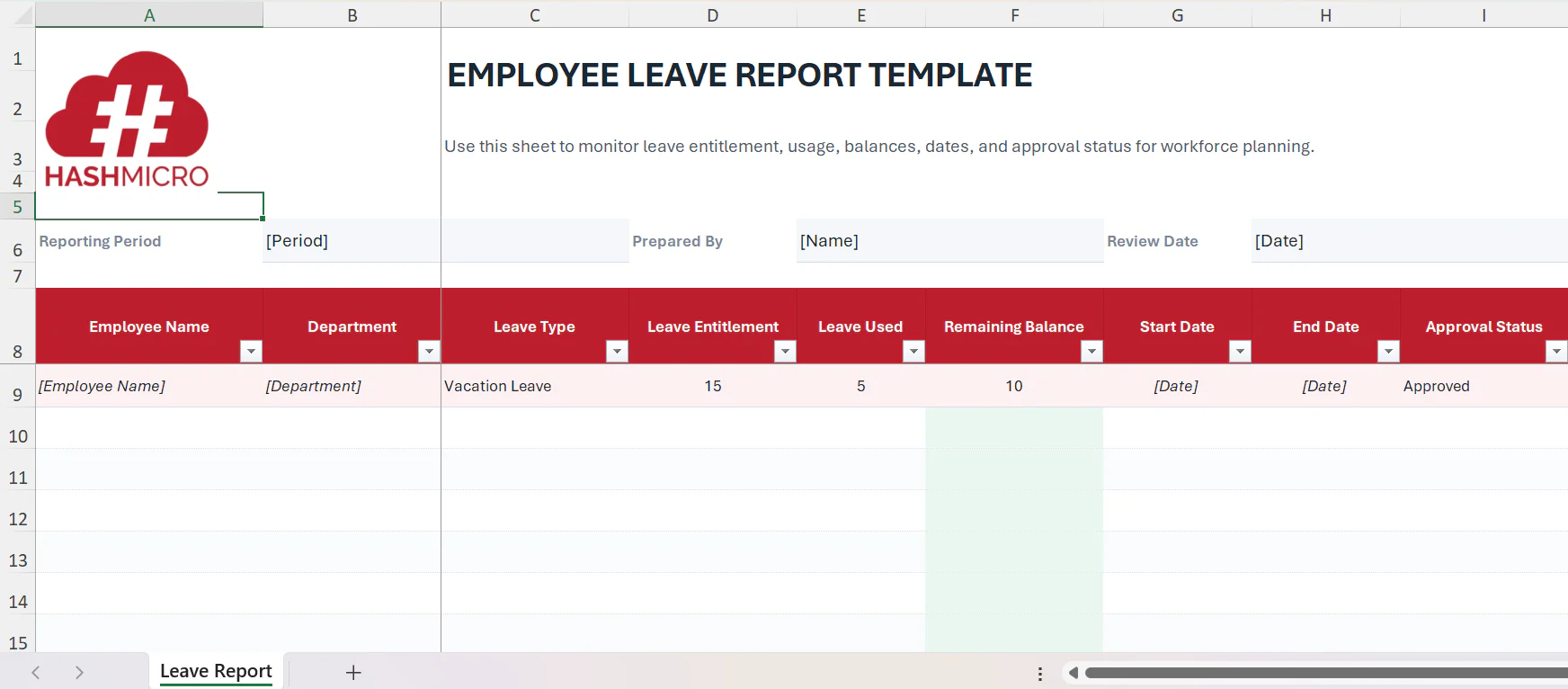
- Purpose: Maintains staffing visibility and supports consistent leave administration.
- Data owner: HR operations, supported by manager approvals.
- Update frequency: Update when leave is requested, approved, amended, or completed.
- Exceptions to flag: Low leave balances, overlapping leave, and pending approvals.
Leave entitlement should follow the organisation’s policies and applicable statutory leave requirements.
Employee Payroll Report Template
Free downloadable employee payroll report template
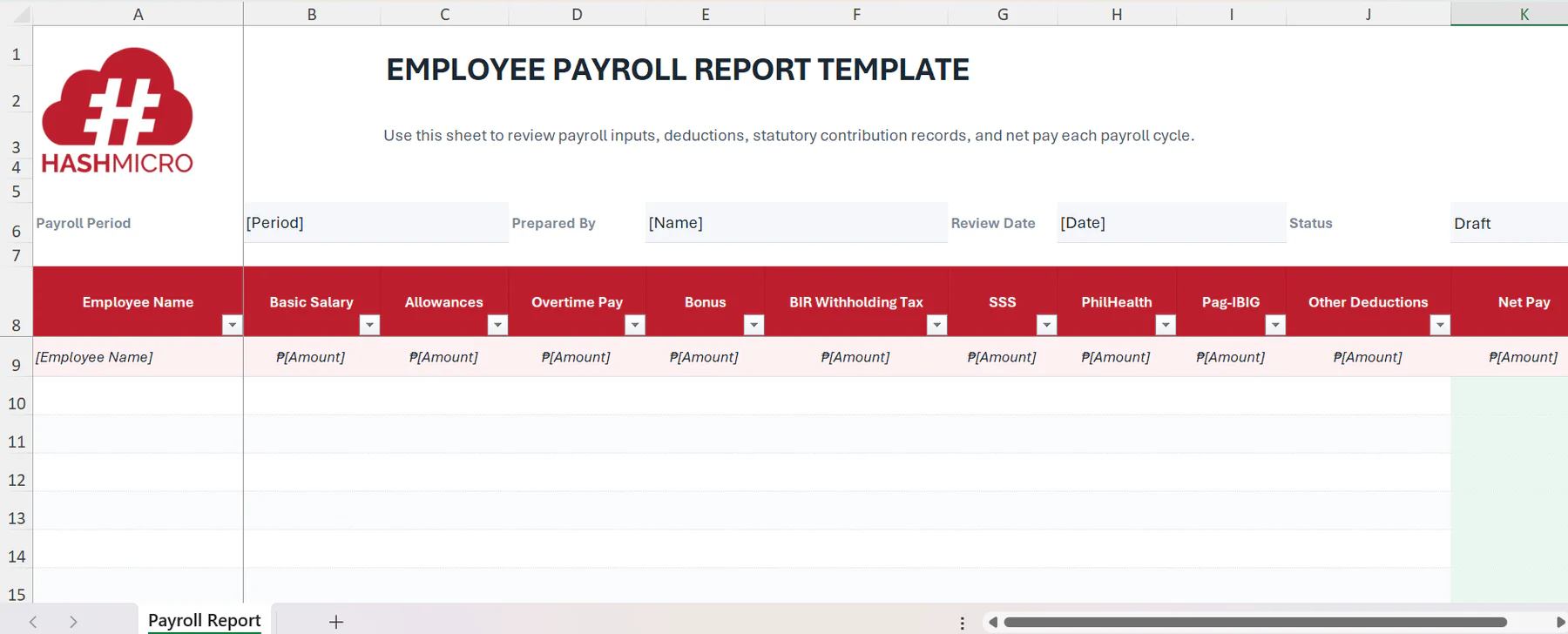
- Purpose: Supports payroll review, finance reconciliation, and management visibility.
- Data owner: Payroll team, with finance and HR review.
- Update frequency: Every payroll cycle and during monthly close.
- Exceptions to flag: Unapproved overtime, deduction variances, and missing employee master data.
This template illustrates a possible reporting structure only. Payroll calculations, statutory contributions, and withholding requirements should be validated by the organisation’s payroll, tax, or legal advisers.
How to Create a Monthly HR Report More Efficiently
A faster monthly HR reporting process starts with a clear reporting design, not simply a better spreadsheet. Define the business questions first, then align HR metrics, employee data sources, reporting periods, and accountable owners. This structure helps teams create accurate workforce reports, identify trends consistently, and turn findings into practical management actions.
Here are the steps to create a monthly report:
- Define the business question the report should answer.
- Standardise reporting periods, metric definitions, and data owners.
- Consolidate data from attendance, leave, payroll, recruitment, and performance sources.
- Validate anomalies, missing records, and approval exceptions.
- Turn numbers into trends, risks, and management recommendations.
- Assign follow-up actions, owners, and review dates.
When teams spend too much time combining files, resolving duplicate records, and revising reports, the issue is often fragmented data. A centralised HRIS can help bring employee data, approval workflows, and reporting processes into one environment.

Managing HR Reporting Complexity at Enterprise Scale
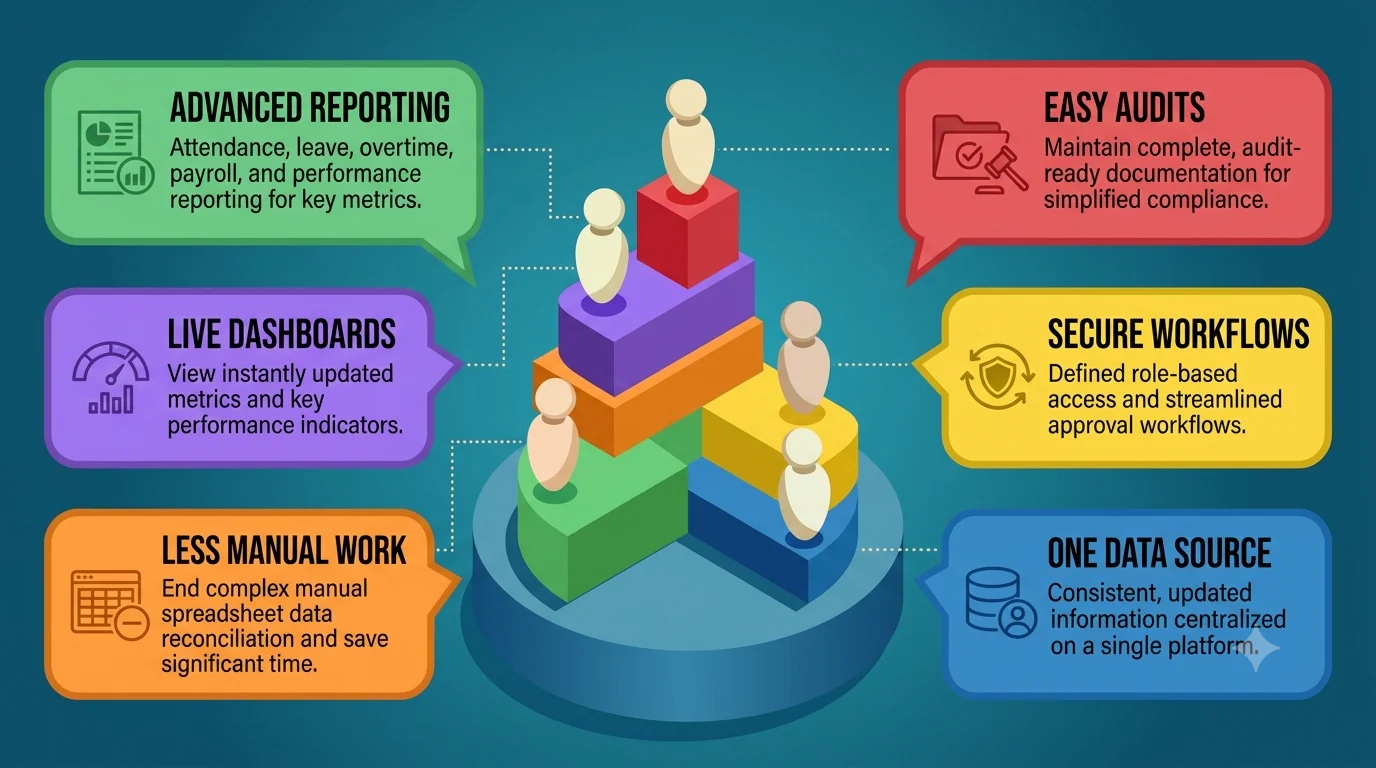
HR reports become more complex as enterprises add employees, locations, business units, and approval layers. Effective HR reporting centralises workforce data, standardises validation, and delivers reliable insights across payroll, attendance, leave, overtime, and performance. A consistent HR reporting sample helps teams structure different types of HR reports, strengthen controls, reduce reconciliation, and support faster workforce decisions.
A good system should have:
- Centralised employee data
- Real-time reporting dashboards
- Role-based access and approval workflows
- Attendance, leave, overtime, payroll, and performance reporting
- Audit-ready documentation
- Reduced spreadsheet reconciliation
The right HR system should reflect the organisation’s workforce structure, reporting needs, approval processes, and compliance requirements. It should support internal controls and better decisions, not replace professional payroll, tax, or legal review.
Conclusion
Effective HR reports are built on reliable data, consistent metric definitions, accountable owners, and a clear validation process. For enterprise organisations, they provide more than administrative visibility; they support workforce planning, labour-cost management, retention initiatives, and operational decision-making.
Essential HR report metrics include attendance, leave balances, payroll components, overtime, deductions, workforce costs, and data exceptions. Teams can organise and validate these metrics using the free Employee Attendance Report Template, Employee Leave Report Template, and Employee Payroll Report Template, creating a consistent foundation for monthly HR reporting.
If your organisation is managing HR data across multiple systems, start by mapping the reports leadership needs, the data sources behind them, and the workflows required to keep reporting accurate and timely. Use HashMicro ERP Philippines to then centralise these sources, standardise reporting workflows, and give leaders a more reliable view of workforce performance.

FAQ for HR Report
A monthly HR report should include headcount, attendance, leave, payroll, recruitment progress, turnover, performance, labour costs, and significant workforce risks. Effective HR reporting also identifies trends, exceptions, responsible owners, and required management actions. An HR report sample should organise these metrics around decisions about staffing, budgets, employee support, and operational capacity.
The most common types of HR reports are payroll, recruitment, attendance, leave, overtime, reimbursement, shift scheduling, sick leave, performance, and employee turnover reports. Each supports a specific decision, such as controlling labour costs, planning staffing, monitoring absence, improving hiring, or reducing retention risks. A standard HR report sample keeps definitions and reporting periods consistent.
HR reporting summarises workforce data, operational results, and exceptions for a defined period, while HR analytics examines patterns, causes, relationships, and possible future outcomes. For example, reporting shows turnover by department; analytics investigates why exits concentrate there. Both types of HR reports support decisions, but analytics provides deeper interpretation for targeted action.
HR teams can reduce manual report preparation by standardising metric definitions, reporting periods, templates, approval rules, and data ownership. An integrated HRIS can centralise attendance, leave, payroll, recruitment, and employee records. Automated validation and exception checks then improve HR reporting accuracy, while a consistent HR reports sample reduces repeated formatting and reconciliation.
Philippine payroll HR reporting should record employee names, pay periods, basic salary, allowances, authorised overtime, bonuses, deductions, net pay, and applicable fields for BIR withholding tax, SSS, PhilHealth, and Pag-IBIG. Employers should reconcile these records with approved payroll inputs and current official requirements, then obtain professional review where necessary.