






Professional services firms often manage projects, billable hours, expenses, resources, and client invoices across separate tools. When project and financial information is disconnected, managers may struggle to see delivery progress, resource capacity, and project profitability in one place.
Based on Planview, the global PSA software market is expected to reach $16 billion by 2025. A PSA platform can address some of these issues, but the right choice depends on project complexity, billing model, integrations, user requirements, and implementation support.
This guide compares 10 professional services software options in the Philippines based on project management, time tracking, resource planning, billing, expense management, reporting, integrations, and suitability for different service organisations.
Key Takeaways
Professional Services Software, or PSA, streamlines project management, time tracking, billing, and resource allocation, providing businesses with improved operational visibility, decision-making, and customer satisfaction.
The benefits of Professional Services Software include better project visibility, resource planning, billing accuracy, and operational control.
Use the quick comparison table to review each software’s key functions and best-fit business type.
To select the right Professional Services Software, define your business requirements, and read reviews to ensure the software aligns with your needs and supports long-term growth.
Professional Services Software, often referred to as Professional Services Automation (PSA), is a software solution tailored to assist businesses in managing project planning, execution, and evaluation, primarily within the services sector. It connects project and financial data so managers can monitor delivery progress, resource capacity, budgets, and profitability from one platform.
This software often includes professional services automation (PSA) capabilities. Depending on the provider, it may also support resource forecasting, approval workflows, reporting, accounting integrations, and CRM connections. The most suitable functions depend on the company’s services, billing model, project complexity, and team structure.
Benefit of Professional Services Software
Improve project visibility: Connected project plans, milestones, budgets, and delivery updates help managers identify delays before they affect client commitments.
Increase billable accuracy: Time tracking and expense management help teams record chargeable work consistently, prepare accurate invoices, and reduce missed billable hours. Following project time management tips can further improve time-recording practices.
Optimize resource allocation: Resource planning shows employee availability, skills, workload, and project demand. Managers can use this information to assign the right people to each project.
Strengthen project profitability: Integrated cost, revenue, utilization, and billing data helps managers compare project performance against budgets and identify margin leakage. Integrated project and accounting software can help firms track billable costs, budgets, and project profitability in one system.
Support consistent client communication: Centralized project information gives teams a reliable basis for progress updates, billing discussions, and service reviews.
Quick Comparison Table of 10 PSA Software
Before reviewing each platform in detail, the table below compares the 10 professional services software options based on their key functions and ideal use cases. Use it as a quick reference to identify which platforms best match your organization’s operational needs.
| Software | Key Functions | Best For |
|---|---|---|
| HashMicro | Project management, accounting, CRM, HRM, billing, budgeting | Philippine service businesses seeking an integrated ERP |
| NetSuite | Project management, resource management, time and expense, billing, revenue recognition | Multi-entity and multi-location organisations |
| SAP S/4HANA | Project management, resource management, client management, analytics | Large enterprises with complex operations |
| Wrike | Project planning, collaboration, workflows, time tracking, reporting | Teams managing multiple complex projects |
| Sage Intacct | Financial management, project costing, revenue recognition, dashboards | Finance-led professional services firms |
| Polaris PSA | Project, resource, financial, and reporting management | Consulting, IT, and engineering firms |
| Deltek | Project management, resource planning, time and expense, BI | Architecture, engineering, and consulting firms |
| ConnectWise PSA | Project delivery, ticketing, time tracking, billing, service desk | MSPs and IT service providers |
| BigTime | Time and expense, project portfolio, billing, invoicing, reporting | Consulting, accounting, engineering, and IT teams |
| Kantata | Project delivery, resource management, expenses, collaboration | Mid-market and enterprise services organisations |
10 Best PSA Software in the Philippines 2026
Below is the list of best PSA Software in 2026 to help Philippine businesses leverage technology for sustained success and growth.
1. HashMicro PSA Software

HashMicro Professional Services Software stands as a comprehensive ERP solution to cater to the needs of service-oriented businesses. Professional services companies often require a suite of modules to effectively manage various aspects of their operations, from project management, accounting, customer relationship management (CRM), and human resource management (HRM).
HashMicro has become a leading provider of automated systems tailored for various industries. As a principal company, it harmonizes all business operations under a standardized framework. Workforce processes run through HashMicro's industry-tailored HR platform. This keeps every facet of service delivery optimized for peak performance.
Let’s delve into the specifics of what HashMicro’s Professional Services Software has to offer:
- Profit & Loss vs Budget & Forecast: This feature enables businesses to compare their actual financial performance against planned budgets and forecasts, facilitating proactive financial management and strategy adjustments.
- Budget S-Curve: The Budget S-Curve visualizes the progression of expenses overtime against the planned budget, providing a clear depiction of financial health and project cost control.
- Financial Statement with Budget Comparison: This tool offers a view of financial statements alongside budget comparisons to aid in the analysis of financial performance versus budgetary expectations.
- Leads & Opportunities Management: It streamlines the tracking and nurturing of sales leads and opportunities, enhancing the sales pipeline’s efficiency and boosting conversion rates.
- Activities Scheduling, Management, and Reminders: This functionality supports the business of tasks, scheduling of activities, and setting reminders to ensure that no tasks are overlooked.
- Custom Printout for Invoices: Allows for the customization of invoice templates, enabling businesses to create professional and branded billing documents for their clients.
- Talent Management with KPI Tracking: Facilitates the management of employee performance through Key Performance Indicators (KPIs), helping to align individual objectives with business goals.
- In-Depth Leaves, Payroll, Expenses, Overtime, Attendance Reporting: Offers detailed reporting on various HR aspects, including leave, payroll, expenses, and attendance, for comprehensive human resource management.
Pros | Cons |
|
|
Suitable for: HashMicro Professional Services Software is particularly beneficial for businesses in need of an end-to-end business solution with comprehensive features.
Pricing: Custom pricing; request a quote in Philippine pesos.
HashMicro ERP Professional Services Software offers a flexible and competitive pricing scheme tailored to various business needs. With customizable pricing based on selected features and the number of users, we provide an affordable solution without compromising quality. Click the banner below to learn more and enjoy a free demo of HashMicro ERP Professional Services Software.

2. NetSuite

NetSuite Professional Services Automation (PSA) software is a cloud-based solution designed to help service-based businesses manage their entire project lifecycle management, from resource allocation and project management to billing and revenue recognition. Before choosing a platform, compare the features, pricing, and limitations shown in this NetSuite ERP review.
Some of the features that NetSuite PSA software offers are stated as follows:
- Project management : Helps teams plan projects, assign tasks, and monitor delivery progress.
- Resource management: Supports resource allocation based on availability, skills, and project demand.
- Time and expense management: Records billable hours for accurate project costing and invoicing.
- Billing and invoicing: Uses project records to prepare client invoices.
- Analytical and reporting: Shows project performance through reports and dashboards.
|
Pros |
Cons |
|
|
Suitable for: Industries that manage complex projects and resources across multiple locations will find NetSuite’s PSA software offering especially beneficial.
Pricing: Custom pricing based on users, modules, and implementation.
3. SAP S/4HANA
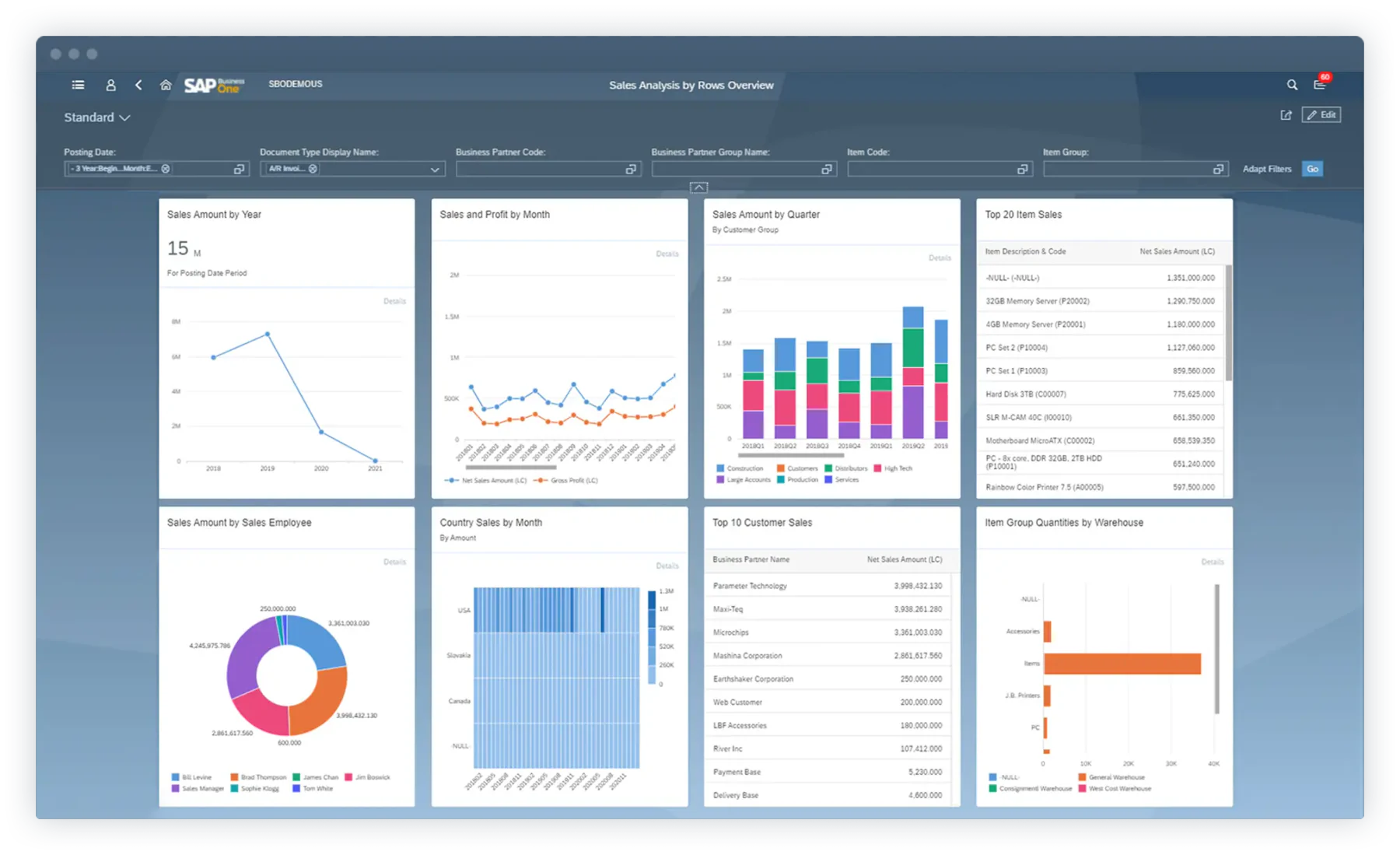
SAP S/4HANA Professional Services Software represents a comprehensive Enterprise Resource Planning (ERP) solution tailored to the unique demands of a professional service company. It can streamline the project management lifecycle within a company.
Below are the main features that SAP S/4HANA PSA software offers:
- Project management: Supports project planning, execution, and progress tracking.
- Resource management: Helps allocate resources across project activities.
- Client management: Keeps client information connected to service processes.
- Real-time analytics: Provides current data for monitoring project performance.
|
Pros |
Cons |
|
|
Suitable for: SAP S/4HANA Professional Services Software is a good fit for businesses that prioritize real-time data analytics and operational efficiency to drive decision-making and performance.
Pricing: Custom pricing based on the package and implementation scope.
4. Wrike
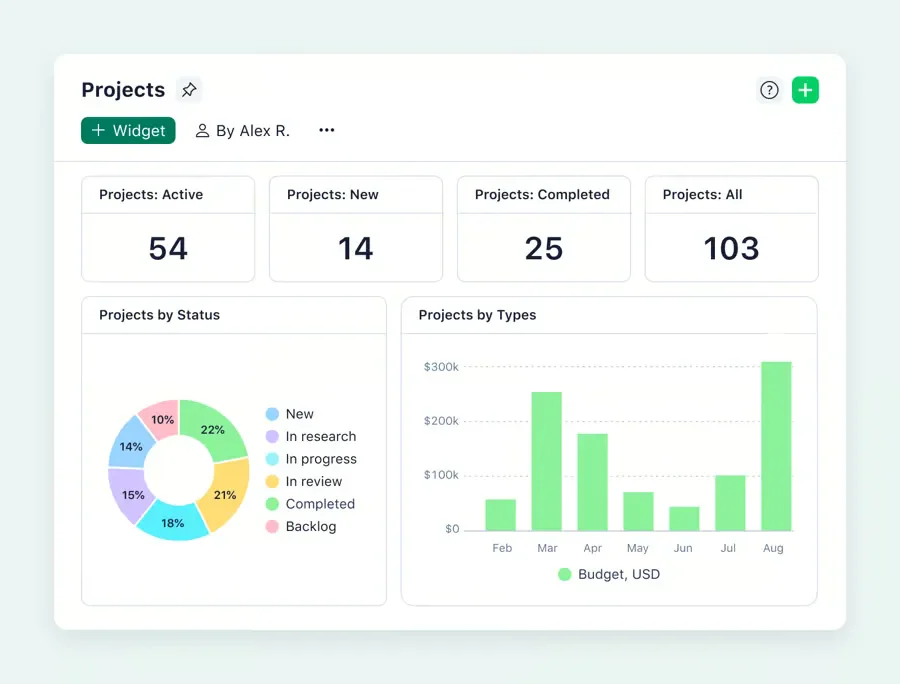
Wrike is a Professional Services Automation (PSA) software that is designed to cater to the needs of businesses seeking to optimize their project management processes, enhance collaboration among teams, and streamline operational workflows.
Wrike PSA tools offer a comprehensive suite of features, which include:
- Project planning and scheduling: Organizes tasks, deadlines, and project timelines.
- Collaboration tools: Lets team members share updates, files, and feedback.
- Custom workflows: Adapts task stages and approvals to team processes.
- Time tracking and reporting: Records task hours and summarizes project activity.
|
Pros |
Cons |
|
|
Suitable for: Wrike PSA tools are best suited for businesses that require project management solutions and have a variety of complex projects to manage.
Pricing: Starts at approximately ₱620 per user per month, billed annually.
5. Sage Intacct

Sage Intacct PSA software is a comprehensive cloud-based financial management and accounting solution tailored for professional service companies. It is designed to help these businesses streamline their lifecycle project management and improve profitability.
- Financial management: Tracks project costs, revenue, and financial performance.
- Time and expense management: Captures employee hours and expenses for project costing.
- Revenue recognition management: Helps account for project revenue according to applicable rules.
- Reporting and dashboards: Displays financial and project data for review.
|
Pros |
Cons |
|
|
Suitable for: Sage Intacct Professional Services Software is beneficial for businesses looking for a scalable solution that can grow with them and provide financial reporting and analysis to support strategic decision-making.
Pricing: Custom pricing based on users and selected modules.
6. Polaris PSA Solution

Polaris PSA solution is a comprehensive software designed to cater to the unique needs of service-oriented businesses. It aims to streamline operations, optimize resource allocation, and enhance project visibility, all within a unified platform.
The features that are offered by Polaris PSA are stated as follows:
- Project management: Helps teams plan work and monitor project delivery.
- Resource management: Shows resource availability and assignments across projects.
- Financial management: Tracks project budgets, costs, and revenue.
- Reporting and analytics: Provides insights into project and resource performance.
|
Pros |
Cons |
|
|
Suitable for: Polaris PSA is particularly beneficial for firms in consulting, IT services, engineering, and other professional service industries where project efficiency, billing accuracy, and resource optimization are crucial.
Pricing: Custom pricing; request a quote in Philippine pesos.
7. Deltek
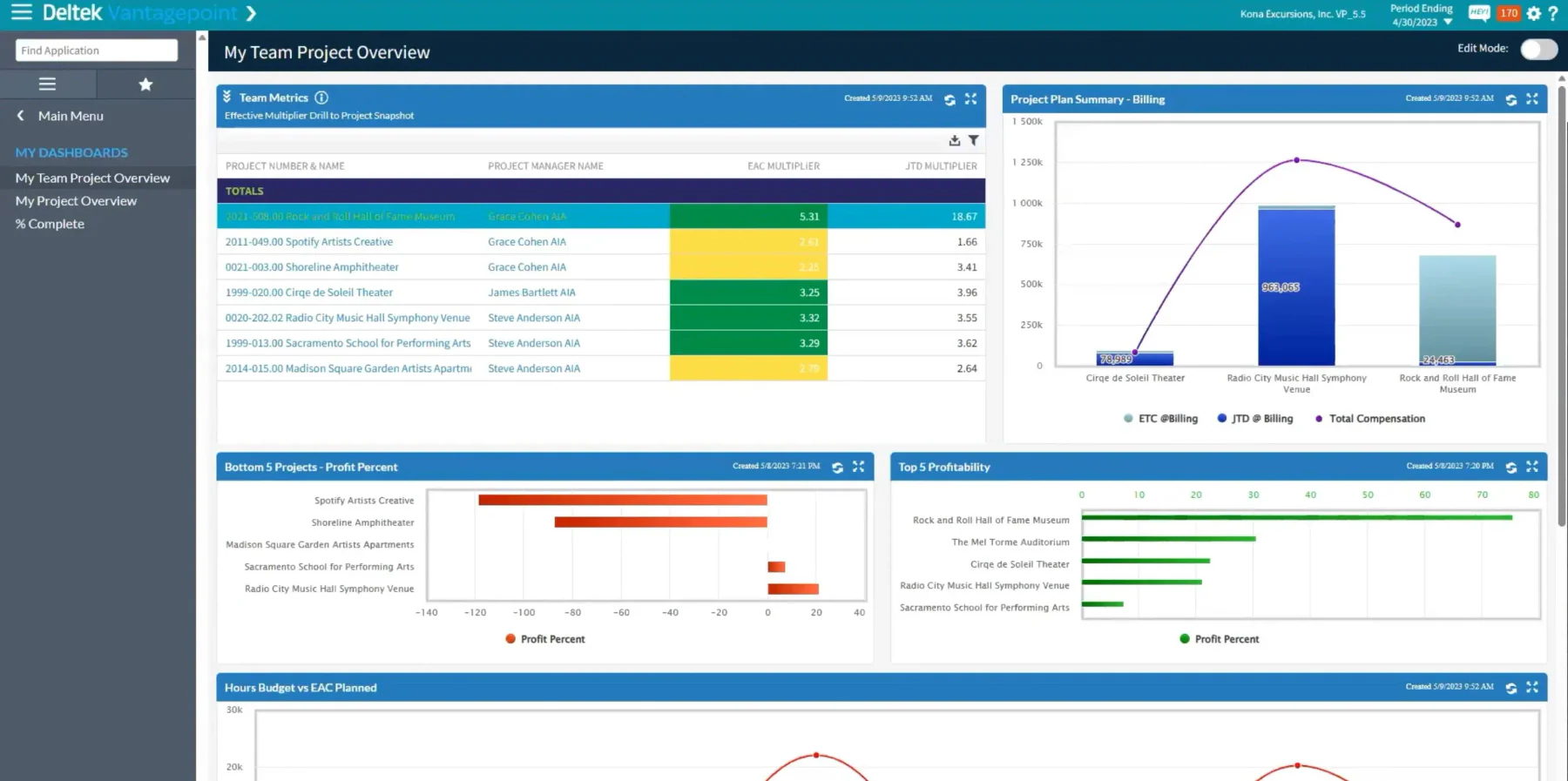
Deltek PSA solution is a comprehensive suite designed to cater to the intricate needs of firms within the professional services sector. This software aims to streamline operations, enhance project management, and improve profitability.
Let’s delve into Deltek PSA Software’s offered features:
- Project management: Supports project planning, scheduling, and delivery tracking.
- Resource planning: Helps match staff availability with project needs.
- Time and expense tracking: Records billable hours and project-related expenses.
- Business intelligence and reporting: Summarizes project data to support business decisions.
|
Pros |
Cons |
|
|
Suitable for: Deltek PSA tools are beneficial for businesses looking for an industry-specific solution that can support their growth and help them maintain competitiveness in the market.
Pricing: Custom pricing; request a quote in Philippine pesos.
8. ConnectWise
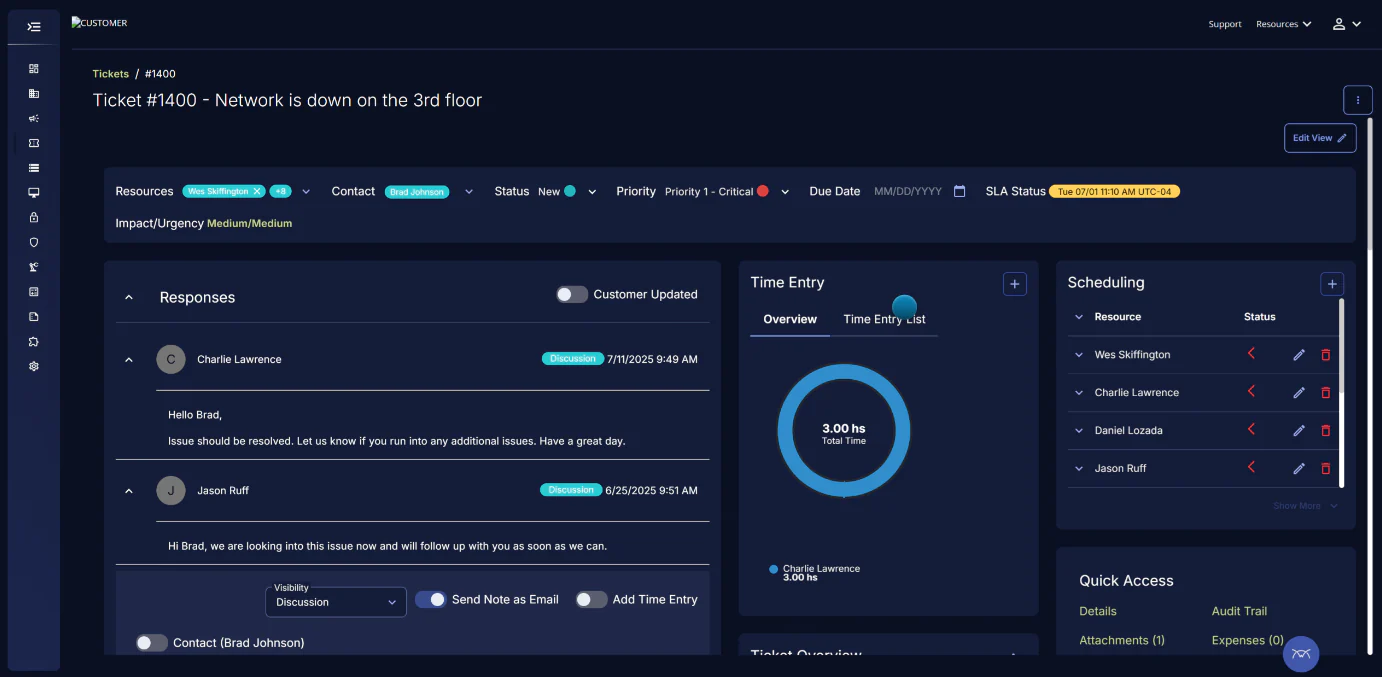
ConnectWise Professional Services Automation (PSA) software is a comprehensive suite designed to streamline the operations of service-based businesses, enhancing efficiency, and improving the overall customer experience.
The features that ConnectWise PSA software has to offer include:
- Project management: Helps teams organize tasks and track project progress.
- Time tracking and billing: Records service hours for client billing.
- Service desk: Manages client requests and support tickets.
- Reporting and analytics: Shows service and project performance in reports.
|
Pros |
Cons |
|
|
Suitable for: ConnectWise is particularly well-suited for IT service providers, MSPs, and technology businesses looking for a comprehensive solution to manage their operations.
Pricing: Custom pricing based on the selected package.
9. BigTime PSA Tools
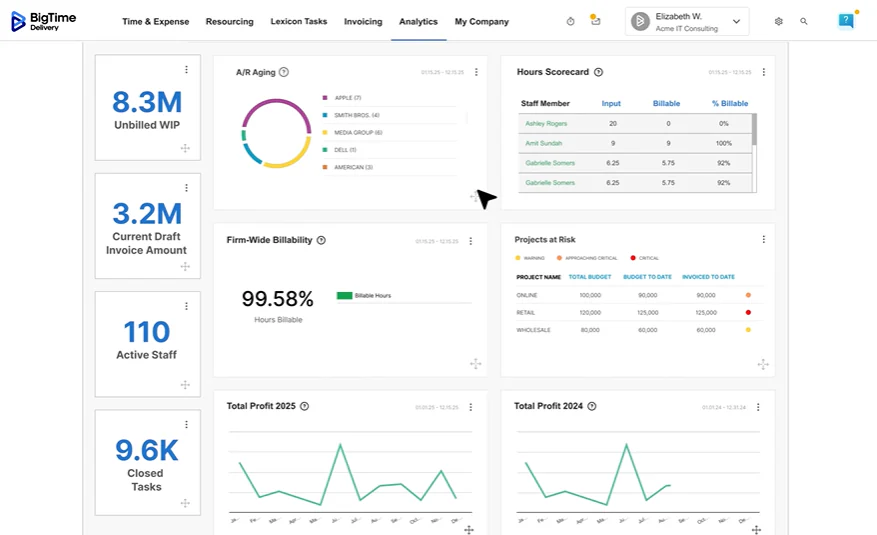
BigTime Professional Services Software is a comprehensive solution designed to cater to the needs of service-oriented businesses, particularly those in the consulting, accounting, engineering, IT services, and architectural sectors.
Below are the suite of features that BigTime PSA Tools has to offer:
- Project management: Helps teams track projects, tasks, and budgets.
- Time tracking and billing: Records work hours and connects them to billing.
- Expense tracking: Captures expenses associated with each project.
- Invoicing and financial reporting: Supports client invoicing and reviews of project finances.
|
Pros |
Cons |
|
|
Suitable for: BigTime software is particularly beneficial for businesses looking to streamline their operations, improve accuracy in billing and reporting, and gain insights into project profitability and resource utilization.
Pricing: Starts at approximately ₱1,230 per user per month.
10. Kantata

Kantata is a Professional Services Automation (PSA) Software tailored to cater to the needs of professional services organizations. It aims to provide a comprehensive suite of tools that streamline project delivery, resource management, and financial performance analysis.
Below is the comprehensive suite of features that Kantata PSA software has to offer:
- Project management: Helps teams plan and monitor service delivery.
- Resource management: Matches team capacity with project requirements.
- Expense management: Records and monitors project-related expenses.
- Collaboration and communication: Keeps project discussions and updates accessible to the team.
|
Pros |
Cons |
|
|
Suitable for: Kantata Professional Services Software is beneficial for industries, such as consulting, IT services, engineering, and creative agencies, where project delivery and resource optimization are critical.
Pricing: Custom pricing based on company requirements.
How to Select the Right Professional Services Software for Your Business

Selecting the right Professional Services Automation (PSA) software is a pivotal decision that can significantly impact the efficiency, profitability, and overall success of your business. With an array of options available, it’s crucial to approach this decision with a strategic mindset.
Here are some strategies to ensure you select the PSA software that best aligns with your business needs:
- Define your business requirements: Consider factors like the size of your team, the complexity of your projects, and any unique industry requirements. A clear understanding of what you need from PSA software will guide your selection process.
- Consider integration capabilities: Your PSA software should seamlessly integrate with the tools your business already uses, check whether the software integrates with customer relationship management (CRM), accounting, and communication tools.
- Evaluate user experience: A user-friendly interface and intuitive design can significantly reduce the learning curve and improve adoption rates among your team. Consider conducting a trial run or requesting a demo to get a feel for the software’s usability.
- Prioritize customer support and training: Look for providers who offer responsive support and a variety of training materials to help your team make the most of the software.
- Read reviews: Gain insights from other businesses similar to yours by reading reviews. Learning about others’ experiences can provide valuable information on the software’s performance, reliability, and the quality of customer service.
By carefully considering these strategies, you can select a Professional Services Software that not only meets your current needs but also supports your business’s growth and success in the long term. Check also whether the platform supports workflow automation for recurring approval and service workflows.
Conclusion
The adoption of the right Professional Services Software is not just a technological upgrade but a strategic necessity. These software solutions streamline operations, enhance project delivery, and optimize resource management, thereby driving efficiency and profitability. Review the main ERP system benefits before making a final decision.
HashMicro Professional Services Software serves as an all-in-one solution, known for its comprehensive functionality, customization capabilities, and seamless integration features.
Discover how HashMicro Professional Services Software can transform your business operations, enhance your service delivery, and drive your business growth. Take the first step towards operational excellence and get the free demo now!

Questions About Professional Service Automation
Professional Services Software improves operational efficiency by automating tasks such as project management, time tracking, billing, and resource allocation, leading to streamlined processes and better use of resources.
While some Professional Services Software is tailored for large enterprises, many solutions offer scalable features that can be customized to meet the needs of small businesses as well.
Industries such as healthcare, hospitality, retail, manufacturing, and any business with complex scheduling needs benefit greatly from rostering software to manage employee shifts efficiently.