

Australian businesses process millions of documents every year, supplier invoices, contracts, HR onboarding forms, and compliance records. For most, this work is still largely manual, with someone reading a PDF and re-typing the data into a system.
Intelligent document processing is AI technology that captures, extracts, classifies, and validates data from any document type, feeding it directly into business systems without manual entry.
Key Takeaways
Intelligent document processing is AI-powered technology that automatically captures, extracts, classifies, and validates data from business documents.
IDP follows a five-stage pipeline from the moment a document arrives to the moment clean data lands in your business systems.
IDP applies across multiple departments and industries, with each use case reducing a different type of document-heavy manual work.
The most important evaluation factor is not a vendor's advertised accuracy rate, but how the system performs on your specific document mix.

What Is Intelligent Document Processing?
Intelligent document processing (IDP) is AI-powered technology that automatically captures, extracts, classifies, and validates data from business documents without manual data entry. It works across structured, semi-structured, and unstructured documents alike.
Traditional OCR converts scanned images into text, but IDP understands what the text means, recognising an invoice number, an ABN format, or a total amount due rather than treating them as random characters.
The difference is similar to a photocopier versus a finance officer reading the same document. The photocopier gives you raw characters. The finance officer gives you structured, actionable data.
IDP vs Traditional Document Processing
This comparison makes the practical difference clearer, particularly for businesses still relying on basic OCR or manual review.
| Capability | Manual / Basic OCR | Intelligent Document Processing (IDP) |
|---|---|---|
| What it reads | Text only, images converted to characters | Text plus context and semantic meaning |
| Document types handled | Structured, consistent formats only | Structured, semi-structured, and unstructured |
| Learns over time | ❌ Static rules | ✅ Improves with every document processed |
| Error handling | Errors passed through silently | Low-confidence extractions flagged automatically |
| System integration | Manual export or import required | Native API or built-in ERP integration |
| Best suited for | Simple, uniform, low-volume documents | Complex, varied, high-volume business documents |
How Does Intelligent Document Processing Work?
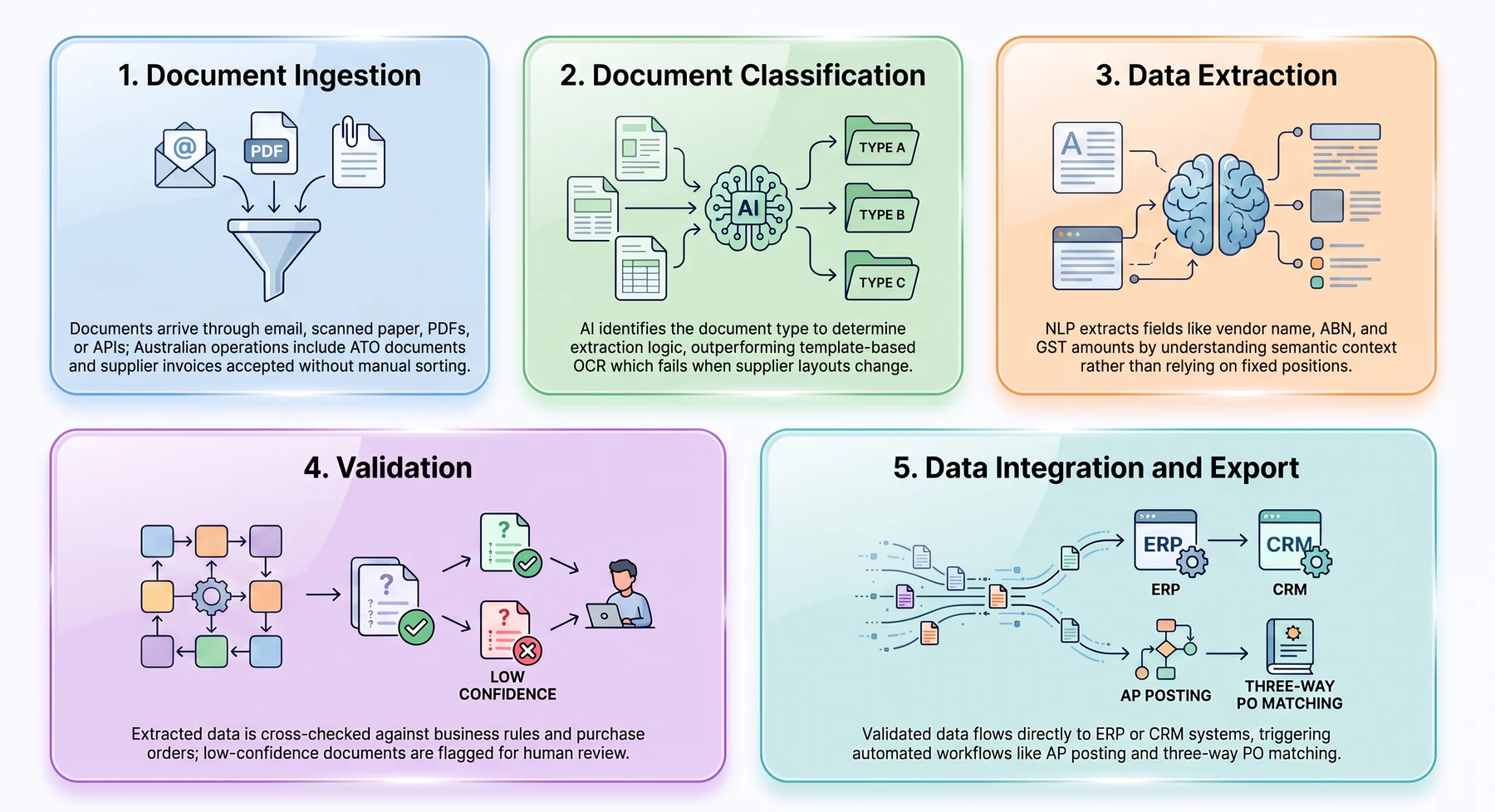
IDP follows a five-stage pipeline from the moment a document arrives to the moment clean data lands in your business systems, with each stage relying on a distinct AI capability.
1. Document ingestion
Documents arrive through multiple channels, including email, scanned paper, PDFs, fax, EDI feeds, or direct API connections. For Australian operations, this includes ATO documents, supplier invoices, and Fair Work records, all accepted without manual sorting.
2. Document classification
Before extracting data, AI identifies what kind of document it is looking at, since an invoice and a contract require different extraction logic. This is where IDP diverges from template-based OCR, which breaks when a supplier changes their layout.
3. Data extraction
NLP extracts specific fields such as vendor name, invoice number, amounts, and ABN, understanding semantic context rather than relying on fixed positions. For Australian documents, this includes ABN numbers, GST amounts, and BAS-relevant data automatically.
4. Validation
Extracted data is cross-checked against business rules and master data, confirming whether figures match the purchase order. Low-confidence documents are flagged for human review rather than passed through silently.
5. Data integration and export
Validated data flows directly to ERP, accounting, or CRM systems without manual re-keying. Native ERP integration can trigger automated workflows such as AP posting and three-way PO matching without manual handoff.
Benefits of Intelligent Document Processing
The business case for IDP rests on measurable outcomes that compound each other, where faster processing lowers cost per document and allows teams to scale without proportional headcount growth.
1. Higher accuracy, fewer costly errors
Manual processing carries a meaningful error rate from misread fields and transposed numbers, creating recurring correction work that delays payment. Modern IDP systems achieve accuracy rates exceeding 98 to 99 percent on configured document types.
2. Dramatically faster processing times
IDP handles tasks that take a finance clerk meaningful manual time in seconds instead. According to Deloitte, document automation delivers up to 35 percent efficiency gains and reduces processing time by 70 to 90 percent compared to manual entry.
3. Lower cost per document
The fully loaded cost of manual invoice processing includes staff time, error correction, and compliance overhead. IDP reduces this meaningfully at scale, with most mid-sized businesses seeing payback within 12 to 18 months.
4. Scalability without proportional headcount growth
Document volumes often grow faster than revenue, particularly in wholesale and logistics. With IDP, capacity is added by configuring document types rather than hiring, which matters for seasonal businesses with predictable volume spikes.
5. Stronger compliance and audit trail
Every document processed generates a timestamped, traceable log of what was extracted and validated. For businesses facing ATO audits or ASIC reporting requirements, this trail is a compliance asset, not just convenience.
6. Improved employee experience and retention
High-volume data entry is a reliable predictor of staff turnover. When IDP removes that repetitive work, teams shift to exception handling and analysis, which has measurable value in a tight labour market.
"The real value of intelligent document processing is not just speed, it is the confidence that every invoice, contract, and onboarding form has been captured, validated, and recorded the same way, every time."
Common Use Cases for Intelligent Document Processing in Australian Businesses
IDP applies across multiple departments and industries, with each use case reducing a different type of document-heavy manual work.
1. Finance and accounts payable
The most common IDP deployment in Australian businesses is supplier invoice processing. IDP extracts vendor name, ABN, line items, and GST components, routing the data into AP for three-way matching against purchase orders and goods receipts.
Businesses processing high volumes of monthly invoices see the clearest ROI, as GST reconciliation and BAS preparation become faster once invoice data is already structured and validated.
2. Human resources and employee onboarding
Australian onboarding involves substantial documentation, including right-to-work verification, TFN declarations, and superannuation forms. IDP captures and validates these automatically, reducing administration time while maintaining the audit trail Fair Work obligations require.
3. Legal and contract management
IDP extracts key clauses, parties, dates, and obligations from contracts, flagging documents where critical fields are missing or terms deviate from standard templates.
For businesses managing supplier agreements or commercial leases across multiple sites, this reduces legal review burden without requiring a large in-house legal team.
4. Healthcare
Medical practices and health insurers process large volumes of patient intake forms, referral letters, and Medicare documentation. IDP handles data extraction so clinical and admin staff can focus on patient care, reducing claim rejection rates caused by data entry errors.
5. Logistics and supply chain
Freight invoices, bills of lading, and customs declarations move through logistics operations at high velocity. IDP integrates with inventory systems to update stock records and flag discrepancies between ordered and received quantities without manual entry at each handoff.
6. Insurance
Claims processing is document-intensive by design, with first notice of loss forms, assessor reports, and policy documents requiring accurate capture and routing. IDP reduces claims cycle time, a key metric for insurers navigating ASIC general insurance code obligations.
What Technologies Power Intelligent Document Processing?
IDP is a pipeline of AI capabilities, not a single technology, with each layer handling a different stage of the process.
1. Optical character recognition (OCR)
OCR is the foundation layer, converting scanned images and non-searchable PDFs into machine-readable text. It does not know that "NET 30" is a payment term, that context-understanding sits with the layers above it.
2. Machine learning (ML)
ML models handle document classification and field extraction, trained on large volumes of document examples. Critically, these models improve with use, refining accuracy with every document processed.
3. Natural language processing (NLP)
NLP lets IDP understand what text means in context, identifying entities and relationships between them. This is what allows IDP to extract the right data even when layout varies by supplier or template version.
4. Robotic process automation (RPA)
RPA handles what happens after extraction, automating downstream workflows such as creating records, triggering approvals, and scheduling payments. IDP and RPA together automate the complete document-to-action pipeline with no manual steps in between.
Intelligent Document Processing vs OCR: What's the Difference?
This question comes up in almost every technology evaluation. The direct answer is that OCR is a component inside IDP, not a substitute for it.
| Capability | Traditional OCR | Intelligent Document Processing (IDP) |
|---|---|---|
| Core function | Converts images to machine-readable text | Understands document content and extracts structured data |
| Document understanding | Characters only, no semantic context | Characters plus field meaning and relationships |
| Layout variation | ❌ Fails when layout changes | ✅ Handles variable layouts across vendors and document types |
| Learns from data | ❌ Static rules require manual updates | ✅ Models improve automatically with each document processed |
| Validation | ❌ None, errors pass through undetected | ✅ Cross-checks against business rules and master data |
| System integration | Output requires manual transfer to business systems | Direct API or native ERP integration, no manual step |
| Extraction accuracy | 95-98% character recognition | 99%+ field-level extraction on configured document types |
| Best suited for | Digitising static, uniform documents | End-to-end document automation at business scale |
Most Australian businesses that start with standalone OCR tools find they outgrow them within 12 to 18 months as document volume and format variety increase.
How to Evaluate Intelligent Document Processing Software

The most important evaluation factor is not a vendor's advertised accuracy rate, but how the system performs on your specific document mix.
1. Accuracy on your actual documents
Ask vendors what accuracy rates look like on documents representative of yours, not benchmark data. For Australian operations, confirm whether the system handles ABN numbers, GST components, and AU-format dates and addresses.
International platforms do not always come pre-configured for AU document specifics, so always request a proof-of-concept on your actual documents before committing.
2. ERP and system integration depth
Confirm exactly how extracted data reaches your ERP, whether through a native built-in module, certified connector, or custom API requiring middleware. Native integration eliminates the maintenance burden and data lag that middleware introduces.
3. Australian data sovereignty and privacy compliance
Your business documents contain sensitive data, including supplier banking details and employee records. Under the Australian Privacy Act 1988, personal information must be handled with appropriate safeguards, particularly around cross-border data transfers.
Ask vendors directly where their processing servers are located and whether Australian-hosted processing is available.
4. Human-in-the-loop exception handling
Evaluate the exception workflow specifically, since no IDP system reaches full confidence on every document. Check whether the review interface is efficient, as poor exception UX often means exceptions pile up while high-confidence documents process quickly.
5. Total cost of ownership over 3 years
IDP pricing varies widely, from per-page fees to flat ERP-native licensing. Calculate 3-year TCO including implementation and volume-based charges, since flat licensing typically delivers better long-term economics.
How Intelligent Document Processing Works Inside HashMicro's ERP
HashMicro's ERP includes document processing as a native module, connected directly to accounts payable, procurement, inventory, and financial reporting, without platform switching or middleware dependencies.
Behind this capability is Hashy OS, HashMicro's AI engine powering document understanding and extraction across the platform. Data extracted by Hashy OS is immediately available across AP, procurement, and reporting without manual handoff.
The module handles document types common in Australian mid-market operations:
- Supplier invoices
- Purchase orders and delivery orders
- HR and onboarding documents
- Customer documents
Because document processing is native to the ERP, there is no lag between processing and financial reporting.
Because Hashy OS reads and extracts every document into the same connected system, Hashy, HashMicro's AI Coworker, can act on that data straight away, flagging invoices that fail three-way matching, surfacing duplicate supplier documents, and answering questions about any transaction without a manual search.






Conclusion
Intelligent document processing eliminates one of the most persistent productivity drains in Australian business operations, the manual handling of high-volume documents across finance, HR, logistics, and compliance functions.
What separates a useful implementation from a transformative one is integration depth. If your business processes invoices, contracts, or compliance records at volume, book a free consultation to see how IDP can fit into your existing systems.

FAQ
Intelligent document processing (IDP) is AI-powered technology that automatically captures, extracts, classifies, and validates data from business documents, including invoices, contracts, HR forms, and compliance records, without manual data entry.
OCR converts scanned images into machine-readable text but cannot understand what the text means. Intelligent document processing goes further, using AI to classify documents, extract fields by meaning, validate data against business rules, and push results directly into ERP or accounting systems.
Yes. Intelligent document processing combines machine learning, natural language processing, and computer vision. IDP systems improve automatically as they process more documents, which is a core characteristic of AI-powered software.
IDP follows a five-stage pipeline: document ingestion, classification, data extraction, validation against business rules, and integration into ERP, accounting, or CRM systems without manual transfer.
Australian businesses commonly use IDP for accounts payable automation, HR document management, logistics documentation, insurance claims processing, and contract management, with the clearest ROI seen at higher monthly document volumes.
IDP connects to ERP systems either through API integration or, in more advanced platforms, as a native built-in module. Native integration allows extracted data to flow directly into accounts payable, trigger purchase order matching, and update inventory without manual data transfer.