

HR software pricing can be difficult to compare because vendors package employees, users, modules, implementation, support, and integrations differently.
The cost of HR software also depends on workforce size and operational complexity. A simple subscription may suit one business, while another needs payroll, rostering, recruitment, and analytics.
This article explains how much HR software costs in Australia, what each pricing model includes, and which factors businesses should examine before comparing quotes.
Key Takeaways
HR software cost in Australia starts at around AUD 7 to AUD 14 per employee per month, rising with payroll, modules, and implementation fees
HR software pricing includes core HR, time and attendance, recruitment, performance, payroll integration, hosting, security, and support
HR software costs are driven by employee count, modules, entities, implementation scope, data quality, integrations, and compliance needs.
Comparing HR software quotes means normalising scope, separating recurring from one-off costs, and calculating a three-year TCO per vendor.
How Much Does HR Software Cost in Australia?
There is no single Australian price that applies to every organisation. However, current market benchmarks can help businesses establish an initial budget.
Australian core HR platforms commonly start at about AUD 7 to AUD 14 per employee per month, according to MerchantCompare.
This range is only a starting point. Payroll, recruitment, scheduling, performance management, integrations, and advanced reporting can substantially increase the final hr software cost.
Businesses asking how much does hr software costs should compare the full first-year expense, not only the monthly subscription shown on a vendor’s pricing page.
"Most businesses underestimate hr software cost because they price the platform, not the implementation required to run it"
1. Subscription Cost vs Implementation Cost
The subscription cost is the recurring fee paid monthly or annually. It usually provides access to selected modules, hosting, updates, and a defined level of customer support.
Implementation is normally a separate one-off cost. It can include project planning, system configuration, data migration, testing, integrations, training, and go-live assistance.
For example, a platform quoted at AUD 12 per employee may appear affordable. However, the first-year total can rise once setup, payroll configuration, historical records, and training are included.
HarmonyHR’s pricing comparison recommends separating recurring fees from implementation charges when evaluating the first-year cost.
Businesses should ask vendors to itemise both categories. This makes it easier to identify whether a low subscription is being offset by high configuration or onboarding charges.
2. HR Software Cost by Business Size
Employee numbers affect both subscription fees and implementation effort. Larger businesses may receive lower per-employee rates, but their total project cost is usually higher.
Rippling’s Australian pricing article provides illustrative monthly scenarios based on business size and functional scope.
| Business Size | Illustrative Scope | Illustrative Monthly Cost |
|---|---|---|
| 10 employees | Basic payroll, time, and leave | AUD 150 to AUD 400 |
| 50 employees | Payroll, performance, and HRIS | AUD 1,500 to AUD 2,500 |
| 100 employees | Payroll, compliance, and workforce management | AUD 2,500 to AUD 5,000 |
| 200 employees | Payroll, scheduling, and benefits | AUD 5,000 to AUD 10,000 |
| 500 employees | Full HRIS, payroll, compliance, and performance | AUD 10,000 to AUD 25,000 or more |
These figures are illustrative rather than standard market prices. Actual quotes will depend on modules, award complexity, integrations, entities, locations, and implementation requirements.
A business should therefore use employee count as one budgeting input. It should not be assumed that two companies with the same headcount will face the same cost of HR software.
How HR Software Pricing Models Work
Vendors use different billing structures to distribute costs across employees, users, modules, or packages. Understanding the model helps buyers predict how fees will change over time.
A useful HR software cost comparison should test each pricing model against expected recruitment, seasonal staffing, business expansion, and future module requirements.
1. Per Employee Per Month
Per employee per month, commonly called PEPM, charges the business for each employee stored or managed in the system.
For example, a company with 100 employees using a platform priced at AUD 10 PEPM would pay AUD 1,000 per month before setup, integrations, taxes, or optional modules.
This model is easy to calculate and generally scales with workforce growth. However, buyers must confirm whether contracts for casual, inactive, contractor, and terminated employees are billable.
Some vendors apply volume discounts as headcount increases. Businesses should still calculate the total expense because a lower unit rate does not necessarily mean a lower overall bill.
2. Per User or Active Employee
Per-user pricing charges for people who actively access the platform. This may include HR employees, managers, administrators, payroll teams, or the entire workforce.
A per-active-employee model can suit businesses with seasonal workers or archived employee records because the vendor may charge only for people active during that billing period.
The definition of active is important. A worker who logs in once, receives a payslip, submits leave, or appears in payroll may be counted for the entire month.
Buyers should ask vendors to define licensed users and active employees in the contract. They should also confirm how charges change when employees join, leave, or become inactive.
3. Base Fee Plus Employee Fee
Some vendors charge a fixed platform fee plus a smaller amount for every employee. The base fee may cover the account, administration tools, hosting, or core HR functions.
For example, a quote could include a monthly base fee and an additional PEPM charge. Optional modules may then be added as separate recurring fees.
This structure can make the cost of HR software less economical for small employers because the base fee is divided across fewer employees.
Growing businesses should model the combined cost at current and expected headcounts. They should also check whether the base fee rises when they add modules, entities, or locations.
4. Tiered or Package-Based Pricing
Tiered pricing groups features into packages such as basic, professional, premium, or enterprise. Each higher tier provides a broader set of functions.
A basic package may include employee records and leave management. Higher tiers may add recruitment, performance reviews, analytics, workflow automation, and advanced support.
This model is convenient when the package closely matches business needs. It becomes less efficient when a company must upgrade an entire tier to obtain one necessary feature.
Businesses comparing HR platform options should review the included functions line by line. They should also identify usage caps, employee limits, storage limits, and features reserved for higher-priced packages.
5. Modular Pricing
Modular pricing lets businesses select individual components, such as core HR, payroll, recruitment, attendance, performance management, expenses, or learning management.
This approach allows an organisation to begin with essential functions and add modules later. It can reduce the initial subscription and support a phased implementation.
However, several module fees can accumulate quickly. A low advertised starting price may cover only the core database, with common HR workflows charged separately.
Buyers should request the price of their expected future configuration. This reveals whether a modular product will remain economical as the organisation expands its use.
6. Custom Enterprise Pricing
Enterprise vendors often prepare custom quotes for organisations with complex payroll, multiple entities, international operations, advanced security, or extensive integrations.
The vendor may consider headcount, locations, award requirements, modules, transaction volumes, data migration, service levels, and contract duration.
Custom pricing can accommodate unusual requirements, but it also makes direct comparison harder. Two vendors may present similar totals while including very different services.
Enterprises should request a detailed scope, pricing assumptions, implementation plan, service levels, and rate card for future work before selecting a platform.
What Is Included in HR Software Pricing?
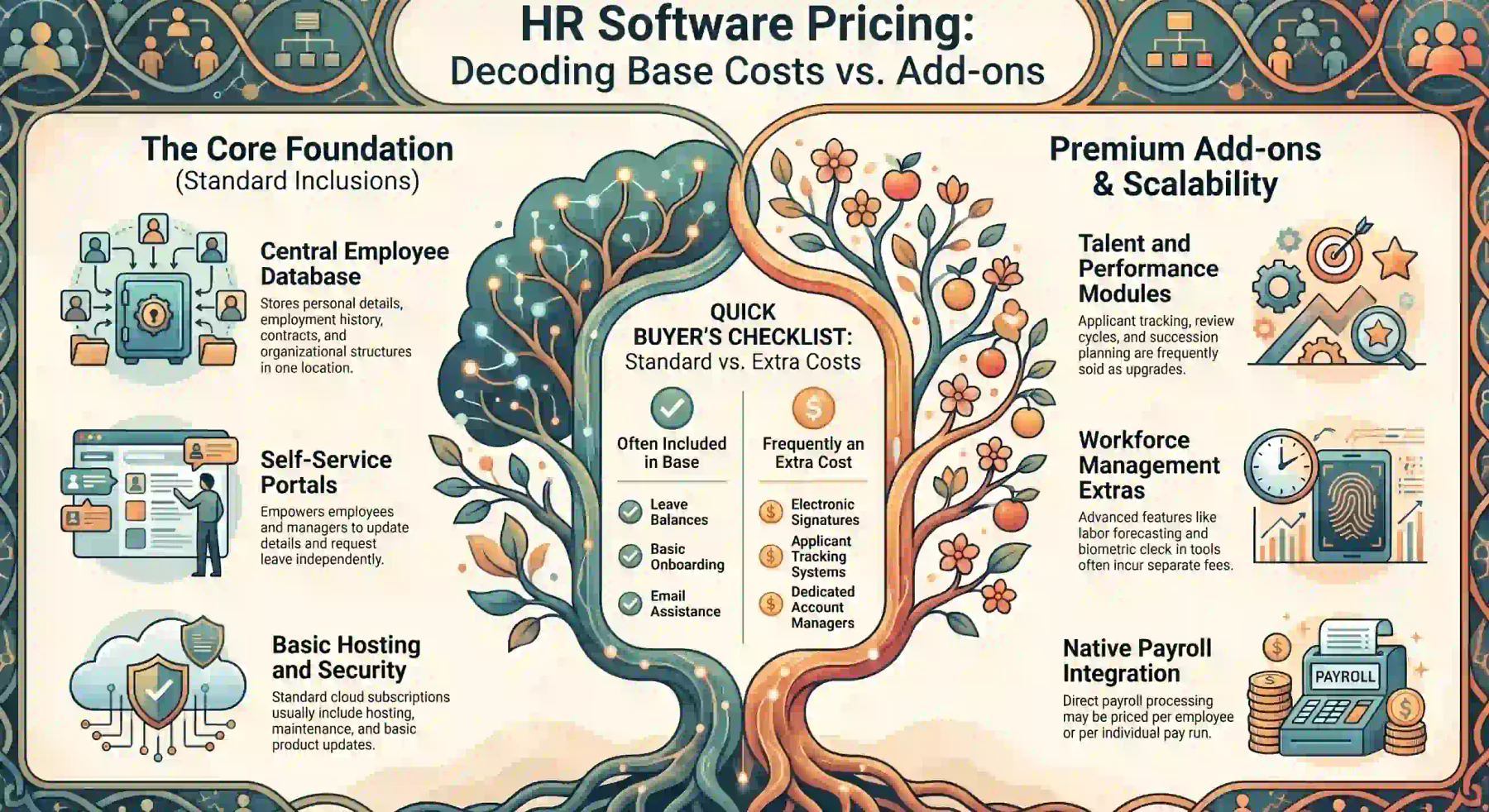
Subscription prices do not always include the same capabilities. One vendor may bundle payroll and support, while another charges separately for each component.
Before evaluating how much HR software costs, businesses should identify the functions included in the base price and the services treated as optional additions.
1. Core HR Administration
Core HR normally provides a central employee database for personal details, employment history, positions, contracts, documents, leave balances, and organisational structures.
Employee and manager self-service may also be included. These portals allow users to update details, request leave, access documents, and complete routine approvals.
Buyers should confirm whether document storage, electronic signatures, workflow approvals, organisational charts, and custom fields form part of the standard package.
A low-cost core system may be suitable for record keeping, but it may require additional modules to automate wider workforce processes.
2. Time, Attendance, and Workforce Management
Time and attendance functions can include timesheets, clock-in tools, leave management, shift scheduling, overtime controls, and manager approvals.
More advanced workforce management may provide award interpretation, fatigue controls, labour forecasting, location-based attendance, and roster optimisation.
Vendors may charge separately for physical time clocks, biometric devices, mobile attendance, scheduling, or award configuration.
Australian businesses should verify how the system handles ordinary hours, overtime, penalties, allowances, breaks, and other conditions relevant to their workforce.
3. Recruitment and Onboarding
Recruitment modules may cover job requisitions, vacancy advertising, applicant tracking, interview scheduling, candidate communication, and offer management.
Onboarding can include digital forms, document collection, policy acknowledgement, equipment requests, task allocation, and employee record creation.
Some vendors include basic onboarding within core HR but sell applicant tracking as an add-on. Others limit job postings, recruiter seats, candidates, or active vacancies.
Businesses should calculate whether these limits match expected hiring volumes. Recruitment charges can significantly change the hr software cost for fast-growing employers.
4. Performance and Talent Management
Performance functions may include objectives, review cycles, manager feedback, competency frameworks, development plans, succession planning, and employee surveys.
Talent tools can support career pathways, skills tracking, learning activities, workforce planning, and succession decisions.
These capabilities are commonly included in higher packages or sold as optional modules. Advanced analytics and compensation planning may require another upgrade.
Buyers should confirm whether pricing covers all employees, only participating employees, or only managers and HR users.
5. Payroll and Accounting Integration
HR platforms may provide native payroll, connect to a separate payroll product, or export approved employee and attendance data for payroll processing.
Native payroll may be priced per employee, per pay run, or as a separate module. Charges can also apply for additional entities, countries, payroll schedules, or year-end processing.
Accounting integration can transfer wages, taxes, superannuation, deductions, and cost allocations to the organisation’s financial system.
Businesses should distinguish a direct integration from a manual file export. They should also confirm who maintains field mappings when either platform changes.
6. Hosting, Security, Updates, and Support
Cloud subscriptions generally include hosting, system maintenance, backups, and product updates. However, service levels and support channels vary between vendors.
Standard support may be limited to email or business hours. Telephone assistance, priority response, a dedicated account manager, or extended support may cost extra.
Buyers should examine data location, access controls, authentication, audit logs, backup procedures, recovery commitments, and security incident processes.
They should also confirm whether regulatory updates are included or charged as professional services. These details can affect both risk and long-term ownership costs.
What Affects the Cost of HR Software?
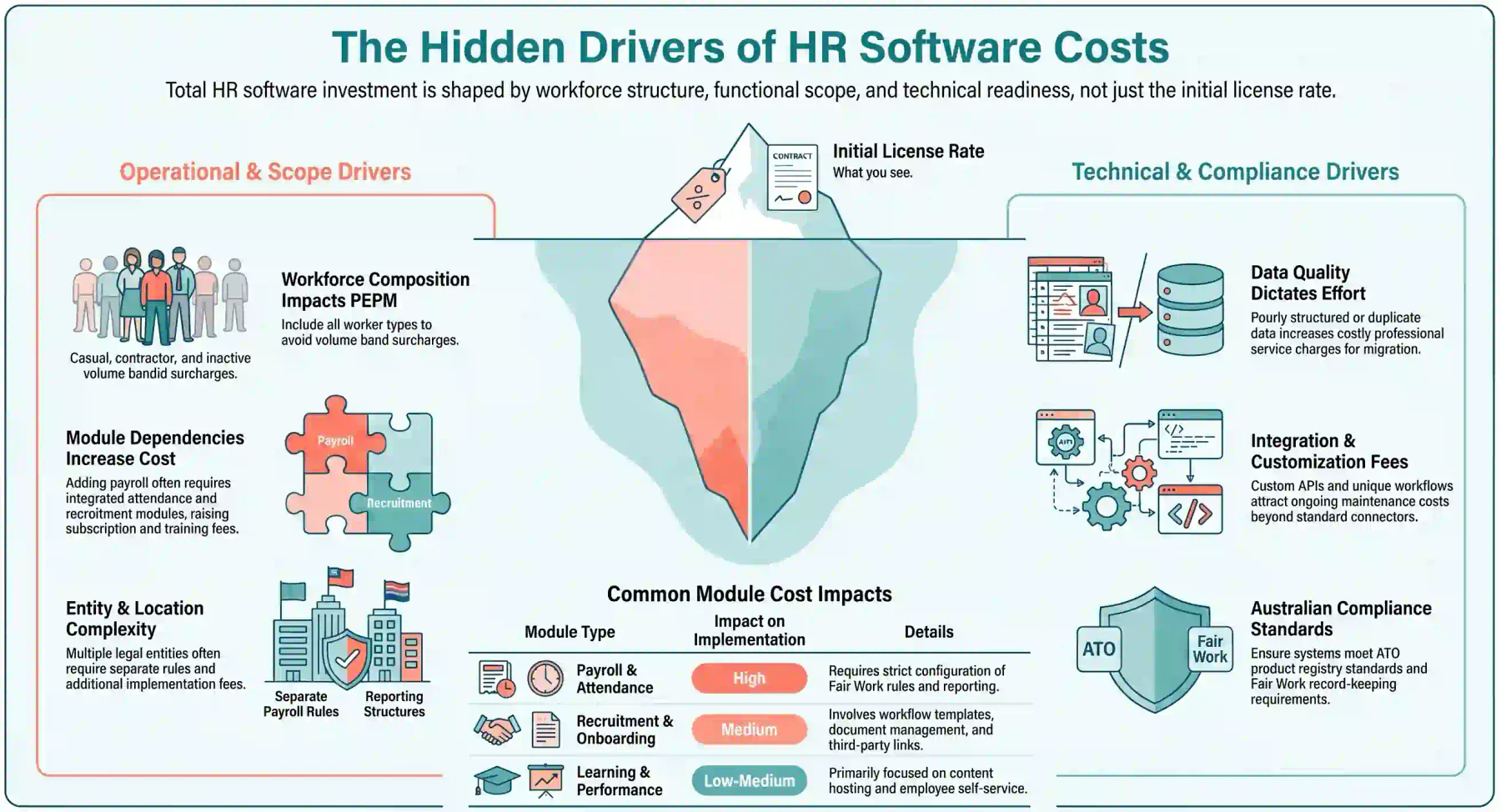
The final price reflects more than the vendor’s licence rate. Workforce structure, project scope, data condition, integrations, and compliance needs all influence the total investment.
Understanding these cost drivers helps a business prepare a realistic brief and reduces unexpected variations after the contract has been signed.
1. Number of Employees and Licensed Users
Employee count is a primary cost driver under PEPM pricing. Per-user platforms are instead influenced by how many administrators, managers, or employees need direct access.
Businesses should include permanent, part-time, casual, seasonal, contractor, and inactive worker categories when requesting a quote.
They should also model expected headcount growth. A quote that is competitive today may become expensive if its volume bands or minimum fees change at a higher workforce size.
2. Modules and Functional Scope
Each additional module can increase subscription, configuration, testing, training, and support costs. Common additions include payroll, recruitment, attendance, performance, and learning.
A wider scope can also create dependencies between modules. Payroll may rely on approved attendance data, while onboarding may need recruitment, document, and workflow functions.
Businesses should define essential, desirable, and future capabilities before selecting an integrated workforce management platform.
This prevents vendors from quoting different scopes and makes the cost of HR software easier to compare.
3. Number of Entities and Locations
Multiple legal entities can require separate payroll rules, approval structures, cost centres, reporting, security roles, and financial mappings.
Additional locations may introduce different rosters, public holidays, work patterns, management structures, and local operating requirements.
Some vendors charge per entity or country. Others include a limited number in the subscription before applying additional platform or implementation fees.
Businesses should identify every entity, branch, site, and payroll group during discovery, even if some will be implemented in a later phase.
4. Implementation and Configuration
Implementation effort depends on how closely the standard platform matches existing policies and processes.
Configuration may include organisational structures, leave rules, approval workflows, payroll settings, security roles, templates, reports, and notifications.
A highly standardised deployment may be faster and less expensive. Complex workflows and extensive exceptions usually require more consulting, testing, and documentation.
Buyers should request an implementation scope that lists activities, responsibilities, assumptions, exclusions, deliverables, and acceptance criteria.
5. Data Migration and Data Quality
Migration costs depend on the number of sources, years of history, data volume, file quality, required transformations, and validation effort.
Incomplete employee records, inconsistent job titles, duplicate profiles, and poorly structured spreadsheets can increase preparation and testing work.
Vendors may include one standard import but charge separately for cleansing, historical payroll, attachments, custom fields, or repeated migration runs.
Businesses should assess their data before requesting final pricing. Clean source data can reduce project delays and limit avoidable professional service charges.
6. Integrations and Customisation
HR software may need to connect with payroll, accounting, identity management, recruitment, learning, rostering, benefits, or business intelligence platforms.
Prebuilt connectors may be included, sold separately, or limited to particular packages. Custom integrations can attract design, development, testing, and maintenance fees.
Customisation can also raise costs when the business requires unique fields, workflows, reports, documents, or interfaces beyond standard configuration.
Buyers should confirm ownership, maintenance responsibilities, API limits, and future upgrade impacts for every integration and custom component.
7. Training and Support Level
Training may be delivered through self-service materials, recorded courses, group workshops, administrator sessions, or tailored role-based programs.
Some implementation packages include limited training hours. Additional sessions, new-user training, onsite delivery, or customised materials may cost extra.
Support pricing can vary by response target, operating hours, communication channel, and access to specialist consultants.
Businesses should select support based on operational risk. A payroll-critical system may justify stronger service commitments than a limited employee directory.
8. Australian Compliance and Security Requirements
Australian requirements can affect product selection, configuration, and ongoing costs, particularly when a platform handles payroll, attendance, and sensitive employee data.
Employers must keep prescribed employment and pay records under the Fair Work record-keeping requirements.
Payroll buyers should also verify relevant reporting capabilities and check applicable products through the ATO product register.
Privacy responsibilities require careful review. The employee records exemption has limits, as explained by the Office of the Australian Information Commissioner.
Security requirements may include Australian data hosting, multifactor authentication, audit trails, encryption, role-based access, backups, and incident response commitments.
These controls may be standard, restricted to premium plans, or subject to separate fees. Buyers should verify them in writing instead of relying on general security claims.
HRIS vs HRMS vs HCM vs Payroll Software Pricing
HRIS, HRMS, HCM, and payroll platforms overlap, but they do not always cover the same processes. Comparing them only by price can produce an inaccurate conclusion.
An HRIS usually focuses on employee records, leave, documents, onboarding, and basic reporting. It often represents the lowest functional starting point.
An HRMS typically extends core HR into areas such as attendance, recruitment, performance, workflows, and broader workforce administration.
HCM platforms generally cover strategic functions, including talent management, workforce planning, advanced analytics, compensation, learning, and succession.
Payroll software supports payroll administration processes such as including wage calculations, deductions, superannuation, taxes, and pay runs.
| System Type | Typical Focus | Common Pricing Effect |
|---|---|---|
| HRIS | Employee data, leave, documents, and basic workflows | Lower starting scope, with add-on charges for advanced functions |
| HRMS | Core HR plus operational workforce management | Higher subscription due to broader modules and configuration |
| HCM | Strategic talent, planning, analytics, and enterprise workforce needs | Often uses premium tiers or custom enterprise pricing |
| Payroll Software | Pay calculations, compliance, reporting, and disbursement data | May be priced per employee, pay run, entity, or payroll module |
A cheaper HRIS may become more expensive after payroll, recruitment, attendance, and performance modules are added.
Conversely, an integrated HRMS or HCM platform may carry a higher headline price but reduce duplicated data entry, separate contracts, and integration maintenance.
Businesses should compare systems against the same functional scope. That is the only reliable way to determine how much does hr software costs for their actual requirements.
Hidden and One-Off HR Software Costs
Hidden costs sit outside the advertised subscription. They may be necessary project expenses, but they should be identified before the contract is approved.
Common examples include configuration, data cleaning, integration work, additional training, premium support, and assistance when leaving the platform.
| Cost Area | What It May Include | How to Control It |
|---|---|---|
| Implementation | Discovery, setup, workflows, permissions, testing and launch support | Define deliverables, assumptions and acceptance criteria |
| Data Migration | Extraction, cleaning, mapping, imports, attachments and validation | Assess source data and required history before quoting |
| Integrations | Connector licences, configuration, testing and ongoing maintenance | Assign ownership and document each required data flow |
| Training | Administrator, manager, employee and new-starter training | Confirm included hours, formats and participant limits |
| Premium Services | Priority support, extra storage, custom reports and test environments | Separate operational requirements from optional services |
| Renewal and Exit | Price increases, cancellation charges, data exports and transition support | Review renewal, notice, ownership and export terms |
Internal project time should also be included. HR, payroll, finance, IT and managers may spend substantial time preparing data, testing workflows and supporting adoption.
Scope changes can increase the final HR software cost. Establish a written process for requesting, pricing, approving and testing work outside the agreed scope.
Renewal terms can affect the long-term cost of HR software. Review indexation, minimum commitments and notice periods before signing.
Exit costs deserve equal attention. Confirm available export formats, retention periods, deletion procedures and fees for vendor-assisted data extraction.
How to Calculate HR Software Total Cost of Ownership
Total cost of ownership, or TCO, combines subscriptions with every expense needed to implement, operate, support and eventually replace the platform.
TCO provides a more accurate answer to how much does HR software cost because it includes expenses that do not appear in the advertised employee rate.
1. First-Year TCO Formula
The first year normally costs more because implementation, migration, integration and training occur alongside the subscription.
First-Year TCO = Annual Subscription + Implementation + Migration + Integrations + Training + Internal Project Costs + Additional Support
Include every item required for a successful launch. Exclude an optional expense only when the business can operate effectively without it.
Internal project costs can be estimated by multiplying the hours contributed by each employee by an agreed internal hourly cost.
Also include temporary resources, travel, testing environments and duplicate software subscriptions during the transition period.
2. Three-Year TCO Formula
A three-year calculation reveals whether an initially attractive price remains economical after growth, renewals and additional modules.
Three-Year TCO = First-Year TCO + Recurring Costs in Years Two and Three + Expansion Costs + Contract Increases
Recurring costs may include licences, support plans, storage, connector maintenance and paid security services.
Expansion costs can include higher headcount, new entities, extra locations, additional modules and changes to integrations.
Apply the vendor’s stated price adjustment rules. If those rules remain unclear, test several reasonable increase scenarios before approval.
3. Cost per Employee Formula
Cost per employee converts the total investment into a standard measure that can support comparisons between quotes and workforce scenarios.
Annual Cost per Employee = Annual TCO ÷ Average Number of Employees
Effective Monthly Cost per Employee = Annual TCO ÷ Average Number of Employees ÷ 12
Use average headcount rather than the year-end total when workforce numbers change materially during the period.
This calculation differs from the quoted PEPM rate because it includes implementation, migration, training and other ownership costs.
Use the measure as a comparison tool, not as the sole decision factor. A cheaper system may create more manual work or provide weaker functional coverage.
4. Worked Australian Business Scenario
Consider a business with 100 employees paying AUD 10 per employee per month for its selected HR software scope.
The annual subscription is AUD 12,000. The first-year TCO rises after implementation, migration, integrations and internal project work are included.
| Cost Item | Year One | Year Two | Year Three | Three-Year Total |
|---|---|---|---|---|
| Software Subscription | AUD 12,000 | AUD 12,000 | AUD 12,000 | AUD 36,000 |
| Implementation and Configuration | AUD 8,000 | AUD 0 | AUD 0 | AUD 8,000 |
| Data Migration | AUD 3,000 | AUD 0 | AUD 0 | AUD 3,000 |
| Integration Setup | AUD 4,000 | AUD 0 | AUD 0 | AUD 4,000 |
| Training and Internal Project Time | AUD 5,000 | AUD 0 | AUD 0 | AUD 5,000 |
| Total TCO | AUD 32,000 | AUD 12,000 | AUD 12,000 | AUD 56,000 |
The first-year annual cost is AUD 320 per employee, or an effective monthly cost of about AUD 26.67 per employee.
Across three years, the average annual cost is about AUD 18,667. This equals an average monthly cost of about AUD 15.56 per employee.
The scenario assumes stable headcount, subscription pricing and scope. It excludes taxes, renewal increases, new modules and ongoing integration maintenance.
Businesses should calculate current-state, expected-growth and high-growth scenarios to see how the pricing structure responds to change.
How to Compare HR Software Quotes
Every vendor should receive the same requirements, workforce assumptions and implementation expectations.
This approach reveals whether price differences reflect genuine value, missing functions or a narrower service scope.
1. Normalise the Scope
Create one requirements matrix covering modules, workflows, users, entities, locations, integrations, migration, security, training and support.
Ask each vendor to classify every requirement using the same response options.
- Included in the quoted package
- Available for an additional fee
- Requiring standard configuration
- Requiring custom development
- Planned but not currently available
- Not supported
Request written explanations for conditions and limitations. A function may be included but restricted by volume, package or user type.
Normalising the scope prevents a basic HRIS quote from being compared directly with a broader HRMS or HCM proposal.
2. Separate Recurring and One-Off Costs
Dividing costs into recurring and one-off categories shows when each charge occurs and whether it continues throughout the contract.
| Recurring Costs | One-Off Costs |
|---|---|
| Software Subscription | Implementation |
| Module Licences | Data Migration |
| Support Plans | Integration Setup |
| Storage and Environment Fees | Configuration |
| Connector Maintenance | Training |
| Additional Users | Custom Development |
Some costs can fall into either category. An integration may involve a one-off setup fee and an ongoing connector licence.
Ask vendors to identify optional charges and costs that become mandatory when usage, headcount or data volumes increase.
3. Build a Three-Year Quote Comparison
Calculate each proposal using the same headcount, modules, entities, locations, support level and implementation schedule.
The comparison should include expected growth, annual price changes, new modules and likely integration maintenance.
| Comparison Area | Vendor A | Vendor B | Vendor C |
|---|---|---|---|
| Year-One TCO | Enter Quote | Enter Quote | Enter Quote |
| Three-Year TCO | Enter Quote | Enter Quote | Enter Quote |
| Effective Monthly Cost per Employee | Calculate | Calculate | Calculate |
| Mandatory Requirements Met | Score | Score | Score |
| Implementation Risk | Assess | Assess | Assess |
| Contract Flexibility | Assess | Assess | Assess |
Do not rank proposals by price alone. Functional fit, implementation risk, usability, integration quality and support affect long-term value.
A three-year comparison provides a more defensible answer to how much does HR software cost under realistic business conditions.
4. Questions to Ask Each Vendor
Consistent questions expose assumptions that may otherwise remain hidden until implementation or renewal.
- Which employees, users, entities and environments are billable?
- Which modules and functions are included in the quoted package?
- What implementation tasks and deliverables are included?
- How many migration cycles, integrations and training hours are covered?
- Which assumptions could change the quoted amount?
- How are scope changes requested, priced and approved?
- What support hours, response targets and escalation paths apply?
- How can subscription prices change at renewal?
- Who owns the data, configurations and custom developments?
- Which export formats are available when the contract ends?
- Who maintains integrations when connected systems change?
- What security incidents, outages and recovery commitments are covered?
Request written answers for requirements that affect price, compliance, security or operational continuity.
Verbal assurances should not replace the contract, licence schedule, implementation scope or service-level agreement.
Conclusion
HR software pricing cannot be evaluated from the monthly rate alone. Scope, implementation, data, integrations, support and contract terms determine the real investment.
Document requirements, normalise vendor quotes and calculate first-year and three-year TCO. The strongest option controls long-term costs while improving administration and workforce visibility.
To learn further about HR Softwares, you can book a free consultation with us today. Start anytime and implement your own HR system.
Frequently Asked Questions
Prepare headcount, entities, locations, modules, integrations, security needs, migration history, growth plans and implementation timing so vendors can prepare comparable quotes.
Core HR can launch in weeks, while payroll, multiple entities and complex integrations extend timelines to months. Allow contingency for data cleaning and testing corrections.
Yes, businesses can begin with core HR then add payroll, recruitment, attendance and performance modules later, once budget, dependencies and pricing are confirmed.
HR, payroll, finance, IT, security, operations and legal should evaluate the investment, with one accountable decision owner overseeing requirements and commercial decisions.
A pilot or sandbox helps test payroll rules, integrations and usability against realistic scenarios, with clear success criteria set before any sensitive data is uploaded.
Yes. Phased budgeting spreads implementation costs if each phase has a defined scope and acceptance criteria, provided the full three-year cost is calculated before approval.