

AI agent for CRM combines customer relationship management software with artificial intelligence to help businesses understand customers, prioritise opportunities, automate routine work, and make faster decisions. It turns customer records, conversations, transactions, and sales activity into practical recommendations.
For Australian small and mid-market businesses, the value comes from connection. AI becomes more useful when CRM data links with quotations, inventory, orders, invoices, payments, and service records through an integrated ERP platform.
Key Takeaways
AI CRM can prioritise leads, forecast sales, recommend actions, and reduce manual administration.
Predictive, generative, conversational, and agentic AI support different customer-facing activities.
Strong data governance, role-based access, and human oversight help businesses use AI responsibly.
A controlled pilot allows a company to test one valuable use case before expanding AI across customer operations.
What Is AI CRM?
AI CRM is a customer relationship management system that uses artificial intelligence to analyse information, identify patterns, generate content, and support business decisions. It can help teams score leads, forecast sales, summarise interactions, recommend follow-ups, and detect customer risks.
A standard CRM system records customer details and tracks activities. AI agent for CRM adds prediction and reasoning capabilities, allowing the system to explain what may happen next and suggest an appropriate response.
AI capability can appear in different forms. The following table compares traditional, AI-powered, and AI-native CRM approaches.
How Does AI CRM Work?
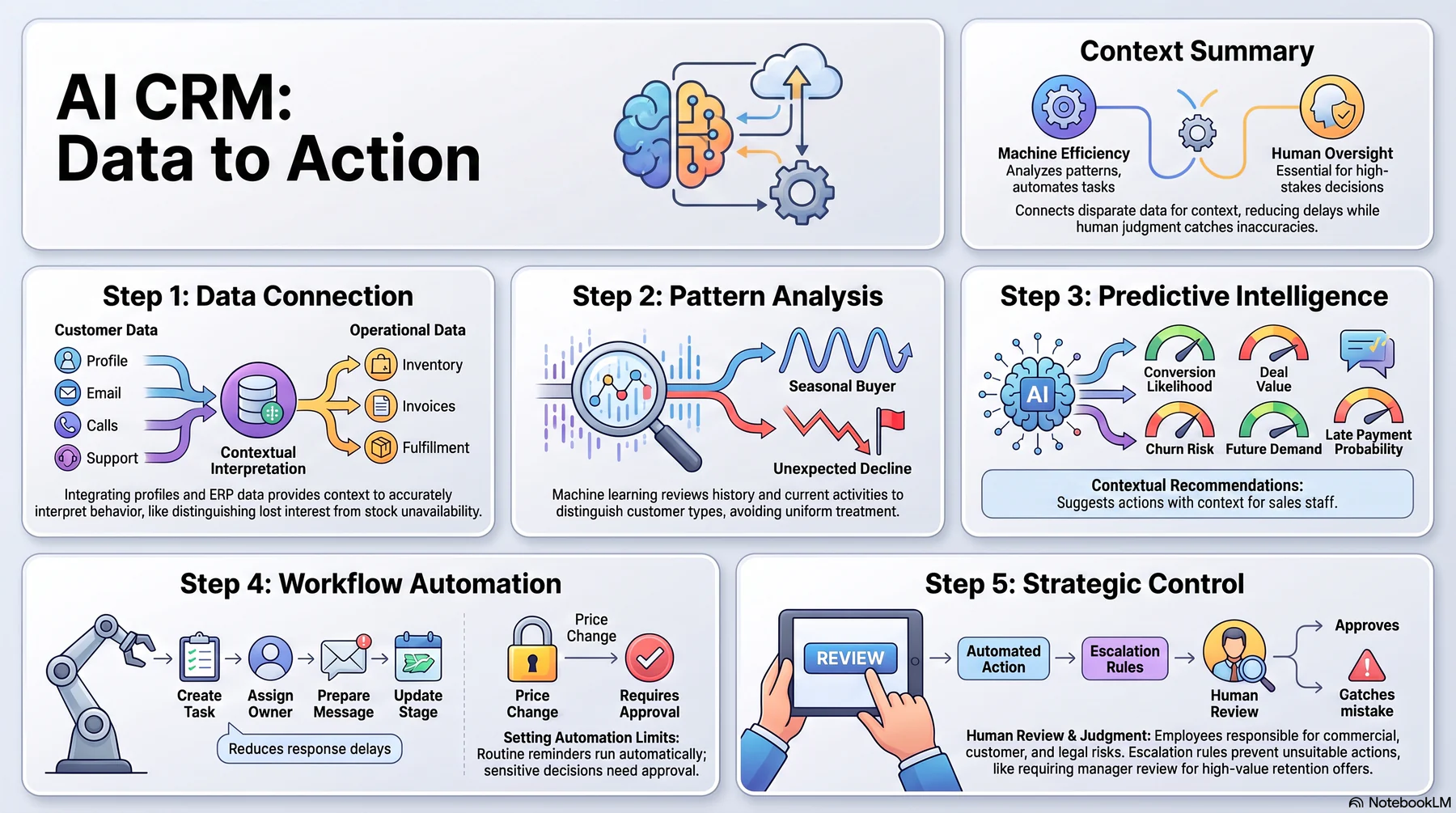
AI CRM moves from collecting information to recommending and completing controlled actions. The following process shows how data becomes practical customer insight.
1. Customer and Operational Data Are Connected
The system brings together customer profiles, emails, calls, meeting notes, opportunities, support requests, orders, and account activity. ERP integration can add inventory, quotation, invoice, payment, and fulfilment information.
Connected records give the AI enough context to interpret customer behaviour accurately. Without that context, a delayed purchase may look like lost interest even when unavailable stock caused the delay.
2. AI Analyses Patterns and Customer Signals
Machine learning models review historical outcomes and current activity to find useful patterns. These signals may include response frequency, buying history, pipeline movement, service issues, product interest, and payment behaviour.
The analysis does not need to treat every customer identically. For example, the model can distinguish a seasonal buyer from an account whose order frequency has declined unexpectedly.
3. The System Predicts Outcomes and Recommends Actions
AI can estimate conversion likelihood, expected deal value, churn risk, future demand, or the probability of a late payment. It can then recommend which lead to contact, what information to provide, or when an account needs attention.
A recommendation should include enough context for users to assess it. Sales staff should understand whether customer activity, historical outcomes, or another factor influenced the result.
4. Automation Moves the Workflow Forward
Once the system identifies an appropriate action, automation can create tasks, assign account owners, prepare messages, update stages, or request approval. This reduces delays between recognising an issue and responding to it.
Businesses should set limits around what AI can complete independently. Routine reminders may run automatically, while price changes, contract commitments, or sensitive customer decisions may require approval.
5. Human Review Keeps Important Decisions Controlled
Employees remain responsible for decisions that involve commercial judgement, customer impact, or legal risk. Human review helps teams catch inaccurate assumptions and consider information that may not appear in the data.
Clear escalation rules also prevent automation from taking an unsuitable action. For example, a service manager may review a retention offer before the system sends it to a high-value account.
Core AI Capabilities in CRM
AI CRM can use several forms of artificial intelligence within the same platform. Each capability supports a different type of customer or sales activity.
Predictive AI
Predictive AI uses historical records and current signals to estimate future outcomes. Common applications include lead scoring, churn prediction, sales forecasting, next-purchase estimates, and payment-risk detection.
These predictions help teams focus their time where it may have the greatest effect. However, businesses should monitor accuracy because customer behaviour and market conditions can change.
Generative AI
Generative AI creates or transforms content based on instructions and business context. It can draft emails, prepare call summaries, create proposal text, explain reports, and convert meeting notes into follow-up tasks.
Users should review customer-facing material before sending it when accuracy or tone carries significant risk. Approved templates and brand guidance can also keep generated communication consistent.
Conversational AI and Natural Language Processing
Conversational AI lets employees ask questions in ordinary language instead of building reports manually. Natural language processing helps the system interpret customer messages, call transcripts, service requests, and internal notes.
A manager could ask which opportunities have stalled or which accounts show declining engagement. The system can then retrieve relevant records and explain the result without requiring the manager to search several screens.
Agentic AI
Agentic AI can plan and complete a series of permitted tasks toward a defined goal. For example, an authorised agent could identify inactive opportunities, create follow-up tasks, assign owners, and prepare draft messages.
This capability needs strict access controls, action limits, and audit trails. Businesses should also require human approval before an agent makes commitments, changes commercial terms, or contacts sensitive accounts.
Benefits of AI CRM for Businesses
AI CRM delivers value when it improves everyday work and customer outcomes. The following benefits apply across sales, marketing, service, finance, and account management.
Less Manual CRM Administration
AI can summarise calls, update activity notes, classify enquiries, schedule follow-ups, and prepare routine communication. Sales and service teams can spend less time maintaining records and more time handling customer needs.
Automation also improves consistency because required tasks do not depend entirely on individual memory. Managers still need controls that prevent incorrect updates from moving through the system unnoticed.
Better Lead and Opportunity Prioritisation
AI lead scoring compares customer fit, engagement, activity, and historical conversion patterns. This helps sales teams separate promising opportunities from contacts that need more nurturing.
The score should guide attention rather than make the final decision. A salesperson may know about a customer requirement that the model has not captured.
More Accurate Sales Forecasting
AI can assess deal age, stage history, customer engagement, sales activity, and previous outcomes when forecasting revenue. This provides more context than a forecast based only on the value assigned to each pipeline stage.
A stronger forecast helps managers plan staffing, purchasing, cash flow, and sales targets. Teams should compare predicted and actual results regularly to identify errors or changing patterns.
Faster and More Consistent Customer Service
AI can classify enquiries, summarise account history, suggest answers, and direct cases to the right employee. Service staff gain useful context without manually reviewing every past interaction.
Faster access to information can reduce response delays and unnecessary transfers. However, employees should take control when a request involves complaints, vulnerable customers, safety, or contractual obligations.
More Relevant Customer Engagement
AI can recommend messages, offers, and contact timing based on customer interests and relationship history. This supports more relevant engagement than sending the same communication to every contact.
Australian businesses must still follow privacy and marketing requirements. The ACMA spam guidance explains that commercial electronic messages require consent, sender identification, and a working unsubscribe option.
Stronger Customer Retention
AI can flag falling order frequency, unresolved complaints, slower responses, or reduced product usage. Account teams can then investigate the cause before the relationship deteriorates further.
Retention recommendations should consider the full account record. A customer may need service support, a revised delivery arrangement, or a commercial discussion rather than a generic discount.
Better Cross-Department Visibility
A connected platform gives sales, service, inventory, finance, and management teams a consistent customer view. This reduces conflicting information and makes ownership easier to understand.
For example, sales staff can see whether stock, an unpaid invoice, or an unresolved complaint affects an opportunity. Other departments can also understand which customer commitments need attention.
How AI CRM Connects With ERP Customer Workflows
CRM records customer demand, while ERP software manages the operational and financial work required to fulfil it. Connecting both systems allows AI to recommend actions based on business capacity as well as customer activity.
Lead Prioritisation to Quotation
AI can identify a high-priority lead and recommend a follow-up based on fit, activity, and buying signals. Once the opportunity qualifies, the connected workflow can create a quotation using current products, pricing rules, and approval requirements.
This connection reduces manual re-entry between CRM and sales administration. It also gives the customer a faster and more consistent response.
Customer Demand to Inventory Availability
Product interest becomes more useful when sales teams can compare it with live stock and expected replenishment. AI can flag whether a requested item is available, limited, or likely to arrive within the customer’s timeframe.
Sales staff can then recommend realistic alternatives or delivery dates. This prevents promises that warehouse and purchasing teams cannot support.
Sales Order to Fulfilment
An accepted quotation can move into order processing, picking, packing, and delivery without recreating customer details. AI can monitor the workflow and identify orders that risk missing a promised date.
The account owner can receive an alert before the delay affects the customer. As a result, the business gains time to adjust fulfilment or communicate a revised expectation.
Invoice and Payment History to Account Action
CRM activity alone does not show whether an account pays reliably. ERP accounting data can add invoice status, overdue balances, credit limits, and payment history to the customer view.
AI can use that context to recommend a payment follow-up or credit review before a new order proceeds. Finance staff should approve actions that change credit terms or account restrictions.
Complaints and Service History to Retention Action
Service cases can reveal recurring product, delivery, or communication problems. AI can combine these records with order history and account value to identify relationships that need attention.
A retention action can then address the actual source of dissatisfaction. This produces a more useful response than applying the same offer to every at-risk customer.
Customer Data to Profitability and Growth Insights
Revenue does not always reflect the full value of a customer relationship. ERP data can add service costs, returns, discounts, freight, payment delays, and product margins.
AI can help managers compare growth potential with the cost of serving each account. These insights support more informed pricing, service, and account-planning decisions.
AI CRM Data Governance for Australian Businesses

Customer data can include personal information, commercial records, communication history, and inferred behavioural insights. Australian businesses should establish governance before allowing AI to analyse or act on this information.
1. Define Which Customer Data AI Can Use
Document the data sources, purposes, and permitted AI use cases before connecting records. A system should not receive unrestricted access simply because the information already exists inside the company.
The Australian Privacy Principles cover areas such as collection, use, disclosure, security, access, and correction of personal information. Businesses covered by the Privacy Act should obtain appropriate advice about how these obligations apply to their AI CRM use.
2. Apply Role-Based Access and Permissions
Access should reflect each employee’s responsibilities. A sales representative may need customer and pipeline data, while payment details or sensitive service records may require tighter restrictions.
The same controls should apply to AI agents and automated workflows. An AI tool should not retrieve, alter, or share information that the requesting user could not access directly.
3. Keep AI Decisions Explainable and Reviewable
Users should be able to inspect the main factors behind an important score or recommendation. Explainability helps employees assess whether the system used relevant and accurate information.
The Australian Government’s Guidance for AI Adoption also highlights responsible governance within the existing legal environment. Practical records should show what the system recommended, which information it used, and what action followed.
4. Maintain Human Oversight for Sensitive Actions
Human approval should remain mandatory when a decision may significantly affect a customer. Examples include changing credit access, rejecting an application, altering contract terms, or escalating a serious complaint.
Businesses should assign clear responsibility for approving, monitoring, and correcting AI-supported decisions. Customers and employees also need a practical way to question an outcome.
5. Review Data Accuracy and Retention Practices
Incorrect customer details can produce misleading scores and unsuitable recommendations. Teams should correct duplicate records, outdated contact information, incomplete histories, and mismatched account data.
Retention settings should also reflect business, legal, and privacy requirements. Keeping unnecessary information increases security exposure without necessarily improving the model.
How to Prepare Your Business for AI CRM

A controlled implementation usually produces more useful learning than activating AI across every CRM workflow at once. Preparation should begin with data, integration, ownership, and one measurable use case.
Audit Existing CRM Data
Review customer records for duplicates, missing fields, inconsistent stages, outdated contacts, and unrecorded activities.
Identify which fields employees trust and which are routinely ignored. AI should not be trained or evaluated against data that teams already consider unreliable.
Set responsibilities for correcting records and maintaining data quality after implementation.
Map CRM and ERP Integration Requirements
Determine which information the selected use case requires. Lead scoring may rely mainly on CRM and marketing data, while account-risk analysis may also need orders, invoices, payments, deliveries, and support history.
Map where each record originates, how often it updates, who owns it, and which users may access it.
Integration should solve a defined workflow problem rather than connect systems without a clear purpose.
Choose One High-Impact Use Case
Select a workflow that occurs often, has an identifiable problem, and can be measured. Suitable pilots may include lead prioritisation, meeting summaries, customer-service routing, complaint escalation, or churn-risk alerts.
Avoid starting with the most sensitive or autonomous process. The first pilot should generate useful feedback while keeping operational risk manageable.
Define Human and Automated Decisions
Document what the AI can analyse, recommend, prepare, execute, and escalate.
For example, the system may create a follow-up task automatically but require approval before sending a commercial offer. It may flag customer risk but leave the response strategy to the account manager.
Clear boundaries make responsibilities easier to understand.
Run a Controlled Pilot
Start with a limited team, customer segment, or workflow. Train users on the purpose of the AI, its limitations, and the process for reporting incorrect results.
Monitor how employees use the recommendations. High override rates may indicate poor data, unsuitable rules, weak explanations, or a workflow that does not match daily work.
Measure Results and Errors
Measure the pilot against its original problem. Relevant indicators may include response time, follow-up completion, forecast accuracy, resolution time, manual administration, and user adoption.
Businesses should also track incorrect recommendations, overrides, missed escalations, and customer-impacting errors.
A successful AI CRM project should improve both efficiency and decision quality. Measuring only activity volume can hide important problems.
How HashMicro Supports AI-Enabled Customer Operations
HashMicro connects CRM with sales, inventory, accounting, and other ERP workflows. This connection lets customer-facing teams work with operational and financial context instead of relying on isolated CRM records.
HashMicro AI agent for CRM serves as the integrated intelligence layer across the wider business ecosystem. Users can query connected customer data in natural language, review pipeline and account signals, receive next-action recommendations, and automate authorised tasks within controlled workflows.
Paragraf baru...
For example, a sales team can identify priority leads, check product availability, prepare quotations, and follow the resulting order through invoicing and fulfilment. Service and account teams can also review customer activity, complaints, payment history, and retention signals within the connected environment.
Conclusion
AI CRM helps businesses move beyond storing customer records. It can analyse behaviour, predict outcomes, generate useful content, and move routine work forward while employees retain control of important decisions.
The strongest results come from clean data, connected CRM and ERP workflows, clear permissions, and measured implementation. Australian businesses should also address privacy, marketing consent, explainability, and accountability before expanding automation.
HashMicro combines connected customer operations with AI agent as an integrated AI layer for growing businesses. Discuss the right setup for your company through a free consultation with HashMicro.
Turn customer data into clearer actions
Connect sales, service, inventory, invoicing, and customer history with HashMicro CRM. Hashy AI for CRM helps your teams identify priorities, understand account risks, and move customer workflows forward from one integrated system.
FAQ
AI analyses customer records, interactions, pipeline activity, and transaction history to identify patterns and recommend actions. It can support lead scoring, forecasting, content drafting, service classification, churn detection, and workflow automation.
Traditional CRM stores customer information and tracks activity through reports and predefined rules. AI CRM also predicts outcomes, explains patterns, generates content, and recommends suitable actions.
AI-powered CRM adds selected AI features to an established CRM platform. AI-native CRM builds prediction, reasoning, natural-language interaction, and controlled automation into its core workflows.
Useful features include lead scoring, sales forecasting, customer risk detection, interaction summaries, natural-language search, workflow automation, role-based access, approval controls, and audit trails. The platform should also connect with systems that hold order, inventory, invoice, and service data.
Yes. CRM and ERP integration can connect leads and customer interactions with quotations, inventory, orders, fulfilment, invoices, payments, and customer profitability information.
AI CRM can suit Australian small and mid-market businesses when the selected use case matches their data quality and operational needs. Companies should also consider privacy requirements, marketing rules, security controls, and human oversight.
AI CRM is more likely to change how teams work than replace them. It can handle repetitive administration and provide recommendations, while employees contribute judgement, empathy, negotiation, accountability, and relationship management.