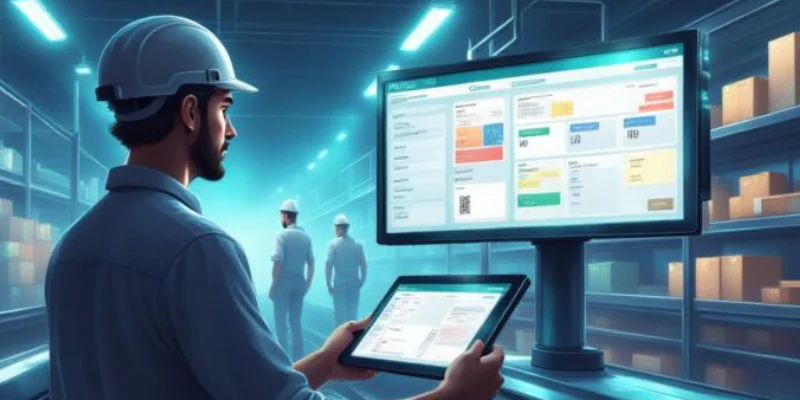

Inventory teams often have plenty of data, but identifying the right stock issues can be difficult.
AI analyses inventory, sales, and warehouse data to provide real-time insights. It can forecast demand, recommend replenishment, and detect unusual stock movements.
AI assistants can also suggest next steps and automate routine tasks, helping businesses manage inventory more efficiently.
Key Takeaways
AI combines predictive analysis with real-time inventory data to help businesses make faster and more informed decisions.
AI agents can identify stock issues, recommend actions, and support inventory workflows while keeping users in control.
AI delivers the best results when inventory records, product data, and supplier information are accurate and up to date.

What Is AI Inventory Management?

AI inventory management is the use of artificial intelligence to analyse inventory data, anticipate stock requirements, detect operational risks, and recommend actions that improve stock availability and control.
IBM defines AI inventory management as applying technologies such as data analysis, machine learning, and predictive analytics to inventory processes. Common applications include demand forecasting, supplier management, replenishment, anomaly detection, and warehouse operations.
AI, machine learning, and AI inventory agents have different roles. Machine learning predicts trends from historical data, while AI inventory agents analyse live data, recommend actions, and help resolve inventory issues faster.
How Does AI Inventory Management Work?
AI inventory management works by connecting inventory analysis with a repeatable decision workflow. The system needs current operational records rather than an isolated spreadsheet or historical sales file.
Toolio’s explanation of AI inventory management describes systems combining real-time inventory, historical sales, supplier performance, promotions, seasonality, and other demand signals. These inputs help models identify where stock is likely to move away from plan.
1. Collect operational data
The comprehensive inventory system gathers stock-on-hand quantities, sales orders, purchase orders, receipts, internal transfers, returns, adjustments, supplier lead times, and warehouse locations. The agent must also understand units of measure and product relationships.
2. Detect patterns and exceptions
AI continuously evaluates records for unusual conditions. These may include stock falling faster than expected, repeated quantity differences, a delayed supplier order, or slow-moving stock accumulating at one location.
3. Predict potential stock problems
Machine-learning models can estimate demand, stockout risk, future inventory positions, and safety-stock requirements. For example, Peak’s Dynamic Inventory platform uses demand forecasting and safety-stock models to recommend reorder points and stock levels at individual distribution locations.
4. Recommend an appropriate response
The response should reflect the cause of the problem. Reordering is not always the right answer. If another warehouse has excess stock, an internal transfer may be more appropriate. If an expected receipt was never posted, the correct response may be to investigate the receiving record rather than buy more stock.
5. Request approval for controlled actions
High-impact actions should be routed through a defined approval workflow. Purchase requests, inventory adjustments, stock write-offs, and inter-warehouse transfers may require different approvers or monetary thresholds.
6. Learn from the outcome
Once the team approves, rejects, or modifies a recommendation, the outcome becomes useful feedback. Forecast settings, exception thresholds, and future recommendations can then be refined.
"AI inventory management helps businesses turn inventory data into faster, smarter decisions."
AI Inventory Management vs Traditional Inventory Software
Traditional inventory software remains essential for recording stock movements and enforcing operational rules. AI adds adaptive analysis, exception prioritisation, and decision support on top of those records.
| Area | Traditional Inventory Software | AI Inventory Management |
|---|---|---|
| Monitoring | Manual reports | Real-time monitoring |
| Forecasting | Based on historical data | Predicts demand using real-time data |
| Alerts | Basic stock alerts | Identifies issues and suggests actions |
| Automation | Manual tasks | Automates routine workflows |
The distinction matters when assessing AI inventory management software. A product that only adds forecasting to a dashboard may improve planning, but it does not necessarily provide an AI agent.
A genuine agent-led workflow should be able to move from detection to investigation, recommendation, approval, and controlled execution.
Key AI Inventory Management Use Cases
The most valuable use case depends on the inventory problem a business experiences repeatedly. A retailer may prioritise multi-location allocation, while a distributor may focus on replenishment and supplier delays.
1. Demand forecasting
AI examines sales history, seasonality, promotions, consumption patterns, and other relevant signals to estimate future demand. The forecast should still be reviewed when products have limited history or unusual events have distorted previous sales.
2. Reorder-point recommendations
AI can recommend when to replenish and how much to order based on expected demand, safety stock, open orders, available stock, and supplier lead time. This creates a more responsive approach than applying one static threshold to every SKU.
3. Stockout prevention
The integrated inventory system can identify items that are likely to run out before the next expected receipt. It can then check whether another warehouse has available stock or whether a purchase order should be expedited.
4. Excess and obsolete inventory detection
AI can highlight products with declining movement, prolonged stock age, or inventory levels that exceed expected demand. The team can review whether to reduce future purchasing, transfer the stock, bundle it, return it to a supplier, or apply another approved strategy.
5. Multi-warehouse stock allocation
AI warehouse management can compare demand and available stock across locations. It may recommend transferring an item from a location with excess inventory to one facing an immediate shortage.
6. Supplier-delay monitoring
An agent can monitor purchase-order confirmation, promised delivery dates, and receipt status. When a delay creates a stock risk, it can prepare a supplier follow-up or identify alternative stock sources.
7. Stock discrepancy investigation
AI can examine the records behind a difference between physical and system quantities. This moves discrepancy handling beyond a simple adjustment screen and towards evidence-based investigation.
How an AI Agent Investigates a Stock Discrepancy
An AI agent investigates stock discrepancies by tracing the affected SKU, location, and inventory details. It reviews transaction history to ensure the correct records are analysed.
It compares system stock with physical counts and identifies possible causes, such as missing receipts, transfer errors, or incorrect returns.
The agent creates a report with key evidence and recommends actions like recounting stock or updating records, while leaving approval to authorised users.
Data and Integration Requirements
AI cannot compensate for unreliable inventory records. It may process poor-quality data faster, but the resulting recommendation will still be weak.
1. Clean SKU and Unit Records
Each product should have a unique SKU with accurate unit conversions, such as packs, cartons, or pallets, to prevent inventory errors.
2. Accurate Warehouse Locations
Warehouse, rack, and bin locations should match the physical layout so stock can be tracked and located accurately.
3. Reliable Transaction Data
AI relies on accurate records of receipts, transfers, sales, returns, and stock adjustments to analyse inventory correctly.
4. Sales and Supplier History
Historical sales, purchase orders, and supplier lead times help AI improve demand forecasting and replenishment decisions.
5. Connected Business Systems
Integrating inventory with ERP, purchasing, sales, WMS, POS, and e-commerce ensures AI works with consistent, real-time data for better decision-making.
Risks, Controls, and Human Approval
AI inventory management works best with accurate data and clear approval controls. Incorrect SKUs, stock records, or lead times can result in unreliable recommendations.
Businesses should use role-based access, approval workflows, and audit logs to keep AI recommendations accurate, secure, and easy to review.
The Office of the Australian Information Commissioner’s guidance on commercial AI products recommends due diligence, privacy-by-design, regular monitoring, and embedded human oversight. Its guidance also states that privacy obligations apply when personal information is entered into or generated by an AI system.
How to Implement AI Inventory Management
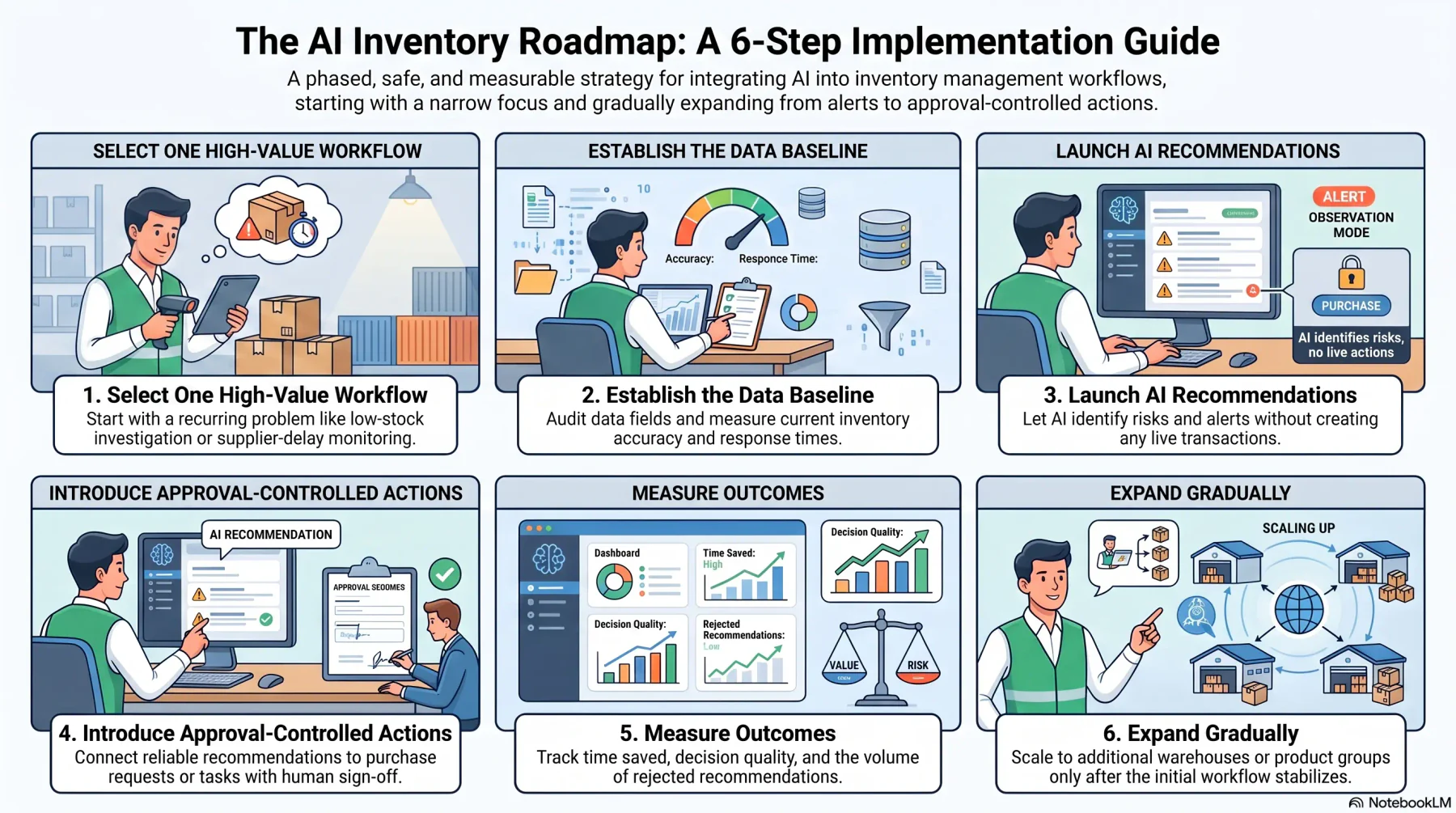
The safest implementation begins with one narrow workflow where the inputs, decision owner, and desired outcome are clear.
1. Select one high-value workflow
Start with a recurring problem such as low-stock investigation, supplier-delay monitoring, excess-stock detection, or discrepancy analysis. Avoid launching several automated workflows before the team understands how recommendations will be reviewed.
2. Establish the data baseline
Measure current inventory accuracy, exception volume, response time, and relevant stock outcomes. Audit the data fields needed for the selected workflow.
3. Begin with recommendations and alerts
Let the AI identify risks and prepare recommendations without creating transactions. Inventory planners can compare the output with their existing process.
4. Introduce approval-controlled actions
Once recommendations are reliable, connect them to purchase requests, transfer requests, supplier follow-ups, or count tasks. Actions with inventory-value or financial implications should remain approval controlled.
5. Measure outcomes
Track whether the system identifies useful exceptions, reduces investigation time, and supports better inventory decisions. Also monitor rejected or heavily edited recommendations.
6. Expand gradually
Extend the workflow to additional warehouses, suppliers, or product groups only after the first use case is stable. This phased approach makes errors easier to identify and keeps operational change manageable.
How HashMicro’s Inventory AI Agent Supports Inventory Teams
HashMicro’s Inventory AI Agent connects inventory questions and exceptions with live inventory, purchasing, sales, supplier, and warehouse information.
Rather than asking a planner to open several reports, the agent can surface a low-stock risk, check expected receipts, review stock at other locations, and prepare the next operational request.
The same exception-led approach can support slow-moving inventory, overdue supplier confirmations, warehouse imbalances, and quantity discrepancies.
HashMicro’s AI Agent for Inventory can answer questions using live stock records, monitor reorder risks, draft replenishment requests, coordinate supplier follow-ups, and prepare transfer requests. The connected inventory management system provides the underlying multi-warehouse tracking, demand planning, discrepancy reporting, adjustment approval, and audit history.
This keeps the team in control. The agent investigates and coordinates, while authorised users remain responsible for approving material inventory actions.
Use HashMicro’s Inventory AI Agent to monitor stock risks, investigate operational records, and prepare the next approved action from one connected workflow.






Conclusion
AI inventory management helps businesses improve stock visibility, forecast demand, and make faster, more informed decisions. It reduces manual work while helping teams respond quickly to inventory issues.
The best results come from accurate data, connected systems, and clear approval processes. As businesses grow, AI can support better inventory planning while keeping teams in control of important decisions.
To get the best results, businesses need accurate data, connected systems, and clear approval processes. Book a free consultation with HashMicro's experts to find the right AI-powered inventory solution for your business

FAQ
AI can automate monitoring, forecasting, and routine tasks. However, important actions like stock adjustments and purchase orders should still require approval.
Yes. AI can track stock across multiple warehouses and recommend transfers to balance inventory and prevent shortages.
Yes. AI can identify unusual stock changes, investigate possible causes, and recommend actions for review.
AI needs accurate product, inventory, warehouse, sales, purchasing, and supplier data to provide reliable recommendations.
No. AI supports inventory planners by automating routine tasks and providing insights, while people make the final decisions.
To get the best results, businesses need accurate data, connected systems, and clear approval processes. Book a free consultation with HashMicro's experts to find the right AI-powered inventory solution for your business.
To get the best results, businesses need accurate data, connected systems, and clear approval processes. Book a free consultation with HashMicro's experts to find the right AI-powered inventory solution for your business.
To get the best results, businesses need accurate data, connected systems, and clear approval processes. Book a free consultation with HashMicro's experts to find the right AI-powered inventory solution for your business.
To get the best results, businesses need accurate data, connected systems, and clear approval processes. Book a free consultation with HashMicro's experts to find the right AI-powered inventory solution for your business.
To get the best results, businesses need accurate data, connected systems, and clear approval processes. Book a free consultation with HashMicro's experts to find the right AI-powered inventory solution for your business.
To get the best results, businesses need accurate data, connected systems, and clear approval processes. Book a free consultation with HashMicro's experts to find the right AI-powered inventory solution for your business.
AI inventory management helps businesses improve stock visibility, forecast demand, and make faster, more informed decisions. It reduces manual work while helping teams respond quickly to inventory issues.
AI inventory management helps businesses improve stock visibility, forecast demand, and make faster, more informed decisions. It reduces manual work while helping teams respond quickly to inventory issues.
AI inventory management helps businesses improve stock visibility, forecast demand, and make faster, more informed decisions. It reduces manual work while helping teams respond quickly to inventory issues.