

An invoice arrives, someone keys it into the system, checks it against a purchase order, and a third person eventually signs off on the payment before anything actually moves anywhere.
AI in accounts payable replaces most of that manual relay with a system that reads the invoice, proposes the coding, runs the match, and routes only genuine exceptions to a human reviewer.
For Australian finance teams buried under supplier invoices, that shift turns AP from a slow data-entry queue into a controlled, exception-based workflow with clear, defensible final sign-off.
Key Takeaways
AI in AP automates capture, coding, matching, approval routing, and exception detection, not the decision to pay.
The biggest wins come when AP sits inside your ERP, so invoice data connects to purchase orders, budgets, and payments.
Human approval must stay on payment release, vendor master changes, and high-risk exceptions.
For Australian teams, the system should keep records GST-correct, BAS-ready, and auditable across multiple entities.

What Is AI in Accounts Payable?
AI in accounts payable applies document AI, machine learning, and agentic assistants to the repetitive, rules-based work of processing supplier invoices every day.
Rather than a clerk keying in every line and chasing an approver by email for days, the system reads the invoice, proposes coding, and checks it against the PO and receipt automatically.
Traditional automation follows fixed rules and posts a matching invoice. AI adds genuine judgement, learning how your team codes each supplier and reading invoices with no consistent layout.
Why Manual Accounts Payable Breaks as Invoice Volume Grows
Manual AP works fine at low volume, but as a business scales, more suppliers, entities, and invoices quietly turn that same process into the bottleneck slowing everything down.
1. Slow approvals, data entry errors, and poor spend visibility
Every invoice keyed by hand is a chance for a wrong amount, a wrong GL code, or a wrong cost centre to slip through unnoticed until someone finally catches it much later.
Approvals stall in inboxes, so invoices sit unposted and month-end spend stays effectively invisible until someone reconciles everything manually, usually under real time pressure.
2. Duplicate payments, late fees, and fraud exposure
When invoices arrive by email, PDF, and post across several entities, the same invoice can be paid twice, and an altered or fraudulent invoice can slip through completely unnoticed.
Late approvals also mean missed early-payment discounts, a direct and recurring cost that quietly erodes margin every single month the process continues to run this slowly.
How AI Improves the Accounts Payable Workflow
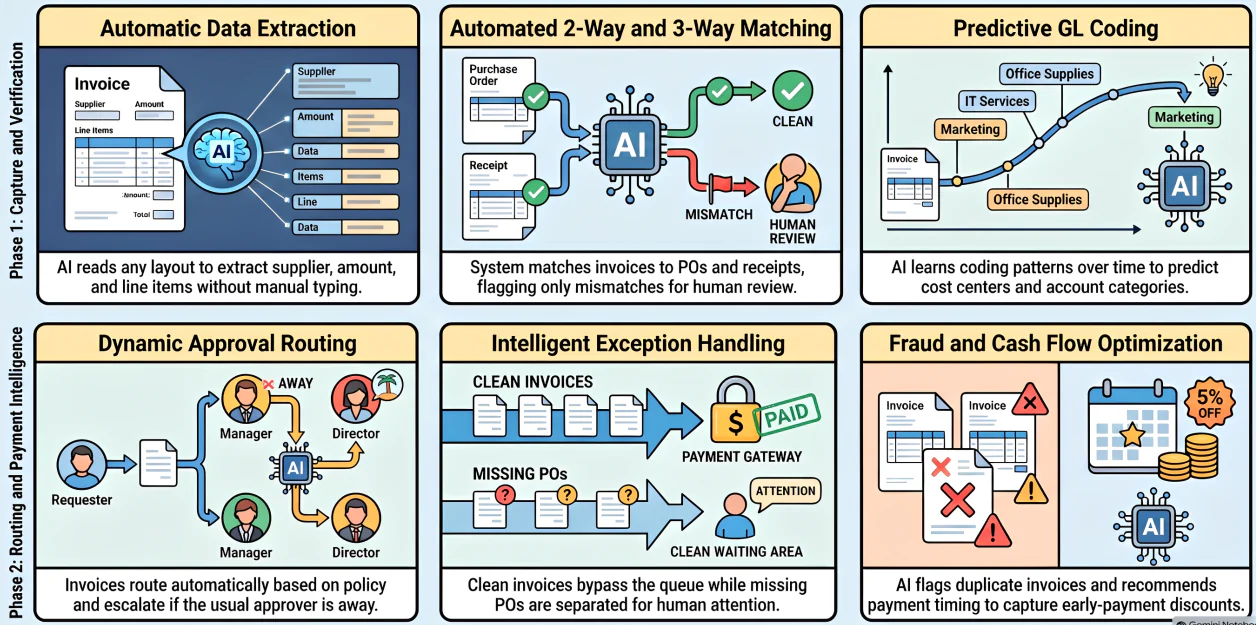
AI doesn't replace the AP workflow, it removes the manual handoffs sitting inside it, so the team spends its attention on genuine exceptions instead of processing every single invoice by hand.
1. The end-to-end AP flow: capture, code, match, approve, pay, reconcile
A modern AP flow runs like this: receive the invoice, extract its data, code it to the right GL account, cost centre, and entity, then match it against the PO and goods receipt.
From there it routes for approval, schedules payment, and reconciles against the bank, with AI touching every step along the way except the ones you deliberately choose to keep manual.
2. Where AI removes the manual handoffs
AI reads the invoice so no one has to key it, predicts the coding so the approver simply confirms it, and runs the match instantly, escalating only genuinely meaningful mismatches.
AI Use Cases in Accounts Payable
AI touches every stage of the AP process differently, from reading the invoice through to flagging what needs a second look before payment goes out.
1. Invoice data capture and predictive GL coding
AI reads invoices in essentially any layout, PDF, scan, or email, and extracts supplier, date, amount, tax, and line items without anyone ever needing to type a single figure by hand.
Over time it learns how you code each supplier and predicts the accounts payable account, cost centre, and entity, turning coding into a quick confirmation.
2. 2-way and 3-way invoice matching
The system automatically matches the invoice to the purchase order and the goods receipt, checking both without anyone having to physically pull the underlying documents.
Exact matches pass straight through the queue; mismatches in price, quantity, or receipt status get flagged for review instead of holding up the entire invoice queue.
3. Dynamic approval routing and exception handling
AI routes each invoice to the right approver based on amount, cost centre, or policy, and escalates automatically whenever the usual approver happens to be away or unavailable.
Over-tolerance variances, missing POs, and unusual suppliers get separated out and queued specifically for a human, so clean invoices never sit waiting behind them in the queue.
4. Payment timing, cash flow, and anomaly detection
Reading due dates, discount terms, and current cash position lets AI recommend exactly when to pay, capturing early-payment discounts without ever straining the business's liquidity.
It also flags anomalies as they happen: duplicate invoices, round-number fraud patterns, or a supplier's bank details changing unexpectedly without any obvious explanation on file.
OCR, Machine Learning, IDP, Generative AI, and Agentic AI in AP
The term AI actually hides several distinct technologies, each doing a genuinely different job inside the accounts payable process, and understanding the differences matters in practice.
What "agentic AI" realistically means for an AP team
| Technology | What it does | Example in AP |
|---|---|---|
| OCR | Turns an invoice image into readable text | Scanning a supplier PDF into raw text |
| IDP | Structures that text into named fields | Identifying which figure is the total vs GST |
| Machine learning | Learns coding and matching patterns over time | Predicting the GL code for a repeat supplier |
| Generative AI | Drafts language from structured data | Summarising an invoice history or a supplier query |
Agentic AI describes an assistant that can carry out a short chain of steps on its own, find the invoice, check its status, flag the mismatch, and draft the follow-up message.
Used well, it's a governed helper that prepares work for a person to approve, not an autonomous system that pays vendors on its own without any human oversight at all.
That is where Hashy AI fits naturally inside AP. It can review invoice status, surface PO mismatches, and prepare the next action for finance teams, while keeping final approval and payment release firmly with the right person.






Where Human Approval Must Stay in the Loop
The point of AI in AP is control, not blind automation, so some decisions must always sit with a person, no matter how confident the underlying system appears to be.
1. What AI can read, match, flag, and recommend
- Extract: pull supplier, amount, tax, and line-item data from an invoice.
- Code: propose the GL account, cost centre, project, and entity.
- Match: run the 2-way or 3-way comparison automatically.
- Flag: surface duplicates, anomalies, and out-of-tolerance amounts.
- Recommend: suggest an approver, a due date, or a payment timing.
These are high-volume, reversible, and checkable actions, exactly the kind of repetitive work that automation genuinely handles well without introducing unnecessary operational risk.
2. What people must still own: payment release, vendor master, high-risk exceptions
- Payment release: the final action that actually moves money out the door.
- Vendor master changes: especially updates to a supplier's bank details.
- High-risk exceptions: anything over-tolerance or genuinely unusual.
This separation of duties is what protects the business from both error and fraud, backed by a timestamped audit trail that can withstand scrutiny from any reviewer.
AI Accounts Payable Workflow for Australian Finance Teams
Australian finance teams carry obligations that generic, offshore-built AP tools rarely handle natively out of the box, which is exactly where the workflow needs to be localised properly.
1. GST treatment, supplier ABN validation, and BAS-ready records
Every invoice needs correct GST handling, GST-exclusive amounts, and the right tax code applied before it reaches the ledger.
AI can also validate that the supplier's ABN and registration are legitimate at the point of capture, keeping BAS records reconciled cleanly each quarter.
2. ATO e-invoicing (Peppol) and multi-entity AU groups
As ATO-aligned e-invoicing adoption keeps growing, AP should ingest structured e-invoices directly rather than re-reading a PDF that was never designed for parsing.
Groups running several Australian entities also need the workflow to code and route to the correct entity automatically, while keeping every intercompany item clean throughout.
3. Audit trail and segregation of duties
Every action, who coded it, who approved it, who released the payment, needs a timestamped, unalterable audit trail that can withstand scrutiny from any reviewer.
Larger businesses should also stay aware of the Payment Times Reporting Scheme, which requires public reporting on exactly how quickly suppliers actually get paid.
"An AI system that reads and codes an invoice hasn’t made a financial decision yet. Someone still has to own the moment the money actually leaves the account."
How to Implement AI in Accounts Payable Step by Step
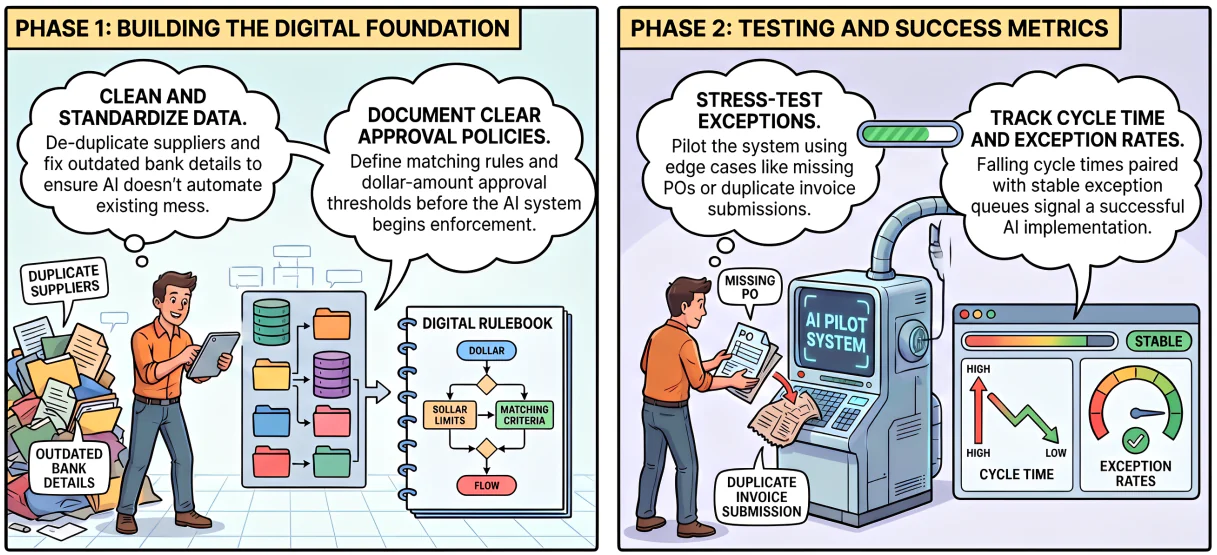
AI amplifies whatever process already exists in the business, which means the underlying foundations need cleaning up first, well before any serious automation gets switched on.
1. Clean the vendor master and standardise invoice intake
Start by de-duplicating suppliers, fixing outdated bank details, and consolidating how invoices actually arrive, ideally down into a single, consistent intake channel.
AI trained on a messy vendor master just automates that same mess a little faster, so the cleanup step genuinely cannot be skipped.
2. Define matching rules and map approval authority
Set clear tolerance thresholds for both 2-way and 3-way matching, and document who can approve what, at which dollar amount, and for which entity across the business.
This is the exact policy AI ends up enforcing, and it has to exist clearly on paper before anyone can reasonably expect a system to automate it correctly.
3. Test exceptions, then measure cycle time and exception rate
Pilot the rollout on a subset of suppliers, deliberately testing exception paths like a missing PO, an over-tolerance amount, or a straightforward duplicate invoice submission.
Then track two numbers closely: invoice cycle time and exception rate, since falling cycle time alongside a stable exception queue is the clearest signal that it's working.
What to Look for in AI-Powered AP Automation Software
Not every AP tool marketed as AI-powered handles these responsibilities the same way, so it helps to know exactly what to test before committing to one.
1. Capture accuracy, matching depth, and approval flexibility
Judge tools on how accurately they read non-templated invoices, whether they run true 3-way matching, and how flexibly approvals map onto your real authority structure.
2. ERP-native vs standalone AP tools
A standalone AP tool has to sync invoices, POs, and payments back to your finance system constantly, which adds a fragile integration layer that can quietly break over time.
An ERP-native approach keeps AP running on the same data as your purchase orders, budgets, and ledger, meaning fewer syncs and one genuine source of truth throughout.
3. Controls, reporting, and AU compliance fit
Confirm the audit trail, segregation-of-duties enforcement, GST and BAS handling, ABN validation, and multi-entity support carefully before evaluating anything else at all.
In AP, controls and compliance are effectively the actual product; the automation only carries real value if it consistently stays inside those boundaries at every step.
How HashMicro's AI Agent for Finance Supports AP Control
HashMicro's AI Agent for Finance brings AI into accounts payable as a governed assistant working on your live ERP data, not a generic chatbot bolted on the side.
It can find an invoice, explain where an approval is stuck, and surface overdue bills needing attention. It flags a PO mismatch and hands that straight to the right person to approve.
Running AP inside HashMicro means approvals, three-way matching, vendor bills, and payment reconciliation share one source of truth, so a coded invoice flows through without re-keying.
Conclusion
AI in accounts payable earns its keep when it makes AP controlled and fast at once, reading and coding invoices while consistently surfacing genuine exceptions for review.
Your team keeps final sign-off on every payment, balancing speed and control. The real leverage comes from keeping AP inside your ERP, connecting invoice data directly to purchase orders and payments.
Get the foundations clean, keep humans firmly on the decisions that matter, and book a free consultation to see how it fits your team.

Frequently Asked Questions
AI is used to capture invoice data, predict GL coding, run 2-way and 3-way matching, route approvals, detect duplicates and anomalies, and recommend payment timing, automating the repetitive work while finance keeps control of payments.
AI can route invoices to the right approver, escalate when someone is away, and pre-check them against POs and policy, so approval becomes a quick confirmation. The actual approval decision and payment release should stay with a person.
No. It removes manual data entry and matching so AP staff move from processing every invoice to handling exceptions, controls, and supplier relationships, higher-value work, not eliminated roles.
Traditional AP automation follows fixed rules for clean, matching invoices. AI in AP adds judgement, reading non-templated invoices, learning your coding, and flagging anomalies, so it handles the messy cases rules can't.
AI runs the 2-way or 3-way match automatically, comparing the invoice against the purchase order and goods receipt within your set tolerances. Exact matches pass through instantly, while genuine mismatches get flagged for a person to review.