

Running a modern warehouse means coordinating equipment, people, inventory, and orders simultaneously. When automation grows more complex, a dedicated control layer for that equipment can determine whether materials flow efficiently or whether bottlenecks develop during peak periods.
A warehouse control system, commonly called a WCS, is the software layer that translates warehouse work instructions into real-time commands for automated equipment. It sits between warehouse management software and the physical machines, directing conveyors, sorters, robots, and scanning stations so materials move accurately and on time.
For Australian businesses managing distribution centres, fulfilment operations, or automated storage environments, understanding where a WCS fits within the broader technology stack can inform investment decisions before automation projects reach completion.
Key Takeaways
A warehouse control system sits between inventory management software and physical warehouse equipment, converting work instructions into real-time machine commands.
WCS communicates directly with conveyors, sorters, scanners, and automated storage devices, executing tasks and managing equipment exceptions without manual input.
Core WCS capabilities include equipment coordination, conveyor routing, sortation control, real-time monitoring, and error recovery across multiple automated devices.
Successful WCS implementation depends on documenting every device and integration point, completing integration testing, and training operators before go-live.

What Is a Warehouse Control System?

A warehouse control system is a software platform that manages automated equipment inside a warehouse or distribution centre. It receives work instructions from a higher-level system and converts them into real-time commands that direct physical machinery.
The WCS controls tasks such as activating conveyor belts, routing totes to the correct sortation path, triggering automated storage and retrieval systems, and coordinating scanning or labelling stations. It monitors equipment status continuously and adjusts commands when sensors detect jams, failures, or unexpected conditions.
Unlike warehouse management systems, which focus on inventory accuracy, order allocation, and picking work, a WCS focuses on the physical movement of goods through automated equipment. The distinction becomes significant when a facility runs multiple interdependent machines that require rapid, precise coordination.
Smaller warehouses with limited automation may not require a dedicated WCS. However, as a facility adds conveyors, sorters, autonomous mobile robots, and automated storage systems, dedicated equipment control becomes increasingly important for maintaining consistent material flow and reducing unplanned downtime.
"A warehouse control system bridges the gap between inventory logic and physical machinery, ensuring that every equipment instruction reflects the latest operational priorities rather than a static set of rules. "
How Does a Warehouse Control System Work?
A WCS processes incoming instructions from warehouse management or orchestration software and converts them into physical equipment commands, adjusting continuously based on real-time feedback. The following sequence describes the typical flow of control within a WCS-managed environment.
1. Receive warehouse work instructions
The WCS receives a task from the warehouse management system or a warehouse execution system. The instruction may describe a pick task, a replenishment movement, an order release, or a transfer between zones.
At this point, the WCS does not decide which product to pick or which order to fulfil. That decision belongs to the WMS. The WCS responsibility is to direct the equipment needed to carry out the instruction accurately and within the required time.
2. Translate work into equipment tasks
The WCS converts the received work instruction into a set of specific equipment commands. For example, an instruction to move a tote from a storage aisle to a packing station becomes a sequence of conveyor activations, sortation decisions, and scanner triggers.
The system selects the appropriate equipment path based on current availability, queue lengths, and routing rules. Therefore, the same high-level instruction may follow different physical paths depending on real-time equipment conditions at the moment of release.
3. Prioritise and route material movement
When multiple instructions are active simultaneously, the WCS sequences and prioritises movements to prevent congestion and avoid equipment conflicts. It monitors queue depths, conveyor speeds, and zone capacities to allocate the most efficient path for each tote or carton.
Routing decisions happen continuously and dynamically. As a result, the system can redirect a movement mid-transfer when a downstream zone becomes congested or when a higher-priority task enters the queue.
4. Monitor equipment and sensor feedback
While commands are active, the WCS collects real-time feedback from sensors, barcode readers, weight scales, and equipment controllers. It uses this data to confirm that movements proceed correctly and that each item reaches its intended destination.
Equipment status updates allow the system to detect problems as they occur. For instance, a sensor signal indicating a jam on a conveyor section triggers an immediate response rather than waiting for an operator to report the issue manually.
5. Resolve exceptions and confirm completion
When a sensor detects an error, a scanner reads an unexpected barcode, or equipment fails to respond within a defined time, the WCS escalates the exception according to predefined rules. It may divert the item, halt a section, alert an operator, or trigger an automatic recovery routine.
Once a task completes successfully, the WCS sends a confirmation message back to the WMS or WES. This message updates the inventory record, closes the task, and allows the next instruction to proceed.
Core Functions of Warehouse Control Software
Warehouse control software performs a range of real-time coordination functions that keep automated equipment productive and responsive. Each function addresses a specific challenge that arises when multiple machines operate within a shared physical space.
1. Equipment interface and command execution
The WCS communicates with equipment controllers through standardised interfaces and protocols. Each connected device, whether a conveyor motor, a sortation diverter, or a robotic arm, receives commands through a defined integration layer.
Command execution must be reliable and fast enough to match equipment operating speeds. In high-throughput environments, delays of even a few hundred milliseconds can cause downstream queues to form or equipment to halt mid-cycle.
2. Task sequencing and dynamic routing
The WCS manages the order in which tasks reach each piece of equipment. It sequences movements to match equipment capacity, order priorities, and the physical layout of the warehouse floor.
Dynamic routing allows the system to reassign a movement in progress when conditions change. For example, if a primary conveyor path becomes unavailable due to maintenance, the WCS can reroute active tasks through an alternative path without manual intervention.
3. Queue and congestion management
Automated warehouses can experience congestion when too many tasks compete for the same equipment or path simultaneously. The WCS monitors queue lengths and adjusts release rates to prevent accumulation points from forming.
Buffer management is closely related to congestion control. The system uses available staging areas to hold items temporarily when downstream equipment is occupied, releasing them when capacity becomes available again.
4. Real-time equipment monitoring
The WCS continuously collects equipment status data from sensors, PLCs, and device controllers. It tracks operational states, cycle counts, throughput rates, and error conditions across the entire automated system.
Monitoring data allows the system to detect early signs of equipment degradation, unusual cycle times, or sensor drift before they develop into operational failures.
Maintenance teams can use this information to plan interventions during scheduled downtime rather than responding reactively to unplanned stoppages.
5. Exception handling and operational recovery
Every automated warehouse encounters exceptions, whether a barcode reads incorrectly, a tote jams on a curve, or an AGV loses its navigation signal. The WCS applies predefined rules to each exception type, determining whether to retry, divert, halt, or escalate.
Recovery scenarios should be designed before go-live and tested against realistic failure conditions. A system that handles common exceptions automatically can maintain throughput during minor incidents without requiring operator involvement for every fault.
6. Event logging and system visibility
The WCS maintains a log of equipment commands, sensor readings, task completions, and exception events. Operators can use this data to investigate throughput issues, identify recurring faults, and verify that movements completed correctly.
Visibility dashboards give supervisors a real-time view of active tasks, equipment status, and zone performance. In addition, historical logs support continual improvement by revealing patterns that are not obvious during day-to-day operations.
WMS vs WCS vs WES: Who Controls Each Decision?
Warehouse technology stacks often include multiple software layers, each responsible for a distinct type of control. The table below compares what each layer manages and when each is relevant.
| System | Primary Responsibility | Typical Control Decisions |
|---|---|---|
| WMS | Inventory management and warehouse work planning | What to pick, where to store it, which orders to release, and how to allocate inventory |
| WES | Dynamic work orchestration across people and automation | How to sequence tasks, balance workloads, and coordinate picks between manual and automated zones |
| WCS | Real-time automation equipment control | Which conveyor to activate, how to route a tote, when to trigger a sorter, and how to recover from equipment faults |
| PLC | Machine-level execution | Motor on/off, sensor reads, safety interlocks, and individual device state management |
These systems often operate as a connected stack rather than independent tools. The WMS sets the inventory and order priorities, the WES determines how work flows across zones, the WCS translates that work into machine commands, and PLCs carry out individual device actions.
1. WMS for inventory and warehouse work planning
A warehouse management system manages the business logic of the warehouse. It tracks stock levels, allocates inventory to orders, generates pick tasks, controls put-away rules, and coordinates receiving and shipping activities.
The WMS does not communicate directly with conveyor belts or robotic systems in most architectures. It passes work instructions to the WCS or WES, which then determine how that work reaches the physical equipment.
2. WES for dynamic work orchestration
A warehouse execution system sits between the WMS and the WCS in facilities that operate both manual and automated picking zones. It sequences and distributes tasks dynamically, adjusting in real time to changing workloads, staffing levels, and equipment availability.
Not every warehouse requires a WES. Facilities with either entirely manual operations or fully automated systems may manage adequately with just a WMS and a WCS. A WES becomes valuable when tasks must flow between human workers and automated equipment within the same order fulfilment cycle.
3. WCS for real-time automation control
The WCS manages what happens at the equipment level from the moment a task is released until it completes. It handles routing, sequencing, monitoring, and exception recovery across every piece of automated equipment in the facility.
In simpler environments, some WMS platforms include basic equipment control capabilities. However, as automation grows more complex and interdependent, a dedicated WCS provides the response speed and granular control that a general-purpose WMS cannot consistently deliver.
4. PLCs for machine-level execution
Programmable logic controllers sit at the base of the control hierarchy. Each PLC manages the electrical and mechanical state of an individual piece of equipment, such as a conveyor motor, a diverter arm, or a lift.
The WCS communicates with PLCs through industrial protocols. It sends high-level commands, and the PLC handles the precise timing and safety interlocks required to execute them. PLCs do not make routing or sequencing decisions.
What Equipment Can a WCS Coordinate?

A warehouse control system is designed to manage a wide range of automated equipment within a single control environment. The following categories represent the most common types of machinery that businesses connect to a WCS.
- Conveyors and sortation systems: The WCS controls conveyor start, stop, and speed, and directs diverters or pop-up transfers to route cartons or totes to the correct destination.
- Automated storage and retrieval systems (ASRS): The WCS communicates with ASRS controllers to request tote retrieval, confirm put-away locations, and manage crane or shuttle positioning.
- Autonomous mobile robots and guided vehicles: The WCS assigns movement tasks to AMRs and AGVs, monitors their positions, and coordinates traffic flow to prevent collisions or deadlocks in shared pathways.
- Scanning, weighing, and labelling stations: The WCS triggers scanner reads, captures weight data, and initiates label printing at defined points along the material flow path.
- Automated packing and palletising equipment: The WCS releases items to automated packing lines, coordinates carton erection and sealing sequences, and directs palletisers based on outbound shipment requirements.
The breadth of equipment that a WCS can manage depends on the available integration protocols and the specific platform chosen. Businesses should confirm compatibility between the WCS and each piece of equipment before finalising a deployment plan.
A Practical Warehouse Control System Example
The following scenario illustrates how a WCS manages a typical order fulfilment sequence in a distribution centre that operates conveyors, an ASRS, and automated scanning stations. The scenario uses a single order to show how each system contributes to the movement.
1. Release the order from the WMS
The WMS confirms that an order is ready for picking and releases a work instruction to the WCS. The instruction identifies the required product, its storage location within the ASRS, and the outbound lane where the packed carton must arrive.
At this moment, the WCS takes responsibility for directing the physical movement. The WMS retains responsibility for the inventory record until the WCS confirms task completion.
2. Retrieve and route the inventory
The WCS sends a retrieval command to the ASRS controller. The ASRS moves the correct tote to the output conveyor, and the WCS activates the conveyor section to carry the tote towards the scanning station.
At the scanning station, the WCS triggers a barcode read to confirm the correct item. Once confirmed, it commands the sortation system to route the tote to the appropriate packing workstation, while also monitoring conveyor queue depth to ensure the tote arrives without causing downstream congestion.
3. Respond to an equipment exception
During transit, a sensor detects that the tote has stopped moving on a conveyor section. The WCS immediately identifies the affected zone, halts the section to prevent further accumulation, and generates an alert for the nearest operator.
Simultaneously, the system reroutes other active totes through an alternative conveyor path. As a result, the fulfilment of other orders continues while the operator clears the jam and resets the affected section.
4. Return completion data to the WMS
Once the tote reaches the packing workstation and the automated packer or operator confirms despatch, the WCS sends a completion message to the WMS. The WMS then updates the inventory record, marks the order as shipped, and generates the relevant documentation.
Throughout this sequence, the WCS handled every physical coordination decision, while the WMS maintained the inventory logic. Neither system needed to duplicate the other's function.
Benefits of a Warehouse Control System

A warehouse control system provides operational advantages that extend beyond equipment coordination. The following benefits reflect the impact that dedicated real-time control can have on warehouse performance over time.
1. More consistent material flow
When a WCS manages routing and sequencing, materials move through the facility according to defined priorities and real-time conditions. Equipment does not sit idle waiting for manual instructions, and movements do not accumulate at bottlenecks unnecessarily.
Consistent flow reduces the variation in throughput that manual coordination typically introduces. For example, a sortation system directed by a WCS can maintain a steady discharge rate across multiple lanes without requiring an operator to monitor and intervene throughout each shift.
2. Better equipment utilisation
The WCS allocates tasks to equipment based on availability and current load rather than assigning everything to the nearest or most familiar machine. This distribution prevents some equipment from running at capacity while similar machines nearby remain underutilised.
Improved utilisation extends equipment service life by reducing the wear concentrated on overloaded machines. Maintenance schedules also become easier to plan when the WCS provides accurate cycle count and operational data for each connected device.
3. Faster detection of operational disruptions
Sensor feedback monitored by the WCS reaches the control system within milliseconds. When an equipment fault, misread, or physical blockage occurs, the WCS can respond, divert affected items, and alert operators before the disruption spreads to adjacent zones.
This response speed contrasts with environments where operators discover faults by walking the floor or receiving complaints from downstream stations. Earlier detection typically means shorter recovery times and less disruption to order throughput.
4. Greater visibility across automated processes
The WCS provides a real-time view of equipment status, active tasks, queue depths, and material locations across the automated zones of the warehouse. Supervisors can monitor performance without physically inspecting each area.
This visibility supports better shift management and capacity decisions. For instance, a supervisor can identify a developing queue on a specific conveyor section before it affects despatch commitments and take corrective action while time remains.
5. More scalable warehouse automation
A well-designed WCS can accommodate additional equipment, new conveyor routes, extra ASRS aisles, or expanded robot fleets without requiring a complete redevelopment of the control architecture. New devices connect through the WCS rather than through manual coordination adjustments.
Scalability also applies to throughput increases. As order volumes rise, the WCS manages the higher task density dynamically rather than proportionally increasing the manual oversight required to keep materials moving.
When Does a Warehouse Need a WCS?
Not every warehouse with automation requires a dedicated warehouse control system. The right time to introduce a WCS depends on the complexity of the equipment environment and the limitations of existing control approaches.
Signs that automation has outgrown basic controls:
- Multiple automated systems operate independently without a shared routing layer.
- Equipment faults spread to adjacent machines before operators can intervene effectively.
- Congestion builds at predictable points during peak periods despite operator effort.
- Material misroutes or scan exceptions require repeated manual correction to resolve.
- The WMS lacks the response speed or equipment interfaces needed to manage automation directly.
- Adding new equipment requires custom integration work each time rather than connecting to a shared platform.
When a WMS may still be sufficient:
A business with limited conveyor automation, a single sorting line, and straightforward pick-and-pack workflows may not yet need a separate WCS. In these environments, a capable WMS that includes basic equipment interface functions can manage the required coordination without an additional software layer.
The decision to add a WCS should reflect actual operational difficulty rather than an assumption that more software always produces better results. If the current setup maintains acceptable throughput and recovery time, investing in a WCS may not deliver proportionate value at that stage.
Questions to assess WCS readiness:
- Does the warehouse regularly experience equipment-related throughput losses that manual intervention cannot recover quickly?
- Do different automated systems require separate monitoring tools and operator interfaces?
- Does the existing control approach limit the ability to add or change equipment without significant integration effort?
- Has the facility experienced order accuracy problems caused by equipment misrouting rather than inventory errors?
- Is planned automation investment likely to exceed what the current WMS can coordinate reliably?
A positive answer to several of these questions suggests that a warehouse control system would provide measurable operational benefit worth investigating further.
How to Implement a Warehouse Control System
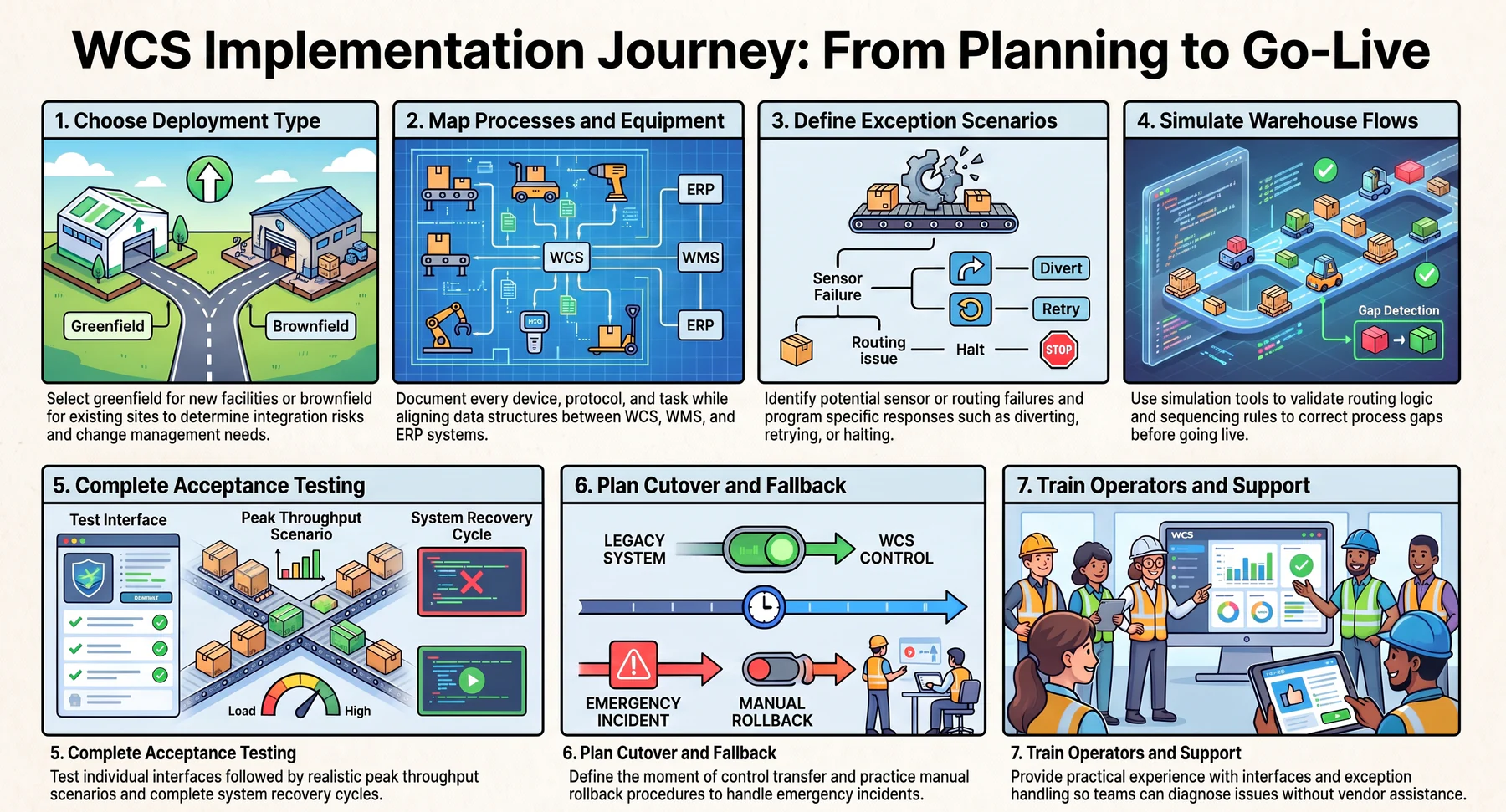
WCS implementation requires careful preparation before any equipment connection or software configuration begins. The following areas represent the most important preparation and deployment considerations for businesses undertaking this type of project.
1. Choose between greenfield and brownfield deployment
A greenfield deployment introduces the WCS into a new facility where equipment and layouts are being designed simultaneously.
A brownfield deployment integrates the WCS into an existing facility where equipment, processes, and practices are already established. Each approach carries different integration risks and requires different change management effort from the implementation team.
2. Map processes, equipment, and dependencies
Before configuration begins, document every automated device, its communication protocol, its physical location, and the tasks it performs.
Include the interfaces between the WCS and the WMS, WES, or ERP, and confirm that data formats and message structures are aligned across all connected systems.
3. Define exception and recovery scenarios
Identify the most likely equipment failures, sensor errors, and routing exceptions for each piece of connected equipment.
For each scenario, define whether the system should divert, retry, halt, escalate, or alert, and confirm that the WCS supports the required response before go-live.
4. Simulate warehouse flows
Before connecting to live equipment, use simulation tools or controlled test environments to validate routing logic, sequencing rules, and exception responses.
Simulation reveals gaps in process definitions that are far less costly to correct before go-live than after the warehouse has switched to live operations.
5. Complete integration and acceptance testing
Test each equipment interface individually, then test the complete material flow under realistic conditions. Acceptance testing should include peak throughput scenarios, simultaneous exception conditions, and recovery from complete equipment restarts.
6. Plan cutover and manual fallback
Define the moment when the WCS takes control of each equipment zone and the manual procedures that remain available if the system requires an emergency rollback.
Operators should practise fallback procedures before go-live rather than discovering them during an actual incident.
7. Train operators and support teams
Operators need practical experience with the WCS interface, exception handling procedures, and alert responses before taking responsibility for a live environment.
Support teams also need sufficient access and documentation to diagnose integration issues without relying entirely on the vendor for first-line assistance.
Businesses managing inventory, warehouse movements, and fulfilment workflows across multiple locations can explore how HashMicro's Inventory Management Software supports stock accuracy, location tracking, and warehouse operational data across connected sites.






Conclusion
A warehouse control system bridges inventory management software and physical warehouse equipment, converting work instructions into real-time machine commands while handling exceptions. The right combination of WCS, WMS, WES, and PLC depends on automation complexity, integration needs, and growth plans. Preparation determines outcomes more than technology selection alone.
Solid process mapping, integration testing, and operator training decide whether the system delivers consistent performance after go-live. A well-configured WCS improves equipment coordination, operational reliability, and fulfilment efficiency as complexity grows. To discuss how connected warehouse and inventory workflows could support your operations, arrange a free consultation with HashMicro.
Frequently Asked Questions
A warehouse management system (WMS) handles the business logic of the warehouse, including stock levels, order allocation, picking tasks, and put-away rules. A warehouse control system (WCS) handles the physical layer, sending real-time commands to conveyors, sorters, and automated equipment. The WMS decides what needs to happen; the WCS makes it happen.
Most automated warehouses operate with both. The WMS manages inventory and order workflows, while the WCS translates those instructions into machine commands. Simpler warehouses with limited automation may manage with a WMS alone, but once conveyor systems, sortation equipment, or automated storage are involved, a WCS becomes necessary.
A WCS can coordinate conveyors, sortation systems, automated storage and retrieval systems (AS/RS), barcode scanners, weighing stations, print-and-apply machines, and goods-to-person picking systems. The specific equipment depends on the WCS software and the communication protocols it supports.
Implementation timelines vary by complexity. A straightforward WCS integration with existing equipment can take eight to twelve weeks. Larger implementations involving multiple equipment types, custom integrations, and extensive testing may take six months or more.
Yes. Many warehouses run a WCS directly connected to a WMS without a WES in between. A warehouse execution system adds dynamic orchestration and real-time labour management, but it is not required for a WCS to function. The right combination depends on the scale and complexity of the operation.
No. A programmable logic controller (PLC) operates at the machine level, controlling individual pieces of equipment such as a conveyor motor or a sensor trigger. A WCS operates above the PLC layer, coordinating multiple machines and translating work instructions into device-level commands that PLCs then execute.