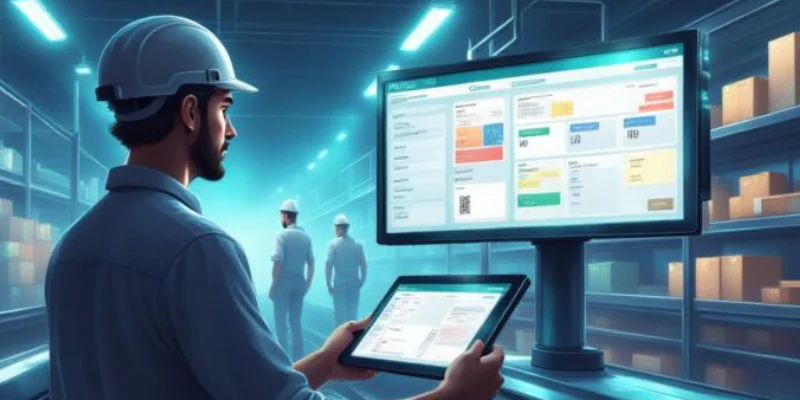

Mining management software helps mining companies manage maintenance, inventory, workforce, procurement, and compliance from a single platform. As part of an integrated ERP system, it centralises data and improves visibility across mining operations.
For mining businesses, real-time visibility helps reduce downtime, control costs, and improve coordination across sites. It also supports safer and more efficient daily operations.
This guide explains how mining management software works, the key features to look for, and the best solutions for Australian mining companies.
Key Takeaways
Restaurant inventory management software helps businesses track ingredients, reduce waste, and improve stock accuracy through real-time inventory monitoring.
Key features such as recipe management, inventory tracking, purchasing, and POS integration help restaurants streamline daily operations and control food costs.
Choosing the right restaurant inventory management software depends on operational needs, integration requirements, and the ability to support business growth across one or multiple locations.

What Is Mining Management Software?
Mining management software is a digital platform that helps mining companies manage maintenance, inventory, workforce, procurement, production, and compliance in one system.
It centralises operational data and automates routine processes, giving teams real-time visibility across equipment, sites, and resources. This improves coordination and supports faster decision-making.
Mining management software can be used as a standalone solution or as part of a broader ERP system. The right option depends on the size, complexity, and operational needs of the mining business.
How Does Restaurant Inventory Management Software Work?
Restaurant inventory software creates a continuous record of stock entering, moving through and leaving the business. Its effectiveness depends on accurate product data, recipe quantities, transaction records and physical counts.
1. Record purchases and receiving
The system records purchase orders and received goods to keep inventory accurate. It also identifies issues such as missing items, damaged deliveries, price changes, or incorrect quantities.
2. Convert menu sales into ingredient usage
The software links recipes to menu items and automatically deducts ingredients when a sale is recorded. This calculates theoretical inventory usage based on actual sales.
3. Compare theoretical and actual inventory
The system compares expected stock with physical stock counts to identify discrepancies. Variances can indicate waste, over-portioning, theft, or receiving errors.
4. Replenish or redistribute stock
Based on stock levels and demand, the software recommends replenishing inventory or transferring stock between locations. This helps prevent shortages, reduce waste, and maintain menu availability.“
"Effective inventory management is the foundation of consistent food quality, lower costs, and profitable restaurant operations"
Restaurant Inventory Software vs POS, ERP, and Spreadsheets
Each system serves a different purpose. While POS systems and spreadsheets can handle basic inventory tasks, restaurant inventory software and ERP systems provide greater control and automation.
| System | Best for | Limitation |
|---|---|---|
| Spreadsheet | Manual stock tracking | Time-consuming and prone to errors |
| POS system | Sales and basic inventory | Limited purchasing and stock control |
| Inventory software | Managing ingredients, recipes, and stock | May not include finance or accounting |
| ERP system | Managing inventory, purchasing, accounting, and operations | Requires a more structured setup |
Small restaurants may start with spreadsheets or a POS system, but growing businesses often need inventory software or an ERP system to manage multiple suppliers, locations, and operations more efficiently.
Essential Restaurant Inventory Management Software Features
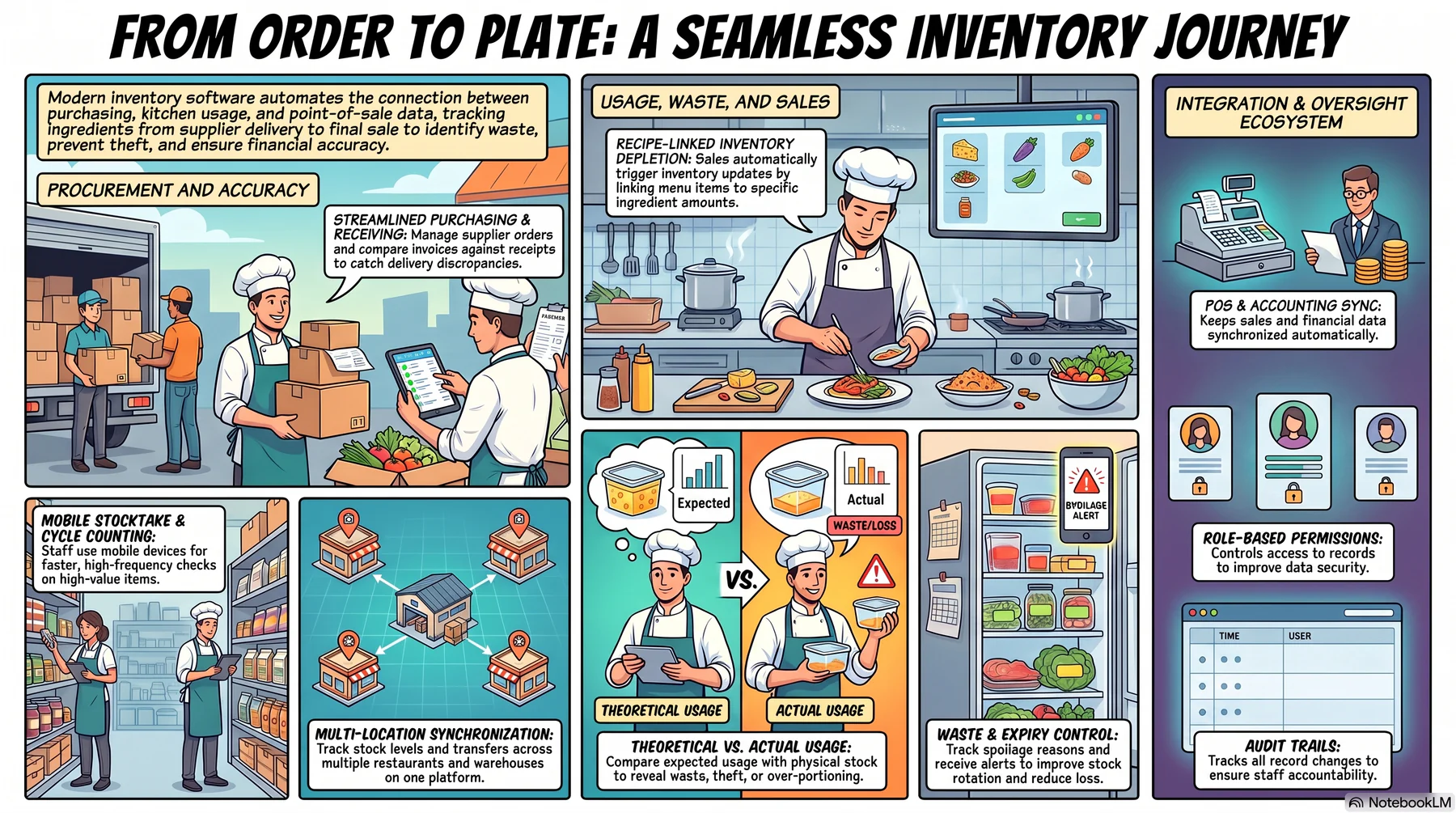
The best feature set is the one that matches the restaurant’s operating model. A single-site café has different requirements from a hospitality group with central kitchens, bars and several concepts.
1. Ingredient and recipe management
The software links recipes to ingredients and automatically updates inventory when menu items are sold. It also tracks recipe costs as ingredient prices change.
2. Theoretical versus actual usage
The system compares expected ingredient usage with actual stock levels to identify discrepancies. This helps detect waste, over-portioning, theft, or recording errors.
3. Mobile stocktake and cycle counting
Staff can record inventory using mobile devices, making stocktakes faster and more accurate. Cycle counting also allows high-value items to be checked more frequently.
4. Waste, spoilage, and expiry control
The software records waste, spoilage, and expired stock while tracking the reasons for inventory loss. Expiry alerts help reduce food waste and improve stock rotation.
5. Purchasing and supplier management
The system simplifies purchasing by managing supplier orders, deliveries, pricing, and approvals. It also compares purchase orders, receipts, and invoices to detect discrepancies.
6. Multi-location inventory
The software tracks inventory across multiple restaurants, kitchens, and warehouses from one platform. It also records stock transfers to maintain accurate inventory levels.
7. POS, accounting, and system integrations
The software integrates with a restaurant POS system, accounting, and other business systems to keep inventory, sales, and financial data synchronised automatically.
8. Permissions and auditability
Role-based permissions control who can access or edit inventory records, while audit trails track all changes to improve accountability and accuracy.
Example: From a Menu Sale to an Ingredient Reorder
A restaurant sells 40 grilled chicken bowls, with each recipe using 180g of chicken, 120g of rice, 50g of vegetables, and 30ml of sauce. The inventory system automatically deducts these ingredients based on POS sales.
If the kitchen started with 12kg of chicken, the system expects 4.8kg to remain after service. A stocktake finds only 4.2kg, indicating a possible variance caused by over-portioning, waste, or counting errors.
Because the remaining stock is below the reorder level, the system recommends purchasing more chicken based on supplier lead times and pack sizes. After approval, the recommendation is converted into a
Managing Inventory Across Multiple Restaurants and Central Kitchens
Managing inventory across multiple restaurants requires consistent product data, recipes, and units of measure to ensure accurate stock tracking and reporting across all locations.
For businesses with a central kitchen, the system tracks raw ingredients, batch production, and transfers of prepared items to each outlet. This provides better visibility into inventory movement and production efficiency.
Each location can also have its own replenishment rules based on demand, helping restaurants maintain optimal stock levels while reducing shortages and waste.
Benefits and Restaurant Inventory KPIs
A restaurant inventory management system helps businesses improve stock control, reduce waste, and make better purchasing decisions. Monitoring key inventory KPIs also helps managers identify operational issues before they affect profitability.
Key restaurant inventory KPIs include:
- Food cost percentage: Measures how much revenue is spent on ingredients.
- Inventory variance: Compares expected stock usage with actual stock levels.
- Inventory turnover: Shows how quickly inventory is used and replenished.
- Days on hand: Estimates how long current inventory will last.
- Waste percentage: Tracks inventory lost through spoilage, damage, or overproduction.
- Stockout rate: Measures how often ingredients are unavailable when needed.
- Purchase price variance: Compares actual purchase costs with expected supplier prices.
- Count accuracy: Evaluates the accuracy of stocktake results and inventory records.
Reviewing these KPIs together helps restaurants improve inventory accuracy, control costs, and maintain consistent stock availability.
How to Implement a Restaurant Inventory System
A successful restaurant inventory system depends on accurate data and consistent processes. Following a structured implementation helps improve inventory accuracy, reduce errors, and ensure the system supports daily operations.
1. Set up inventory processes
Define roles, responsibilities, and approval rules for ordering, receiving, stocktakes, and inventory adjustments.
2. Organise inventory data
Standardise product names, units of measure, suppliers, storage locations, and recipes before importing data into the system.
3. Integrate and test the system
Connect the POS and test sales, refunds, modifiers, and other transactions to ensure inventory updates accurately.
4. Launch and monitor performance
Start with one outlet or product category, then review stock accuracy, inventory variances, and reports before expanding across the business.
How HashMicro Supports Restaurant Inventory Management
HashMicro's HMX platform connects restaurant inventory with POS, purchasing, and accounting, allowing hospitality businesses to manage stock from a single ERP system. It centralises inventory data to improve visibility and streamline daily operations.
The platform links recipes to ingredients and updates inventory when menu items are sold. HMX Inventory tracks stock across restaurants, warehouses, and central kitchens, while an asset management system supports equipment management.
The modular platform can be tailored to different restaurant operations, whether the focus is ingredient management, multi-location inventory, purchasing, or end-to-end ERP integration.
Furthermore, businesses can gain smarter insights, automate routine tasks, and make faster data-driven decisions with Hashy AI, HashMicro's built-in AI assistant, helping restaurants improve inventory control and operational efficiency.






Conclusion
Restaurant inventory management software helps hospitality businesses track ingredients, reduce waste, and maintain accurate stock levels.
By connecting inventory with recipes, POS, purchasing, and accounting, it provides greater visibility and control across daily operations.
The right solution should support your restaurant's workflow while scaling as your business grows. Consult with our experts to discover how an integrated restaurant inventory management system can help improve stock accuracy, streamline purchasing, and support more efficient operations across one or multiple locations.

FAQ
The best restaurant inventory management software depends on your business size and needs. Look for a solution that offers recipe management, POS integration, purchasing, and real-time inventory tracking.
Restaurant inventory software integrates with the POS system to automatically deduct ingredients from inventory whenever a menu item is sold. This keeps stock levels updated without manual data entry.
Yes. It tracks ingredient quantities, links them to recipes, and calculates recipe costs based on current ingredient prices, helping restaurants monitor food costs more accurately.
Theoretical food usage is the amount of ingredients expected to be used based on recipes and sales. Actual food usage is measured through physical stock counts, with any differences indicating inventory variances such as waste or over-portioning.