

Construction software pricing in Australia can range from a few hundred dollars per month to a tailored annual enterprise contract.
The subscription is only one part of the cost. Configuration, migration, integrations, training, support, add-ons, GST and internal labour can materially increase the total.
This article explains each pricing model and cost component, helping construction businesses compare quotes on an equivalent basis and avoid misleading headline prices.
Key Takeaways
Construction software pricing models include flat-rate, per-user, tiered, modular, project-based, and custom enterprise pricing structures
Construction software costs are determined by user numbers, project complexity, required modules, integrations, configuration, and support needs
Total cost calculation covers subscriptions, implementation, migration, training, and internal labour compared across three years.
Which pricing model fits depends on project complexity, collaboration needs, commercial controls, and expected growth.
How Much Does Construction Software Cost in Australia?
There is no reliable average price for every construction platform. Products vary in scope, billing method, user access, project capacity and implementation requirements.
Public prices are most useful as reference points. They show the entry cost for standard plans, but rarely represent the complete budget for deployment and ongoing use.
As of July 2026, Buildxact’s Australian pricing ranges from A$199 to A$599 per month when billed monthly.
Its annual plans cost the equivalent of A$169 to A$509 per month. Annual billing requires a 12-month commitment, while listed base plans and add-ons exclude GST.
Styck’s published pricing starts at A$299 per month for one user or A$499 per month for two users.
Styck charges A$89 per month for each additional user. Its annual options reduce the equivalent monthly cost to A$239 and A$399 respectively.
| Public Pricing Example | Monthly Billing | Annual Billing Equivalent | Access Basis |
|---|---|---|---|
| Buildxact Foundation | A$199 per month | A$169 per month | Unlimited users |
| Buildxact Pro | A$399 per month | A$339 per month | Unlimited users |
| Buildxact Master | A$599 per month | A$509 per month | Unlimited users |
| Styck Single User | A$299 per month | A$239 per month | One user |
| Styck Multi User | A$499 per month | A$399 per month | Two users, then A$89 per extra user |
These figures are advertised subscriptions, not an industry average. Features, limits, onboarding and tax treatment differ, so the prices should not be compared in isolation.
Enterprise platforms usually provide tailored quotes because the required operational scope varies widely between contractors.
For example, Procore’s Australian pricing depends on selected products and Annual Construction Volume.
Annual Construction Volume is the aggregate value of construction work managed during the contract period. Procore includes unlimited users, storage, support and training.
The scale of the local market also affects software requirements. The ABS recorded A$83.4 billion of construction work in the March 2026 quarter.
The Australian Bureau of Statistics reported A$44.7 billion in building work and A$38.7 billion in engineering work.
This scale covers businesses with very different commercial controls. A residential builder and a national civil contractor will not need the same software or budget.
When evaluating construction software pricing, compare these three figures:
- The base subscription or licence cost
- The complete first-year cost, including implementation
- The expected annual cost after implementation
The cheapest subscription may carry a higher operating cost if it requires extra licences, paid modules, duplicate systems, manual reconciliation or custom integrations.
"There is no standard price for construction software because vendors charge by different units, so the real comparison should always be the total cost, not the headline subscription."
Construction Software Pricing Models Explained
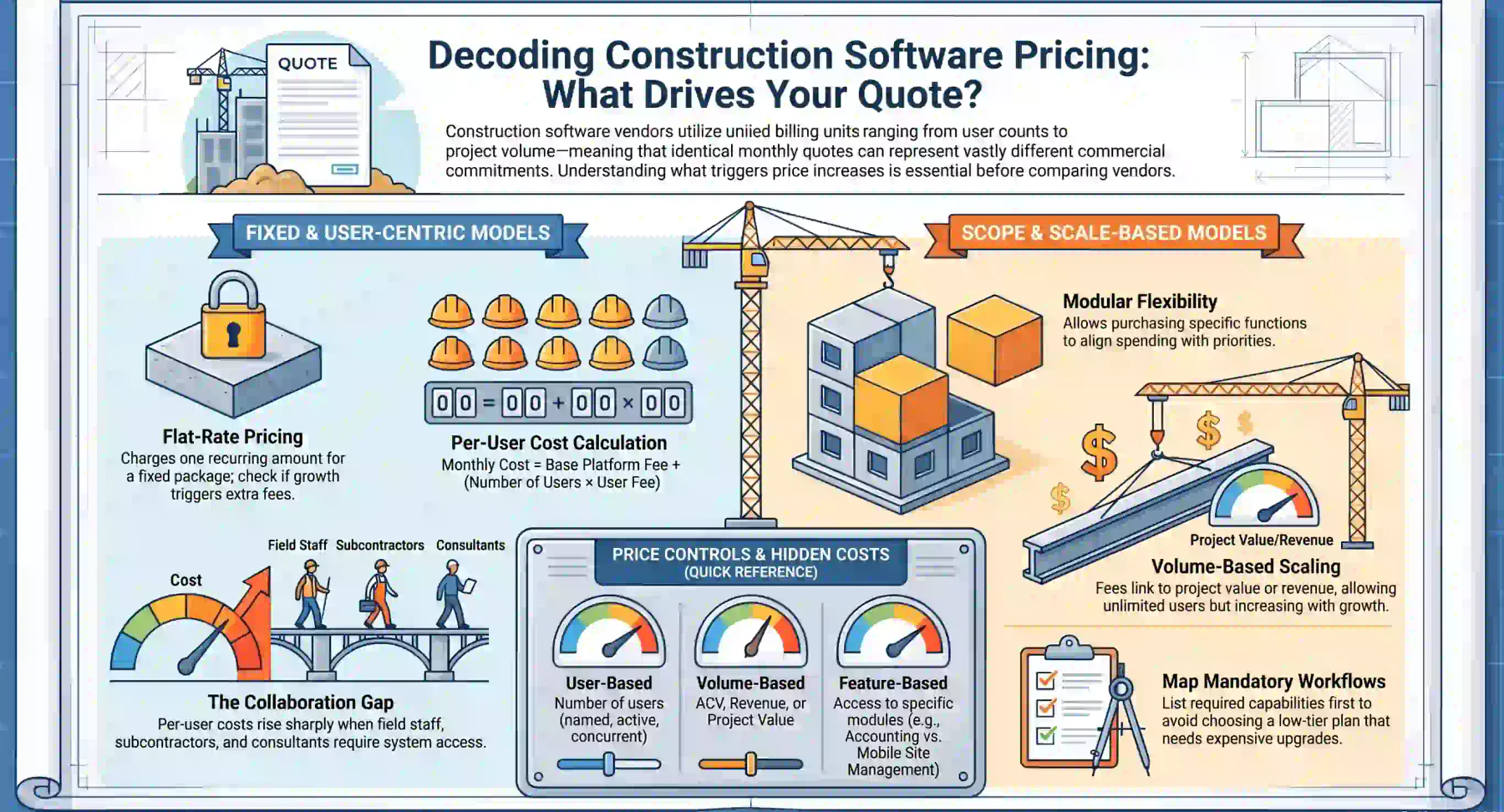
Vendors use different billing units, so similar monthly prices can represent very different commercial commitments.
Identify what controls the price before comparing quotes. It may be users, modules, projects, construction volume, storage, transactions or a combination of factors.
1. Flat-Rate Pricing
Flat-rate pricing charges one recurring amount for a defined package. The price may cover a fixed feature set, project allowance, storage limit or number of business entities.
This model makes budgeting easier when the scope is stable. It may also suit smaller builders that need standard workflows without complex configuration.
Flat-rate does not always mean unlimited access. Confirm whether growth in users, projects, companies, documents or transactions triggers another plan or fee.
Also check whether estimating, scheduling, actual cost tracking, invoicing and support are included. A low flat fee may cover only one part of the construction workflow.
2. Per-User Pricing
Per-user pricing calculates the subscription from the number of named, active or concurrent users.
Monthly software cost = base platform fee + number of paid users × user fee
This structure can be economical when only a small office team needs access. The cost can rise sharply when field and external users must be licensed.
Map everyone who may need the system, including estimators, supervisors, contract administrators, finance staff, subcontractors, consultants and clients.
Ask whether external collaborators can use a free portal. Also confirm whether licences can be reassigned and whether inactive or casual users continue to attract fees.
A per-user quote should model current access and expected headcount. Otherwise, a low first-year price may become unsuitable as projects and teams expand.
3. Tiered Feature Pricing
Tiered pricing groups features into packages such as Foundation, Pro, Premium or Enterprise. Higher plans unlock additional functions, controls or support.
This approach gives buyers a clear upgrade path, but the plan names do not indicate whether the required workflows are included.
A basic tier may support estimating but exclude actual costing, advanced permissions, forecasting, accounting integration or mobile site management.
Build a list of mandatory workflows before selecting a tier. Classify each capability as required now, required soon or optional.
Then confirm which tier supports every mandatory requirement. This reduces the risk of choosing an entry plan that requires an early and costly upgrade.
4. Modular Pricing
Modular pricing lets a business purchase selected functions instead of one fixed bundle.
Common modules include project management workflows, estimating, procurement, contracts, cost control, documents, inventory, equipment, accounting and workforce management.
This model can align spending with operational priorities. It is particularly useful when a contractor wants to introduce the platform in controlled phases.
However, modular construction software pricing can be difficult to compare. One vendor may bundle several functions that another provider sells separately.
Request an itemised quote showing every required module, the dependencies between modules and the future cost of expanding the scope.
Confirm whether reporting, mobile access, APIs and workflow tools are independent modules. These functions may be essential even when they appear secondary.
5. Project- or Volume-Based Pricing
Project-based pricing links the fee to the number of active projects. Volume-based pricing uses a measure such as project value, revenue or Annual Construction Volume.
This approach can support broad collaboration without charging for each user. It may suit contractors with many employees, subcontractors and external consultants.
The cost may rise as the business secures more work. Buyers should understand how the vendor measures volume and when additional fees apply.
Ask how variations, joint ventures and projects spanning several contract years are treated. Also confirm whether completed or archived projects count towards the limit.
Model a low, expected and high project pipeline. This shows how the subscription may change during both slower periods and rapid growth.
6. Custom Enterprise Pricing
Enterprise pricing is tailored to the required scope. The vendor may assess modules, legal entities, users, workflows, integrations, security and transaction volume.
A custom quote is not automatically less transparent than a published price. A properly itemised proposal can provide a more accurate view of the required investment.
The proposal should separate recurring software charges, implementation, migration, integrations, optional services and third-party costs.
It should also define renewal assumptions, usage limits and the events that trigger higher fees. Examples include new entities, extra modules or increased project volume.
For complex buyers, the key measure is not the entry price. It is the cost of supporting equivalent users, workflows and controls over the selected evaluation period.
What Determines the Cost of Construction Software?
The billing model explains how the vendor charges. The business scope determines the amount ultimately paid.
A detailed requirements map is essential when comparing construction project cost management software, particularly across products with different feature boundaries.
1. Business Size and User Numbers
Team size directly affects per-user subscriptions. It can also influence enterprise pricing through business scale, access requirements and support needs.
Separate users by role rather than counting employees alone. Office staff, site teams, subcontractors, consultants, approvers and clients may need different access.
Identify which users need full editing rights and which only need to view, submit or approve information. Restricted access can reduce licence costs.
Include expected recruitment, turnover and new offices in the calculation. A pricing model that suits the current team may become expensive after expansion.
2. Number and Complexity of Projects
A residential builder managing repeatable homes has different needs from a civil contractor delivering joint ventures, complex claims and long-term infrastructure work.
Project complexity can require detailed cost codes, committed-cost tracking, forecasting, retentions, variations, plant costing and consolidated reporting.
More projects also create greater document, storage and transaction volumes. Check whether these measures affect the subscription or infrastructure charges.
Evaluate how the platform manages project templates, cross-project reporting and archived records. These features influence both administrative effort and long-term cost.
3. Required Modules
A standalone estimating tool normally costs less than a connected platform covering tendering, procurement, delivery, inventory, workforce and accounting.
However, buying several disconnected tools creates additional licences, integrations, reconciliations and system administration.
An integrated construction operations platform can reduce this fragmentation by connecting project, procurement, cost and finance workflows.
Define the required outcome before selecting modules. A business seeking margin control may need construction project cost management software, not only scheduling.
Review feature dependencies carefully. A reporting module may require finance or project-control data that is available only through another paid module.
Compare the total module set needed to complete each workflow. Do not compare one vendor’s full platform against another vendor’s entry package.
4. Integrations
Construction software may need to exchange data with accounting, payroll, banking, supplier, document, business intelligence or legacy systems.
Integration costs can include design, development, middleware, API usage, testing, monitoring and future maintenance.
A listed integration may be native, supplied by a third party or built separately. Each option has different costs, support boundaries and upgrade risks.
Confirm which system owns customer, supplier, project, cost and payment records. Unclear ownership can cause duplicates and reconciliation work.
Ask how failed transactions are detected and corrected. An inexpensive integration can become costly if staff must monitor and repair it manually.
5. Configuration and Custom Workflows
Standard configuration may cover cost codes, approval limits, roles, templates, project stages, tax settings and reporting dimensions.
Complex requirements can add multi-level approvals, company-specific contract rules, bespoke reports and connections with legacy applications.
Separate configuration from custom development. Configuration uses supported platform settings, while development introduces new code or product behaviour.
Custom development may require testing and maintenance after future software updates. Include this ongoing responsibility when calculating total cost.
Prioritise workflows that improve control or remove substantial manual effort. Replicating every legacy process can increase cost without improving the outcome.
6. Support, Security, and Compliance
Support may be included, limited by channel or sold as a premium package. Confirm operating hours, response targets and access to local specialists.
Ask whether the vendor provides a named account contact, post-launch assistance and escalation for critical issues.
Enterprise security may include single sign-on, audit logs, advanced permissions, data residency controls and formal security reviews.
These capabilities may only be available on higher plans. They can also require internal identity, legal and security teams to participate in implementation.
Compliance reporting, retention policies and controlled approvals may add cost, but they can reduce audit effort and strengthen accountability.
Construction Software Implementation Costs
Implementation turns a software subscription into a working operational system. Its cost depends on scope, data quality, integrations and the scale of business change.
A cheaper implementation is not always better. Removing essential discovery, testing or training may shift cost into rework, delays and poor adoption.
1. Discovery and Process Mapping
Discovery documents how the business currently manages estimates, contracts, purchasing, project costs, claims, variations, documents and reporting.
It should identify duplicated work, unclear ownership, approval gaps and inconsistent practices before the platform is configured.
The team should distinguish mandatory controls from habits inherited from older systems. This prevents unnecessary complexity from entering the new design.
Useful outputs include an agreed scope, process maps, role definitions, data requirements, integration boundaries and measurable acceptance criteria.
Reducing discovery may lower the initial quote, but unresolved decisions often reappear during configuration and testing at a higher cost.
2. Configuration and Project Setup
Configuration establishes business entities, project types, user roles, cost codes, approvals, templates, numbering rules, dashboards and reporting structures.
A single-entity contractor using standard processes may need limited setup. A multi-entity group with different divisions may require extensive configuration.
Reusable project templates can reduce future setup effort. They should reflect common delivery models without preventing project-specific controls.
Document each configuration decision and assign an owner. Undocumented settings make support, training and future changes more difficult.
Include a process for managing configuration after launch. Uncontrolled changes can weaken reporting consistency and approval governance.
3. Data Migration
A structured data migration process should cover extraction, mapping, cleansing, trial loads, reconciliation, approval and final cutover.
Cost depends on data quality and structure, not only volume. Duplicate suppliers, inconsistent codes and missing fields require cleansing before import.
Define which records must remain operational, which are needed for reporting and which can stay in a controlled archive.
Migrating every historical record can increase cost without adding value. A targeted migration often gives users cleaner data and a faster launch.
Assign business owners to validate balances and project data. The implementation team cannot confirm commercial accuracy without operational input.
4. Integrations
Each integration requires design, configuration, testing and an accountable owner. It should also have a clear purpose and measurable business benefit.
Complexity increases when systems use different account structures, project identifiers, approval statuses or reporting periods.
The design should define the source of truth for every shared record and the direction and frequency of each data transfer.
Testing must cover successful transactions, rejected data, duplicates, outages and recovery. Testing only the ideal path leaves costly operational gaps.
Budget for monitoring and maintenance after launch. Vendor updates, authentication changes and new business rules can affect an existing connection.
5. Training and Change Management
Training costs depend on the number of roles, locations, workflows and delivery methods. A single generic session rarely serves every user effectively.
Site teams may need short mobile tasks, while finance and project-control staff require detailed instruction on commercial processes.
Use role-based training with realistic project scenarios. Users should practise the work they will complete, not only watch feature demonstrations.
Change management also includes communication, role clarification, operating procedures, super-user preparation and adoption monitoring.
Include onboarding for future employees. Without reusable training materials, every new starter creates another support and productivity cost.
6. Testing and Go-Live Support
Testing confirms that permissions, workflows, migrated data, calculations, reports and integrations operate as designed.
Business users should test complete scenarios, from project creation and purchasing to cost reporting, claims and financial outcomes.
Document expected results and record defects by severity. This prevents minor presentation issues from obscuring failures in critical controls.
Go-live support may cover issue triage, data corrections, workflow adjustments and user assistance during the transition.
Confirm the support period, response targets and included effort. Some vendors bundle this service, while others charge according to time used.
A clear exit criterion should define when implementation support ends and standard support begins. This avoids uncertainty over ownership and fees.
Hidden and Ongoing Construction Software Costs
Headline subscriptions often exclude costs that appear during implementation, expansion or renewal.
Review every proposal for charges linked to users, modules, storage, APIs, support, training and data ownership.
- Additional user or collaborator licences
- Premium modules and feature add-ons
- Document storage and data limits
- API access and integration middleware
- Data cleansing and migration services
- Custom reports, forms and workflows
- Premium support or account management
- Training for new employees
- Mobile devices and site connectivity
- Renewal increases and currency adjustments
- Data export and contract-exit charges
Internal labour is another significant cost. Employees must attend workshops, validate records, test workflows and support other users.
Estimate this labour using each employee’s loaded hourly cost, including wages, superannuation and other employment expenses.
Implementation may also require temporary backfilling. Key employees cannot always manage system design while maintaining their normal workload.
Running old and new systems in parallel creates overlapping subscriptions and duplicate administration. Include this period in the first-year budget.
Review contract terms for minimum commitments, automatic renewals, notice periods and price changes. These conditions affect flexibility as much as the fee itself.
Data ownership also has a financial impact. Confirm the format, cost and timing of a full export if the business later changes platforms.
Construction software pricing should include the cost of leaving the system, not only entering it. Restricted exports can make future migration more expensive.
First-Year Cost vs Ongoing Annual Cost
The first year usually costs more because it combines recurring fees with implementation, migration, training and integration work.
Later years normally carry lower project costs, but subscriptions, support, integrations and continuous training remain.
| Cost Component | First Year | Ongoing Years |
|---|---|---|
| Core Software Subscription | Yes | Yes |
| Implementation and Configuration | Usually | For major changes |
| Data Migration | Usually | Occasionally |
| Initial Integration Setup | Usually | When expanded or replaced |
| Integration Subscriptions | Yes | Yes |
| Initial Training | Usually | No |
| Refresher and New-User Training | Sometimes | Usually |
| Support Package | Yes | Yes |
| Custom Development | Sometimes | Maintenance may continue |
| Internal Project Team | High involvement | Lower involvement |
| Renewal Increase | Not usually applicable | Possible |
Request a complete first-year total and a separate estimate for steady-state annual operation.
A monthly licence alone can materially understate the budget required to deploy and maintain the platform.
Ask the vendor to identify one-off, recurring, usage-based and optional costs. This makes future budget changes easier to trace.
Include an allowance for continuous improvement. New reports, workflows and integrations may be justified after users gain practical experience.
Do not treat all later-year costs as fixed. User growth, project volume, storage and contract indexation can change the annual commitment.
How to Calculate Construction Software Total Cost
Use the same evaluation period for every proposal. Three years is often long enough to capture implementation costs and at least two renewal cycles.
Three-year total cost = initial costs + three years of recurring costs + internal labour + contingency
Initial costs include implementation, migration, integration setup, training, devices and any custom development required before launch.
Recurring costs include subscriptions, support, middleware, API usage, storage, add-ons, maintenance and ongoing training.
Build the comparison around equivalent business requirements. Each proposal must support the same users, projects, modules, controls and integrations.
| Cost Category | Year 1 | Year 2 | Year 3 |
|---|---|---|---|
| Core Subscription | Quote | Quote | Quote |
| Additional Users | Quote | Quote | Quote |
| Modules and Add-Ons | Quote | Quote | Quote |
| Implementation | Quote | None expected | None expected |
| Data Migration | Quote | None expected | None expected |
| Integration Setup | Quote | Expansion only | Expansion only |
| Integration Maintenance | Quote | Quote | Quote |
| Training | Quote | Quote | Quote |
| Support | Quote | Quote | Quote |
| Internal Labour | Estimate | Estimate | Estimate |
| Contingency | Estimate | Estimate | Estimate |
| Total | Calculate | Calculate | Calculate |
Add a contingency based on known uncertainty rather than applying an arbitrary percentage.
A higher allowance may be appropriate when data quality is unclear, integrations are untested or business processes differ across entities.
Record every assumption beside the calculation. Include user growth, project volume, annual increases, exchange rates and expected implementation timing.
Run at least three scenarios: minimum scope, expected scope and growth scope. This exposes pricing models that become expensive as usage increases.
Include the cost of systems that the new platform will replace. Removing licences, integrations and manual tasks may offset part of the investment.
A construction project cost management software business case should also quantify avoidable effort, reporting delays and commercial control gaps.
Do not claim savings unless the baseline is documented. Record current labour hours, system fees and process volumes before calculating a benefit.
All proposals should use Australian dollars, the same billing period and the same GST treatment.
The Australian Taxation Office states that GST is 10% on most goods and services sold or consumed in Australia.
Eligible GST-registered businesses can generally claim credits for GST paid on purchases used for business purposes, subject to the applicable conditions.
The ACCC’s price-display guidance confirms that prices displayed only to other businesses do not need to include GST.
This means an Australian B2B software price may be advertised excluding GST. Check the tax status of every subscription, service and add-on.
Which Pricing Model Fits Your Construction Business?
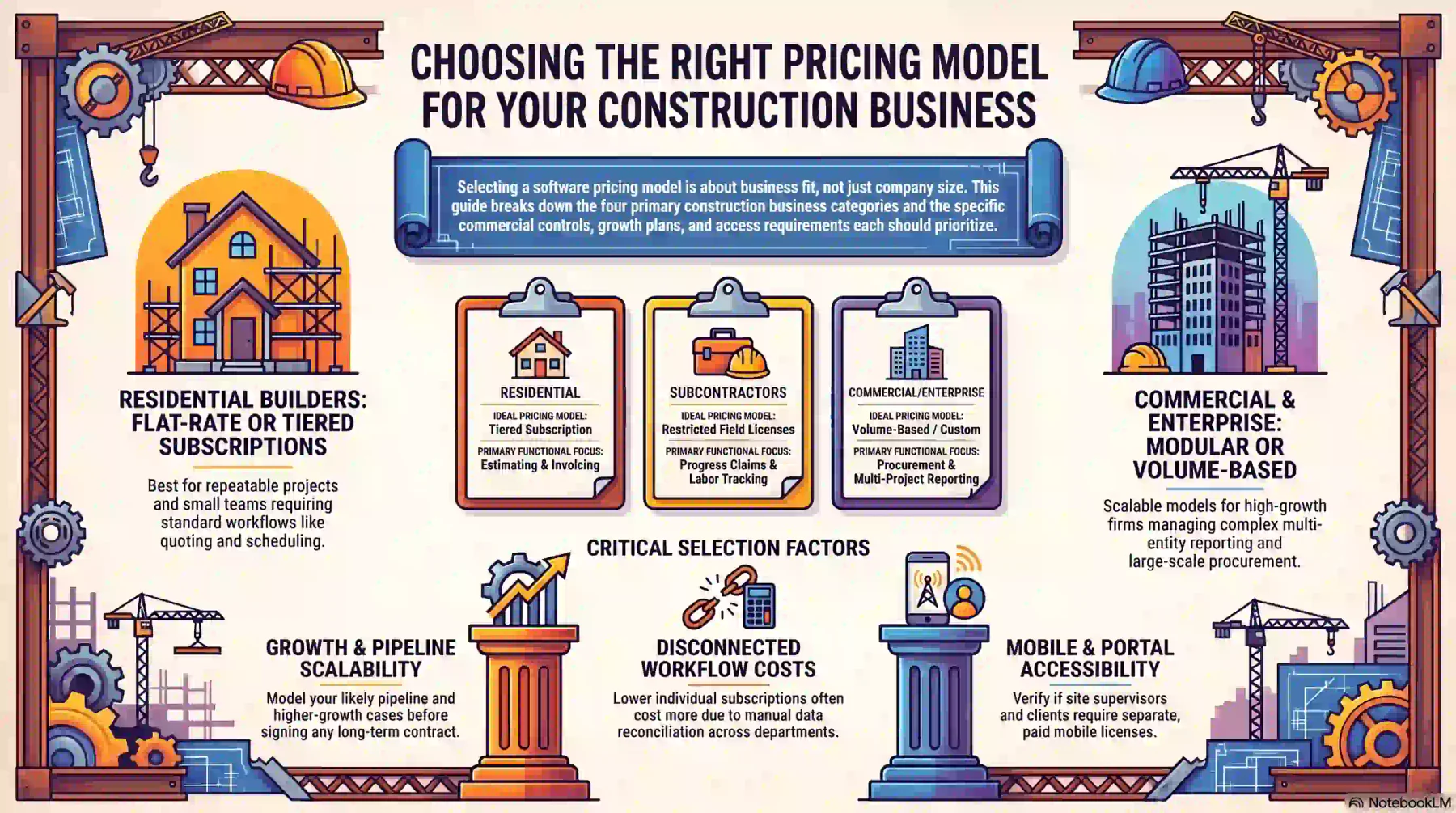
The right model depends on how the business works, not simply its size.
Consider project complexity, collaboration, commercial controls, growth plans and the number of people who require access.
The right platform should suit your workflows, project complexity, growth plans and available budget. See Hashy AI in action to assess how well it supports your construction operations.






1. Residential Builders and Renovators
Flat-rate or tiered subscriptions often suit residential builders with repeatable projects and a small internal team.
Typical requirements include take-offs, estimating, quoting, scheduling, purchase orders, variations, invoicing and basic job-cost tracking.
The chosen tier should support the full workflow. An estimating plan may be insufficient if the team also needs site updates and actual cost control.
Unlimited-user plans can be useful when supervisors, trades and clients require access. Check whether mobile and portal functions are included.
Template quality matters for repeatable work. Reusable estimates, schedules and cost codes can reduce setup effort across similar projects.
A simple subscription is usually preferable when it avoids extensive configuration and can exchange data with the existing accounting platform.
2. Subcontractors and Specialist Trades
Flat-rate or limited per-user plans can suit subcontractors when only estimators, project managers and administrators need full access.
The platform should support progress claims, retentions, variations, commitments, labour costs and subcontract-specific reporting.
Mobile records are important when field teams must submit hours, quantities, photos, issues or completed work.
Check whether site employees need full paid licences. A restricted field interface may control costs without limiting operational reporting.
A general task-management product may not provide adequate commercial controls. Confirm how the system links site progress to claims and actual costs.
Subcontractors working for several head contractors should also assess document exchange, approval evidence and project-level reporting.
3. Commercial and Civil Contractors
Commercial and civil contractors usually need stronger controls across contracts, procurement, forecasting, documents and multi-project reporting.
Modular or volume-based pricing can be more practical than strict per-user licensing because many internal and external parties need access.
Construction project cost management software should track budgets, commitments, actuals, forecasts and approved changes against consistent cost codes.
It should also manage progress claims, retentions, variations, plant costs and subcontractor obligations where required.
Assess whether information can move from tender and budget through procurement, delivery, claims and final financial reporting.
Disconnected workflows increase reconciliation and weaken forecast confidence, even when each separate application has a lower subscription.
Ask how pricing changes when construction volume rises. Model secured work, likely pipeline and a higher-growth case before signing.
4. Enterprise and Multi-Entity Construction Groups
Enterprise groups normally require tailored pricing because their needs extend beyond a standard package.
The scope may include multiple legal entities, business units, approval hierarchies, shared suppliers, consolidated reports and complex integrations.
Security, auditability and access by company, branch and project can also affect configuration and licence requirements.
Custom pricing should be based on an agreed solution design. The quote must identify modules, implementation services and future growth triggers.
HMX Construction can support an enterprise scope spanning project delivery, procurement, contracts, cost control, finance and operational reporting.
Its commercial fit should still be assessed through an itemised proposal, implementation plan and total-cost comparison.
A broader platform may cost more initially but reduce separate licences, duplicate data and manual reconciliation across departments.
The decision should reflect long-term operating requirements. Replacing an undersized system after rapid growth can cost more than selecting a scalable platform.
Conclusion
Construction software pricing should be assessed as a full investment, not a monthly subscription. Compare first-year and ongoing costs across users, modules, projects, integrations and support.
Normalise quotes for GST, currency and contract length. Then select the model that supports current workflows and growth without excessive add-ons, manual work or replacement systems.
To learn further about construction softwares, you can schedule a free consultation with our experts today and gain deep business insights.
Frequently Asked Questions
Public Australian plans start at a few hundred dollars monthly, while enterprise platforms are custom quoted. Compare first-year and ongoing costs, which include users, modules, implementation and GST.
Some platforms charge per user, others use flat-rate, tiered, modular or volume-based pricing. Check whether subcontractors, clients and consultants need paid accounts or can use free restricted portals.
Not always. Australian B2B vendors may advertise prices excluding GST, so check each proposal's tax treatment and convert all quotes to the same GST basis before comparing them.
Not always. Configuration, migration, integrations, training and launch support may be quoted separately, so request an itemised scope showing what each cost covers.
Construction software pricing covers what a platform costs to buy and run. Construction pricing software calculates project prices from labour, materials and overheads, a different search and buying intent.
Not necessarily. Custom pricing can cost more but may avoid unnecessary licences and workarounds. Compare total cost for equivalent functions, users, implementation and support, not just the entry price.