

Unexpected equipment failures can interrupt production, delay deliveries, and increase repair costs. However, maintenance teams often struggle to prevent them when work orders, asset records, and spare-parts data sit in separate spreadsheets.
CMMS software centralises maintenance planning, asset histories, inspections, inventory, and technician activity. Australian businesses can use it to schedule preventive work, track equipment condition, control parts, and measure maintenance performance.
This guide compares ten platforms for small and mid-sized businesses in 2026. The shortlist reflects public product information reviewed in July 2026, but the right choice still depends on your assets, workforce, sites, integrations, and budget.
Key Takeaways
CMMS software centralises work orders, preventive maintenance, asset histories, spare parts, labour, and performance reporting.
The ten recommended CMMS platforms serve different maintenance priorities, industries, team sizes, and integration needs.
Businesses should compare mobile access, preventive maintenance, meter triggers, inventory control, integrations, and reporting before selecting a system.
The right CMMS depends on whether the business manages manufacturing equipment, facilities, fleets, small teams, or ERP-integrated operations.
Best CMMS Software in Australia at a Glance (Shortlisted)


Best Because
Configurable Australian CMMS for mobile maintenance and inspections

Best Because
Mobile-first CMMS built for fast technician adoption and easy work orders

What Is CMMS Software?

CMMS stands for computerised maintenance management system. It stores maintenance information in a central database and helps teams control work orders, preventive servicing, asset histories, spare parts, labour, and performance reporting.
A typical workflow begins when an employee reports a fault or the system triggers scheduled maintenance. The platform then creates a work order, assigns a technician, records labour and parts, and adds the completed activity to the asset history.
Modern platforms can also create maintenance work from meter readings, inspections, or connected sensors. According to IBM’s CMMS guide, core capabilities commonly include work order automation, inventory management, preventive scheduling, and performance dashboards.
The resulting records help managers track downtime, backlog, mean time to repair, preventive maintenance compliance, and asset costs. Therefore, teams can move from reactive repairs towards planned maintenance based on reliable operational data.
How We Selected the Best CMMS Software
"A reliable CMMS comparison should consider maintenance capabilities, technician usability, integrations, scalability, and total value, not features or subscription prices alone."
This comparison reviews publicly available capabilities, pricing information, and stated product scope. We assessed each option against five practical criteria relevant to Australian small and mid-sized businesses.
Core maintenance capabilities: The platform should manage work requests, work orders, asset histories, inspections, and preventive maintenance.
Technician and mobile usability: Field employees should be able to view assignments, add notes, record parts, attach photos, and close work from a mobile device.
Asset, inventory, and integration depth: Strong products connect equipment records with meters, spare parts, purchasing, finance, sensors, or other operational systems.
Scalability and reporting: The software should support growing user numbers, additional locations, role controls, maintenance KPIs, and auditable records.
Australian fit and total value: We considered local support, offline requirements, Australian pricing clarity, implementation effort, and the broader operating value.
The order does not represent a universal ranking. A straightforward mobile platform may suit a small team better than a broader EAM product, while an integrated ERP approach may create more value for a growing enterprise.
10 Best CMMS Software in Australia
The following reviews explain where each platform fits, which capabilities stand out, and what buyers should clarify before signing a contract.
1. MEX CMMS
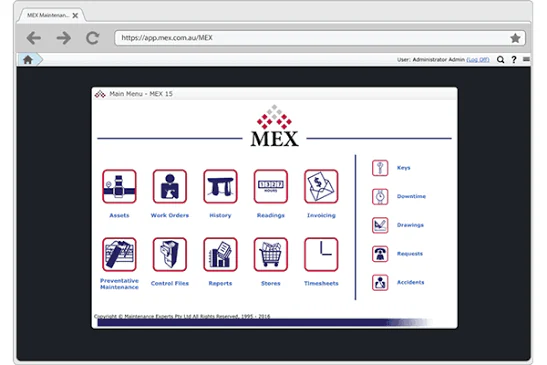
MEX CMMS is an Australian-developed maintenance platform for managing equipment, facilities and maintenance work across one or multiple sites. It works best for asset-intensive businesses seeking local support, preventive maintenance tools and detailed asset records within one system.
Key Features:
- Asset Register: Stores asset specifications, service histories, documents, costs and related maintenance activity.
- Work Order Management: Helps teams create, assign, prioritise and monitor maintenance jobs.
- Preventive Maintenance: Schedules recurring work according to dates, meter readings and operating requirements.
- Inventory Management: Tracks spare parts, stock movements, suppliers and purchasing requirements.
| Pros | Cons |
|---|---|
| Australian-developed platform with local support. Strong preventive maintenance and asset tracking capabilities. Supports multi-site operations and mobile maintenance teams. | Pricing is not publicly displayed. Advanced deployments may require configuration and training. Preparing asset and maintenance data can take time. |
Pricing: Custom quote in AUD based on users, deployment, integrations and service requirements. MEX has replaced its earlier published plan prices with customised quotation pricing.
Suitable for: Australian manufacturing, facilities, fleet and asset-intensive businesses requiring local CMMS support.
2. Pinnacle CMMS
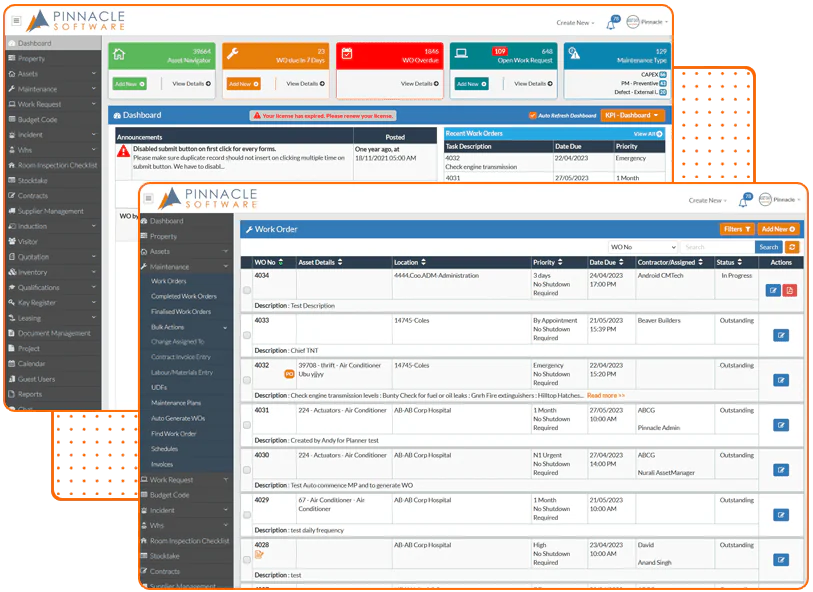
Pinnacle CMMS is an Australian maintenance and asset management platform designed for businesses that need structured control over equipment, inspections and maintenance activity. It works best for businesses seeking mobile access, configurable deployment and support for preventive and reactive maintenance.
Key Features:
- Maintenance Management: Supports preventive and reactive maintenance planning, scheduling and completion.
- Mobile Maintenance: Allows technicians to access work orders, inspections and asset information from mobile devices.
- Inspection and Pre-Start Tools: Helps teams complete equipment checks, audits and operational inspections.
- Business System Integration: Connects maintenance information with finance, ERP, HR and IoT platforms.
| Pros | Cons |
|---|---|
| Australian-owned provider with local experience. Supports cloud and selected on-premises deployments. Provides offline mobile functionality for field teams. | Pricing is not published publicly. Selecting the right package requires vendor consultation. Advanced implementation may require configuration and training. |
Pricing: Custom quote in AUD. Available packages include Pre Start IM, Asset Tracking Pro, Business Plus and Enterprise, with pricing based on licences and required modules. Pinnacle package information.
Suitable for: Australian facilities, utilities, construction and infrastructure businesses needing configurable maintenance management.
3. MaintainX
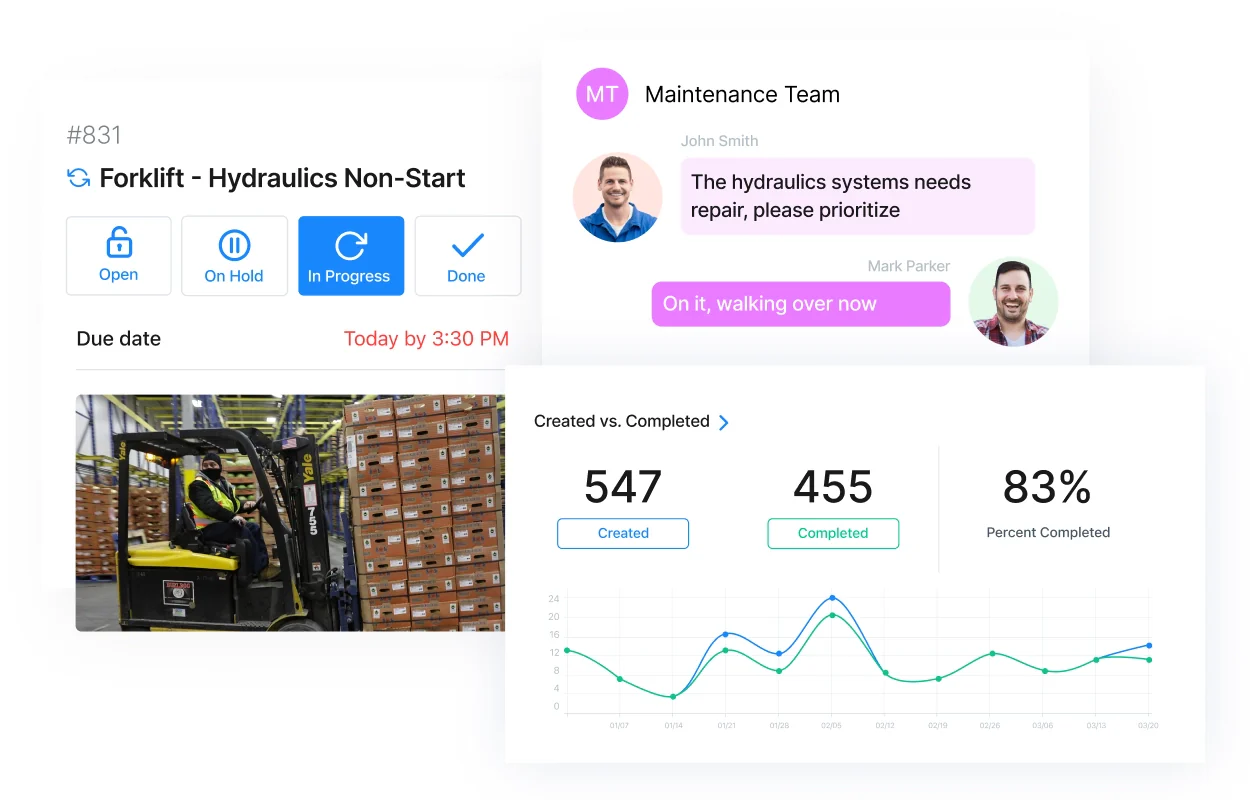
MaintainX is a mobile-first maintenance platform for managing work orders, procedures and preventive maintenance through an accessible interface. It works best for businesses that prioritise technician adoption, fast deployment and communication between maintenance and operational teams.
Key Features:
- Mobile Work Orders: Enables technicians to create, update and complete work orders from mobile devices.
- Preventive Maintenance: Automatically schedules recurring work according to equipment and servicing requirements.
- Parts and Inventory: Tracks spare-part availability, usage, costs and purchasing activity.
- Reporting and Analytics: Provides visibility into maintenance costs, completion rates and equipment performance.
| Pros | Cons |
|---|---|
| User-friendly mobile interface. Free entry-level plan is available. Strong procedures, messaging and work-order collaboration. | Premium pricing can become costly for large teams. Parts management requires the Premium plan. Enterprise integrations use customised pricing. |
Pricing: Basic is free. Essential costs approximately AUD 29 per user per month when billed annually or AUD 36 monthly. Premium costs approximately AUD 93 per user per month when billed annually or AUD 107 monthly. Enterprise pricing is customised. MaintainX pricing.
Suitable for: Australian maintenance teams seeking an accessible, mobile-first CMMS.
4. Fiix
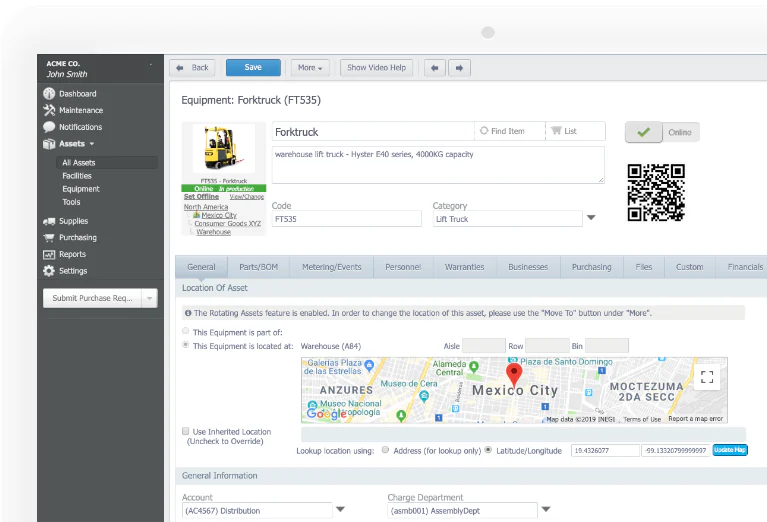
Fiix is a cloud-based CMMS from Rockwell Automation that helps businesses manage assets, maintenance schedules, spare parts and operational performance. It works best for industrial businesses seeking scalable maintenance management with multi-site functionality and predictive analytics options.
Key Features:
- Work Order Management: Creates, assigns and monitors planned and unplanned maintenance work.
- Asset Management: Maintains equipment records, service histories, costs and asset hierarchies.
- Inventory Control: Tracks spare parts, stock levels, suppliers and maintenance-related purchasing.
- Maintenance Intelligence: Analyses maintenance data to identify patterns and support planning decisions.
| Pros | Cons |
|---|---|
| Scales from smaller teams to multi-site businesses. Strong asset and preventive maintenance functionality. Backed by Rockwell Automation’s industrial ecosystem. | Advanced analytics require the Professional plan. Per-user costs can increase quickly. ERP integrations are enterprise add-ons. |
Pricing: Free plan available. Basic costs approximately AUD 64 per user per month, while Professional costs approximately AUD 107 per user per month. Enterprise pricing is customised. Fiix pricing.
Suitable for: Australian manufacturers and industrial businesses requiring scalable, data-driven maintenance management.
5. Limble CMMS
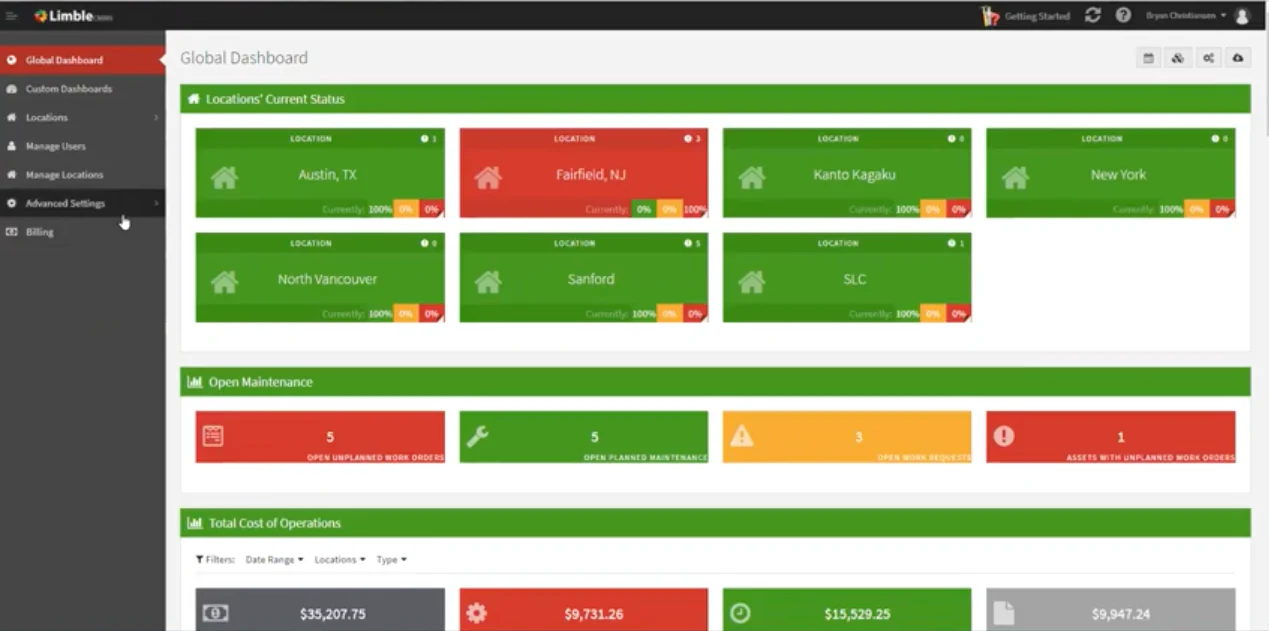
Limble CMMS is a cloud maintenance platform focused on simplifying work orders, preventive maintenance and asset visibility. It works best for businesses that want technicians to adopt the system quickly while retaining access to inventory, vendor and reporting tools.
Key Features:
- Work Order Management: Lets teams create, assign, prioritise and complete maintenance tasks.
- Preventive Maintenance: Schedules recurring work using dates, meter readings and maintenance triggers.
- Asset Management: Centralises asset histories, documents, costs and maintenance records.
- Parts and Purchasing: Manages spare parts, suppliers, purchase orders and stock availability.
| Pros | Cons |
|---|---|
| Clean and accessible user interface. Supports unlimited assets and work orders on paid plans. Strong mobile functionality for technicians. | Current checkout pricing requires a calculator or quote. Offline access requires Premium+ or Enterprise. Advanced integrations are reserved for Enterprise. |
Pricing: Standard is estimated from approximately AUD 40 per user per month, converted from the US$28 figure cited in Limble’s 2026 pricing guide. Premium+ and Enterprise pricing requires a customised calculation or quote. Limble plan information.
Suitable for: Australian businesses prioritising usability, technician adoption and preventive maintenance.
6. HashMicro Asset Management Software
HashMicro Asset Management Software combines maintenance, asset lifecycle control and broader ERP functions within one connected platform. It works best for medium and large businesses that want maintenance activity integrated with inventory, procurement, accounting and operational data.
Key Features:
- Preventive Maintenance: Plans servicing according to schedules, operating hours, odometer readings and equipment requirements.
- Maintenance Work Orders: Manages maintenance requests, repair orders, job assignments and related costs.
- Asset Lifecycle Management: Tracks asset locations, conditions, usage histories, depreciation and disposal.
- ERP Integration: Connects asset maintenance with inventory, purchasing, accounting and other operational functions.
| Pros | Cons |
|---|---|
| Connects maintenance with wider ERP operations. Supports multi-site and asset-intensive businesses. Provides one source of information for asset, cost and maintenance records. | May provide more functionality than small teams require. Pricing is not published as a standard package. Implementation requires process and data planning. |
Pricing: Custom quote in AUD based on users, modules, integrations and implementation requirements. HashMicro Asset Management Software.
Suitable for: Medium and large Australian businesses seeking integrated maintenance, asset and ERP management.
7. UpKeep
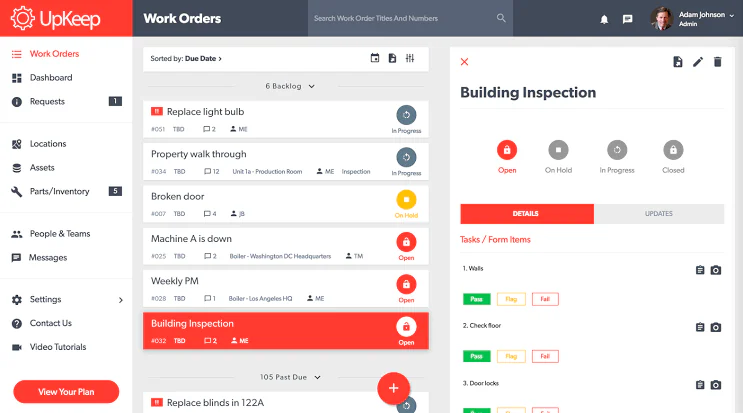
UpKeep is a mobile-first CMMS that helps maintenance and operations teams manage work orders, assets and preventive maintenance from the field. It works best for businesses that need technicians to update maintenance records without relying on desktop access.
Key Features:
- Mobile Work Orders: Allows technicians to receive, update and close maintenance jobs from mobile devices.
- Preventive Maintenance: Automates recurring maintenance schedules and task assignments.
- Parts and Inventory: Tracks stock levels, part usage, costs and maintenance supplies.
- Maintenance Analytics: Monitors work-order performance, costs, downtime and team activity.
| Pros | Cons |
|---|---|
| Strong mobile experience for field technicians. Unlimited work orders are included in Essential. Scales to multi-site enterprise operations. | Preventive maintenance is unavailable in Essential. Offline access requires Professional or Enterprise. Implementation and advanced integrations cost extra. |
Pricing: Essential costs approximately AUD 34 per user per month. Premium costs approximately AUD 79 per user per month. Professional and Enterprise pricing is customised. UpKeep pricing.
Suitable for: Australian field service, facilities and maintenance teams requiring mobile work management.
8. Tractian
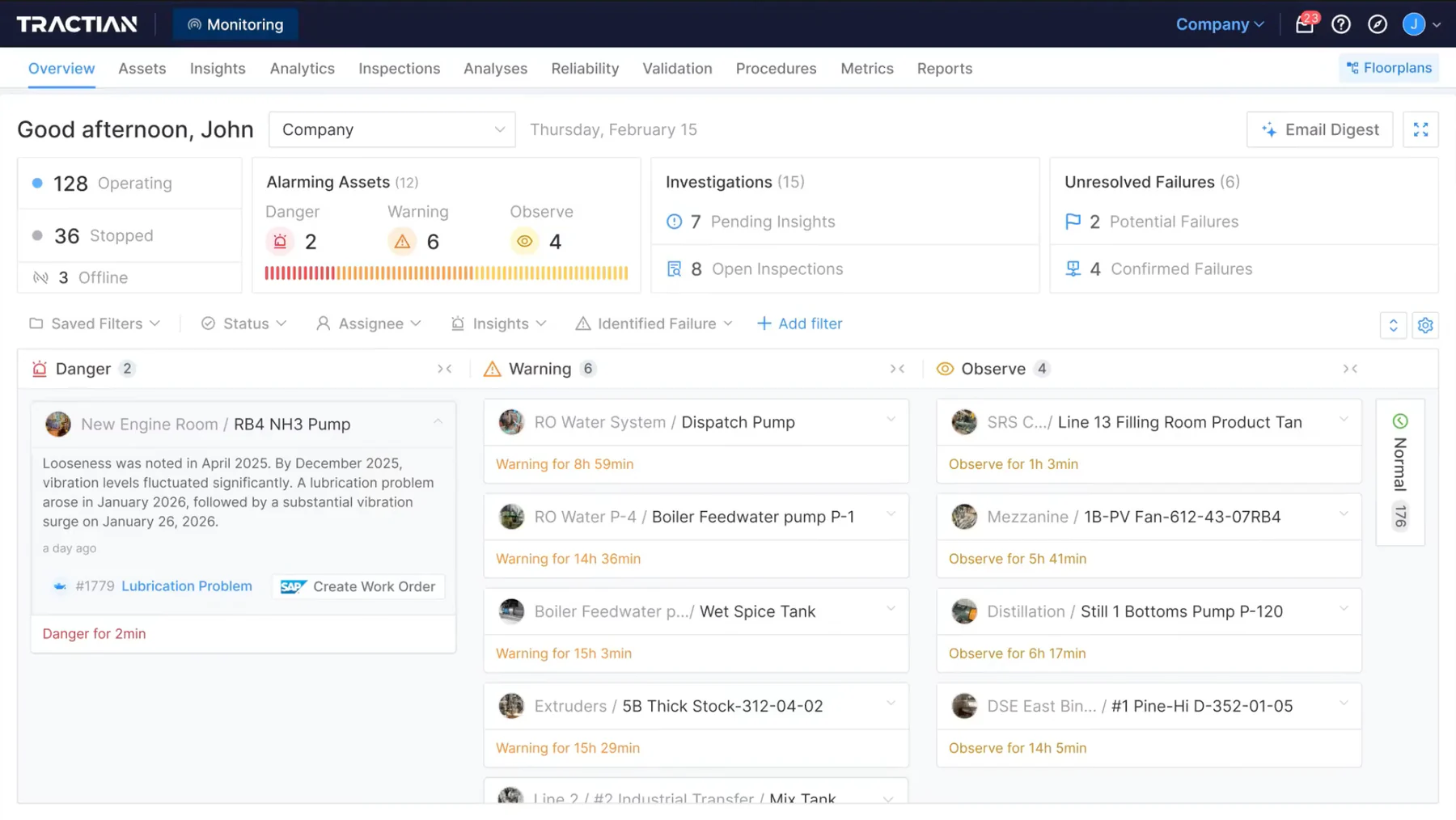
Tractian combines CMMS functionality with AI-assisted maintenance and optional condition-monitoring sensors. It works best for industrial businesses that want to manage maintenance work while detecting equipment problems through machine-condition data.
Key Features:
- Maintenance Management: Supports work orders, preventive maintenance, asset records and maintenance planning.
- Condition Monitoring: Uses sensors to monitor vibration, temperature and equipment condition.
- AI-Assisted Analysis: Helps teams identify potential failures and investigate likely causes.
- Enterprise Integration: Connects maintenance data with ERP systems, Power BI and other business platforms.
| Pros | Cons |
|---|---|
| Combines CMMS and condition monitoring. Strong fit for industrial equipment maintenance. Provides unlimited assets and requester accounts. | Standard requires at least five paid users. Enterprise requires at least ten paid users. Sensors and monitoring require separate bundle pricing. |
Pricing: Standard starts at approximately AUD 86 per user per month, with a five-user minimum and annual billing. This represents a minimum subscription of about AUD 5,141 annually. Enterprise starts at approximately AUD 143 per user per month, with a ten-user minimum, representing about AUD 17,136 annually. Tractian pricing.
Suitable for: Australian manufacturers, mining businesses and industrial operators pursuing predictive and condition-based maintenance.
9. eMaint CMMS
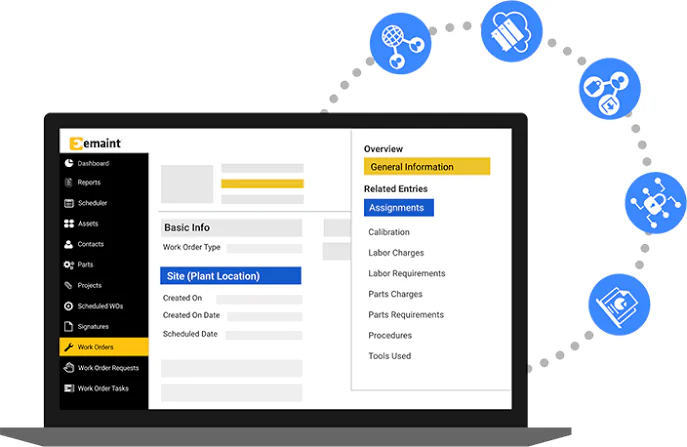
eMaint is an enterprise CMMS from Fluke Reliability designed for businesses that need configurable maintenance workflows and detailed asset control. It works best for industrial teams requiring preventive maintenance, calibration, inventory and condition-based maintenance capabilities.
Key Features:
- Work Order Management: Controls maintenance requests, assignments, priorities, labour and completion records.
- Preventive Maintenance: Schedules recurring work using calendars, meters and equipment conditions.
- Calibration Management: Supports calibration schedules, procedures, standards and compliance records.
- Inventory and Purchasing: Tracks spare parts, suppliers, requisitions and stock movements.
| Pros | Cons |
|---|---|
| Highly configurable maintenance workflows. Strong calibration and condition-based maintenance tools. Suitable for regulated industrial environments. | Public subscription prices are not disclosed. Professional requires at least three users. Implementation and onsite training are additional services. |
Pricing: Custom annual quote converted and invoiced according to the vendor’s agreed terms. Professional requires at least three users, while Enterprise requires at least five. Australian buyers should request the final proposal in AUD. eMaint pricing.
Suitable for: Australian industrial, regulated and asset-intensive businesses needing configurable maintenance controls.
10. Mainpac
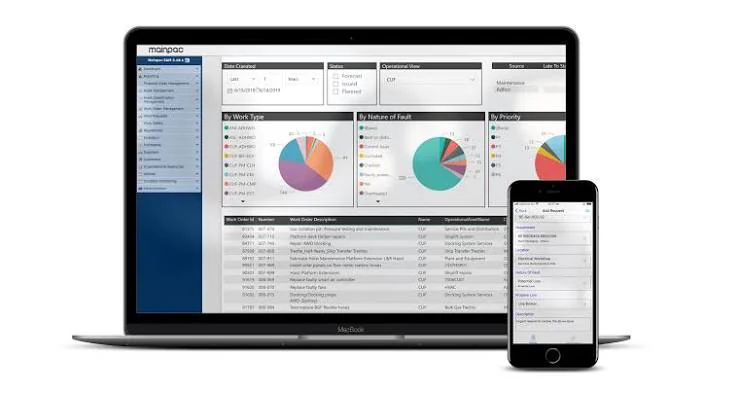
Mainpac is an Australian enterprise asset management system for managing equipment performance, maintenance costs and asset reliability. It works best for businesses that require detailed asset histories and a structured combination of preventive, predictive and reactive maintenance.
Key Features:
- Asset Information Management: Stores equipment specifications, expected lifetimes, documents and maintenance histories.
- Work Order Control: Manages repair schedules, labour, costs, downtime and maintenance completion.
- Preventive Maintenance: Triggers recurring work using dates, meter readings and customised maintenance rules.
- Predictive Maintenance: Uses asset-condition information to support earlier maintenance intervention.
| Pros | Cons |
|---|---|
| Australian enterprise asset management provider. Detailed asset history and maintenance-cost tracking. Supports preventive and predictive maintenance strategies. | Pricing is not published publicly. Implementation may require substantial asset-data preparation. May be too comprehensive for small maintenance teams. |
Pricing: Custom quote in AUD based on deployment, users, applications, implementation and support requirements. Mainpac product information.
Suitable for: Large Australian industrial, infrastructure, mining and asset-intensive businesses requiring enterprise-level maintenance management.
How to Choose the Right CMMS Software
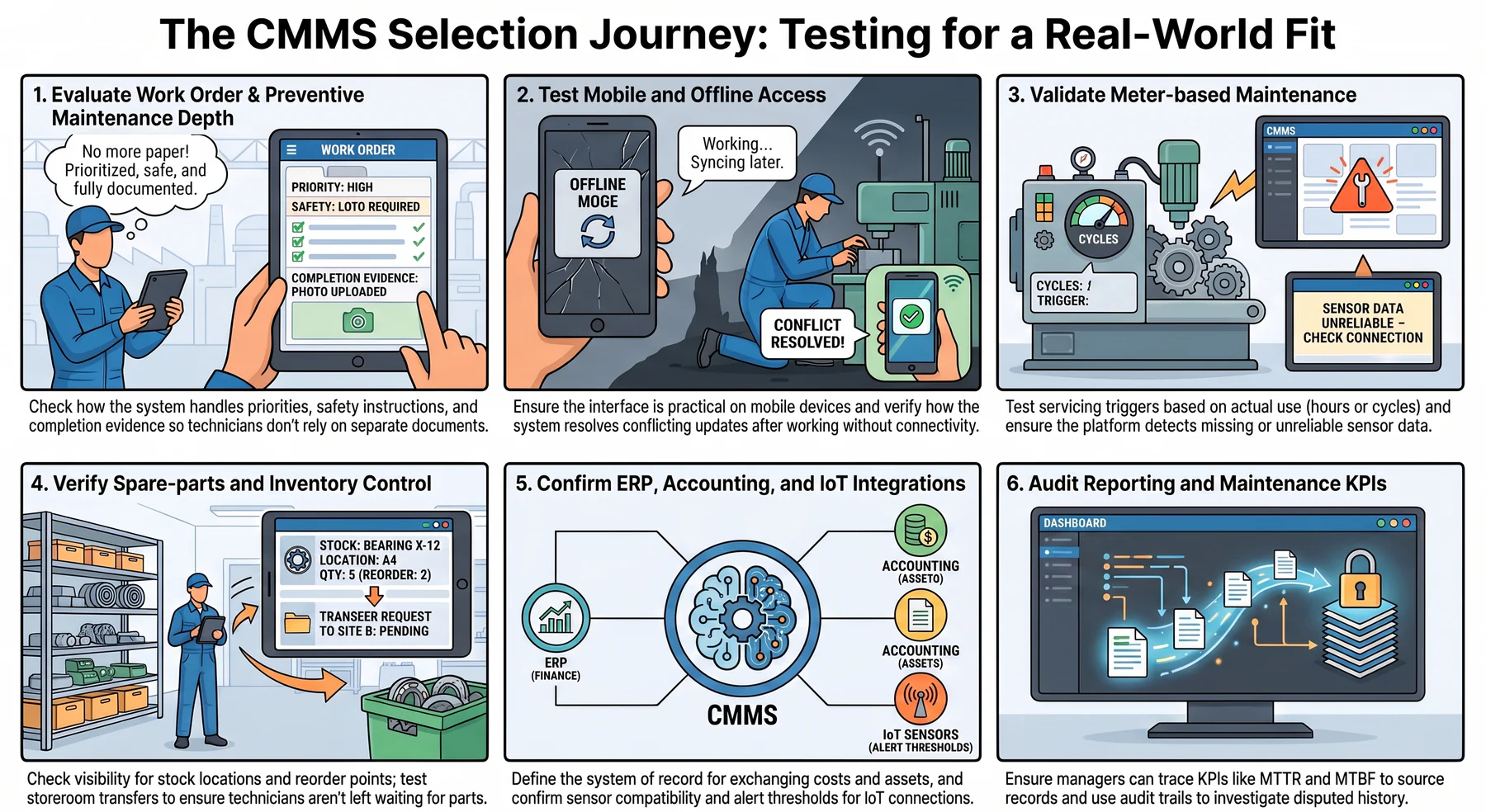
A product demonstration should reflect your actual maintenance environment rather than a generic workflow. The following areas will reveal whether the platform can support technicians, planners, managers, and connected departments.
1. Work order and preventive maintenance depth
Check how the system handles requests, priorities, approvals, labour, parts, safety instructions, attachments, and completion evidence. Technicians should be able to understand and update a work order without relying on separate documents.
Preventive maintenance should support calendars, recurring intervals, asset categories, and configurable triggers. In addition, test how the system prevents duplicate work when several schedules apply to the same equipment.
2. Mobile and offline access
A mobile application should let technicians receive assignments, inspect asset histories, record time, consume parts, attach photos, and close work. The interface should remain practical on the devices employees actually carry.
Offline access deserves separate testing because vendor definitions vary. Ask which records remain available, how long employees can work without connectivity, and how the system resolves conflicting updates after synchronisation.
3. Meter-based maintenance
Meter triggers schedule servicing according to actual use, such as operating hours, kilometres, cycles, or production volume. This method can provide a better maintenance interval than a fixed calendar for heavily used equipment.
Test how employees enter readings and how the platform validates unusual values. Connected meters or telematics can reduce manual entry, but the integration should detect missing or unreliable data.
4. Spare-parts and inventory control
Maintenance teams need visibility into stock on hand, reserved quantities, locations, reorder points, suppliers, and expected deliveries. Work orders should also record which parts each asset consumes.
Companies with several storerooms should test transfers, stocktakes, unit costs, purchasing, and approval controls. Weak inventory integration can leave technicians waiting for parts even when work planning appears complete.
5. ERP, accounting, and IoT integrations
A standalone CMMS may need to exchange suppliers, purchase orders, costs, assets, employees, or inventory with other applications. Each integration should have a defined system of record and error-handling process.
IoT and condition-monitoring connections can trigger work from equipment readings. However, businesses should confirm data frequency, sensor compatibility, storage charges, alert thresholds, and ongoing technical ownership.
6. Reporting, audit trail, and maintenance KPIs
Useful reports may include backlog, downtime, preventive maintenance compliance, schedule attainment, mean time to repair, mean time between failures, labour utilisation, and maintenance cost by asset. Managers should be able to trace each figure to its source records.
An audit trail should record status changes, approvals, edits, parts usage, and completed work. This history supports compliance reviews and helps employees investigate incorrect or disputed records.
Which CMMS Is Best for Your Use Case?
Different operational settings place different demands on maintenance software. The following recommendations provide a starting point, although businesses should validate each option through demonstrations and trials.
Manufacturing maintenance
MEX, Fiix, MaintainX, Tractian, and eMaint offer relevant capabilities for production equipment and plant maintenance. Their strengths include preventive schedules, downtime tracking, work orders, parts, inspections, and maintenance analytics.
Tractian stands out where condition-monitoring sensors form part of the requirement. Meanwhile, HashMicro may suit manufacturers that need maintenance costs and spare parts to connect directly with procurement, inventory, accounting, and production records.
Facilities and multi-site operations
Pinnacle combines maintenance with facilities, property, leases, contractors, inspections, and compliance. Limble, MaintainX, UpKeep, Fiix, and eMaint also provide multi-location functions in selected plans.
Facilities teams should test public request portals, contractor access, recurring inspections, service-level reporting, and location hierarchies. Pricing can rise when each property, technician, or contractor needs additional access.
Fleet and heavy equipment maintenance
MEX, Pinnacle, Mainpac, and HashMicro can support equipment or fleet-related maintenance within different operational scopes. Relevant functions include kilometres, engine hours, inspections, fuel readings, spare parts, work histories, and cost tracking.
Mainpac offers broader lifecycle and EAM depth, while MEX provides locally focused CMMS and mobile functionality. Buyers should also confirm telematics integration, warranty records, pre-start inspections, and offline field use.
Small maintenance teams
MaintainX, Fiix, UpKeep, and Limble provide accessible cloud-based entry points. MaintainX and Fiix offer free plans, although their limitations may restrict preventive schedules, procedures, reporting, or advanced inventory.
A small team should prioritise adoption over the longest feature list. The selected product needs to make creating, updating, and closing work easier than the spreadsheet or paper process it replaces.
Enterprise and ERP-integrated operations
HashMicro suits growing businesses that want maintenance and repair workflows connected with wider ERP records. Mainpac, eMaint, Fiix, MEX, and Pinnacle also support broader integrations or enterprise configurations.
The decision should consider which platform owns asset, inventory, purchasing, labour, and financial information. Maintaining the same records in two systems can create reconciliation work and reduce confidence in reports.
Each use case depends on connected maintenance, asset, inventory, and financial data. Hashy OS adds an AI work layer on top of HMX or HM Nova, helping authorised teams retrieve maintenance insights, coordinate follow-ups, and act on approved workflows using live business records.






How Much Does CMMS Software Cost in Australia?

CMMS costs vary according to users, sites, assets, features, integrations, and implementation complexity. Australian buyers must also consider currency movements and whether published amounts include GST.
Public vendor pricing illustrates this variation. MaintainX offers a free plan and paid tiers, Fiix lists free and per-user options, UpKeep states a starting per-user price, and Tractian applies per-user rates with minimum licence quantities.
Many Australian and enterprise-focused providers use customised quotations. This approach lets vendors match the scope to the customer, but it also makes a standard requirements document essential for fair comparison.
1. Common pricing models
Vendors commonly use several commercial structures. Each model changes how costs respond to workforce growth and operational expansion.
Per named user: The business pays for every employee with a unique account.
Per technician: Full licences apply to maintenance employees, while requesters or viewers may receive free or lower-cost access.
Per site or asset: Charges depend on the number of locations, facilities, vehicles, or equipment records.
Tiered subscription: Each package includes a defined range of features, integrations, security controls, or reporting tools.
Custom enterprise licence: The vendor calculates a tailored price based on users, modules, integrations, support, and deployment requirements.
Public USD prices require conversion into Australian dollars. Companies should also ask how the provider handles exchange rates, payment fees, GST, and renewal adjustments.
2. Costs beyond the subscription
Implementation can create significant one-off spending even when the monthly rate appears low. The budget should account for configuration, asset data cleansing, migration, integrations, training, and project management.
Ongoing costs may include internal administration, additional storage, sensor hardware, mobile devices, premium support, API usage, content updates, and system changes. Exit assistance and data export can also affect the total when a company changes providers.
3. How to compare total cost of ownership
Calculate costs over at least three years using the same users, sites, assets, and feature requirements for every product. Separate one-off implementation spending from annual subscriptions and internal operating costs.
A practical calculation is:
Three-year CMMS cost = subscriptions + implementation + migration + integrations + hardware + training + internal administration + support + renewal increases + exit costs
Quotes should also state whether GST is included or excluded. The ACCC pricing guidance notes that business-only prices do not need to include GST, so buyers must check the tax treatment before comparing totals.
CMMS vs Maintenance Management Software, EAM, and ERP
These terms overlap, but they do not describe identical software scopes. The table below shows the main distinction between each category.
Maintenance management software acts as the broad category, while CMMS focuses on managing maintenance activity. EAM expands that scope across the asset lifecycle, including acquisition, risk, cost, and eventual disposal.
ERP connects financial and operational departments across the company. Some ERP products include maintenance capabilities, while others integrate with a dedicated CMMS or EAM.
SAP is primarily an ERP platform, not a standalone CMMS. However, SAP Asset Management provides maintenance functions within its wider ERP and supply chain environment.
IBM describes CMMS as maintenance-focused and EAM as a broader lifecycle system. Its CMMS and EAM comparison also notes that most EAM platforms contain CMMS functionality, while a standard CMMS may not cover complete asset lifecycle management.
Conclusion
The best CMMS software should fit the way technicians work, the assets they maintain, and the systems that support purchasing, inventory, finance, and operations. MEX, Pinnacle, MaintainX, Fiix, Limble, HashMicro, UpKeep, Tractian, eMaint, and Mainpac each address different combinations of those needs.
Australian businesses should test mobile usability, offline behaviour, preventive schedules, meter triggers, parts control, reporting, and integrations with realistic data. A three-year cost calculation will also provide a clearer comparison than the advertised subscription alone.
Growing businesses that need maintenance and repair records connected with assets, inventory, procurement, and accounting can explore a free consultation with our experts today.

FAQ
The best CMMS varies by business type. Australian-built options include MEX and Pinnacle. MaintainX and Fiix suit smaller teams, while HashMicro suits businesses integrating maintenance with ERP operations.
Maintenance management software is the broad category; CMMS is a specific type within it. A CMMS focuses on work orders, preventive maintenance, asset records, parts, labour, and KPI reporting.
SAP is an ERP platform, not a standalone CMMS. It includes asset management and maintenance functions within its broader ERP and supply chain environment, covering finance, procurement, and operations.
CMMS costs vary widely. Entry plans start from around AUD 30-40 per user per month, while enterprise platforms use custom quotes. Always calculate three-year total cost including implementation and training.
Free CMMS plans exist from providers like MaintainX and Fiix, but they restrict features such as preventive maintenance, reporting, and integrations. Paid plans are usually needed for reliable business operations.
Yes. Platforms like MEX, Pinnacle, Mainpac, and HashMicro support fleet and heavy equipment maintenance, including kilometres, engine hours, inspections, spare parts, work histories, and cost tracking.