

Decision intelligence combines business data, analytics, rules, and AI to help teams choose suitable actions. It turns scattered information into structured decisions that reflect goals, risks, and operating limits.
It works by connecting trusted records with business context, evaluating possible outcomes, and applying approval rules. Recommendations then flow into tasks or transactions, while results improve future decisions.
Key Takeaways
Decision intelligence connects business data, rules, and workflows to help teams choose suitable actions.
A connected decision cycle gathers context, compares outcomes, applies controls, and records results.
Decision intelligence improves speed, consistency, visibility, and oversight across recurring business choices.
Practical use cases include finance, procurement, inventory, sales, supply chain, and workforce planning.
What Is Decision Intelligence?
Decision intelligence is a structured way to improve business decisions. It builds on business intelligence by combining data, analysis, rules, and workflows so teams can move from evidence to a suitable action.
Unlike a standard dashboard, it can compare options, explain a recommendation, request approval, and start the related task or transaction.
For example, when stock runs low, it can assess demand, lead time, budget, and sales forecasts before recommending a reorder, transfer, or delay.
How Decision Intelligence Works
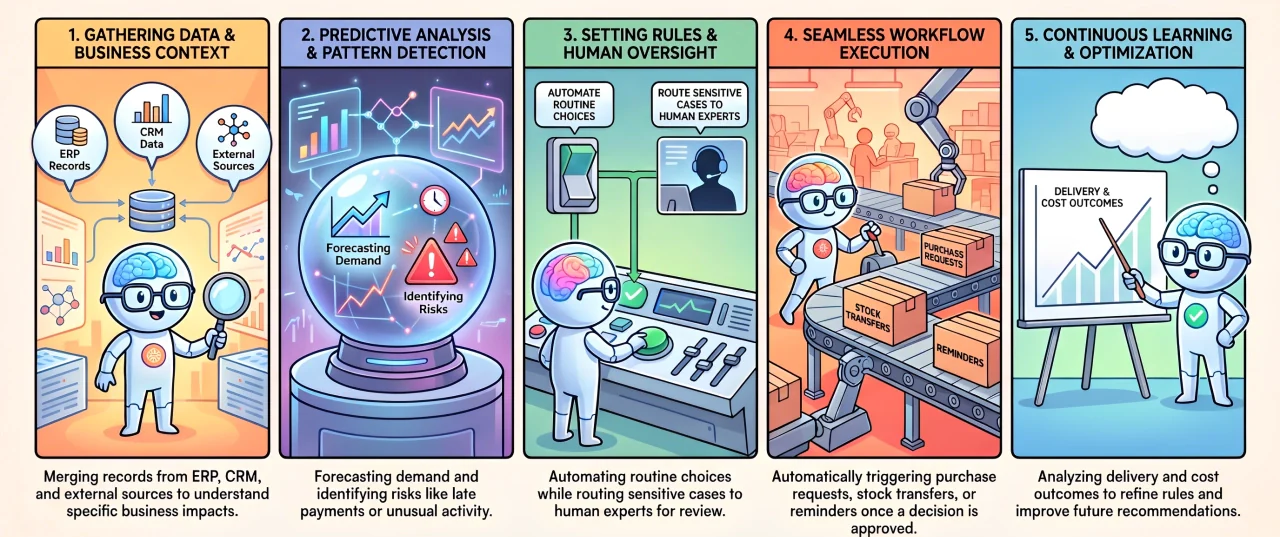
Decision intelligence follows a connected cycle from data collection to action and review. Each part helps the business make choices with clearer context and control.
1. Data Collection and Business Context
Relevant data can come from ERP, CRM, accounting, inventory, sales, procurement, HR, or approved external sources. Business context shows how those records affect the decision.
2. Analysis and Recommendations
Analytics identifies patterns, risks, and possible outcomes. It can forecast demand, detect unusual activity, predict late payments, or compare supplier performance.
3. Decision Rules and Human Review
Rules define which actions can proceed automatically and which need approval. Routine choices may follow set limits, while sensitive cases remain under human review, consistent with the accountability principles in Australia’s AI Ethics Principles.
4. Workflow Execution
Once approved, a recommendation can create a purchase request, stock transfer, reminder, maintenance task, or customer follow-up within the existing workflow.
5. Continuous Learning and Improvement
Recorded outcomes show whether the decision worked. Teams can use delivery, payment, cost, or service results to refine rules and improve later recommendations.
Decision Intelligence vs Business Intelligence vs Analytics
Business intelligence reporting, data analytics, and decision intelligence support different parts of business reasoning. The table below shows the purpose and output of each approach.
| Comparison | Business Intelligence | Data Analytics | Decision Intelligence |
|---|---|---|---|
| Primary purpose | Shows past and current performance | Explains patterns and predicts outcomes | Guides or triggers the next action |
| Main question | What happened? | Why did it happen, and what may happen next? | What should the business do next? |
| Typical output | Reports, dashboards, and KPIs | Forecasts, models, and trend analysis | Recommendations, approvals, and workflows |
| Human involvement | Users interpret the information | Users assess the findings | People review, approve, or oversee actions |
| Outcome tracking | Tracks business performance | Measures forecast accuracy | Records results to improve later decisions |
Business intelligence reports performance, while analytics explains patterns. Decision intelligence uses those findings to guide action and track the outcome.
Benefits of Decision Intelligence for Businesses
Decision intelligence helps businesses make faster, clearer, and more consistent choices. Its value comes from linking trusted information with action, oversight, and measurable results.
1. Faster Decisions and Actions
Connected data and rules reduce time spent collecting reports or waiting for separate reviews. Teams can assess an issue and direct the chosen response into the right workflow.
2. Better Operational Visibility
Managers can review the evidence, assumptions, approvals, and actions behind each choice. This visibility helps reveal delays, unclear rules, and missing information.
3. More Consistent Business Rules
Shared criteria help departments and branches assess similar situations in the same way. Approval limits still allow professional judgement when exceptions arise.
4. Fewer Manual Errors
Bringing relevant records into one process through system integration reduces decisions based on incomplete information. Exception alerts can also flag unusual risks before an action proceeds.
5. Stronger Human Oversight
Routine choices may proceed within approved limits, while sensitive or costly matters remain under human control. This balance supports efficiency without removing accountability.
"Decision intelligence creates value when reliable data leads to clear action while important business choices remain under human review."
6. Improved Strategic and Operational Planning
The same framework can support investment, pricing, staffing, procurement, replenishment, and collections. Departments gain a shared basis for short and long-term planning.
7. Continuous Decision Improvement
Recorded outcomes show which rules and recommendations worked. Teams can refine thresholds, data inputs, and approval paths based on actual business results.
Decision Intelligence Use Cases in Business
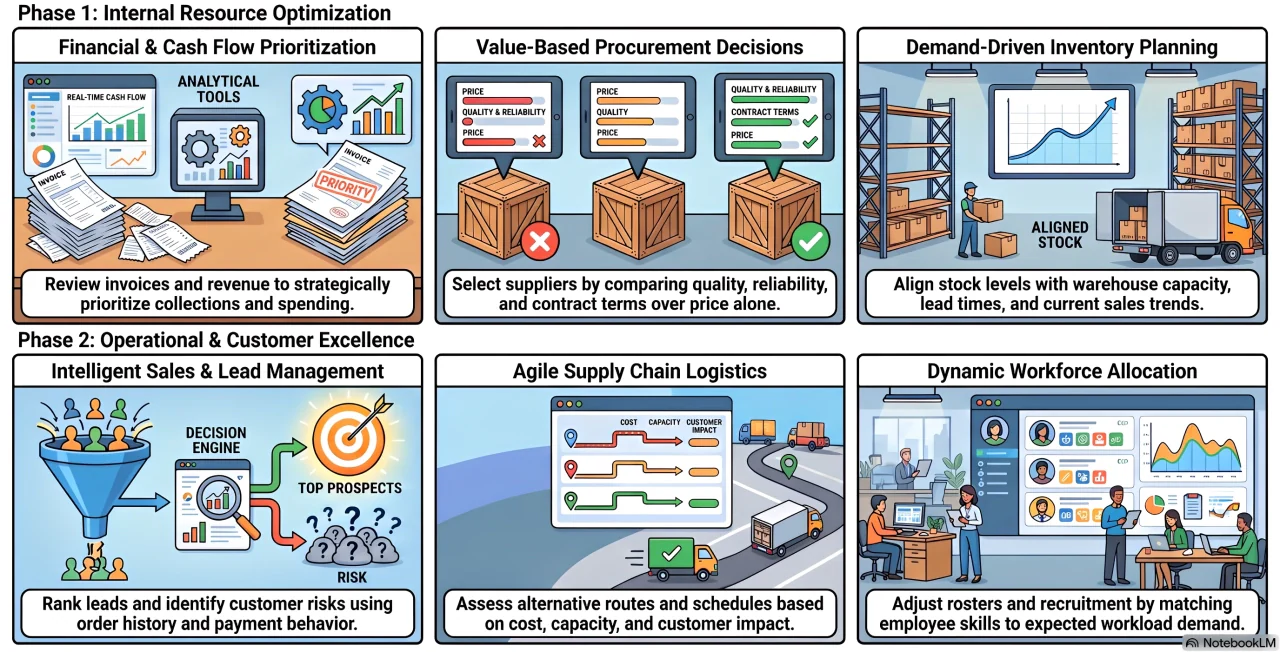
Decision intelligence suits recurring choices that depend on several records, limits, and possible outcomes. These use cases show how it can support key business functions.
1. Finance and Cash Flow Planning
Finance teams using an integrated ERP system can review unpaid invoices, supplier obligations, available cash, and expected revenue. This helps prioritise collections, payments, and spending reviews.
2. Procurement and Supplier Decisions
Procurement teams can compare price, quality, capacity, delivery reliability, and contract terms. This supports supplier choices based on overall value rather than price alone.
3. Inventory and Demand Planning
Stock decisions can consider demand, available quantities, lead times, warehouse capacity, and sales trends. The result may be a reorder, transfer, or delayed purchase.
4. Sales and Customer Management
Sales teams can rank leads, identify customer risks, and choose suitable follow-ups. Account value, margins, order history, and payment behaviour provide added context.
5. Supply Chain and Operations
Teams can compare delivery routes, production schedules, supplier delays, and demand changes. Alternative actions can be assessed by cost, capacity, timing, and customer impact.
6. HR and Workforce Planning
Employee availability, skills, workloads, overtime, and expected demand can guide roster changes. Managers can also identify recruitment or capacity needs earlier.
Decision Intelligence Tools and Key Features
Decision intelligence tools connect business data, rules, recommendations, and workflows. They may work as standalone platforms or within existing business systems.
Key features include:
- Predictive analytics: Identifies patterns, risks, and likely outcomes.
- Practical recommendations: Suggests suitable actions based on current data.
- Workflow automation: Turns approved decisions into tasks or transactions.
- System integration: Connects ERP, CRM, accounting, inventory, and HR records.
- Real-time dashboards: Shows risks, approvals, actions, and outcomes.
- Human approval controls: Routes sensitive decisions to authorised employees.
- Audit trails: Records the evidence, rules, approvals, and final results.
- Cross-department use: Supports finance, sales, procurement, HR, and operations.
Challenges of Adopting Decision Intelligence
Successful adoption depends on reliable records, connected systems, clear ownership, and practical controls. The NIST AI Risk Management Framework provides a voluntary approach for managing AI risks and trustworthiness.
- Poor data quality: Incomplete or outdated records can produce unsuitable recommendations.
- Disconnected systems: Separate platforms prevent teams from seeing the full business context.
- Unclear ownership: Decisions may stall when approval and review duties are not defined.
- Excessive reliance: Recommendations should inform judgement, not remove accountability.
- Limited workflow integration: Suggestions may be ignored when they remain in a separate dashboard.
- .Low employee confidence: Clear reasoning and practical training help users trust the process.
How to Implement Decision Intelligence
Begin with a frequent decision that affects cost, revenue, service, or operational speed. A focused use case is easier to control, measure, and refine.
1. Identify High-Impact Decisions
Review recurring choices such as stock replenishment, supplier selection, credit approval, invoice follow-up, or workforce scheduling. Prioritise one or two use cases.
2. Connect Relevant Business Data
Identify the stock, sales, budget, supplier, and customer data needed for each choice. Use trusted systems and controlled ERP deployment to keep incomplete spreadsheet data out of live workflows.
3. Define Rules, Risks, and Approval Flows
Set the criteria, limits, exceptions, and approval requirements. These controls determine which actions can proceed and which must receive human review.
4. Recommend the Next Best Action
Use analytics to compare available options and recommend a suitable response. The reasoning should be clear enough for employees to assess before approval.
5. Monitor Results and Refine the Model
Compare recommendations with actual results, such as delivery times, payment status, costs, or stock availability. Use those findings to adjust rules and thresholds.
How ERP Supports Decision Intelligence
ERP gives decision intelligence reliable operational data by connecting finance, inventory, sales, procurement, HR, production, and reporting in one environment.
This context allows recommendations to consider current stock, budgets, supplier performance, demand, and approval limits instead of relying on isolated reports.
For example, the system can compare procurement options before routing the chosen request for approval. Once approved, it becomes a transaction or task within the same workflow.
HashMicro Software for Decision Intelligence
HashMicro supports decision intelligence by connecting operational records, reporting, approval rules, and workflows. Hashy AI Coworker helps teams use connected business context within their daily workflows.
Centralised data gives managers clearer context when reviewing risks, recommendations, and possible actions across accounting, inventory, procurement, CRM, HR, and operations.
HashMicro can support practical responses such as:
- Turning low-stock warnings into purchase requests.
- Routing procurement exceptions for approval.
- Creating follow-up tasks from customer risks.
- Using cash flow insights to guide collection priorities.
- Tracking actions and approvals through recorded workflows.
Important choices can remain under employee control, while routine actions follow agreed rules. This helps reduce manual follow-ups without removing accountability.
Conclusion
Decision intelligence connects trusted data, business rules, analysis, approvals, and workflows. It helps teams choose suitable actions and learn from the results.
With HashMicro’s AI-native ERP, businesses can connect decision support with daily operations. Book a free consultation to explore how it could fit your current workflows.

Frequently Asked Questions About Decision Intelligence
No. Decision intelligence improves how choices are assessed, made, and reviewed, while decision automation executes predefined actions. Businesses may use both while retaining human review for sensitive cases.
A decision support system presents information or models to help people choose. Decision intelligence covers a wider cycle that includes context, rules, recommendations, workflow execution, and outcome feedback.
No. Businesses can begin with rules, analytics, and workflows. Machine learning becomes useful when they need forecasting, pattern detection, or recommendations based on larger datasets.
Performance should be measured against the chosen use case. Relevant measures may include decision time, approval delays, exception rates, forecast accuracy, and the operational result produced.
Useful skills include data literacy, process mapping, domain knowledge, analytics, governance, and change management. Technical integration skills may also be required during implementation.