

Legal AI is changing how Australian law firms and in-house legal teams manage research, contracts, documents, requests, and routine administrative work. Its value, however, depends on where the technology is used and which decisions remain under human control.
For legal professionals, adopting AI is not simply a software decision. The selected solution must fit the intended legal task, protect sensitive information, support professional obligations, and produce outputs that qualified people can verify.
This guide explains where legal AI fits, which tasks carry the greatest risk, how to compare available solutions, and what responsible implementation looks like in Australia.
Key Takeaways
Legal AI helps law firms and in-house legal teams automate routine tasks, improve efficiency, and support better legal workflows.
Understanding the risks of legal AI helps businesses maintain accuracy, protect confidential data, and meet Australian legal and compliance requirements.
An integrated AI coworker connects legal processes with business operations, improving collaboration while keeping human oversight in place.
What Is Legal AI?

Legal AI refers to artificial intelligence systems designed or configured to assist with legal work. These systems can help users find information, analyse documents, summarise material, prepare drafts, classify requests, and manage workflow steps.
The term covers more than generative AI. Some legal AI tools retrieve information from controlled legal databases. Others extract clauses, compare documents, predict matter requirements, route requests, or generate text from user instructions.
The Law Society of New South Wales’ responsible AI guide identifies potential uses including matter intake, document summarisation, correspondence, legal research, meeting transcription, and contract review. It also stresses that solicitors must understand how a tool works before deciding whether its use is appropriate.
How Is Legal AI Used by Law Firms and In-House Legal Teams?
Legal AI helps both law firms and in-house legal teams automate routine tasks and improve productivity. While law firms mainly support client matters, in-house teams use AI to manage contracts, legal requests, compliance, and internal business processes.
For law firms, legal AI can assist with document review, legal research, contract comparison, meeting transcription, matter summaries, and case management. This reduces administrative work and allows lawyers to focus on higher-value legal tasks.
In-house legal teams use AI to review contracts, route legal requests, track obligations, monitor regulatory changes, manage approvals, and search internal legal knowledge. These capabilities help legal departments respond more efficiently while supporting the wider business.
"Legal AI delivers the greatest value when it enhances professional judgement rather than replacing it."
Which Legal Tasks Should and Should Not Be Automated?
Legal teams should classify tasks by potential harm, reversibility, information sensitivity, and the level of professional judgement required. This prevents low-risk administrative assistance from being treated the same as advice, court submissions, or decisions affecting legal rights.
1. Low-Risk Tasks
Low-risk tasks suitable for AI include formatting documents, transcribing meetings, extracting key information, categorising requests, searching internal policies, and comparing documents. These tasks should still be reviewed to ensure accuracy.
2. Medium-Risk Tasks
AI can help prepare draft correspondence, summarise contracts, identify key clauses, organise research, and suggest workflow classifications. However, a legal professional should always review the output before it is used.
3. High-Risk Tasks
High-risk work, such as providing legal advice, preparing court submissions, making strategic legal decisions, or handling confidential information, should remain under human supervision and not be fully automated.
| Task Level | Examples | Human Review |
|---|---|---|
| Low Risk | Formatting documents, transcribing meetings, document comparison, policy search. | Recommended. |
| Medium Risk | Drafting emails, summarising contracts, clause review, legal research. | Required. |
| High Risk | Legal advice, court submissions, strategic decisions, confidential matters. | Always required. |
What Business Outcomes Can Legal AI Support?
Legal AI helps reduce repetitive administrative work, allowing legal teams to respond to requests more quickly without compromising professional oversight. When paired with document management software, it can support faster document retrieval, more structured intake, and efficient summarisation while keeping professional review in place.
It also improves consistency by supporting standardised workflows, approved templates, and clear review processes. This gives legal teams better visibility over contracts, requests, approvals, and ongoing legal matters.
The greatest benefits come when AI is built into well-designed workflows. With connected processes and proper oversight, legal teams can collaborate more effectively and focus on higher-value legal work.
What Professional and Operational Risks Apply to Legal AI in Australia?
Australian legal professionals remain accountable for work performed with AI assistance. Technology does not transfer professional duties to the software provider or remove the need for supervision.
The Law Council of Australia advises practitioners to confirm the latest guidance in their jurisdiction and exercise caution because improper AI use can create ethical, professional, and legal risks.
1. Incorrect or Fabricated Information
AI can generate inaccurate information, including incorrect legal cases or citations. All AI-generated content should be checked against reliable legal sources before it is used.
2. Confidentiality and Privacy
Legal teams should protect confidential and personal information when using AI. Sensitive data should only be processed through secure systems that meet privacy and compliance requirements.
3. Professional Accountability
Lawyers remain responsible for the accuracy and quality of AI-assisted work. Human review is essential before legal advice, documents, or decisions are shared.
4. Court and Disclosure Requirements
Australian courts may have different rules for using generative AI. Legal professionals should check the relevant court requirements before submitting AI-assisted work.
5. Bias and Incomplete Legal Context
AI may miss important facts, legal context, or jurisdictional differences. Legal professionals should review outputs carefully to ensure they are complete and appropriate.
6. Governance Controls
Businesses should establish clear AI governance policies, including access controls, source verification, audit trails, and regular reviews to ensure AI is used responsibly.
What Types of Legal AI Solutions Are Available?
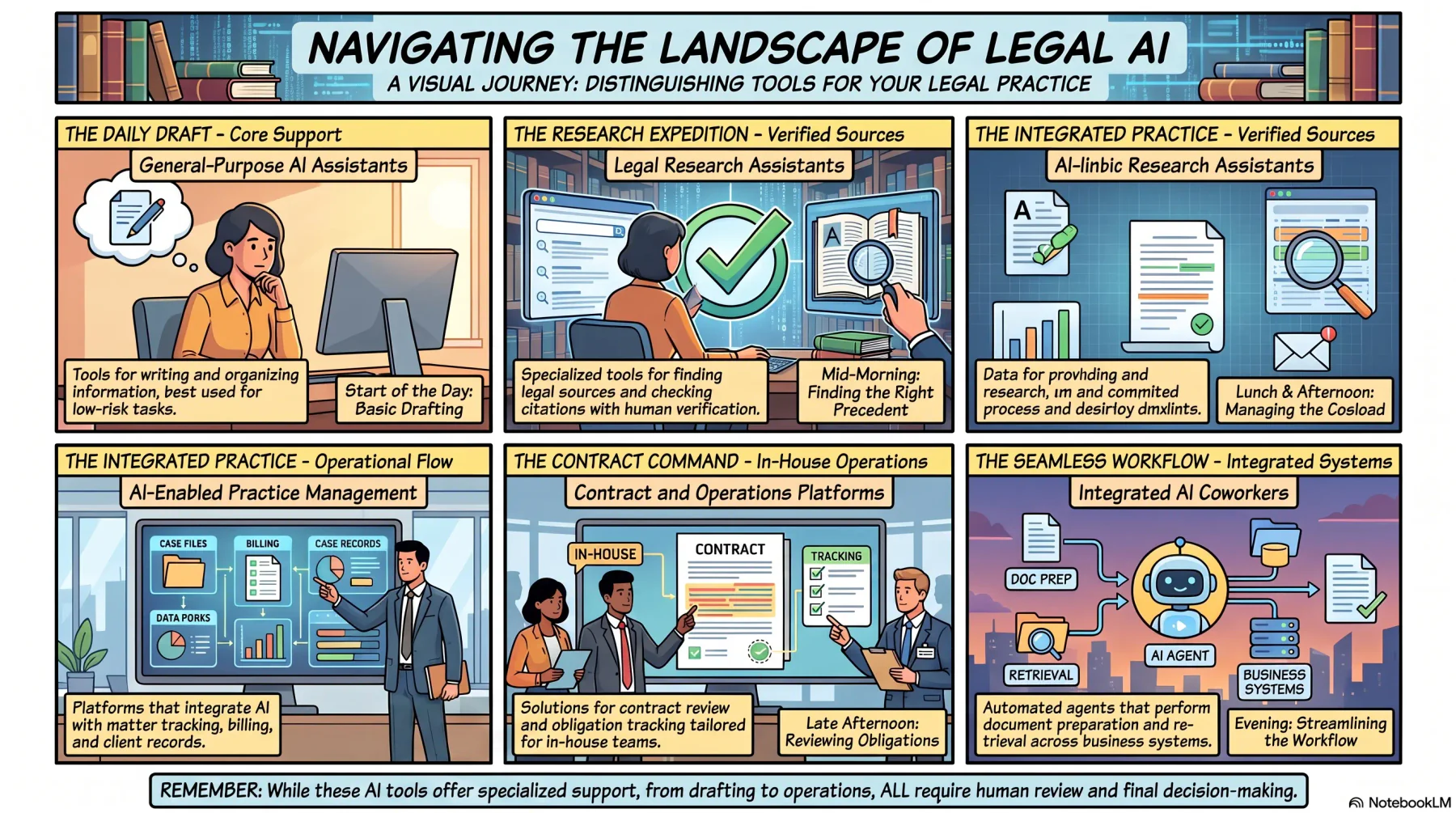
Legal AI products can be grouped by the type of work they support. Understanding these categories helps buyers compare solutions with similar purposes.
1. General-Purpose AI Assistants
These AI tools help with writing, summarising, and organising information. They are useful for low-risk tasks but should not be relied on for legal advice without human review.
2. Legal Research Assistants
Legal research tools help users find legal sources, check citations, and search case law. Lawyers should still verify all information before using it.
3. AI-Enabled Legal Practice Management
These platforms combine AI with practice management features such as matter tracking, document management, billing, and client records to improve daily workflows.
4. Contract and Legal Operations Platforms
These solutions support contract review, approvals, obligation tracking, and legal requests, making them especially useful for in-house legal teams.
5. Integrated AI Coworkers
AI coworkers help automate tasks such as document preparation, approvals, and information retrieval across connected business systems while keeping people in control of final decisions.
How to Evaluate and Choose a Legal AI Solution
Start with the workflow problem, not a list of AI features. A clear use case makes it easier to assess data requirements, risk, integrations, reviewers, and measurable outcomes.
1. Define the Workflow Problem
Start by identifying the process you want to improve, including where delays occur and whether AI is the best solution for the problem.
2. Complete Vendor Security Due Diligence
Review how the vendor stores, protects, and manages data, including security measures, access controls, and privacy policies.
3. Test Source Grounding
Check whether the AI links its responses to reliable sources and produces accurate results using real business scenarios.
4. Assess Integration Requirements
Choose a solution that integrates with your existing systems, such as document management, contracts, finance, HR, and approval workflows.
5. Review Configuration and Approval Controls
Ensure the software supports user permissions, approval rules, and human review for high-risk legal tasks.
6. Evaluate Implementation Support
Look for a vendor that provides implementation, training, ongoing support, and system maintenance to ensure successful adoption.
A Six-Step Legal AI Implementation Roadmap
A controlled implementation makes it easier to identify errors before they affect important legal work.
1. Assess Readiness
Review existing processes, data quality, policies, system access, security requirements, and staff capability. Assign an executive sponsor and accountable legal owner.
2. Select a Low-Risk, High-Friction Workflow
Choose a recurring problem with clear boundaries, such as request classification, approved-policy retrieval, or contract data extraction. Avoid beginning with final advice or litigation work.
3. Define Controls
Specify permitted data, restricted information, reviewers, escalation conditions, verification steps, audit requirements, and incident procedures before enabling the tool.
4. Run a Limited Pilot
Use representative work and a controlled user group. Record incorrect outputs, missed issues, user workarounds, and the time required for review.
5. Measure the Result
Compare the pilot with the previous process. Measures may include turnaround time, rework, unresolved requests, reviewer effort, policy compliance, and user adoption.
6. Refine and Scale
Adjust prompts, playbooks, permissions, training, and approval rules before adding users or workflows. Expansion should follow evidence that the process remains accurate and controlled.
How an Integrated AI Coworker Connects Legal and Business Operations
Legal work often involves multiple departments, such as sales, procurement, finance, and operations. AI can help connect these teams by organising requests, retrieving information, and routing tasks through the right workflow.
An integrated AI coworker can support processes like legal intake, document review, risk classification, approvals, and obligation tracking while keeping legal professionals in control of final decisions.
HashMicro's integrated ERP and AI platform helps legal and business teams manage requests, documents, approvals, and reporting in one connected workflow. This improves collaboration while maintaining security, visibility, and governance.
Conclusion
Legal AI helps businesses and legal teams reduce repetitive work, improve efficiency, and manage legal processes more effectively. When used responsibly, it allows professionals to spend more time on higher-value legal work.
The greatest benefits come from using AI to support tasks such as document review, contract management, legal research, and workflow automation, while keeping human oversight for important decisions.
To achieve the best results, businesses should choose secure, well-integrated AI solutions with strong governance, reliable data, and clear approval processes.
Book a free consultation with our experts to learn how HashMicro's AI-powered ERP solutions can help streamline legal operations, automate workflows, and improve collaboration across your business.
Ready to optimise your business operations?
Consult with HashMicro's experts to find the software solution that best fits your business needs.
FAQ
Legal AI governance should be led by the legal team, with support from IT, security, and compliance. Clear roles and approval processes help ensure AI is used responsibly.
A legal AI policy should be reviewed at least annually or whenever there are major changes to AI technology, regulations, or business processes.
Yes. Many legal AI solutions are cloud-based and easy to use. Small law firms can start with low-risk tasks such as document drafting, legal research, or meeting summaries.
Yes, but legal professionals should always verify that the information is accurate and relevant to the specific Australian jurisdiction involved.
The output should be corrected immediately, reviewed by a qualified legal professional, and the cause of the error should be investigated to prevent it from happening again.
Firms should establish clear AI policies, provide approved tools, train employees on responsible AI use, and restrict the use of unauthorised AI applications for legal work.