

Preparing a quotation becomes difficult when products have multiple variants, prices depend on customer agreements, or discounts require approval. CPQ software gives sales teams a structured way to configure suitable products, apply the correct price, and produce accurate quotes.
For Australian businesses, the value extends beyond faster document creation. A reliable configure price quote process also protects margins, supports GST calculations, and keeps sales, operations, inventory, and finance aligned.
Key Takeaways
CPQ software automates product configuration, pricing, approvals, and quotation creation while reducing manual errors.
CPQ connects complex sales rules with customer and operational data, offering more control than basic quoting tools.
Automated quoting helps sales teams prepare accurate proposals, secure approvals, and protect margins more efficiently.
Businesses with configurable products, multiple price lists, complex discounts, or several sales channels benefit most from CPQ.

What Is CPQ Software?
"CPQ software turns complex product, pricing, and approval rules into a controlled sales process, helping teams produce accurate quotations without unnecessary delays or manual errors."
CPQ software helps sales representatives configure products or services, calculate an approved price, and create a formal quotation. It replaces manual calculations and disconnected spreadsheets with controlled rules.
The configuration function guides users towards valid combinations of products, components, and options. The pricing function then applies relevant price lists, discounts, taxes, currencies, and customer terms.
Finally, the quoting function produces a consistent commercial document. The quote can include product details, pricing, payment terms, expiry dates, delivery information, and required approvals.
Basic systems mainly support templates and price lists. More advanced platforms can manage technical dependencies, configurable products, contract pricing, and quotation workflows across multiple branches or channels.
How Does Configure Price Quote Software Work?

Configure price quote software uses business rules and connected data to move a sales opportunity towards an approved quotation. The process normally follows this sequence:
- The salesperson selects the customer, opportunity, or sales channel.
- The system displays eligible products, services, variants, and bundles.
- Configuration rules prevent incompatible or incomplete selections.
- Pricing rules apply the correct customer terms, discounts, tax, and currency.
- Approval workflows review exceptions that exceed authorised thresholds.
- The platform generates a quotation from an approved template.
- The salesperson sends the document and tracks its status.
- An accepted quotation can progress into a sales order or related workflow.
For example, a distributor may offer different prices based on customer tier, order volume, branch, and contract terms. The CPQ engine evaluates those conditions before presenting the approved amount.
A manufacturer may use product rules to confirm that selected components work together. As a result, the sales team can prepare a technically valid proposal without repeatedly checking every detail with engineering.
When Does a Business Need CPQ Software?
A business does not need advanced CPQ simply because it creates quotations. However, growing commercial complexity can make manual methods difficult to control.
Common signs that a business may need CPQ software include:
- Sales representatives rely on spreadsheets to calculate prices.
- Similar customer requests receive inconsistent quotations.
- Products have many variants, accessories, bundles, or dependencies.
- Contract, volume, promotional, or customer-specific pricing applies.
- Discount exceptions require finance or management approval.
- Quotations pass through several revisions before acceptance.
- Staff repeatedly enter approved quote data into sales orders.
- Multiple branches, dealers, or channels follow different price rules.
- Sales teams cannot confirm stock availability while quoting.
- Managers lack visibility into pending, revised, expired, or accepted quotes.
A basic quoting application may still suit a company with a small catalogue and fixed prices. CPQ becomes more relevant when quotation accuracy depends on several connected commercial or technical rules.
CPQ Software vs Sales Quoting Software, CRM and ERP
CPQ, quoting software, customer relationship management, and enterprise resource planning serve related but different purposes. Understanding the boundaries helps a business avoid buying a tool that covers only part of its requirements.
CPQ Software vs Sales Quoting Software
Sales quoting software creates and manages quotation documents. It often includes templates, product lines, taxes, discounts, expiry dates, and customer acceptance tracking.
CPQ software adds structured configuration and pricing logic. It suits transactions where the system must validate product combinations, select the correct price, or route commercial exceptions for approval.
Therefore, a straightforward sales quoting tool may suit standard products with stable pricing. CPQ offers stronger control when each proposal depends on multiple variables.
CPQ Software vs CRM
CRM software manages leads, contacts, sales opportunities, communication, and pipeline activity. It shows who the customer is, what they need, and where the opportunity sits within the sales process.
CPQ manages the commercial structure of the proposed sale. It determines which combination can be sold, what price should apply, and whether the quote needs authorisation.
Some CRM platforms include quotation functions or connect to a CPQ module. However, businesses should assess the depth of product rules, pricing controls, revisions, and approvals rather than relying on the CRM label alone.
CPQ Software vs ERP
ERP software manages operational and financial processes such as sales orders, inventory, procurement, manufacturing, billing, and accounting. It often stores the product, stock, customer, tax, and pricing records needed during quoting.
CPQ uses that information to prepare a valid commercial offer before order confirmation. Once the customer accepts, an integration can transfer the approved quote into the ERP workflow.
An ERP system may include sufficient quotation management for standard sales. Businesses with highly configurable products may require a specialised configuration engine connected to the ERP.
Manual Quoting vs Automated Quoting Software
Manual and automated approaches can both create quotations, but they provide different levels of speed, consistency, and control. The following comparison highlights the operational differences.
| Aspect | Manual Quoting | Automated Quoting Software |
|---|---|---|
| Product selection | Staff check catalogues and compatibility manually. | Rules guide users towards valid options and bundles. |
| Price calculation | Salespeople calculate prices through spreadsheets or reference sheets. | The system applies approved price lists and customer terms. |
| Discount control | Approvals depend on email, chat, or verbal confirmation. | Thresholds trigger the correct approval workflow. |
| Document creation | Staff copy information into individual templates. | Approved data populates a consistent quotation format. |
| Revisions | Different files may circulate without clear version control. | Version history records changes and current status. |
| Order conversion | Accepted details require further data entry. | Approved quotes can progress into sales orders. |
| Reporting | Managers consolidate quotation information manually. | Dashboards track value, status, revisions, and outcomes. |
Manual methods may remain practical for low quotation volumes and uncomplicated offers. However, automated quoting becomes more valuable as catalogue size, sales volume, or approval requirements increase.
Key Features of CPQ and Quote Management Software
The best feature set depends on how a business sells its products and services. Most growing companies should assess the following capabilities:
- Product and service catalogue management: Maintain consistent descriptions, codes, categories, units, and commercial information.
- Product variants, bundles, and optional components: Build suitable combinations without relying on personal product knowledge.
- Customer-specific price lists: Apply contracted or negotiated prices to eligible accounts.
- Volume, tiered, promotional, and contract pricing: Calculate the correct amount according to quantity and commercial conditions.
- Multi-currency and tax calculations: Support international transactions and applicable GST treatment.
- Discount thresholds and approval workflows: Route commercial exceptions to authorised managers.
- Quote templates and document generation: Produce consistent documents with approved terms and branding.
- Quotation revisions and version history: Preserve earlier versions and record who changed each offer.
- Expiry dates and quotation status: Track drafts, approvals, submissions, acceptance, rejection, and expiration.
- Quote-to-order conversion: Transfer accepted information into the order process without repeated entry.
- CRM and ERP integration: Connect opportunities, customer records, products, pricing, and downstream operations.
- Inventory and availability context: Show stock or availability information before a representative makes a commitment.
- Role-based access and audit trails: Limit sensitive actions and maintain evidence of commercial decisions.
- Sales and quotation reporting: Review quotation value, status, ageing, revisions, outcomes, and representative activity.
A small business may not require every capability at launch. However, the selected platform should support likely catalogue, channel, and approval requirements as the company grows.
What Are the Benefits of CPQ Software?

CPQ software strengthens more than document preparation. When configured correctly, it improves the control and continuity of the wider sales process.
Key benefits include:
- Faster preparation of complex quotations: Guided selections and pricing rules reduce manual research.
- Consistent pricing across teams, branches, and channels: Central policies limit unauthorised variation.
- Fewer quotation and order errors: Validation catches incompatible products and missing information.
- Better control over discounts: Approval rules protect commercial policies and margins.
- Less back-and-forth between sales and finance: The system applies established thresholds before escalation.
- Clearer quotation visibility: Teams can see status, ownership, revisions, and expiry dates.
- Reliable quote-to-order processing: Accepted details can continue without unnecessary re-entry.
- Easier sales onboarding: New representatives follow guided rules instead of memorising every exception.
- More responsive customer service: Accurate quotations reach buyers sooner.
- Stronger data alignment: Sales, operations, inventory, and finance work from connected records.
These benefits depend on accurate source data and sensible rules. Poor catalogue information or outdated prices will still create problems, even when the software automates the workflow.
CPQ Use Cases for Australian Businesses
CPQ applies across industries, although each sector uses configuration and pricing controls differently. The following cases show where the technology can provide practical value.
Manufacturing and Configurable Products
Manufacturers may sell machinery, equipment, furniture, components, or fabricated products with selectable specifications. Each choice can affect compatibility, material requirements, cost, production time, and delivery.
A CPQ engine can restrict invalid combinations and guide representatives through required selections. However, manufacturers should confirm whether the platform can support their specific engineering rules and bill of materials structure.
Wholesale and Distribution
Wholesalers often manage large catalogues, customer-specific price lists, quantity breaks, rebates, promotions, and contract conditions. Pricing may also vary across branches, dealers, or territories.
CPQ and quote management software can apply the relevant rules to each customer. Integration with inventory also helps representatives check availability before confirming commercial terms.
Complex Product and Service Packages
Technology providers, professional services firms, maintenance companies, and equipment suppliers may combine products with installation, training, support, warranties, or recurring services.
Configuration rules can make required services mandatory and prevent incomplete packages. Therefore, customers receive clearer proposals while delivery teams gain a more reliable scope.
Multi-Branch and Multi-Channel Sales
A growing company may sell through internal representatives, ecommerce sites, retail locations, dealers, and partner networks. Each channel can have different permissions, prices, promotions, and approval limits.
A central pricing and quotation system helps the business maintain control while allowing authorised variation. Reporting can then compare activity across branches and channels using consistent data.
Three Levels of CPQ Complexity

Not every business needs the same level of configuration. CPQ requirements usually fall into three broad levels.
Basic Quotation and Pricing Control
The basic level supports standard products, price lists, customer terms, tax calculations, templates, revisions, and quote status. It suits businesses that mainly need consistent commercial documents.
Basic control can often sit within sales management, CRM, or ERP software. The key question is whether the available functions cover the company’s pricing and approval requirements.
Rules-Based Pricing and Approval
The middle level handles customer tiers, quantity bands, promotional pricing, discount limits, contract terms, and conditional approvals. It suits businesses with manageable product structures but more complicated commercial policies.
Rules-based control reduces reliance on individual judgement. In addition, it provides an audit trail when managers approve exceptions.
Advanced Product Configuration
Advanced CPQ supports products with technical dependencies, optional components, complex bundles, or compatibility constraints. It may also connect configuration choices to production requirements.
This level requires detailed product modelling and stronger implementation resources. Businesses should test representative scenarios before selecting the platform.
How to Choose the Best CPQ Software
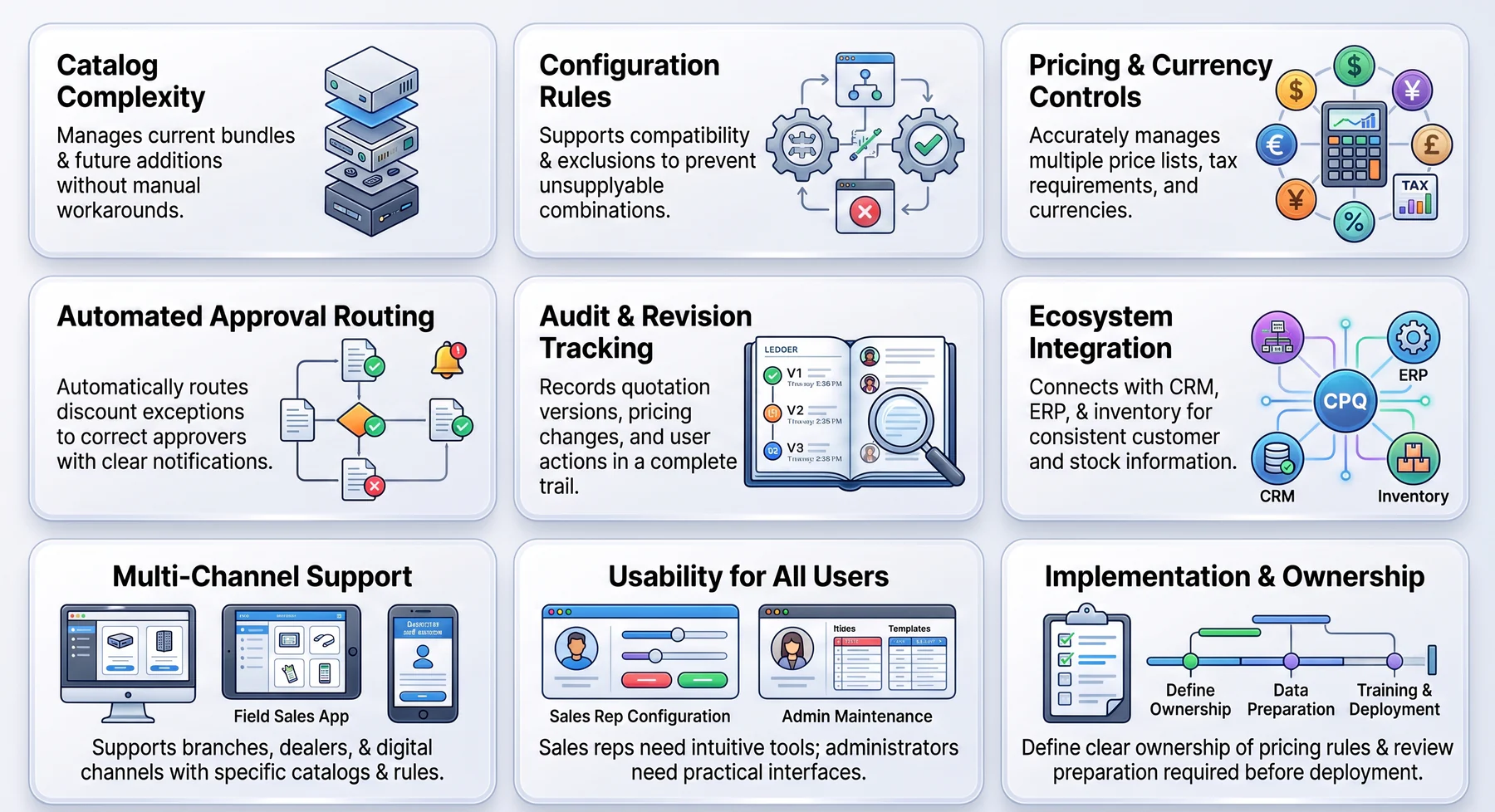
The best CPQ software should reflect how your business configures products, controls prices, and manages quotations. Consider the following areas when comparing systems.
1. Match the Software to Your Catalogue Complexity
Choose a system that can manage your current product catalogue, service packages, bundles, and optional components. It should also accommodate future additions without requiring sales teams to create manual workarounds.
2. Evaluate Configuration Rules and Dependencies
Confirm that the configuration engine supports compatibility rules, required components, exclusions, and product dependencies. These controls should prevent sales representatives from building combinations that the business cannot supply.
3. Review Pricing, Tax, and Currency Controls
The software should manage multiple price lists, discount limits, tax requirements, and currencies accurately. It must also apply the correct pricing conditions based on the customer, location, quantity, or sales channel.
4. Test Approval Routing and Exception Handling
Check whether the system automatically routes discounts, special terms, and pricing exceptions to the correct approvers. Clear notifications and escalation controls can prevent quotations from becoming stuck in review.
5. Confirm Quotation Revision and Audit Capabilities
Select a platform that records quotation versions, pricing changes, approvals, and user actions. A complete audit trail helps managers investigate errors and maintain accountability throughout the sales process.
6. Examine Integration with Existing Systems
CPQ software should connect with your CRM, ERP, inventory, ecommerce, billing, and accounting platforms. Reliable integration keeps customer, product, stock, pricing, and order information consistent across the business.
7. Assess Support for Every Sales Channel
Confirm that the platform can support branches, dealers, partners, field representatives, and digital sales channels. Each channel should receive the correct catalogue, price list, approval rules, and customer terms.
8. Prioritise Usability for Every User
Sales representatives should be able to configure products and prepare accurate quotations without extensive technical knowledge. Administrators also need practical tools for maintaining rules, prices, templates, and approval structures.
9. Clarify Implementation and Rule Ownership
Review the data preparation, configuration, testing, training, and integration work required before deployment. The business should also assign clear ownership of pricing rules so authorised employees can maintain them after implementation.
CPQ Implementation Readiness Checklist
CPQ implementation depends heavily on the quality of existing data and policies. Businesses should complete the following preparation before configuring the system:
- Clean and standardise the catalogue: Remove duplicates and correct inconsistent product records.
- Define valid configurations: Document product variants, bundles, optional items, dependencies, and exclusions.
- Record commercial rules: Consolidate price lists, discount limits, taxes, currencies, and customer terms.
- Assign policy owners: Identify who can change pricing, product rules, templates, and approval thresholds.
- Choose each source of truth: Confirm where customer, product, price, and inventory records will be maintained.
- Map the quote-to-order workflow: Document responsibilities from opportunity creation through order confirmation.
- Define integration requirements: Specify connections with CRM, ERP, inventory, billing, and accounting.
- Prepare quotation template: quotation templates: Include required terms, validity periods, payment details, and acceptance conditions.
- Select an initial rollout scope: Begin with a limited product line, branch, or sales team.
- Measure operational results: Track errors, approval delays, revision volumes, and user adoption without assuming improvement targets.
The initial rollout should include common transactions and difficult exceptions. Testing only simple quotations can leave serious rule gaps undiscovered.
How HashMicro Supports Controlled Pricing and Quotation Workflows
HashMicro provides connected sales and quotation functions for businesses that need stronger commercial control. Its Sales Management Software includes automated quotations, multi-tier pricing rules, discount approval workflows, and quote-to-order conversion.
The sales workflow can also connect with CRM, inventory, accounting, and procurement. As a result, accepted quotations can continue into operational processes without creating disconnected records.
HashMicro offers a practical next stage for growing businesses that have moved beyond standalone documents and spreadsheets. However, companies with advanced engineering configurations should validate their specific product dependencies during the requirements review.
Conclusion
CPQ software helps businesses configure valid offers, apply controlled prices, and generate accurate quotations. The strongest systems also manage approvals, revisions, order conversion, and connections with wider business processes.
The right platform depends on catalogue complexity, pricing policies, sales channels, and operational integration. Therefore, businesses should define their rules and test real quotation scenarios before making a selection.
To review your pricing, approval, and quotation requirements with a product specialist, arrange a free consultation with HashMicro.

Frequently Asked Questions
CPQ stands for configure, price and quote. The term describes software that helps sales teams select valid products, calculate approved prices, and create quotations.
CPQ software manages complex product selection, pricing rules, discounts, approvals, and quote generation. It can also track revisions and transfer accepted quotations into sales orders.
Sales quoting software primarily creates and tracks quotation documents. CPQ adds product configuration, advanced pricing logic, compatibility rules, and controlled commercial approvals.
CPQ may operate as a separate platform or as a module within CRM, sales, or ERP software. The best arrangement depends on where the business stores customer, product, pricing, and operational data.
Can CPQ software convert quotations into sales orders?