
A self service kiosk lets a customer browse, order, and pay without queuing at a counter. In Australian venues it now sits at the centre of how orders reach the kitchen, the till, and the stock ledger.
The screen is only the entry point. Behind it, the kiosk must validate the order, take payment, route the job to fulfilment, adjust stock, and post a clean record for finance to reconcile.
This article helps Australian businesses assess use cases, hardware, payments, integration, cost, accessibility, and rollout. It also sets out when a kiosk is the wrong answer for a site.
Key Takeaways
A self ordering kiosk is the full path from catalogue to payment, fulfilment, stock, and reporting, with a named owner for every step.
Kiosks fit best where transactions repeat, fulfilment has spare capacity, traffic is steady, and staff can step in the moment a customer needs help.
Kiosk integration decides whether orders, payments, and stock reconcile automatically or leave your team correcting records after every trading day.
HashMicro connects kiosk orders, payments, stock, and accounting in one platform, so every team works from the same reporting view.

What a Self Service Kiosk Includes in an Enterprise Operating Model
A self service kiosk is a customer-facing transaction point, not a display screen. It captures a selection, takes payment, and hands the result to the teams and systems that complete the job.
The visible parts are the screen, the stand, and the card reader. The working parts are the catalogue, the pricing rules, the fulfilment handoff, the stock records, and the exception process behind them.
In a restaurant, a self ordering kiosk shows menus, modifiers, dietary notes, and collection choices. In retail, the same hardware may handle a product scan, a member lookup, and a card payment.
An enterprise deployment usually bundles six elements. Each one carries an owner, a failure mode, and a running cost that appears long after the hardware invoice has been settled and signed off.
- A touch interface with the catalogue, choice rules, modifiers, and pricing logic.
- Transaction software for order capture, validation, and receipt handling.
- Payment capability through an integrated terminal or a connected payment workflow.
- Peripherals such as scanners, printers, cameras, or cash modules where the process needs them.
- A fulfilment handoff to a kitchen, counter, warehouse, or service queue.
- Connections to POS, inventory, finance, reporting, and user access processes.
Assign ownership before procurement starts. Operations owns the customer and fulfilment flow, Finance owns tax and settlement, IT owns connectivity and device access, and store managers own daily exceptions.
"A self ordering kiosk is not the screen customers tap. It is the catalogue, the pricing rules, and the fulfilment handoff working behind it."
How a Self Service Kiosk Transaction Moves Through Your Operation
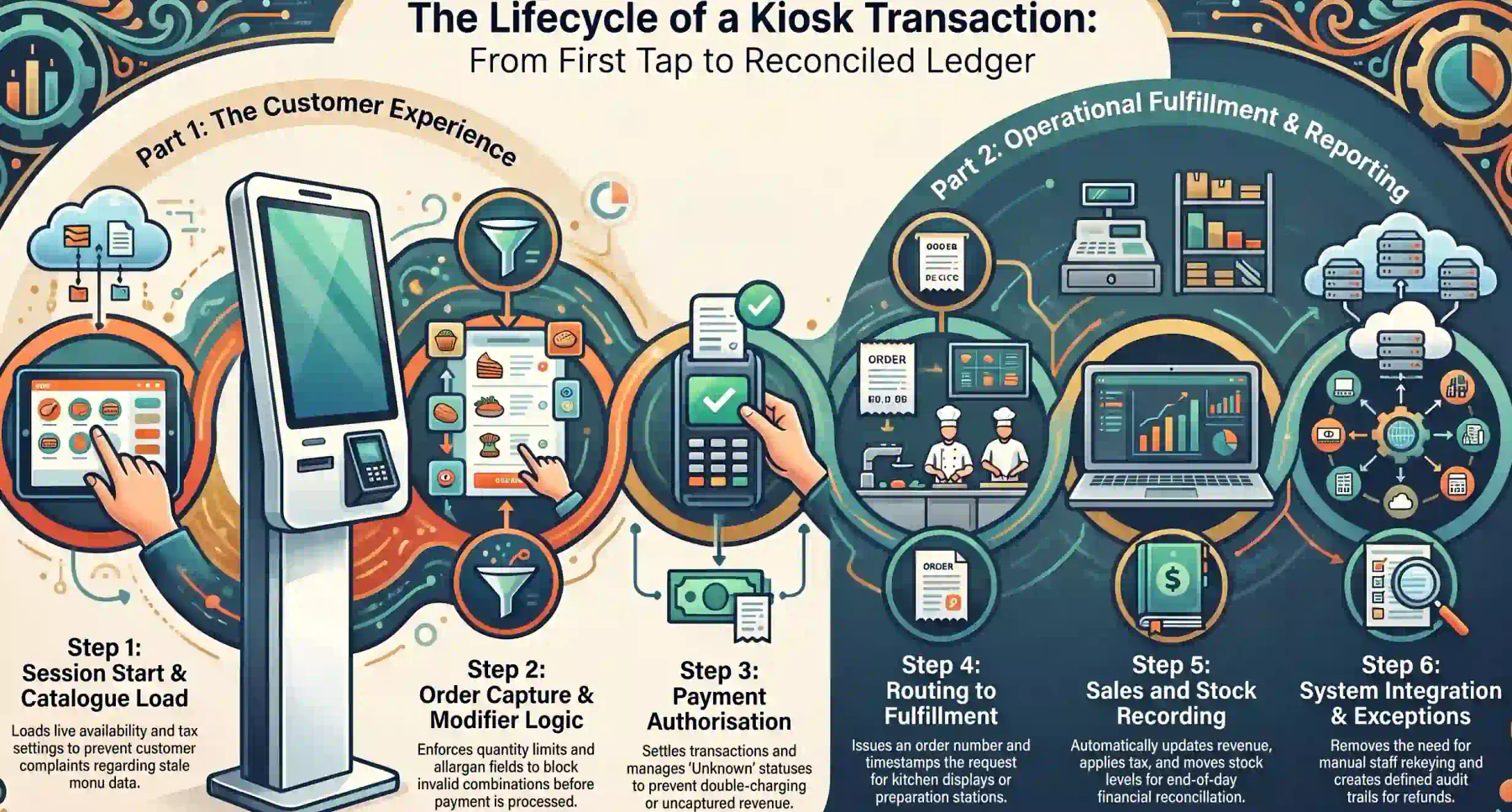
A kiosk transaction should be traceable from the first tap to the reconciled ledger entry. Every system it touches needs to recognise the same order and report the same status at the same moment.
Take a weekday lunch rush. The customer picks a meal, adds modifiers, pays, and receives an order number, while five separate processes update behind a screen that shows a single confirmation.
1. Customer Starts the Session and Browses the Catalogue
The kiosk wakes from an attract screen and loads the approved catalogue, current prices, tax settings, and live availability. Anything stale here becomes a customer complaint later in the flow.
Browsing behaviour is worth capturing. Category depth, search use, and abandoned sessions tell you whether the menu structure is helping customers or slowing them down at the busiest hour.
2. Order or Request Is Captured With Options, Modifiers, and Quantities
The kiosk enforces required choices, optional extras, quantity limits, and promotion conditions. A well built ordering kiosk blocks invalid combinations before payment rather than after fulfilment.
Modifier logic is where most self order kiosk projects gain or lose credibility. Missing allergen fields, hidden surcharges, or unclear substitutions push customers straight back to the counter.
3. Payment Is Authorised and Settled
The terminal returns approved, declined, cancelled, or unknown. Unknown is the status that matters, because it decides whether a customer is charged twice or served without payment being captured.
Contactless and mobile payments now dominate card use in Australia, as the Reserve Bank payments statistics show. Specify the payment mix your customers actually use.
4. Order Number Is Issued and Routed to Fulfilment
The customer receives a number, a printed receipt, or a mobile notification, while the order lands on a kitchen display, a preparation station, or a counter queue with a timestamp attached.
Routing failures are silent by nature. If the fulfilment message never arrives, the customer waits holding valid proof of payment while no one on the floor knows an order has gone missing.
5. Transaction Is Recorded in Sales, Stock, and Reporting
The sale posts to revenue, tax is applied, stock or ingredients move, and the settlement reference is stored. These records are what Finance reconciles at end of day and what managers review weekly.
Decide the source of truth for each field before go live. Order status, price, and stock can each sit in a different system, and that is workable only when the boundaries are written down.
6. Where the Process Breaks Without Integration
Without integration, staff rekeys orders, stock drifts, and payment lines are matched by hand. The kiosk then adds a second queue at the counter instead of removing the original one.
Build an exception queue with a named owner for each case. Declined payments, duplicate charges, missing orders, unavailable items, and refunds all need a defined path and an audit trail.
Why Self Service Kiosks Are Gaining Ground in the Australian Market
Household spending keeps climbing while labour stays tight. The ABS spending indicator tracks that demand month by month across every state.
Wage costs, penalty rates, and recruitment difficulty push venues to redeploy staff rather than add them. A kiosk shifts order capture to the customer and returns floor hours to preparation and service.
Customer expectations have moved too. Shoppers who order through apps and scan their own groceries generally accept a screen, provided the journey is quick, readable, and backed by a person nearby.
Where Do Self Service Kiosks Fit Best?
Kiosks suit repeatable transactions, predictable fulfilment, steady traffic, and a clear route to assisted service. They struggle where the catalogue is confusing, or the kitchen is already at capacity.
| Environment | Strong-Fit Conditions | Operational Requirements | Keep Assisted Service For |
|---|---|---|---|
| Quick service restaurant | Peak demand, stable menu, defined pickup point | Modifiers, kitchen handoff, payment confirmation, ingredient availability | Complex dietary requests, payment failures, accessibility support |
| Food court | High turnover across multiple collection points | Clear outlet identity, queue management, fulfilment status | First-time visitors, disputes, out of stock substitutions |
| Retail store | Standard lookup, collection, or self checkout journeys | Product data, scanning, stock controls, loss prevention process | Restricted goods, returns, complex exchanges |
| Hospitality venue | Repeatable add-on orders and guest service requests | Room, table, or booking references, plus service routing | High-touch guest requests, disputed charges |
| Healthcare or service reception | Check-in, ticketing, and form completion | Privacy controls, appointment matching, escalation rules | Sensitive discussions, identity uncertainty, accessibility needs |
| Multi-site operator | Shared process with controlled local variation | Master data governance, site monitoring, consistent reporting | Site outages and documented local exceptions |
1. Quick Service Restaurants, Cafes, and Food Courts
Peak demand, a stable menu, and a defined pickup point make a self ordering kiosk straightforward. Average order value often rises because prompts stay consistent and the customer is never rushed.
The constraint is rarely the screen. If the kitchen cannot absorb a faster order rate, the kiosk moves the queue from the counter to the collection point and frustration follows shortly after.
2. Retail Stores: Price Check, Click and Collect, and Returns Lodgement
Retail kiosks tend to earn their place on narrow tasks. Price and stock lookup, collection of online orders, and lodgement of a return each remove a predictable interruption from the floor team.
Restricted goods, complex exchanges, and disputed pricing still need a person. Scope the kiosk to journeys that finish without judgement, then measure how often customers escalate anyway.
3. Service Venues: Check-In, Ticketing, and Appointment Kiosks
Reception kiosks handle arrival, form completion, ticket issue, and appointment confirmation. The value comes from removing repeat data entry, not from removing the person at the desk.
Privacy shapes the design here. Screen angle, session timeout, and whatever stays visible after a customer walks away all matter when identity or health details appear on the screen.
4. Venue Characteristics That Predict Kiosk Success
Four signals predict adoption: repeat visitors, transactions under two minutes, a fulfilment team with spare capacity, and floor space where a queue can form without blocking the entrance.
Weak connectivity, frequent substitutions, heavy negotiation, or a catalogue that changes daily point the other way. Fix the underlying process first, then revisit the hardware question.
Which Benefits Matter Beyond Faster Customer Ordering?
Speed is the benefit everyone quotes and the hardest one to prove. The durable gains show up in accuracy, staffing flexibility, data quality, and how a venue behaves during its busiest ninety minutes.
1. Order Accuracy and Fewer Voided or Corrected Transactions
The customer enters the order once, in their own words, with no verbal handoff to mishear. Voids, remakes, and goodwill refunds usually fall, and each one avoided is margin retained.
Measure it properly. Compare void rate, correction rate, and refund value per hundred transactions across kiosk and counter over identical trading periods, rather than against last year.
2. Consistent Upsell and Add-On Prompts at Every Order
A screen never forgets to offer the side, the size upgrade, or the second drink. That consistency is why average transaction value commonly lifts even when total order volume stays flat.
Restraint matters here. Three well chosen prompts convert better than eight, and every additional tap adds seconds that the queue waiting behind the customer eventually ends up paying for.
3. Staff Reallocation From Counter to Preparation and Service
Kiosks rarely remove roles outright. They move labour from order taking to preparation, expediting, floor assistance, and the collection point where customers now spend their waiting time.
Plan that reallocation before installation day. A venue that keeps the same roster shape ends up paying two people to watch a screen take the orders they previously keyed in themselves.
4. Cleaner Transaction Data for Reporting and Demand Analysis
Kiosk orders arrive structured. Item, modifier, quantity, time, payment method, and channel are captured identically every time, which makes demand patterns readable across sites and periods.
That data supports real decisions. Prep quantities, roster shapes, menu placement, and promotion timing all improve once the record stops depending on how quickly a cashier typed.
5. Queue Flow and Peak-Period Throughput
Two kiosks and one staffed till often clear a lunch rush faster than three staffed tills. The gain comes from parallel order capture, not from any single transaction being quicker.
Watch the collection point closely. Throughput gains vanish quickly if orders arrive faster than the team can assemble them, hand them over, and call the numbers to waiting customers.
Which Features and Hardware Should You Specify?
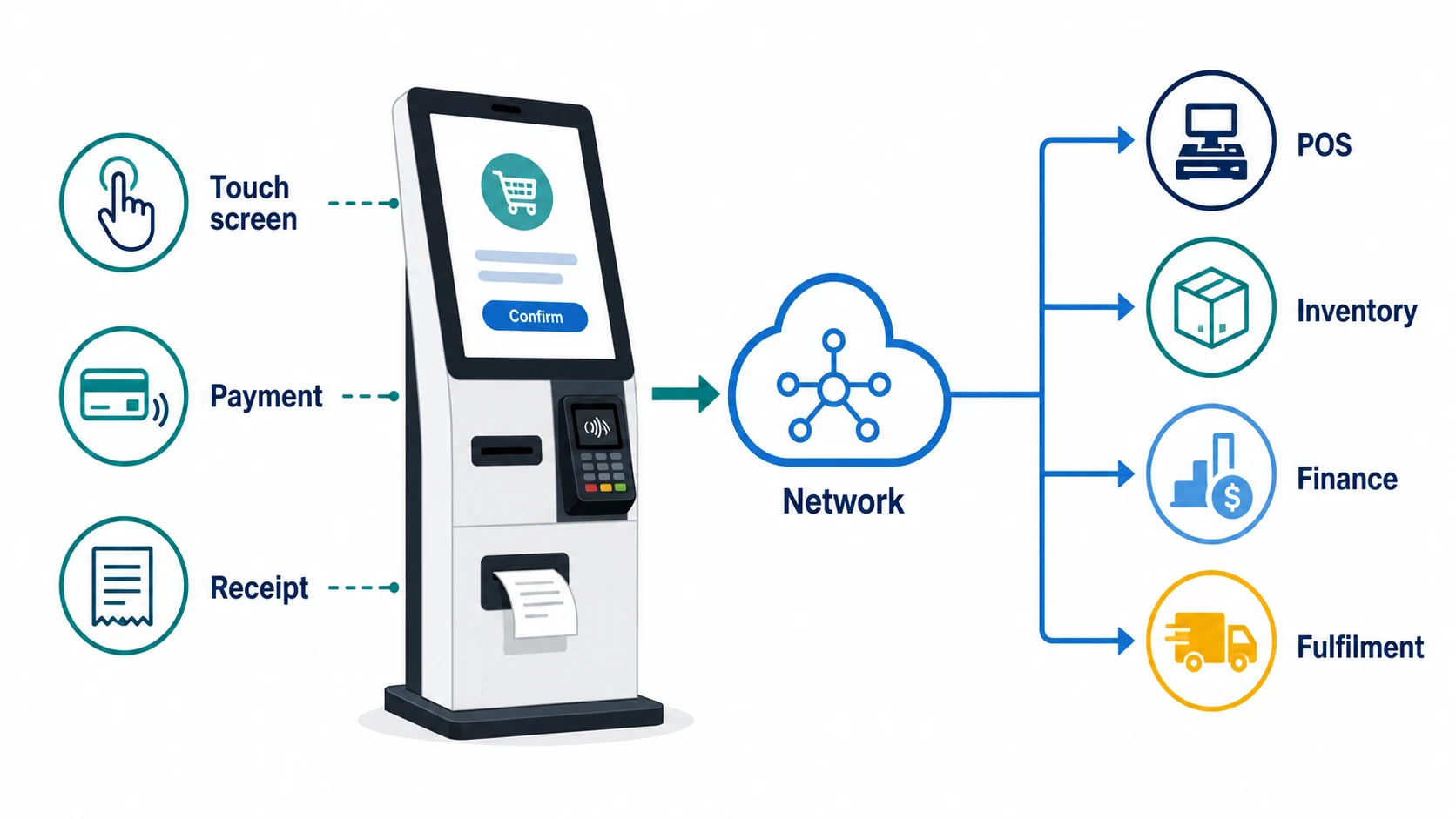
Specify hardware from the transaction and the site, not from a supplier catalogue. Screen, stand, terminal, peripherals, and network all follow from what the customer must do and what you must confirm.
| Priority | Component | Business Requirement | Question to Answer Before Purchase |
|---|---|---|---|
| Essential | Screen, enclosure, compute device, network connection | Present a clear and durable customer journey | Can the device receive catalogue and pricing updates reliably? |
| Essential | Payment terminal | Capture and confirm the payment types you accept | How is approval or failure status returned to the order? |
| Optional | Receipt or order printer | Give paper evidence where customers or staff need it | Does print status affect fulfilment or only communication? |
| Optional | Scanner | Support loyalty, voucher, collection, or product codes | Which system validates the scanned identifier? |
| Situation-dependent | Cash module | Accept cash where the trading model requires it | Who controls float, cash removal, and reconciliation? |
| Situation-dependent | Camera, signage, accessibility peripherals | Improve guidance, monitoring, or access for a defined need | Who owns privacy, retention, support, and incidents? |
1. Screen Size, Mounting Type, and Enclosure
Screen size follows viewing distance and catalogue depth. A deep menu on a small display forces constant scrolling, which slows the queue far more than any processor specification ever will.
Choose between floor stand, counter mount, and wall mount by traffic flow and cleaning access. Confirm power, cable protection, and whether a staff member can reach the device during service.
2. Payment Terminal and Card Reader Options
Decide whether payment is integrated with the order or handled separately. Integrated terminals return a status the order can act on, which is what removes manual matching at end of day.
Cover contactless, chip, mobile wallets, and any gift or loyalty instrument you issue. Confirm surcharge display, receipt handling, and how refunds are started once a customer has already left.
3. Receipt Printer, Scanner, and Optional Peripherals
A printer adds paper, jams, cleaning, and a monitoring obligation to every site. Add one only where a customer or a fulfilment station genuinely needs paper rather than a number on a screen.
Scanners support loyalty cards, vouchers, and click and collect codes. Cash modules bring float control, cash removal, and reconciliation duties that most venues underestimate at quoting stage.
4. Kiosk Software: Catalogue, Modifiers, Promotions, and Languages
Software carries most of the risk. Catalogue structure, modifier rules, promotion logic, tax treatment, and language options decide whether customers finish an order without asking for help.
Ask who edits the menu and how quickly a change reaches every device. A price update that takes a day to propagate creates a compliance problem, not just an inconvenience for the floor team.
5. Remote Management, Updates, and Device Monitoring
Remote management turns a fleet into something a small team can run. Health checks, software updates, restarts, and configuration changes should not require a site visit for each device.
Ask for alerting on offline devices, failed payments, printer faults, and stalled updates. Without it, a store learns the kiosk is down when a customer walks over to complain about it.
How Should Kiosks Integrate With POS, Payments, and Inventory?
Integration is where a kiosk becomes an enterprise system or an isolated till. The question is not whether systems connect, but who owns each field and what happens when a message fails.
| Integration Area | What to Validate | Risk if Left Undefined |
|---|---|---|
| Catalogue and pricing | Which system owns item IDs, prices, tax codes, and modifiers | Wrong prices, wrong tax treatment, invalid orders |
| Order capture | Whether kiosk orders are created in POS directly or transferred | Duplicate, missing, or delayed orders |
| Payments | How approval, decline, refund, and settlement references are handled | Unreconciled takings and customer disputes |
| Inventory | Whether updates are event driven or scheduled, and how retries work | Selling unavailable items and inaccurate stock records |
| Fulfilment | How each station receives and acknowledges an order | Paid orders that nobody actions |
| Finance | How settlements are matched to sales and accounting entries | Manual reconciliation and weak audit evidence |
| Reporting | Which system holds the management view by site, period, and channel | Inconsistent numbers and poor decisions |
1. Catalogue, Pricing, and Promotion Sync With Your POS
One system must own item identifiers, prices, tax codes, and modifier rules. Every other system reads from it, and the till side follows the same record, so any exception to that rule needs a written reason and a review date.
Test propagation speed using a genuine change. Update a price, launch a promotion, then measure how long the kiosk, the POS, and any printed material take to agree with one another on site.
2. Payment Settlement and End-of-Day Reconciliation
Every kiosk sale needs a settlement reference that Finance can match to a bank deposit. Without it, reconciliation becomes a manual exercise that grows heavier with each additional site.
Agree how refunds, cancellations, and partial captures are represented. The audit trail should link the original order, the payment attempt, and the correction without anyone rebuilding it later.
3. Stock Availability and Automatic Item Disabling
Selling an item that ran out an hour ago is the fastest way to lose kiosk credibility. Live stock records need to reach the screen quickly enough that the customer never sees the sold out item.
Decide whether updates are event driven or scheduled, and define the retry path for failed messages. Staff also need a fast manual override for items the system cannot know about.
4. Order Routing to Fulfilment Displays and Preparation Stations
Orders must reach the right station with the right priority attached. A kitchen display, a bump bar, and a clear acknowledgement step keep paid orders from sitting unnoticed during a rush.
Acknowledgement is the control that matters most. If nothing confirms an order was received, no report will ever show you how often that handoff quietly failed during peak trading periods.
5. Multi-Outlet Reporting and Cross-Channel Consistency
Kiosk, counter, app, and delivery sales should land in one reporting model. Shared definitions for channel, site, period, and item let managers compare performance without rebuilding the numbers.
Agree those definitions before the second site opens for trading. Retrofitting consistent reporting across a live fleet costs considerably more than writing the rules down during the pilot.
How Can You Compare Kiosk Options Without Relying on Vendor Rankings?
Compare kiosk options against your operating requirements, integration evidence, and total cost, not against brand popularity. Two businesses can reach different answers from the same criteria.
Transaction volume, catalogue complexity, site conditions, support capability, and existing systems all shift the weighting. A shortlist built from a published ranking usually skips those variables.
This is HashMicro editorial guidance rather than an independent vendor evaluation. Use the criteria below to build your own scorecard and ask every supplier to answer the same scenario.
| Requirement | Evidence to Request | Accountable Stakeholder | Risk if Overlooked | Minimum Acceptable Condition |
|---|---|---|---|---|
| Business fit | Workflow demonstration using your own orders | Operations | A polished demo that does not match real service | Handles common and exception journeys |
| Integration readiness | Interface scope, data fields, failure handling | IT | Manual workarounds and missing transactions | Defined source of truth and retry process |
| Total cost | One-time and recurring cost schedule | Finance and Procurement | Low upfront price masking ongoing obligations | Costs separated by category and period |
| Accessibility | Physical and interface design review | Operations and IT | Customers cannot complete the journey unaided | Documented accessibility requirements met |
| Security controls | Access, patching, monitoring, incident process | IT and Security | Unmanaged devices or weak transaction controls | Named ownership and written procedure |
| Support model | Response process, replacement path, site duties | Store Management | Long outages during peak periods | Escalation and fallback tested in advance |
| Rollout flexibility | Pilot and multi-site deployment approach | Project sponsor | Repeating an unproven configuration | Pilot measures agreed before expansion |
| Reporting | Sample outputs by site, period, and channel | Finance and Operations | Numbers that cannot be compared across sites | Shared definitions applied everywhere |
1. Define Your Evaluation Criteria Before You Shortlist
Write the criteria before you see a single demo. Once a supplier has shaped your expectations, the scorecard tends to describe their product rather than your operating requirements.
Weight each criterion by what actually breaks in your venues. A business with weak connectivity should weight offline behaviour above screen design, and say so in the tender documents.
2. Test the Actual Ordering Journey, Not the Demo Video
Ask every supplier to run your busiest real order end to end. Include a modifier-heavy item, a promotion, a declined card, an unavailable product, and a refund initiated after collection.
Demos are built to succeed. The useful information sits in how the ordering kiosk behaves when something goes wrong, and in how quickly a staff member can recover the transaction.
3. Check Integration Depth Against Your Existing Systems
Ask for the interface specification, not a marketing claim of compatibility. You want field lists, sync frequency, error handling, retry behaviour, and evidence of a comparable live deployment.
Request a reference site running your POS and finance stack. A supplier who integrates well with one platform may still need custom work to reach a defensible standard with yours.
4. Assess Support, Spare Parts, and On-Site Response
A kiosk that fails at midday on a Friday needs a defined response, not a support ticket. Confirm hours of coverage, escalation steps, spare-device policy, and who attends the site.
Ask what the venue is expected to do first. Clear local troubleshooting steps often restore service faster than any callout, provided the store team has been trained and given access.
5. Questions to Ask Every Kiosk Vendor
Send the same question set to each supplier and compare the answers side by side. Vague responses at tender stage tend to become change requests once the contract has been signed.
- Which system owns item data, pricing, and tax codes once the kiosk is live?
- What happens to an order when the payment status returns as unknown?
- How are failed inventory or fulfilment messages retried, and who is alerted?
- What is the response time and replacement path for a failed device at peak trading?
- Which costs are one-time and which recur per device, per site, or per transaction?
- How does the device behave offline, and how are those transactions reconciled?
- Which accessibility standards does the physical and interface design meet?
What Determines the Total Cost of a Self Service Kiosk?
Total cost covers hardware, software, integration, installation, payments, support, and internal effort. A lower purchase price often shifts spending into categories the quote never mentioned.
Build a worksheet that separates capital spend, implementation work, and recurring operating cost. Procurement can then compare suppliers on the same basis rather than on the headline figure.
| Cost Area | One-Time Considerations | Recurring Considerations |
|---|---|---|
| Hardware | Screen, enclosure, peripherals, installation, site preparation | Repair, replacement, consumables, warranty extensions |
| Software | Configuration, interface design, testing | Licences, device management, feature changes |
| Integration | Discovery, API work, data mapping, testing | Monitoring, change management, maintenance |
| Payments | Terminal setup and implementation | Merchant fees, gateway charges, terminal support |
| Network and security | Connectivity setup, segmentation, access design | Connectivity, monitoring, patching, security operations |
| People and rollout | Training, pilot, project management, process design | Store support, refresher training, operating reviews |
1. Hardware: Terminal, Stand or Enclosure, and Peripherals
Hardware is the visible cost and rarely the largest. Screen, compute device, enclosure, mounting, payment terminal, and any printer or scanner form the base configuration for each site.
Budget for spare units from the very start. One replacement device per cluster of sites keeps trading going while a faulty unit is repaired, and it costs less than a lost peak period.
2. Software Licensing and Per-Device Subscription
Most kiosk software is licensed per device per month, sometimes with tiers for modifiers, promotions, or multi-site management. Confirm what a second screen at the same site actually costs.
Check what is included and what is billed separately. Menu changes, new payment types, reporting exports, and additional user accounts are common sources of unplanned recurring cost.
3. Installation, Cabling, and Site Preparation
Installation costs vary far more than hardware costs. Power outlets, data cabling, floor fixings, screen positioning, and any joinery work depend entirely on the condition of each venue.
Survey every site before committing to a fixed price. A store needing a new power circuit and a cable run behind existing fitout can double the installation cost for that location.
4. Ongoing Support, Maintenance, and Replacement Cycles
Screens, terminals, and printers wear out under constant public use. Plan a replacement cycle of roughly three to five years and treat consumables and cleaning as a standing operating cost.
Support contracts differ in what they actually cover. Read whether accidental damage, vandalism, consumables, and after-hours attendance sit inside the fee or attract a separate charge.
5. Payment Processing and Transaction Fees
Card acceptance carries merchant fees, terminal rental, and sometimes a per-transaction gateway charge. Shifting volume from cash to card changes the cost profile of every sale you take.
Model the fee impact at your real transaction mix and average basket. A small percentage difference becomes material once a site processes several hundred kiosk payments each trading day.
6. Internal Staff Time, Training, and Change Management
The cost most often missing from a business case is your own team. Managers update menus, test releases, train staff, resolve exceptions, and review reports for as long as the kiosk operates.
Estimate those hours honestly and assign them to a role. A project that assumes existing managers will absorb the work without relief tends to stall between the pilot and the second site.
What Should You Confirm Before Implementing a Kiosk?
Implementation problems are usually visible before installation day. Space, connectivity, data quality, fulfilment design, and staffing all need confirmation while changes are still cheap.
1. Confirm Floor Space, Power, and Network Readiness
Walk the floor at peak trading and mark where a kiosk queue would form. It must not block the entrance, the collection point, an emergency exit, or the path a staff member uses to assist.
Check power, data cabling, and wireless coverage at the exact position chosen. Confirm the fallback connection and how the device behaves when the primary link drops during busy service.
2. Clean Your Catalogue, Pricing, and Modifier Data
A kiosk exposes every gap in your product data. Missing images, unclear names, inconsistent modifiers, and stale prices become customer-facing errors the moment the screen goes live.
Audit the catalogue before configuration begins. Standardise naming, confirm tax codes, complete allergen and dietary fields, and retire slow moving lines that no venue has actually sold in months.
3. Define the Fulfilment Workflow Behind the Kiosk
Decide exactly where each kiosk order appears, who acknowledges it, and how the customer is called. Faster ordering only helps when the fulfilment side has been redesigned to match it.
Run the flow physically before going live. Walk an order from the screen to collection using the real layout, the real equipment, and the staff numbers you actually roster on a busy day.
4. Set Staff Roles for Assistance and Exception Handling
Name who greets hesitant customers, who resolves payment failures, and who handles refunds. Kiosk adoption rises sharply when a visible team member is available during the first weeks.
Document the exception procedure and keep a copy near the device. Staff should not be improvising a response to a duplicate charge while a queue builds behind the affected customer.
5. Plan the Pilot: One Site, One Flow, Measured Outcomes
Choose a representative site rather than the easiest one. A pilot at your calmest venue proves very little about how a self order kiosk actually performs under genuine peak-hour pressure.
Keep the pilot scope deliberately narrow. One site, one journey, and one payment configuration produce clearer evidence than a broad trial where several variables change at the same time.
6. Agree the Success Metrics Before Go-Live
Set the baseline first, before anything changes. Measure queue time, assisted-order rate, average transaction value, void rate, payment exceptions, and support incidents at the counter.
Agree the thresholds that would justify expansion, a pause, or withdrawal. Metrics chosen after the results arrive tend to be selected to support a decision that was already made.
7. Standardising a Multi-Site Rollout After the Pilot
Before the second site opens, lock the standard. Product and menu master data, pricing, tax configuration, payment rules, access roles, and reporting definitions should be identical everywhere.
Allow local variation only with a documented business reason and a named approver. Uncontrolled site-level changes are the main reason multi-site kiosk reporting stops being comparable.
How Can Businesses Make Self Service Kiosks Accessible and Secure?
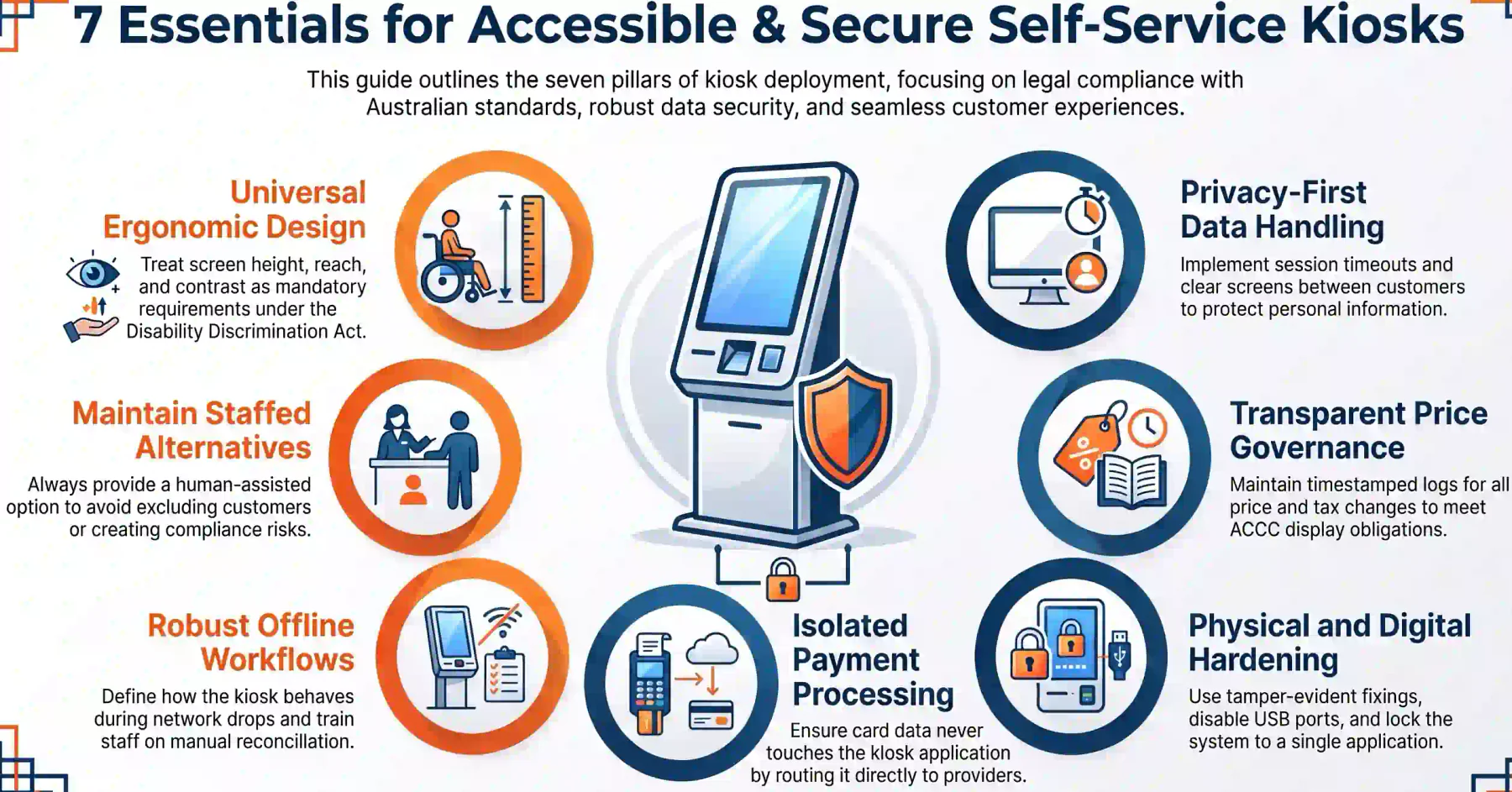
A kiosk needs operating controls around customer access, device administration, payment handling, privacy, and incident response. Design them against the real workflow and the real location.
1. Screen Height, Reach, and Contrast Considerations
Mounting height, reach range, screen angle, text size, and colour contrast decide whether every customer can complete an order without help. Treat these as requirements, not preferences.
Australian businesses have obligations under the Disability Discrimination Act, and the Australian Human Rights Commission publishes the standards and guidance that apply. Review them at design stage.
2. Keeping a Staffed Alternative Available
A kiosk should widen access and never narrow it. Always keep a staffed counter, or a nominated person able to take the order, for customers who cannot or prefer not to use the screen.
Removing the assisted option to force adoption is a false economy. It excludes customers, damages goodwill, and creates a compliance exposure that no throughput gain is ever going to offset.
3. Payment Security and Card Data Handling
Card data should never touch the kiosk application. Use terminals and payment flows where the card details go directly to the payment provider, and confirm that arrangement in writing.
Confirm your obligations under the card scheme security standards with your acquirer. Ask clearly which controls the supplier covers and which ones remain the responsibility of your business.
4. Device Access Control and Tamper Prevention
A kiosk is a computer in a public space. Lock it to a single application, disable the operating system shell, restrict USB ports, and control who holds physical and remote access.
Add tamper-evident fixings, position cameras where policy allows, and log every configuration change. An unlocked kiosk is a route into your network as much as a risk to the device.
5. Downtime, Failover, and Offline Behaviour
Decide what the kiosk does when the network drops. Some businesses stop taking orders, others queue transactions locally, and each choice carries a different reconciliation consequence.
Test that fallback well before it is needed. Staff should know how to switch to counter service, communicate the change to waiting customers, and reconcile transactions caught mid-flow.
6. Governance Over Prices, Tax Settings, and Promotions
Define who can change prices, tax codes, promotions, device settings, and user permissions. Every change should carry an approver, a timestamp, and a record that survives staff turnover.
Displayed prices carry legal obligations. The ACCC price display rules cover total price, surcharge disclosure, and what happens when the checkout price does not match the display.
7. Privacy and Customer Data Handling
Confirm what customer information the kiosk displays, stores, transmits, and makes visible to staff or suppliers. Loyalty numbers, contact details, and order history all deserve that review.
Handling personal information brings obligations under the Australian Privacy Principles. Set retention periods, session timeouts, and a screen that clears fully between customers.
How HashMicro Supports Kiosk-Connected Retail and Hospitality Operations
HashMicro connects kiosk transactions to the systems that finish the job. Orders, payments, stock movements, and accounting entries land in one platform rather than in separate front-counter tools.
POS and inventory work from shared master data, so prices, tax settings, modifiers, and stock availability stay consistent across every kiosk, counter, and outlet that your business operates.
Finance sees the settlement trail alongside the sale, which shortens end-of-day reconciliation. Managers see kiosk, counter, and online performance in one reporting view by site and period.
The most valuable step usually comes before hardware selection. Map the customer, payment, inventory, and reporting workflow with HashMicro across Operations, Finance, IT, and Store Management.
Kiosk operations only stay clean when someone watches every transaction. Hashy AI reads orders, payments, stock, and fulfilment together, then flags what needs attention before service slows.






Conclusion
A self service kiosk earns its place when the operating model behind it is ready. Transaction design, system integration, fulfilment capacity, accessibility, and total cost decide the outcome.
Start with the full journey and run a measured pilot before committing to a fleet. Where customer demand, connectivity, fulfilment capacity, or ownership is not ready, the honest answer is not yet.
If you want to learn more, you can book a free consultation with our experts today. Start anytime and optimize your business.
Frequently Asked Questions
A self service kiosk is a customer-facing terminal where people select products or services, complete a request, and usually pay, without a staff member keying the transaction for them.
A self ordering kiosk is one type of self service kiosk, focused on placing an order in food service or retail. Self service kiosks also cover check-in, ticketing, and information tasks.
It connects through an interface that shares catalogue, pricing, and order data. Verify the available APIs, data ownership, synchronisation frequency, and exception handling before purchase.
Stock should move on the same rules as a counter sale, either in real time or on a schedule. Confirm the update method, the retry path for failed messages, and how items are disabled.
Cost depends on hardware, software licensing, installation, integration, payments, and support. A per-site figure only becomes meaningful once every category has been quoted for your configuration.
Usually they change what staff do rather than how many you need. Labour typically moves from order taking towards preparation, expediting, floor assistance, and managing the collection point.
Avoid a kiosk where fulfilment is already at capacity, connectivity is unreliable, the catalogue changes constantly, or nobody owns exceptions. Fix the underlying process before buying hardware.