

Many businesses use software for finance, sales, inventory, HR, and customer service, but many tasks still rely on manual work. Teams often spend time checking data, chasing approvals, and updating records.
AI automation combines artificial intelligence with workflow automation to reduce these repetitive tasks. It can analyse data, recommend actions, and automate routine processes to keep work moving.
For Australian businesses, this means fewer delays, faster approvals, and smoother collaboration across teams. It helps businesses improve efficiency while giving employees more time to focus on higher-value work.
Key Takeaways
AI automation uses artificial intelligence to streamline business processes, reduce manual work, and improve efficiency.
AI automation helps businesses speed up workflows, reduce errors, and improve decision-making.
Hashy OS combines AI with ERP data to automate workflows and improve business operations.
What Is AI Automation?

AI automation uses artificial intelligence to improve and automate business processes. It can analyse data, identify patterns, and trigger the right action, helping businesses reduce manual work and improve efficiency.
Unlike traditional automation that follows fixed rules, AI automation can make smarter decisions based on real business data. It can recommend actions, prioritise tasks, and detect issues before they affect operations.
Businesses use AI automation for tasks such as invoice processing, purchase approvals, inventory management, customer support, and employee requests, allowing teams to work faster while keeping people in control of important decisions.
How AI Automation Works
AI automation starts by collecting data from business systems such as ERP, CRM, accounting, inventory, or HR software. This is made possible through AI integration, which connects AI with your existing business systems so it can access and analyse real-time data.
The system then analyses the data to identify patterns, risks, or priorities before triggering the next action, such as sending an approval request, creating a task, or updating a workflow.
Most AI automation still includes human oversight. Teams review important decisions while the system tracks every action, making workflows faster, more consistent, and easier to monitor.
"AI automation delivers the greatest value when it supports people, streamlines processes, and helps businesses work more efficiently."
AI Automation vs Traditional Automation vs RPA vs AI Agents
AI automation is often discussed alongside traditional automation, robotic process automation, and AI agents. They are related, but they are not the same.
| Type | What It Does | Best For | Limitations |
|---|---|---|---|
| Traditional automation | Follows fixed rules and triggers | Simple repetitive tasks | Cannot adapt when conditions change |
| RPA | Copies human actions across screens and systems | Admin and back-office tasks | Can break when screens or process steps change |
| AI automation | Analyses data and triggers smarter workflows | Operational decisions and workflow optimisation | Needs clean data, rules, and governance |
| AI agents | Completes tasks with higher autonomy | Guided task execution | Needs clear scope, permission, and approval control |
Traditional automation follows fixed rules, while RPA helps move data between systems. AI automation goes further by analysing information and making smarter decisions before taking action.
AI agents can perform specific tasks, but AI automation manages the entire workflow, including approvals, reporting, and business rules.
Benefits of AI Automation for Business Operations
AI automation helps businesses reduce manual work, improve efficiency, and keep workflows running smoothly. By automating repetitive tasks and using real-time data, businesses can make faster and more informed decisions.
1. Faster Workflow Execution
AI automation speeds up routine processes by automatically routing approvals, assigning tasks, and sending reminders without manual intervention.
2. Better Data Visibility
It brings together information from different systems, making it easier for teams to monitor approvals, inventory, invoices, and other important tasks.
3. Fewer Manual Errors
By automating repetitive processes, AI automation reduces data entry mistakes, missed approvals, and inconsistent workflows.
4. Smarter Decision-Making
AI analyses business data to identify trends, highlight risks, and recommend actions, helping teams make better decisions.
5. Stronger Process Control
AI automation supports secure workflows with approval rules, user permissions, and audit trails to improve accountability and compliance.
AI Automation Examples Across Business Departments
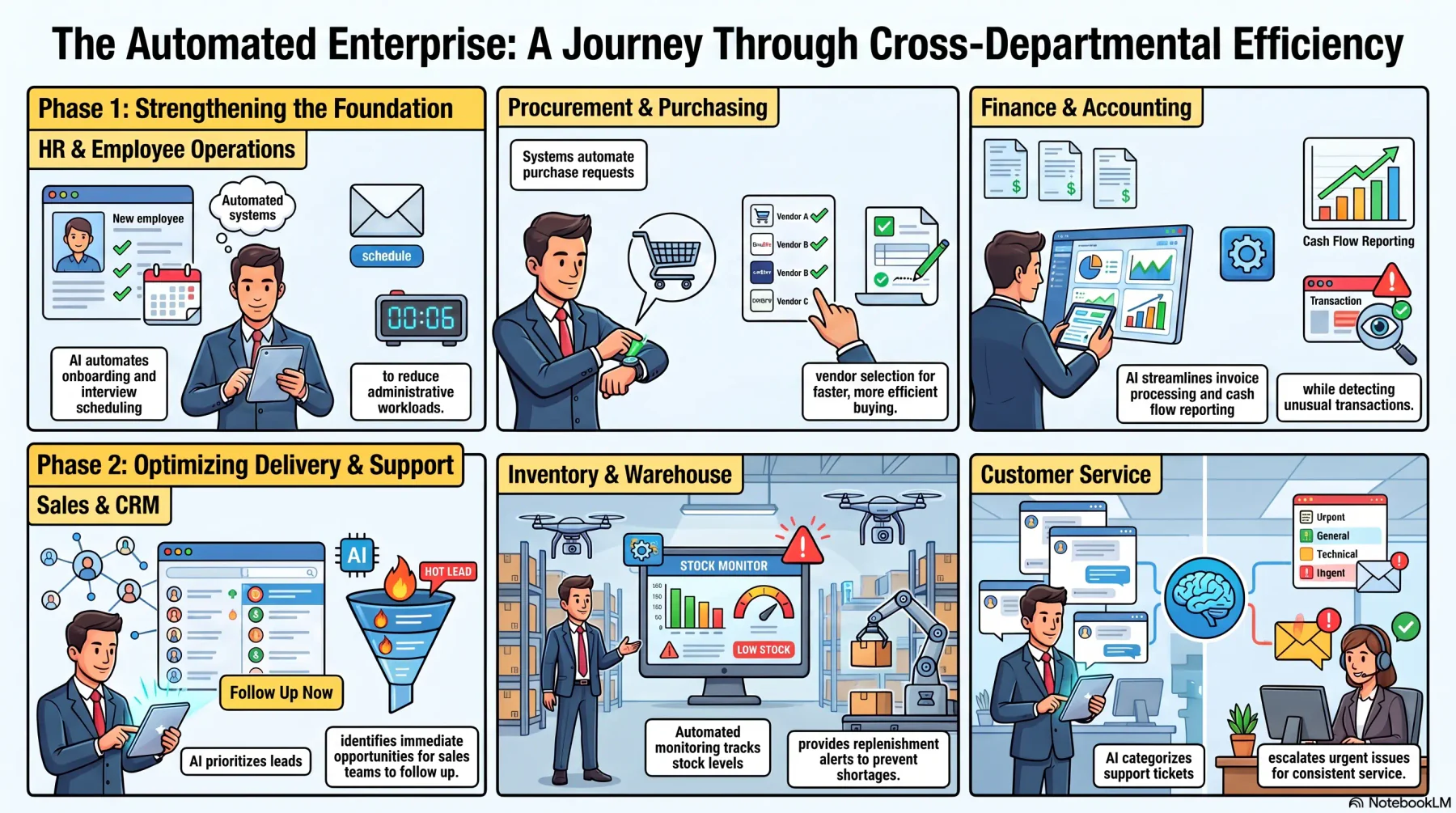
AI automation can improve workflows across different departments by reducing manual tasks, speeding up processes, and helping teams make better decisions.
1. Finance and Accounting
In finance, AI in accounting can streamline invoice processing, payment reminders, expense approvals, and cash flow reporting while helping teams detect unusual transactions.
2. Procurement
It automates purchase requests, approval routing, vendor selection, and reorder recommendations to make purchasing faster and more efficient.
3. Inventory and Warehouse
AI automation helps monitor stock levels, recommend replenishment, prioritise warehouse tasks, and alert teams to potential stock shortages.
4. Sales and CRM
Sales teams can use AI automation to prioritise leads, schedule follow-ups, and identify opportunities that need immediate attention.
5. HR and Employee Operations
HR can automate onboarding, leave requests, interview scheduling, and employee enquiries, reducing administrative work.
6. Customer Service
AI automation helps categorise support tickets, recommend responses, and escalate urgent issues for faster and more consistent customer service.
AI Automation Across ERP Workflows
AI automation delivers the most value when it connects processes through one of the best ERP software options for Australian businesses. By linking departments such as sales, finance, procurement, inventory, and HR, businesses can automate end-to-end workflows instead of isolated tasks.
1. Sales Order to Invoice
AI automation can check stock, prepare deliveries, generate invoices, track payments, and flag issues before they delay the order process.
2. Procurement Request to Purchase Order
The system can validate purchase requests, recommend suppliers, and route approvals before creating purchase orders.
3. Inventory Alert to Replenishment
When stock runs low, AI can analyse demand and suggest replenishment before shortages occur.
4. Employee Request to Approval
Employee requests, such as leave or reimbursements, can be checked and automatically routed to the right approver.
5. Finance Anomaly to Management Review
AI can detect unusual transactions or budget variances and notify managers for review before they become larger issues.
Challenges of AI Automation
AI automation works best with accurate and connected data. If information is outdated or spread across different systems, the results may be unreliable.
Businesses also need clear approval rules to decide when AI can automate a task and when human review is required. Not every decision should be fully automated.
Businesses should also ensure their AI automation strategy complies with the Australian Privacy Principles (APPs) when handling personal and business data.
Businesses handling personal or sensitive data should set these controls through a formal AI governance framework, which defines who approves AI use, how systems are monitored, and where human oversight is required.
Finally, successful adoption depends on employees understanding how the system works. With proper training and clear processes, AI automation can improve productivity instead of creating confusion.
How to Prepare Your Business for AI Automation
Start by identifying repetitive tasks that take too much time, such as approvals, follow-ups, or manual data entry. These are often the best processes to automate first.
Next, make sure your business data is accurate and connected across systems. AI automation performs better when it has access to reliable information.
Begin with a small pilot project, measure the results, and improve the workflow over time. This helps businesses adopt AI automation with less risk and better long-term outcomes.
How to Choose AI Automation Software
Before choosing AI automation software, reviewing a list of AI productivity tools can help you understand what to look for when evaluating options that integrate with your existing ERP, CRM, accounting, HR, and inventory systems.
The software should also support workflow automation, reporting, and AI assistants that can help users complete tasks using natural language. Strong security and role-based access are equally important.
Look for a solution that is easy to scale as your business grows, while giving you the flexibility to automate processes across different departments.
How Hashy OS Supports AI Automation
Hashy OS supports AI automation by working with HashMicro's HMX and HM Nova ERP platforms, giving businesses access to AI powered by real operational data.
With Hashy, businesses can ask questions, automate workflows, and access business insights, while AI Coworkers help complete routine tasks across departments such as finance, HR, and sales.
Hashy Apps lets teams create custom dashboards and workflows that fit their processes. Contact our experts to see how HashMicro AI Coworker can help automate your business operations.
Conclusion
AI automation helps businesses reduce manual work, improve efficiency, and keep workflows running smoothly. When connected to real business data, it supports faster decisions and better collaboration across departments.
The greatest value comes from automating end-to-end processes across finance, sales, procurement, inventory, HR, and customer service, rather than individual tasks.
With HashMicro's Hashy OS, businesses can automate workflows using AI powered by connected ERP data. Book a free consultation with our experts to discover how Hashy OS can help improve your business operations.

FAQ
AI automation uses artificial intelligence to analyse data, support decisions, and automate business workflows. It helps businesses reduce manual work, improve efficiency, and complete tasks faster.
No. RPA follows predefined rules to automate repetitive tasks, while AI automation can analyse data, recognise patterns, and make smarter decisions before triggering workflows.
AI can automate processes such as invoice follow-ups, purchase approvals, inventory replenishment, sales lead management, HR requests, customer service, and reporting.
AI automation uses ERP data to automate workflows across departments such as finance, sales, procurement, inventory, and HR, helping businesses improve efficiency and decision-making.