

AI productivity tools are software applications that use artificial intelligence to help businesses complete work faster, reduce manual admin, speed up decisions, and automate workflows across departments.
Search demand for AI productivity tools in Australia grew strongly across 2025 and 2026, reflecting a shift from curiosity to active business adoption across chatbots, writing assistants, meeting tools, scheduling apps, and business AI systems.
Key Takeaways
AI productivity tools are software applications that use AI to help businesses complete work faster, reduce manual admin, and automate workflows.
For general-purpose AI assistance including drafting, summarising, and researching, these tools cover the most common daily productivity needs.
This category goes beyond individual productivity into team coordination, business process automation, and company-wide AI integration.
The right AI tool fits the workflow you want to improve, complies with Australian privacy obligations, and can be adopted by the people who need it.

What Are AI Productivity Tools?
AI productivity tools are software applications that use artificial intelligence to help people and businesses complete work faster, reduce repetitive tasks, and improve decision-making.
They range from standalone apps like ChatGPT, Grammarly, and Otter.ai to AI features built into platforms your team already uses, such as Microsoft Copilot inside Microsoft 365.
Google and Ipsos research found Australians increasingly see AI as a way to free up worker time, and the RBA has noted AI could lift productivity over time. Workflow automation fit, data privacy, and integration depth matter more than feature lists.
"Most Australian businesses do not have a tool problem. They have a workflow problem. AI only adds value when it is connected to how work actually gets done, not bolted on top of it."
Best AI Chatbots and Research Assistants
For general-purpose AI assistance including drafting, summarising, researching, and reasoning, these tools cover the most common daily productivity needs across Australian business teams exploring AI adoption.
1. ChatGPT
ChatGPT is one of the most versatile AI productivity tools for everyday business work. Teams use it to draft emails, summarise documents, brainstorm ideas, prepare meeting notes, and create first drafts of reports.
For business use, avoid pasting sensitive data into public AI tools without checking your data policy. OpenAI's ChatGPT Business plan does not use business data for training by default, but review the terms before rollout.
2. Claude
Claude is strong for long-document analysis, careful reasoning, and tasks that need a more detailed written response. It is useful for reviewing policies, summarising long PDFs, and drafting structured business documents where nuance matters more than quick answers.
Like any AI chatbot, Claude should be treated as an assistant, not a final authority. Human review remains necessary for legal, financial, HR, compliance, and customer-facing decisions.
3. Microsoft Copilot
Microsoft Copilot is best for businesses already using Microsoft 365. It works across Word, Excel, Outlook, PowerPoint, and Teams, helping users summarise emails, draft documents, prepare slides, and extract insights from existing business content.
Its main advantage is context within the Microsoft environment. Copilot Business is priced from AU$26.91 per user per month, paid yearly, before GST as of June 2026, and may be easier to govern than disconnected consumer AI tools.
4. Perplexity AI
Perplexity AI is best for research with cited sources. Unlike a standard chatbot, it searches the web and shows the sources behind its answers, making it useful for quick market checks, competitor research, policy lookups, and trend scanning.
The main benefit is speed. The main risk is source quality. Teams should still check whether cited sources are current, authoritative, and relevant to Australia before using the output in business decisions.
Best AI Writing and Communication Tools

These tools focus on improving how teams write and communicate, showing how AI integration can support everything from individual emails to brand-consistent business content.
1. Grammarly AI
Grammarly AI helps users rewrite sentences, adjust tone, improve clarity, fix grammar, and make messages sound more professional. This is useful for sales emails, customer support replies, internal updates, proposals, and executive communication.
For Australian teams, it can reduce unclear writing across departments, especially where staff have different writing styles or English proficiency levels. Its AI features go beyond spelling to help rewrite messages for tone, brevity, and consistency.
2. Notion AI
Notion AI is useful for teams that already use Notion for documentation, internal wikis, and knowledge management. In a writing context, it can summarise pages, draft content from notes, and turn scattered information into structured documents.
The strongest use case here is turning stored knowledge into something easier to retrieve and reuse. If the workspace is messy or outdated, AI summaries will be less useful regardless of the tool's capability.
3. Canva AI
Canva AI is best for marketing, sales, and internal teams that need simple visuals without depending on a designer for every request. Its Magic Studio features support presentation design, image generation, copy drafting, background removal, and quick visual editing.
The main advantage is accessibility. Non-designers can produce clean visual drafts quickly. Businesses should still use approved templates, colours, and fonts, and review assets before publishing anything customer-facing.
Best AI Meeting and Scheduling Tools
This category covers two distinct problems: capturing what happens in meetings and managing time better across teams. The tools that solve each are different enough to evaluate separately.
1. Otter.ai and Fireflies.ai
Otter.ai and Fireflies.ai record, transcribe, summarise, and extract action items from meetings. For distributed Australian teams, they support business process automation by reducing admin work after Zoom, Google Meet, or Microsoft Teams calls.
The key privacy consideration is consent. Australian businesses must tell participants when meetings are being recorded or transcribed, and should review how meeting data is stored and deleted before rolling out either tool.
2. Motion and Clockwise
Motion automatically schedules tasks into your calendar based on deadlines and priorities. Clockwise focuses on protecting focus time and reducing calendar fragmentation for teams rather than individuals.
For Australian businesses working with regional or offshore teams, both tools help reduce time-zone friction. The benefit is not just fewer calendar conflicts but better use of attention across the workday.
Best AI Tools for Business Operations and Workflows
This category goes beyond individual productivity into team coordination, business process automation, and company-wide AI integration. Needs here vary significantly, from task tracking to full ERP-connected AI that operates across departments.
| Tool | Best for | Key strength | Main limitation |
|---|---|---|---|
| Hashy OS | Company-wide AI productivity | AI connected to ERP workflows across departments | Requires HMX or HM Nova as base platform |
| ClickUp AI | Team task and project management | Flexible workspace with AI summaries and task generation | Needs clean structure to be effective |
| Asana AI | Structured cross-functional projects | Project summaries, risk detection, goal tracking | Requires mature PM discipline to work well |
| Zapier | Workflow automation between apps | Connects tools without code | Cannot fix a messy underlying process |
1. Hashy OS by HashMicro
Hashy OS is not a task management app but an AI operating layer that runs on top of HMX or HM Nova, connecting AI with ERP workflows across finance, HR, sales, procurement, inventory, and operations.
Its core capabilities include Company Nexus for shared knowledge and decisions, Coworkers as autonomous AI that complete real tasks and are reachable on WhatsApp, and Hashy Apps for building department-level dashboards and workflows without lengthy change requests.
Hashy OS is purpose-built for Australian businesses where productivity depends on ERP data, cross-department approvals, and operational reporting. If that matches where your business is heading, it is worth a closer look.






2. ClickUp AI
ClickUp AI suits teams that want tasks, documents, project updates, and collaboration in one workspace. Its AI features summarise updates, generate task descriptions, create subtasks, and draft project communication.
It works well for flexible teams, but if boards, task owners, and workflows are not clearly structured, AI features will not solve the underlying process problem.
3. Asana AI
Asana AI suits teams with clear project owners, deadlines, milestones, and dependencies. Its AI features support project summaries, goal updates, risk detection, and status reporting across cross-functional teams.
It is strongest when the organisation already has mature project management habits. It is less useful when teams manage work informally through chat, create data silos, or do not update tasks consistently.
4. Zapier
Zapier automates repetitive handoffs between apps without code, connecting forms, spreadsheets, CRMs, email platforms, and project tools. A business can route form submissions into a CRM, notify a channel, create a task, and update a spreadsheet automatically.
It is most useful when a business runs many standalone tools. If the underlying workflow is messy, automation makes the mess move faster.
How to Choose AI Productivity Tools for Your Australian Business
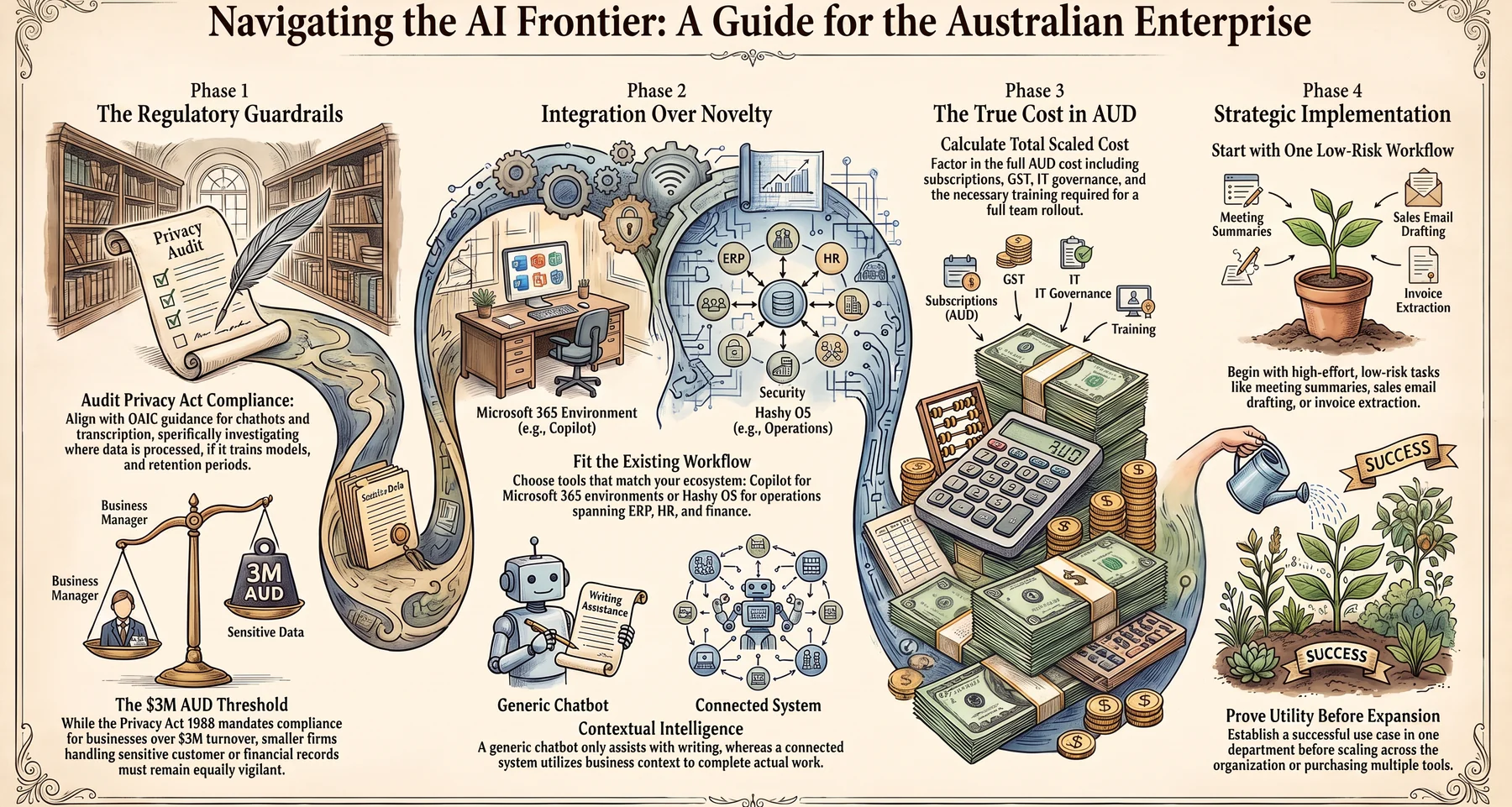
1. Check data privacy and Australian Privacy Act compliance.
The OAIC has published guidance for organisations using AI tools including chatbots and transcription software. Check where data is processed, whether it trains AI models, and how long it is retained.
The Privacy Act 1988 applies to businesses over AUD $3M turnover. Even smaller businesses handling sensitive data should review obligations before employees use AI tools that process customer, HR, or financial records.
2. Prioritise integration over novelty.
The best AI tool fits how your team already works. Copilot suits Microsoft 365 teams, while Hashy OS fits businesses where productivity spans ERP, finance, HR, and operations.
AI becomes more useful when it has access to the right business context. A generic chatbot helps with writing. A connected system helps complete actual work.
3. Calculate total cost in AUD.
Entry-level pricing looks manageable until a tool is rolled out across teams with IT governance, training, and integration added in. Calculate the full AUD cost including subscriptions, GST, and implementation before committing at scale.
4. Start with one workflow, then scale.
Pick a process with high manual effort and low compliance risk to improve operational efficiency. Good starting points are meeting summaries, sales email drafting, invoice extraction, and HR policy Q&A.
Conclusion
The best AI productivity tools help Australian businesses reduce manual work, improve communication, and automate tasks. The right choice depends on the workflow you want to improve first.
For businesses that need AI connected across departments, ERP workflows, and operational data, Hashy OS by HashMicro is a different category of tool. Book a free consultation to see how it fits your business.

FAQ
AI productivity tools are software applications that use artificial intelligence to help users complete work faster. They include chatbots, writing assistants, meeting transcription tools, scheduling apps, project management platforms, workflow automation tools, and business AI systems such as Hashy OS by HashMicro.
For small Australian businesses, ChatGPT suits general tasks, Grammarly suits writing, and Otter.ai suits meeting transcription. Businesses with more than one department should also look at integration depth and whether the tool connects with existing systems before committing.
The Office of the Australian Information Commissioner has published guidance for organisations using AI tools. Businesses should check where data is processed, whether prompts train AI models, and how long data is retained. The Privacy Act 1988 applies to businesses over AUD $3M annual turnover.
General AI tools like ChatGPT or Grammarly help individuals complete specific tasks such as writing or research. Hashy OS is an AI operating layer connected to ERP workflows across finance, HR, sales, procurement, and operations, making it more suited to company-wide productivity than individual task assistance.
Start with one workflow that has high manual effort and low compliance risk. Good starting points include meeting summaries, sales email drafting, invoice data extraction, and HR policy Q&A. Once the workflow proves useful, expand to adjacent processes before scaling across teams.