

Accounting software cost in Australia ranges from under AUD $30 per month for a sole trader to a custom enterprise quotation covering multiple entities, users, and integrations.
The advertised subscription rarely reflects the complete budget. Implementation, data migration, payroll, training, integrations, and support all affect the final accounting software price.
This article covers accounting software pricing models, published price examples, and practical formulas for estimating first-year and three-year costs across Australian businesses.
Key Takeaways
Factors affecting software cost include user numbers, payroll headcount, invoicing needs, financial controls, and multi-entity or integration requirements.
Common pricing models include flat subscriptions, per-user or per-employee fees, module and usage-based pricing, and custom quotes for complex needs.
Features that could increase price include purchase approvals, advanced invoicing, month-end controls, consolidation, project accounting, and advanced reporting
Hidden implementation costs cover requirements assessment, data migration, integration setup, testing, training, and go-live support

Why Accounting Software Costs Matter for Australian Businesses
Software buyers must balance affordability with compliance, visibility, and future growth. A low starting price may offer poor value if staff still rely on spreadsheets or disconnected applications.
The Australian Bureau of Statistics found that 13% of businesses cited uncertainty about ICT costs and benefits as a barrier in 2024 to 2025.
An accounting software price comparison should consider business outcomes, not subscription fees alone. The right system must support current processes without creating an expensive replacement project later.
What Factors Affect Accounting Software Cost?
Accounting software prices depend on users, employees, entities, modules, transaction volumes, integrations, and implementation effort. Businesses with similar revenue can receive very different quotes.
Start by documenting current requirements and expected growth over three years. This baseline prevents suppliers from quoting against different assumptions and makes each proposal easier to compare.
"Buying licences by headcount alone is how businesses end up paying for access they don't need. Match the licence to what each role actually does in the system."
1. Number of Users and Access Levels
User count affects cost, but access type can matter just as much. A finance manager who posts journals normally needs a broader licence than an employee who only submits purchase requests.
Separate users by the work they perform:
- Full finance users
- Managers and approvers
- Operational and data-entry users
- Reporting-only users
- External accountants and bookkeepers
Ask whether lighter roles receive discounted licences. Some enterprise products distinguish full users, team members, devices, approvers, and self-service users.
Confirm whether accountant access sits outside the standard user limit. QuickBooks includes it with its listed limits, while Q6 advertises unlimited internal users and an accountant login.
Check permissions as well as user numbers. Weak role controls may force a business to buy broader licences or accept greater financial risk than expected.
2. Payroll and Employee Numbers
Payroll commonly uses a per-employee fee or plan limit. The cost rises each month as headcount grows, even when the core accounting subscription stays unchanged.
The Australian Taxation Office requires employers to report payroll information through Single Touch Payroll each time employees are paid.
Check whether the quoted payroll price covers:
- Single Touch Payroll reporting
- Leave and entitlement calculations
- Superannuation processing
- Timesheets and rostering
- Employee self-service
- Award interpretation
- Termination calculations
- The expected number of employees
QuickBooks Standard Payroll lists AUD $6 per active employee per month, including GST. The charge sits on top of the selected accounting subscription.
MYOB Business Pro lists payroll at an additional AUD $3 per employee per month. Model the cost against expected headcount, not only the current payroll.
3. Invoicing, Purchasing, and Inventory Requirements
Basic plans may cover standard invoices and bills but restrict document volume, purchase orders, automated capture, locations, or stock functions.
A wholesaler, manufacturer, or retailer should confirm whether inventory is native or supplied through another application. Several small subscriptions can cost more than one integrated platform.
Review operational requirements such as:
- Invoice and bill volumes
- Recurring and milestone billing
- Purchase requisitions and orders
- Three-way matching
- Batch and serial tracking
- Multiple warehouses and locations
- Inventory costing and replenishment
Also check transaction limits. A low plan can become expensive when the business exceeds included invoices, document captures, expense claims, projects, or payment volumes.
4. Financial Controls and Reporting
Advanced controls usually sit in higher plans or separate modules. They may also require consulting time to design permissions, approval limits, reporting dimensions, and the chart of accounts.
Relevant controls can include:
- Journal approval
- Locked accounting periods
- Budget checks
- Delegated approval limits
- Audit trails
- Bank and balance-sheet reconciliations
- Consolidated management reporting
These controls can also strengthen routine bank reconciliation by making transaction histories and supporting records easier to review.
Australian businesses should confirm how the software prepares GST and Business Activity Statement data.
Paragraf baru...
These controls can also strengthen routine bank reconciliation by making transaction histories and supporting records easier to review
These controls can also strengthen routine bank reconciliation by making transaction histories and supporting records easier to review
The ATO explains that a BAS may include GST, PAYG instalments, PAYG withholding, and other tax obligations. The system should preserve supporting records and clear transaction trails.
5. Multi-Entity and Multi-Currency Capabilities
A plan designed for one business file may not support several ABNs, subsidiaries, branches, or reporting currencies. Each entity can require another subscription, database, or implementation.
Ask whether the quote includes:
- Separate legal entities and ABNs
- Parent and subsidiary structures
- Intercompany transactions
- Elimination journals
- Consolidated statements
- Currency translation
- Additional databases or environments
Multi-currency access may also depend on the plan. Xero includes it in Comprehensive but not Grow, while advanced products may price consolidation and entity management separately.
Clarify whether a new entity creates only a licence fee or another implementation project. Tax settings, accounts, workflows, users, reports, and opening balances may all need configuration.
6. Integrations and Customisation
Integration costs include more than a connector subscription. Buyers may need to fund mapping, authentication, custom development, testing, exception handling, and ongoing monitoring.
Custom fields, workflows, reports, approval rules, and document templates also add effort. Heavy customisation can increase testing needs and complicate future upgrades.
For complex operations, compare separate applications with an integrated accounting platform system that connects finance with inventory, procurement, and sales.
Request an integration register before signing. It should name each system, data owner, transfer frequency, support owner, failure process, and ongoing charge.
Common Accounting Software Pricing Models
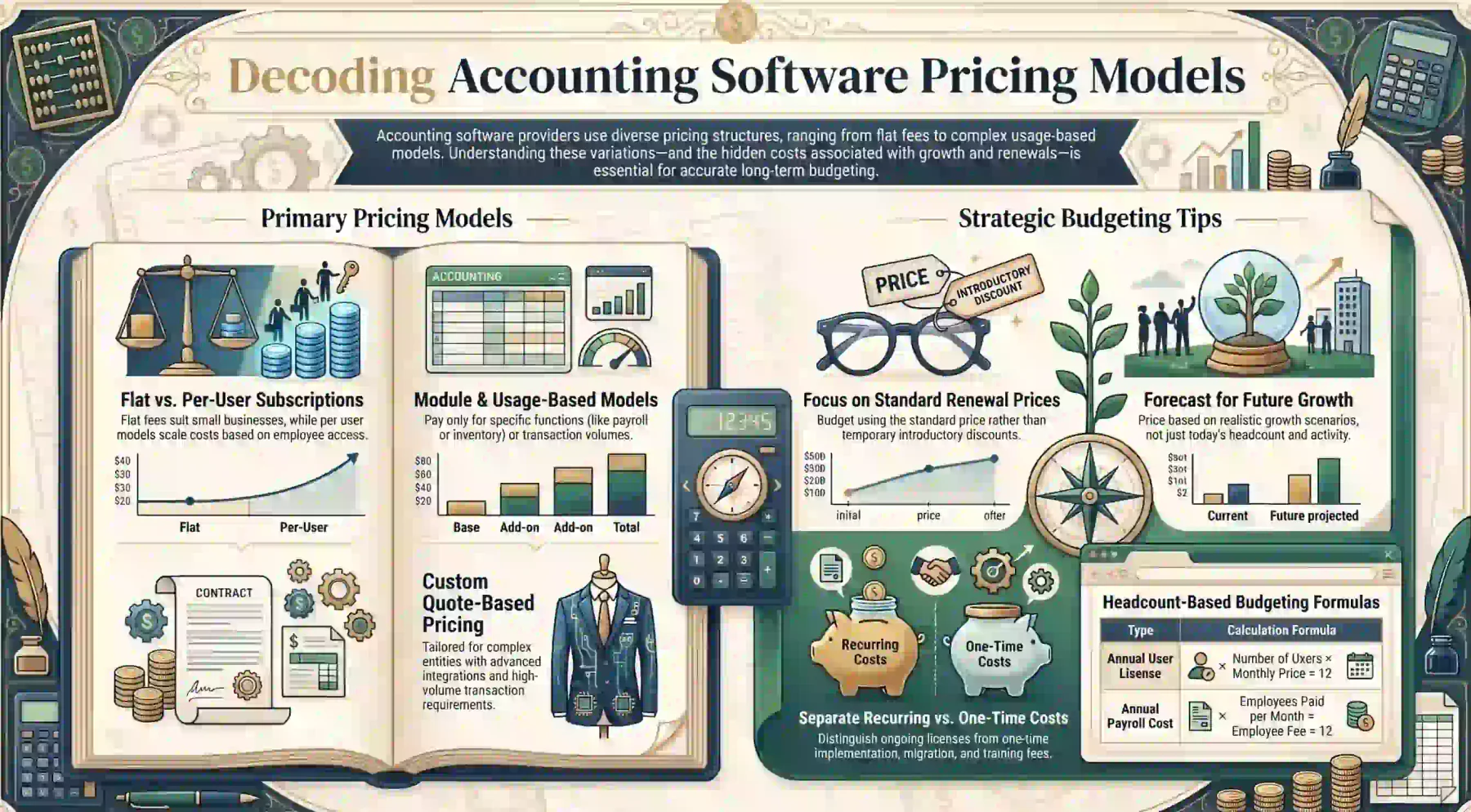
Providers use several accounting software pricing structures. Similar monthly prices can represent very different user rights, employee limits, modules, services, and transaction allowances.
1. Flat Monthly or Annual Subscriptions
A flat subscription provides a defined feature package for one monthly or annual fee. This model is common for sole traders and small businesses with straightforward requirements.
Annual billing may reduce the effective monthly cost. Buyers should still check cancellation terms, refunds, renewal dates, and whether the displayed amount is an introductory offer.
Use the standard renewal price in the main budget. Record promotional savings separately so a temporary discount does not make one option appear cheaper over three years.
2. Per-User or Per-Employee Pricing
Per-user pricing links the licence cost to the number and type of people accessing the system. The annual calculation is:
Annual user licence cost = number of users x monthly licence price x 12
Some providers charge full users more than approvers, team members, or reporting users. Confirm which role applies to every employee before estimating the total.
Payroll often uses a separate formula:
Annual payroll cost = employees paid per month x employee fee x 12
Use expected headcount for each forecast year. A business adding ten employees should not assume that its payroll cost will remain at the year-one level.
3. Module and Usage-Based Pricing
Module pricing lets businesses select accounting, payroll, inventory, projects, procurement, fixed assets, or reporting functions separately.
Usage charges may apply to:
- Employees paid
- Expense claimants
- Active projects
- Document capture
- Storage
- Transactions
- Payment processing
- API consumption
- Additional entities
This model can lower the initial accounting software cost. It can also create unpredictable spending when transaction volumes, locations, employees, or integration usage increase.
Ask suppliers to price both current usage and a realistic growth scenario. A comparison based only on today's activity can understate future recurring costs.
4. Custom Quote-Based Pricing
Custom pricing suits businesses with multiple entities, advanced approvals, extensive integrations, high transaction volumes, or formal implementation requirements.
A detailed quotation should separate:
- Recurring software licences
- One-time implementation services
- Data migration
- Integration work
- Training
- Support plans
- Optional enhancements
- GST
Request the same cost categories from every supplier. Consistent assumptions make the accounting software price comparison more reliable and reduce the risk of missing essential work.
How Much Does Accounting Software Cost in Australia?
Published accounting software prices range from less than AUD $30 per month to several hundred dollars per user. Enterprise implementations can require a broader scope-based quote.
The examples below are published vendor prices checked on 21 July 2026. They illustrate pricing structures rather than market averages, and promotions or product terms may change.
| Provider and Plan | Published Standard Price | GST Treatment | Important Condition |
|---|---|---|---|
| Q6 Basic | AUD $25 per month | Included | Up to five payroll employees |
| Xero Grow | AUD $78 per month | Included | Payroll for two people |
| Xero Comprehensive | AUD $107 per month | Included | Payroll for five people |
| MYOB Business Pro | AUD $70 per month | Check final checkout | Payroll costs AUD $3 per employee |
| Wiise Business | AUD $158 per full user | Excluded | Add-ons priced separately |
| Access Financials Tier One | From AUD $209 per user | Confirm with supplier | Minimum five licences |
1. Basic Plans for Sole Traders
A sole trader may need bank feeds, expense tracking, invoices, GST records, BAS preparation, and standard financial reports. Published prices can remain below AUD $30 per month.
Q6 Basic accounting and payroll lists a standard price of AUD $25 per month, including GST.
The plan includes unlimited invoices and bills, inventory, multi-currency invoices, accountant access, and payroll for up to five employees. It also limits STP submissions to ten reports per month.
Q6 advertises an introductory discount, but the normal AUD $25 rate provides a more defensible long-term budget.
A low-cost plan is suitable only if its limits match the operating model. Check bank feeds, support, payroll rules, transaction limits, payment fees, and data export before deciding.
2. Plans for Small and Growing Businesses
Growing businesses often need more automation, payroll capacity, bill management, budgeting, cash-flow forecasts, expense claims, or performance dashboards.
Xero Grow lists a standard price of AUD $78 per month. Comprehensive lists AUD $107 per month. Both prices include GST.
Grow includes payroll for two people and expenses for one user. Comprehensive increases payroll to five people, expenses to five users, and adds multi-currency.
Xero may charge more when included payroll, expense, or project limits are exceeded. Payment services and some bank feeds can also create separate usage charges.
MYOB Business Pro lists a standard price of AUD $70 per month after its introductory offer. Payroll costs another AUD $3 per employee per month.
These examples show why the base subscription is not enough. Compare the plan after adding payroll, payment fees, inventory, document capture, and any connected applications.
3. Advanced Accounting Systems
An advanced system may combine accounting with inventory, warehousing, CRM, projects, job costing, purchasing, manufacturing, or operational reporting.
Wiise Business lists AUD $158 per full user per month. Premium lists AUD $210 per full user per month. Both prices exclude GST.
Team-member licences cost AUD $23.50 per user, while device licences cost AUD $84 per month. Payroll, multi-entity management, environments, and other add-ons have separate pricing.
Advanced products cost more than basic accounting subscriptions. However, they may replace several disconnected applications and reduce duplicate data entry.
Compare the total system cost rather than the ledger price alone. Include every application, connector, support agreement, and internal process the new platform could replace.
4. Enterprise and Project-Based Systems
Enterprise accounting software prices usually reflect business complexity. Common requirements include consolidation, intercompany accounting workflows, project controls, approvals, and extensive integrations.
Access Financials lists tier-one pricing from AUD $209 per user per month and tier-two pricing from AUD $330.
The published prices assume at least five licences and exclude implementation and training. Project-based tier-three pricing depends on the customer's requirements.
At the tier-one rate, five users cost at least AUD $12,540 per year before implementation, training, integrations, other services, and any applicable GST.
HashMicro uses scope-based pricing for advanced implementations. The quote reflects selected modules, users, entities, customisation, integrations, migration, and implementation requirements.
A tailored quote should include clear assumptions and exclusions. It should also show which charges recur, which apply once, and how costs change when the business grows.
Here is Part 2.
Accounting Software Features That Can Increase the Price
Feature depth affects accounting software cost more than the base ledger alone. Businesses that need procurement controls, project tracking, or consolidation should confirm these requirements before comparing plans.
A basic plan may cover standard transactions but restrict approvals, automation, or detailed reporting. Identifying mandatory controls early prevents a low-cost subscription from becoming an expensive workaround.
1. Purchase Order and Approval Management
Purchase requisitions, multi-level approvals, budget checks, supplier controls, and three-way matching usually require a separate procurement or purchasing module.
Approval limits may need to vary by company, department, purchasing category, or transaction value. Budget for both licences and the consulting time to design and test those workflows.
2. Advanced Invoicing and Revenue Workflows
Complex billing can include recurring invoices, milestone billing, subscriptions, progress claims, revenue recognition, credit controls, and automated collection workflows.
A plan that handles basic invoices may not support these processes without add-ons or custom configuration. Confirm which billing workflows are native before signing a contract.
3. Month-End and Audit Controls
Month-end capabilities may include close checklists, journal approvals, locked periods, reconciliations, variance analysis, supporting documents, and complete audit trails.
These controls help finance teams establish consistent processes. They also increase implementation and training requirements, so factor configuration time into the full accounting software cost estimate.
4. Intercompany Accounting and Consolidation
Multi-entity groups may need automated intercompany entries, elimination journals, consolidated statements, currency translation, and group-level reporting.
Confirm whether consolidation is native, available as an add-on, or dependent on a separate platform. Each entity may also require its own database, environment, or licence.
5. Project Accounting and Time Tracking
Professional services, construction, and engineering businesses may need timesheets, job costing, project budgets, work in progress, revenue recognition, and project profitability reporting.
Costs can be based on full users, timesheet users, active projects, or a dedicated project-accounting module. Request a cost breakdown for each component before committing.
6. Advanced Financial Reporting
Standard profit and loss, balance sheet, and cash-flow reports may be included. Custom management reporting can require dimensions such as branch, department, project, fund, or cost centre.
Budget for report design, dashboard configuration, data warehousing, and business intelligence licences where relevant. These costs sit outside the core accounting subscription.
Hidden Implementation and Switching Costs
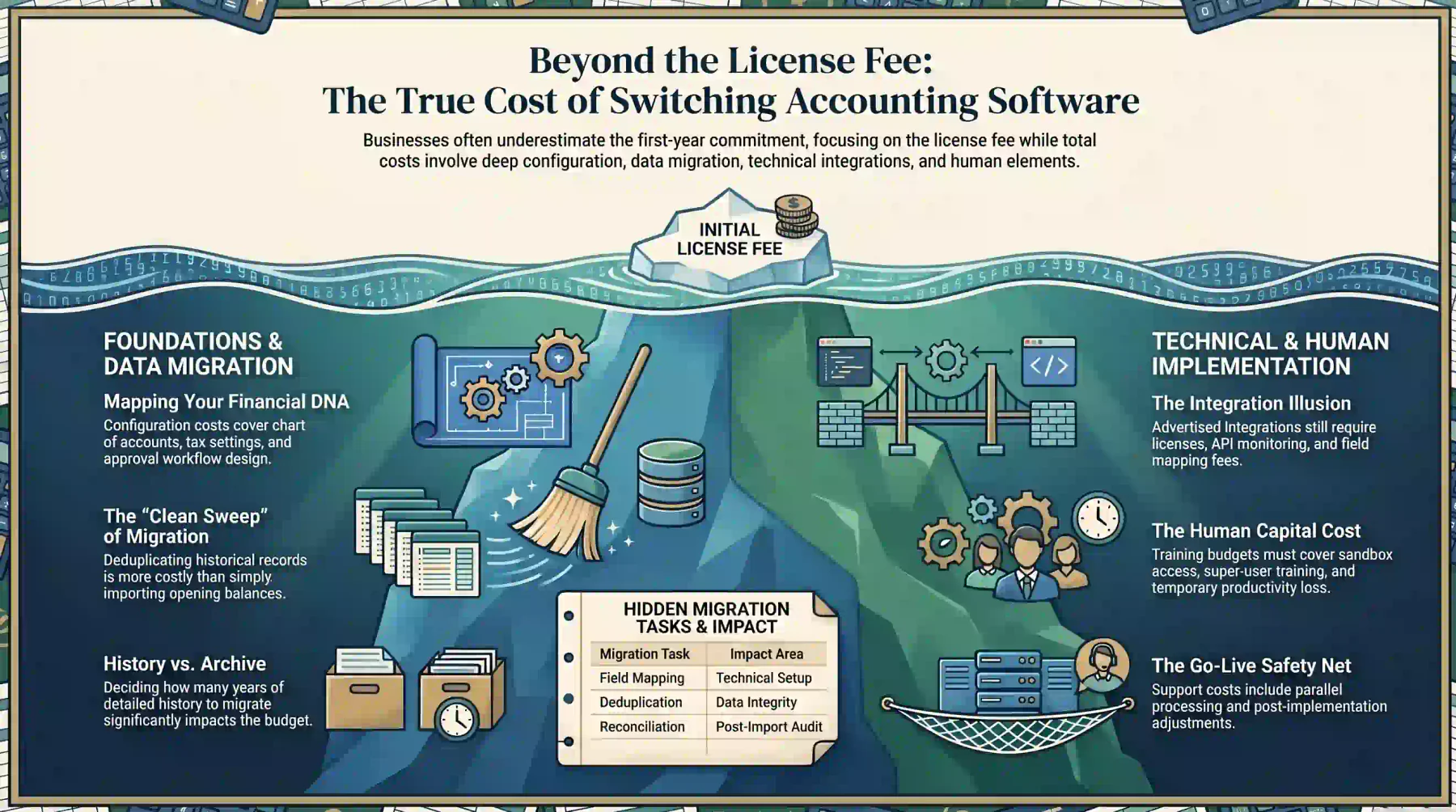
Implementation costs become significant when the business is moving more than opening balances and contact records. A quote that excludes migration, configuration, and training understates the switching budget.
Businesses that treat the licence fee as the total accounting software price often underestimate the first-year commitment by a wide margin. Plan for each of the categories below before choosing a supplier.
1. Requirements Assessment and Configuration
The implementation team must understand the current chart of accounts, tax settings, approval processes, reporting structure, entities, users, and integrations.
Configuration costs can include workshops, solution design, workflow setup, permission design, document templates, and project management. These services are usually billed separately from the subscription.
2. Data Cleansing and Migration
Historical data rarely moves cleanly from one system to another. Customer, supplier, product, account, employee, and transaction records may contain duplicates or inconsistent formats.
Migration work can include:
- Data extraction
- Cleansing and deduplication
- Field mapping
- Opening balances
- Outstanding invoices and bills
- Fixed assets
- Inventory quantities and values
- Historical transactions
- Reconciliation after import
Decide how many years of detailed history must remain inside the new system. Moving historical records is more expensive than importing opening balances and retaining a secure archive.
3. Integration Setup
An advertised integration does not mean zero-cost deployment. The connector may still require licences, authentication, field mapping, exception handling, and testing.
Ask who maintains the integration, how errors are monitored, and whether future API changes are covered by the support agreement. These questions often reveal ongoing costs the initial quote omits.
4. Testing, Training, and Go-Live
Testing should cover normal transactions, exceptions, permissions, reports, tax calculations, payroll, integrations, and period-end processes.
Training costs depend on the number of user groups and the degree of process change. The budget may also need to cover:
- Training materials
- Sandbox access
- Super-user training
- Parallel processing
- Go-live support
- Temporary productivity loss
- Post-implementation adjustments
How to Calculate First-Year and Three-Year Costs
A three-year model provides a more reliable comparison than the advertised monthly fee. It exposes recurring add-ons, implementation costs, and charges that grow as the business scales.
Run at least three scenarios: current operating size, expected growth, and a higher-growth or acquisition case. This range shows how accounting software pricing changes as the business evolves.
1. First-Year Cost Formula
Use this formula for the first year:
First-year cost = annual subscriptions + implementation + migration + integrations + training + first-year support + contingency
Annual subscriptions should include users, employees, entities, add-ons, storage, payment services, and connected applications. Do not use a promotional price as the annual budget figure.
2. Ongoing Annual Cost Formula
After implementation, calculate the steady-state annual cost:
Ongoing annual cost = subscriptions + add-ons + support + integration maintenance + expected usage charges
Include a reasonable allowance for additional users, employees, entities, and vendor price increases. Vendors may raise prices at renewal, so the year-one rate may not hold.
3. Three-Year Cost Formula
For a straightforward implementation, calculate as follows:
Three-year cost = one-time costs + year-one recurring costs + year-two recurring costs + year-three recurring costs
Where user counts are expected to grow, calculate each year separately:
Yearly licence cost = expected users x monthly licence price x 12
4. Worked Budgeting Scenarios
The examples below use published standard licence prices checked on 21 July 2026. They exclude price changes and any unlisted services.
Q6 Basic accounting and payroll
Monthly standard subscription: AUD $25 including GST
Annual subscription: $25 x 12 = AUD $300
Three-year subscription: $300 x 3 = AUD $900
This calculation excludes any separate migration or advisory services.
Xero Grow
Monthly standard subscription: AUD $78 including GST
Annual subscription: $78 x 12 = AUD $936
Three-year subscription: $936 x 3 = AUD $2,808
Additional payroll, expenses, projects, payment fees, or apps would need to be added separately.
Access Financials tier one with five users
Published price: AUD $209 per user per month
Minimum licence: $209 x 5 x 12 = AUD $12,540 per year
Three-year licence: $12,540 x 3 = AUD $37,620
These figures exclude GST, implementation, training, integration, and other professional services. The complete three-year model is:
Three-year cost = AUD $37,620 + implementation + training + integrations + support adjustments
How to Determine the ROI of Accounting Software
Accounting software ROI should compare measurable operational benefits with the full annualised cost. Lower accounting software prices do not automatically create better value if staff still rely on spreadsheets and disconnected systems.
Use this formula:
ROI = (quantified annual benefits - annual software cost) / annual software cost x 100
For implementation decisions, also calculate the payback period:
Payback period = initial investment / monthly net benefit
1. Finance-Team Time Savings
Measure the time currently spent on bank reconciliation, invoice entry, approval follow-up, reporting, consolidation, data correction, and spreadsheet preparation.
Calculate the benefit using the employee's loaded hourly cost:
Annual time-saving value = hours saved per month x loaded hourly cost x 12
Use observed process times rather than vendor productivity claims. The gap between a vendor estimate and actual saving often affects the ROI calculation by a significant margin.
2. Error and Compliance Risk Reduction
Accounting errors can create rework, delayed closes, duplicate payments, incorrect reporting, or incomplete audit evidence.
Not every risk has an exact dollar value. However, businesses can track correction hours, audit adjustments, duplicate payments, late fees, and reconciliation exceptions to establish a baseline.
Australian businesses should factor in ATO compliance obligations, including BAS accuracy, STP reporting, and record-keeping requirements, when assessing risk reduction as part of the ROI case.
3. Reduced Reliance on Disconnected Applications
List every application that could be retired after implementation, including bookkeeping, inventory, expense management, reporting, document capture, approvals, and integration tools.
The saving should include subscriptions, connector charges, maintenance, and administrative effort. Do not count an application as a saving unless it will actually be cancelled after go-live.
When doing an accounting software price comparison, total all existing tool costs against the integrated replacement. A higher subscription can still be cheaper when it eliminates several disconnected applications.
4. Scalability and Avoided Replacement Costs
A basic package may appear cheaper but become expensive if the business must replace it after adding entities, locations, inventory, projects, or formal controls.
Evaluate whether the system can support the expected operating model for at least three years. A scalable system may justify a higher initial accounting software cost if it prevents a future migration project.
How a Smarter System Can Improve Finance Operations
A connected accounting system can reduce manual entry, accelerate reconciliations, automate approval follow-ups, and give finance teams clearer visibility across departments and entities.
AI-assisted workflows can also identify unusual transactions, surface overdue actions, and make financial information easier to access. This helps the team spend less time processing data and more time supporting decisions.
The right system must still match the business’s structure, financial controls, reporting requirements, and existing applications. Buyers should test real workflows instead of relying only on feature lists.
A free consultation or trial provides an opportunity to assess these capabilities before committing. Use it to test priority processes, review implementation needs, and determine whether the system supports future growth.






Conclusion
Accounting software cost in Australia ranges from simple subscriptions under AUD $30 a month to custom enterprise quotes covering implementation, payroll, integrations, and multi-entity support.
Compare standard renewal prices over a three-year model, then request a scope-based quote if you need inventory, procurement, or multi-entity support, so the comparison reflects each option's real cost.
To learn further about accounting software costs, you can schedule a free consultation with our expert and gain deep insights for your business.

Frequently Asked Questions
It depends on the provider. Some plans include a separate accountant login, while others count advisers within the user limit. Q6, QuickBooks, and MYOB offer accountant access without an extra licence
Not always. Most small-business plans cover one organisation, so each ABN may need its own subscription. Advanced systems can manage multiple entities, but consolidation often carries a separate charge.
It varies by provider. You may get read-only access, access until the billing period ends, or be required to export data first. Always export your ledger, invoices, payroll, and audit history before cancelling.
Not necessarily. Some providers allow cancellation at the end of the billing period, while others apply notice periods or early-termination fees. Check renewal terms and minimum user commitments before signing.
Request one when the business has multiple entities, advanced approvals, inventory, project accounting, high transaction volumes, or several integrations, or when migration and implementation services are needed.