

Payroll software costs in Australia vary depending on the size of your business, number of employees, and the features you need. Small businesses often pay a monthly subscription, while larger businesses usually receive customised pricing.
The subscription fee is only part of the total cost. Businesses should also consider implementation, payroll setup, data migration, training, ongoing support, and future system updates when comparing software.
Some providers charge a fixed monthly fee or a per-employee rate, while enterprise payroll systems typically require a custom quote. Comparing the total cost of ownership helps businesses choose the right solution for their long-term needs.
Key Takeaways
Costs depend on the pricing model, employee numbers, payroll complexity, and the features your business needs. Comparing different payroll software options helps you find the best value.
Consider implementation, training, integrations, and ongoing support costs when evaluating payroll software. Understanding your payroll process also helps estimate the total investment.
The right solution should improve efficiency, support compliance, and grow with your business. An integrated HR software solution can help streamline payroll and employee management.
How Much Does Payroll Software Cost in Australia?

There is no single market price because Australian payroll software vendors package different functions and use different billing methods.
The following examples show the range of public pricing structures available. They are illustrations of pricing models, not a complete market benchmark.
| Payroll requirement | Indicative pricing structure | Common inclusions |
|---|---|---|
| Micro or small-business payroll | Low flat fee or packaged subscription | Basic pay runs, PAYG, superannuation, payslips and STP |
| Growing-business payroll | Base fee plus employee charge | Leave, employee self-service, accounting integration and reporting |
| Complex workforce payroll | Per employee or modular pricing | Awards, rostering, overtime, allowances and multi-location processing |
| Enterprise payroll | Custom quote | Multiple entities, advanced security, integrations, service levels and implementation |
These examples show why a headline such as “A$4 per employee” is not enough to establish value. One product may include payroll only, while another includes rostering, award interpretation, attendance, onboarding or HR records.
What Payroll Software Pricing Models Are Available?
hat Payroll Software Pricing Models Are Available?
Payroll software providers use different pricing models, so the advertised price doesn't always reflect the total cost. Understanding how a provider charges helps you compare options more accurately and choose a plan that fits your business.
1. Per Employee per Month
This is one of the most common pricing models, where you pay a monthly fee for each employee. Before choosing this option, check which employees are counted, as some providers charge for casual or inactive staff and may also apply a minimum monthly fee.
2. Flat Monthly or Base Fee
Some providers charge a fixed monthly subscription, while others combine a base fee with an additional charge for each employee. This offers predictable pricing, but costs may increase as your workforce grows.
3. Per Pay Run or Payslip
Some payroll systems charge based on payroll activity, such as each pay run, payslip, or employee payment processed. This model can suit businesses with less frequent payroll but may cost more for weekly or off-cycle pay runs.
4. Per Business or Payroll Entity
Some providers charge separate fees for each business entity, payroll database, branch, or location. This pricing model is common for businesses operating multiple companies and can increase overall costs.
5. Quote-Based Enterprise Pricing
Large businesses often receive customised pricing based on factors such as workforce size, payroll complexity, integrations, implementation, and support. While pricing is tailored, larger businesses may also benefit from volume discounts.
"The right payroll software delivers value through accuracy, efficiency, and long-term cost savings, not just a lower monthly price."
What Determines the Final Payroll Software Price?
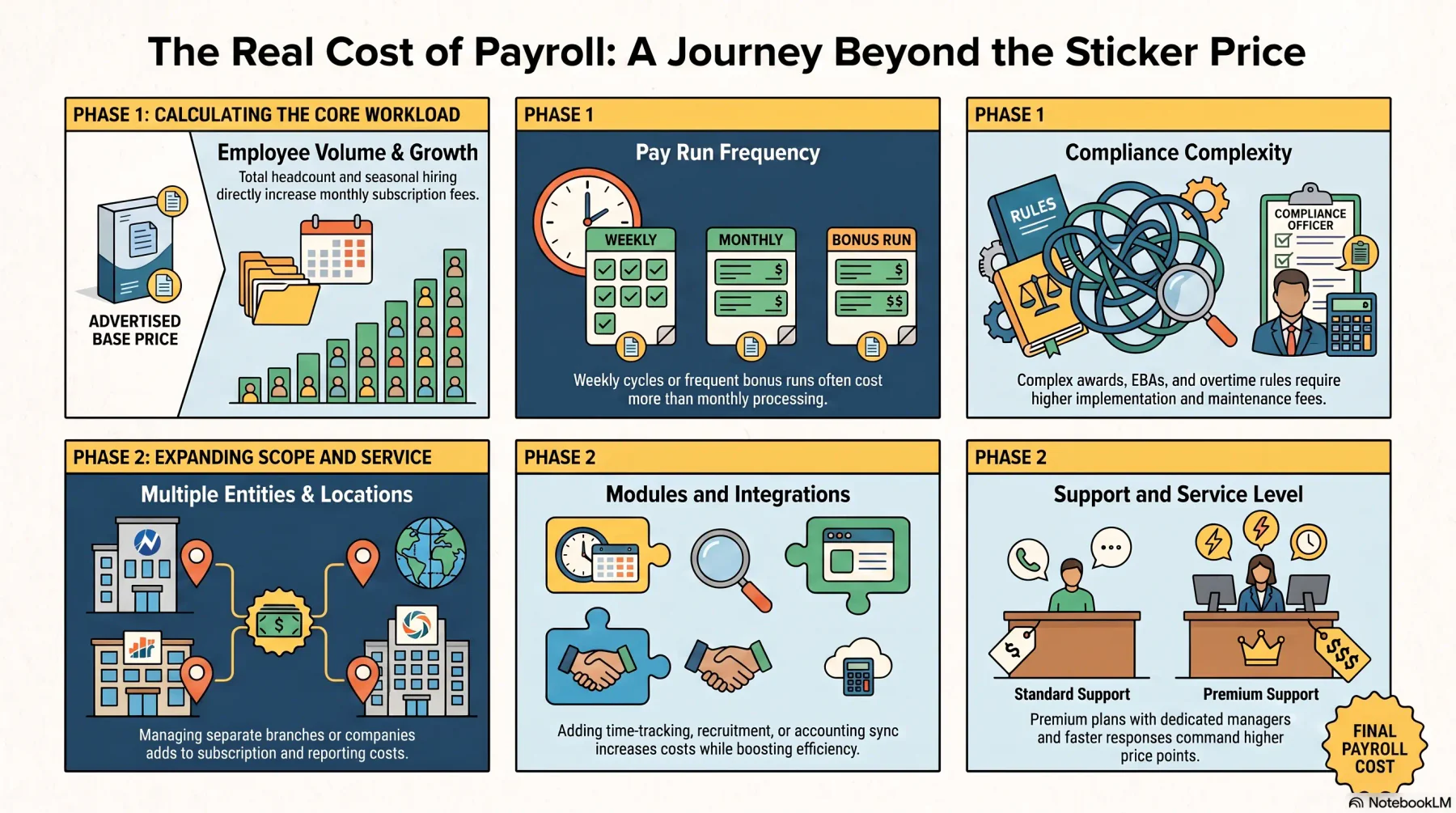
Payroll software costs depend on more than just the advertised subscription price. Several factors can influence the final amount you pay, so understanding them helps you compare providers more accurately and choose a solution that suits your business needs.
1. Employee Numbers and Workforce Changes
The number of employees is one of the biggest factors affecting payroll software costs. Businesses should also consider future growth, as adding more employees or managing casual and seasonal workers may increase monthly fees.
2. Pay Frequency and Number of Pay Runs
How often you process payroll can also affect pricing. Businesses that run payroll weekly or process frequent bonus, correction, or termination payments may pay more than those with monthly payroll cycles.
3. Awards, EBAs, Overtime, and Allowances
Complex payroll rules, such as modern awards, overtime, shift penalties, and allowances, often require additional setup and configuration. The more complex your payroll requirements, the higher the implementation and maintenance costs may be.
4. Number of Entities and Locations
Businesses operating multiple companies, branches, or locations may face additional costs. Separate payroll calendars, reporting requirements, and approval processes can increase both subscription and implementation fees.
5. Required Modules and Integrations
Many payroll systems offer optional features such as time tracking, leave management, employee self-service, recruitment, and accounting integration. While these modules increase the overall cost, they can also reduce manual work and improve efficiency.
6. Support and Service Level
The level of support included in your subscription can also affect pricing. Basic plans usually provide standard support, while premium plans may include faster response times, dedicated account managers, or additional payroll assistance.
Payroll Software vs Managed Payroll Costs
Payroll software gives an internal team the tools to calculate pay, maintain records and complete reporting. Managed payroll adds a service provider that processes some or all of the payroll workload.
| Payroll Software | Managed Payroll |
|---|---|
| Managed by your team | Managed by a payroll provider |
| Monthly software subscription | Monthly service fee |
| Greater control over payroll | Less administrative work |
| Best for businesses with in-house payroll | Best for businesses wanting to outsource payroll |
Managed payroll is not always cheaper. It may deliver value by reducing internal processing work or providing specialist support, but the employer still needs accurate attendance, employee and approval data.
Compare the combined cost of software, internal labour and risk—not simply the provider’s monthly invoice.
How to Calculate Payroll Software TCO
Looking beyond the monthly subscription helps businesses understand the true cost of payroll software. Calculating the total cost of ownership (TCO) includes both upfront and ongoing expenses, making it easier to compare different providers.
1. First-Year Payroll Software Cost
Your first-year TCO includes more than the subscription fee. It should also cover implementation, payroll setup, data migration, integrations, training, support, and any hardware or platform fees required to get the system running.
2. Three-Year TCO
A three-year TCO provides a better view of long-term costs than the first year's expenses alone. Include recurring costs such as subscriptions, support, integrations, maintenance, and any expected upgrades or system improvements.
3. Effective PEPM
Effective PEPM (Per Employee Per Month) calculates the actual monthly cost per employee after including implementation and other related expenses. This gives a more accurate comparison between payroll software providers than the advertised subscription price alone.
4. Payroll Software Cost Example
For example, a business with 80 employees may pay A$10 per employee per month, but once platform fees, implementation, training, and integrations are included, the total cost can be much higher. Calculating the TCO helps businesses understand the real investment and compare payroll solutions more accurately.
Hidden Payroll Software Costs to Check
The advertised subscription price is not always the total cost of payroll software. Businesses should also consider additional expenses such as implementation, payroll setup, data migration, and historical data storage.
Other costs may include extra pay runs, system integrations, administrator training, premium support, and annual price increases. Some providers also charge additional fees for multiple business entities, data export, or contract termination.
Before signing a contract, check how pricing changes as your workforce grows or shrinks. Some vendors apply minimum monthly fees, annual commitments, or other pricing conditions that can affect your long-term costs.
Conclusion
Choosing payroll software involves more than comparing the monthly price. Consider the total cost, features, and how well the system supports your business needs.
An integrated payroll solution connects employee records, attendance, leave, and accounting in one platform. This helps reduce manual work, improve accuracy, and support business growth.
If you're looking for a payroll solution tailored to your business needs, consult with our experts for free. Our team can help you explore the right HRM solution, explain pricing based on your workforce requirements, and recommend the best modules for your business.
Ready to optimise your business operations?
Talk to HashMicro and get the right software recommendation for your operations.
FAQ About Payroll Software Cost
No. Providers may charge per employee, business, ABN, location, pay run, payslip or transmission. Enterprise systems commonly use customised quotes.
Often, yes. Implementation may cover payroll configuration, data migration, testing, integrations and training. Some vendors bundle part of this work into the subscription, while others quote it separately.
At minimum, the quote should identify subscription scope, employee limits, payroll calculations, pay slips, reporting, STP-related workflows, support, implementation and additional module costs.
Its invoice is usually higher because it includes processing services. However, the correct comparison also considers internal payroll labour, expertise, operational risk and the cost of correcting errors.
Total cost of ownership includes the subscription plus implementation, migration, integrations, training, add-ons, support, scaling and internal administration over a defined period.
Not always. Some Australian pricing pages explicitly add GST, while others do not clearly state its treatment. Confirm GST before comparing quotes