

Customer orders can arrive by phone, WhatsApp, website chat, email, kiosk, or voice note. Every channel creates the same challenge: turning an informal request into an accurate order.
AI order taking interprets the conversation, identifies the required products, and checks live business rules. It then prepares a structured order for confirmation instead of relying on manual entry.
When connected with POS, inventory, CRM, accounting, and fulfilment systems, an AI Coworker can coordinate the full process while routing unclear or sensitive requests to authorised staff.
Key Takeaways
AI order taking is the use of conversational AI to receive, interpret, validate, and record customer orders within connected business systems.
AI order taking works by extracting order details from conversations, matching business records, validating rules, and creating the transaction.
Implementing AI order taking starts with one channel, clean product data, POS integration, defined exception rules, and a controlled pilot phase.
HashMicro's Order Taking AI Coworker turns customer conversations into sales workflows grounded in connected products, prices, and inventory.

What Is AI Order Taking?
AI order-taking uses conversational artificial intelligence to receive, interpret, validate, and record customer orders within
order-taking uses conversational artificial intelligence to receive, interpret, validate, and record customer orders within
It converts unstructured speech, messages, documents, and images into structured fields. These include products, quantities, variants, modifiers, customer details, prices, and fulfilment instructions.
An AI ordering system does more than save a transcript. It matches each request with approved product, customer, pricing, inventory, and location records.
For example, a restaurant customer may request two burgers, remove cheese from one, add chips, and schedule collection. The system must translate every instruction into valid POS fields.
A wholesale customer may ask to repeat a previous order but increase one product to 50 cartons. The AI must retrieve the correct order, units, contract prices, and delivery location.
The system typically identifies:
- The customer and relevant account.
- The requested products or menu items.
- Quantities, units, sizes, and variants.
- Required modifiers and special instructions.
- The branch, warehouse, or service location.
- Applicable prices, promotions, taxes, and fees.
- The delivery, collection, dine-in, or shipment method.
- Any issue requiring clarification or staff approval.
AI should ask a focused question when essential information is missing. It must not guess a product, quantity, address, allergen status, delivery time, or final price.
This distinction separates AI order taking from a basic chatbot. A chatbot may answer a menu question, while order-taking AI can prepare a validated transaction.
Australian businesses were receiving digital orders well before the current AI wave. Australian Bureau of Statistics data recorded internet ordering across retail, wholesale, manufacturing, and hospitality.
AI extends this behaviour into conversational channels. Customers can describe what they want naturally, rather than searching a catalogue and filling out every field themselves.
"Order accuracy depends on validation, not conversation alone. AI order taking works when every request is checked against live product, price and stock data before confirmation"
How Does AI Order Taking Work?
AI order taking follows a conversation-to-confirmation workflow. Each stage should use approved business records and defined controls rather than information generated without evidence.
-
Receive and classify the request. The system identifies whether the customer wants to order, change an order, check stock, request a quote, or ask a general question.
-
Extract the order details. It identifies product names, quantities, units, variants, modifiers, timing, addresses, and special instructions from the conversation.
-
Match the request with business records. Customer language is mapped to approved SKUs, menu items, pack sizes, price lists, and fulfilment locations.
-
Validate the proposed order. The system checks product status, available stock, required modifiers, prices, promotions, taxes, credit rules, and fulfilment capacity.
-
Clarify missing or conflicting details. If several products match the request, the AI presents relevant options instead of selecting one without permission.
-
Present an itemised summary. The customer reviews the items, quantities, modifications, location, timing, discounts, fees, and total before confirming.
-
Create the appropriate transaction. Depending on the workflow, the AI creates a POS order, quotation, sales order, online order, or draft awaiting approval.
-
Coordinate payment and fulfilment. It can send a secure payment link, reserve stock, notify the kitchen, prepare delivery, or assign the case to staff.
Order status and payment status should remain separate. A confirmed order awaiting payment must not appear as paid unless the approved workflow permits that treatment.
The system should also preserve the source channel, customer confirmation, validation results, approval history, and final transaction reference.
If an integration fails, the AI should hold the request as a pending draft. It must check for duplicate records before attempting to create the order again.
AI Order Taking Vs Traditional Ordering Systems
Traditional ordering tools usually capture either the conversation or the transaction. AI order taking connects both activities within one controlled workflow.
| Ordering Method | How It Works | Main Limitation |
|---|---|---|
| Staff Phone Ordering | An employee listens, confirms the request, and enters the order manually. | Busy periods can produce missed calls, slow responses, and transcription errors. |
| IVR Phone Tree | The caller selects numbered options from a fixed menu. | It cannot handle natural, detailed, or unexpected requests well. |
| Basic Chatbot | It answers questions through scripts, FAQs, or predefined paths. | It may not access current prices, stock, customer terms, or order records. |
| Online Ordering Form | The customer selects products and enters each detail through fixed fields. | The customer must find the correct item and complete the form independently. |
| Order Management System | It records, routes, and tracks orders after they enter the business. | It does not usually manage the original customer conversation. |
| Predictive AI | It forecasts demand, stock needs, or likely product preferences. | It does not necessarily capture, validate, or create an order. |
| AI Order Taking Coworker | It understands the request, validates business data, creates the order, and coordinates follow-up. | It requires reliable records, integrations, permissions, and escalation rules. |
An IVR may direct a caller to press one for orders. Conversational AI can ask what the customer wants, clarify modifications, check availability, and prepare the basket.
A basic chatbot may provide a menu link. An ERP-connected AI Coworker can combine customer, product, price, stock, sales, and fulfilment data before creating the transaction.
The goal is not to remove every person from the process. It is to automate repeatable work while preserving human judgement where safety, trust, or commercial authority matters.
Where Can Businesses Use AI Order Taking?
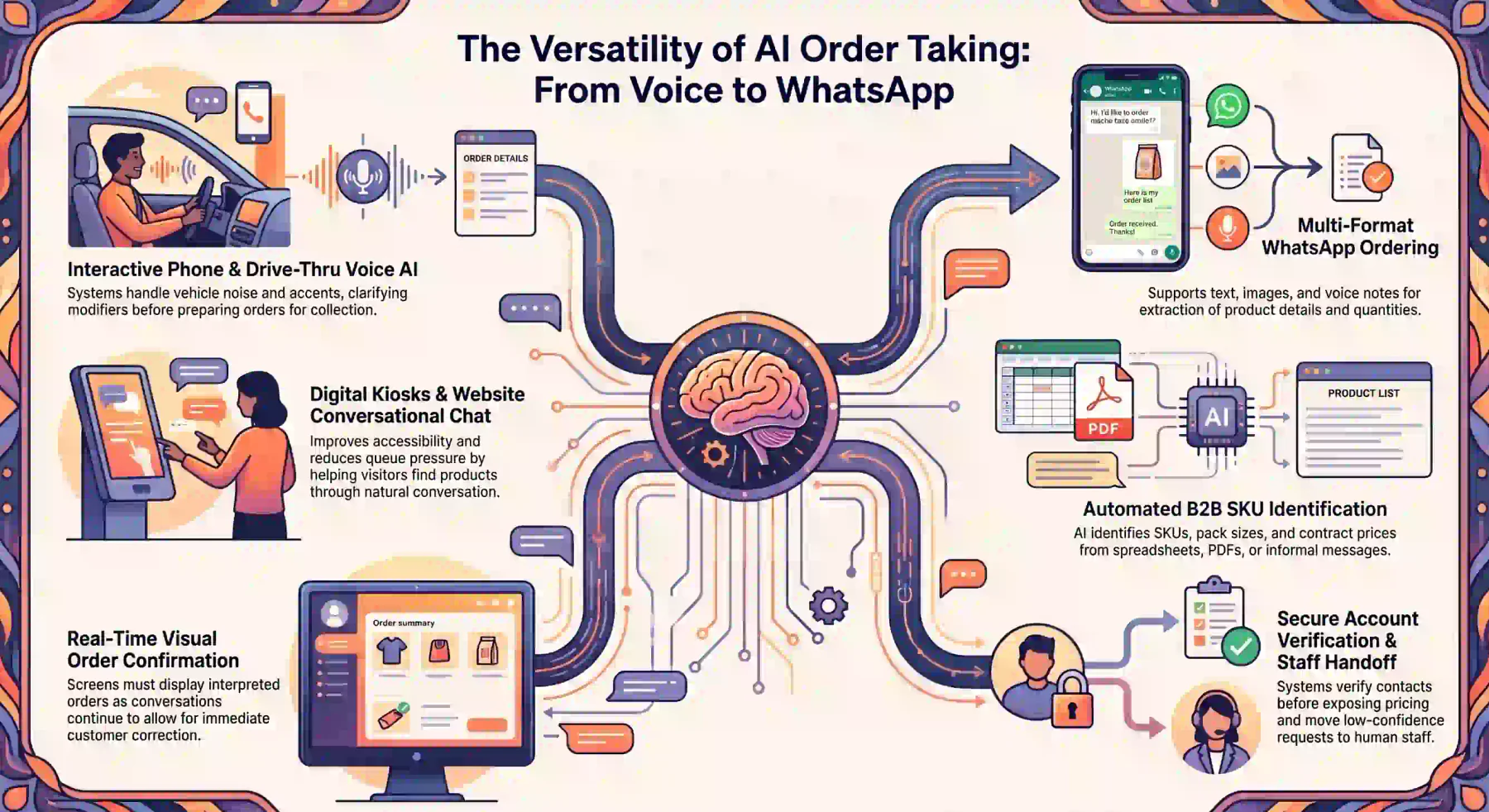
AI order taking suits businesses that receive repeatable customer requests through conversation. Common users include restaurants, retailers, wholesalers, distributors, and service providers.
1. Phone
Restaurant voice ai can answer calls, identify menu requests, clarify modifiers, and prepare orders for collection or delivery.
The system should confirm critical details aloud, including quantities, sizes, branch, timing, and total price. Customers need a clear chance to correct the interpretation.
Testing should cover accents, interruptions, background noise, poor call quality, and similar-sounding items. Low-confidence requests should move to staff with their context attached.
Phone automation can also support retail, spare-parts, pharmacy, and service bookings where customers prefer speaking instead of completing a form.
2. WhatsApp
WhatsApp supports text, images, PDFs, and voice notes in one conversation. This makes it suitable for consumer orders and repeat B2B purchasing.
A customer may repeat a previous order, adjust quantities, confirm an address, request a quotation, and receive payment instructions without changing channels.
Automated order taking can extract product details from informal messages while still applying customer-specific prices, pack sizes, and commercial terms.
The workflow should verify the customer before exposing account information or applying contract pricing. Unverified contacts should receive only approved public information.
3. Website
Website chat can help visitors find products, compare valid options, check availability, and prepare an order through natural conversation.
The AI must distinguish browsing from purchasing. A question about a product should not add that item to the basket without explicit customer consent.
Recommendations should follow approved rules and current availability. The system should explain why an option is relevant without pressuring the customer.
A visible basket summary helps customers review how the ai ordering system interpreted their request before they proceed to payment.
4. Kiosk
A conversational kiosk can help customers find items, select sizes, choose required modifiers, and confirm the basket before payment.
This interface can improve accessibility for customers who struggle with complex menus. It can also reduce queue pressure during busy periods.
The screen should display the interpreted order as the conversation continues. Customers need simple controls to remove items, correct quantities, or request staff assistance.
5. Drive-Thru
Drive-thru ordering combines speech recognition with menu, stock, pricing, and kitchen workflows. Speed matters, but accuracy remains the primary control.
The system must handle vehicle noise, multiple speakers, changed instructions, unavailable items, and customers who pause while deciding.
Staff should be able to enter the conversation without restarting the order. The handover should preserve the current basket and the unresolved question.
The final order should appear on a confirmation screen before payment or preparation begins.
6. B2B Repeat Ordering
Distributors and wholesalers often receive orders through WhatsApp, email, spreadsheets, PDFs, images, and voice notes.
AI can identify SKUs, pack sizes, units, quantities, delivery sites, contract prices, credit terms, and requested delivery dates.
It can also compare the request with previous orders. However, it should not assume that repeating an earlier order means every line and quantity remains unchanged.
Large or unusual orders may require approval before confirmation. The AI can prepare the transaction and supporting checks so staff review only the exception.
How AI Validates Menu, Pricing, And Inventory
AI must validate the proposed order against connected business rules before promising availability, delivery, or a final amount.
1. Item Availability
The system checks whether an item is active, sellable through the selected channel, and available from the chosen branch or warehouse.
Recorded stock is not always available stock. Units may already be reserved, allocated, quarantined, damaged, or held at another location.
For prepared food, availability may depend on ingredients, recipes, kitchen capacity, and lead time rather than a finished-item quantity alone.
If the requested item is unavailable, the AI may present approved alternatives. It must not apply a substitution that changes price, specifications, or dietary suitability without consent.
2. Modifier And Recipe Rules
Restaurant orders may require sizes, sides, cooking preferences, sauces, add-ons, exclusions, or other mandatory selections.
The AI should enforce the same modifier rules as the POS. If a meal requires a drink choice, the customer must provide one before confirmation.
Recipe data can reveal whether an unavailable ingredient affects several menu items. It can also support preparation notes and inventory consumption.
A modifier must not be treated as proof of allergen safety. Removing one ingredient may not address cross-contact or ingredients used elsewhere in the recipe.
3. Branch-Specific Menus
Multi-location businesses may operate different menus, stock levels, prices, promotions, opening hours, and fulfilment options.
The AI should identify the branch before quoting availability or price. It must validate the order using records assigned to that location.
If another branch can fulfil the request, the system may present it as an option. It should not change the pickup location or delivery origin without confirmation.
Location validation should also cover service areas, minimum delivery values, cut-off times, production capacity, and scheduled closures.
4. Promotional Pricing
Promotions may depend on dates, times, quantities, channels, customer groups, product combinations, or participating branches.
The pricing engine should determine eligibility. The conversational layer can explain the result, but it should not invent a discount or calculate one independently.
When several promotions exist, the system should apply the configured priority and compatibility rules. It must not stack offers unless the business permits it.
The itemised summary should show the original price, approved discount, applicable fees, and final total before confirmation.
5. Customer-Specific Pricing
B2B customers may have contract prices, volume tiers, currencies, credit limits, payment terms, and approved product lists.
The system should select the price list assigned to the verified customer, company, branch, currency, and order date.
If the customer cannot be verified, the AI should use an approved public price or transfer the request. It must not reveal confidential commercial terms.
Overrides, manual discounts, expired contracts, and credit exceptions should require approval from an authorised employee.
Connecting AI Orders With POS And ERP
The value of AI order taking depends on what happens after the conversation. An isolated transcript still requires staff to enter, validate, and route the request manually.
A connected POS workflow allows validated customer details, products, prices, and fulfilment instructions to move into the transaction without duplicate entry.
1. POS
The POS supplies menu items, modifiers, prices, branch rules, taxes, service charges, and order statuses.
After confirmation, the AI can create a POS order with the correct source channel, fulfilment type, location, customer, and preparation notes.
Staff should be able to identify whether the order came from phone, WhatsApp, website chat, kiosk, or drive-thru.
The integration should reject inactive products, invalid modifiers, closed sessions, and duplicate submissions rather than silently creating an incomplete order.
2. Inventory
Inventory integration checks on-hand, available, reserved, incoming, and restricted stock at the relevant location.
The approved workflow determines when stock is reserved. A draft enquiry should not reduce availability in the same way as a confirmed order.
For restaurants, the system may record ingredient consumption through recipe rules. For wholesale orders, it may reserve finished goods by warehouse and batch.
If stock changes before confirmation, the AI should revalidate the basket instead of relying on an earlier result.
3. Kitchen Display
Confirmed restaurant orders can move directly to the relevant kitchen stations with quantities, modifiers, timing, and preparation notes.
The kitchen should receive concise operational instructions, not a full conversation transcript or the AI’s internal reasoning.
Order updates must remain controlled. A customer change should not overwrite an item already in preparation without notifying the appropriate staff member.
Preparation, ready, served, and cancelled statuses should flow back to the customer channel when the business enables those notifications.
4. CRM
CRM integration connects the order with the correct customer, contact details, addresses, preferences, and previous transactions.
The AI can use verified history to support repeat ordering and relevant recommendations. It should not create sensitive or inferred profile data without a valid business purpose.
Identity matching needs safeguards where customers share phone numbers, email addresses, delivery locations, or company accounts.
The CRM record should retain the order source and relevant consent while limiting access to the full conversation according to staff permissions.
5. Accounting
Accounting integration records the financial effect when the transaction reaches the relevant stage.
Depending on the workflow, it may create an invoice, record GST, monitor payment, allocate a receipt, or reconcile the completed sale.
A quotation or abandoned basket must not be posted as revenue. The system should distinguish interest, confirmation, fulfilment, invoicing, and payment.
Refunds, credit notes, write-offs, and manual adjustments should follow financial approval rules and preserve a complete audit history.
6. Delivery And Fulfilment
A confirmed order can initiate collection preparation, warehouse picking, delivery scheduling, shipment, or third-party courier booking.
The workflow should validate addresses, delivery zones, cut-off times, capacity, service fees, and customer instructions before making a commitment.
Tracking updates can return to the original conversation channel. Customers should receive clear status messages without gaining access to internal operational details.
If fulfilment fails, staff should receive the customer context, order details, validation history, and available recovery options.
Example: From Customer Conversation to Confirmed Order
Consider a customer who sends this WhatsApp message to a restaurant group:
“Can I order 25 chicken lunch boxes for tomorrow at 12:30 pm? Two need to be gluten-free. Pickup from the Brisbane CBD store.”
The AI should not confirm the request immediately. It must structure the order, resolve missing details, and validate whether the selected branch can fulfil it safely.
1. Customer Request
The AI extracts 25 chicken lunch boxes, two gluten-free requests, pickup fulfilment, Brisbane CBD, and a requested collection time of 12:30 pm tomorrow.
It then matches “chicken lunch box” with the approved menu. If several products match, the AI presents those options instead of choosing one without confirmation.
The system also identifies the customer where possible. A verified customer record may provide contact details, previous orders, saved addresses, or an applicable price list.
2. AI Clarification
The lunch box may require a side, drink, sauce, or serving size. The AI asks only the questions needed to produce a valid order.
It also clarifies whether gluten-free is a preference, intolerance, coeliac requirement, or diagnosed allergy.
Removing an ingredient does not automatically make a meal safe. The AI must not promise allergen safety unless approved product data and operating procedures support that statement.
Once the customer answers, the system repeats the critical details so the customer can correct any misunderstanding before validation continues.
3. Stock Validation
The system confirms that the Brisbane CBD branch offers the product at the requested time and can prepare a 25-unit order.
It checks finished items, required ingredients, reserved stock, open purchase orders, existing kitchen demand, preparation lead time, and staff capacity.
If the branch lacks an ingredient, the AI may present an approved alternative, another pickup time, or another branch.
It must not switch the item, branch, quantity, or collection time without customer confirmation.
The pricing engine then applies the correct menu price, volume terms, GST treatment, promotion rules, and any disclosed surcharge.
4. Order Creation
When every required detail is valid, the AI presents an itemised summary with products, quantities, modifiers, pickup location, collection time, fees, and total price.
After customer confirmation, it creates the appropriate POS or sales order and records the source channel.
The system may send a secure payment link, reserve stock, notify the kitchen, and provide a confirmation reference.
The transaction should preserve the customer’s confirmation, validation results, payment status, fulfilment status, and any later changes.
5. Human Escalation When Required
The order includes a large quantity and an allergen-related request. Either condition may require approval under the restaurant’s operating rules.
The AI sends staff the structured basket, relevant conversation context, stock result, menu rules, and the specific issue requiring judgement.
Staff should not need to rebuild the order or ask the customer to repeat every detail.
After review, the authorised employee can approve, modify, or decline the request. The customer then receives an updated summary before final confirmation.
Benefits and KPIs
Businesses should assess AI order taking through order quality and operational outcomes. Conversation volume alone does not show whether the system creates reliable orders.
1. Missed-Order Rate
The missed-order rate tracks genuine order requests that receive no useful response or follow-up.
Measure it across channels, branches, operating hours, and peak periods. Separate abandoned enquiries from customers who were ready to order.
A falling rate may show that automated order taking is improving after-hours coverage or supporting staff during busy periods.
2. Order Accuracy
Order accuracy measures confirmed orders completed without material corrections to products, quantities, modifiers, prices, locations, or timing.
Track errors by category. A product-matching problem requires a different fix from an outdated price, missing modifier, or failed stock check.
Review corrections made before confirmation separately from those discovered after payment or preparation begins.
3. Response Time
Response time measures how quickly a customer receives the first useful answer after sending a message or starting a call.
A greeting alone is not a useful response. The measurement should reflect when the system begins addressing the customer’s actual request.
Also track total order-completion time. Fast replies have limited value when repeated questions or slow integrations delay confirmation.
4. Average Order Value
Average order value shows whether confirmed baskets change after AI order taking is introduced.
Approved recommendations may increase value, but the system must not add products without consent or promote unavailable items.
Review value beside conversion, corrections, complaints, and cancellations. A larger basket is not beneficial when customers did not understand what was added.
5. Staff Workload
Measure how much time employees spend receiving, interpreting, entering, correcting, and following up on orders.
The strongest reduction should come from repetitive transcription and routine validation, not from suppressing necessary human review.
Track how many escalations arrive with complete context. A poor handover can move work between teams without reducing it.
6. Abandoned Calls
The abandoned-call rate measures callers who disconnect before completing an order or reaching the required assistance.
Review the point where each call ends. Long introductions, repeated confirmations, recognition errors, and unclear options can increase abandonment.
For restaurant voice AI, compare peak and off-peak periods while accounting for outages, call quality, and transfers to staff.
Risks and Human Controls
Automated order taking requires clear boundaries. The AI must know which actions it may complete, which require confirmation, and which must move to an authorised person.
1. Allergies and Special Requests
The AI may retrieve approved ingredient information, record dietary requests, and enforce defined menu rules.
For unpackaged food, such as café or takeaway meals, required allergen information must be displayed with the food or provided on request using approved names.
FSANZ allergen requirements support clear declarations and access to current information.
The system should escalate diagnosed allergies, cross-contact questions, uncertain ingredients, unsupported substitutions, and conflicting recipe records.
It must never guarantee that a meal is safe when approved data or preparation controls cannot support that claim.
2. Ambiguous Language
Accents, background noise, spelling differences, product nicknames, and incomplete messages can change the interpreted order.
Confidence thresholds should trigger clarification. The AI should present relevant options when several products could match the request.
If uncertainty remains, the system should transfer the conversation instead of selecting the most likely answer.
The handover should include the proposed interpretation and unresolved detail, allowing staff to continue from the current point.
3. Payment Information
Order conversations should not become uncontrolled stores of card information. Customers should move to an approved payment environment through a secure link or terminal.
Card verification codes must not be retained after authorisation. Recording, transcripts, logs, and support tools must follow the same payment-data controls.
Payment status should come from the payment provider. The AI must not describe an order as paid because the customer says that payment was completed.
4. Refunds and Cancellations
A cancellation may affect payment, stock, kitchen work, delivery bookings, and accounting records.
The AI can identify the order, collect the reason, check the policy, and prepare the required action.
High-value refunds, late cancellations, dispatched orders, manual adjustments, and repeated exceptions should move to authorised staff.
The final record should preserve the original order, reason, approval, financial adjustment, inventory effect, and customer communication.
5. Approval and Escalation Rules
A practical control model separates routine actions from decisions that require customer confirmation, staff approval, or a complete block.
| Control Level | Example Actions |
|---|---|
| Automate | Answer approved product questions, collect order details, and provide verified order status. |
| Confirm With Customer | Add products, apply modifiers, select a location, accept a substitution, and confirm the final basket. |
| Require Staff Approval | Handle allergen requests, large orders, contract exceptions, manual discounts, refunds, and credit overrides. |
| Block | Invent products, bypass payment controls, confirm unavailable stock, or remove the audit history. |
Each completed order should retain the source conversation, extracted fields, validation results, confirmation, escalation history, and final system record.
Businesses using customer information should also apply privacy controls. The OAIC recommends transparency, due diligence, and meaningful human oversight.
A public-facing AI system should identify itself clearly. Customers should understand when they are interacting with AI and how their information supports the order process.
How to Implement AI Order Taking
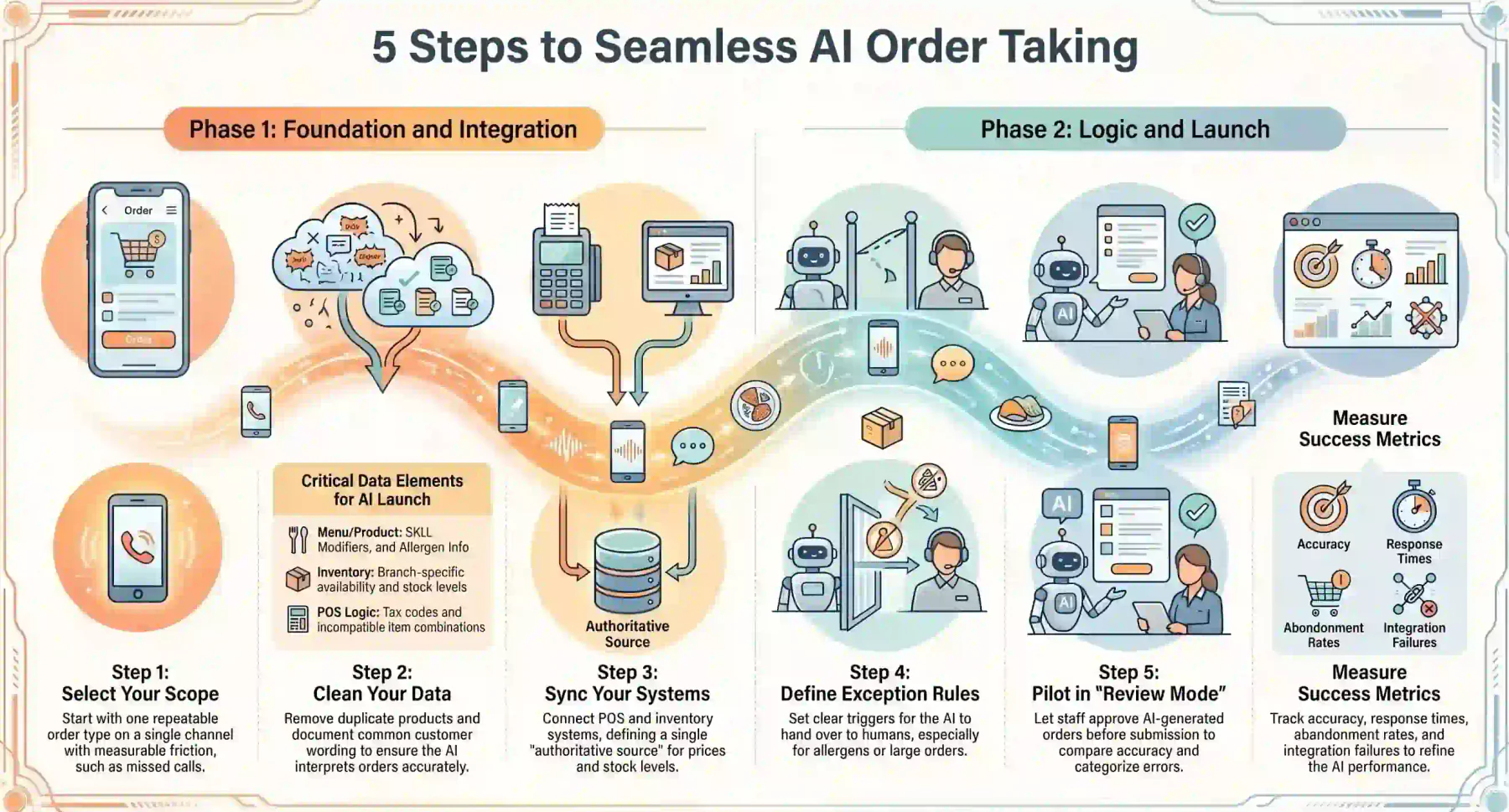
A controlled rollout should begin with one repeatable order type. This creates a clear scope for testing data, integrations, staff handovers, and customer outcomes.
1. Select Channels
Choose the channel with a measurable ordering problem. A restaurant may begin with missed calls, while a distributor may start with repeat WhatsApp orders.
Define the first supported order type, customer group, location, operating hours, and fulfilment method.
Do not activate every channel before the core interpretation, validation, and escalation process works reliably.
2. Clean Menu and Product Data
Review product names, SKUs, variants, units, menus, modifiers, recipes, prices, tax codes, locations, and sale status.
Remove duplicates and document common customer wording. Similar product names need clear attributes that allow the AI to present the correct options.
For restaurant orders, confirm mandatory modifiers, incompatible combinations, ingredient records, allergen information, and branch-specific availability.
The AI cannot create reliable orders when the source catalogue contains incomplete or conflicting records.
3. Connect POS and Inventory
Connect the systems controlling products, prices, stock, customers, order creation, payment, and fulfilment.
Define the authoritative source for each field. If two systems show different prices or quantities, the workflow needs a clear rule for resolving the conflict.
Test read and write operations separately. The ability to check stock does not prove that the system can create an order successfully.
Also test timeouts, rejected orders, partial failures, and duplicate prevention before enabling automatic creation.
4. Define Exception Rules
Document when the AI should clarify, request approval, transfer the conversation, or block an action.
Rules should cover allergens, ambiguous quantities, unavailable items, unsupported modifiers, payment failures, pricing disputes, and large orders.
Include offline systems, low-confidence interpretations, contract exceptions, refunds, credit overrides, and suspected duplicate orders.
Each handover should identify the issue, responsible role, required context, response target, and permitted resolution.
5. Pilot and Measure
Begin in review mode. Let the AI structure and validate orders while trained staff approve them before submission.
Compare proposed orders with the records employees would create. Categorise every correction by cause instead of relying on general feedback.
Once performance is stable, enable controlled order creation for low-risk requests while keeping higher-risk cases within approval workflows.
Track missed orders, accuracy, response time, corrections, escalations, abandonment, staff workload, and integration failures.
Review failed conversations regularly. The cause may be weak language recognition, poor product data, an incorrect rule, or a failed connection.
How HashMicro’s Order Taking AI Coworker Works
HashMicro’s Order Taking AI Coworker converts customer conversations into structured sales workflows grounded in connected business data.
It operates through Hashy OS, the AI work layer that runs on top of HMX or HM Nova and other connected tools. The Coworker does not replace the ERP that controls the transaction.
Depending on the configured integrations, it can receive order requests from WhatsApp, email, live chat, documents, images, voice notes, and other approved channels.
A typical workflow includes:
- Receive a customer request through a connected channel.
- Identify the customer, products, quantities, and instructions.
- Match customer wording with approved product records.
- Check current prices, stock, branch rules, and customer terms.
- Clarify missing, conflicting, or low-confidence details.
- Present the complete order for customer confirmation.
- Create the appropriate sales order or draft transaction.
- Send approved payment instructions or a secure payment link.
- Monitor payment and fulfilment status.
- Escalate exceptions with the relevant order context attached.
Its main distinction is grounding. The Coworker works from the company’s products, customers, prices, inventory, order history, permissions, and operating rules.
It can recommend approved add-ons or alternatives, but it should not alter the basket without consent or bypass configured approval controls.
The order, confirmation, validation, and escalation history remain traceable. This supports operational review without exposing unrestricted data to every employee.
Channel coverage depends on the integrations configured for each business. Phone, kiosk, drive-thru, and marketplace ordering should be validated before being presented as active.






Conclusion
AI order taking connects conversations with systems for pricing, stock, sales, payment, and fulfilment. The AI Coworker structures requests from any channel, then validates and creates the order.
Reliable automation still depends on clean data, connected systems, customer confirmation, and human control. The safest starting point is one repeatable flow with measurable outcomes.
If you are interested in learning further about AI order taking, you can book a free consultation with our experts today. Start anytime and improve your operation.

Frequently Asked Questions
The AI sends order details to the pricing engine for GST and surcharges. Card surcharge caps apply until 30 September 2026, with no-surcharge rules from 1 October 2026. Holiday surcharges must be disclosed upfront.
AI can record dietary requests and enforce modifier rules, but cannot assume an item is safe just because an ingredient is removed. Diagnosed allergies and complex modifications go to trained staff with full context.
If the system goes offline, the AI stops making real-time commitments and saves the request as a pending draft for staff. Confirmation waits for a successful system result, and duplicates are checked before retrying.