

 Limited to 100 registrants

inclusions can change. Unless stated otherwise, confirm whether quoted amounts are in AUD and whether GST is included.
Inventory management software costs in Australia vary depending on your business size, features, and operational needs. Small businesses may pay a low monthly subscription, while larger businesses often require custom pricing.
The subscription fee is only part of the total cost. Businesses should also consider implementation, integrations, hardware, training, and ongoing support.
This guide explains common pricing models, the factors that affect costs, and how to calculate the total cost of ownership (TCO).
Key Takeaways
Costs depend on your business size, required features, warehouses, users, and integrations rather than a single fixed price.
Look beyond the monthly subscription by including implementation, hardware, training, support, and ongoing maintenance costs.
Choose a solution that fits your workflows, supports future growth, and delivers the best value over time, not just the lowest upfront price.
How Much Does Inventory Management Software Cost in Australia?

Inventory management software pricing varies because each provider offers different features. Basic systems focus on stock tracking, while advanced solutions include warehouse management, barcode scanning, forecasting, manufacturing, and accounting integration.
Costs are usually based on factors such as the number of users, warehouses, SKUs, transactions, and integrations rather than employee count. Businesses with more complex inventory operations typically require higher-tier plans or custom pricing.
Before comparing software, identify your operational needs and the features your business requires. This makes it easier to choose a solution that fits your budget and supports future growth.
How Vendors Price Inventory Management Software
Inventory software vendors use several pricing mechanisms. Understanding these mechanisms is essential because two plans with similar headline prices can produce very different costs as a business grows.
1. Organisation-Based and Tiered Subscriptions
Many providers charge a subscription based on your business or organisation, with different pricing tiers that unlock more users, warehouses, integrations, and advanced inventory features. Higher tiers generally cost more but offer greater functionality.
2. User, Location and Device-Based Pricing
Some providers charge extra based on the number of users, business locations, or warehouse devices such as barcode scanners and tablets. Businesses with larger teams or multiple warehouses may have higher monthly costs.
3. Modules and Advanced Capabilities
Advanced features such as warehouse management, barcode scanning, demand forecasting, manufacturing, and accounting integrations are often sold as optional modules or included only in higher-tier plans. Adding these features can increase the overall software cost.
"The best inventory software isn't the cheapest. It's the one that delivers the most value as your business grows."
What Costs Sit Outside the Subscription Fee?
The first-year cost of inventory management software is often higher than the monthly subscription. Businesses should also budget for implementation, system setup, data migration, integrations, training, and ongoing support.
Additional costs may include barcode scanners, printers, labels, tablets, custom reports, API access, and other hardware. These items are often priced separately from the software subscription.
Preparing your data can also add to the overall cost. Cleaning product records, updating stock information, and fixing inventory errors before migration helps ensure a smoother implementation.
Australia-Specific Pricing Checks
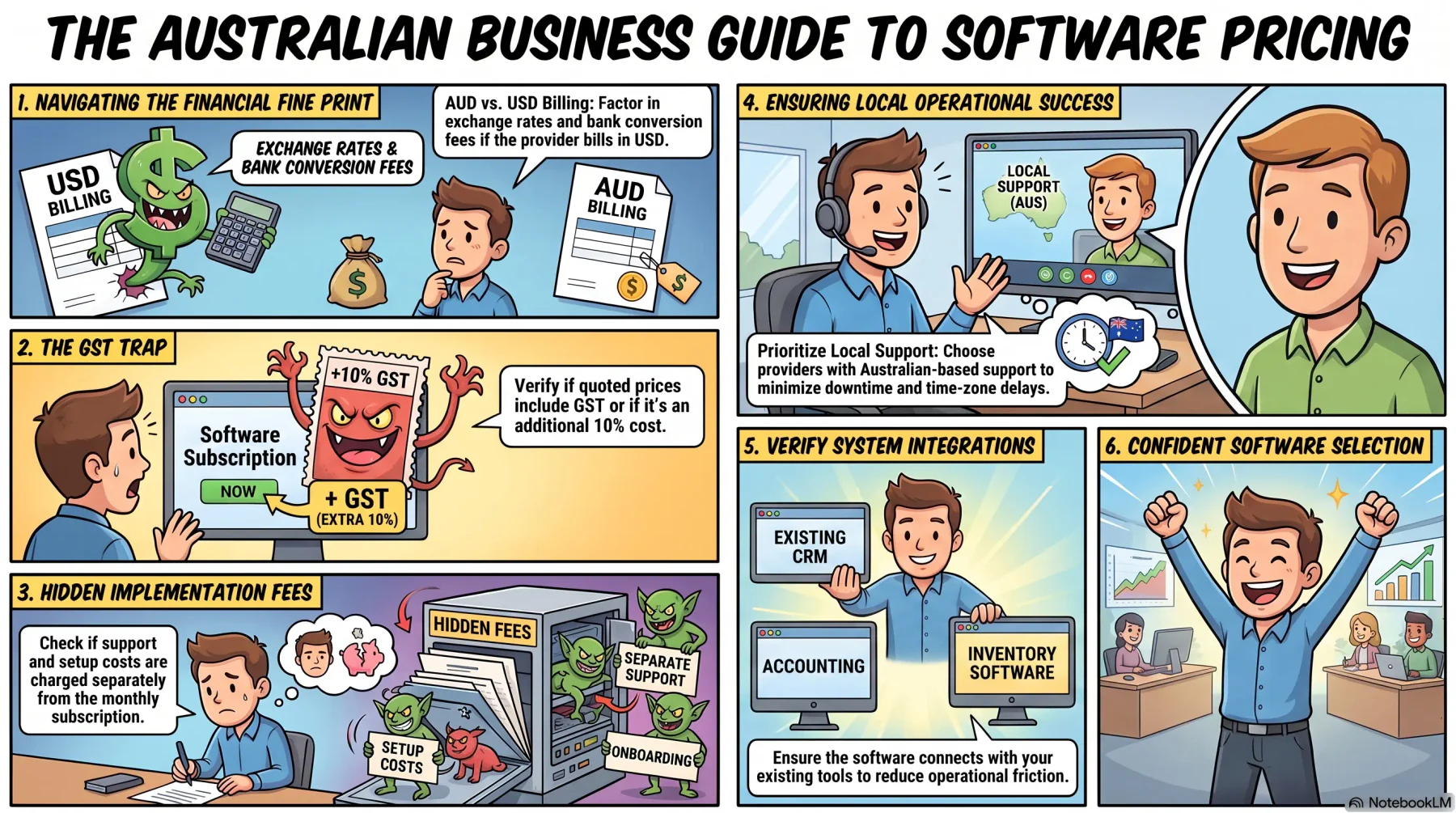
Before choosing inventory management software, Australian businesses should check whether pricing includes GST, what currency is used, and whether local support and integrations are available.
1. AUD Versus USD Billing
Some providers list prices in AUD, while others charge in USD. If pricing is in USD, consider exchange rates, conversion fees, and currency fluctuations when estimating the total cost.
2. GST-Inclusive Versus GST-Exclusive Prices
Not all software prices include GST. Before comparing providers, check whether the quoted price includes GST and whether implementation or support costs are charged separately.
3. Local Support and Integration Requirements
Choose a provider that offers local support and integrates with the systems your business already uses. This can simplify implementation, improve ongoing support, and reduce operational issues.
Inventory Software vs WMS vs ERP Pricing
The product category has a major effect on both subscription and implementation costs.
| System Type | Purpose | Typical Cost |
|---|---|---|
| Inventory software | Tracks stock and inventory | Lower cost |
| Warehouse management system | Manages warehouse operations and barcode scanning | Medium to high cost |
| ERP with inventory | Connects inventory with accounting, sales, purchasing, and other business functions | Higher upfront cost but can replace multiple systems |
Inventory software is ideal for businesses that need to track stock levels and manage replenishment. A warehouse management system (WMS) offers more advanced features, such as barcode scanning, picking, packing, and warehouse operations, which usually come at a higher cost.
An ERP goes a step further by connecting inventory with accounting, purchasing, sales, and other business functions. Although the upfront cost is higher, it can replace multiple standalone systems and provide greater long-term value.
How to Calculate 12-Month and Three-Year TCO
The total cost of ownership (TCO) includes more than the software subscription. It also covers implementation, data migration, integrations, hardware, training, and ongoing support, giving businesses a clearer picture of the total investment.
1. 12-Month and Three-Year TCO
To estimate your first-year cost, use this formula:
12-month TCO = Annual subscription + Implementation + Data migration + Integrations + Hardware + Training + Other setup costs
For a longer-term comparison, use:
Three-year TCO = One-off setup costs + (Annual recurring costs × 3)
Comparing TCO over three years provides a more accurate view than looking at the monthly subscription alone.
2. Normalised Monthly Cost
To compare different pricing models, calculate the normalised monthly cost:
Normalised monthly cost = TCO ÷ Number of months
You can also compare costs by business size using:
Cost per user = TCO ÷ Average users ÷ Months
Cost per location = TCO ÷ Average locations ÷ Months
Cost per order = TCO ÷ Total orders processed
3. Example TCO Calculation
For example, a business pays AUD 600 per month for inventory software and spends AUD 9,000 on implementation, migration, hardware, and training.
Annual subscription: AUD 600 × 12 = AUD 7,200
12-month TCO: AUD 7,200 + AUD 9,000 = AUD 16,200
Three-year TCO: AUD 9,000 + (AUD 7,200 × 3) = AUD 30,600
Normalised monthly cost: AUD 30,600 ÷ 36 = AUD 850 per month
This example shows that although the advertised subscription is AUD 600 per month, the effective cost is AUD 850 per month after including implementation and other expenses. Actual costs will vary depending on your business requirements
How to Compare Inventory Software Quotes Fairly
When comparing inventory software quotes, make sure every vendor is pricing the same requirements, including users, warehouses, SKUs, integrations, and barcode devices. Separate recurring subscription fees from one-off implementation and optional costs to compare quotes fairly.
Before choosing a provider, check what is included in the price, such as GST, data migration, training, support, integrations, and contract terms. A lower subscription fee may exclude services that are included in a higher-priced quote.
Ask vendors to demonstrate how the software handles your daily workflows using the features included in the quote. The Australian Government also recommends testing inventory systems before purchase and choosing a solution that can grow with your business while supporting accurate inventory tracking.
How HashMicro Scopes Inventory Management Software Cost
HashMicro uses a scope-based pricing approach because every business has different inventory requirements. Pricing is based on factors such as the number of users, warehouses, SKUs, required modules, integrations, implementation, and support, ensuring businesses only pay for the features they need.
HashMicro Inventory Management Software supports multi-warehouse tracking, barcode scanning, batch and serial number tracking, inventory valuation, demand forecasting, and seamless integration with accounting, sales, procurement, manufacturing, and POS.
It also includes Hashy, HashMicro's AI assistant, which helps users access real-time inventory insights, automate routine tasks, and make faster, data-driven decisions. With Hashy, businesses can simplify inventory management, improve stock visibility, and optimise daily operations while using an inventory solution tailored to their unique requirements.






Conclusion
Inventory management software costs should be evaluated based on the total cost of ownership, not just the monthly subscription. Consider implementation, integrations, hardware, support, and other ongoing costs to understand the full investment.
Before choosing a solution, compare pricing, included features, user limits, and how well the software supports your business operations. A three-year cost comparison can provide a more accurate picture of long-term value.
If you're looking for an inventory solution tailored to your business, book a free consultation with HashMicro's experts. Our team can help you explore the right solution, estimate the total cost of ownership, and recommend the best modules for your operational needs.
FAQ
Free inventory software can work for small businesses with simple inventory needs. As your business grows, you may need paid software with more features, users, and integrations.
Most providers will ask for details such as the number of users, warehouses, products, integrations, and the features your business requires. This helps them provide a more accurate quote.
Usually not. Barcode scanners, printers, labels, and other hardware are often sold separately from the software subscription.
Yes. Many businesses start with core inventory features and add warehouse management, barcode scanning, or other modules as their needs grow.