

Orders become difficult to control when they arrive through several channels but depend on separate spreadsheets, inboxes, warehouses and finance systems. Delays and conflicting updates quickly follow.
An order management system connects these activities in one workflow. It gives every team a shared order view and automates validation, allocation, fulfilment and customer updates across channels.
This article explains how an OMS works and which features matter most. It also shows Australian businesses how to select a system that supports present operations, changing demand and future growth.
Key Takeaways
Order management system is a central workflow connecting order capture, validation, fulfilment, invoicing, delivery and returns.
Order management system workflow captures and validates orders, allocates stock, manages fulfilment and closes returns with an audit trail.
Order management system types range from spreadsheets to standalone, ecommerce, ERP-integrated and distributed platforms.
Connected order management with HashMicro links Sales, Inventory, Warehouse, Procurement and Accounting to prevent fragmented records.

What Is an Order Management System?
An order management system, or OMS, coordinates customer orders from initial capture through validation, fulfilment, invoicing, delivery and returns. It keeps every stage visible and controlled.
It creates one operational record for every order, so sales, inventory, warehouse, finance and service teams use consistent information. Each update remains attached to the same transaction.
Order management is the wider process of receiving and completing orders. An OMS supplies the technology and controls that connect sales channels, customer accounts, pricing, stock and delivery providers.
For complex trading terms, a B2B OMS can apply account prices, credit limits, approval levels and agreed delivery conditions. It also flags orders that need authorised review before fulfilment.
Order management software does not need to perform every task itself. A WMS may direct warehouse work, while accounting software posts journals and reconciles payments after systems exchange data.
The OMS coordinates these applications and maintains the order's overall status. It records completed actions, outstanding work and the team responsible for moving each order or exception forward.
A complete record can cover customer details, products, quantities, prices, taxes, stock allocation, payment status and tracking. It may also capture backorders, returns, refunds and credit notes.
Centralising this information reduces repeated data entry across departments. It also prevents teams from keeping conflicting order versions in email threads, spreadsheets and separate applications.
"An OMS isn't just software that logs orders. It's the single source of truth that keeps sales, warehouse and finance working from the same information."
How Does an Order Management System Work?
An OMS follows an order from entry to closure through a connected operational workflow. Although exact steps vary by industry, most systems coordinate six stages and preserve a clear audit trail.
1. Order capture
Orders can arrive through ecommerce stores, marketplaces, sales representatives, customer portals, EDI connections or physical locations. The OMS brings every approved channel into one controlled queue.
It preserves each order's source while giving teams a consolidated operational view. This keeps channel reporting accurate and prevents staff from losing important commercial details during processing.
2. Order validation
The system checks whether each order contains the information and approvals required for processing. It can review customer details, agreed prices, discounts, taxes, stock and payment confirmation.
Other checks may cover credit limits, delivery addresses and internal authorisation. If information is missing or unusual, the OMS holds the order and directs it to an employee who can review it.
3. Inventory allocation
The OMS checks available stock across warehouses, stores or branches, then reserves suitable quantities for the order. This prevents another transaction from claiming inventory that is already committed.
Available stock differs from on-hand stock because it excludes reserved, damaged or restricted quantities. Allocation rules can also consider destination, service level, freight cost and warehouse capacity.
4. Order processing
Once validated, the order moves to the relevant team or connected application. This step may trigger an approval, invoice, warehouse request or production order without duplicating the source data.
If stock or materials are unavailable, the workflow may start a transfer, backorder or procurement action. Each response stays connected to the original customer demand and its promised delivery date.
Effective sales order management links these activities without making staff rebuild records across systems. Automation moves routine orders forward, while employees handle credit, price and delivery exceptions.
5. Fulfilment and delivery
The warehouse or fulfilment partner receives the approved picking, packing and dispatch requirement. Shipment details return to the OMS, giving internal teams an accurate view of operational progress.
If only part of an order is available, the system records the delivered quantity and leaves the remaining balance open. Staff can then manage the backorder without losing the original customer commitment.
6. Returns and reconciliation
A returned or cancelled order starts the relevant inventory, service and financial actions. The workflow can cover approval, inspection, restocking, replacement, refund processing and reconciliation.
A connected audit trail records who changed the order, why the change occurred and how it affected stock, delivery and customer balances. This supports faster investigations and clearer accountability.
Core Features of Order Management Software
The right feature set depends on the business model, channels and fulfilment network. However, effective software should control the full order lifecycle and exchange reliable data with existing systems.
1. Centralised order capture
A central workspace collects orders from every approved channel, so employees do not switch between ecommerce dashboards, inboxes and spreadsheets. It also preserves the source and time of each order.
Consolidation should retain the detail required for channel reporting and customer service. Import controls should detect duplicate references, incomplete records and mismatched data before processing begins.
B2B software may capture purchase-order references, account catalogues, negotiated prices and branch instructions. With EDI or portals, early validation helps teams correct errors before warehouse work starts.
2. Real-time inventory visibility
An OMS needs current stock data to decide whether an order can be accepted and where fulfilment should occur. The view must separate on-hand, reserved, incoming, damaged and quarantined quantities.
A connected inventory management system supplies the movements and balances used in these decisions. It can show stock by warehouse, branch, batch or serial number while keeping a consolidated view.
Balances should update after receipts, transfers, allocations, picks, returns and adjustments. Expected arrival dates also help sales teams give realistic estimates when inventory is not immediately available.
3. Automated order routing and allocation
Routing rules decide which location, team or workflow handles an order after validation. They may consider stock availability, customer proximity, freight cost, service level and warehouse capacity.
Advanced rules can split one order across locations, but the decision requires balance. Faster delivery may improve service, while extra shipments can increase transport costs and handling complexity.
Automation should route exceptions as carefully as standard orders. Staff need to know why a decision occurred, when they may override it and how that override will be recorded for later review.
4. Pricing, payments and invoicing
An OMS should apply the correct commercial terms before an order proceeds. Prices may depend on the customer, product, quantity, contract or channel, while discounts may require formal approval.
Retail orders often need immediate payment, whereas B2B transactions may use credit terms, deposits or staged billing. The system should identify expired prices, credit breaches and unusual conditions.
Connections with payment and accounting systems keep order, invoice and payment statuses aligned. When an invoiced order changes, the workflow should manage credits, refunds, revised invoices or extra charges.
5. Order tracking and customer communication
Employees should see an order's current status, previous actions and outstanding requirements in one record. Clear stages can include approval, allocation, picking, dispatch, delivery, cancellation and return.
Status details should explain both the delay and the owner of the next action. This helps sales and service teams answer customers accurately without chasing warehouse or finance staff for updates.
Automated messages can confirm receipt, approval, dispatch, delivery changes and return progress. Notifications must follow real events, so customers never receive a dispatch notice before shipment occurs.
6. Returns and cancellation management
A return should connect the customer request with the original order, delivered item, inventory record and financial transaction. The OMS must capture the reason, condition and proposed resolution.
Possible outcomes include restocking, replacement, repair, refund or write-off, with approval rules based on value or product type. Higher-risk cases can move to authorised staff for additional review.
Cancellation controls should reflect the order's operational stage, since stopping before allocation differs from cancelling after picking. Affected teams need immediate notice of stock or invoice changes.
7. Reporting and integrations
OMS reporting should expose delays and recurring exceptions, rather than only count completed orders. Useful measures include order ageing, cycle time, backorders, returns and resolution time.
Managers should be able to analyse results by channel, customer, product, warehouse, branch and order type. This detail helps them locate the workflow or location behind a poor consolidated result.
Integrations may connect CRM, ecommerce, inventory, WMS, procurement, accounting, payment and delivery platforms. Each data type needs a clear owner, update schedule, validation rule and recovery process.
Benefits of an OMS for Australian Businesses
An OMS improves the reliability of order acceptance, fulfilment and customer communication. Its value reaches beyond administration by strengthening control across stock, revenue and service operations.
- Fewer manual errors: Centralised data reduces repeated entry of products, quantities, prices and delivery details across separate applications. Teams use one order record, which lowers the risk of conflicting or incomplete updates.
- Faster order processing: A structured order fulfilment process moves valid orders through routine steps automatically. Employees can focus on genuine credit, stock and delivery exceptions.
- Better stock accuracy: Current allocation data shows which quantities remain available and which are already reserved for other demand. This helps prevent overselling, unnecessary backorders and promises based on outdated balances.
- Greater operational visibility: Managers can review orders across channels, branches and warehouses without combining several exports. Delayed approvals, recurring backorders and fulfilment bottlenecks therefore become easier to locate.
- More consistent customer experiences: Sales, warehouse and support teams provide updates from the same operational record. Customers receive clearer availability information, more reliable status messages and fewer contradictory explanations.
- Easier multi-location coordination: Allocation rules identify which warehouse or branch should fulfil each Australian order. This matters as demand grows: the Australian Bureau of Statistics found 32% of businesses received online orders in 2024-25.
- More scalable operations: A shared workflow supports new channels and locations without forcing every team to create another manual process. The business can handle greater complexity while retaining consistent controls and ownership.
- Better planning data: Order history reveals demand patterns, recurring backorders, cancellation causes and operating constraints. Managers can use those findings to improve purchasing, inventory placement and capacity planning.
These benefits still depend on accurate data and a clearly designed process. Automating an uncertain workflow can move errors faster, so teams must define ownership and exception rules before launch.
Signs Your Business Needs an Order Management System
An OMS becomes relevant when order complexity outgrows the controls used to manage it. The decision should reflect operational friction, coordination risk and service failures rather than company size alone.
- Orders sit across several tools: Teams depend on inboxes, spreadsheets and channel dashboards to understand current demand. Building a complete order view takes extra time, and important changes may remain hidden in another employee's file.
- Employees repeat data entry: The same order must be entered manually into inventory, warehouse, invoicing or delivery systems. Every repeated entry creates another opportunity for quantities, prices, addresses or references to change.
- Stock figures conflict: Sales and warehouse teams see different balances or cannot separate available stock from reserved quantities. As a result, employees may accept orders that a location cannot fulfil by the promised date.
- Order status is unclear: Staff must contact several people before explaining whether an order is approved, allocated, picked or dispatched. Customers wait longer for answers, while internal teams lose time chasing routine updates.
- Backorders are difficult to control: Outstanding quantities, expected receipt dates and customer commitments are tracked in separate records. Employees can miss overdue balances or promise delivery without seeing earlier demand for the same stock.
- Commercial rules depend on memory: Employees must remember customer prices, credit terms, order limits and approval requirements. Inconsistent knowledge can produce unauthorised discounts, delayed reviews and different treatment for similar orders.
- Errors rise with order volume: Higher order volumes lead to duplicated records, incorrect quantities, missed approvals or delivery problems. Growth exposes weaknesses because manual checks and individual workarounds do not scale consistently.
- Customers request frequent updates: Service teams cannot answer basic status questions without contacting sales, finance or the warehouse. Repeated enquiries indicate that order information is not visible to the employees responsible for customers.
- Reporting requires manual consolidation: Management relies on several exports to understand order volume, delays and exceptions. By the time employees combine and correct those files, the resulting report may no longer reflect current operations.
- Expansion creates reconciliation work: Each new channel, warehouse or branch introduces another disconnected process and data source. Instead of supporting growth, expansion increases the time spent comparing records and resolving differences.
A small business using several sales channels may need an OMS sooner than a larger company with one predictable workflow. Complexity and exception frequency are stronger indicators than order count alone.
The clearest signal is the rising cost of coordinating customers, stock, fulfilment and finance manually. When workarounds become normal, the business needs a shared process with defined ownership and controls.
Types of Order Management Systems
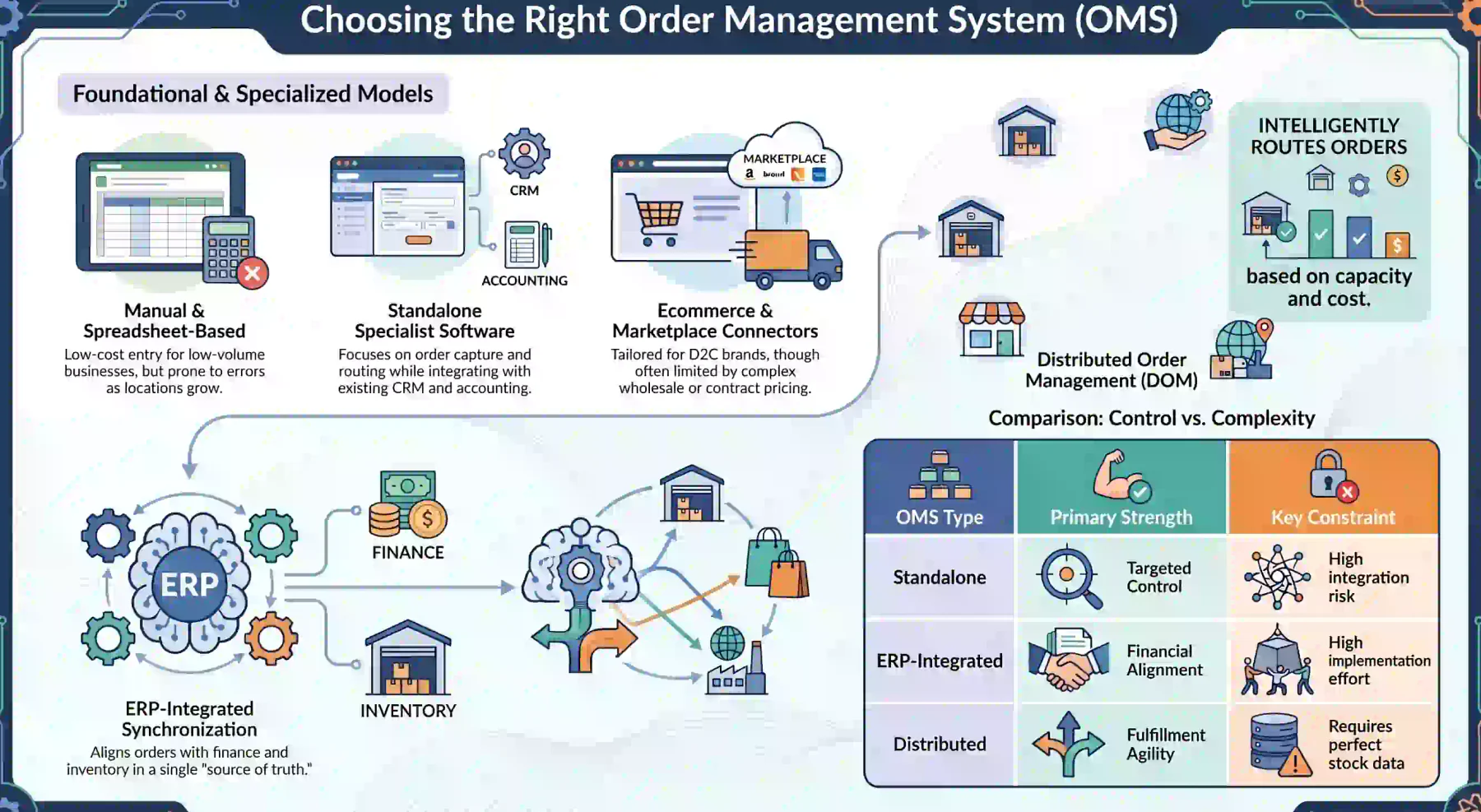
The right model depends on channel complexity, customer terms, order exceptions and the number of locations involved. Businesses should assess future requirements as well as today's transaction volume.
1. Manual or spreadsheet-based order management
A manual approach can suit a business processing a small number of straightforward orders through one channel. Employees record customer details, quantities, dates and statuses in a shared spreadsheet.
The initial cost may be low, but spreadsheets offer limited automation, access control and audit history. Problems grow when several employees edit separate versions or allocate stock without current balances.
This approach becomes harder to control when the business adds locations, customer-specific terms or partial deliveries. Each new exception requires another column, file or manual communication step.
2. Standalone order management software
A standalone OMS focuses on order capture, validation, routing, tracking and fulfilment coordination. It can suit businesses that already use dependable CRM, inventory, warehouse and accounting platforms.
Specialisation allows the company to improve order control without replacing every established application. However, customer, price, stock and status data must move accurately between those systems.
Each connection needs technical and operational ownership, including monitoring and recovery. Businesses should confirm that specialised features justify the ongoing cost and risk of maintaining integrations.
3. Ecommerce or marketplace order management
Ecommerce platforms often include online orders, payments, dispatch updates, refunds and basic inventory controls. These functions can suit direct-to-consumer businesses with simple pricing and fulfilment needs.
Marketplace connectors may also consolidate transactions from several online channels. Their limits appear when the business introduces contract prices, account credit, wholesale quantities or layered approvals.
Online tools may struggle with manufacturing, procurement, branch allocation or complex warehouse processes. Testing should include unusual orders and failures, not only the standard customer checkout.
4. ERP-integrated order management
An ERP-integrated OMS connects customer orders with sales, inventory, procurement, warehouse operations and accounting. This reduces the number of separate links needed to keep operational records aligned.
A confirmed order can update demand, reserve stock, start fulfilment and support invoicing in one environment. If stock is unavailable, configured rules may trigger a transfer, purchase or production requirement.
Management also sees how orders affect inventory, purchasing, cash flow and operational capacity. This model is useful when order decisions depend on several business functions and shared financial controls.
5. Distributed order management
Distributed order management supports fulfilment through warehouses, stores, suppliers or logistics partners. It selects a source using stock, destination, capacity, service commitments and operating rules.
The system may split one order across locations when no single site holds every item. Routing logic should weigh delivery speed against the transport cost and handling effort created by extra shipments.
Distributed models depend on dependable inventory updates throughout the network. Inaccurate availability can route demand to a location that cannot fulfil it, weakening service instead of improving it.
OMS vs ERP, CRM, WMS and Inventory Software
These systems exchange information, but each controls a different part of the customer and operational lifecycle. Clear boundaries help businesses avoid duplicate records, conflicting rules and unclear ownership.
| System | Primary Role | Typical Data Controlled | Relationship With an OMS |
|---|---|---|---|
| OMS | Coordinates the customer-order lifecycle | Orders, allocation, status, delivery and returns | Acts as the order orchestration layer |
| ERP | Manages connected business resources and transactions | Finance, sales, procurement, inventory and operations | Provides or integrates order management functions |
| CRM | Manages customer relationships and sales activity | Leads, contacts, activities and opportunities | Supplies customer and pre-order information |
| WMS | Controls physical warehouse execution | Bins, putaway, picking, packing and movements | Completes warehouse tasks created from orders |
| Inventory Software | Tracks stock quantities and movements | On-hand, available, reserved and incoming stock | Provides availability for order decisions |
A CRM manages leads, opportunities, communications and customer activity before and around a sale. An OMS takes responsibility for the confirmed order and coordinates the work required to complete it.
An ERP has a broader role because it connects financial and operational transactions across the business. Some platforms include OMS functions, depending on channel complexity, routing and fulfilment requirements.
A warehouse management platform directs receiving, storage, picking, packing and dispatch inside the warehouse. The OMS defines what must be fulfilled, while the WMS controls how employees complete that requirement.
Inventory software records what is on hand, reserved, incoming or stored at each location. The OMS uses those balances to decide whether an order can proceed and which site should fulfil it.
A B2B OMS may connect CRM, ERP, WMS and inventory functions because account orders combine customer terms, stock rules, approvals and financial controls. Integration keeps those decisions attached to one order.
How Much Does an Order Management System Cost?
OMS costs vary because a simple online tool and a multi-company platform solve different operational problems. Pricing may depend on users, order volume, sales channels, locations, companies and modules.
Implementation may include process design, configuration, customisation, migration, integration, testing and training. The final scope depends on existing data quality and the number of workflows involved.
A standalone product may carry a lower licence fee but require more integration work with established applications. An ERP-based approach can cost more initially while reducing separate system connections.
Businesses should compare total ownership cost rather than subscription prices alone. Administration, support, upgrades, integration maintenance and internal reconciliation all continue after the system launches.
The current process also carries costs through order errors, delayed fulfilment and repeated data entry. A sound business case compares these losses with the practical benefits expected from the new workflow.
Vendors should identify included services, optional work and changes that create extra charges. A realistic estimate requires documented processes, integrations and data volumes, not a broad industry average.
How to Choose the Right Order Management System
The best OMS matches the company's real workflows, commercial rules and frequent exceptions. Feature lists help with screening, but realistic operational testing provides stronger evidence of suitability.
1. Map current order workflows
Document every route an order can take through entry, approval, allocation, fulfilment, invoicing, delivery and returns. Record the responsible team, system and information required at each handover.
Pay close attention to repeated copying, email approvals and spreadsheet updates. These manual handovers often reveal the requirements that will produce the greatest improvement in control and speed.
Map exceptions as carefully as the standard process, including stock shortages, credit holds, price changes and failed deliveries. Use the result to separate essential controls from lower-value preferences.
2. Define essential integrations
List every application that must exchange information with the OMS, including ecommerce, CRM, inventory, WMS, accounting and delivery platforms. Define which system owns each important data type.
Customer, product, price and stock records should each have one authoritative source. Update timing should reflect operational need, since allocation data may require faster synchronisation than reporting.
Integration requirements must cover validation, failure alerts and recovery procedures. Businesses should also ask how upgrades affect each connection and who will maintain it after implementation.
3. Test real operational scenarios
A demonstration should use realistic orders and exceptions instead of one prepared transaction. Ask the vendor to process partial fulfilment, a backorder, return, cancellation and change after approval.
For B2B workflows, test contract prices, customer references, credit limits and approval levels. Multi-location businesses should also test allocation when branches hold different available quantities.
The demonstration should show whether connected business systems remain reliable when information is missing or a connection fails. Sales, warehouse, finance and service employees should assess the result from their own perspectives.
4. Evaluate scalability and controls
The platform should support expected growth in orders, users, channels, locations and companies. It must also handle additional approval, allocation and pricing rules as the business becomes more complex.
Review role-based access, approval workflows, audit trails and record-locking controls. Users should only see the customers, locations and actions relevant to their responsibilities and authority.
Administrators should be able to adjust routine workflows without excessive development. Security reviews should also cover data protection, backups, recovery and the vendor's incident response process.
5. Compare total cost and vendor support
Compare implementation, migration, integrations, training and ongoing support alongside the licence price. Clarify the vendor's responsibilities during testing, launch and post-implementation operations.
Ask how order-related incidents are prioritised and escalated because one disruption can affect customers, revenue and warehouse work. Support coverage should align with Australian operating hours.
Reference checks should involve enterprises with similar channels and order complexity. The final decision must balance capability, integration risk, ownership cost and the vendor's capacity to support change.
How to Implement and Measure an OMS
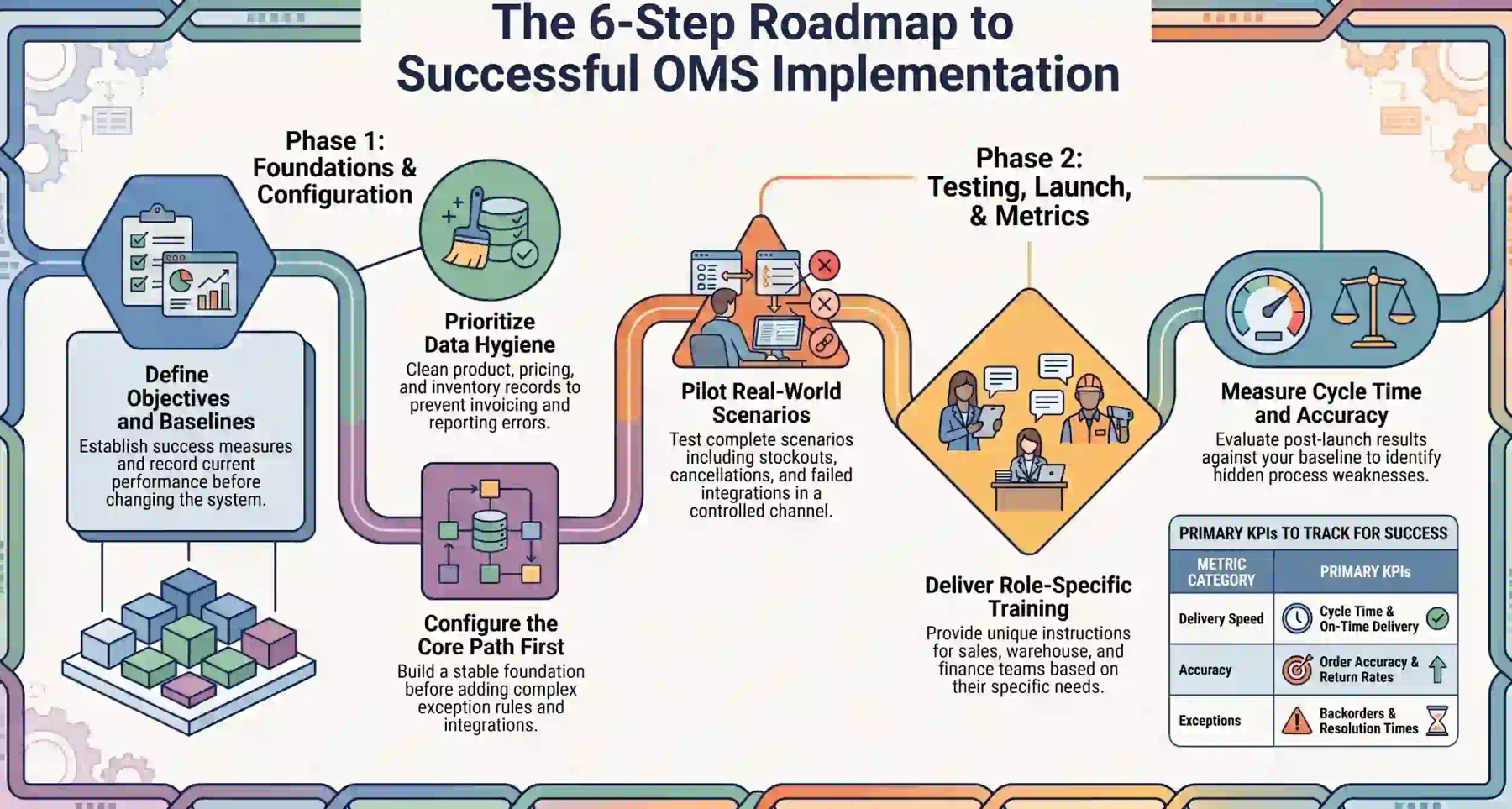
Implementation should improve a defined process rather than automate an uncertain one. A controlled rollout connects technology with clear ownership, prepared data, realistic testing and measurable outcomes.
1. Define the process and objectives
Begin with agreed responsibilities, scope, objectives and success measures. The team should understand which problems the OMS must solve and how results will be evaluated after implementation.
Set a baseline for current performance before changing the process. Without reliable starting measures, management cannot separate system benefits from seasonal demand or unrelated operational changes.
2. Prepare data and configure workflows
Clean customer, product, pricing and inventory records before migration. Duplicate, incomplete or outdated data can weaken allocation, invoicing and reporting even when the workflow is configured correctly.
Configure the core order path first, then add exception rules and integrations by business priority. This sequence gives teams a stable foundation before introducing less common or more complex scenarios.
3. Pilot and test real scenarios
A pilot limits disruption while exposing the system to genuine operating conditions. Select a manageable channel, team or location that still represents the wider business and its common exceptions.
Test complete scenarios from entry through financial and inventory outcomes. Include unavailable stock, rejected credit, price changes, partial delivery, cancellation, failed integration and return cases.
4. Train users and expand the rollout
Train employees according to their responsibilities because sales, warehouse and finance teams use the same order differently. Each group needs clear instructions for its actions and decisions.
Provide specific procedures for exceptions, including when to resolve, escalate or wait for another role. Expand the rollout only after the pilot team handles standard and unusual orders reliably.
5. Measure and improve performance
Measure results against the pre-implementation baseline using cycle time, accuracy, on-time delivery, backorders and cancellations. Return rates and exception-resolution times add further context.
Review results by channel, location and order type because one average can hide a weak process. Post-launch workarounds may also reveal that an approval, integration or training step needs adjustment.
How HashMicro Supports Connected Order Management
HashMicro’s AI-powered ERP platform connects order workflows across Sales, Inventory, Warehouse Management, Procurement and Accounting. Teams share one operational foundation instead of transferring orders between disconnected tools.
Sales teams can manage quotations and orders while reviewing customer information, pricing and status. Connected inventory records show stock by location and separate on-hand, reserved and available quantities.
Confirmed demand can move into warehouse operations for picking, packing, dispatch and partial delivery. Each update remains linked to the order, giving customer-facing teams a current operational view.
When stock is insufficient, connected procurement and inventory processes help teams respond without rebuilding the order. Accounting connections keep order, invoice and financial records aligned as work progresses.
Dashboards provide visibility across companies, branches, teams and customers. Managers can identify delays and exceptions without combining reports, while AI-supported insights can highlight changing demand.
These capabilities support standard orders and B2B workflows involving credit terms, approvals and multi-location fulfilment. Businesses can select the modules and controls that match their mapped process.
Once customer, product, inventory, and fulfilment data are connected, AI can support the first step of the order lifecycle. Hashy AI captures customer requests and prepares structured sales orders for review.






Conclusion
An OMS connects order capture, validation, stock allocation, fulfilment, invoicing, delivery and returns. It gives teams clearer status information while reducing manual handovers and conflicting records.
Australian businesses should map real workflows, test frequent exceptions and define integration ownership before selecting software. The right system should improve present control and support future growth.
To learn further about order management systems, you can schedule a free consultation with our team and learn more business insights to further scale your business.

Frequently Asked Questions
An order management system coordinates customer orders from capture through validation, allocation, fulfilment, invoicing, delivery and returns. It keeps status and responsibilities in one record.
An OMS can receive ecommerce and sales orders, check warehouse stock and select a suitable fulfilment location. It then shares delivery, invoice and return information with connected systems.
No, a CRM manages leads, relationships and sales activity before and around a purchase. An OMS coordinates the confirmed order and the operational work required to complete the transaction.
No, an OMS focuses on the order lifecycle, while an ERP connects broader financial and operational processes. Some ERP platforms include order management and remove the need for a separate system.
An OMS coordinates orders across sales, inventory, fulfilment and customer service. A WMS controls warehouse tasks such as receiving, putaway, picking, packing and dispatch for those orders.