


 Limited to 100 registrants

Employees often lose time searching through reports, applications, documents, and message threads before they can act. Disconnected systems also make routine questions harder to answer than they should be.
An AI Assistant for business gives employees a conversational way to find information, interpret company data, coordinate work, and complete approved tasks. Unlike a public chatbot, a business assistant works with authorised company records, operating rules, and employee permissions.
Australian businesses can use this technology across finance, sales, procurement, HR, and operations. However, reliable results depend on accurate data, connected systems, security controls, and meaningful human oversight.
Key Takeaways
A business AI assistant uses company context to answer questions and support authorised work.
Employees can use AI to find information, summarise data, coordinate approvals, and complete controlled actions.
An AI assistant differs from a chatbot and fixed workflow automation because it interprets requests and applies context.
Successful adoption requires strong permissions, reliable data, clear accountability, and human intervention controls.

What Is an AI Assistant for Business?
An AI assistant for business is software that understands employee requests and responds using approved company information. Depending on its access, it may answer questions, summarise records, recommend actions, prepare documents, or complete tasks within connected systems.
The assistant may use natural language processing, generative AI, search, machine learning, and workflow automation. These technologies help it interpret an employee’s intent and connect that request with relevant business data.
For example, a manager could ask which invoices are overdue, which purchase orders await approval, or which products may run short. The assistant could retrieve the relevant records and present a concise response without requiring several reports.
A capable assistant should recognise the difference between providing information and changing a business record. It may answer a low-risk question immediately while requesting approval before issuing a refund, changing payroll data, or sending a purchase order.
An AI assistant can support employees without replacing professional judgement. Qualified employees should continue reviewing financial, legal, employment, safety, and compliance decisions.
How Does an AI Business Assistant Work?
"A useful AI assistant does more than answer questions. It works with trusted company data, follows employee permissions, and keeps people in control of important actions."
A business AI assistant moves through several processes before it produces an answer or completes an action. The following capabilities determine whether the assistant provides useful, controlled support.
1. Understanding employee requests
The assistant analyses the employee’s words to identify the intended outcome. It considers the question, relevant dates, business terminology, named records, and any requested action.
For example, “Show unpaid invoices due this week” requires information retrieval. However, “Send reminders for unpaid invoices due this week” also requires permission to contact customers.
The assistant should request clarification when an instruction contains missing or conflicting details. Guessing a supplier, bank account, approval amount, or reporting period can create unnecessary risk.
2. Retrieving relevant business context
After interpreting the request, the assistant searches the company systems and knowledge sources it can access. These sources may include ERP records, policies, reports, contracts, emails, documents, and previous approved decisions.
A grounded assistant works from current business records rather than relying only on general training data. Therefore, it can produce answers that reflect the company’s actual customers, transactions, workflows, and operating rules.
Strong retrieval controls should identify which source supports each answer. Employees can then check whether the information is current and appropriate for the decision.
3. Generating answers or completing tasks
The assistant may summarise information, calculate a result, recommend an action, or prepare a review task. Its response should match the employee’s request without exposing unrelated data.
When authorised, an AI assistant may also update a record, create a draft document, assign work, or send an approved message. Each action should follow the company’s existing business rules.
Higher-impact activities require stronger controls than simple information retrieval. For example, drafting a supplier email creates less risk than sending it or accepting revised commercial terms.
4. Applying permissions and human review
The assistant should inherit the employee’s role and access rights. A sales representative should not gain access to confidential payroll records merely by requesting them through conversational AI.
Approval rules can also control what happens after the assistant prepares an action. The system may require a manager to review payments, payroll changes, supplier appointments, customer credits, or employment decisions.
Human reviewers need enough context to assess each recommendation. Supporting records, assumptions, warnings, and confidence indicators make review more meaningful than a simple approve button.
What Can an AI Personal Assistant Do for a Business?

An AI personal assistant can support both individual productivity and shared workflows. Its practical value depends on the information, applications, and permissions connected to it.
1. Find Information Across Company Systems
Employees can ask questions without opening several applications or manually combining reports. The assistant can locate authorised information across finance, sales, inventory, procurement, HR, and operational records.
For example, an employee could request the current stock level, latest supplier commitment, associated purchase order, and outstanding invoice. A connected assistant can assemble that context into one response.
Search results should identify their source and reporting period. This detail helps employees recognise incomplete, outdated, or conflicting records.
2. Summarise Reports and Business Data
AI can condense lengthy reports, transaction histories, meeting notes, policies, and operational records. It can also highlight exceptions that require attention.
An executive may request a summary of cash flow, overdue receivables, sales performance, and inventory risks. The assistant can present key findings while retaining links to the underlying information.
A summary should not conceal uncertainty or material exceptions. Employees must be able to inspect the supporting data before making an important decision.
3. Coordinate Tasks and Approvals
An AI assistant can identify incomplete work, prepare reminders, assign owners, and track due dates. As a result, employees spend less time manually chasing routine approvals.
For example, the system may remind a manager about a pending purchase request or notify finance when supporting documents remain incomplete. Escalation rules can direct overdue work to the appropriate employee.
The assistant should follow established approval authority. It must not bypass a reviewer simply because a transaction is urgent.
4. Perform Permission-Controlled Actions
AI assistants can move beyond answering questions when they connect with business applications. They may create draft invoices, update task statuses, prepare purchase requests, schedule meetings, or record approved notes.
Every action should operate within defined limits. Transaction value, employee role, data sensitivity, and business impact can determine whether the system acts automatically or waits for approval.
Audit records should capture what the assistant changed and why. Employees also need a practical method for correcting or reversing an action when appropriate.
5. Support Employees Through Conversational Channels
Employees may interact with an assistant through a business application, mobile device, shared chat, or approved messaging service. Conversational access can make company systems easier to use for employees who do not work at a desk.
The channel should not weaken existing security controls. Identity checks, permissions, session protection, and device policies still apply when an employee uses mobile messaging.
Employees should also know whether they are communicating with AI. Clear identification reduces confusion about accountability and response limitations.
AI Assistant Use Cases Across Business Departments
A connected assistant can support several departments while respecting separate roles and access rights. The following examples show where Australian businesses may apply the technology.
1. Executives and management
Executives can request summaries of revenue, cash flow, costs, workforce capacity, project status, and operational exceptions. This access reduces dependence on manually compiled management packs.
An assistant can also compare performance against budgets or targets. However, decision-makers should investigate the underlying causes before acting on a generated recommendation.
2. Sales and customer service
Sales teams can retrieve account histories, open quotations, pipeline changes, order status, and customer communication records. The assistant may also prepare follow-ups based on approved templates.
Customer service employees can use the same context to respond more consistently. Personal information and commercially sensitive records should remain limited to authorised users.
A connected CRM system gives the assistant access to current customer and pipeline records. Consequently, sales responses can reflect actual account activity rather than disconnected notes.
3. Finance and accounting
Finance teams can ask about overdue invoices, cash positions, expense movements, budget variances, and payment status. AI may also prepare reconciliations, reports, or collection reminders for review.
A business assistant can help organise information for BAS, payroll, or compliance work. Nevertheless, a qualified employee or adviser should validate the data and determine the correct treatment.
Integrated accounting software can connect financial questions with supporting transactions. This structure helps employees trace each summary back to the relevant record.
4. Procurement and operations
Procurement employees can ask about supplier performance, open purchase orders, expiring documents, quotation comparisons, and approval delays. The assistant may then prepare follow-ups or assign internal tasks.
Operations teams can monitor stock, production, deliveries, maintenance, and service commitments. Earlier visibility gives employees more time to address shortages or delays.
Using procurement software as the operational source helps keep AI recommendations aligned with current orders, receipts, suppliers, and approvals.
5. HR and administration
HR teams can retrieve authorised information about attendance, leave, recruitment, training, payroll status, and employee requests. The assistant may also coordinate interviews or prepare routine administrative responses.
Employment records contain personal and sensitive information. Therefore, businesses need strict access limits and human review for hiring, disciplinary, remuneration, or termination decisions.
An AI assistant should support employee services without becoming the final authority on workplace matters. HR specialists remain responsible for policy interpretation and employee outcomes.
Benefits of Using an AI Assistant in Business
The strongest benefits come from reducing friction between a question and the approved business action. The following outcomes can improve as usage expands across connected departments.
1. Less time spent searching for information
Employees often search several systems before finding the records needed for one decision. An assistant can retrieve relevant information through a single request.
Faster retrieval does not mean employees should accept every answer without review. Source references and timestamps help users confirm that the information remains reliable.
2. Faster and more consistent decisions
AI can apply the same data definitions, policies, and evaluation rules to repeated requests. This consistency reduces variation caused by separate spreadsheets or personal interpretations.
Employees can also receive supporting information sooner. Therefore, managers spend more time evaluating the decision and less time assembling its inputs.
3. Fewer administrative bottlenecks
Routine reminders, document checks, task creation, and status updates can consume substantial employee time. Controlled automation keeps these activities moving without constant manual follow-up.
Exceptions can move directly to the relevant reviewer. This approach prevents employees from treating every transaction as if it carries the same urgency or risk.
4. Better coordination between departments
Many business decisions involve several departments. A purchase delay, for example, can affect inventory, production, sales commitments, and cash flow.
A connected assistant can show how one issue affects several workflows. Shared context helps departments coordinate responses without creating multiple versions of the same information.
5. Easier access to company knowledge
Policies, operating procedures, decisions, and employee experience often remain scattered across documents and conversations. An AI assistant can make approved knowledge easier to retrieve and reuse.
This capability can support onboarding and reduce repeated questions. However, knowledge owners must keep source material current so the assistant does not repeat outdated instructions.
AI Assistant vs Chatbot vs Workflow Automation
AI assistants, chatbots, and workflow automation solve different problems. The table below compares their typical roles in a business environment.
A chatbot may form part of an AI assistant, while workflow automation may execute its approved actions. The main difference lies in how the assistant uses context and language to decide which capability fits the request.
Security and Governance Considerations for Australian Businesses
An assistant that accesses company systems can create security, privacy, accuracy, and accountability risks. Businesses should apply controls according to the sensitivity and impact of each use case.
The Australian Government’s Guidance for AI Adoption recommends accountable ownership, risk management, transparency, testing, monitoring, and human control. It also recommends alternative pathways for critical work when an AI system becomes unavailable.
The following controls provide a practical governance foundation:
- Role-based access: The assistant should only retrieve or change information available to the authenticated employee.
- Approval boundaries: Payments, contracts, employee decisions, credits, and external commitments should require appropriate review.
- Source visibility: Answers should identify relevant records, dates, and assumptions.
- Audit trails: Logs should capture requests, data accessed, recommendations, approvals, and completed actions.
- Data-quality controls: Employees need a process for identifying and correcting incomplete or inaccurate records.
- Testing and monitoring: Businesses should test realistic scenarios and continue checking accuracy, behaviour, and operational impact.
- Intervention controls: Authorised employees need the ability to pause, reject, reverse, or escalate an action.
- Fallback procedures: Critical processes should continue through an approved manual or alternative system if the assistant becomes unavailable.
Australian privacy obligations may apply when an AI system handles personal information. The OAIC’s AI privacy guidance highlights due diligence, privacy safeguards, transparency, and human oversight when businesses adopt commercial AI products.
Agentic systems require additional care because they can interact with several applications and complete tasks. Australian cyber guidance recommends incremental adoption, limited initial access, strong identity controls, continuous monitoring, and human oversight for agentic AI services.
How to Choose an AI Assistant for Your Business
The right product should match the company’s workflows, data environment, risk profile, and growth plans. Businesses should evaluate operational fit before comparing general AI features.
A practical assessment should cover the following areas:
- Business grounding: Confirm whether the assistant can work with actual company records, policies, and workflows.
- Integration coverage: Review how it connects with ERP, finance, CRM, procurement, inventory, HR, and document systems.
- Permission controls: Test whether existing employee roles carry through to every answer and action.
- Action capability: Distinguish between products that only generate responses and those that complete controlled work.
- Source traceability: Check whether employees can inspect the records supporting an answer.
- Human review: Confirm which activities can require approval, rejection, intervention, or escalation.
- Australian context: Test local spelling, dates, currency, GST terminology, time zones, and common business language.
- Security and privacy: Review data locations, encryption, retention, subcontractors, access logs, and incident procedures.
- Monitoring: Request information about accuracy testing, model changes, audit records, and performance reporting.
- Expansion costs: Identify charges for users, integrations, data storage, actions, support, and additional departments.
Hashy OS provides an example of a grounded business approach. It runs on top of HashMicro’s HMX or HM Nova ERP and connected tools, allowing Hashy to work with authorised company data rather than operating as a separate public chatbot.
The Company Nexus retains shared business knowledge, while AI Coworkers complete governed work across supported functions. In addition, Manifest Apps lets teams create connected applications, dashboards, and workflows around their own requirements.
Explore HashMicro’s AI-native ERP to connect business data, workflows, Company Nexus, and AI Coworkers within one operating environment.






How to Implement an AI Assistant in Your Business
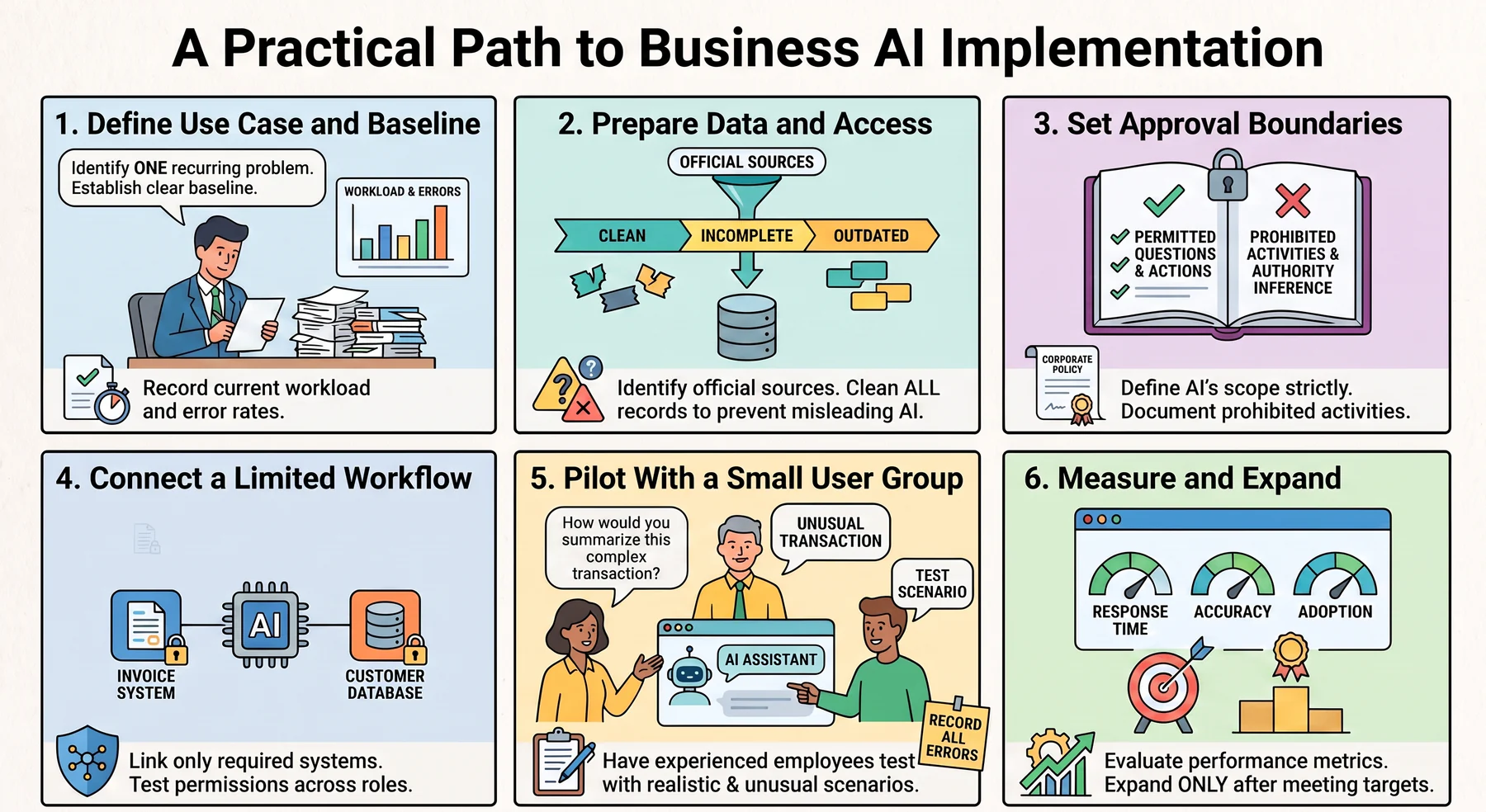
A controlled implementation helps employees learn where the assistant adds value without exposing the company to unnecessary risk. The following actions provide a practical adoption path.
1. Define the Use Case and Baseline
Start with one recurring problem, such as searching for order status, summarising reports, tracking approvals, or preparing invoice reminders. Assign an accountable business owner who understands the workflow.
Record the current workload, response time, error rate, and employee effort. A clear baseline makes the result easier to evaluate.
2. Prepare Data and Access
Identify the records, documents, applications, and policies required for the chosen use case. Confirm which source provides the official version of each field.
Correct duplicate, incomplete, and outdated data before connecting the assistant. Poor source records can produce confident but misleading answers.
3. Set Approval Boundaries
Define which questions the assistant may answer and which actions it may prepare or complete. Link each boundary to employee roles, transaction values, data sensitivity, and operational impact.
Document prohibited activities as well. The assistant should not infer authority from an urgent or persuasive request.
4. Connect a Limited Workflow
Connect only the systems required for the initial use case. Limited access reduces technical complexity and makes unexpected behaviour easier to investigate.
Test permissions with different employee roles. A correct response for a finance manager may expose inappropriate information when shown to another user.
5. Pilot With a Small User Group
Select employees who understand the workflow and can evaluate the assistant’s responses. Use realistic questions, incomplete instructions, unusual transactions, and permission tests.
Record incorrect answers, missing sources, unsuitable actions, and employee overrides. This evidence should determine whether the assistant is ready for broader use.
6. Measure and Expand
Measure response time, task completion, adoption, corrections, approval delays, and employee effort. Accuracy measures should also cover missed issues and inappropriate recommendations.
Expand only after the initial workflow meets its operational and control targets. Each new department or action should receive its own data, risk, and permission review.
Conclusion
An AI Assistant for business can help employees find information, summarise data, coordinate approvals, and complete authorised tasks. Its value grows when it connects with trusted systems and reflects the company’s actual records, policies, and responsibilities.
Australian businesses should treat the assistant as a controlled work layer rather than an unrestricted chatbot. Reliable data, transparent sources, strict permissions, audit trails, and human intervention keep its activity accountable.
Hashy OS connects Hashy, Company Nexus, AI Coworkers, and Manifest Apps with HMX or HM Nova business data and workflows. Discuss a suitable configuration through a free consultation with HashMicro.
Frequently Asked Questions
A suitable assistant can interpret Australian English, GST terminology, Australian currency, and local date formats when the product supports that context. Businesses should test local terminology and require qualified employees to review accounting and compliance information.
One AI assistant can support teams across different states when it recognises user location, daylight-saving differences, business calendars, local policies, and employee permissions.
An AI assistant can retrieve records, identify missing data, summarise transactions, and prepare draft information. A qualified employee or adviser should review the result and remain responsible for submissions and material decisions.
The assistant should identify missing fields, conflicting records, or uncertain results and request clarification or direct the issue to the relevant data owner. Businesses also need ongoing data-quality controls.
A governed AI assistant can require approval before completing selected actions. Authorised employees should be able to review, reject, pause, or escalate an action, with the final outcome recorded in an audit trail.