


 Limited to 100 registrants

Tracking supplier orders without a documented process creates gaps that lead to overpayments, incorrect deliveries, and GST compliance issues. A purchase order template gives Australian businesses a consistent format to authorise and record every procurement transaction before goods or services arrive.
This guide explains what a purchase order is, what it must include under Australian GST rules, which type suits your procurement scenario, and how to create one from scratch. You can download free purchase order templates in Excel, PDF, and Word at the end of this article.
Key Takeaways
A purchase order is legally binding the moment the supplier accepts it, so accuracy in quantities, prices, and GST details matters before you send it.
GST must be shown as a separate line item on every purchase order raised against a GST-registered supplier, and supplies that are GST-free must be clearly noted.
Choosing the right PO type, whether standard, blanket, planned, contract, or service, depends on your supplier relationship and order frequency rather than the product category alone.
What Is a Purchase Order?
"Our accounts team used to spend hours chasing invoices that didn't match what we'd actually ordered. Once we standardised our purchase orders, the back-and-forth with suppliers dropped off almost immediately. Everything was in writing from the start."
A purchase order (PO) is a formal commercial document that a buyer sends to a supplier to authorise a specific purchase. It documents the agreed items, quantities, prices, delivery expectations, and payment conditions before any goods or services are provided.
A purchase order differs from a verbal or email request because it creates a structured, trackable record of the commitment. Once the supplier accepts the PO, either by confirming it in writing or by beginning to fulfil it, the document becomes legally binding on both parties.
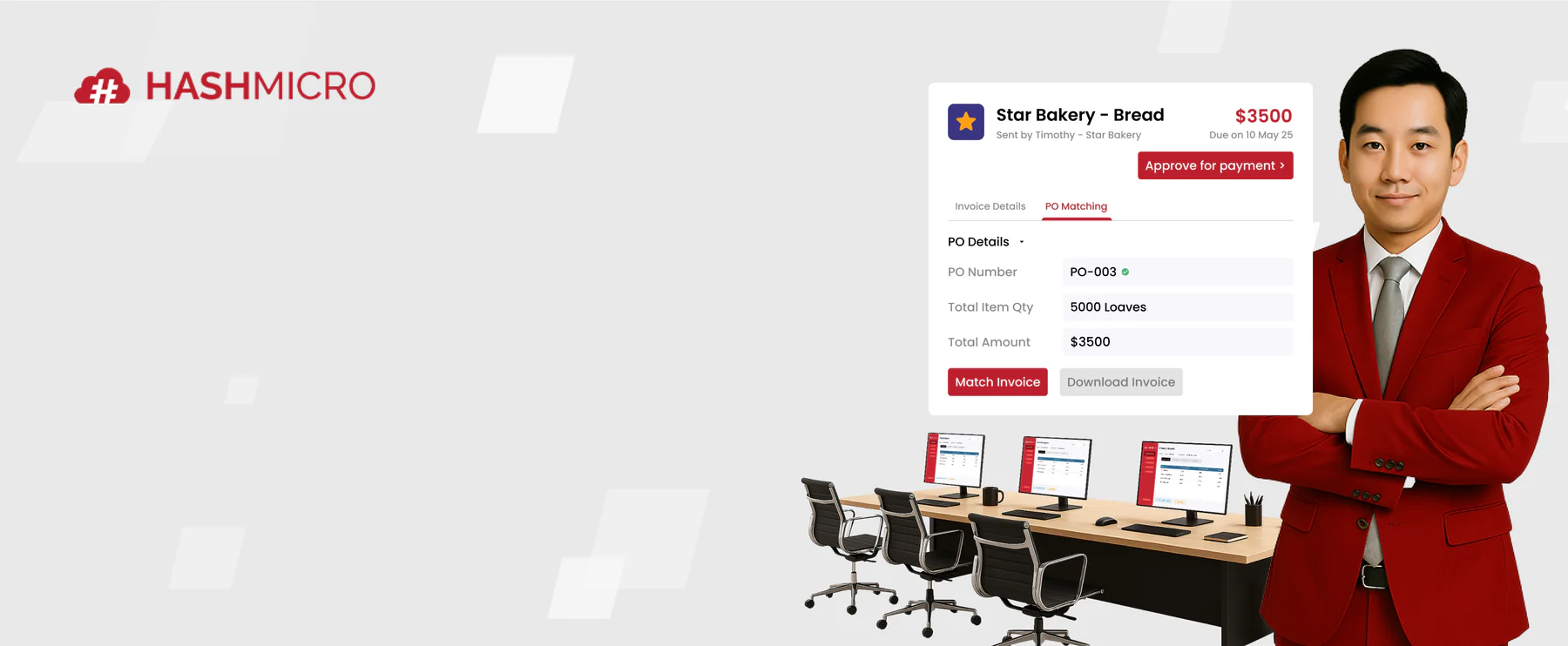
For Australian businesses, purchase orders also support internal financial controls. The accounts payable team uses them to verify supplier invoices through a process called three-way matching, comparing the purchase order, the goods receipt, and the invoice before approving payment.
Purchase Order vs Invoice
A purchase order and an invoice are both transaction documents, but they serve different purposes at different points in the procurement cycle. The table below outlines the key differences.
A purchase order sets the terms before the supply happens. An invoice confirms what was delivered and requests payment. When the invoice matches the original PO, the accounts payable team can approve payment with confidence.
What to Include in a Purchase Order
- PO number: a unique identifier assigned to each order for tracking and three-way matching against supplier invoices
- Date of issue: the date the purchase order was created and sent to the supplier
- Buyer details: the purchasing company's legal name, ABN, address, and primary contact information
- Supplier details: the vendor's legal name, ABN, address, and the name of the contact person or account manager
- Description of goods or services: a specific line-by-line breakdown that includes product codes or a defined scope of work
- Quantity and unit of measure: the number of units ordered and how they are counted, such as units, hours, or kilograms
- Unit price: the agreed price per unit, stated exclusive of GST
- GST amount: a separate line showing 10% GST calculated per item or across the total order value
- Total amount (including GST): the full payable amount after GST is applied across all line items
- Delivery address and delivery date: where the goods should be sent and when they are expected to arrive
- Payment terms: the agreed timeframe for settlement, such as net 30 days from invoice date
- Authorised signatory: the name and signature of the person within the business who approved the purchase
How to Create a Purchase Order
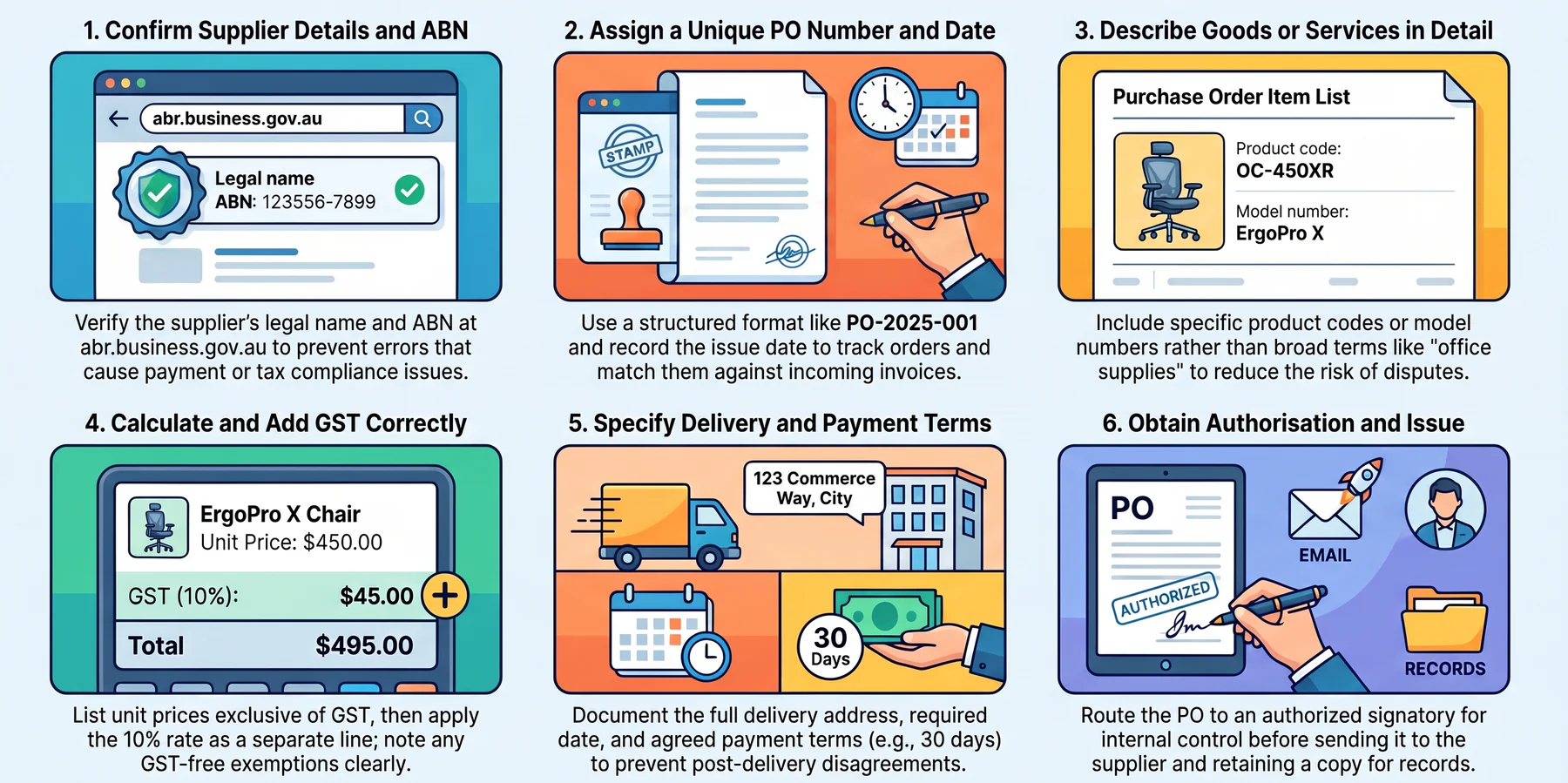
Creating a purchase order follows a clear sequence that covers supplier verification, order detail, GST calculation, and internal approval. The process below applies whether you are working from a free template or a procurement system.
1. Confirm Your Supplier Details and ABN
Verify the supplier's legal business name and Australian Business Number before raising the PO. You can check any ABN free of charge against the Australian Business Register at abr.business.gov.au. Confirming these details at the outset prevents errors that could cause payment or tax compliance issues later.
2. Assign a Unique PO Number and Issue Date
Every purchase order needs a unique reference number. A structured format such as PO-2025-001 makes it straightforward to track open orders and match them against incoming invoices. Record the issue date so both parties have a clear timestamp for the transaction.
3. Describe the Goods or Services in Detail
Write a specific description for each line item rather than using broad terms such as "office supplies" or "IT services". Include product codes, model numbers, or a defined scope of work where applicable. Clear descriptions reduce the risk of disputes when goods arrive or a service invoice is submitted.
4. Calculate and Add GST Correctly
List each item's unit price exclusive of GST, then apply the 10% GST rate to all applicable line items. Show GST as a separate line so the total amount inclusive of GST is transparent to both parties. Where any items are GST-free, note the exemption on the same line.
5. Specify Delivery Details and Payment Terms
Include the full delivery address, the required delivery date, and any handling or packaging instructions. Then confirm the agreed payment terms, for example 30 days from invoice date. Documenting both at the PO stage reduces the chance of disputes after delivery.
6. Obtain Authorisation and Issue the PO
Route the completed PO to the relevant authorised signatory within your business before sending it to the supplier. Internal approval ensures spending is controlled and traceable. Once approved, send the PO to the supplier and retain a copy alongside the delivery records and resulting invoice.
Where a Purchase Order Template Loses Control of Your Spend
A purchase order is not really a document. It is a control, and its job is to make sure money is committed on purpose and then checked against what actually arrives.
A template does the first half of that job well. It captures the commitment cleanly. What it cannot do is hold that commitment open and watch what happens to it afterwards.
That gap is where the cost sits. The problems below are not about formatting a better PO. They appear after the PO has been sent, when the paperwork has to reconcile.
1. The three-way match depends on three documents finding each other
Three-way matching is only as reliable as your ability to put three separate records side by side. In a manual process, those records rarely live in the same place.
The purchase order sits in a spreadsheet or a shared drive. The delivery docket is signed in the warehouse. The invoice arrives by email into the accounts inbox.
Someone has to connect them from memory. That works at ten open orders. At fifty, matching becomes a job in itself rather than a check performed in passing.
Partial deliveries break it faster. One order, three shipments and two invoices produce a reconciliation puzzle that a single row on a spreadsheet was never designed to hold.
2. Committed spend that no one can see until the invoice arrives
Raising a purchase order commits money. The obligation exists from the moment the supplier accepts, even though nothing has been delivered and no invoice has been issued.
A spreadsheet does not reduce a budget when a PO is raised. The figure only moves once the invoice is entered into your accounting system, often weeks later.
The result is predictable. A department with a $60,000 quarterly budget can have $48,000 of invoices processed and another $27,000 of approved orders still in transit.
Nobody sees the overrun until the last invoices arrive, usually close to the end of the quarter when there is no time left to correct it.
Procurement software treats an approved order as committed spend immediately. The budget reflects the obligation on the day it is created, not the day it is billed.
3. Approval limits that exist as a field, not a control
Most purchase order templates include an authorised signatory line. A line on a page is a record of approval, not a mechanism that enforces it.
Nothing in a Word file stops someone typing a manager's name and emailing the order the same afternoon. The control depends entirely on people following the process.
Split ordering is the harder version of the same problem. Two orders of $4,800 raised on consecutive days avoid a $5,000 approval threshold without anyone noticing.
In a folder of individual files, that pattern is effectively invisible. In a system that holds every order against one supplier and one budget line, it surfaces immediately.
4. Blanket orders and the drawdown nobody is tracking
A blanket order agrees a total value with a supplier over a set period, then draws down against it through individual release orders.
In a spreadsheet, that drawdown is a manual log. Its accuracy depends on every person who calls off stock remembering to record it in the right row.
One missed entry and your remaining commitment is wrong. The error surfaces when the supplier invoices beyond the agreed total, which is an awkward conversation to have.
The problem grows with the number of people entitled to call off against the agreement. A shared file has no way of knowing who ordered what without being told.
5. GST credits that rest on a reconciliation nobody performed
Your purchase order is not the document you claim a GST credit against. That comes from the supplier's tax invoice, and the two do not always agree.
For any purchase above $82.50 including GST, you need to hold a valid tax invoice before claiming the credit. The PO is the check, not the evidence.
If your order assumed GST and the supplier turns out not to be registered, the credit is not available. Registration status can change during a long supply arrangement.
Errors also have a shelf life. GST credits generally must be claimed within four years, so a mismatch discovered late may no longer be recoverable at all.
Manual reconciliation tends to compress into the days before a quarterly activity statement is due. That is the worst possible moment to be finding discrepancies.
6. The shift from managing documents to managing commitments
The practical threshold is not a number of orders. It is a change in what you are actually managing.
A template manages documents. Once you need to know how much is committed, what has arrived, what remains open, and which invoices are unmatched, you are managing commitments.
Those are questions about status, not about formatting. A document cannot report on itself, and a folder of documents cannot tell you what the folder adds up to.
That is the point where the template has done its job and something needs to take over. Not because the format was wrong, but because the process outgrew what a file can hold.
Download Free Purchase Order Templates
The templates below are pre-formatted for Australian GST compliance, including a dedicated GST line item and a total amount inclusive of GST. Each format is ready to use and can be customised with your business name, logo, and branding.
Standard Purchase Order Template (Excel & PDF)
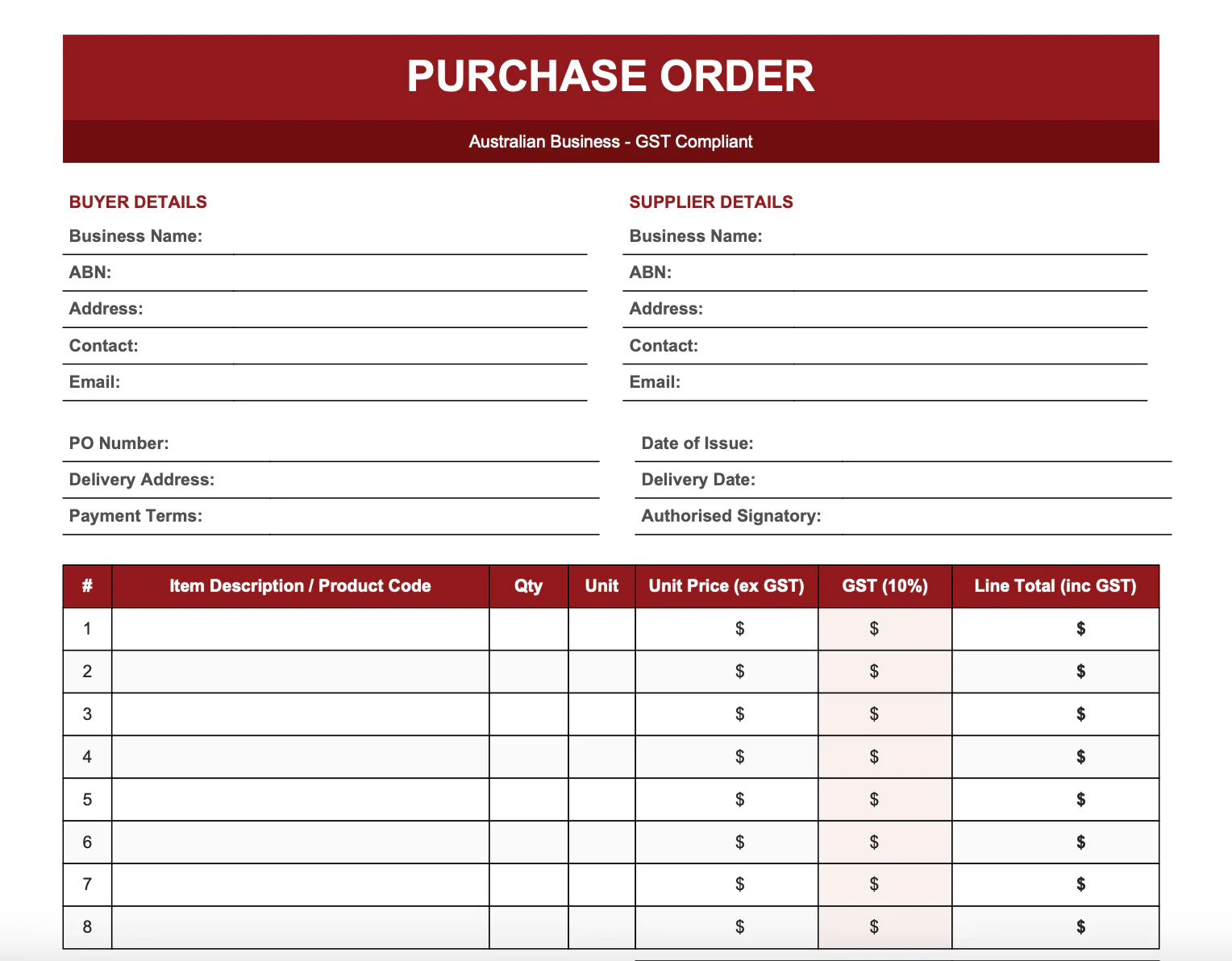
The standard purchase order template includes all core PO fields: PO number, buyer and supplier details, item descriptions with product codes, quantities, unit prices, GST amounts, and the total inclusive of GST. A delivery address field and payment terms line are also included.
This template suits businesses that raise individual purchase orders for specific, fully defined transactions.Free Standard Purchase Order Template
Free Standard Purchase Order Template
Simple Purchase Order Template
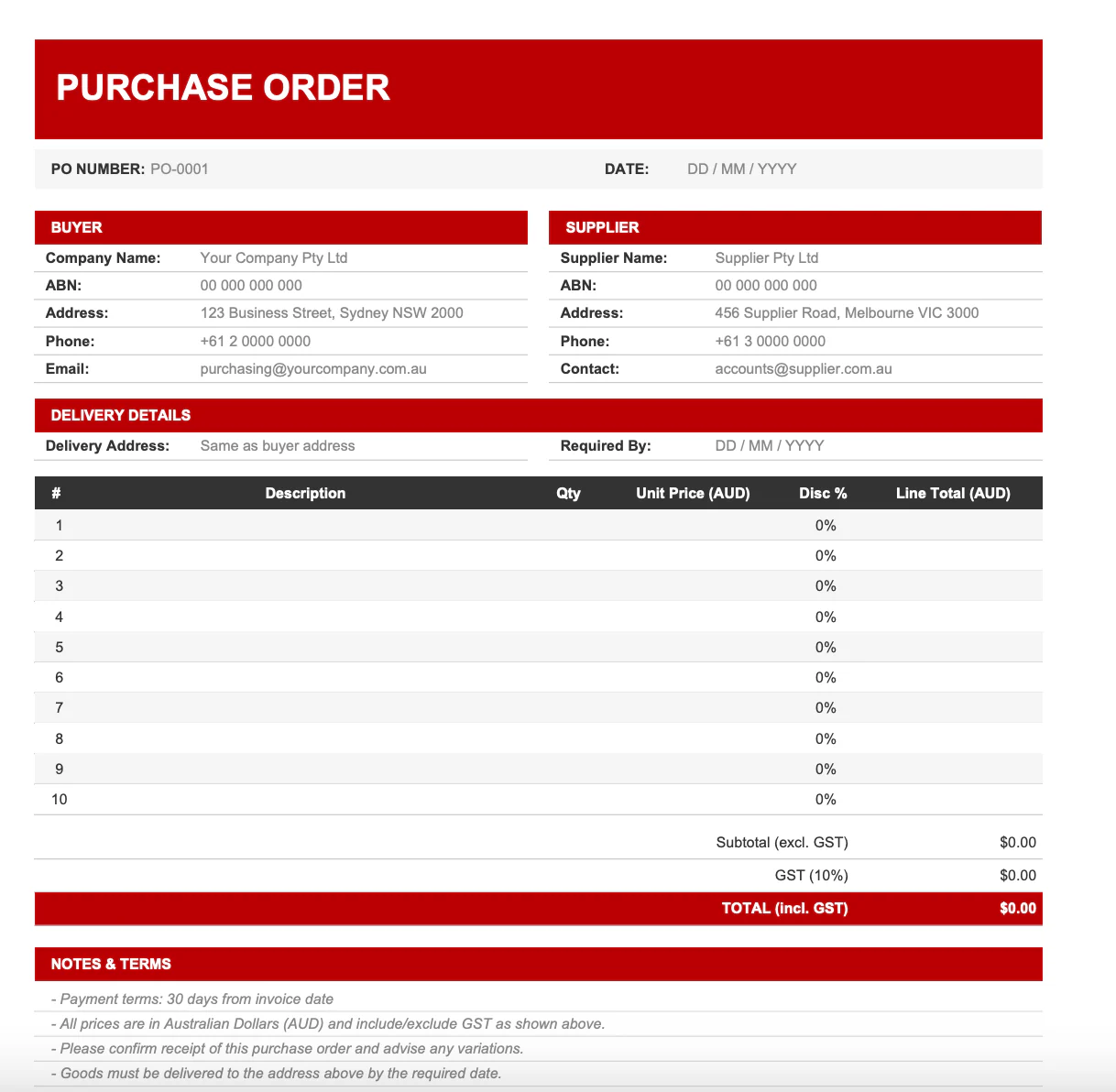
The Word version of the purchase order template is designed for businesses that want to quickly personalise the format. You can add your logo, adjust field labels, and update the document styling to match your letterhead.
The content covers all required fields for GST compliance and supplier reference, in the same structure as the standard template.
Free Simple Purchase Order Template
Service Purchase Order Template
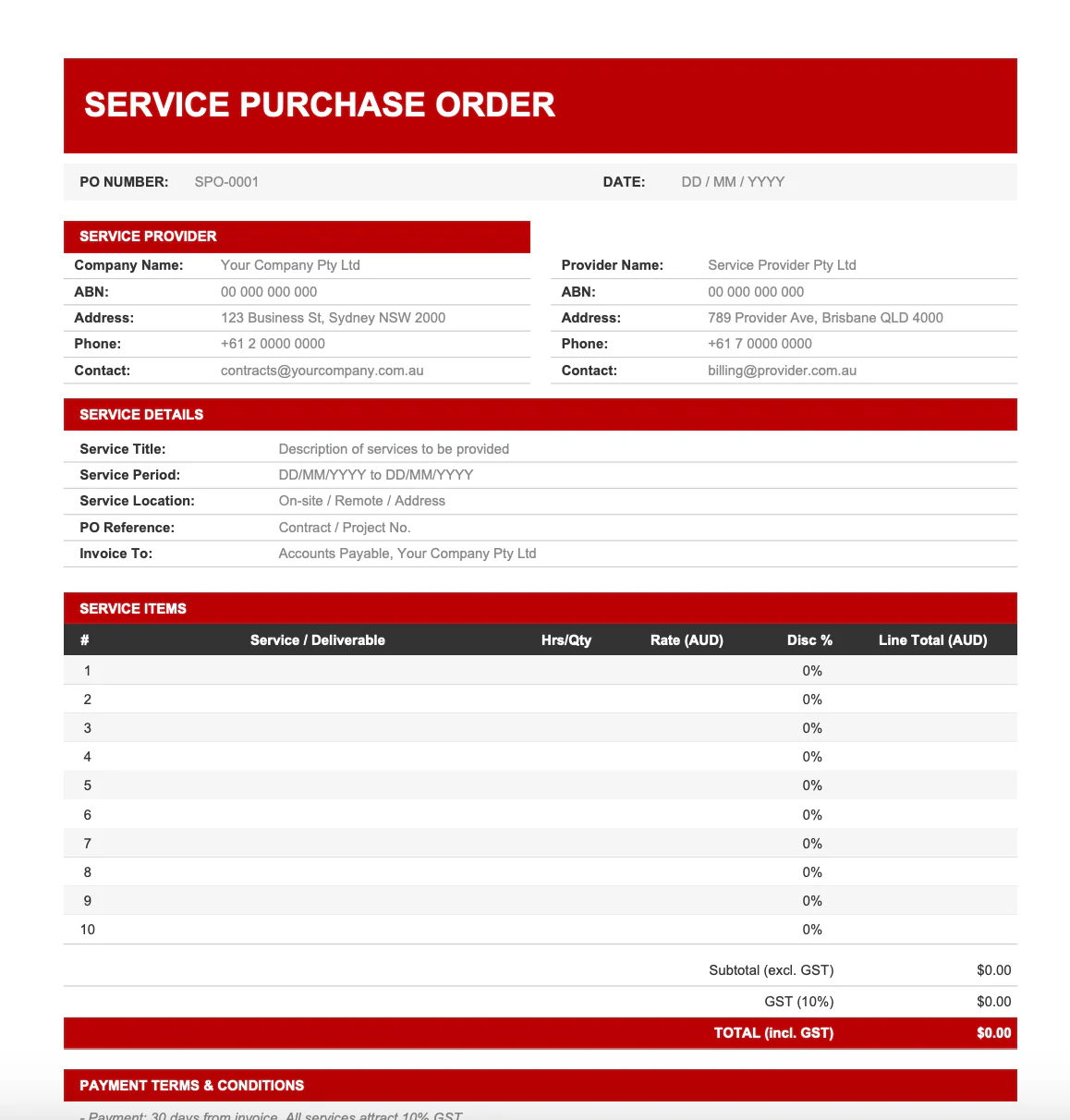
The service PO template includes fields for scope of work, agreed rate (hourly or fixed-price), start and completion dates, milestone payment terms, and deliverable descriptions. It is designed for engaging contractors, consultants, and service providers.
This template is available in both Excel and PDF formats.
Blanket Purchase Order Template
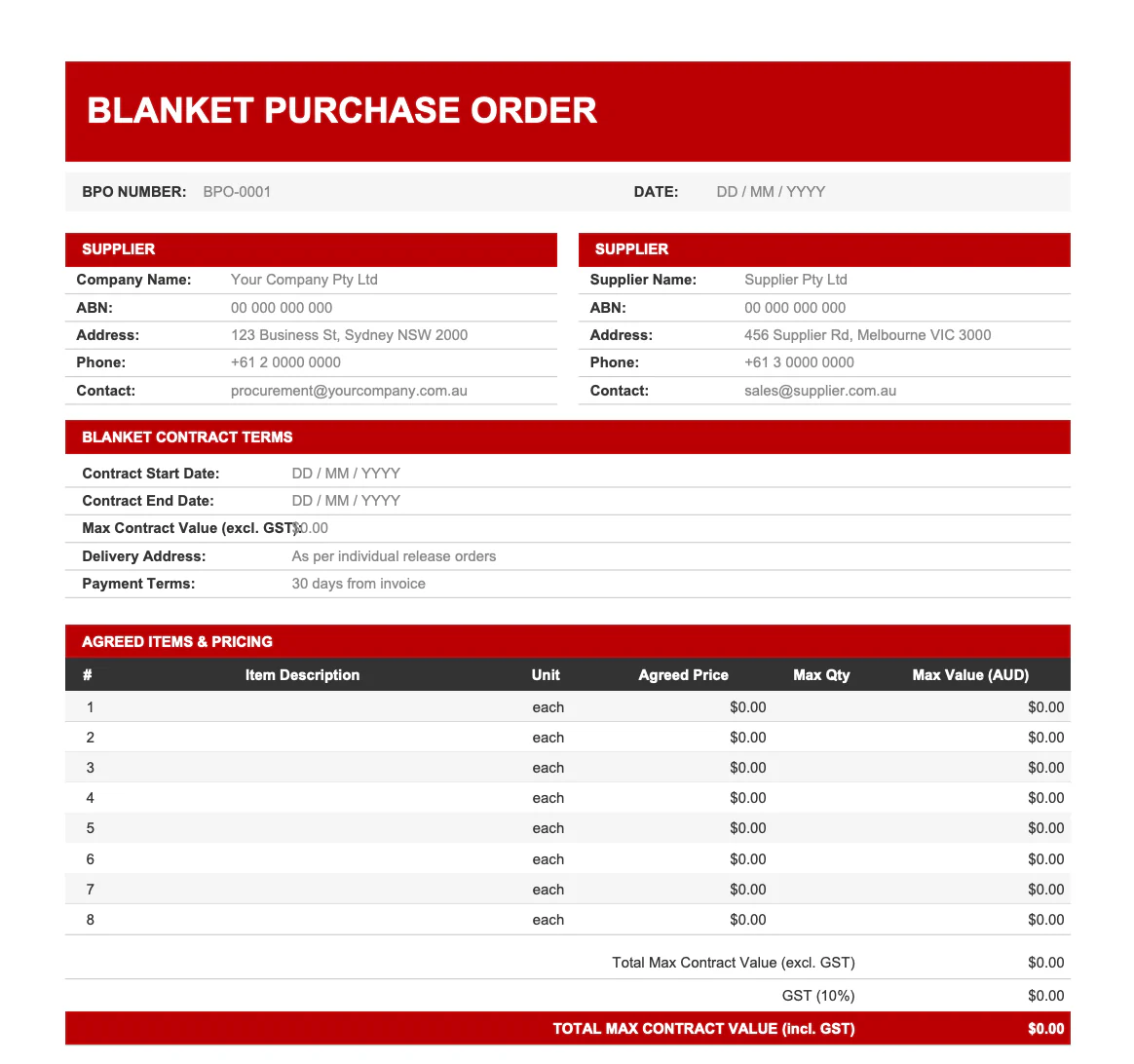
The blanket PO Excel template includes an agreement summary section covering the total commitment value, supply period, and supplier details. It also includes a release order tracking log where individual call-off orders are recorded against the blanket total, so you can see your remaining commitment at a glance.
Free Blanket PO Template
Setting Up a PO Approval Workflow
A purchase order template establishes what to document, but an approval workflow determines who can commit spending and at what level. Without a defined process, purchase orders can be raised and sent to suppliers without the right people reviewing them first.
A basic PO approval workflow includes three stages: request, review, and dispatch. The person raising the PO submits the request, a budget holder or finance manager reviews it against available funds, and the approved PO is then sent to the supplier. Purchase orders above a defined value threshold should require an additional level of sign-off.
For small teams, a shared folder and email approval chain can manage the process in the short term. However, as order volumes grow, tracking approval status, following up on overdue sign-offs, and matching each PO against a supplier invoice becomes increasingly difficult to manage manually.
Procurement software automates approval routing, sends notifications to the right people, and provides a full audit trail for every purchase order. HashMicro's procurement software supports configurable approval thresholds, real-time PO status tracking, and automatic three-way matching between purchase orders, goods receipts, and supplier invoices.
Common Purchase Order Mistakes and How to Avoid Them
Errors in purchase orders delay payments, create supplier disputes, and introduce GST compliance risks. The following mistakes are among the most common and can each be addressed with a structured template and a clear internal process.
Vague or missing item descriptions
Writing "supplies" or "services" instead of a specific description creates problems when goods arrive and the invoice doesn't reflect what was ordered. Every line item should include a clear description, quantity, and unit price.
No GST line item
Leaving GST off the purchase order creates a discrepancy when the supplier's tax invoice includes it. Always show GST as a separate line, even when the calculation is straightforward.
Incorrect supplier ABN
A single transposition error in a supplier's ABN can cause problems during BAS reconciliation and input tax credit claims. Verify the ABN at abr.business.gov.au before finalising the PO.
Unspecified payment terms
Purchase orders that don't state payment terms leave both parties with different expectations. Confirm the agreed payment period on the PO so there is no ambiguity when the invoice arrives.
No authorised signatory
A purchase order without a named and approved signatory provides no internal accountability and may not be treated as binding by the supplier. Always include the name of the person authorising the spend.
Raising POs after the fact
Backdating a PO or raising one after goods have already been received removes the document's core purpose, which is to authorise spending before it occurs. Purchase orders must be issued before the order is placed or work begins.
From Manual PO Templates to Automated Procurement
A purchase order template is a practical starting point for any business that wants to bring structure and accountability to its procurement. However, as supplier relationships grow and transaction volumes increase, the limitations of manual templates become clear.
Tracking 50 or more open purchase orders across a shared spreadsheet is time-consuming and error-prone. Matching each PO against a goods receipt and a supplier invoice requires careful attention, and a missed discrepancy can result in overpayments or BAS errors that take time to unwind.
HashMicro's procurement software connects purchase orders, goods receipts, and supplier invoices in a single system. Approval thresholds are configurable, three-way matching runs automatically, and purchase orders can be generated directly from approved purchase requisitions. The result is a procurement process that is faster, more controlled, and easier to audit.
Hashy, HashMicro's AI Coworker, draws on connected procurement and financial data through the Company Nexus to help purchasing teams surface overdue approvals, flag budget variances against committed POs, and answer operational questions without pulling reports from multiple modules.






Conclusion
A structured purchase order process protects Australian businesses from overspending, disputed deliveries, and GST compliance gaps. Starting with a well-formatted template ensures every transaction is documented, GST is handled correctly, and your finance team has what it needs to process supplier invoices without delays.
Download the free purchase order templates above in Excel, PDF, or Word format and adapt them to your business needs. When manual processes start to slow your team down, HashMicro's procurement software gives you the tools to automate approvals, track open orders, and connect your entire procurement cycle in one place. Schedule a free consultation to find out how.
Frequently Asked Questions
A purchase order (PO) is a formal commercial document issued by a buyer to a supplier that authorises a specific purchase. It sets out the agreed items, quantities, prices, delivery expectations, and payment terms before goods or services are provided. A PO becomes legally binding once the supplier accepts it.
Yes. A purchase order becomes a legally binding contract once the supplier accepts it, either by confirming it in writing or by beginning to fulfil the order. The details on the PO, including quantities, prices, and delivery terms, must be accurate before the document is issued.
You should include GST on any purchase order raised against a GST-registered supplier. Show GST as a separate line item for each applicable product or service, and confirm the total amount inclusive of GST. For GST-free supplies, note the exemption clearly on the PO.
A purchase order is issued by the buyer before goods or services are delivered to authorise the transaction. An invoice is issued by the supplier after delivery to request payment. The purchase order sets the terms; the invoice confirms what was supplied and the amount owed.
You can create a purchase order using the free templates on this page, available in Excel, PDF, and Word formats. Download the template that suits your purchase type, fill in your business and supplier details, itemise the goods or services with quantities and prices, add the GST line, and have it approved by an authorised signatory before sending.
A purchase order does not automatically become a tax invoice. Under ATO rules, a tax invoice must be issued by the supplier and meet specific requirements, including the supplier's ABN, the words "Tax Invoice", the GST amount, and a description of the taxable supply. The supplier's invoice, not the buyer's PO, is the document used to claim GST input tax credits.