


 Limited to 100 registrants

A warehouse tracking system produces a verifiable record of every item movement from receiving to final dispatch. Operations, finance and IT share a single source of truth rather than reconciling separate records.
Manufacturers, wholesalers and 3PL operators managing multiple sites or high volumes need more than basic stock visibility. The right warehouse tracking software also directs, validates and records operational work at every stage.
Operations leaders need to protect throughput and service levels, while finance requires credible inventory values and cost controls. IT must assess integrations, security and scalability before any system commitment.
Key Takeaways
A warehouse tracking system records every item movement from receiving through dispatch, giving operations, finance, and IT a shared source of truth.
Warehouse tracking works across six stages: receiving, putaway, replenishment, picking, dispatch, and returns.
Selecting a warehouse tracking system requires documenting your warehouse profile, separating mandatory capabilities, and testing vendors with real scenarios.
HashMicro supports warehouse tracking through a module that connects receiving, putaway, picking, and dispatch with procurement and accounting records.

What Is a Warehouse Tracking System?
A warehouse tracking system records stock identity, quantity, location and status at every operational stage. It supports real-time stock visibility whether implemented as a standalone application, an ERP module or a capability layer within a wider WMS.
Its value depends on whether it reduces fulfilment errors, labour effort and inventory discrepancies for the business. A system that records without directing or validating work delivers only partial control.
Warehouse inventory tracking software spans basic stock tools to full systems that validate every pick, pack and dispatch. Buyers must confirm which tier addresses their operational failures before shortlisting vendors.
"A warehouse tracking system only earns its cost when it changes what happens on the floor, not just what appears on a screen."
Which System Architecture Fits Your Warehouse?
No single architecture suits every Australian operation. The right choice depends on warehouse count, transaction volume, execution complexity and the enterprise's capacity to govern integrations.
The table below compares ERP warehouse modules, cloud WMS and dedicated systems across factors relevant to Australian buyers. The right architecture depends on how quickly each option can deliver real-time stock visibility at your required transaction volume and site count.
| Factor | ERP Warehouse Module | Cloud WMS | Dedicated Tracking System |
|---|---|---|---|
| Warehouse count | One to several standard sites | Multiple sites with central management | Complex or specialised sites |
| Process complexity | Low to moderate | Moderate to high | High or narrowly specialised |
| Transaction volume | Moderate | Moderate to very high | Depends on product design |
| Real-time needs | Suitable when ERP updates are responsive | Strong fit for frequent updates | Strong if event-driven |
| Automation support | Usually limited or integration-led | Supported through configured connections | Often selected for specialised equipment |
| Integration scope | Native within ERP ecosystem | APIs to ERP, commerce and carriers | Substantial integration effort required |
| Choose when | Finance integration and standardisation take priority | Multi-site growth or cloud-native operations | Traceability or execution requirements are specialised |
Choose a cloud WMS or cloud ERP when multiple sites need centrally managed workflows without maintaining local servers. Ask about Australian hosting locations, recovery arrangements and support hours before committing.
Before shortlisting, document three years of expected growth in SKUs, orders, users and automation events. A warehouse tracking comparison based only on today's volume can create an early replacement problem.
Warehouse Tracking in the Australian Market
Unreliable warehouse inventory tracking carries higher costs in Australia due to long domestic distances and dispersed customer bases. Errors common in dense markets can take days to resolve across regional operations.
The Australian Bureau of Statistics identifies wholesale trade, retail and manufacturing as major contributors to national economic output. These are the sectors where warehouse tracking failures cost the most.
Australian businesses handling personal information in tracking data must also consider obligations under the Privacy Act 1988. Seek legal and compliance advice for your specific circumstances.
How Warehouse Tracking Works from Receiving Through Dispatch
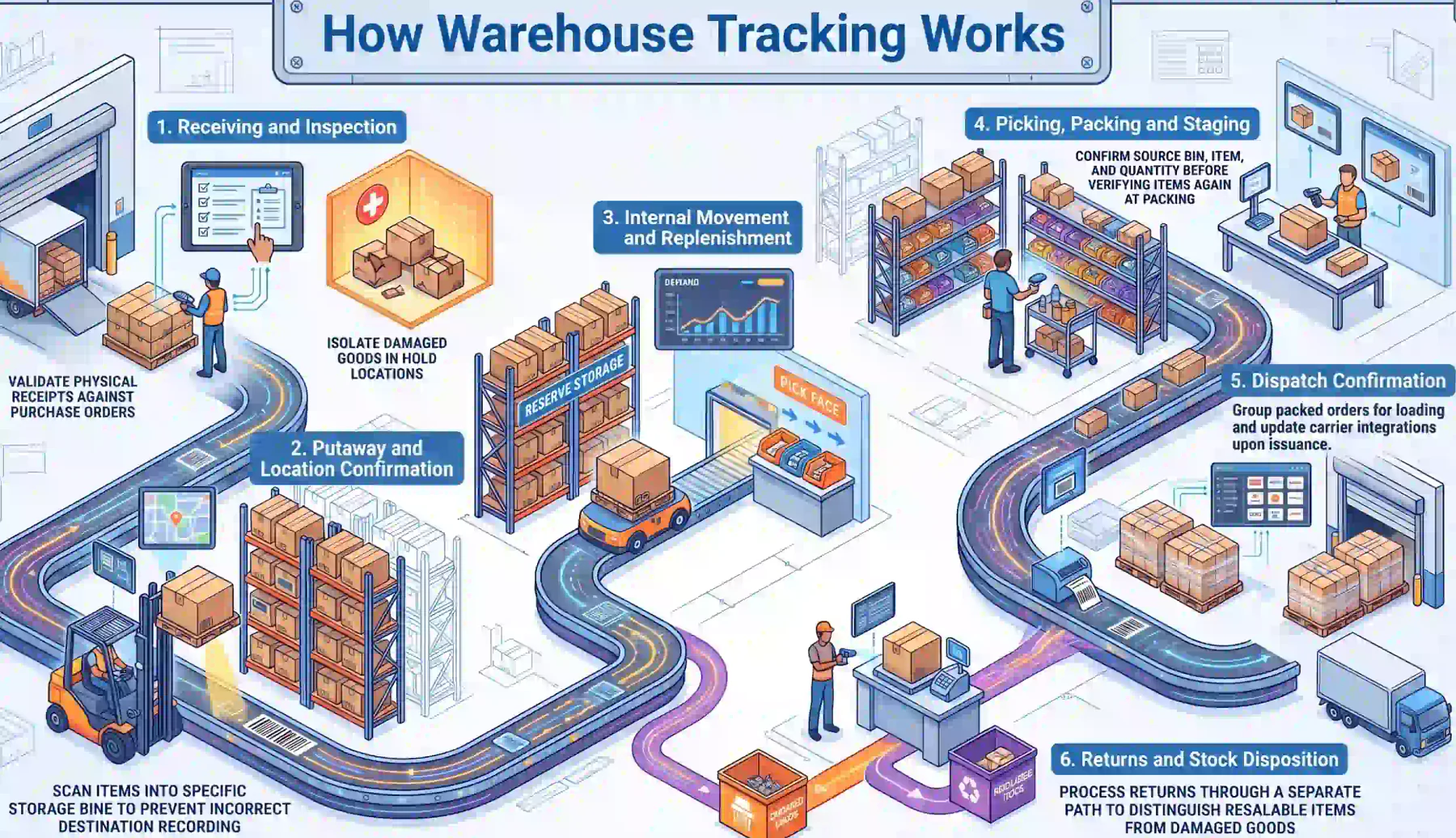
A practical tracking workflow begins before the delivery arrives at the dock. A purchase order or transfer notice provides the expected item and quantity for validation against the physical receipt.
Suppose a Melbourne distribution centre expects 120 cartons but receives 116. The system should record 116, raise the four-carton shortfall as an exception and block it from entering available stock.
1. Receiving and Inspection
The receipt scan creates a received or inspection-pending stock status immediately. Damaged or unmatched goods are isolated in a hold location until assessed, preventing premature entry into available inventory.
2. Putaway and Location Confirmation
A confirmed movement transfers acceptable stock from the receiving area into a storage bin. A failed location scan must stop or flag the transaction rather than silently recording an incorrect destination.
3. Internal Movement and Replenishment
Demand levels or minimum thresholds trigger movement from reserve storage to pick-face locations. Shortfalls remain visible as open exceptions until a supervisor resolves or reassigns each task.
4. Picking, Packing and Staging
The operator confirms the source bin, item and quantity before picking begins. A verification step at packing builds the order fulfilment record by checking selected items against the order and documenting each carton or handling unit.
5. Dispatch Confirmation
A staging scan groups packed orders for loading and prevents premature stock issuance. Dispatch confirmation then issues the inventory and updates the connected order record and any carrier integration.
6. Returns and Stock Disposition
Returns must enter a separate receiving path from inbound supplier deliveries. Resalable, damaged, quarantined and inspection-pending goods must remain distinguishable so stock is not released before assessment.
What Data Should Each Tracking Event Capture?
Each tracking event should record item identifier, quantity, source location, destination, timestamp and initiating user. Missing fields prevent reliable audit trails and complicate discrepancy investigations.
Lot, batch and serial data must link to each movement rather than recorded only at receipt. Without this, a quality hold or recall requires manual tracing across multiple systems instead of a single report.
The table below outlines recommended data fields for the six primary warehouse events, from receiving to returns. Vendors should demonstrate each field as a native capture rather than a configurable extension.
| Event | Item ID | Quantity | Source | Destination | Timestamp | User | Lot / Serial | Status |
|---|---|---|---|---|---|---|---|---|
| Receiving | Required | Required | Supplier or dock | Receiving bin | Required | Required | If applicable | Received or held |
| Putaway | Required | Required | Receiving bin | Storage bin | Required | Required | If recorded | Available |
| Replenishment | Required | Required | Reserve storage | Pick face | Required | Required | If recorded | In-transit |
| Picking | Required | Required | Pick face | Staging | Required | Required | If recorded | Allocated |
| Packing and dispatch | Required | Required | Staging | Carrier | Required | Required | Required | Dispatched |
| Returns | Required | Required | Customer or dock | Hold or receive | Required | Required | If recorded | Inspection pending |
Food and pharmaceutical operations often face traceability requirements beyond standard warehouse stock tracking. Consult relevant authorities for sector-specific obligations.
10 Core Warehouse Tracking Capabilities to Evaluate
Use this checklist during vendor demonstrations and requirements workshops. Ask vendors to show each workflow using representative data from your own warehouse, not a scripted presentation slide.
Functions described as native should work without a separate product, though some configuration may still be required. Barcode and scan capture, label printing and RFID each need device and integration discovery before committing to any warehouse tracking software.
Confirm whether real-time inventory management means immediate transaction posting or a scheduled synchronisation. That distinction affects how quickly your team can act on stock status changes after each warehouse event.
| # | Capability | How It Should Work | KPI Affected | Demonstration Question |
|---|---|---|---|---|
| 1 | Receiving validation | Match scanned pallets or cartons against a purchase order; flag over-deliveries and missing lines | Receiving accuracy | Show how the system handles an over-delivery and a missing line. |
| 2 | Barcode, QR and RFID capture | Capture item, unit and handling-unit identifiers through supported scanning devices | Scan accuracy and processing time | Which identifier formats and GS1-compatible standards does the system support? |
| 3 | Location and bin tracking | Confirm movements between receiving, storage, staging and dispatch locations | Inventory location accuracy | Can an operator move a partial pallet while preserving its movement history? |
| 4 | Lot, batch and serial traceability | Record identifiers at receipt, movement, picking and dispatch | Traceability completeness | Trace one serialised item from supplier receipt to customer order. |
| 5 | Putaway rules | Recommend a storage destination using capacity, item class or configurable rules | Dock-to-stock time | What happens when the preferred bin has insufficient capacity? |
| 6 | Replenishment control | Trigger movement from reserve storage to pick-face based on demand or minimum levels | Replenishment response time | Show an urgent replenishment created during an active picking wave. |
| 7 | Picking and packing verification | Validate item, quantity, order and container at each checkpoint before dispatch | Pick and order accuracy | How does the system stop an operator packing the wrong SKU? |
| 8 | Real-time inventory status | Update available, allocated, damaged, held and in-transit balances after each event | Inventory accuracy and availability | When does received stock become available for allocation? |
| 9 | Dispatch confirmation | Confirm staging and loading before final stock issue and order status update | On-time dispatch | Show how a staged order is corrected before dispatch confirmation. |
| 10 | Dashboards, alerts and audit trails | Record users, timestamps and transactions while surfacing overdue tasks or discrepancies | Exception resolution time | Can a manager identify who changed a quantity and why? |
Ask each vendor whether the proposed warehouse tracking software supports your selected scanning hardware. A live demonstration using your actual SKUs and warehouse structure reveals more than any scripted generic scenario.
Pharmaceutical and medical device warehouses should confirm traceability requirements with the Therapeutic Goods Administration. Sector-specific obligations may require capabilities beyond what standard warehouse inventory tracking software provides out of the box.
Integration, Security and Data Requirements
Warehouse system integration quality becomes visible when a transaction changes mid-flight. A sales order amended after allocation must reach the warehouse in time to prevent operators from acting on outdated picking instructions.
Use the architecture discovery table below to separate required outcomes from vendor assumptions. Classify each connection as verified native, configurable or requiring development discovery before committing to a vendor or contract.
| Area | Data or Control to Verify | Key Buyer Question |
|---|---|---|
| ERP and finance | Items, units, inventory movements, costs and posting references | Which application is the authoritative source for each field? |
| Procurement | Purchase orders, transfer notices, receipts and discrepancies | Are partial receipts and tolerance exceptions synchronised? |
| Sales and e-commerce | Orders, allocations, cancellations and status updates | How quickly do amended or cancelled orders reach warehouse operators? |
| Manufacturing | Materials, production issues, completions and warehouse transfers | Where does responsibility pass between the WMS and manufacturing system? |
| Devices and automation | Scanners, printers, RFID, conveyors, robots or scales | Is device support native, configurable or subject to technical discovery? |
| Transport | Consignments, labels, tracking references and dispatch events | Which carriers or platforms have verified connectors? |
| Identity and access | User provisioning, roles, approvals and privileged access | Can duties be separated by warehouse, role and transaction type? |
| Data governance | Retention, audit history, backups and recovery | What recovery objectives and restore tests are documented? |
| APIs and monitoring | Authentication, rate limits, error handling and message logs | How are failed messages detected, retried and reconciled? |
Security due diligence should cover role-based access, encryption, audit records, incident response and third-party access controls. Request documentation on vulnerability management, backup procedures and restore test results.
The Office of the Australian Information Commissioner provides guidance on obligations relevant to personal data held in warehouse tracking systems. Seek independent legal and compliance advice for your specific data-handling circumstances.
Confirm Australian support hours, escalation procedures and how each site operates during internet or integration failures. Offline workarounds must include a controlled reconciliation path to prevent duplicate stock movements entering the live system.
Warehouse Tracking KPIs and Business Case
A business case should connect warehouse tracking capabilities to measurable operational outcomes. Avoid committing to percentage improvements before establishing a baseline over at least four representative trading weeks.
Segment baseline measurements by warehouse, process and order profile so an average does not hide a poorly performing site. Include at least one peak or promotion period to capture realistic exception volumes before selecting a system.
| KPI | Suggested Calculation | What It Reveals |
|---|---|---|
| Inventory accuracy | Correct counted locations or units ÷ total counted | Reliability of system balances and location records |
| Receiving accuracy | Correct receipt lines ÷ total receipt lines | Supplier, scanning and receiving-control performance |
| Dock-to-stock time | Time from arrival or receipt start to available storage | Receiving, inspection and putaway speed |
| Pick accuracy | Correct pick lines ÷ total pick lines | Effectiveness of location, scan and verification controls |
| Order accuracy | Correctly fulfilled orders ÷ dispatched orders | End-to-end fulfilment quality |
| On-time dispatch | Orders dispatched by cut-off ÷ orders due | Execution reliability against service commitments |
| Inventory adjustment rate | Adjusted units or value ÷ throughput or stock value | Frequency and materiality of stock discrepancies |
| Labour productivity | Lines, units or orders completed per labour hour | Capacity and warehouse workflow efficiency |
| Exception resolution time | Average time from exception creation to closure | Responsiveness to shortages, damage and data errors |
| System adoption | Valid system-recorded tasks ÷ expected tasks | Whether operators consistently follow the designed workflow |
Total cost of ownership should include licences, implementation, integrations, devices, training and future change requests. Finance should approve the assumptions and distinguish recoverable cash savings from capacity or headcount gains.
The Australian Taxation Office requires businesses to maintain adequate stock records supporting inventory valuations. These record-keeping obligations should be reflected in the system's audit trail and reporting design from day one.
Multi-Warehouse and In-Transit Tracking
Multi-warehouse warehouse inventory tracking requires a consistent location master and item master across every site. Automated warehouse workflows rely on these shared data models; divergent structures create reconciliation work that removes efficiency gains.
In-transit stock must carry a clear status between dispatch confirmation at the origin and receiving at the destination. Without this, finance cannot reliably value goods in transit and operators risk double-allocating the same stock to separate orders.
Offline resilience matters for operations with limited connectivity between remote sites or during peak periods. Temporary records must follow a controlled reconciliation path to prevent duplicate stock movements entering the live warehouse tracking system.
How to Select a Warehouse Tracking System
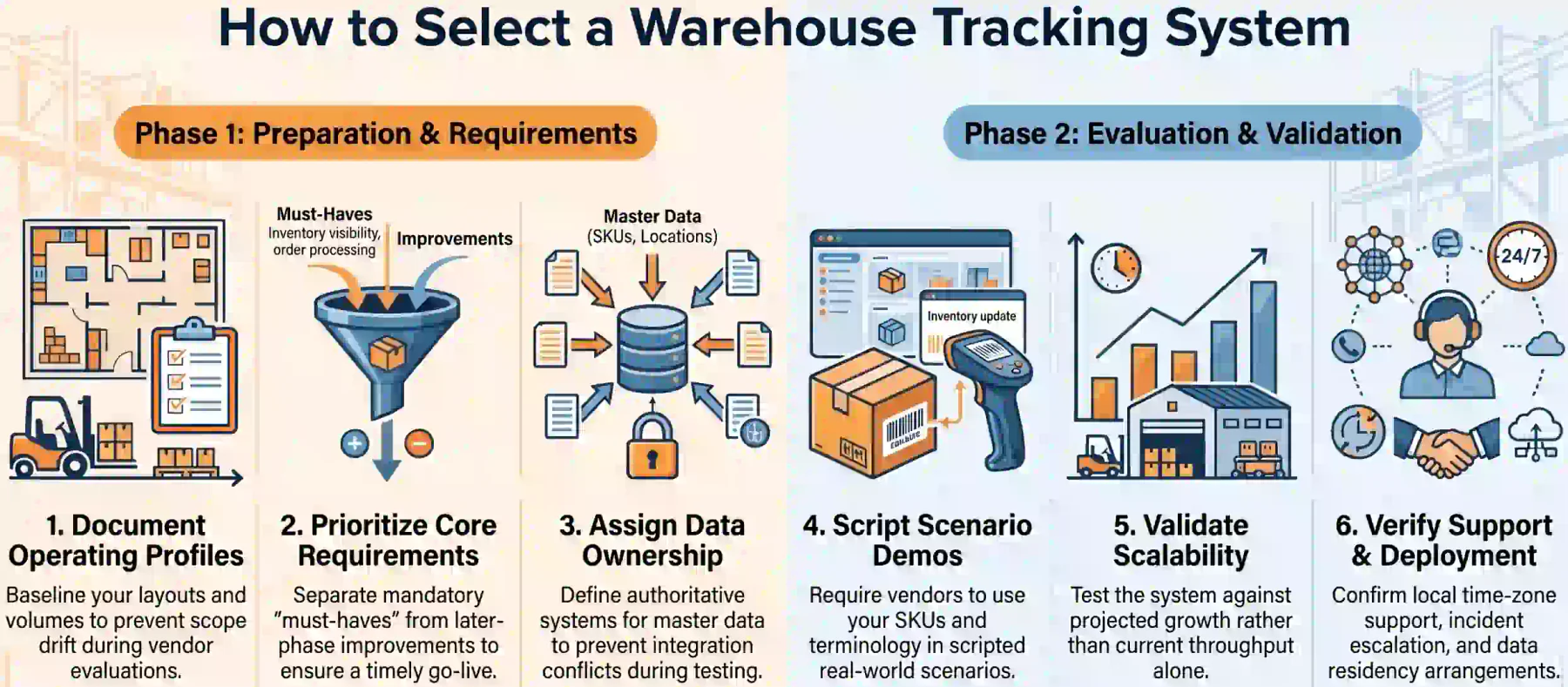
A well-managed selection process tests operational fit and implementation credibility rather than the number of features demonstrated. References should resemble your warehouse complexity, even if they operate in a different industry sector.
Ask reference customers about operational disruption, scope changes, integration reliability and post-go-live support quality. Those questions reveal implementation risk more reliably than general product satisfaction or sales demonstrations alone.
1. Document the Warehouse Operating Profile
Document warehouse layouts, order types, volumes, peak periods and current failure points before approaching any vendor. This baseline prevents scope drift and gives each shortlisted warehouse tracking software a clear and measurable standard to meet.
2. Define Mandatory and Later-Phase Requirements
Separate capabilities the business cannot operate without from improvements that can wait for a later phase. Mandatory requirements define the minimum acceptable system; later-phase items scope future investment without delaying the initial go-live.
3. Assign Data and Integration Ownership
Assign each master-data field and transaction record to one authoritative system before shortlisting begins. Unclear data ownership creates field conflicts that surface during integration testing rather than during vendor demonstrations.
4. Use Scenario-Based Vendor Demonstrations
Provide vendors with scripted scenarios covering shortages, damaged goods, order cancellations and partial dispatches. Require demonstrations using your own terminology, SKUs and warehouse structure rather than vendor-prepared sample data.
5. Validate Performance and Scalability
Test performance assumptions against projected users, orders, scans and warehouse count rather than current volume only. A warehouse inventory tracking system sized for today's throughput may create an early replacement problem as the business grows.
6. Review Australian Support and Deployment Arrangements
Confirm that support coverage spans Australian time zones and that escalation procedures are documented for critical incidents. Ask about cloud hosting location, recovery time objectives and data residency arrangements before signing any contract.
Implementation Roadmap and Risk Controls
Implementation should protect daily throughput while progressively increasing system control over warehouse operations. A structured roadmap reduces the risk of cutover disrupting fulfilment or service levels during the transition period.
Major risks include incomplete master data, untested integrations and operators bypassing scan steps in the warehouse. Each risk needs an owner, trigger, mitigation plan and a rollback or continuity procedure in the event of failure.
Avoid scheduling go-live immediately before seasonal peaks, major stocktakes or site changes unless suitable contingency capacity exists. Measure time-to-value from stable adoption, not from contract signature or the nominal go-live date.
1. Master-Data and Label Preparation
Clean item identifiers, barcodes, storage locations, lot and serial records, and opening balances before configuration begins. Poor master data is the most common cause of early failures in any warehouse inventory tracking system implementation.
2. Configuration and Integration
Build approved workflow rules and integration interfaces, then document error handling and reconciliation for each connection. A connector described as available may still require configuration, middleware or development work to function reliably.
Run unit, integration, security and user-acceptance tests using both normal and exception scenarios during the testing phase. Include realistic peak transaction volumes and the error paths identified during requirements and design workshops.
How HashMicro Supports Warehouse Tracking
HashMicro's warehouse management system connects receiving, putaway, picking and dispatch with procurement and accounting records. Warehouse inventory tracking operates as part of a shared operational record rather than as a standalone application layered separately.
The platform supports barcode scanning, location tracking, bin management and lot or serial traceability within a single environment. Integration scope, performance and support arrangements are confirmed through a structured discovery and requirements session.
HashMicro serves more than 1,750 clients across its business software portfolio. Product suitability for your specific warehouse must still be verified through requirements analysis, demonstration and due diligence before any commitment is made.
With receiving, movement, picking and dispatch records connected, Hashy AI can review tracking status across locations and surface the exceptions that need a decision.






Conclusion
The right warehouse tracking system supports your actual transaction volumes, exception paths and integrations within manageable implementation risk. Basic warehouse inventory tracking software may be sufficient for a straightforward single site with limited execution rules.
Bring operations, finance and IT into selection before issuing a vendor request. Use the comparison matrix for architecture, the capability checklist for demonstrations and the KPI framework to build and validate the business case.
If you are interested in learning further, you can schedule a free consultation with our experts anytime. Start today and gain deeper business insights.

Frequently Asked Questions
Yes, many ERP systems include a warehouse module covering receiving, putaway, picking and dispatch. The right choice depends on execution complexity and whether the module meets your fulfilment and traceability needs.
Barcodes are the most common format, though systems can also support QR codes, RFID, lot numbers and serial identifiers. Items without a scannable identifier need manual handling, which limits validation.
A well-configured system should flag a missing scan as an exception and halt the transaction until resolved. Duplicate scans should trigger an alert, preventing the same unit being recorded twice.
Yes, provided the system uses site-specific locations, roles and workflows while keeping one consistent item master across sites. Performance should be tested at combined volumes and checked for latency at every site.
Ask the vendor to demonstrate a stock movement and show when the updated balance becomes available for allocation. A genuine real-time system records the event at scan, not during a batch synchronisation.