


 Limited to 100 registrants

Australian companies rely on a mix of digital solution for business to run daily operations; ERP, CRM, HRM, and warehouse systems are some of them. However, when these tools can’t talk to each other, they create data silos, manual rework, and inconsistent information across departments.
Likewise, as a business scales, a standalone ERP simply can’t keep up. Integrating it with the rest of your stack automates workflows, improves visibility, and gives leaders the real-time insight they need to make faster, sharper decisions.
That’s where ERP integration comes in. By connecting these platforms, data flows smoothly across functions. No more duplicate entries or conflicting reports.
Key Takeaways
Explains how ERP integration connects systems, aligns data, and creates a unified flow of information across business functions.
Potential issues like data quality, legacy systems, and security can be addressed with careful planning and proper training.
AI-driven iPaaS and composable ERP allow companies to stay flexible, respond quickly, and make better decisions.
Integrated ERP systems turn data into actionable insights, boost efficiency, and support long-term business growth.
What Is ERP Integration?
ERP integration connects a central ERP system with other business applications, databases, and third-party software. The goal is to create a smooth flow of data across departments so every team works with the same information.
Think of Australia’s top ERP systems for business as the most common ERP modules such as finance, HR, procurement, and inventory. However, modern companies also use tools like CRM, marketing platforms, and supply chain systems that operate separately.
Integration connects these platforms through APIs or middleware so data syncs automatically. For example, a customer update in an eCommerce system can instantly reflect in inventory, finance, and logistics records.
For Australian businesses, this connectivity supports compliance, improves reporting accuracy, and strengthens operational efficiency. Instead of isolated data, companies gain real-time insights to guide faster and smarter decisions.
"Once we integrated our ERP, everything clicked. Operations got tighter, errors dropped, and we stopped second-guessing every decision."
How Does ERP Integration Work?

ERP integration connects different systems so data flows smoothly across the business. The system maps and synchronizes information between applications, ensuring every platform uses the same accurate data while keeping operations connected.
1. The functional workflow of data exchange
ERP integration works through trigger-based or scheduled data exchange. When an event occurs, such as a new order in a CRM, the system extracts the data and maps it to the ERP’s structure so both platforms recognize the same information.
After mapping, the system sends the data to the ERP for validation. If the data meets the rules, it is recorded automatically; if not, the system logs the error and alerts administrators. This process can run in real time or in scheduled batches depending on business needs.
2. Technical mechanisms and protocols
Systems communicate through several technologies, most commonly Application Programming Interfaces (APIs). APIs act as digital bridges that allow different applications to exchange data securely using standard formats like JSON or XML.
Webhooks support real-time integration by automatically pushing data to another system when an event occurs. In larger enterprise environments, middleware often manages these connections by handling data translation, routing, and security between multiple systems.
Common Types of ERP Integrations by System
To boost efficiency, a company must connect key peripheral systems to its central database. Needs vary by industry, size, and model, but some integrations are essential for every business. The right connections keep workflows smooth and decisions fast.
CRM (customer relationship management) integration
Aligning sales and finance is vital for any business. Connecting the CRM and ERP automates orders, manages inventory, and starts invoicing. This integration links customer acquisition directly to order fulfillment.
It removes duplicate data and speeds up the sales cycle. Sales teams gain real-time visibility into inventory, credit, and order status. Overall, the process streamlines operations and improves decision-making.
Ecommerce integration
For retail, wholesale, and direct-to-consumer businesses, integrating the eCommerce storefront with the central operations system is essential, and reliable ecommerce hosting plays a key role in ensuring seamless performance and scalability. Inventory stays synchronized across all channels, preventing stockouts and overselling. Online orders flow instantly into fulfillment for picking, packing, and shipping.
The integration updates pricing, product details, and tracking on the store. This improves the customer experience and eases support workloads. Overall, it ensures smooth, accurate, and efficient order management.
Human resources management system (HRMS) integration
Many businesses rely on HR or payroll software to handle employee changes and pay. Connecting these systems keeps data like new hires, terminations, and role updates in sync with financial planning. This makes payroll accurate and access controls simpler.
Timesheets, leave, and overtime feed directly into the financial system. The integration also helps track labor costs for projects or production runs. Overall, it makes HR and finance work smoother and more transparent.
Supply chain and third-party logistics (3PL) integration
Many businesses outsource warehousing and distribution to 3PL providers. Connecting the company’s system with the 3PL’s WMS keeps the supply chain visible and efficient. Orders, shipping notices, and inventory updates flow automatically between systems.
This integration lets businesses track goods from manufacturer to customer in real time. It helps optimize inventory costs and reduce delays. Overall, it prevents disruptions and keeps customers satisfied.
Business intelligence (BI) and analytics integration
Data is a company’s most valuable asset, but it’s only useful when analyzed properly. Connecting core systems to BI platforms like Tableau, Power BI, or Looker unlocks deeper insights. Financial, operational, and sales data flow into interactive, customizable dashboards.
This integration lets teams spot trends, run predictive models, and uncover hidden opportunities. Executives and analysts can make proactive, data-driven decisions. Overall, it drives smarter strategies and long-term growth.
Marketing automation integration
Connecting marketing automation platforms like HubSpot or Marketo to the central database enables detailed closed-loop reporting. Marketing teams can see exactly how campaigns convert into revenue. Leads that become customers automatically send financial data back to the platform.
This integration makes it easy to calculate CAC and ROI for each channel. Teams can allocate budgets smarter and focus on high-value customers. Overall, it helps run more effective, personalized marketing campaigns.
ERP Integration Methods
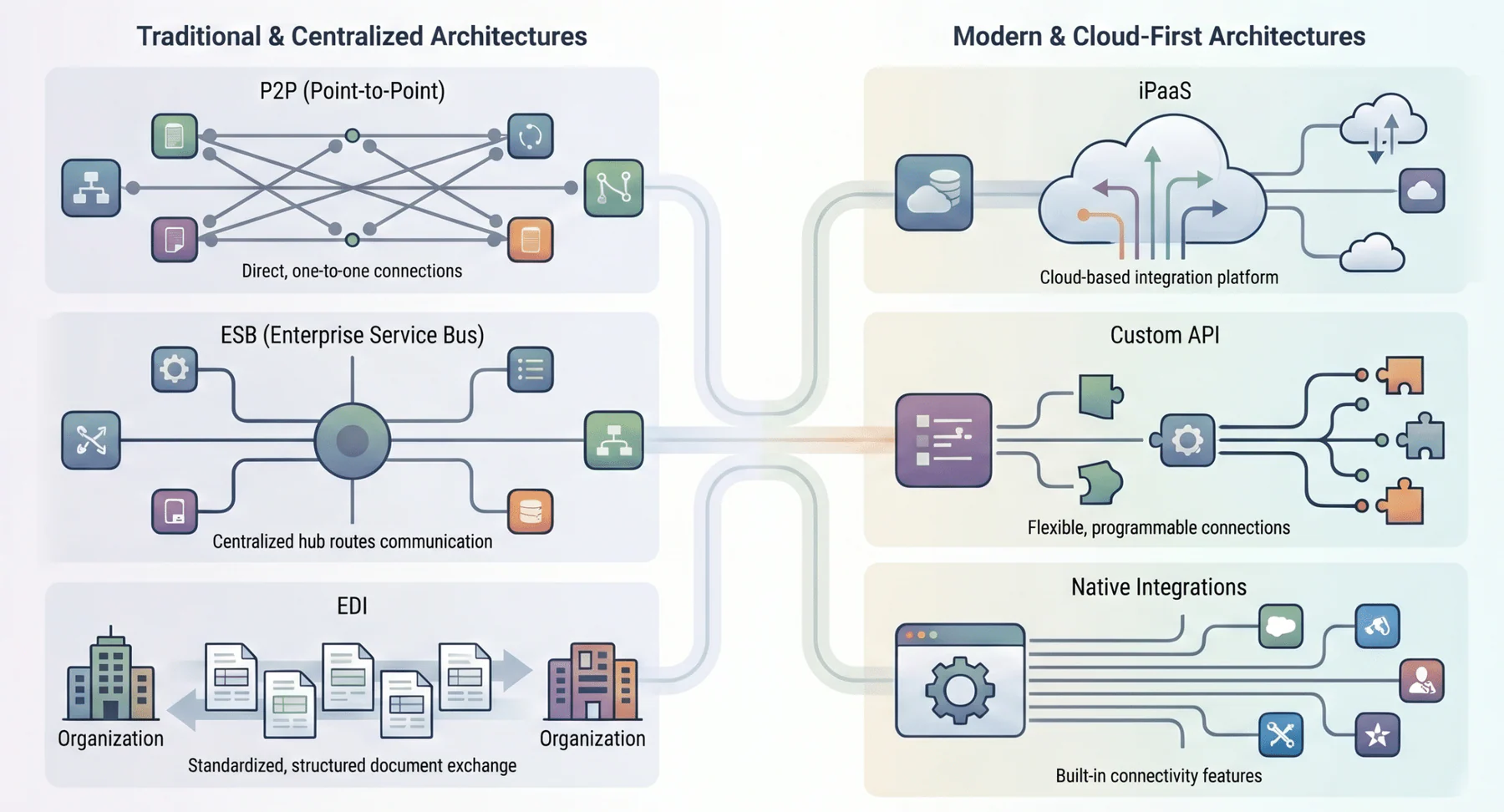
Choosing the right integration method affects scalability, security, and maintenance. The best approach depends on system complexity, data volume, and available technical resources.
1. Point-to-point (P2P) integration
Connects two systems directly using custom code without middleware. It works well for simple setups, but becomes complex and difficult to maintain as connections increase.
2. Enterprise service bus (ESB)
Acts as a central hub that manages routing and data translation between systems. It improves stability but is often complex and less flexible in cloud environments.
3. Integration platform as a service (iPaaS)
Cloud-based integration that connects multiple systems through a centralized platform. It is scalable, flexible, and suitable for modern businesses with dynamic needs.
4. Native or built-in integrations
Pre-built connectors provided by vendors for quick setup. They are easy to use but limited to standard data and basic workflows.
5. Custom API development
Custom-built integrations designed for specific business needs. It offers flexibility but requires higher cost, development effort, and maintenance.
6. Electronic data interchange (EDI)
Standardizes document exchange such as orders and invoices. It remains reliable for high-volume B2B transactions, especially in logistics and manufacturing.
Key Benefits of ERP Integration
Integration creates a Single Source of Truth by aligning data across systems, including the most common ERP modules such as finance, HR, and inventory. This eliminates discrepancies and improves decision-making.
- Creation of a Single Source of Truth (SSOT)
Integration creates a Single Source of Truth, keeping all systems aligned on the same data. This eliminates discrepancies between teams and endless reconciliation. With uniform, up-to-date information, executives can make confident, accurate decisions.
- Automation of Complex Workflows
Manual data entry kills productivity and invites errors. Integration automates workflows, from routing purchase orders to updating ledgers. This speeds operations, cuts labor costs, and eliminates costly mistakes.
- Real-Time Visibility and Agility
End-of-month reports aren’t enough in today’s fast-paced market. Integration gives real-time visibility across operations, from supply chain delays to daily sales performance. This insight lets businesses act quickly and stay agile in response to changes.
- Enhanced Customer Experience (CX)
Integration greatly improves the front-office customer experience. It gives service teams instant access to complete customer histories and order details. Automated updates and self-service options boost satisfaction, loyalty, and brand reputation.
- Optimized IT Costs and Scalability
Fragmented IT systems are costly and time-consuming to manage. Modern integration methods like iPaaS streamline architecture, cut maintenance costs, and reduce reliance on external consultants. A well-integrated framework is scalable, letting new applications plug in with minimal disruption.
Common ERP Integration Challenges

Even with clear benefits, achieving full integration is challenging. Integration projects are complex and require careful planning. Businesses must navigate common roadblocks to succeed.
1. Data formatting and quality issues
The main challenge in integration is data incompatibility. Different systems often store the same information in different ways. Duplicate, outdated, or messy data can make things even worse. Cleaning and mapping the data first is key to avoiding big mistakes.
2. Legacy system limitations
Many Australian businesses still run heavily customized, on-premise legacy systems. These old systems often can’t talk easily with modern cloud applications. Integration usually needs complex middleware or other fragile workarounds. Companies must weigh whether to build custom connections or update the system entirely.
3. Security and compliance risks
Connecting internal databases with external apps increases a company’s security risks. Data must be encrypted, and businesses must follow the Australian Privacy Principles and Privacy Act. A breach could cause legal penalties, financial loss, and serious reputational damage.
4. Change management and user adoption
Integration changes how employees work by automating or altering long-standing workflows. Without proper training and communication, it can cause resistance or overwhelm. When done right, updates sync instantly across systems, reducing errors and speeding up order fulfillment.
Industry Use Cases for ERP Integration
The basics of connecting business systems stay the same, but applications and benefits differ by industry. Each sector uses integrations in unique ways. Understanding these differences can guide your own digital transformation efforts.
1. Retail and eCommerce
Retailers need accurate inventory and fast fulfillment. Integrating ERP with eCommerce and POS systems ensures stock, pricing, and orders stay synchronized, improving customer experience and reducing errors.
2. Manufacturing and supply chain
Manufacturing efficiency relies on coordinating materials, machines, and labor. Integrating ERP with MES, PLM, and IoT sensors creates a connected smart factory. Managers can monitor machines in real time, trigger maintenance automatically, and adjust procurement based on actual usage.
3. Healthcare and life sciences
In healthcare, accurate data is vital for patient safety and compliance. Integrating ERP with EHR and medical supply systems aligns procurement with patient needs and procedures. Proper data mapping ensures sensitive information follows regulations like HIPAA and the Australian Privacy Principles.
Advanced Practices and Future Trends
- Event-driven architecture: Enables real-time data exchange as transactions occur, improving responsiveness across systems.
- AI and machine learning: Enhances data mapping, predicts integration failures, and optimizes system performance automatically.
- Composable ERP: Allows modular system design so businesses can adapt quickly without disrupting core operations.
ERP Integration Trends in Australia
1. PEPPOL e-invoicing adoption
The ATO e-invoicing initiative is accelerating structured invoicing adoption. This improves compliance, reduces manual processing, and standardizes financial data exchange across businesses.
2. Government digital transformation incentives
Government grants and programs support businesses adopting ERP and integration technologies, helping improve productivity and digital capability.
3. Data sovereignty and compliance regulations
Privacy Act requirements require businesses to manage and protect data carefully, especially when integrating multiple systems across platforms.
Conclusion
ERP integration connects systems, removes data silos, and improves operational efficiency. With the right setup, businesses gain real-time visibility, automate workflows, and make faster decisions. Consult our expert for a free consultation to plan your integration strategy.
Modern tools like AI-driven iPaaS and composable ERP help businesses stay flexible and make faster decisions. Integrated systems turn data into action and support long-term growth. Contact us for a free consultation.
Frequently Asked Question
ERP integration connects your central ERP system with other business applications, ensuring data flows smoothly across departments.
It eliminates data silos, automates workflows, improves decision-making, and provides real-time insights for faster, smarter operations.
Challenges include data quality issues, legacy system limitations, security risks, and ensuring employee adoption of new workflows.
Businesses can choose from point-to-point connections, Enterprise Service Bus (ESB), iPaaS, native integrations, custom APIs, or EDI depending on their needs and technical resources.