


 Limited to 100 registrants

A warehouse barcode system streamlines inventory tracking by recording stock movements across receiving, picking, transfers, and dispatch activities.
As items are scanned, information is updated automatically within the system. This helps businesses improve stock accuracy, reduce manual processes, and maintain better operational visibility.
Key Takeaways
A warehouse barcode system uses barcode labels, scanners, and software to improve inventory accuracy and warehouse visibility.
Barcode systems track inventory movements through scanning activities and real-time inventory updates.
Benefits include improved inventory accuracy, faster warehouse operations, and better stock visibility.
Successful implementation involves selecting the right barcode standards, hardware, software, and staff training processes.

What Is a Warehouse Barcode System?
A warehouse barcode system is a solution that uses barcode labels, scanners, and software to identify and track inventory throughout the warehouse. Each barcode contains information that can be captured instantly during daily operations.
When items are scanned, inventory records are updated automatically within the system. This allows warehouse teams to monitor stock movements and inventory levels in real time.
This also supports centralised stock visibility, allowing teams to monitor inventory movements, stock levels, and warehouse activity from one connected system.
Many businesses connect barcode technology with a warehouse management platform to improve inventory accuracy and operational visibility across multiple warehouse activities.
Core Components of a Warehouse Barcode System
A warehouse barcode system combines several components that work together to support inventory tracking and warehouse operations.
1. Barcode labels
Barcode labels are attached to products, pallets, cartons, or storage locations. They provide unique identifiers that allow inventory to be tracked accurately throughout the warehouse.
2. Barcode scanners
Barcode scanners capture information from labels and transfer it into the system. Businesses may use handheld scanners, mobile computers, or fixed scanning devices depending on operational requirements.
3. Warehouse management software (WMS)
Barcode data is typically managed through a warehouse management system. The software stores inventory information, processes transactions, and provides real-time visibility across warehouse operations.
For growing warehouses, digital storage solutions help organise barcode data, stock locations, and movement records more consistently.
How a Warehouse Barcode System Works
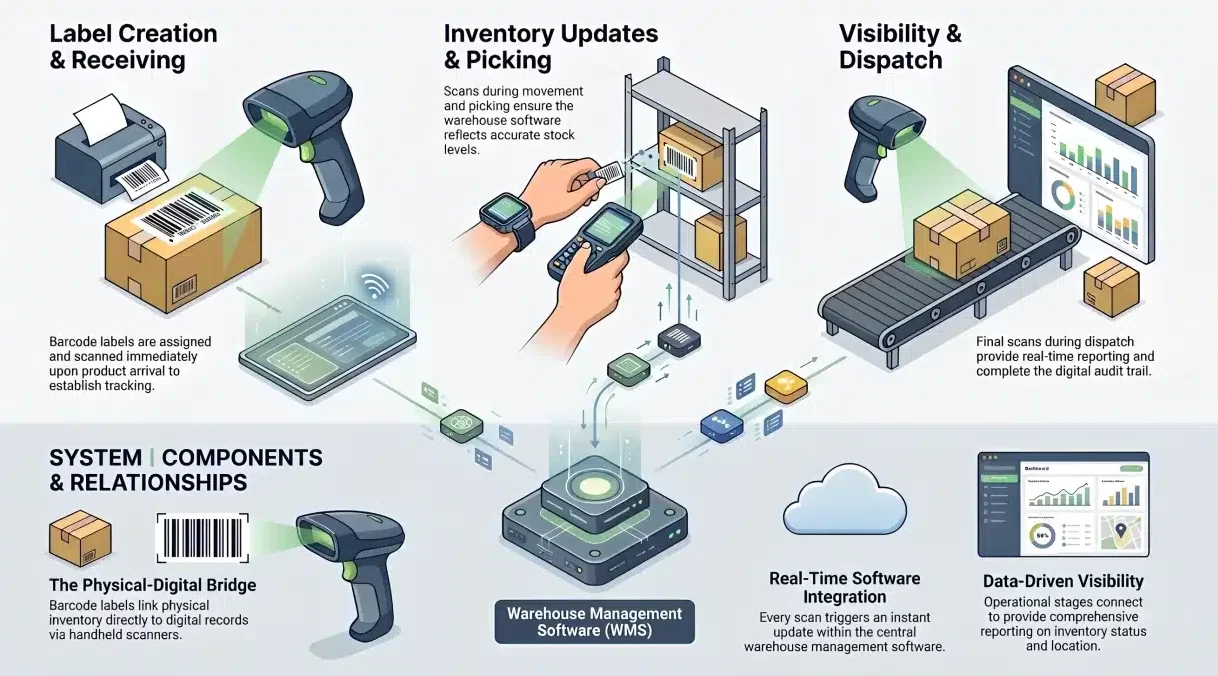
Barcode systems connect physical inventory movements with digital inventory records, allowing warehouse teams to track stock more accurately.
1. Barcodes are created and assigned to inventory
Unique barcode labels are generated and attached to products, pallets, bins, or storage locations.
2. Items are scanned throughout warehouse activities
Inventory is scanned during receiving, putaway, picking, transfers, and dispatch.
3. Inventory records are updated in real time
Each scan automatically updates stock quantities and location information within the system.
4. Warehouse reports and visibility are generated
The system uses barcode data to provide inventory reports, stock movement history, and operational insights.
Types of Barcodes Used in Warehouses
Warehouses typically use either 1D or 2D barcodes depending on the amount of information required and the complexity of operations.
Choosing the Right Barcode Type
For most warehouses, 1D barcodes provide a practical solution for inventory identification and stock tracking. They are widely used, easy to implement, and compatible with most scanning devices.
Businesses requiring additional product information or traceability may benefit from 2D barcodes. Many organisations also combine barcode technology with barcode asset tracking processes to improve visibility across inventory and warehouse assets.
Essential Components of a Warehouse Barcode System
A warehouse barcode system relies on several technologies working together to support inventory tracking and warehouse operations.
1. Barcode Scanners and Mobile Devices
Barcode scanners capture information from inventory labels and transmit it directly into the system. Depending on operational requirements, businesses may use handheld scanners, mobile computers, or wearable scanning devices.
These tools help warehouse teams record inventory movements more efficiently during receiving, picking, transfers, and dispatch activities.
2. Label Printers and Barcode Labels
Barcode labels provide the unique identifiers used to track inventory throughout the warehouse. They can be applied to products, cartons, pallets, storage bins, or warehouse locations.
Label printers ensure barcodes remain clear and scannable, helping businesses maintain accurate inventory records and reduce scanning errors.
3. Warehouse Management Software
Warehouse management software acts as the central platform that stores and processes barcode data. It connects inventory transactions, stock movements, and warehouse activities within a single system.
Many businesses combine barcode technology with a barcode inventory system to improve inventory visibility, automate stock updates, and support more accurate warehouse operations.
How to Implement a Warehouse Barcode System
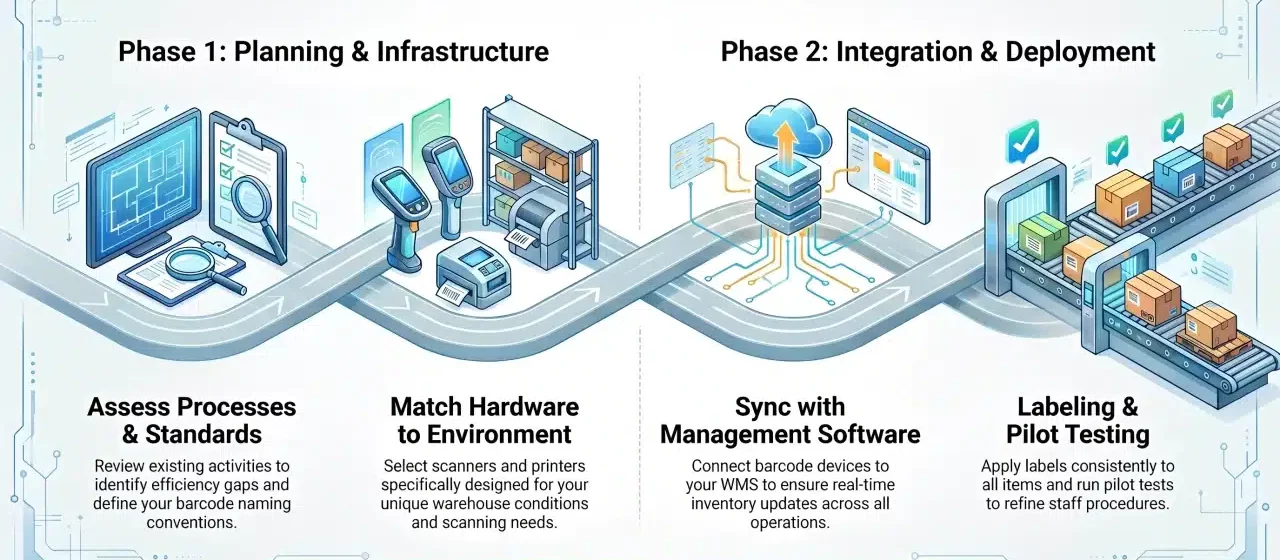
Implementing a barcode system requires a structured approach to ensure barcode hardware, labelling processes, and warehouse workflows operate effectively together.
1. Assess warehouse processes and requirements
Review existing warehouse activities to identify where barcode tracking can improve inventory accuracy, stock visibility, and operational efficiency.
This review also helps identify opportunities for storage process optimisation before barcode labels, scanners, and software are fully deployed.
2. Choose barcode standards and labelling rules
Select barcode formats, naming conventions, and labelling requirements that align with inventory and warehouse processes. Many businesses follow standards published by GS1 Australia.
3. Select scanners, printers, and labels
Choose hardware that matches operational needs, warehouse conditions, and scanning requirements.
4. Integrate with warehouse management software
Connect barcode devices with a warehouse management platform to ensure inventory data updates automatically across warehouse operations.
5. Design and apply barcode labels
Create barcode labels and apply them consistently to products, pallets, storage locations, and inventory containers.
6. Train staff and conduct pilot testing
Train warehouse personnel on scanning procedures and run pilot tests before full deployment to identify any process improvements.
Benefits of a Warehouse Barcode System
Warehouse barcode systems help businesses improve inventory control while reducing manual work. Guidance from the Warehousing & Logistics Association of Australia (WLAA) can also support better warehouse practices.
1. Improved inventory accuracy
Barcode scanning reduces manual data entry and helps maintain more accurate inventory records across warehouse operations.
2. Faster warehouse operations
Warehouse teams can process receiving, picking, and dispatch activities more efficiently through automated data capture. Barcode scanning can also support automated picking processes by guiding staff to the right item, location, and order sequence.
3. Real-time stock visibility
Inventory information is updated immediately after each scan, allowing businesses to monitor stock levels more accurately.
4. Lower manual workload
Automated inventory updates reduce administrative tasks and minimise the time spent recording inventory movements.
5. Better traceability and compliance
Barcode systems provide detailed inventory records that support product traceability, audit requirements, and operational compliance.
"A warehouse barcode system improves more than inventory accuracy. By connecting inventory movements with real-time data, businesses gain better visibility, faster operations, and greater control across the warehouse."
How WMS Software Improves Barcode Tracking
Barcode systems capture inventory data, but warehouse management software is responsible for processing, storing, and organising that information. Together, they provide a more accurate and efficient approach to inventory management.
When barcode scanning is integrated with a warehouse management system (WMS), inventory records update automatically during receiving, putaway, picking, and dispatch. This improves visibility and supports faster decision-making with real-time data.
Features to Look for in a Barcode-Enabled WMS
- Real-time inventory tracking: Provides up-to-date inventory information across products, locations, and warehouse activities.
- Mobile barcode scanning: Supports barcode transactions through handheld devices and mobile warehouse applications.
- Automated stock updates: Updates inventory records automatically after each barcode scan, reducing manual data entry.
- ERP integration: Connects warehouse operations with purchasing, inventory, sales, and financial data.
- Warehouse reporting and analytics: Generates reports on inventory levels, stock movements, warehouse productivity, and operational performance.
Common Mistakes When Implementing a Warehouse Barcode System
Even with the right technology, implementation issues can reduce the effectiveness of a warehouse barcode system. Understanding common mistakes helps businesses avoid unnecessary disruptions and achieve better results.
Clear warehouse operations strategies can help teams align barcode usage with receiving, putaway, picking, transfers, and dispatch workflows.
1. Choosing the wrong barcode format
Selecting a barcode format that does not align with operational requirements can create limitations in inventory tracking, data storage, or future scalability.
2. Skipping WMS integration
Barcode scanners alone provide limited value without software that can process and manage inventory data effectively. Integration with a WMS helps maximise the benefits of barcode tracking.
3. Applying labels inconsistently
Poor label placement, damaged labels, or inconsistent labelling standards can lead to scanning errors and inventory inaccuracies.
4. Providing limited staff training
Warehouse personnel need clear procedures for scanning, inventory handling, and barcode usage to ensure accurate data collection.
5. Launching without pilot testing
Implementing a barcode system without testing can increase the risk of operational issues. Pilot testing helps identify process gaps before full deployment.
Warehouse Barcode System Cost
The cost of a warehouse barcode system depends on the size of the warehouse, operational requirements, and the technologies being used.
Common expenses include barcode scanners, label printers, barcode labels, warehouse management software, implementation, and staff training.
Costs can vary based on warehouse size, user numbers, hardware requirements, software integrations, and operational complexity. Many growing businesses invest in the best inventory platform for stock managers to support long-term warehouse scalability.
Conclusion
Warehouse barcode systems help businesses improve inventory accuracy, increase operational efficiency, and maintain better visibility across warehouse activities.
When combined with warehouse management software, barcode technology supports real-time inventory updates, faster order processing, and more reliable inventory control.
If you are looking to modernise warehouse operations with barcode technology, book a free walkthrough with our team to see how HashMicro’s Barcode Inventory System can support your business.
Frequently Asked Question
A warehouse barcode system uses barcode labels, scanners, and software to track inventory movements and warehouse activities more accurately.
The system works by assigning barcodes to inventory items and updating inventory records automatically whenever items are scanned during warehouse operations.
Key benefits include improved inventory accuracy, faster warehouse processes, real-time stock visibility, reduced manual work, and better traceability.
Yes. Many barcode systems integrate with warehouse management software (WMS) to automate inventory updates and improve operational visibility.
Costs vary depending on warehouse size, hardware requirements, software capabilities, and implementation needs.
1D barcodes store less information and are commonly used for basic inventory tracking, while 2D barcodes store more data and support advanced traceability requirements.
Yes. Even smaller warehouses can benefit from improved inventory accuracy, faster stock tracking, and reduced manual data entry.