


 Limited to 100 registrants

A work order template is a structured document that captures every detail of a job, from scope and labour to materials and authorisation, in one place that all parties can refer to.
It bridges the gap between a customer request and the completed task, helping Australian manufacturers, tradespeople, field service teams, and facility managers stay aligned, billable, and compliant.
This article provides a production systems overview, explaining what a work order is, its legal and ATO requirements, available templates, how to complete one, and when to move to software.
Key Takeaways
Work order is a formal document that authorises a job, sets out scope and resources, and records what was used during execution from start to completion.
Australian compliance requires every work order to display ABN, contractor licence numbers where applicable, GST breakdown, scope, priority, and authorisation.
Industry templates differ across maintenance, construction, field service, manufacturing, and IT, with each capturing specific data to operate efficiently.
Seven steps to prepare a work order: business and client info, scope, costs, GST, priority, authorisation, and completion sign-off, in that order.

What Is a Work Order?

A work order is a formal document that authorises a specific job to begin, gives instructions to the team executing the task, and serves as a record of the resources used during the work.
In manufacturing, the work order (sometimes called a production order) drives the shop floor, listing what to produce, including bill of materials components, machine routing, and quality steps.
For field services and trades, the same document dispatches technicians to a site to repair or install something, capturing the client’s problem, parts used, time on site, and the final sign-off.
A work order is internal, unlike a purchase order (sent to suppliers) or an invoice (sent after work to demand payment). The completed work order usually feeds the data straight into the final invoice.
"A work order is what turns a vague request into something a business can actually deliver; without one, every job lives in someone's head, and that is where the misunderstandings and missed invoices begin."
What a Work Order Template Must Include in Australia
Australian work order templates must meet specific tax, regulatory, and licensing standards. Generic templates pulled from overseas sources rarely cover what the ATO and state authorities actually require.
Australian Bureau of Statistics data shows trades and manufacturing make up a substantial share of small business revenue, making work order compliance critical for cash flow and audit readiness.
The six elements below cover the minimum every Australian work order template should display to stay compliant, professional, and legally protective for both the business and the client.
1. Business and client details (ABN and licence number requirements)
Every work order must show the business name, registered address, contact details, and Australian Business Number (ABN). A missing ABN can trigger 47% no-ABN withholding once it supports an invoice.
Trades and construction businesses must also display state-specific contractor licence numbers. Queensland operators need their QBCC licence; New South Wales requires a Fair Trading licence for residential building work.
Including these details upfront establishes trust, proves your legal right to perform the work, and avoids disputes that delay payment when a client questions whether your business is properly registered.
2. Work description and scope of work
The scope of work must spell out what tasks are being performed in unambiguous detail. Vague descriptions like “fix machine” or “repair plumbing” cause scope creep and lead directly to billing disputes.
A robust scope details symptoms, diagnostic steps, and the boundaries of the repair or production run. In manufacturing, that includes batch numbers, quality tolerances, and required output quantities.
Stating what is excluded matters as much as stating what is included. Both sides know exactly what was agreed before work starts, removing room for “I thought that was part of the job” arguments later.
3. Labour, materials, and cost breakdown
Pricing transparency is a legal and ethical requirement. The labour section captures the technician’s name, date, start and end times, total hours, and applicable hourly rate or flat fee for the job.
The materials section documents every part used: item name, part number, quantity, and unit price. In manufacturing, this section ties directly into inventory deductions across the central warehouse.
Itemised cost breakdowns make the final bill defensible. When a client questions a charge, line-level detail provides immediate evidence rather than forcing a full reconstruction of the job from memory.
4. GST and pricing fields
GST handling is non-negotiable in Australia. The template must clearly indicate whether listed prices include or exclude GST, with the 10% rate shown as a separate line where the supply is taxable.
A subtotal field, a distinct GST line, and a clearly visible “Total Amount Due” should appear at the bottom of the pricing section. The breakdown supports tax invoice status once the work is billed.
Failing to separate GST creates problems at BAS lodgement, blocks the client’s input GST credit claim, and exposes the business to ATO penalties when the document is later treated as a tax invoice.
5. Priority level and target completion date
Prioritisation fields let dispatchers triage work effectively. Standard priority levels include Low, Medium, High, and Urgent or Emergency, allowing critical breakdowns to move ahead of routine maintenance.
Scheduling fields capture the issue date, requested start date, and target completion date. These dates help manage customer expectations and ensure compliance with any active Service Level Agreement.
6. Authorisation and sign-off block
A work order is effectively a contract for a small project, so it requires authorisation before work begins. Include a signature block for the client or internal manager with printed name and date.
A separate completion sign-off block should sit at the end of the document. The technician verifies quality, and the customer signs to acknowledge satisfactory delivery, reducing payment disputes.
When to Use Work Order Software Instead of a Template
A work order template is useful for assigning maintenance and service tasks, but tracking job progress, labour hours, parts used, and completion status manually can become inefficient as operations grow.
Work order software centralises job scheduling, technician updates, parts usage, and service records in one system. It provides real-time job visibility, simplifies invoicing, and maintains a complete maintenance history for every asset.
If your business handles a small number of work orders, a template may be sufficient. However, if you manage multiple technicians, schedule jobs daily, or need accurate tracking for maintenance and billing, work order software can help improve efficiency and operational visibility.
Downloadable Work Order Templates
There is no single template that suits every industry, so businesses often consider manufacturing software recommendations. Each industry captures different data points, and the format must match the workflow.
The five industry templates below cover the most common operational use cases for Australian businesses. Each is available as a downloadable starting point that can be customised to match internal procedures.
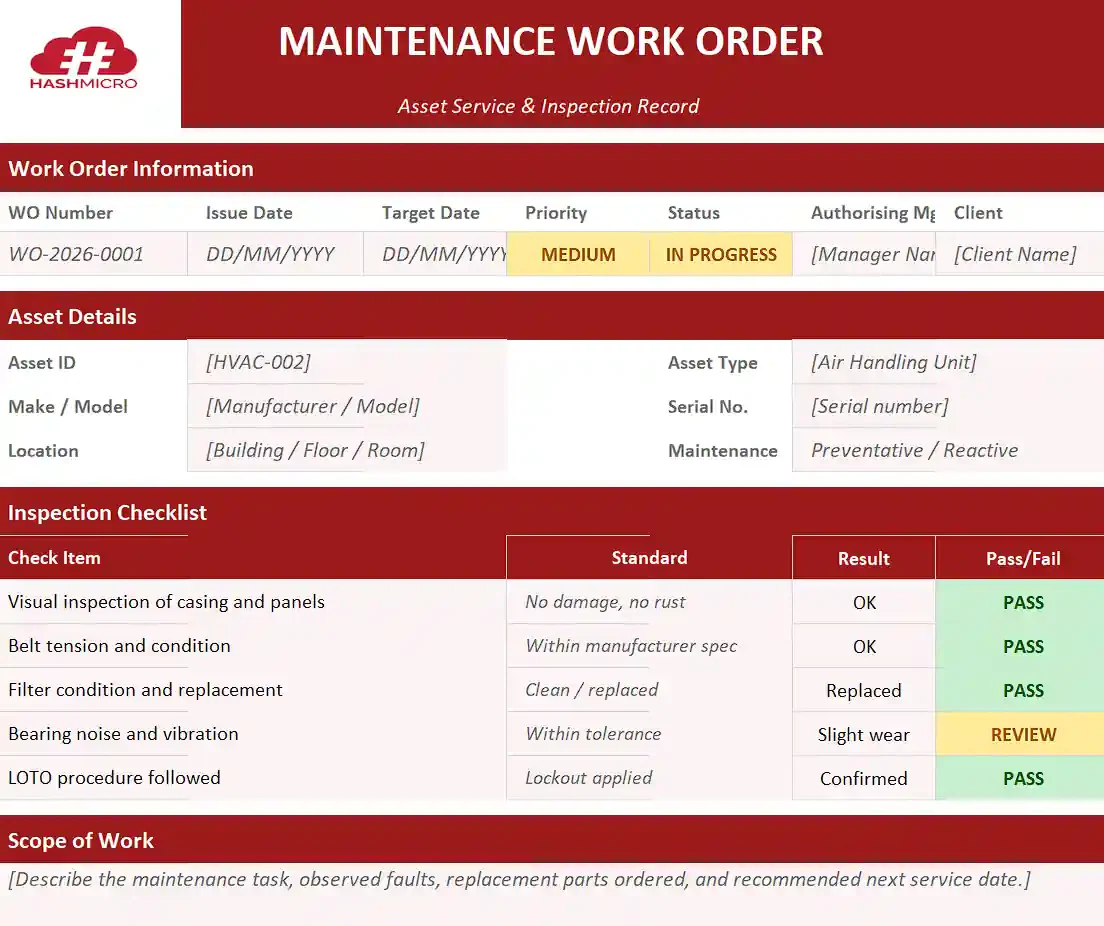
1. Maintenance and facilities work order template
Maintenance templates handle both preventative checks and reactive repairs. The Asset Details section captures machine or building information including asset ID, serial number, make, model, and location.
Safety protocols sit alongside the standard fields, especially Lockout/Tagout (LOTO) procedures for isolating hazardous energy. A standard inspection checklist ensures uniform preventative work every visit.
| Asset ID | Description | Location | Next Service | LOTO Required | Status |
|---|---|---|---|---|---|
| HVAC-002 | Rooftop air handling unit | Building A, Level 4 | 12 June 2026 | Yes | Scheduled |
| PUMP-014 | Centrifugal water pump | Plant Room, Building B | 02 July 2026 | Yes | In Progress |
| LIFT-007 | Passenger lift, North core | Building C, Tower 1 | 18 May 2026 | Yes | Completed |
Maintenance and facilities work order template
2. Construction and trades work order template
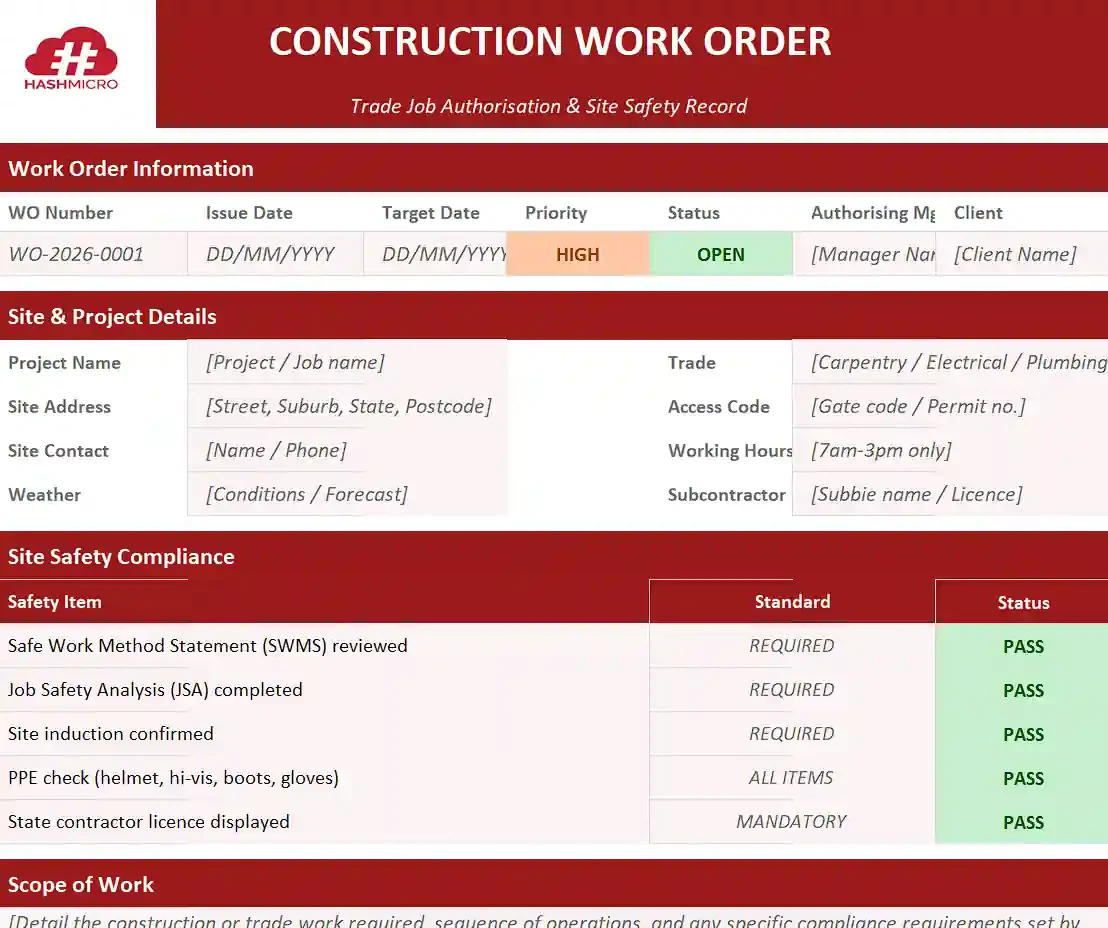
Construction templates handle site complexity. Standard fields include detailed site location, on-site contact details, and access instructions such as gate codes, restricted hours, and induction requirements.
Integration with Safe Work Method Statements (SWMS) and Job Safety Analyses (JSA) is mandatory. A checkbox confirming the tradesperson reviewed site-specific safety requirements should appear before any work begins.
| Task | Site Location | Trade | SWMS Reviewed | Access Notes | Status |
|---|---|---|---|---|---|
| Install switchboard | 14 Smith St, Brisbane | Electrical | Yes (signed) | Gate code 4421 | In Progress |
| Pour ground slab | 22 Park Rd, Sydney | Concreting | Yes (signed) | Site induction first | Scheduled |
| Frame stud wall | 8 Beach Pde, Gold Coast | Carpentry | Pending | 7am-3pm only | Awaiting SWMS |
Construction and trades work order template
3. Field service work order template
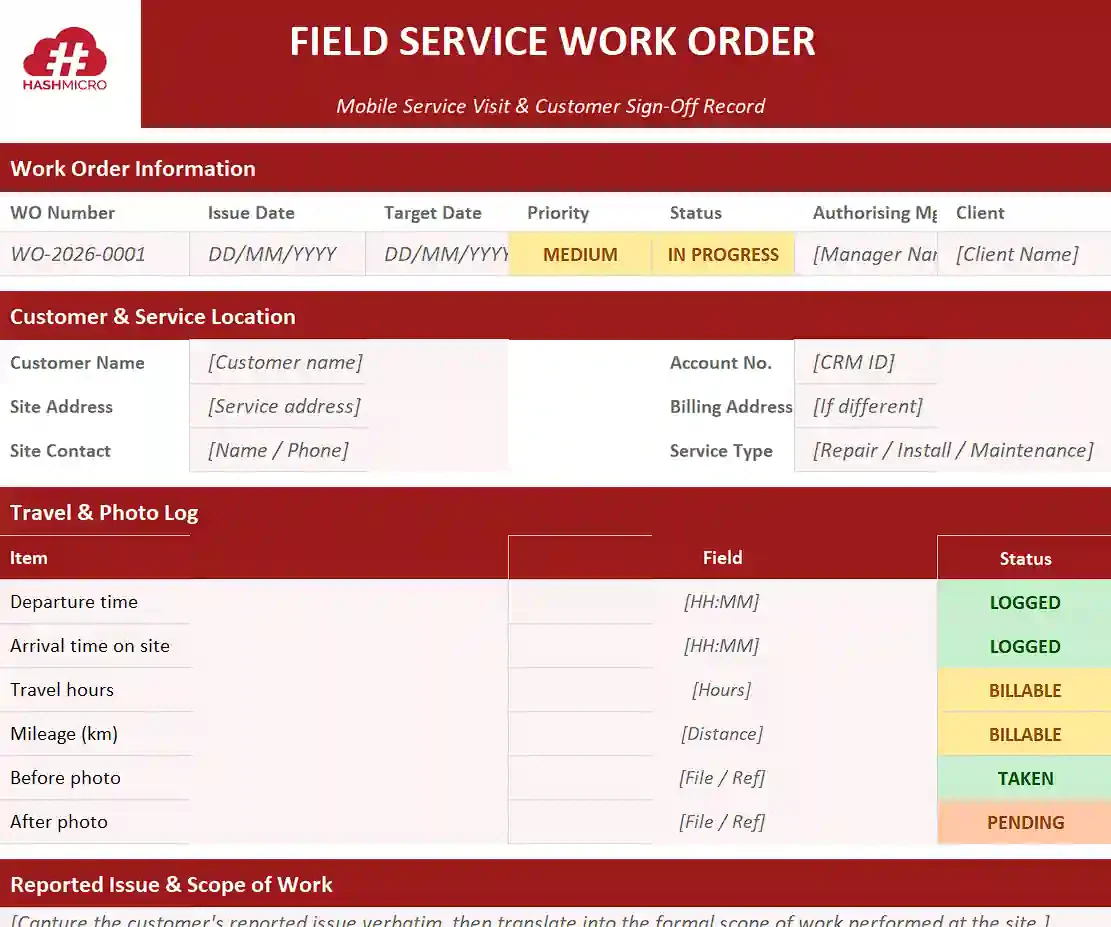
Field service templates are mobile and customer-facing, designed for plumbers, electricians, HVAC technicians, and landscapers. They prioritise customer details, billing addresses, and the precise service location.
Travel time and mileage fields capture billable transit hours. Strong field service templates also prompt before-and-after photographs, protecting the technician from disputes about quality on arrival.
| Customer | Site Address | Service Type | Travel Time | Photos On File | Sign-Off |
|---|---|---|---|---|---|
| A. Nguyen | 12 Riverside Dr, Perth | HVAC service | 35 min | Before / After | Customer signed |
| M. Patel | 88 King St, Melbourne | Hot water repair | 22 min | Before only | Pending |
| J. O’Connor | 5 Hill Rd, Adelaide | Electrical fault diag. | 48 min | Before / After | Customer signed |
Field service work order template
4. Manufacturing production work order template
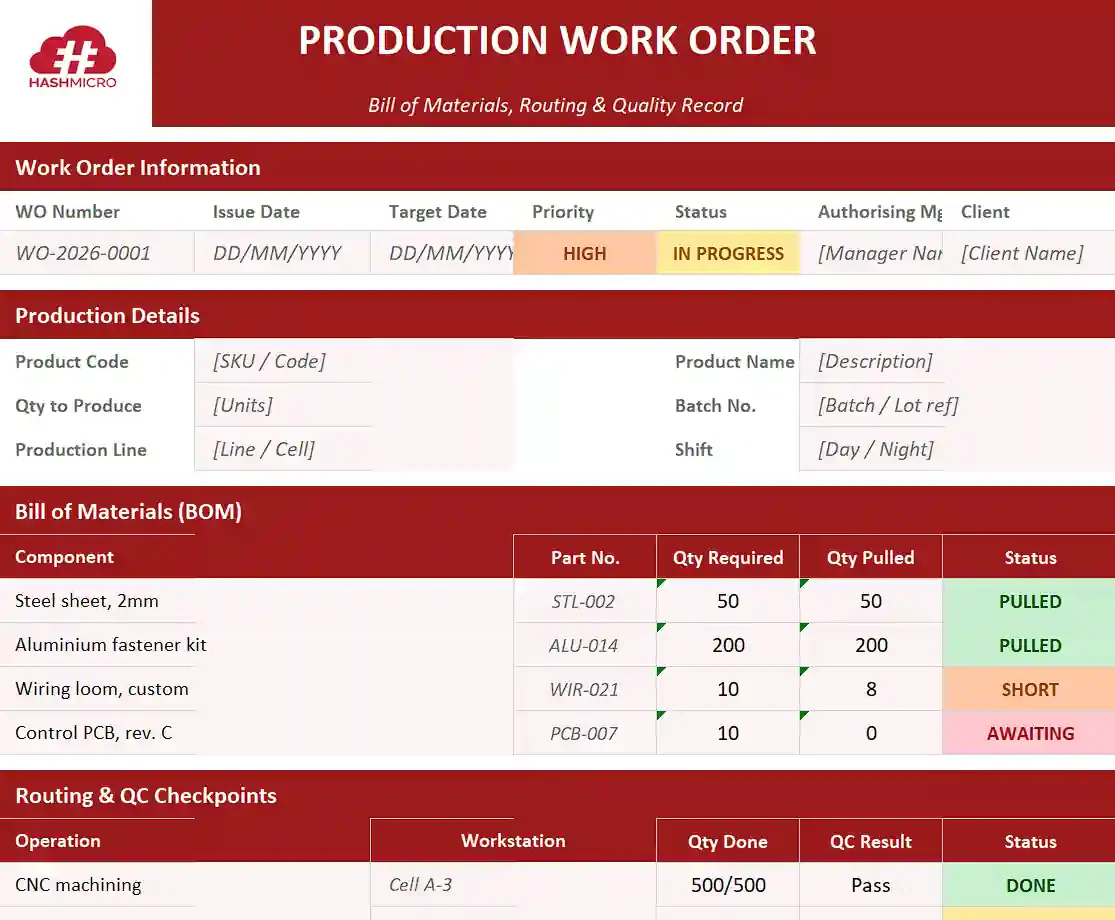
Manufacturing templates manage transformation of raw materials into finished goods. A Bill of Materials section lists exact quantities to pull, and routing defines the machine sequence the product follows.
Quality control checkpoints sit at each production stage. Operators record machine settings, scrap waste, and final yield, providing the data needed for true cost of goods sold and continuous improvement.
| Operation | Workstation | Batch No. | Qty | QC Check | Status |
|---|---|---|---|---|---|
| CNC machining | Cell A-3 | B-2026-0421 | 500 | Pass | Completed |
| Assembly | Line 2 | B-2026-0422 | 240 | In progress | In Progress |
| Final QA | QC Bench 1 | B-2026-0420 | 800 | Pending | Awaiting |
Manufacturing production work order template
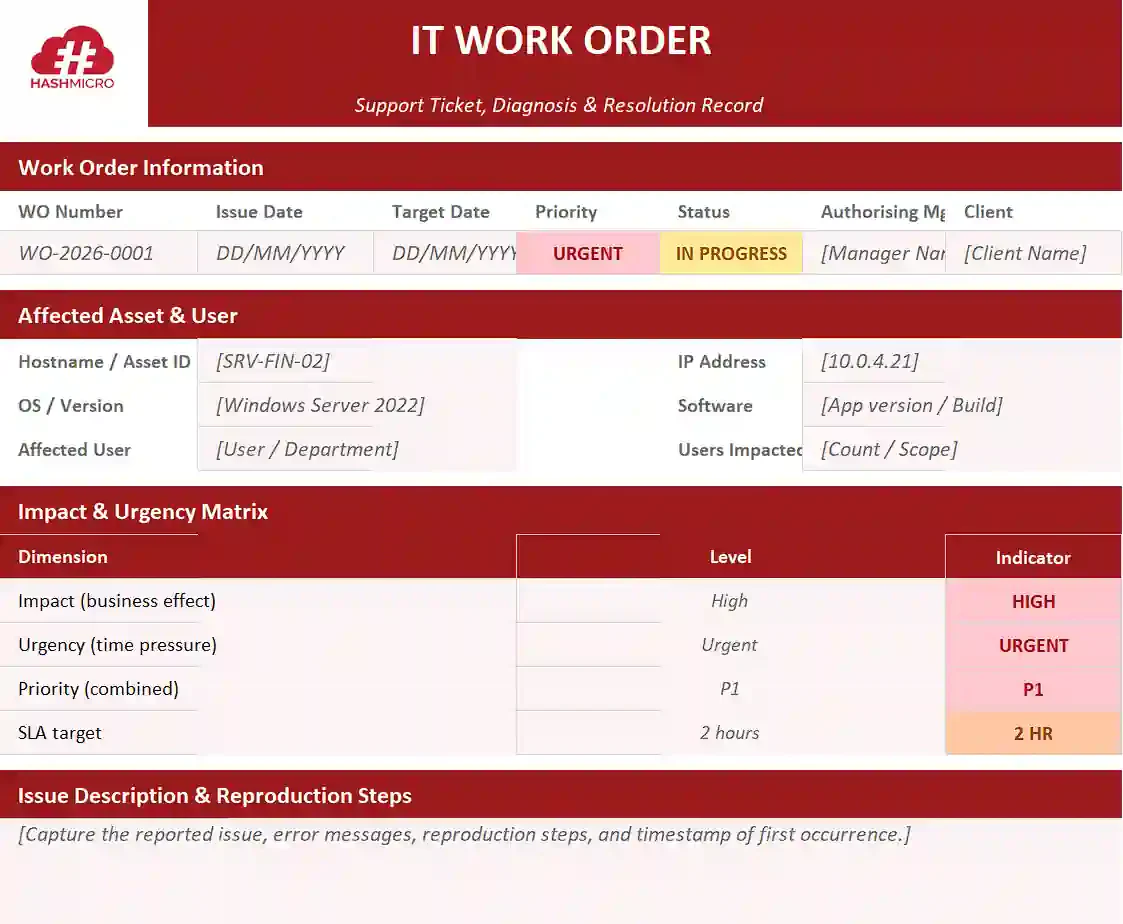
5. IT and technology work order template
IT work orders, often called support tickets, deal with digital assets and infrastructure. The template captures IP addresses, software versions, hardware specifications, and network nodes affected by the issue.
Impact and urgency matrices set priority. Sections for troubleshooting steps, root cause analysis, and configuration changes build a knowledge base for future incidents and preserve continuity across rotations.
| Ticket ID | Affected Asset | Issue | Impact | Urgency | Status |
|---|---|---|---|---|---|
| IT-2026-118 | SRV-FIN-02 (10.0.4.21) | Login service down | High | Urgent | In Progress |
| IT-2026-119 | User laptop, S/N 7821 | VPN dropouts | Medium | High | Diagnosing |
| IT-2026-120 | Printer queue, HQ floor 3 | Driver mismatch | Low | Medium | Resolved |
IT and technology work order template
7 Ways to Fill Out a Work Order
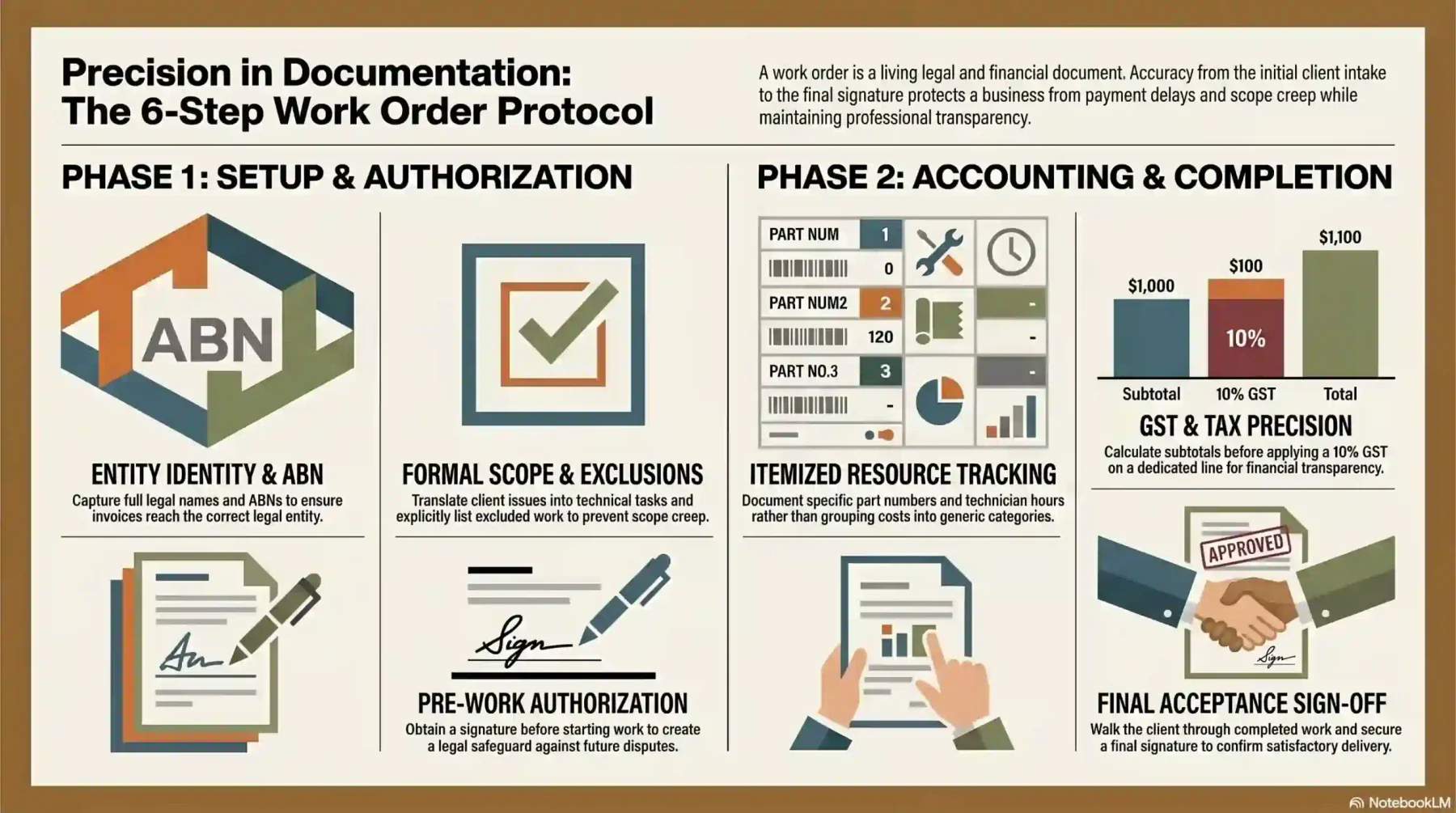
A well-designed template only delivers value when it is filled out accurately and consistently. A poorly completed work order is just as harmful as not having one at all.
Following the seven steps below ensures every critical data point is captured, protecting the business legally and financially while keeping the customer informed at every stage.
1. Enter business and client information including ABN
Start by completing the business header: logo, name, address, contact details, and ABN. Then capture the client’s full legal name or registered corporate entity, billing address, and physical site address.
Add a primary contact person with phone number and email. Accurate identity data ensures invoices reach the right legal entity, preventing payment delays from mismatched addresses or generic contact details.
2. Describe the work required with a clear scope of work
Record the client’s exact words as the “Reported Issue”, then translate them into a formal Scope of Work with diagnostic procedures, expected repairs, or specific manufacturing requirements.
Note any work explicitly excluded from this job, such as a secondary leak found near the primary repair site. Stating exclusions sets firm boundaries and prevents demands for free additional work later.
3. List labour, parts, and materials with unit costs
Document every resource used during the job. The labour section records technician names, roles, hours, and hourly rate. The materials section captures part numbers, descriptions, quantities, and unit costs.
Avoid grouping items together. Writing “Plumbing supplies $500” is unacceptable; itemise down to specific lengths of pipe and bolt counts. The detail justifies pricing and keeps inventory accurate.
4. Apply GST and calculate the total
With labour and materials itemised, calculate subtotals for each category. Add them to find the pre-tax total, then apply 10% GST on taxable supplies, showing the GST amount on its own designated line.
Add the pre-tax total and the GST amount to determine the Grand Total. State clearly whether the figure is an estimate or a fixed quote, and double-check the arithmetic before presenting to the client.
5. Assign priority level and set a target completion date
Assess urgency based on client need, risk of further damage, and current operational capacity. Tick the appropriate priority box (Low, Medium, High, Urgent) so dispatchers and supervisors can triage easily.
Enter the issue date, scheduled start date, and target completion date. If the work depends on a part being shipped or external approval, note this in scheduling so the client understands potential delays.
6. Obtain authorisation before work begins
Never start work without written authorisation. Present the work order, which acts as a quote at this stage, to the client or authorising manager for review of scope, costs, and terms before they sign.
The signed authorisation block is a legal safeguard. If the client later disputes the bill or claims they never agreed to the price, the signature serves as irrefutable proof of consent.
7. Record actual time, costs, and completion sign-off
A work order is a living document. Update it with actual data as the job progresses: real start and finish times, parts substituted from the original estimate, and any deviation from the planned scope.
Once work is finished, the technician signs the completion block. If the client is on-site, walk them through the completed work and have them sign the acceptance block to confirm satisfactory delivery.
5 Work Order Mistakes Australian Businesses Make
Even with a strong template, human error and weak procedures can undermine the system. The mistakes below appear repeatedly across Australian small and medium businesses in trades and manufacturing.
Each one carries a direct cost: rejected invoices, withheld payments, regulatory fines, or hours of admin work to correct. The fix in every case is procedural, not technical.
1. Missing ABN or contractor licence number
A missing ABN looks unprofessional and triggers serious tax consequences. For payments over $82.50 including GST without an ABN, the payer must withhold 47% of the amount and remit it to the ATO.
Operating without a state contractor licence in jurisdictions where it is mandatory invites fines from regulators like Fair Trading or the QBCC. Display licence numbers prominently on every work order.
2. Vague scope of work that leads to disputed invoices
Vague scopes like “service the HVAC unit” leave room for interpretation. The client may assume filter replacement and duct cleaning are included; the technician may not, and the dispute lands at invoice time.
Detailed, granular scopes are the only reliable defence against this conflict. Spell out each task, each exclusion, and any quality criteria so both sides see exactly what is being agreed to.
3. Starting work without written authorisation
Starting work on a verbal agreement or handshake is a major risk. If sticker shock hits when the invoice arrives, the client can deny ever agreeing to the work or price, leaving little recourse.
Always secure a signature on the authorisation block before any tools are picked up or machines start. This single discipline avoids most invoice disputes that drag on for weeks at small business volume.
4. Omitting GST line items on taxable supplies
Lumping all costs into a single Total without breaking out GST creates compliance and customer-side problems. The ATO requires the GST amount payable to appear clearly on a tax invoice.
Without a GST line, the client’s accounting team cannot claim their input GST credit and will reject the invoice for re-issue. The cash flow delay can stretch the payment cycle by weeks.
5. No tracking system for open and completed work orders
Paper templates and disconnected spreadsheets create black holes. A work order goes out, gets handed to a technician, and disappears, leaving the office unable to track invoicing or job status.
Lost paperwork means unbilled work, delayed customer follow-up, and managers without an accurate workload picture. A template only delivers value when its lifecycle is visible at every stage.
When Should You Move from Work Order Templates to Software?
Word documents, Excel spreadsheets, and printed PDF templates work for new or very small businesses. As volume grows, the limitations of manual handling become hard to ignore.
Recognising the tipping point where manual processes start blocking growth is essential. The two subsections below cover the warning signs and the capabilities only software can deliver.
1. Signs your manual work order process is creating operational risk
When admin staff spend hours each week typing handwritten technician notes into the accounting system, the manual workflow is wasting capacity that should be earning revenue elsewhere.
Lost paperwork is another red flag. A completed work order ruined by spilled coffee in a technician’s van often results in a job that never gets invoiced, costing the business directly.
Lack of real-time visibility is the third sign. If a customer calling for a status update means staff must track down a supervisor or phone a technician, the operational tools have hit their limit.
2. What work order software does that a template cannot
Manufacturing software solutions give every work order live status across the organisation. Dispatchers, technicians, and finance see the same view in real time, with updates pushed instantly when a status changes.
Mobile access lets field staff update jobs from a tablet or phone, capturing photos, signatures, and material consumption directly. Stock automatically deducts as parts are scanned at the job site.
An integrated ERP supports MRP in production planning, linking work orders into procurement, inventory, accounting, and CRM. Closing a job triggers the invoice, updates inventory, and posts revenue without manual data re-entry.
Conclusion
A work order template gives Australian businesses a reliable structure for dispatching, tracking, and billing every job, while protecting the business legally through clear scope, pricing, and sign-off.
Six elements (ABN, scope, costs, GST, priority, authorisation) form the compliance baseline, with industry-specific templates layering on the data each sector needs to operate.
If your are interest in preparing your own work order, you can get advices from our experts to improve your work order and production process.

FAQ About Work Order Templates
A work order is a formal authorisation that defines scope, pricing, and sign-off. A job ticket is a simpler, often internal version used for quick tasks where a full document is unnecessary.
Yes, if it carries the words “Tax Invoice”, the supplier’s ABN, GST breakdown, issue date, item description, and total. For supplies over $1,000, the buyer’s identity or ABN must also appear.
At least five years from the date the BAS or income tax return supported by the work order is lodged. Records can be paper or digital, but must remain readable, secure, and ATO-retrievable on request.
Yes. The Electronic Transactions Act 1999 recognises digital signatures, provided both parties agree to use them. Most reputable e-signature platforms meet the legal requirements for authorisation.
Document the refusal in writing alongside photos and a statement of work performed. An unsigned completed job remains billable, but dispute risk rises if the matter goes to debt recovery.