

Payslips sit at the centre of payroll accuracy. A clear payslip template shows how wages are calculated, what has been deducted, and what employees receive each pay cycle.
Without a consistent structure, even small inconsistencies can lead to confusion or disputes. A payslip for business also carries compliance responsibility, so each detail must align with Fair Work requirements and keep records ready for verification.
Key Takeaways
A compliant payslip must include legally required details and reflect how wages, deductions, and entitlements are calculated.
A clear payslip structure helps organise earnings, deductions, and superannuation into consistent sections for better transparency.
Different employment types require different payslip formats because working hours, entitlements, and pay structures vary across roles.
Free payslip templates give payroll teams a ready-made, compliant starting point for full-time, part-time, casual, and salaried staff.

What Makes a Payslip Template Fair Work Compliant
A compliant payslip is not only about formatting. It must include legally required details and reflect how wages, deductions, and entitlements are calculated.
The Fair Work Ombudsman's pay slip requirements set out exactly what each payslip must show, and missing or unclear information can create audit risks and penalties.
The Fair Work Act mandatory checklist
A payslip must include specific details such as employer and employee information, pay period, gross and net pay, deductions, superannuation contributions, and payment date. These elements ensure the payslip meets minimum legal requirements.
Why generic global templates fail compliance
Templates designed for other regions often omit key Australian requirements such as PAYG withholding or superannuation details. Using non local formats increases the risk of incomplete records and non-compliance.
How to Structure a Payslip Template
A clear structure makes payslips easier to read and aligns with the steps in payroll process that teams follow each cycle. When information is organised consistently, it improves transparency and helps teams verify calculations more efficiently.
1. Header block
Includes employer details, employee name, and identification information to ensure each payslip is properly attributed.
2. Pay period and payment date
Shows the exact period covered and when payment was made, helping align records with payroll cycles.
3. Earnings section
Breaks down base pay, overtime, allowances, and other income components to show how total earnings are calculated.
4. Deductions block
Lists tax, benefits, or other deductions clearly so employees can understand how net pay is derived.
5. Superannuation section
Displays employer contributions and relevant fund details to meet reporting requirements.
6. Net pay and YTD summary
Summarises take-home pay and cumulative earnings for the financial year to support tracking and reporting.
7. Leave balance section
Shows accrued and used leave balances, helping employees monitor entitlements over time.
Payslip Variations by Employment Type
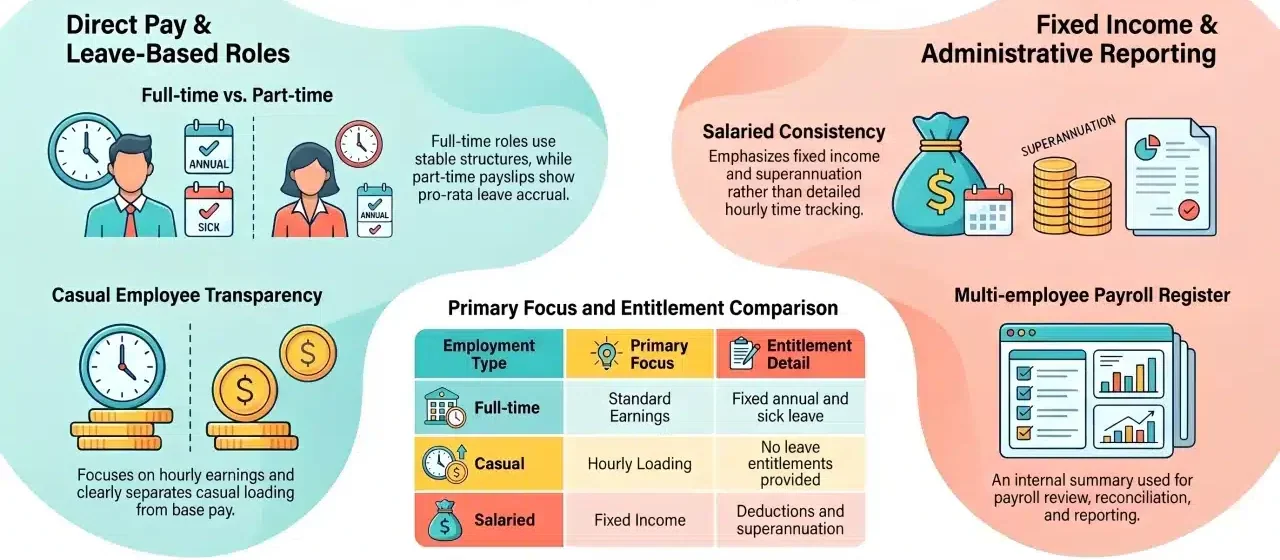
A single payslip format cannot cover every employment arrangement. Differences in working hours, entitlements, and pay structure mean each role requires a slightly adjusted layout to reflect how earnings and obligations are calculated.
Full-time employee payslip
Typically includes fixed hours, standard earnings, and full leave entitlements such as annual and sick leave. The structure is relatively stable across pay cycles.
Part-time employee payslip
Similar to full-time, but with variable hours and pro-rata entitlements. Payslips must clearly show adjusted earnings and leave accrual based on hours worked.
Casual employee payslip
Focuses on hourly earnings with casual loading applied instead of leave entitlements. Transparency is important to separate base pay and loading components.
Salaried employee payslip
Usually presents fixed income without hourly breakdowns. Payslips emphasise consistency, deductions, and superannuation rather than detailed time tracking.
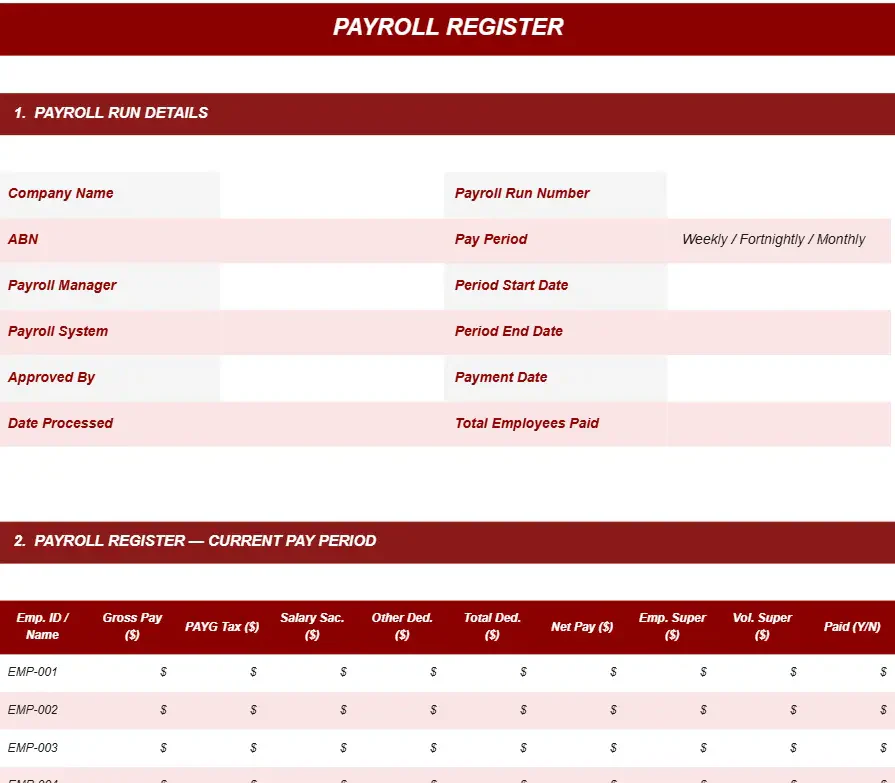
Multi-employee payroll register
Used internally to summarise payroll across multiple employees. It supports payroll review, reconciliation, and reporting rather than individual employee distribution.
Key differences across payslip types
Different employment types require different payslip structures to reflect how wages, entitlements, and deductions are calculated. Understanding these differences helps ensure each payslip format is accurate and aligned with employment conditions.
Full-time vs part-time payslips
Both include leave entitlements and standard earnings, but part-time payslips must reflect variable hours and pro-rata leave calculations, making them slightly more detailed.
Casual vs permanent payslips
Casual payslips include loading instead of leave entitlements, while permanent roles separate base pay and accrued benefits such as annual leave and sick leave.
Salaried vs hourly payslips
Salaried payslips focus on fixed income and consistency, while hourly-based payslips require detailed breakdowns of hours worked, overtime, and allowances.
| Aspect | Full-time | Part-time | Casual | Salaried |
| Hours consistency | Fixed | Variable | Irregular | Not tracked |
| Leave entitlements | Yes | Pro-rata | No | Yes |
| Casual loading | No | No | Yes | No |
| Payslip complexity | Medium | High | High | Low |
When a payslip template stops being enough
Most payroll problems do not announce themselves. They surface months later, usually when someone asks a question the spreadsheet cannot answer.
The scenarios below are ordinary. Each one starts with a template that worked perfectly well, right up until the moment it did not.
1. The casual who worked a public holiday
A casual picks up a shift on Australia Day. The template has one hourly rate field, so someone types the loaded rate in manually and moves on with the pay run.
Six weeks later that employee asks why their public holiday pay looks different to a workmate's. Nobody can reconstruct the rate used, because the cell was simply overwritten.
Casual loading and penalty rates stack differently depending on the award and the day. A template stores the answer, but never the working behind it.
2. The pay run that happened while someone was on leave
Payroll is usually one person's job until that person takes annual leave. The backup opens last fortnight's file, saves a copy, and updates the hours.
What carries across silently is everything else: last cycle's leave balances, a salary sacrifice that ended, and a terminated employee who is still sitting in row eleven.
Leave accrual is the detail that suffers most. Balances only stay accurate if every cycle updates them, and a copied file accrues nothing on its own.
3. The year the super guarantee rate changed
Superannuation percentages are written into template formulas, then forgotten. When the rate steps up on 1 July, every file holding the old figure quietly underpays.
The ATO sets the super guarantee percentage and it has moved several times this decade. Catching that in a spreadsheet depends entirely on somebody remembering.
Underpaid super does not stay small either. It compounds across every affected employee and every quarter until the shortfall is found and corrected.
4. The STP lodgement that did not match the payslips
Single Touch Payroll Phase 2 asks employers to report income in itemised components. Gross pay must be broken into overtime, allowances, bonuses, and paid leave.
A template that lumps these into a single earnings line cannot feed that reporting. The categorisation has to be redone by hand every cycle, and it drifts.
When payslips and STP data disagree, the employee's income statement is the version the ATO sees. Reconciling the two after the fact is slow work.
5. The request for records from four years ago
Employers must keep employee records for seven years, and those records need to be legible and readily accessible if a Fair Work Inspector asks for them.
A folder of dated spreadsheets technically satisfies this until you need to prove something specific, such as who changed a rate, when, and with whose approval.
Spreadsheets do not carry an audit trail. The file shows the final state, not the history, and history is exactly what a records request is asking about.
6. Reading the pattern
Each scenario shares one trait. The template did its job, which was to lay out a payslip, and then something happened that needed memory, rules, or an audit trail.
That is the honest boundary. Templates format payroll. Once your payroll needs to calculate, remember, and prove things, the format alone stops carrying the load.
Download free payslip templates
Using structured payslip templates helps standardise payroll records and reduce formatting errors across pay cycles. A consistent format makes it easier to verify calculations, track entitlements, and maintain compliance.
HRM tools for automating payslips take this further by eliminating manual formatting entirely. Templates provide a repeatable structure for different employee types, helping payroll teams maintain accuracy while handling variations in earnings, deductions, and reporting requirements.
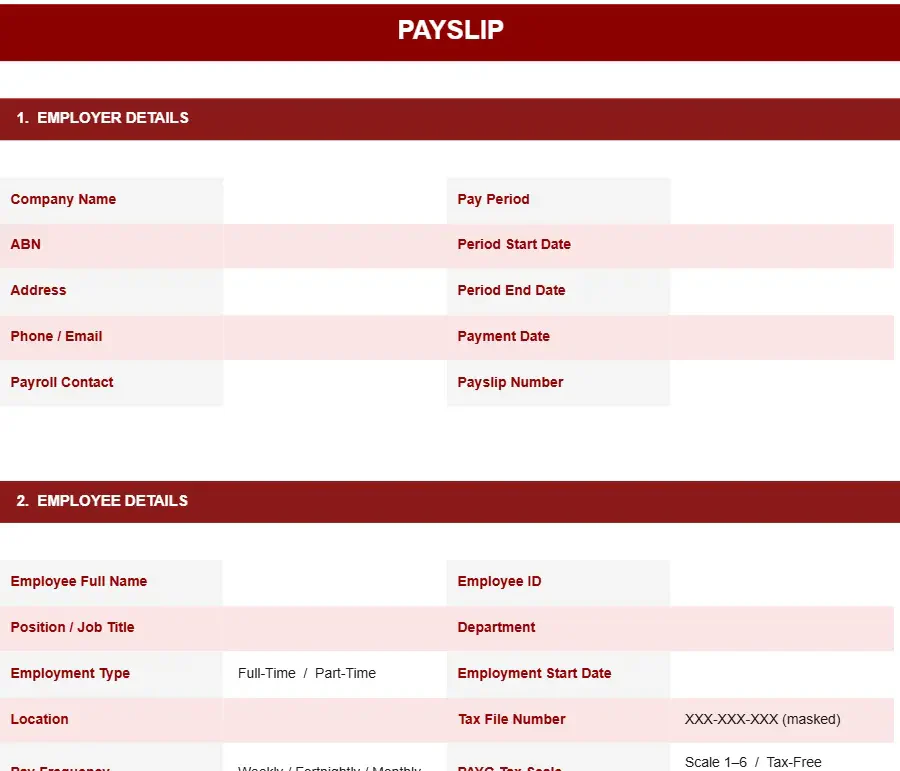
1. Full-time and part-time payslip template
Covers standard payroll components including fixed or variable hours, earnings breakdown, deductions, and leave balances, making it suitable for most permanent employees.
FULL-TIME AND PART-TIME PAYSLIP TEMPLATE
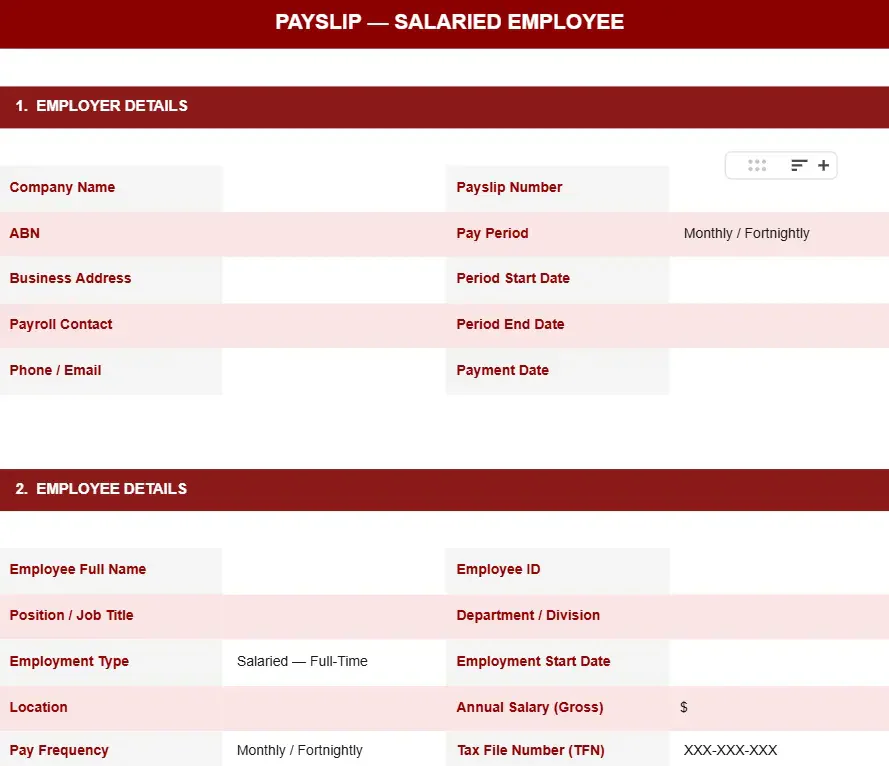
2. Salaried employee payslip template
Designed for fixed-income employees, focusing on salary structure, deductions, and superannuation without detailed hourly tracking.
SALARIED EMPLOYEE PAYSLIP TEMPLATE
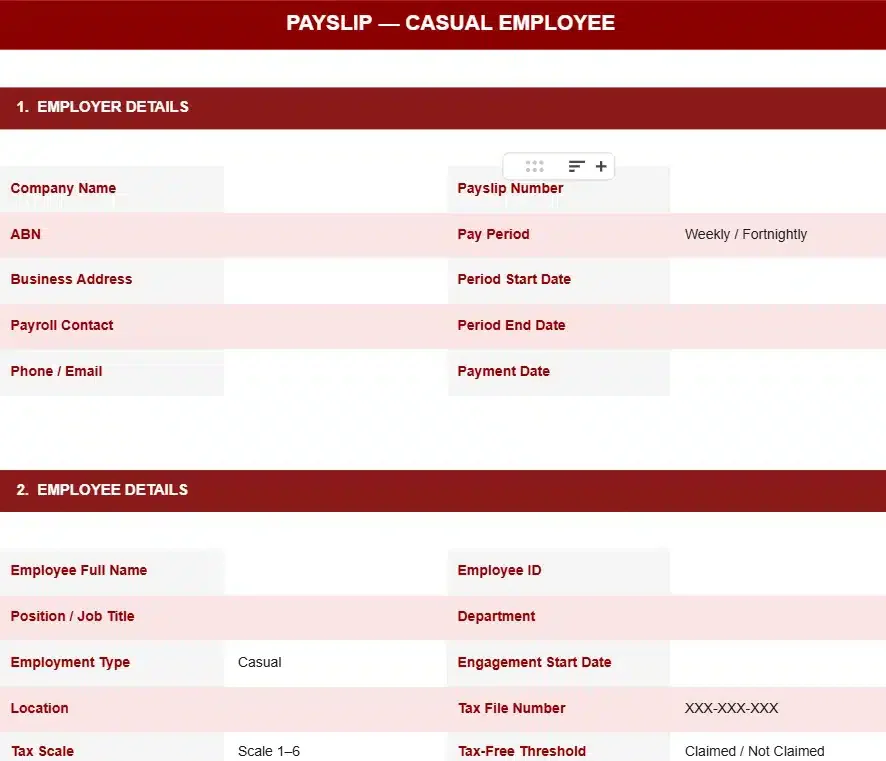
3. Casual employee payslip template
Includes hourly pay with casual loading, ensuring base rate and loading are shown separately for transparency and compliance.
CASUAL EMPLOYEE PAYSLIP TEMPLATE
4. Multi-employee payroll register
Summarises payroll data across multiple employees, including total earnings, deductions, and YTD tracking for internal payroll review.
MULTI-EMPLOYEE PAYROLL REGISTER






How to Customise Payslip Templates for Awards and Agreements
Modern awards introduce variations in pay structures, making payslip configuration more complex. One of the key benefits of HRM systems is that they handle these variations automatically, reflecting wages, allowances, and penalties without manual adjustments.
Aligning payslips with modern awards
Each award defines minimum pay rates, entitlements, and conditions. Payslips should reflect these rules clearly so employees can verify how their pay is calculated.
Adding allowances and loadings
Allowances such as travel, meals, or industry-specific payments should be listed separately. This helps maintain transparency and avoids confusion with base earnings.
Handling overtime and penalty rates
Overtime and penalty rates must be shown as distinct line items. This ensures employees can see how additional pay is calculated based on hours and conditions.
Adjusting pay cycle formats
Payslip structures should adapt to weekly, fortnightly, or monthly cycles. Clear date ranges and payment timing help align records with payroll schedules.
Common Payslip Mistakes That Create Compliance Risk
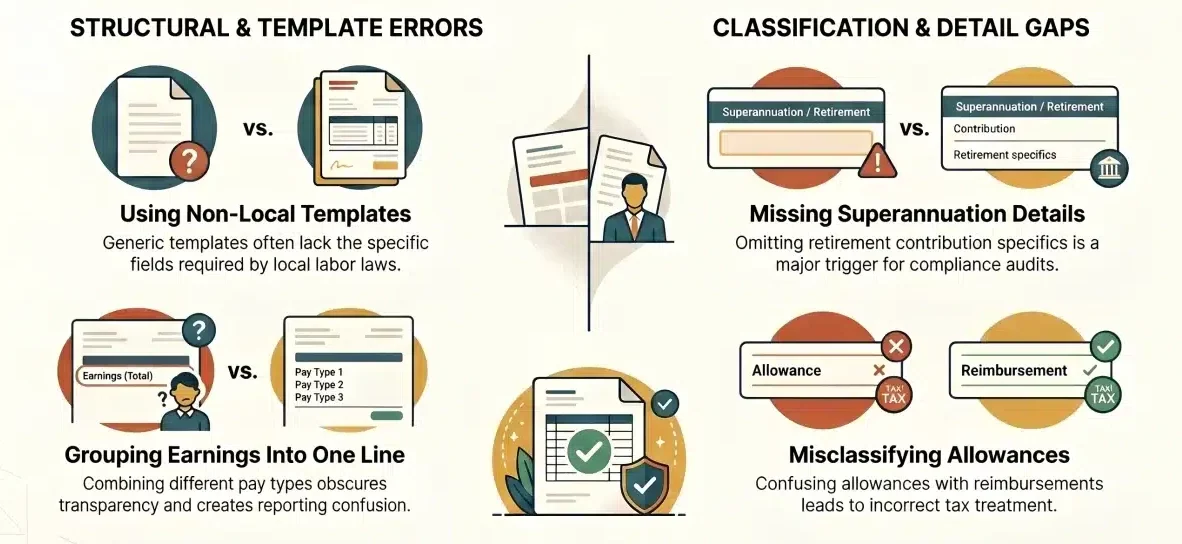
Most payslip issues come from how information is presented rather than the template itself. Small formatting or classification errors can lead to misunderstandings, audit issues, or compliance gaps.
- Grouping different earnings into one line
- Missing superannuation details
- Using non-local templates
- Misclassifying allowances and reimbursements
When to Move from Payslip Templates to Payroll Software
Templates work well for simple payroll setups, but they become harder to manage as employee numbers, pay structures, and compliance requirements grow. At this stage, manual processes can create inconsistencies and increase the risk of errors.
Signs manual templates create risk
Frequent corrections, inconsistent calculations, and difficulty tracking changes across pay cycles indicate that templates are no longer sufficient.
What payroll systems improve
Australian top payroll software solutions automate calculations, standardise payslip formats, and centralise data, making reporting and compliance easier to manage across the business.
"Payroll accuracy depends less on the template itself and more on how consistently it is applied. As complexity grows, businesses need structured systems to maintain compliance and reduce risk."
Conclusion
Payslips play a critical role in ensuring payroll accuracy, transparency, and compliance. A well-structured format helps businesses reduce errors, improve clarity for employees, and maintain consistent records across each pay cycle.
If your payroll process is becoming harder to manage or prone to inconsistencies, it may be time to move beyond manual templates. Consult our experts to explore how structured payroll systems can improve accuracy, reduce risk, and simplify compliance.
FAQ About Payslips
Employers are generally required to keep payslip and payroll records for several years to meet compliance and audit requirements.
Yes, payslips can be issued electronically as long as employees can easily access and store them when needed.
Employees are not required to sign payslips, but they should receive them for each pay cycle as proof of payment.
Incorrect payslips should be corrected as soon as possible to avoid disputes, compliance issues, or payroll discrepancies.
Yes, many payroll systems integrate payslips with accounting and HR tools to streamline reporting and improve data accuracy.