

AI in accounting uses artificial intelligence to support finance tasks such as invoice processing, reconciliation, reporting, and financial data review.
It works by reading documents, identifying patterns, and highlighting records that need attention, helping finance teams reduce manual work and review data faster.
To use it safely, businesses still need clean data, secure systems, clear approvals, and accountant review before decisions are made.
Key Takeaways
AI in accounting uses artificial intelligence to support finance tasks such as invoices, reconciliation, reporting, and forecasting.

What Is AI in Accounting?
AI-powered finance tools support tasks such as data entry, invoice processing, reconciliation, reporting, forecasting, and anomaly checks.
It works by reading documents, recognising patterns, and applying automation rules to accounting data.
Reliable results depend on connecting AI across systems. If invoices, purchase orders, bank transactions, inventory records, and approvals sit in separate systems, outputs can become less accurate.
How AI Is Changing Accounting and Finance
Finance teams are using AI to spend less time on manual processing and more time on review, analysis, and decision-making.
Reporting can also become faster because routine checks, transaction matching, and data preparation happen earlier in the workflow.
For businesses, AI may support GST, BAS, EOFY, and accountant review preparation by organising records and flagging items that need attention.
"AI is most effective in accounting when automation is supported by clean data, secure workflows, and human review. Finance teams should use it to strengthen judgement, not replace it."
Common Use Cases of AI in Accounting
AI is most useful for repetitive accounting tasks that involve documents, transactions, and large amounts of data. These use cases help finance teams reduce manual work while keeping final review in place.
1. Invoice processing
Invoice tools read supplier documents, extract key details, and match records with purchase orders or receipts. This helps accounts payable teams process invoices faster.
2. Bank reconciliation
During reconciliation, the system suggests matches between bank transactions, invoices, bills, receipts, and payment records. Accountants can then focus on exceptions.
3. Expense categorisation
Expense tools learn from previous coding patterns to classify recurring transactions. This helps keep the general ledger cleaner.
4. Financial reporting
Reporting workflows become faster when financial data is easier to collect. Finance teams can then review changes before reports are finalised.
5. Forecasting and cash flow analysis
Forecasting tools compare historical sales, expenses, payment timing, and seasonal patterns. This helps businesses prepare for cash flow needs.
6. Anomaly and fraud detection
Unusual payments, duplicate invoices, expense spikes, and approval rule exceptions can be flagged earlier. Finance teams can investigate these items sooner.
7. Tax and compliance preparation
Automated checks help organise GST, BAS, EOFY, and accountant review records. Missing documents or inconsistent coding can also be flagged for follow-up.
AI delivers the greatest value when it is applied to repetitive and data-intensive accounting processes. These tasks are easier to review and usually offer faster time savings.
Benefits of AI in Accounting for Australian Businesses
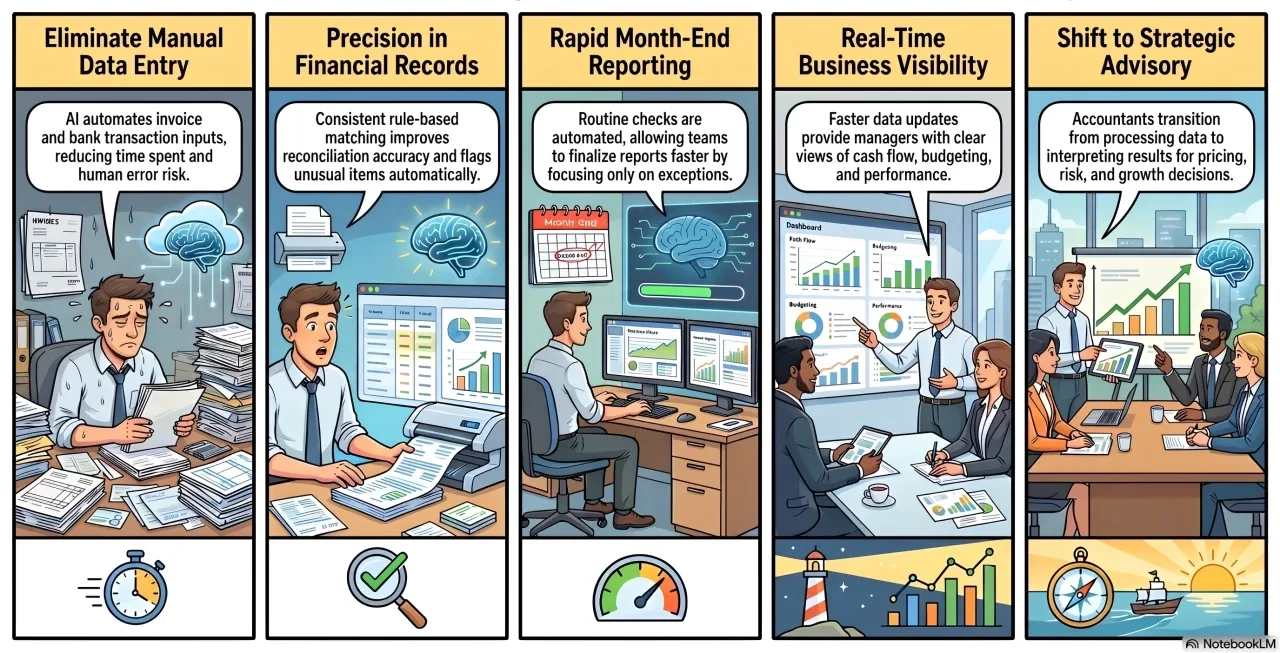
AI in accounting can help businesses reduce repetitive work, improve visibility, and respond faster to financial changes. Its main value comes from supporting accountants, not replacing their judgement.
1. Less manual data entry
AI can reduce the need to manually enter invoice details, expense records, bank transactions, and report data. This saves time and lowers the risk of simple input errors.
2. Faster month-end reporting
Month-end reporting often slows down when teams collect documents, reconcile accounts, and check transaction details manually. AI can speed up routine checks so accountants can focus on exceptions.
3. Better accuracy in financial records
AI can improve accuracy by applying consistent rules to transaction coding, invoice matching, and reconciliation. It can also flag unusual items that may be missed during manual review.
4. Stronger visibility over business performance
When accounting data is updated faster, analysing business financial performance becomes clearer for managers. This supports cost control, cash flow planning, budgeting, and financial decision-making.
5. More time for advisory and decision-making
AI helps accountants spend less time on repetitive processing and more time interpreting financial results. This gives finance teams more room to support pricing, budgeting, risk, and growth decisions.
AI for Accountants: What Tasks Can Be Automated?
Accountants should review AI outputs before they affect reports, tax treatment, payments, or business decisions, especially when the result depends on professional judgement.
Automated Tasks
- Invoice capture: Extract invoice details from supplier documents.
- Bank transaction matching: Suggest matches between bank entries and accounting records.
- Payment reminders: Send reminders based on due dates and payment status.
- Expense coding: Categorise expenses using previous accounting patterns.
- Approval notifications: Route documents to the right reviewer.
- Recurring journal entries: Prepare repeated entries based on set rules.
- Report preparation: Gather financial data for review and reporting.
Accountant Review Still Required
- GST and BAS treatment: Review tax-related classifications and reporting details.
- Financial statement review: Check accuracy before final reports are issued.
- Revenue recognition: Assess timing and treatment based on accounting standards.
- Complex journal entries: Review entries that require judgement or context.
- Compliance interpretation: Confirm how rules apply to specific transactions.
- Financial decisions: Evaluate business impact before action is taken.
AI works best for repetitive tasks with clear source documents. It should support accountants, not replace professional judgement.
Accounting Automation vs AI in Accounting
Accounting automation and AI are related but different. Automation follows set rules, while AI looks for patterns and suggests actions based on data.
Many businesses use both together. Financial operations automation tools keep routine workflows consistent, while AI helps spot patterns, exceptions, and useful financial insights.
Risks and Limitations of AI in Accounting
AI in accounting can create risks when businesses rely on it without proper controls. Finance teams still need review processes, secure systems, and clear accountability.
1. Data privacy concerns
Accounting data may include supplier, customer, payroll, tax, and payment information. Businesses need to know where data is stored, how it is processed, and who can access it.
2. Incorrect or incomplete outputs
Systems may misread invoices, classify expenses incorrectly, or make suggestions from incomplete data. Without review, these errors can affect financial records.
3. Poor integration with existing systems
Disconnected accounting, inventory, purchasing, sales, and payroll systems can reduce output quality. Connected data gives better context behind each transaction.
4. Over-reliance without accountant review
Automation can support accounting work, but it should not replace professional judgement. Accountants still need to review unusual, complex, or compliance-sensitive items.
5. Compliance and audit trail gaps
Businesses need clear records of approvals, source documents, and accounting entries. Weak audit trails can make financial decisions harder to explain later.
How to Adopt AI in Accounting Safely
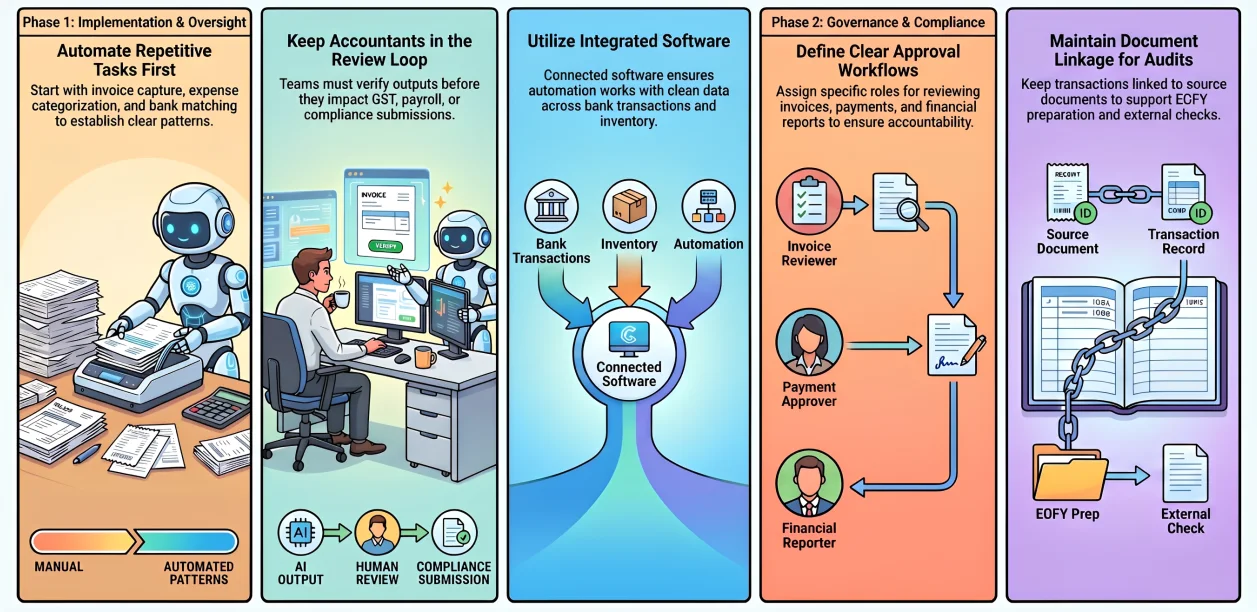
Businesses should start with low-risk workflows and keep review controls in place. This helps improve speed without removing accountability.
1. Start with repetitive accounting tasks
Begin with invoice capture, expense categorisation, recurring payments, bank matching, or report preparation. These tasks follow clear patterns and are easier to check.
2. Keep accountants involved in review
Finance teams should review outputs before they affect reports, payments, or compliance submissions. This is especially important for GST, BAS, payroll, and complex accounting decisions.
3. Use secure and integrated accounting software
Connected software keeps invoices, approvals, bank transactions, inventory, purchasing, and reports aligned. This gives automation cleaner data to work with.
4. Maintain clear approval workflows
Approval workflows should define who reviews invoices, payments, journal entries, and financial reports. This keeps AI-supported processes accountable.
5. Track changes and supporting documents
Transactions should stay linked to source documents and system records. This supports audit readiness, EOFY preparation, and external checks.
How Accounting Software Supports AI in Accounting
Centralised financial management gives AI a more reliable data foundation by keeping financial records, approvals, transactions, and reports in one connected system.
When accounting data is structured and easier to review, finance teams can use automation more safely for reconciliation, reporting, approvals, and document tracking.
As finance processes become more connected, teams need a faster way to find reliable figures and identify what requires attention. Hashy AI uses current business context to provide relevant answers and guide the next action.





Benefits of Accounting Automation Software
- Less manual processing: Reduces repetitive data entry and document handling.
- Faster approvals: Helps route invoices, payments, and records to the right reviewer.
- Better financial visibility: Keeps accounting data easier to monitor and analyse.
- Improved reporting accuracy: Supports cleaner records before reports are finalised.
- Stronger audit trails: Keeps approvals, source documents, and changes easier to trace.
For businesses adopting AI, integrated accounting software can help keep financial data more organised, secure, and ready for review.
Conclusion
AI in accounting helps finance teams reduce repetitive work, speed up reporting, and review financial data more efficiently.
It still needs clean data, secure systems, clear approvals, and accountant review. To improve accounting automation and financial visibility, you can book a free consultation with our team.
Frequently Asked Question
AI is unlikely to fully replace accountants because accounting still requires judgement, compliance knowledge, business context, and professional review. AI can automate repetitive work, but accountants are still needed to interpret results and manage risk.
AI can help organise transactions, classify expenses, identify GST-related records, and flag missing documents before BAS preparation. However, accountants or qualified professionals should still review BAS and GST details before submission.
AI can be safe for accounting data when used through secure systems with access controls, data protection, audit trails, and clear approval rules. Businesses should avoid using tools that do not meet their security or compliance requirements.
Businesses should start with repetitive and lower-risk tasks such as invoice capture, bank reconciliation support, payment reminders, recurring invoices, expense categorisation, and approval routing.
Accounting automation follows predefined rules to complete routine workflows, while AI accounting uses data patterns to make suggestions, detect anomalies, classify information, or support forecasting. Many businesses use both together.