















Business records should match the transactions shown on your bank statement. When the balances differ, bank reconciliation helps identify and resolve the cause.
Bank reconciliation is the process of comparing your accounting records with your bank statement. It helps businesses find errors, track outstanding transactions, and maintain accurate financial records.
This guide explains what bank reconciliation is, why it matters, how to complete it, and the common mistakes Australian businesses should avoid.
Key Takeaways
Regular bank reconciliation helps businesses maintain accurate financial records, detect errors early, and gain better visibility into cash flow.

What Is Bank Reconciliation?

Bank reconciliation is the process of comparing your business’s accounting records with its bank statement. The goal is to ensure both balances match and identify any differences.
During the process, businesses review items such as outstanding payments, deposits in transit, bank fees, interest, and data entry errors. This process also supports centralised financial oversight by giving finance teams a clearer view of cash movements, account balances, and unresolved transactions.
Regular bank reconciliations help maintain accurate financial records, support tax reporting, and provide a clear view of your business’s cash position.
Why Bank Reconciliation Matters
Regular bank reconciliation helps businesses maintain accurate financial records and quickly identify discrepancies. It also supports better cash management and compliance reporting.
1. Accuracy and Fraud Prevention
Bank reconciliation helps identify missing, duplicated, or incorrect transactions. It can also reveal suspicious activity that may indicate fraud or unauthorised account access.
2. ATO Compliance and BAS Reporting
Accurate reconciliations support reliable financial records for BAS lodgements and tax reporting. This reduces the risk of reporting errors and compliance issues. Consistent reconciliation also strengthens the foundation of financial reporting because every recorded transaction can be checked against actual bank activity.
3. Better Cash Flow Visibility
Reconciling accounts regularly provides a clearer view of available cash. This helps businesses plan expenses, manage obligations, and avoid cash shortages.
"A bank reconciliation does more than match balances. It helps businesses verify every transaction, maintain accurate records, and detect errors before they affect financial reporting or cash flow."
The Bank Reconciliation Formula
The purpose of bank reconciliation is to ensure your bank statement balance matches your accounting records. This confirms that all transactions have been recorded correctly.
To achieve this, businesses adjust for items such as outstanding deposits, unpresented cheques, bank fees, interest, and recording errors. These adjustments help explain any differences between the two balances.
A simple bank reconciliation formula is:
Adjusted Bank Balance = Adjusted Cash Book Balance
After all adjustments are made, both balances should be the same.
How to Do a Bank Reconciliation in 6 Steps
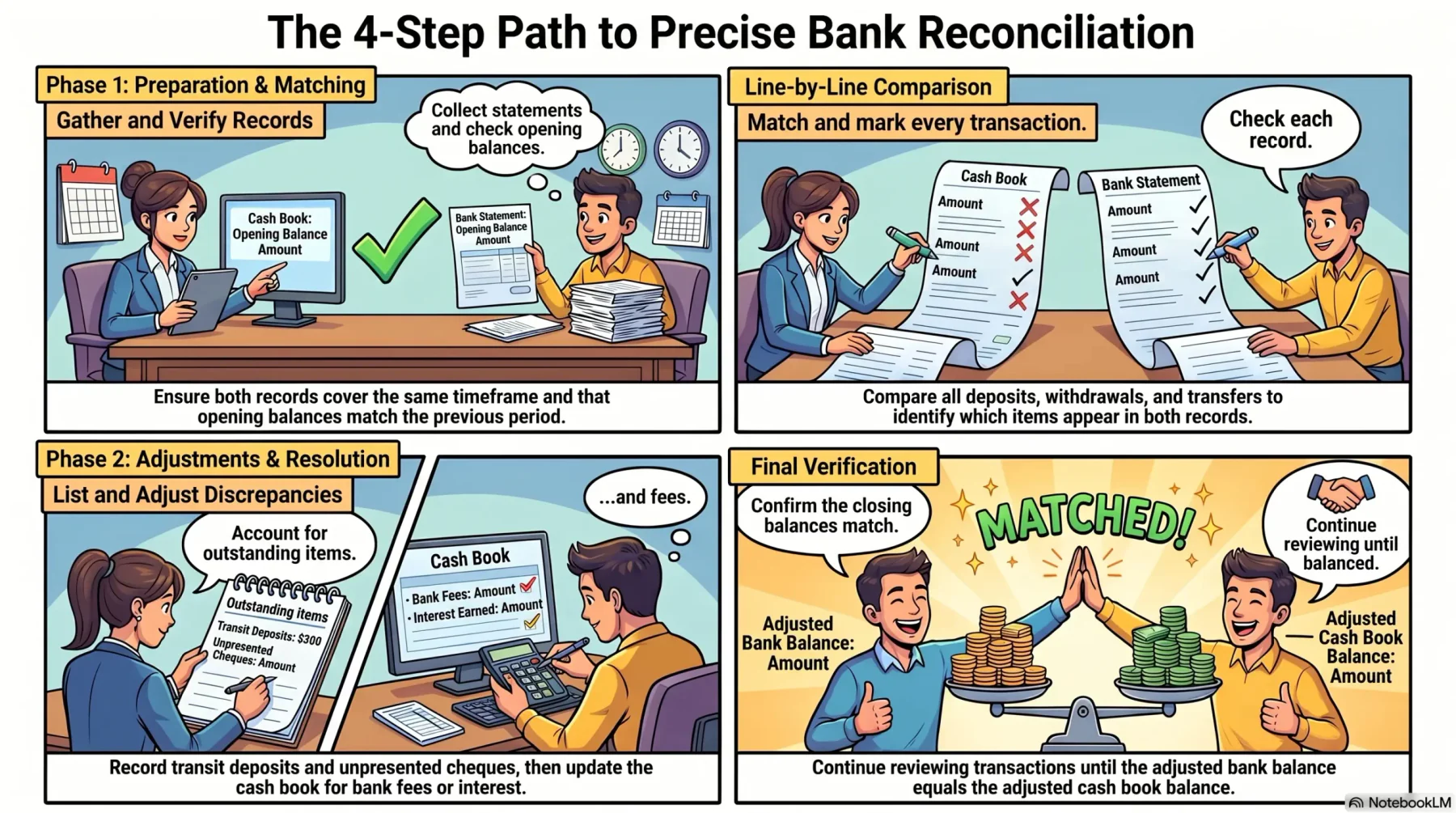
Bank reconciliation follows a structured process that helps businesses identify differences between their accounting records and bank statements.
1. Gather Your Bank Statement and Ledger
Collect the bank statement for the reconciliation period along with your cash book, ledger, or accounting records. Ensure both records cover the same timeframe.
2. Compare Opening Balances
Verify that the opening balance on the bank statement matches the reconciled closing balance from the previous period. Investigate any discrepancies before proceeding.
3. Match Each Transaction
Compare deposits, withdrawals, transfers, and payments line by line. Mark transactions that appear in both records and identify any unmatched items. This step is especially useful for tracking business expenditures because it helps confirm whether each payment has been recorded accurately.
4. List Outstanding Items
Record transactions that appear in one record but not the other, such as deposits in transit or unpresented cheques. These differences are often due to timing rather than errors.
5. Adjust Both Balances
Update the cash book for bank fees, interest income, direct debits, or corrections. Make any necessary adjustments to ensure both records reflect the same activity.
6. Confirm the Closing Balance Matches
Verify that the adjusted bank balance equals the adjusted cash book balance. If differences remain, continue reviewing transactions until the discrepancy is resolved.
Common Bank Reconciliation Errors to Avoid
Even small reconciliation mistakes can create reporting issues and inaccurate account balances. Understanding these common errors helps businesses maintain reliable financial records.
1. Transposition Errors
Transposition errors occur when numbers are entered incorrectly, such as recording $1,254 as $1,524. These mistakes can create unexplained balance differences.
2. Duplicate Entries
Recording the same transaction twice can overstate income or expenses. Reconciliation helps identify and remove duplicate entries.
3. Timing Differences Treated as Errors
Not all differences indicate mistakes. Deposits in transit and outstanding cheques often appear because transactions are recorded at different times.
4. Ignoring Small Discrepancies
Small discrepancies can accumulate over time and become difficult to trace. Every difference should be reviewed and resolved where possible.
5. Skipping Months
Delaying reconciliations increases the number of transactions that need review. Monthly reconciliations are generally easier and more accurate. Using digital financial workflows can help finance teams schedule reconciliations, reduce manual follow-ups, and keep records updated more consistently.
Manual vs Automated Bank Reconciliation
Manual bank reconciliation requires businesses to compare bank statements and accounting records line by line. While suitable for businesses with fewer transactions, it can be time-consuming and increase the risk of errors.
Automated bank reconciliation software matches bank transactions with accounting records automatically. This reduces manual work and helps businesses complete reconciliations more efficiently.
As transaction volumes grow, automation can improve accuracy, save time, and provide better visibility into financial data and cash flow.
Many finance solutions for Australian businesses now include automated reconciliation features to help teams manage compliance, reporting, and cash visibility more efficiently.
If your finance team still checks transactions line by line, consider AI-assisted reconciliation to reduce repetitive work and identify exceptions earlier.
The banner below shows how Hashy AI matches bank transactions, flags unmatched items, and prepares them for faster review.






Conclusion
Bank reconciliation helps businesses keep their financial records accurate by ensuring accounting data matches bank statements. It also supports better reporting, cash flow management, and financial control.
Regular reconciliations help identify errors, detect unusual transactions, and support compliance with ATO reporting requirements. Addressing discrepancies early can prevent larger issues later.
Whether completed manually or with accounting software, bank reconciliation is an important process for maintaining accurate and reliable financial records.
Consult with our experts for free to learn how automation can simplify your reconciliation process and improve financial accuracy.

Frequently Asked Question
Bank reconciliation is the process of comparing a business’s accounting records with its bank statement to ensure both balances match and any differences are identified and resolved.
To prepare a bank reconciliation statement, compare your bank statement with your accounting records, identify unmatched transactions, adjust for outstanding items, and confirm that the final balances match.
Most Australian businesses perform bank reconciliations monthly. However, businesses with high transaction volumes may benefit from weekly or even daily reconciliations.
A bank statement is a record provided by the bank that shows all account transactions, while a cash book is maintained by the business to record receipts, payments, and account balances.
Yes. Accounting software can automatically import bank transactions, match them against accounting records, identify discrepancies, and significantly reduce manual reconciliation work.